by community-syndication | Jan 10, 2013 | BizTalk Community Blogs via Syndication
In Workflow Foundation 4.5 in the .Net Framework 4.5 it is possible to use C# as your expression lanugage, but how do you change it for a workflow that has been upgraded from .Net Framework 4.0?
There are two ways. One is to create a new workflow in your project (this assumes that your project is based on the C# project template) and copy the shapes/recreate over to the new workflow and afterwards you have to change each expression to the C# language.
Another option is to open the file in XML mode and add the following attribute to the root element: sap2010:ExpressionActivityEditor.ExpressionActivityEditor=”C#”.
You still have to go into each expression to change from C# to Visual Basic code. You don’t even get any compiler errors. It would be nice if this were better in the next version, but most likely not.
Random posts:
Help me, help you. You know how 😉 (click, click, click…) Or buy anything at Amazon. You get the same price, and I get a little bit of money. Follow the Photospots site on Facebook

by community-syndication | Jan 9, 2013 | BizTalk Community Blogs via Syndication
With BizTalk Server 2010 the mapper got updated to a new version and one of the features was the possibility to use the mapper in Workflow Foundation. What happens if you try to use the mapper in Visual Studio 2012?
In Visual Studio 2012 there are some really nice new features for Workflow Foundation like annotations, C# in expressions and a lot more. Coming from a BizTalk world you might want to use the BizTalk mapper to map between two different types and now that it also is an activity the logical choice would try to use the BizTalk mapper in Workflows. This will most likely be fixed in BizTalk Server 2013, but then you have to wait for that upgrade and you might not want to upgrade your BizTalk just because you use a newer version of Workflow Foundation.
First part is to add the activity to the toolbox. It isn’t available just be choose items like you normally would, but if you browse the GAC you should find a DLL called Microsoft.ServiceModel.Channels.MapperActivy.
You can now add it to your Workflow, but when you click the BizTalkMapClass you get the following error:
Now to the workaround. Use Visual Studio 2010 to create a simple project where you use the mapper with the same input and output parameters and create the map you need. This should create a folder with the schema files, map file and a C# file. This folder you need to include in your Visual Studio 2012 project.
If you like you can change the namespace in the C# class file. Next you need to edit your Workflow in XAML mode (view code) and find the activity. Here you will find an attribute BizTalkMapClass and change that to the namespace and class in the C# from the Visual Studio 2010 folder:
<mscm:Mapper x:TypeArguments=”x:String, x:String” BizTalkMapClass=”HelpForUsingBizTalkMapperInVS2012.MapString“
The last thing you need is to create a reference to the assembly Microsoft.XLANGs.BaseTypes which are located at “C:\Program Files (x86)\Microsoft Visual Studio 10.0\Common7\IDE\PublicAssemblies\Microsoft.XLANGs.BaseTypes.dll”.
You project is now ready to go and should compile and run without any problems.
If you look closer at the items in the map created folder you will see that runtime it is actually only the C# code that is used. It contains the method to serialize the objects to XML and it contains the XSLT from the map. The map and the schemas are just there so that you can use the mapper in design time.
Random posts:
Help me, help you. You know how 😉 (click, click, click…) Or buy anything at Amazon. You get the same price, and I get a little bit of money.
by community-syndication | Jan 8, 2013 | BizTalk Community Blogs via Syndication
I thought I’d brain dump a few thoughts after the recent BizTalk summit and how some of the information will help shape solutions with the customers whom I work with.
BizTalk On-Premise
Traditionally for a Microsoft focused integration team BizTalk was often used as the platform for nearly all integration solutions and this was often taken to the degree where some companies would make enterprise architecture decisions that “all integration would be done in BizTalk”. As a product BizTalk often would allow you to do this because it has an extensive feature set which covers most of the core capabilities needed in an integration platform.
In recent years the Microsoft Integration Developer’s tool set has been extended with other products which have become more mature and now mean that BizTalk is not the only way to solve an integration with Microsoft technology and now the BizTalk product itself is expanding to include the IAAS and PAAS offerings which should change the solutions that we build in the future.
I believe that this will change the way that organisations use BizTalk as part of their integration platforms. I believe we will see fewer of those solve everything with BizTalk implementations and I believe we will see customers who have smaller BizTalk groups than we did in the past as they begin the embrace the use of other products along-side BizTalk.
I think BizTalk will also be used more to focus on the dirtier side of integration in the EAI space where you can use the many features of BizTalk and its adapter set to integrate into various line of business systems.
BizTalk IAAS
I think the benefits of the IAAS offering of BizTalk proposed in the next version of BizTalk will be particularly attractive to many organisations. This will probably fall into two categories. Firstly there will be those companies who are comfortable using the Windows Azure Service Bus and can bridge an on-premise and cloud instance of BizTalk using either the Service Bus Relay or Queue’s and Topics. This will allow them to use BizTalk in the cloud for things like burst or batch patterns and then use Service Bus to integrate messages into on premise applications. I can think of a number of customer scenarios where this option to process batch files in the cloud and to produce a queue of messages to process would be very attractive.
The second scenario would be for customers who embrace the networking capabilities of Windows Azure and connect their data centre to a Windows Azure data centre hosting their new BizTalk IAAS instance. This would allow for a greater use of the BizTalk feature set in the cloud and would mean you can integrate with applications exactly as you do now. This would be very attractive for many customers who might wish to minimize their on-premise infrastructure investment. One of the big benefits of the extended tool set which is available is that there are other alternatives for some of the traditional “as low as possible” latency solutions which opens up the option of moving some of all of your BizTalk investment off premise.
I would be surprised if in the future Microsoft didn’t offer pre-built templates for many of the different topologies BizTalk is often deployed in. This would be a massive win because it is often time consuming and expensive to get your BizTalk installation setup correctly and to prove it performs well. If this was a template, then all customers would be able to start with an environment that adheres to best practices rather than this being uncommon.
Customers using BizTalk IAAS will also have the ability to scale up and down their group on demand. When I think back to some customer scenarios where you need to scale for peak demand scenarios and then have a BizTalk environment which has plenty of capacity for large periods. These customers will eventually be able to automate scaling based on actual demand and predicted demand. The IAAS offering will also be likely to make the licensing scenarios simpler so that a customer can have multiple BizTalk groups whereas with traditional on-premise setups it might not be practical. I can think of one customer scenario where they have a weekend batch which requires the BizTalk group to require 4 BizTalk servers which are maxed out for the processing window of the batch, and then at other times this BizTalk group processes relatively low volume messaging. In this customers scenario it might be feasible to separate the BizTalk group into two groups. One small group of 2 BizTalk servers to provide highly available messaging but the batch stuff is on the 2nd group. This group could then only be on for the duration of the batch window and turned off after. Perhaps the 2nd group would utilize 6 BizTalk servers to process the batch and then be turned off the rest of the week.
Depending upon how Microsoft licenses the BizTalk IAAS offering, multiple group scenarios and part-time usage scenarios could be much more cost effective for customers that in the past.
I think it will also be interesting to see how BizTalk as an IAAS offering compares in its uptake to the way customers used to use BizTalk branch edition. In my experience I haven’t really come across any customers who have used branch edition and I always felt that its limitations meant that bigger customers would just get standard edition setups in their local offices. I would expect that companies who embrace the cloud may find BizTalk IAAS as an interesting alternative way of doing this.
BizTalk PAAS
The BizTalk PAAS offering also means that some of the traditional work done in an on-premise instance of BizTalk may be able to be done in the PAAS platform. The features available in the PAAS offering for BizTalk will initially be small by comparison with on-premise BizTalk so you will only be able to do a limited number of things, but over time this is bound to extend. I think its interesting that one of the key areas of focus is EDI and I believe that in recent years one of the key areas of growth for BizTalk was around EDI scenarios when BizTalk introduced a new version with some new EDI enhancements which other vendors had not already implemented. This is an example of where the time to market offered by the BizTalk PAAS platform could be a key element in the future. I would expect that other accelerators and industry vertical solutions would be areas where there is good value to be had in the PAAS platform, particularly if on-premise BizTalk plays well with the PAAS platform.
I think BizTalk PAAS will open up new opportunities which we have never had in the BizTalk space before. I think small organisations who would never have considered BizTalk or any of the other big integration vendors will now have the ability to develop structured integration solutions using the Microsoft platform. This will have the benefits that they will develop solutions which will have a better chance of being able to grow and scale as the organization grows. It will also help in acquisition scenarios when smaller organisations have built solutions on a platform rather than the spaghetti custom solutions im sure we have all come across before.
I think BizTalk PAAS will also help for B2B scenarios with regard to organisations passing data between each other in a secure way.
BizTalk for Large Organisations
I think that in larger organisations you will tend to see smaller BizTalk setups than usual but also potentially more organisations with more than one BizTalk group. These will still be some large organisations who do those massive BizTalk implementations with specialist requirements which occasionally come up but they will probably do more hybrid solutions using BizTalk plus other Microsoft integration technologies.
There are likely to be many organisations who will not really change much for many years, but at the same time there will be others who embrace some of the new opportunities.
I think in that the organisations who really take advantage of these changes you will find that they will have moved some of their existing BizTalk investment to the BizTalk IAAS offering because it offers cost savings. I would expect they will still keep some BizTalk on premise but its likely to be smaller scale and to have a few constraints around what kind of patterns are implemented on premise to ensure they need to be on premise.
I think the most effective larger organisations will be likely to use most of the newer Microsoft integration technologies for example:
– On-premise
o BizTalk
o Windows Server Service Bus
o Workflow Host
– Cloud
o BizTalk IAAS
o BizTalk PAAS
o Windows Azure Service Bus
These organisations will have a great platform which will allow them to use the best technology suited to each integration problem and hopefully the integration between the technologies in the platform will be very seamless.
BizTalk for Medium Sized Organisations
Medium sized organisations are bound to be interesting places to work. Typically you come across those who try to implement BizTalk but struggle for various reasons. They usually struggle around the ability to get skilled resources and to implement and manage a good infrastructure. I would expect that in the future BizTalk IAAS will be one of the attractive bits to these companies because it means some of the problem areas they typically face can be removed. I would also expect that the IAAS offering will help many organisations find BizTalk is more affordable if it moves towards a usage based cost model. These organisations may not have been able to afford a suitable BizTalk setup and implementation previously but when your deployment and management costs get smaller and you have the ability to pay based on CPU hour rather than the full cost up front then this becomes much more feasible for many companies.
There will still be medium sized organisations who do BizTalk just as they do now, but there will be many who can save money by considering the above and there will be those who have never had BizTalk before who suddenly become potential BizTalk users.
For some medium sized organisations they may find that they have BizTalk but don’t really need it. They would be the kind of organization where they implemented a BizTalk solution because it was previously Microsoft’s only real integration offering and it did most things pretty well. These organisations may find that they don’t necessarily need BizTalk anymore because there are other Microsoft technologies which do certain integration patterns slightly better or as well as BizTalk. For these customers they may find that they can get migrate their BizTalk investment to take advantage of other Microsoft technologies which meet their requirements better than BizTalk does but offer a better value for money solution. These organisations are typically ones where you might look at their BizTalk investment and feel it was overkill of the solution they were trying to achieve.
Medium sized companies are also more likely to consider BizTalk IAAS solutions because the risk profile around BizTalk projects will change significantly if the licensing becomes usage based. In the past a medium sized company would be taking a reasonable risk to purchase licenses for SQL and BizTalk during their project life cycle as an up-front cost. If the project failed to deliver its business value for some reason then they would still have purchased these licenses which would not be cheap. In a usage based scenario if the business project failed to deliver results then you can just turn off and remove the BizTalk virtual machines and stop paying for them. This would remove some of the barriers that would have previously been a blocker to companies considering a BizTalk project.
BizTalk for Small Organisations or Start-ups
Smaller organisations are one of the areas which I find most exciting. Often these companies will not consider BizTalk solutions because the cost to implement a solution makes it unfeasible. These companies are also some of the ones which can offer some of the most innovative opportunities. With the changes coming in the BizTalk space and the extended Microsoft integration platform including the other technologies discussed earlier, these types of company will be in a better position than ever to start using a structured integration platform with Microsoft from day one. This will create opportunities for Microsoft integration developers with companies who they have never worked with before.
Imagine small companies using an on-premise instance of Service Bus for Windows Server or BizTalk IAAS. They will be able to create solutions when the business is a company of less than 10 people which will be on infrastructure which could scale with the company when it grows into a company with thousands of employees. This scalability will allow them to take more iterative approaches to enhancing their integration platform rather than the typical distinct phases where a growing organisation makes periodic massive investments in IT projects because the organisation has outgrown their applications and integration solutions.
Conclusion
As I mentioned at the start of the article this has been a little bit of a brain dump of my thoughts following the BizTalk summit and Im hoping that I have articulated that I believe there some quite exciting opportunities ahead in the integration space around Microsoft technology and particularly with BizTalk.
I think one thing that did come to mind while I was at the BizTalk summit was the marketing story Microsoft used a couple of years ago with BizTalk which was “Better Together”. I believe this marketing story is still true and stronger than ever. I believe as architects using these technologies it is important to understand the capabilities of each and the overlaps and distinctions between them to help customers in the future leverage the right tool for the right job. There is a lot of talk around hybrid solutions but I think that in time people will appreciate that hybrid solutions do not just mean integrating on-premise with the cloud but also a hybrid integration solution can mean combining integration technologies that work together to deliver a solution regardless of where the technology execution is hosted.
I’m really looking to see what other people think and provoke some discussion around this

by community-syndication | Jan 8, 2013 | BizTalk Community Blogs via Syndication
One of the cool new features of the Workflow Foundation in the .Net framework 4.5 is the annotations. This gives you the option to at nice comments to your workflows.
In the designer you just have to right click your activity and choose the annotations menu item to add, edit or delete annotations.
If you upgrade your Visual Studio project from Visual Studio 2010 you can’t see these menu options. The problem is that the upgrade wizard doesn’t change the target framework, so if you go into properties window of your project and change the Target framework to .Net Framework 4.5 or newer, then you will have the option to add annotations to your workflow.
Random posts:
Help me, help you. You know how 😉 (click, click, click…) Or buy anything at Amazon. You get the same price, and I get a little bit of money.
by community-syndication | Jan 7, 2013 | BizTalk Community Blogs via Syndication
I tried to install the Cumulative update package 14 for SQL Server 2008 R2.
After requesting the update on http://support.microsoft.com/kb/2703280, I got an email containing a link to download the file 449383_intl_x64_zip.exe. After downloading the file an trying to run the self extracting zip file, I got following error:
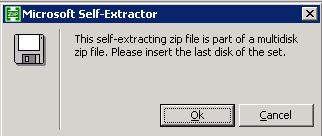
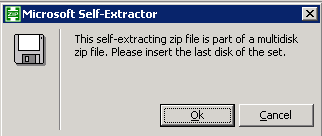
This self-extracting zip file is part of a multidisk zip file. Please insert the last disk of the set.
There is no other option than pressing the OK-button.And after pressing the OK-button 3 times, I got following error message:
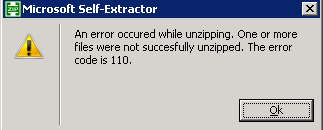
An error occured while unzipping. One or more files were not succesfully unzipped. The error code is 110.
The solution for this seemed to be to just download the file from the given link in my email again.
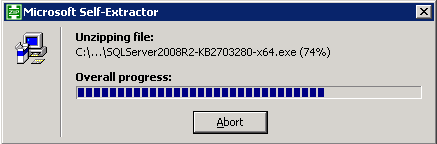
After this I could succesfully run the self-extracting zip file an install my cumulative update package.