by community-syndication | Jul 3, 2013 | BizTalk Community Blogs via Syndication
We are super excited to announce the immediate availability of BizTalk360 version 6.5. We are keeping the same release cadence with a release every 4-5 months once, adding 3-4 core features, some improvements and bug fixes. This is more of an intermediate release, hence 0.5 increment, nevertheless it contain some of the core capabilities our […]
The post BizTalk360 version 6.5 is available for download with exciting new features appeared first on BizTalk360 Blog.
Blog Post by: Saravana Kumar
by community-syndication | Jul 3, 2013 | BizTalk Community Blogs via Syndication
BizTalk Server 2013 fails to start. Read the cause and solution of this particular problem in this blog post.
by community-syndication | Jul 2, 2013 | BizTalk Community Blogs via Syndication
You create your flat file schema using flat file schema generation wizard with the help of an instance of the flat file document. The schema looks fine, but when you try to validate the schema against an instance with repeating records it fails, there are two settings on the schema that need to be changed for the schema to work.
1. Go to the node and change the Min Occurs to 0 and Max Occurs to unbounded
2. Go to the properties of the schema find the property named Parser Optimization and change it to Complexity
Thats it, your schema will now be able to validate an instance with repeating records!

by community-syndication | Jul 2, 2013 | BizTalk Community Blogs via Syndication
Just a reminder to everyone that the beta version of BizTalk 2013 has expired. I believe 1st July was the expiry date. I have a development VM in Azure running the old beta and on attempting to start host instances, this error popped up: Checking in the Event Log, I found this error message: So […]
Blog Post by: James Corbould
by community-syndication | Jul 1, 2013 | BizTalk Community Blogs via Syndication
Today I have received an e-mail from Microsoft with exciting news that my MVP status has been renewed again!
For me this is the fourth time
to receive this award. The third year in the program has been an
awesome experience, which gave me the opportunity to do great things
and meet inspiring, very skilled people. I have had some interesting speaking engagement, which were fun to do and were

by stephen-w-thomas | Jul 1, 2013 | Stephen's BizTalk and Integration Blog
Last week BizTalk360 announced a new one-click installation process that works great for BizTalk running in Windows Azure Infrastructure as a Service (IaaS).
This can be used to set up a stand-alone single server BizTalk environment in a short amount of time. One of the key features of BizTalk360 is the ability to send alert emails based on criteria you specify. Sending emails on a isolated environment in Azure may be a challenge due to no SMTP Server.
Never fail! SendGrid has a super easy and free solution to this problem. Just sign up for the free account as an Add-On inside the Windows Azure Management Portal.
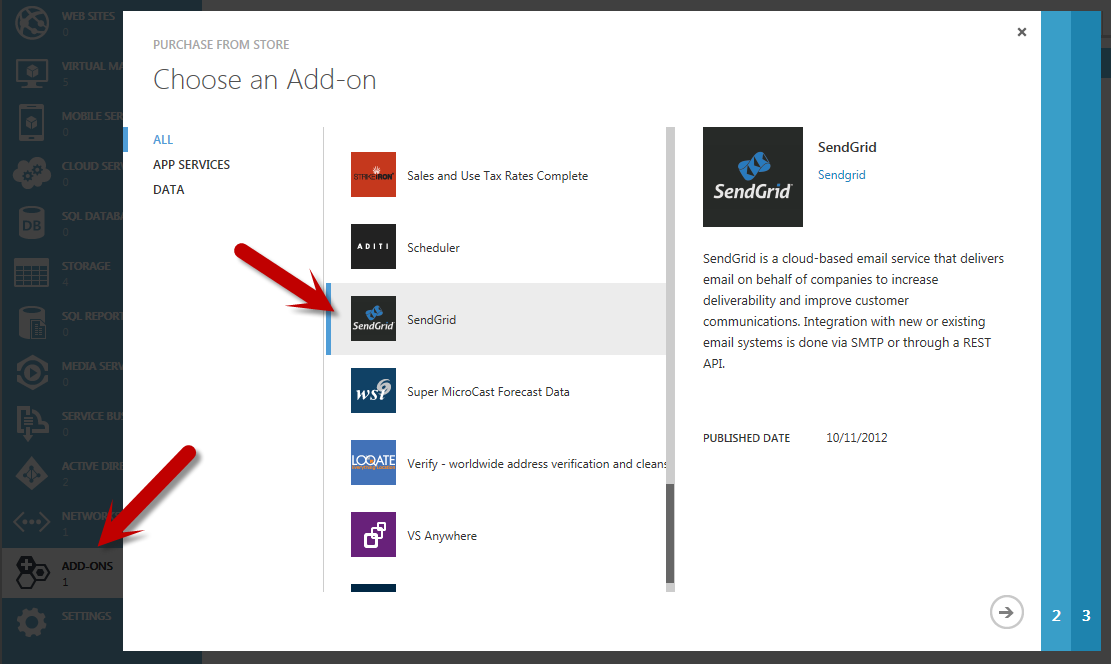
SendGrid’s current offer is for 25,000 free email per month! This should last you a while. SendGrid offer the ability to easily send email via SMTP, .Net, or even a REST API – all using their SMTP server.
Once you have your account details and have installed BizTalk360, simply go to Settings. Under Monitoring and Notification – SMTP Settings simply enter your SendGrid account details.
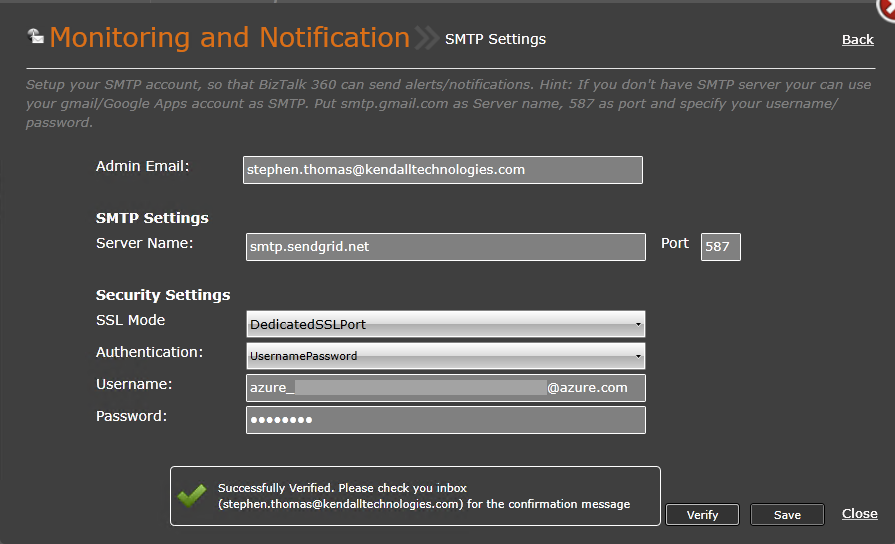
Click the Verify button to have a test email sent to your account. It is that easy.
Using SendGrid with any Windows Azure application looks to be a great solution for sending email.
by community-syndication | Jul 1, 2013 | BizTalk Community Blogs via Syndication
L’Azure Camp 100% en ligne avec de nombreux t%u00e9moignages de partenaires commence %u00e0 15h sur http://aka.ms/1erJuillet.
Blog Post by: Benjamin GUINEBERTIERE

by community-syndication | Jul 1, 2013 | BizTalk Community Blogs via Syndication
One of my pet peeves about the usage of dynamic send ports in BizTalk Server is the loss of flexibility that comes along with the programming model that is generally accepted when using them (I’m normally quite pragmatic rather than puritanical but for some reason this really grinds my gears). The loss of flexibility typically […]
Blog Post by: Johann
by community-syndication | Jun 30, 2013 | BizTalk Community Blogs via Syndication
In the recent months there were overwhelming amount of improvements in the Microsoft integration space both on-premise and in the cloud and it’s very difficult to keep up with the various technologies and how they all relate to each other. In this article we are going to take a brief look at each one of […]
The post Understanding the current Integration Technologies Puzzle (cloud and on-premise) appeared first on BizTalk360 Blog.
Blog Post by: Saravana Kumar

by community-syndication | Jun 28, 2013 | BizTalk Community Blogs via Syndication
Now that the BRE pipeline framework v1.3.0 has been released and is also compatible with BizTalk Server 2013 I am starting to think of what the next version is going to deliver. My colleague Craig Haiden who has recently joined the project team (and who’s brain is a bit like an ESB toolkit ) had […]
Blog Post by: Johann
