by Sandro Pereira | Sep 13, 2017 | BizTalk Community Blogs via Syndication
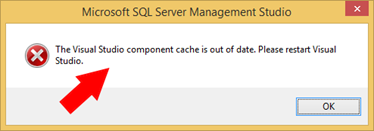
This strange error does not occur often, perhaps from time to time, or in different environments, but in reality, I already had the “privilege” of encountering it more than once while I was trying to open the SQL Server Management Studio (SSMS):
The Visual Studio component cache is out of date. Please restart Visual Studio.
Not really a BizTalk Server problem but you now that behind the curtains, BizTalk Server relies on SQL Server 
Cause
The cause of this problem is unclear, and I wish I could have a better explanation to provide and in fact, there is an issue active opened in MSFT about this (see here).
I just assume that something may have happened, maybe an update or something similar, that left something in a corrupt or incorrect state… but despite that, the resolution to this problem is quite simple.
Solution
As I said above, the resolution to this problem is quite simple and you may have several approaches to accomplish that. One of them is to manually remove all the temporary files from the Windows operating system by:
- Exit all programs and then hold down the WINDOWS key and then type R to open the “Run” windows.
- In the “Run” window, type “%TMP%” and then click “OK”
- This will open the TEMP directory that normally is: C:Users<your_user_name>AppDataLocalTemp
- Select and delete all the content of the TEMP folder
This approach always solved my problem.
But you can also try a different approach to do the same operations like:
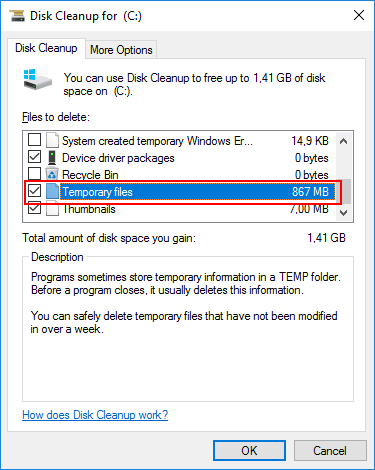
- Open the Disk Cleanup utility.
- Make sure that you select the “Temporary files” option and then click on “OK”.
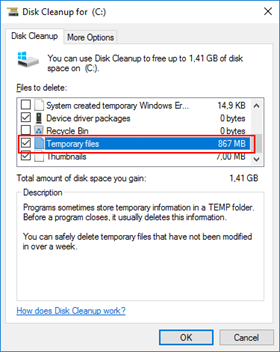
- When prompted up, select “Delete Files”
Again, if you now try to open Microsoft SQL Server Management Studio this The Visual Studio component cache is out of date. Please restart Visual Studio solution error message will have disappeared.
Author: Sandro Pereira
Sandro Pereira lives in Portugal and works as a consultant at DevScope. In the past years, he has been working on implementing Integration scenarios both on-premises and cloud for various clients, each with different scenarios from a technical point of view, size, and criticality, using Microsoft Azure, Microsoft BizTalk Server and different technologies like AS2, EDI, RosettaNet, SAP, TIBCO etc. He is a regular blogger, international speaker, and technical reviewer of several BizTalk books all focused on Integration. He is also the author of the book “BizTalk Mapping Patterns & Best Practices”. He has been awarded MVP since 2011 for his contributions to the integration community. View all posts by Sandro Pereira
by BizTalk Team | Sep 13, 2017 | BizTalk Community Blogs via Syndication
We are happy to announce the release of Microsoft Host Integration Server 2013 Cumulative Update 4. Host Integration Server is included with the BizTalk License and is a part of our broader BizTalk offerings to assist our customers with integrating to various backend systems. In the case of Host Integration Server, we provide customers with options to interact with IBM software. For customers just starting out with Host Integration Server we suggest using our latest version, Host Integration Server 2016.
This cumulative update package contains hotfixes for issues that were resolved after the release of Host Integration Server 2013.
We recommend that you test the cumulative update before you deploy it in a production environment. Because the builds are cumulative, each new update release contains all the hotfixes and all the security updates that were included in the previous Host Integration Server 2013 cumulative updates. We recommend that you consider applying the most recent Host Integration Server 2013 Cumulative Update to remain current with the product.
Cumulative update package 4 for Microsoft Host Integration Server 2013:
- Application Integration – 6 customer issues fixed
- Data Integration – -12 customer issues fixed
- Message Integration – 6 customer issues fixed
- Network Integration – 10 customer issues fixed
- Session Integration – 10 customer issues fixed
Information regarding how to download the package and details regarding the specific fixes can be found in the KB article here.
We encourage you to actively engage with us and propose new features for all BizTalk offerings, including Host Integration Server, through our BizTalk User Voice page.
by Sandro Pereira | Sep 12, 2017 | BizTalk Community Blogs via Syndication
Continuing the season topic: “BizTalk Server Tips and Tricks” I have to say this is one of my favorites, I simply love this tip…
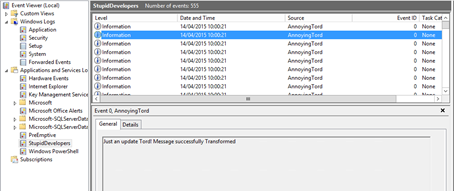
If you followed the old BizTalk Innovation Day’s events, that lead to the current Integrate event in London, you may remember my dear friend Tord Glad Nordahl complaining every year in his sessions about Developers writing unnecessary information Application Log. Well, I partially agree with him, I agree in the first part: you shouldn’t write custom application errors, warnings of information in the Application Log!
You need to realize that Application Event Log holds almost all the important information related to different aspects of BizTalk – SQL, IIS, BizTalk infrastructure and runtime problems – it is one of the main places that admins use to monitor “applications” installed on their server. This is the information that is extremely important for BizTalk Administrator in order to monitor the well-being of the platform and to diagnose problems. For that reason you don’t want to immerse the Application log with irrelevant and unnecessary information at the point to be almost impossible to find real problems – instead you, or in this case, the admins, should keep it clean.
Instead of using the Application Log, you can use a custom log for logging your custom application (integration) errors, warnings or information., So, in this way, I really don’t care if you are using the Event Viewer to log additional information’s about your integration processes.
What the Administrator does normally in these circumstances?
They tend to ask (argue) to the developer team to change their code, that already is deployed in several (or all) the environments, for not to write in the Application log this unnecessary information…
… they tend to receive the following response, “this information is critical for us to have visibility and track the processes (feeling surprised but I have heard enough times this statement), debugging and troubleshooting and so on”.
It’s basically a stupid and unnecessary battle where I can say that no one will be defeated or victorious.
What should the Administrator do?
Changing people’s behavior is hard, but I’m not saying that you should not try. You should, but getting others to change can be impossible, or a big challenge, it will definitely take time… especially developers who will try to find a thousand excuses for explaining why such information is important.
My advice for them take back the control of your environment by easily creating or using PowerShell (let the developer by happy by writing in the Event Viewer)
With this simple script, you can easily move an Event Source to a different Windows Event Log:
foreach ($LogSource in $LogSources) {

Remove-EventLog -Source $LogSource

}

$logFileExists = Get-EventLog -list | Where-Object {$_.logdisplayname -eq $LogName}

if (! $logFileExists) {

$LogSources | %{

New-EventLog -LogName $LogName -Source $_

}

# Compose Key:

$LogPath = 'HKLM:SYSTEMCurrentControlSetserviceseventlog'+$LogName;

if(Test-Path $LogPath)

{

$acl = Get-Acl $LogPath

$GpOrUsers | %{

$ace = New-Object System.Security.AccessControl.RegistryAccessRule $_,'WriteKey, ReadKey','allow'

$acl.AddAccessRule($ace)

#Set-Acl $LogPath $acl

}

}else{Write-Error "Cannot acesss log $LogName"}

}

else {

$LogSources | %{

New-EventLog -LogName $LogName -Source $_

}

}
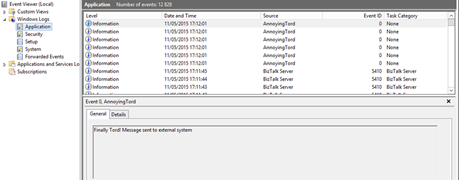
This way, you as an admin can take back the control of your environment and fix the developers madness.
The full script can be found and download here: BizTalk DevOps: Moving Event Source To a Different/Custom Windows Event Log
Stay tuned for new tips and tricks!
Author: Sandro Pereira
Sandro Pereira is an Azure MVP and works as an Integration consultant at DevScope. In the past years, he has been working on implementing Integration scenarios both on-premises and cloud for various clients, each with different scenarios from a technical point of view, size, and criticality, using Microsoft Azure, Microsoft BizTalk Server and different technologies like AS2, EDI, RosettaNet, SAP, TIBCO etc. View all posts by Sandro Pereira

by Saravana Kumar | Sep 11, 2017 | BizTalk Community Blogs via Syndication
Today Microsoft announced one of the biggest changes in BizTalk Server 17 years history, they are open sourcing some elements of the product. It makes perfect sense for a product like BizTalk Server to head down this route since apart from the core engine there are a lot of ancillary components on the platform that makes the platform richer and can be developed and improved in isolation.
The key components of BizTalk Server that makes perfect candidates to-be open sourced are
- Schemas
- Adapters
- Accelerators
- Pipeline Components
- Maps
The main objective of Microsoft will be to sell more licenses of BizTalk Server. The above components on its own (except Schemas) has very little value outside the scope of BizTalk Server. The platform gets richer if there are a richer set of Adapters, Accelerators, Pipeline Components, ready to use Maps (transformations) available on the platform, eventually resulting in more sales of BizTalk Server licenses.
Typically Microsoft builds a strong partner and developer community with its product line ups. SQL Server and SharePoint are good examples, where there are numerous ISV’s who build value added products on top of the platform. Whereas for some reason even though BizTalk Server is a perfect candidate for a thriving partner eco-system to built adapters, maps, and pipeline components and so on, for some reason the partner eco-system didn’t take off. There are very few companies like BizTalk360, nSoftware, Active Adapter etc who tapped into this market.
However, the developer community is so big in BizTalk Server. Today, you’ll find answers to pretty much any BizTalk Server related questions by doing a simple “Google or Bing” search. It makes perfect sense to give the opportunity for the BizTalk developer community to enrich and enhance the platform by contributing real code.
As the first step in this journey, today Microsoft has open sourced 3500+ schemas via their Integration Git repository under the “Contributor License Agreement”. This includes all the EDIFACT, HIPAA, X12, and HIX schemas. Looking at the folder structure of the Git repository, it’s apparent soon we could see Adapter and Pipelines getting open sourced as well.
Will the core engine get open sourced?
It will be very unlikely to see the BizTalk Server core engine getting open sourced. There is no real value either for Microsoft or for the community in doing so, the engine is complex and it may depend on various Microsoft internal dependencies. Example: When Microsoft open sources ASP.NET MVC and Web API, they didn’t open-source ASP.NET Web Form since it was part of System.Web.dll which the Windows Server OS relies on.
What is the benefit of open sourcing?
The community can get involved and enhance certain improvements. The end customers can tweak the component slightly for their requirement. Example: If Microsoft open source the SAP adapter, and a customer got some specific requirement to make small enhancement to the adapter, that’s possible. All the standard benefits of Open Source will be applicable when it comes to benefit.
If there is a nagging small bug in the component, if you think the fix is straight forward you can simply fix it yourself and move on, instead of waiting for a Feature Pack or Cumulative update. Please see the next section carefully about supportability.
Who is going to support it?
Microsoft is only open sourcing certain components code and it will not support the modified version by end users. Microsoft will only support the version of the components that ship with the product, either out of the box or via Features packs or cumulative updates. Microsoft is also planning to accept community contribution, which might then get released as part of “Feature Pack” or in the vNext of the product. However, only officially shipped components will be supported. This is something the end user needs to be aware of.
Overall it’s a great initiative, it’s fantastic to see Microsoft heading more in this direction. Few important products that gone in this route .NET Core is Open Source, ASP.NET MVC, Web API, and Web Pages (Razor) are Open Source
Author: Saravana Kumar
Saravana Kumar is the Founder and CTO of BizTalk360, an enterprise software that acts as an all-in-one solution for better administration, operation, support and monitoring of Microsoft BizTalk Server environments. View all posts by Saravana Kumar
by BizTalk Team | Sep 11, 2017 | BizTalk Community Blogs via Syndication
As a second step in the increased commitment to provide a better product to our customers and increase the collaboration with our community. we took the first step into joining the open source community with BizTalk Server.
Today we open sourced 3,539 files for our customers as well as the community, these are all the schemas we ship as a part of the product. Or intention is to continue our open source commitment, and the repository is made available for everyone. while the main branch will be managed by the BizTalk Server Product group, the community contributions is more than welcome, this can include elements like Schemas, Samples, Adapters, pipeline components or anything else you feel the community can take advantage of.

by Rochelle Saldanha | Sep 11, 2017 | BizTalk Community Blogs via Syndication
We are planning a series of blogs, Customer feedback getting Answered, where we will be trying to address and answer some of the issues where a workaround is possible rather than awaiting a new feature release.
Many of our customers put a lot of effort in describing their problems in the feedback portal – (where we collect all requirements in single place and we pick the popular features to be implemented based on the voting done by various customers). We often go through the feature requests – updating the status of the issues and also discussing them with our technical development team of the feasibility of implementing them.
Behind the scenes, we go through a process for the popular requests and help to bring them to implementation in the upcoming releases.
In one of our previous blogs, I went through the FAQ’s a lot of our customers usually have. In this article, I take an issue from the feedback portal and show how it can be solved with the API we expose.
The Issue:
Monitoring Alarms information on the Operations Dashboard
The Operations Dashboard is widely used by a lot of companies to have a quick overview of the system. While we do have a lot of interesting widgets, we do not have anything which links the Alarm notification section to this area.
http://feedback.biztalk360.com/forums/331698-biztalk360-monitoring/suggestions/20369500-widget-with-errors
With API Documentation capability of BizTalk360, we have exposed over 350 REST services (APIs) that have the capability to retrieve the requested information from the BizTalk server environment. The APIs are defined as Swagger files which mean that you have the ability to execute them online to see if the result is what is intended. For example, you may want to display the list of BizTalk Applications or the performance of the BizTalk server (such as CPU, Memory, etc.) in a custom dashboard application within your organization. With BizTalk360 API Documentation, it is very easy for you to consume the API and retrieve the information from the BizTalk server environment. It not only ends with these. You can access pretty much any information like EDI, BAM, Artifact information, and so on from the BizTalk environment with the help of BizTalk360 APIs.
The Solution:
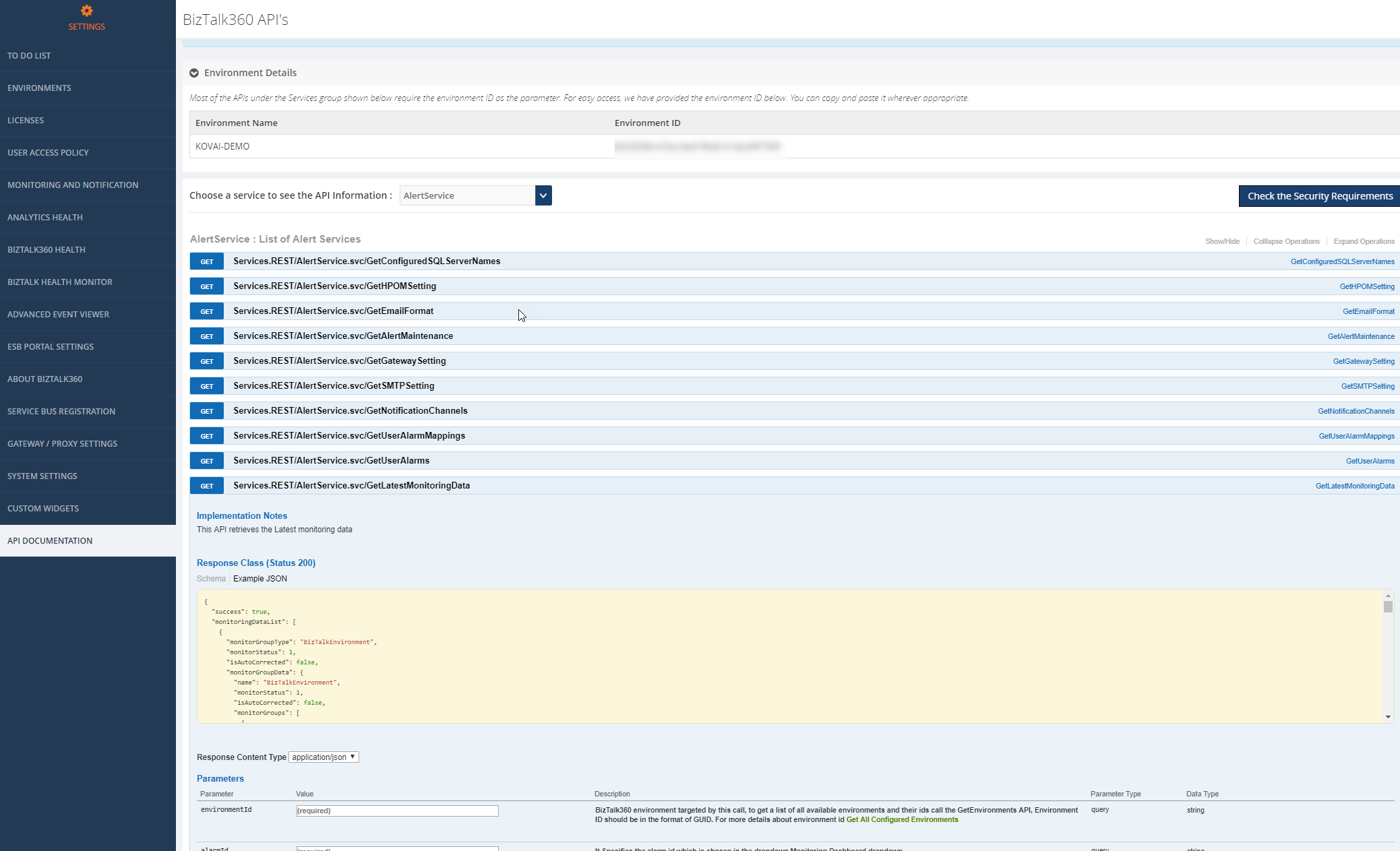
I have used for this example, a very simple API to retrieve the latest monitoring data for a specific alarm from the below API.
GET Services. REST/AlertService. svc/GetLatestMonitoringData
You can use the BizTalk360 API documentation to test your parameters and then view the output response.
In BizTalk360, navigate to Settings -> API documentation -> Select Alert services from the dropdown and then select GetLatestMonitoringData.
Current Alarm Monitoring Dashboard View
This is how my Alarms current state is in the Monitoring dashboard is currently.
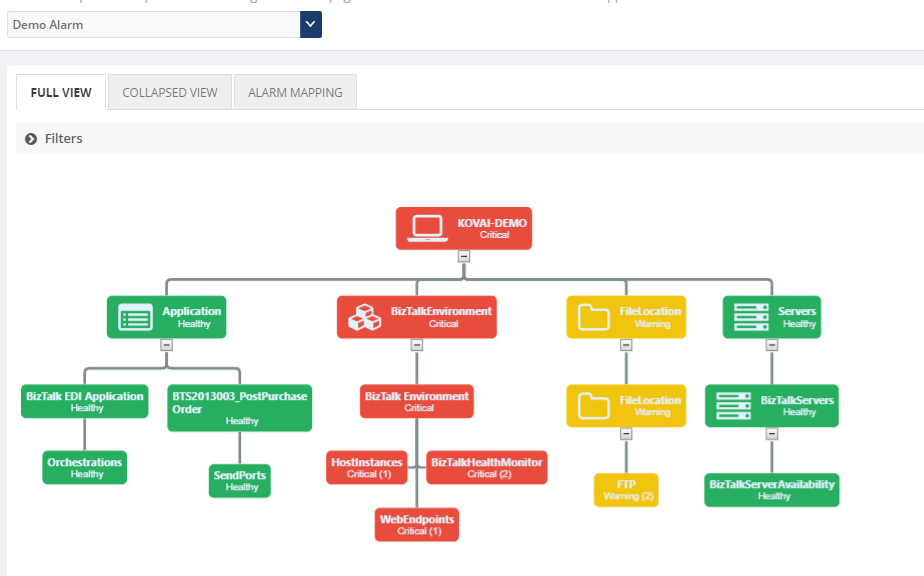
And now to view the same data in the Operations Dashboard, we need to create a custom widget which will use the API call as shown earlier. All you need to provide is the <Environment ID> & <Alarm Id> to pass as parameters which you can retrieve from the SQL tables. (Environment ID is provided at the top of the API Documentation page already)
Then you can use this code for the widget which I wrote to have a basic widget for a specific alarm to show on the Operations Dashboard.
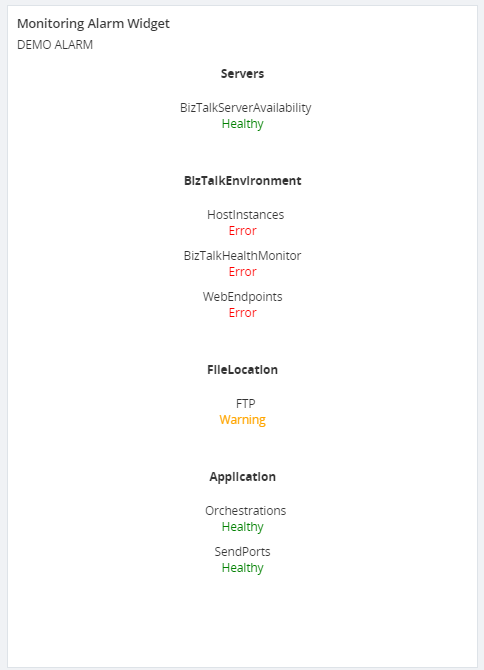
Thus, you can see for the Alarm – Demo Alarm, I have displayed all the artifacts and the state they are in.
This can be crucial for those who use their dashboards a lot. Rather than switch to the Monitoring dashboard, you can view the same data as a widget on the Operations Dashboard, along with other useful information.
Hopefully, this blog gave you some more ideas on how you can use the API & Custom widgets to customise the data displayed.
If you have any questions, contact us at [email protected]. Also, feel free to leave your feedback in our forum.
Author: Rochelle Saldanha
Rochelle Saldanha is currently working in the Customer Support & Client Relationship Teams at BizTalk360. She loves travelling and watching movies. View all posts by Rochelle Saldanha
by Bill Chesnut | Sep 11, 2017 | BizTalk Community Blogs via Syndication
Currently BizTalk Server 2016 has support for REST, but the support is fairly limited and is missing some feature that most developer expect from REST services.
To overcome these missing feature for companies that are exposing these services to their consumers/partner over the internet, I will show you have to use Azure API Management to publish SOAP services from BizTalk as REST.
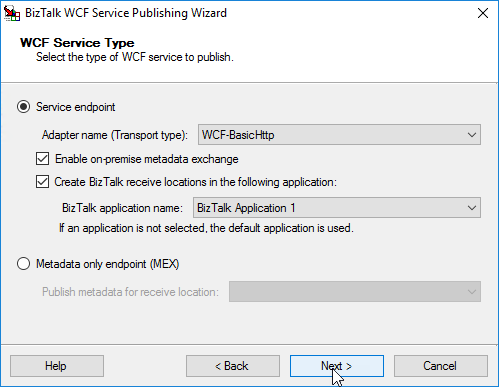
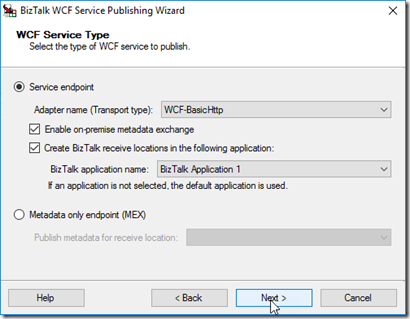
For this blog post I took the Hello World example from the BizTalk SDK samples and converted it to a Request/Response orchestration and used the WCF publishing wizard to publish
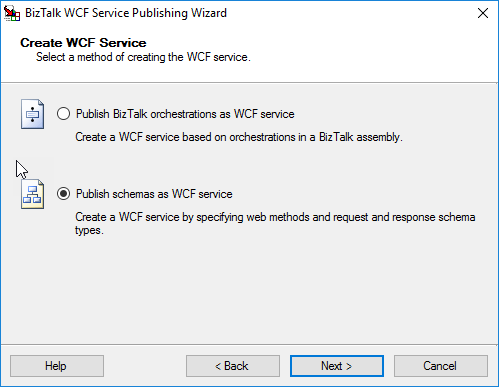
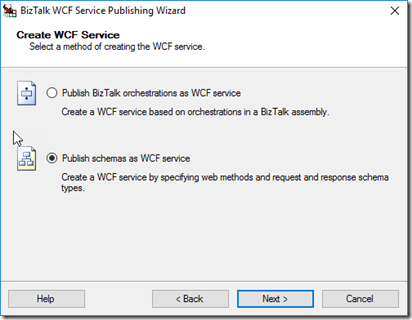
Publish schema as WCF service (this allows better control over the URL)
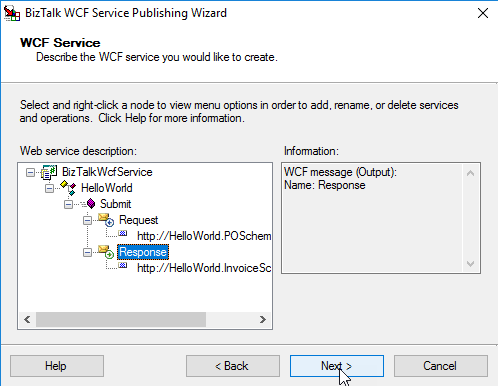
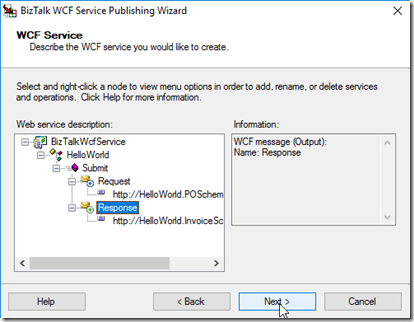
Rename the Service and Operation, Select Schemas
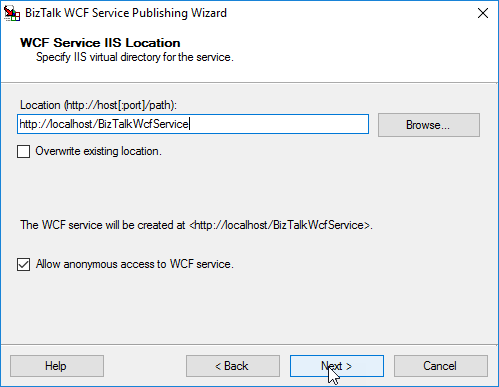
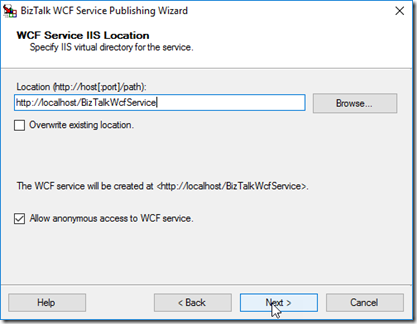
Select the location to publish to and I am allowing Anonymous for my example
Note: I ended up using BizTalkWcfService2 as the URL, because an issue I am working with the API Management group
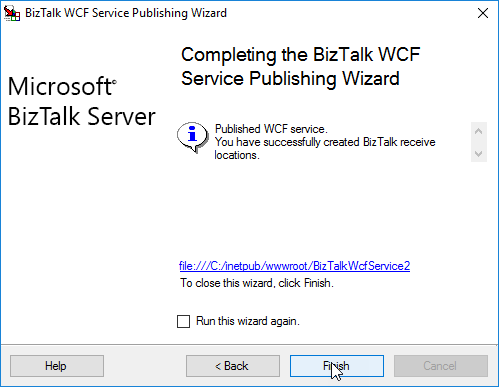
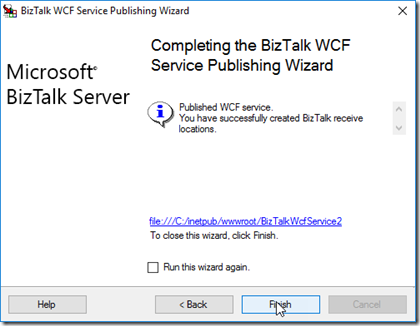
Publish Service
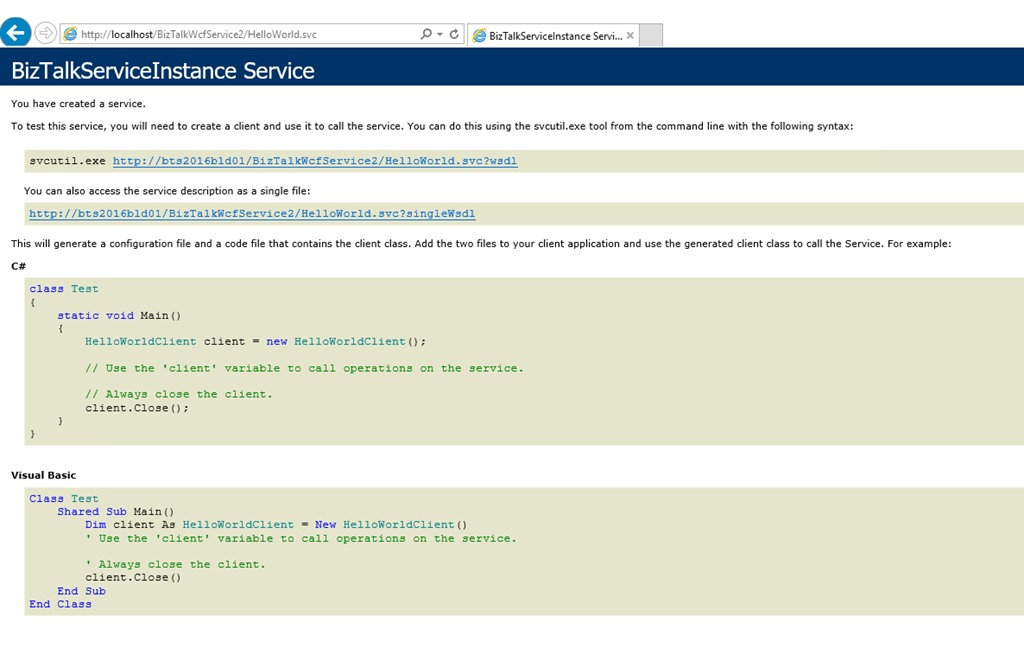
Now you need to setup the App Pool and make sure you can get the WDSL, for this example, We also need to update the WSDL to have the internet name for the server, by default the WSDL is going to be generated with the local server name
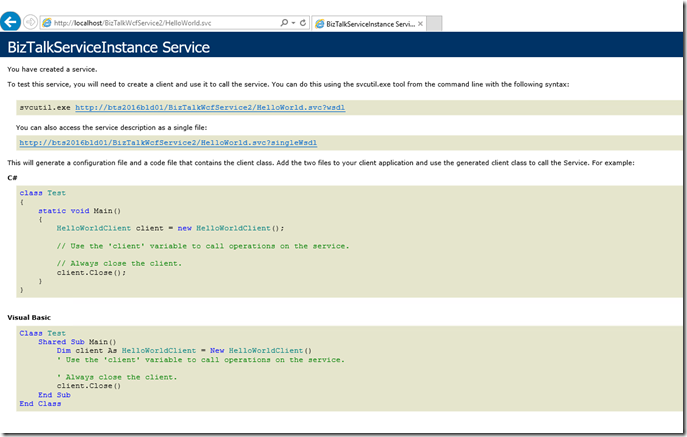
I downloaded the WSDL file and changed the server name
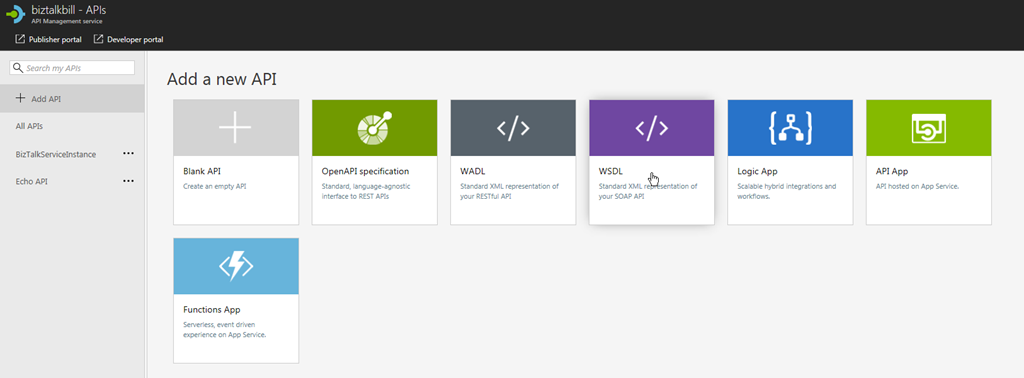
Open your Azure API Management Instance and go to the Add a new API blade
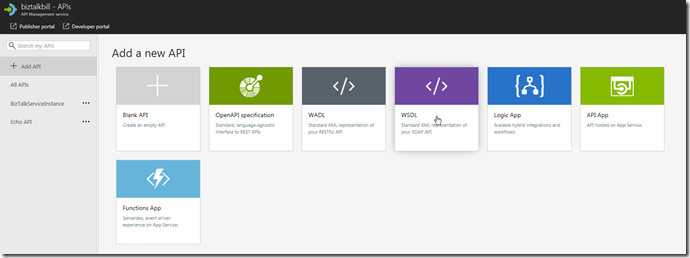
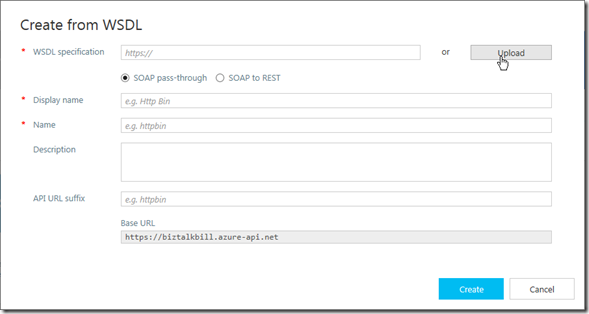
Click Upload to upload the WSDL file, if it was not necessary to change the WSDL file you could use the URL instead
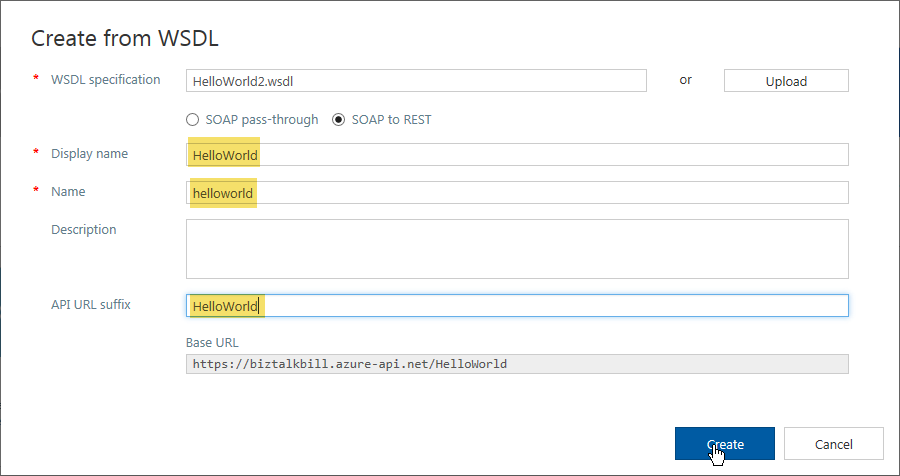
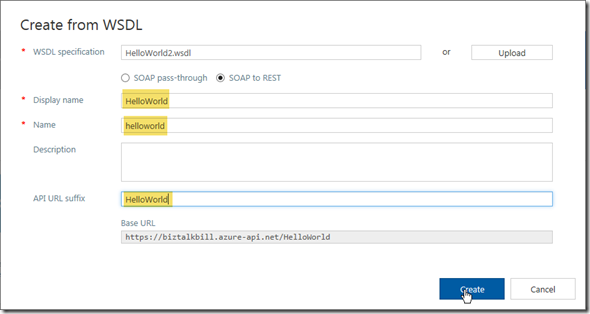
Update the highlighted fields with your values, Click “Create”
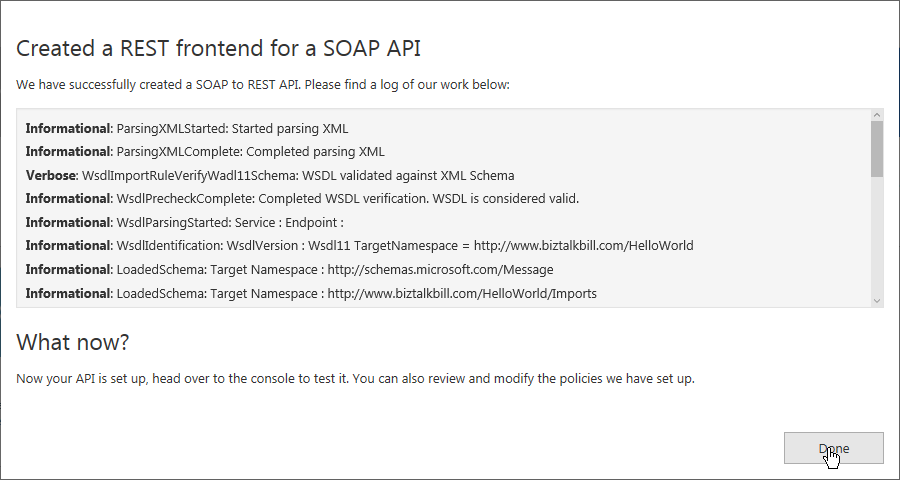
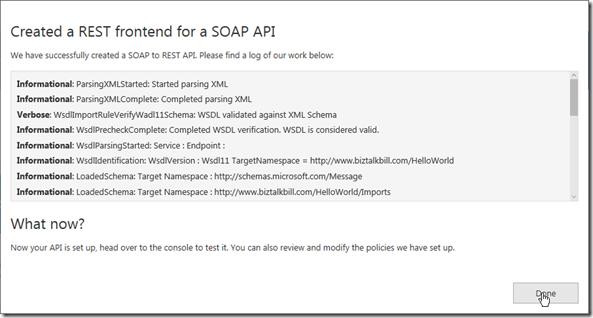
Wait for the create to complete, Click “Done”
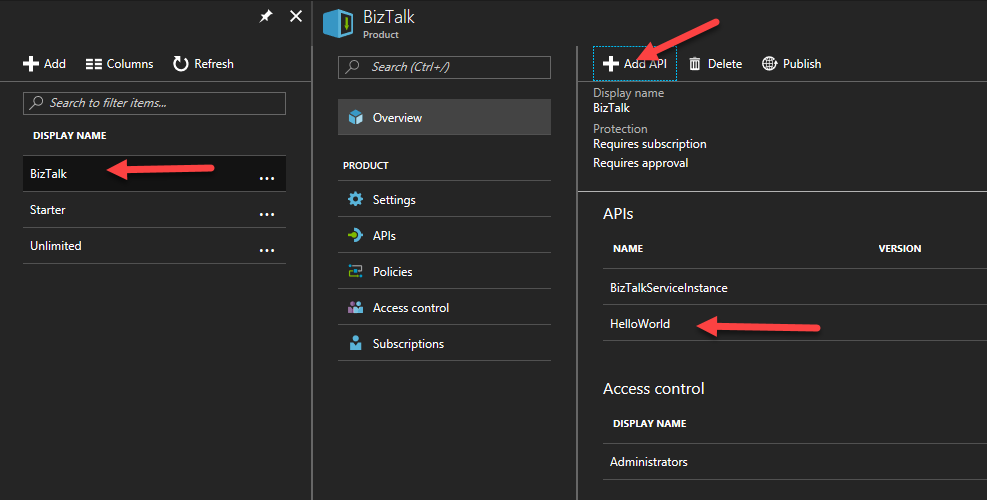
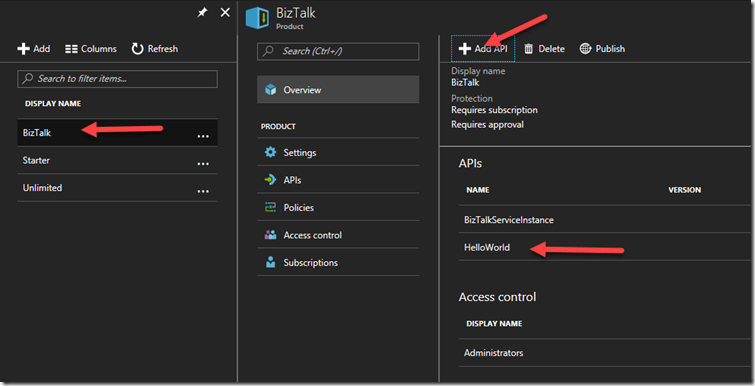
Now before we can use our newly imported SOAP service exposed as REST, we need to add it to a Product to allow users to call it.
I am using a Product Named BizTalk, you can create and use any Product Name you like
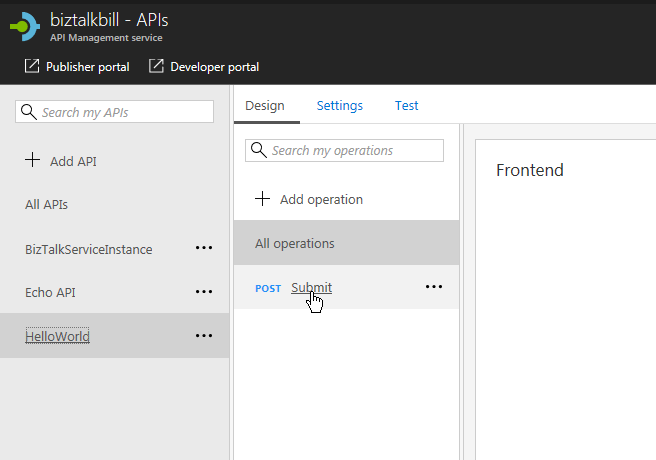
Now I go back to the API Definition, Click on our “submit” operation
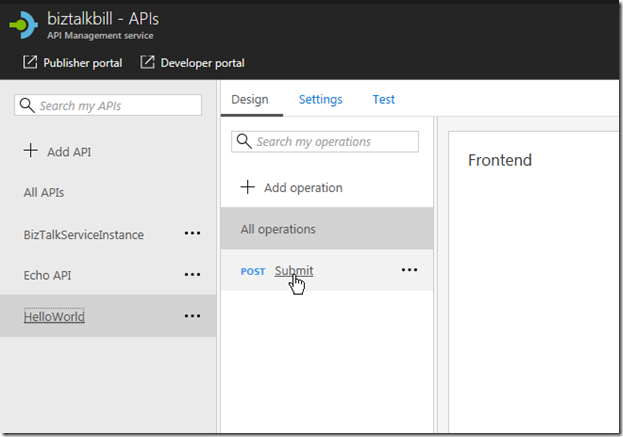
Then Click on the “Test” Tab
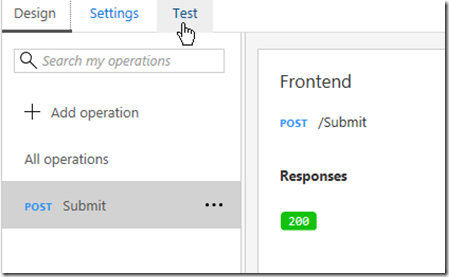
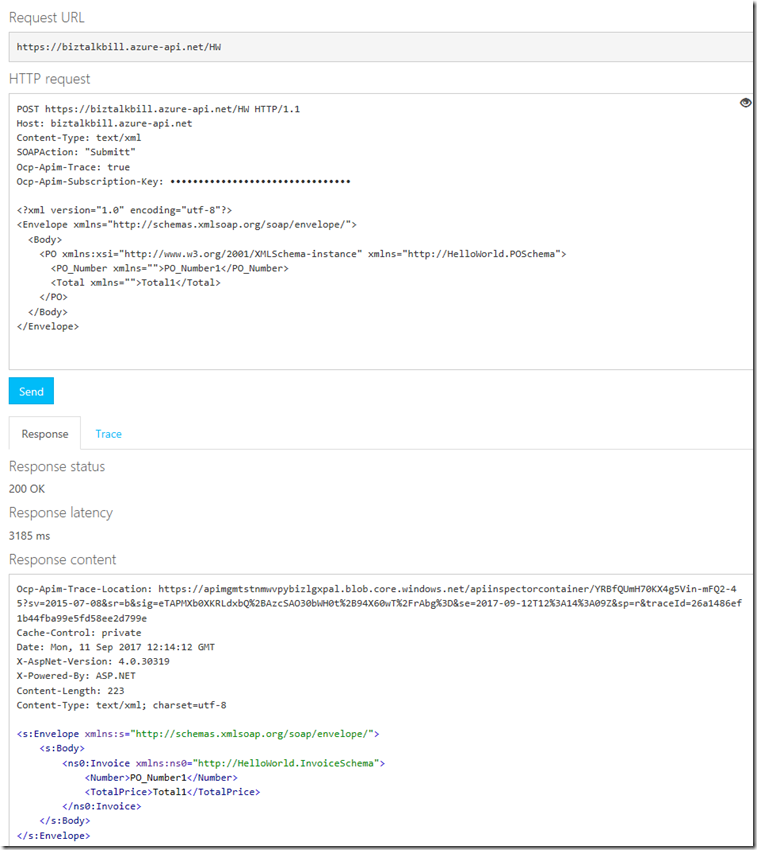
This is the Test blade, notice that API Management has supplied the API Management Subscription Key (necessary to call API Management, this is based on the product we put our API in), the Sample JSON Document and a “Send” button to test with. Click the “Send” button
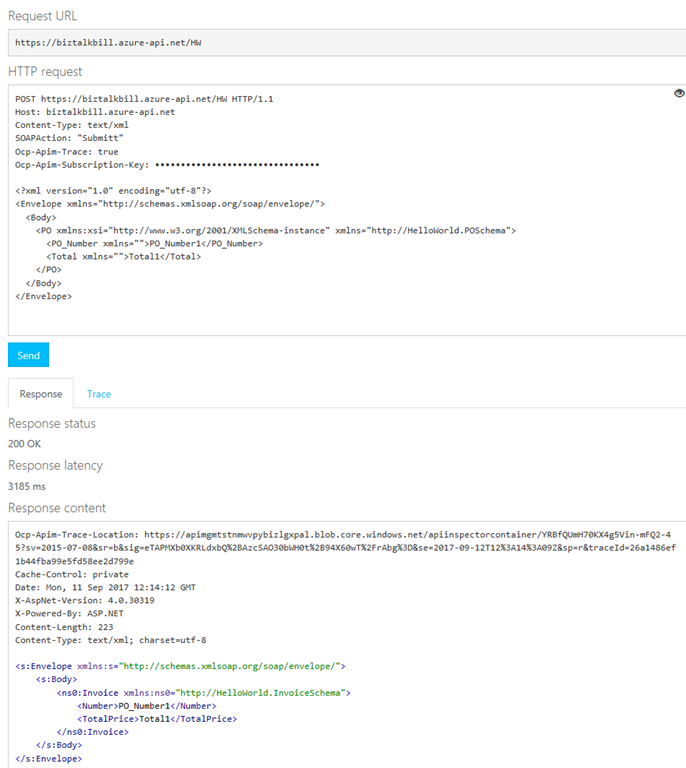
View the results of the call
You will notice that the send and receive bodies are JSON, but we are calling a SOAP Service, this is what the SOAP call would look like
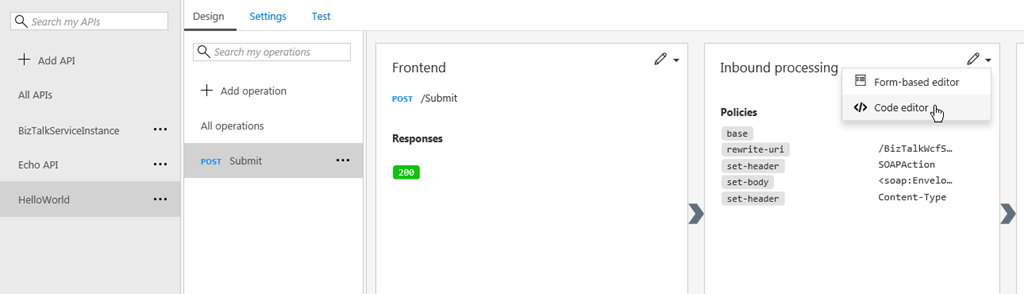
Lets now examine how API Management published our SOAP Service as REST, on the API tab, Click the “View Code”
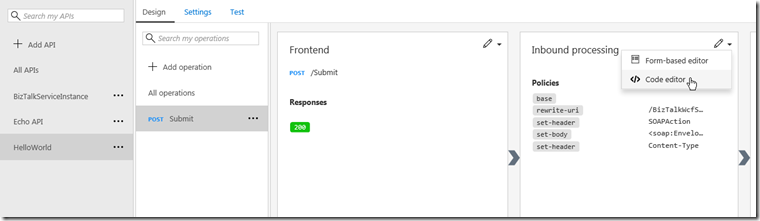
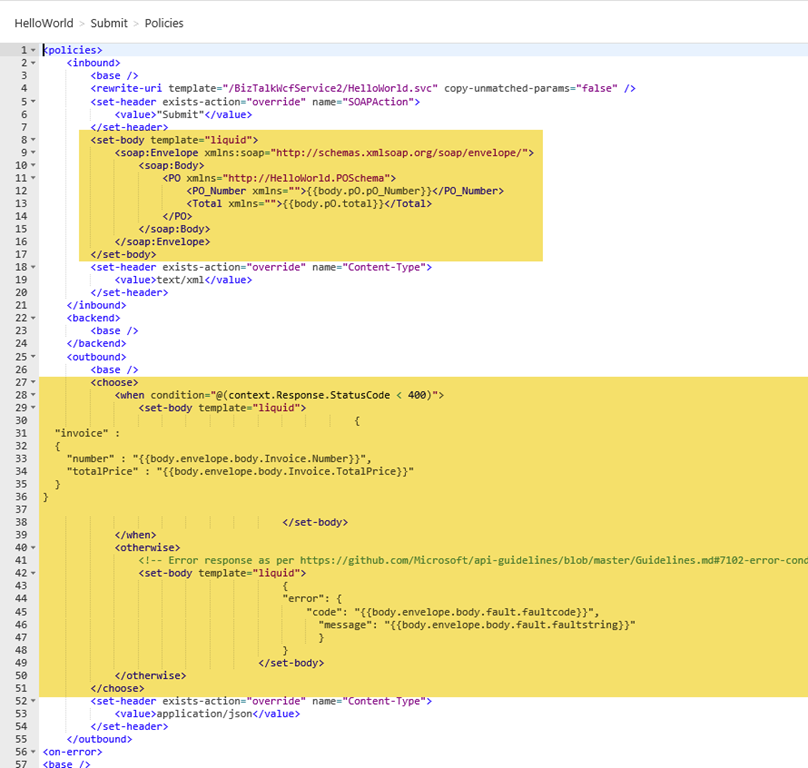
The API Management use a policy to do the inbound and outbound transformation, the policy uses the liquid language to do the translation from JSON to XML and them XML to JSON and include error handling
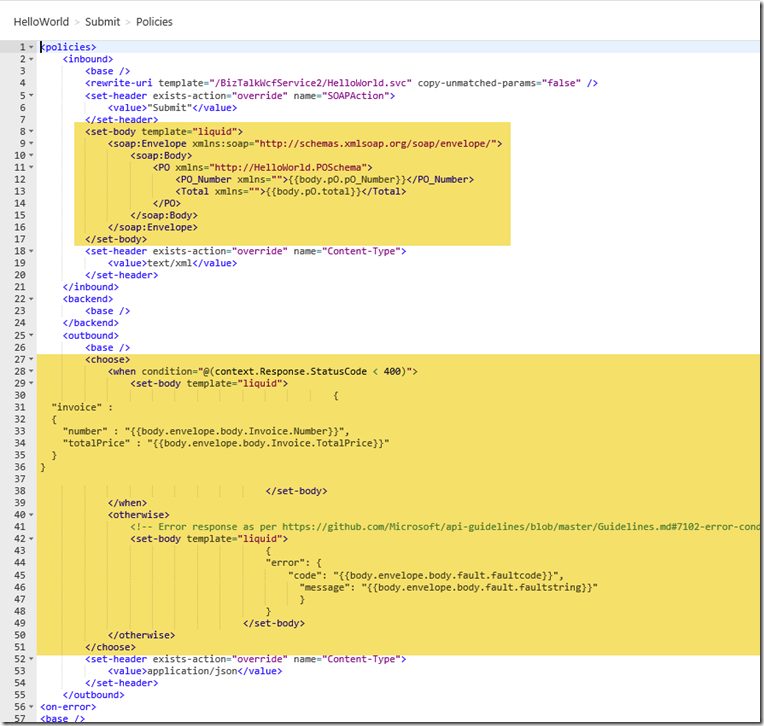
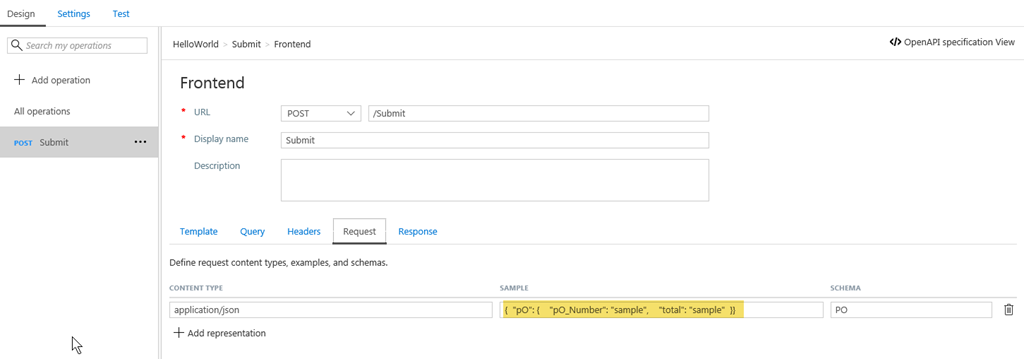
The process of importing our WSDL as REST to SOAP automatically created the policy that does the transformations and also created the inbound and outbound JSON schemas
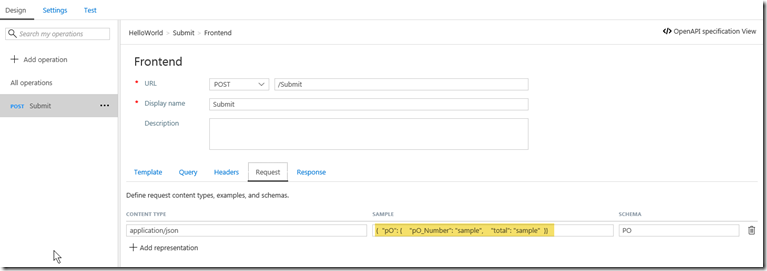
In a later blog post I will talk about how you can modify the schemas and the transformation.
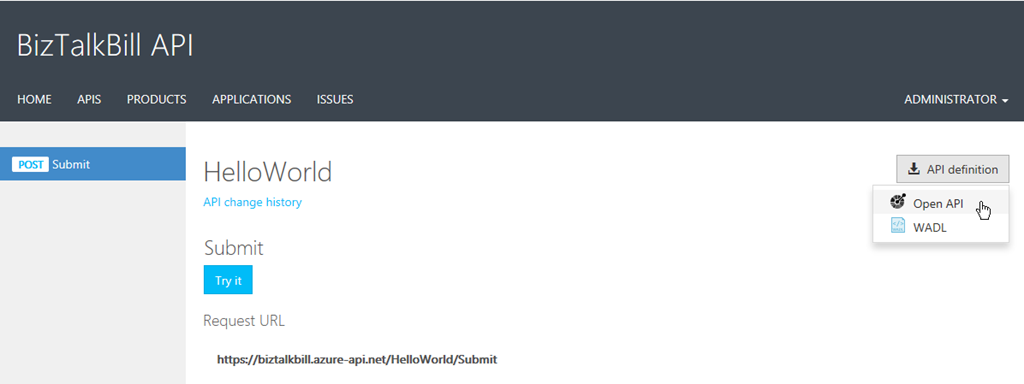
One of the main features that BizTalk is missing with its REST adapter is the ability to provide the definition of the API for the clients to use to generate the code to call our REST services, in the Developer Portal, API Management provides either Open API (swagger) or WADL for our clients to use.
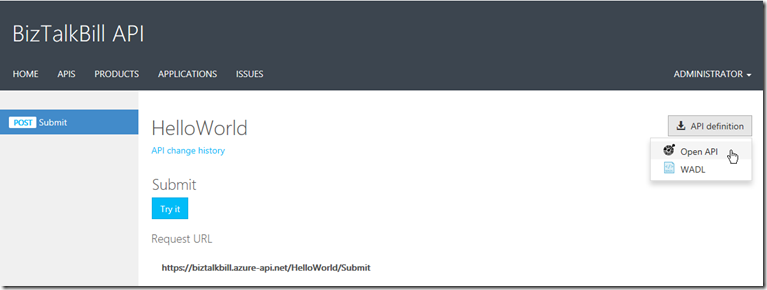
I hope this blog post helped you understand how you can use Azure API Management to publish your BizTalk SOAP Services as REST
by Gautam | Sep 11, 2017 | BizTalk Community Blogs via Syndication
Do you feel difficult to keep up to date on all the frequent updates and announcements in the Microsoft Integration platform?
Integration weekly update can be your solution. It’s a weekly update on the topics related to Integration – enterprise integration, robust & scalable messaging capabilities and Citizen Integration capabilities empowered by Microsoft platform to deliver value to the business.
If you want to receive these updates weekly, then don’t forget to Subscribe!
On-Premise Integration:
Cloud and Hybrid Integration:
Feedback
Hope this would be helpful. Please feel free to let me know your feedback on the Integration weekly series.
by Sandro Pereira | Sep 8, 2017 | BizTalk Community Blogs via Syndication
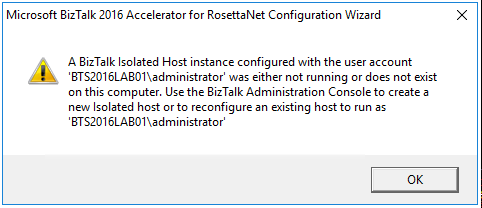
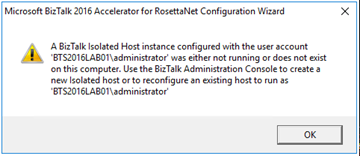
While trying to document, or better update my RosettaNet installation and configuration guide, I got a very strange (but by now I should know that nothing is strange with BizTalk and RosettaNet) while executing Microsoft BizTalk 2016 Accelerator for RosettaNet Configuration Wizard:
A BizTalk Isolated Host instance configured with the user account ‘DOMAINadministrator’ was either not running or does not exist on this computer. Use the BizTalk Administration Console to create a new Isolated host or to reconfigure an existing host to run as ‘DOMAINadministrator.
This error occurred just after I try to open the BTARN configuration wizard! (first thing that appears)
I well aware that when you are planning to install and configure Microsoft BizTalk 2016 Accelerator for RosettaNet (BTARN), you need to be very careful with a certain configuration like this one:
- The BizTalk Host Instance Account and the BizTalk Isolated Host Instance Account should be the same account. Otherwise, BTARN does not function correctly.
Or that:
- BTARN requires the IIS_WPG group (group provided by IIS 6.0 that provides the minimum set of user rights and permissions required to run an application).
- BTARN requires both in-process and isolated host to be marked as “Authentication Trusted” (this setting is off by default when you create a new host)
Notice that this last one is just for everything to work well but it doesn’t impact the configuration itself.
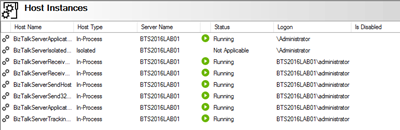
And in fact, all my host instances have the same account and all of them was running.
Cause
BTARN installation process it’s quite old fashioned and weird is some points, the true it that Microsoft just invest a little to modernize it, and change some behaviors and requirements which are no longer justified, a good example is the IIS_WPG group requirement, this group doesn’t exist anymore, so you need to create it manually. Otherwise, BTARN installation fails.
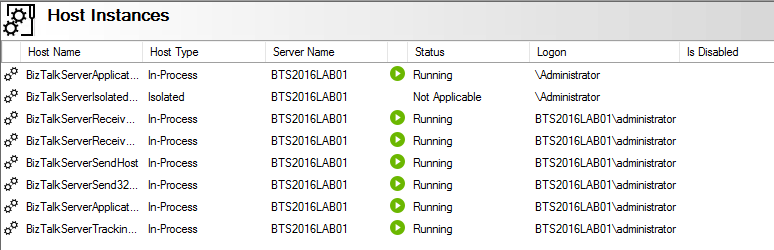
In this case, the problem, as you can see in the figure above, is that I have two types of logon formats:
- The 2 default host instances, created by the BizTalk installation wizard, are defined as “username” – without the domain or in this case the machine name (this is a standalone environment)
- And others are set up in the format “DOMAINUsername”.
Well, regarding BTARN, if you want to avoid problems during the installation/configuration process or future problems in the runtime you should:
- Never use Full Qualify domain name in the Logon credentials. Otherwise, BTARN does not work correctly.
- To avoid BTARN problems use the down-level logon name format (DOMAINUsername).
Solution
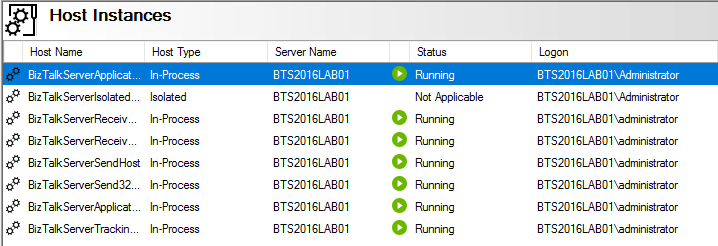
To solve this issue the solution was quite simples, I just need to configure the logon to all my host instance in the down-level logon name format (DOMAINUsername).
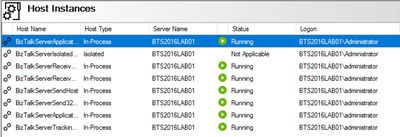
After that, I was able to execute the BTARN configuration wizard without any further issues and especially no more user account was either not running or does not exist on this computer.
Author: Sandro Pereira
Sandro Pereira lives in Portugal and works as a consultant at DevScope. In the past years, he has been working on implementing Integration scenarios both on-premises and cloud for various clients, each with different scenarios from a technical point of view, size, and criticality, using Microsoft Azure, Microsoft BizTalk Server and different technologies like AS2, EDI, RosettaNet, SAP, TIBCO etc. He is a regular blogger, international speaker, and technical reviewer of several BizTalk books all focused on Integration. He is also the author of the book “BizTalk Mapping Patterns & Best Practices”. He has been awarded MVP since 2011 for his contributions to the integration community. View all posts by Sandro Pereira
by Sandro Pereira | Sep 7, 2017 | BizTalk Community Blogs via Syndication
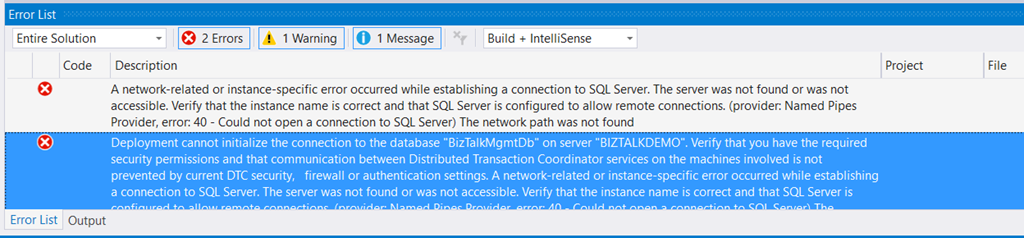
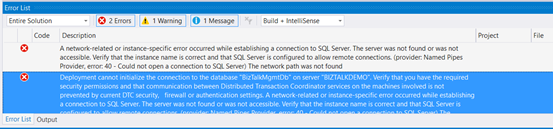
Typical basic error for beginners that also occur sometimes even with experienced BizTalk developers… While trying to deploy a BizTalk Server solution directly from Visual Studio 2017 I got the following errors messages:
| Severity |
Code |
Description |
Project |
File |
Line |
Suppression State |
| Error |
|
A network-related or instance-specific error occurred while establishing a connection to SQL Server. The server was not found or was not accessible. Verify that the instance name is correct and that SQL Server is configured to allow remote connections. (provider: Named Pipes Provider, error: 40 – Could not open a connection to SQL Server) The network path was not found |
|
|
0 |
|
| Severity |
Code |
Description |
Project |
File |
Line |
Suppression State |
| Error |
|
Deployment cannot initialize the connection to the database “BizTalkMgmtDb” on server “BIZTALKDEMO”. Verify that you have the required security permissions and that communication between Distributed Transaction Coordinator services on the machines involved is not prevented by current DTC security, firewall or authentication settings. A network-related or instance-specific error occurred while establishing a connection to SQL Server. The server was not found or was not accessible. Verify that the instance name is correct and that SQL Server is configured to allow remote connections. (provider: Named Pipes Provider, error: 40 – Could not open a connection to SQL Server) The network path was not found |
|
|
0 |
|
Cause
This error may occur for several reasons, like BizTalk Server cannot communicate with SQL Server machine because some firewall restrictions or SQL Server does not accept Remote Connections or that SQL Server Network Protocols are not properly configured – I wrote a few days ago a blog post about that: WCF-SQL Adapter: Connecting to the LOB system has failed. A network-related or instance-specific error occurred while establishing a connection to SQL Server– and so on.
However, in the cause of this problem is quite different, the first error doesn’t tell us to much about the main cause of the problem but the second one:
Deployment cannot initialize the connection to the database “BizTalkMgmtDb” on server “BIZTALKDEMO”…
Gives you a good clue about the problem.
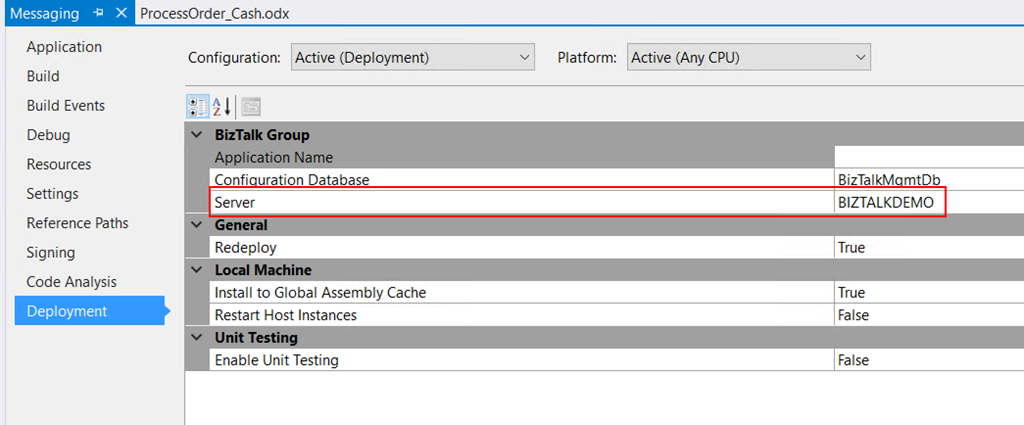
In fact, I was migrating an existing BizTalk Server solution to a new server and I forgot to update the Visual Studio deployment properties and the Server was pointing an incorrect to an incorrect an inaccessible SQL Server.
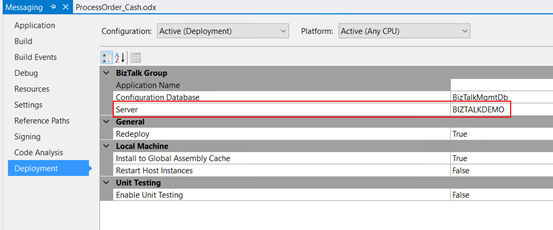
Solution
Again, this is a typical a beginner error and quite easy to fix, so to solve the problem you just need to properly configure the BizTalk Server deployment properties in all your Visual Studio projects inside your solution by:
- In Visual Studio Solution Explorer, right-click a project for which you want to configure properties, and then click “Properties”.
- Click the “Deployment” tab in Project Properties Designer.
- And make sure you properly configure the following properties:
- Application Name: Name of the BizTalk application to which to deploy the assemblies in this project. If the application already exists, the assemblies will be added to it when you deploy the project. If the application does not exist, the application will be created. If this field is blank, the assemblies will be deployed to the default BizTalk application in the current group. Names that include spaces must be enclosed by double quotation marks (“).
- Configuration Database: Name of the BizTalk Management database for the group, “BizTalkMgmtDb” by default.
- Server: Name of the SQL Server instance that hosts the BizTalk Management database on the local computer. In a single-computer installation, this is usually the name of the local computer. Note: If you move this BizTalk project to a different computer, you probably will need to modify the Server property to reflect the new computer name before you will be able to deploy the assembly.
Note: there are other properties but these three (3) are the most important ones (see the full list of properties here: How to Set Deployment Properties in Visual Studio)
- Save the file and then redeploy the BizTalk Server solution (or project).
Author: Sandro Pereira
Sandro Pereira lives in Portugal and works as a consultant at DevScope. In the past years, he has been working on implementing Integration scenarios both on-premises and cloud for various clients, each with different scenarios from a technical point of view, size, and criticality, using Microsoft Azure, Microsoft BizTalk Server and different technologies like AS2, EDI, RosettaNet, SAP, TIBCO etc. He is a regular blogger, international speaker, and technical reviewer of several BizTalk books all focused on Integration. He is also the author of the book “BizTalk Mapping Patterns & Best Practices”. He has been awarded MVP since 2011 for his contributions to the integration community. View all posts by Sandro Pereira