by Sandro Pereira | Jul 26, 2018 | BizTalk Community Blogs via Syndication
With all these new security features present on the latest Microsoft operating systems, don’t get me wrong they are good, sometimes our life as BizTalk Developers seems like it’s reversing and becoming a nightmare, especially if you are a consultant working with multiple different clients, environments, and projects.
Most of the times I start developing a new project at a new client, the first time I try to deploy a solution I get an “Error 87 Access is denied. (Exception from HRESULT: 0x80070005 (E_ACCESSDENIED))…” error message.
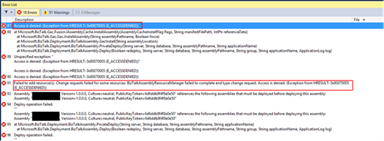
There are several possible causes for you to get such Access Denied errors when deploying BizTalk solutions directly from Visual Studio. Most common is that you don’t have the right BizTalk privileges to deploy artifacts, or in other words, you are not a local Administrator.
But most of the time is simpler than that and indeed is related with these additional securities setting present in recent Windows Server versions. For you to be able to successfully deploy a BizTalk Server solution directly from Visual Studio, you must run Visual Studio as an Administrator, or with elevated permissions, because BizTalk assemblies need to be deployed into the GAC. What normally happens, is that if you have User Account Control (UAC) activated, or sometimes even deactivated, there are some additional securities setting present in recent Windows Server versions that, by default, doesn’t run Visual Studio with elevated permissions.
The quick solution is for you to run Visual Studio as an Administrator by simply run below step:
- Right-click under Visual Studio and choose “Run as administrator” option.
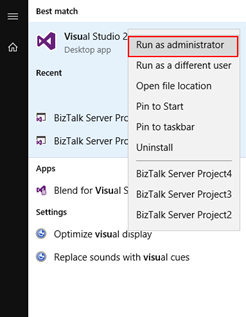
The problem with this approach is that you need to remember yourself to do it every time you want to run Visual Studio, otherwise the next time you try to deploy the solution it will fail again with the same error.
How to properly address this problem?
Actually, this problem can be simply addressed by:
- Access the devenv.exe file on the file system, which is by default installed in: “C:Program Files (x86)Microsoft Visual Studio 14.0Common7IDE”
- Right-click devenv.exe and select “Troubleshoot compatibility”
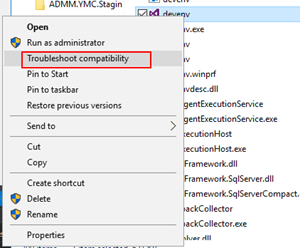
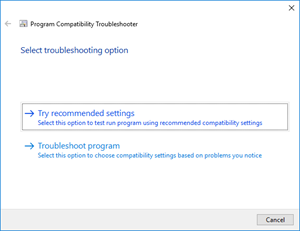
- On the “Select troubleshooting option” page, select “Troubleshoot compatibility” option
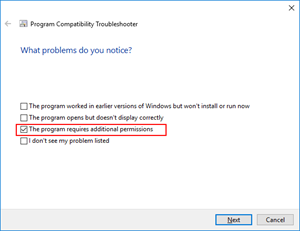
- On the “What problems do you notice?” page, select the “The program requires additional permissions” option and then click “Next”
- On the “Test compatibility settings for the program” page, click “Test the program…”, wait for the program to launch and then click “Next”
- Select “Yes, save these settings for this program”
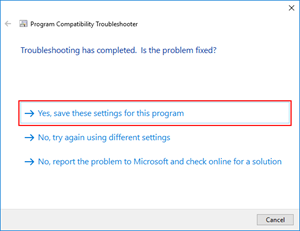
You will never face this problem again… at least at that client.
Enjoy and Stay tuned for new BizTalk Server Tips and Tricks!
Author: Sandro Pereira
Sandro Pereira is an Azure MVP and works as an Integration consultant at DevScope. In the past years, he has been working on implementing Integration scenarios both on-premises and cloud for various clients, each with different scenarios from a technical point of view, size, and criticality, using Microsoft Azure, Microsoft BizTalk Server and different technologies like AS2, EDI, RosettaNet, SAP, TIBCO etc. View all posts by Sandro Pereira
by Sandro Pereira | Jul 24, 2018 | BizTalk Community Blogs via Syndication
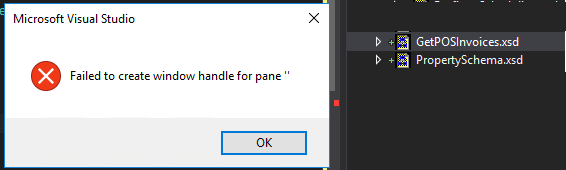
There are errors that we are familiar with, but I guess this you may never hear about it. I didn’t know it until today: Failed to create window handle for pane ”.
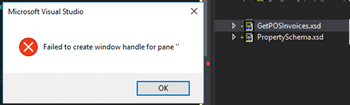
This happened today while I was trying to open a Schema from my BizTalk Server project. Every other artifact opened well in their designer/editor like Orchestrations, Maps, and Pipelines… with the exception of Schemas.
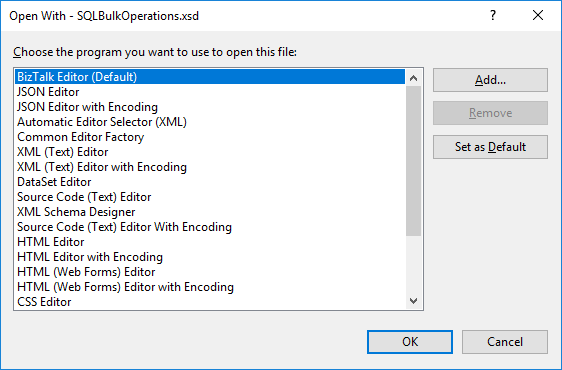
I try to force it open by the BizTalk Schema Editor by right-clicking on the schema, open with and select the BizTalk Editor (Default) without any result.
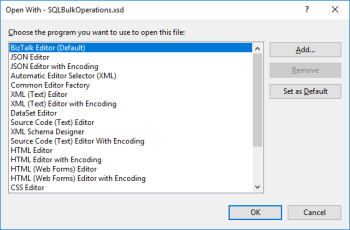
I even try to force it open with another editor like XML (Text) Editor – it worked by the way – and once again try to open by the Schema Editor, again, without any practical result.
Note: I had 3 visual studio instances opened with 3 different projects: 2 of them worked well and only one had this problem.
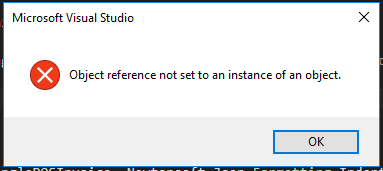
Also, when I try to close this particular Visual Studio instance, I got another error:
Microsoft Visual Studio: Object reference not set to an instance of an object
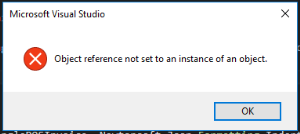
Cause
Honestly, I have no f*** idea… but I know the solution.
Solution
To solve this problem, you need to… do what we normally do when nothing works!
- Close the Visual Studio and open again
Problem solved!
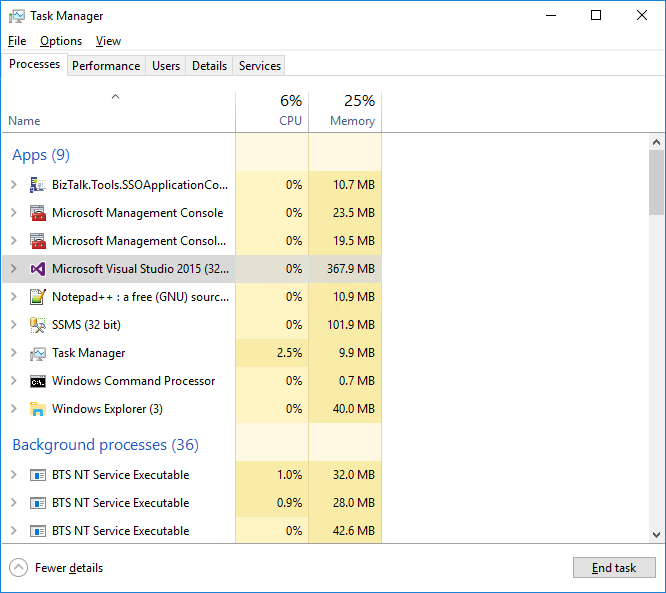
Because I was unable to close the Visual Studio – Object reference not set to an instance of an object – I terminated the Visual Studio task using the task manager.
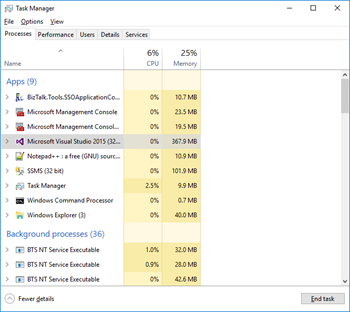
Author: Sandro Pereira
Sandro Pereira lives in Portugal and works as a consultant at DevScope. In the past years, he has been working on implementing Integration scenarios both on-premises and cloud for various clients, each with different scenarios from a technical point of view, size, and criticality, using Microsoft Azure, Microsoft BizTalk Server and different technologies like AS2, EDI, RosettaNet, SAP, TIBCO etc. He is a regular blogger, international speaker, and technical reviewer of several BizTalk books all focused on Integration. He is also the author of the book “BizTalk Mapping Patterns & Best Practices”. He has been awarded MVP since 2011 for his contributions to the integration community. View all posts by Sandro Pereira
by Sandro Pereira | Jul 24, 2018 | BizTalk Community Blogs via Syndication
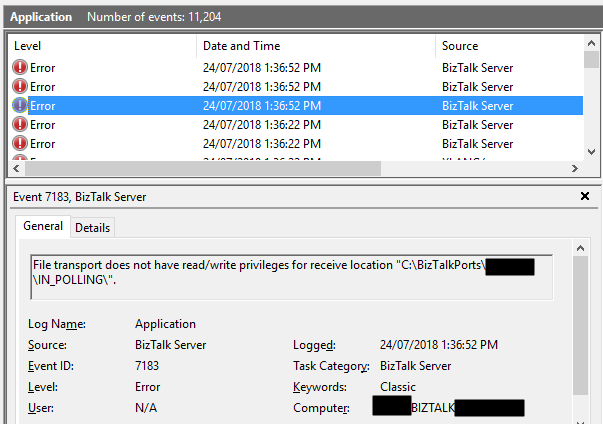
In the spirit of documenting all possible and imaginary errors, let’s address today a classic one: File transport does not have read/write privileges for receive location “DRIVE:FOLDER NAME”.
This happens more than you may think, and today after finish creating a backup port for testing a new process while I was trying to Enable the File receive location I got the following errors:
File transport does not have read/write privileges for receive location “C:BizTalkPortsIN_POLLING”.
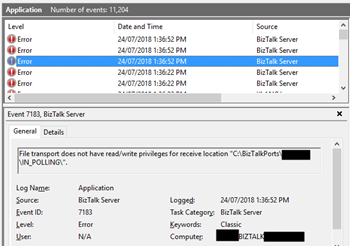
Followed by other similar warning messages:
The Messaging Engine failed to add a receive location “POLLING_FILE” with URL “C:BizTalkPortsIN_POLLING*.xml” to the adapter “FILE”. Reason: “File transport does not have read/write privileges for receive location “C:BizTalkPortsIN_POLLING”. “.
The receive location “POLLING_FILE” with URL “C:BizTalkPortsIN_POLLING*.xml” is shutting down. Details:”The Messaging Engine failed while notifying an adapter of its configuration. “.
Cause
As I said before this is a classic error, the reason is quite obvious and the error message clearly identifies the origin of the problem.
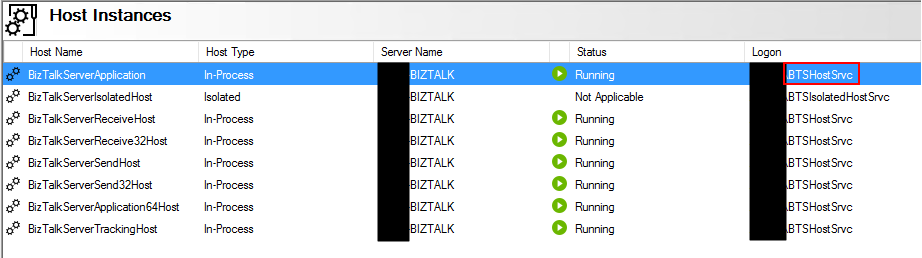
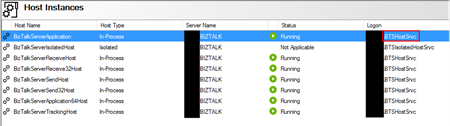
The problem is that the user that is running the BizTalk Server host instance(s) don’t have read/write privileges in that specific folder.
Solution
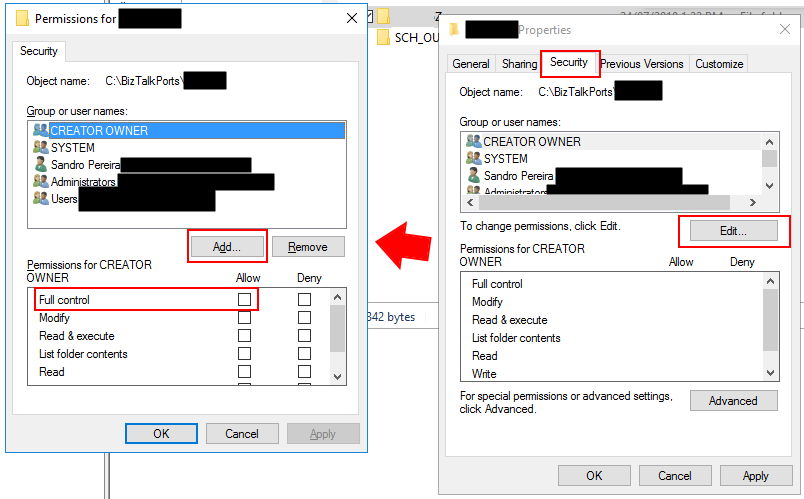
To solve this problem, you need to give readwrite privileges for the user that is running BizTalk Server Host Instance, in my case “BTSHostSrvc”, into that specific folder. For that you need to:
- From the file system, access to the folder in question and then right-click on the folder and select the “Properties” option;
- If attribute “Read-only (only applies to files in folder)” is enabled (selected), disable it (unselect);
- Then go to the “Security” tab and then click “Edit…” button and then “Add…” button
- Search for the user that is running the BizTalk Server Host Instance and then click “OK”;
- For that specific user give read and write access;
- In my case, because this was/is a “BizTalk process” folder, I gave “Full control”
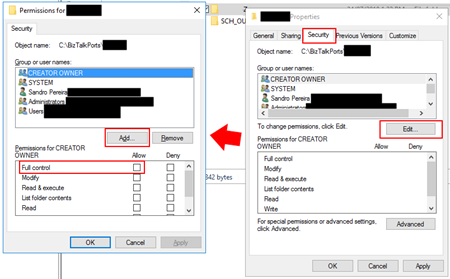
- At the click “OK” and “OK” once again.
Once you give access to the user this classic problem is going away… until the next time!
Author: Sandro Pereira
Sandro Pereira lives in Portugal and works as a consultant at DevScope. In the past years, he has been working on implementing Integration scenarios both on-premises and cloud for various clients, each with different scenarios from a technical point of view, size, and criticality, using Microsoft Azure, Microsoft BizTalk Server and different technologies like AS2, EDI, RosettaNet, SAP, TIBCO etc. He is a regular blogger, international speaker, and technical reviewer of several BizTalk books all focused on Integration. He is also the author of the book “BizTalk Mapping Patterns & Best Practices”. He has been awarded MVP since 2011 for his contributions to the integration community. View all posts by Sandro Pereira

by Sandro Pereira | Jul 19, 2018 | BizTalk Community Blogs via Syndication
After many requests and many postponements, due to my unavailability and free time to take these tasks, BizTalk Scheduled Task Adapter is finally officially available and optimized for BizTalk Server 2016 on GitHub!
This became more critical because Codeplex closed and community members were not finding mainly the installation files so I was getting a lot of emails requesting them. Note that despite Codeplex is closed you can still download the source code from the archive.
At the moment is only available the installation files of BizTalk Scheduled Task Adapter v6.0 for BizTalk Server 2016 and the following reported issue was solved:
- In some scenarios, in the first trigger event, multiple messages were sent at the same time – Solved
You can download this “new” version of the adapter in BizTalk Scheduled Task Adapter from GitHub:
The BizTalk Scheduled Task Adapter is an in-process receive adapter that executes a prescribed task on a daily, weekly or monthly schedule. The adapter is configured entirely within BizTalk, all configurations are stored within the SSODB and can be exported and imported via binding files.
Soon I will add the source code for BizTalk Server 2016 and the same for previous versions: BizTalk Server 2013 R2, BizTalk Server 2013, BizTalk Server 2010, and so on.
Question?
Should I do a BizTalk Scheduled Task Adapter commercial version that will guarantee full support to this adapter (reported bugs and/or issues quietly fixed) and new features?
 BizTalk Scheduled Task Adapter for BizTalk Server 2016 available on GitHub
Microsoft | GitHub
Author: Sandro Pereira
Sandro Pereira lives in Portugal and works as a consultant at DevScope. In the past years, he has been working on implementing Integration scenarios both on-premises and cloud for various clients, each with different scenarios from a technical point of view, size, and criticality, using Microsoft Azure, Microsoft BizTalk Server and different technologies like AS2, EDI, RosettaNet, SAP, TIBCO etc. He is a regular blogger, international speaker, and technical reviewer of several BizTalk books all focused on Integration. He is also the author of the book “BizTalk Mapping Patterns & Best Practices”. He has been awarded MVP since 2011 for his contributions to the integration community. View all posts by Sandro Pereira
by Sandro Pereira | Jul 19, 2018 | BizTalk Community Blogs via Syndication
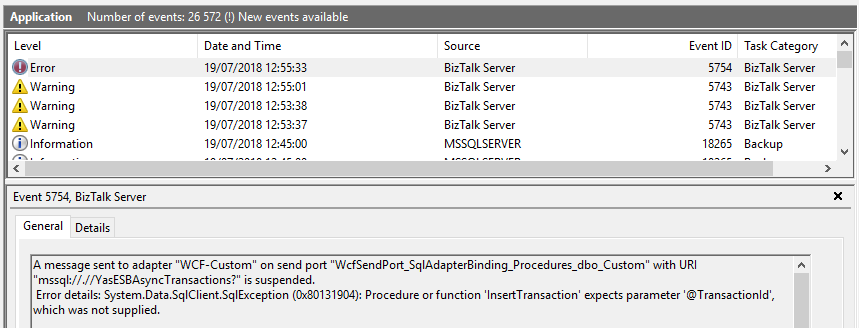
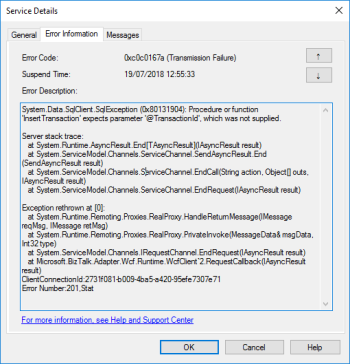
Today while trying to test a solution where it was supposed to invoke a SQL Server Stored Procedure with optional parameters thru the BizTalk Server WCF-SQL adapter I got this following error: Procedure or function expects parameter which was not supplied.
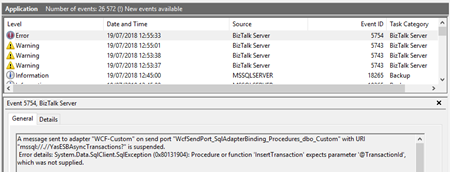
A message sent to adapter “WCF-Custom” on send port “WcfSendPort_SqlAdapterBinding_Procedures_dbo_Custom” with URI “mssql://.// AsyncTransactions?” is suspended.
Error details: System.Data.SqlClient.SqlException (0x80131904): Procedure or function ‘InsertTransaction’ expects parameter ‘@TransactionId’, which was not supplied.
Server stack trace:
at System.Runtime.AsyncResult.End[TAsyncResult](IAsyncResult result)
at System.ServiceModel.Channels.ServiceChannel.SendAsyncResult.End(SendAsyncResult result)
at System.ServiceModel.Channels.ServiceChannel.EndCall(String action, Object[] outs, IAsyncResult result)
at System.ServiceModel.Channels.ServiceChannel.EndRequest(IAsyncResult result)
Exception rethrown at [0]:
at System.Runtime.Remoting.Proxies.RealProxy.HandleReturnMessage(IMessage reqMsg, IMessage retMsg)
at System.Runtime.Remoting.Proxies.RealProxy.PrivateInvoke(MessageData& msgData, Int32 type)
at System.ServiceModel.Channels.IRequestChannel.EndRequest(IAsyncResult result)
at Microsoft.BizTalk.Adapter.Wcf.Runtime.WcfClient`2.RequestCallback(IAsyncResult result)
ClientConnectionId:2731f081-b009-4ba5-a420-95efe7307e71
Error Number:201,State:4,Class:16
MessageId: {746C3B89-A7ED-4C12-8548-0FE174ACA2CB}
InstanceID: {FF06027F-BB96-498B-9515-1E2D55FEAC5A}
Followed by other similar warning messages:
The adapter failed to transmit message going to send port “WcfSendPort_SqlAdapterBinding_Procedures_dbo_Custom” with URL “mssql://.// AsyncTransactions?”. It will be retransmitted after the retry interval specified for this Send Port. Details:”System.Data.SqlClient.SqlException (0x80131904): Procedure or function ‘InsertTransaction’ expects parameter ‘@TransactionId’, which was not supplied.
The adapter failed to transmit message going to send port “WcfSendPort_SqlAdapterBinding_Procedures_dbo_Custom” with URL “mssql://.// AsyncTransactions?”. It will be retransmitted after the retry interval specified for this Send Port. Details:”Microsoft.ServiceModel.Channels.Common.XmlReaderParsingException: The start element with name “Request” and namespace “http://BizTalkTesting.SQLBulkOperations” was unexpected. Please ensure that your input XML conforms to the schema for the operation.
Cause
The cause of this problem is, once again, quite obvious and the error message present clearly identifies the origin of the problem. The stored procedure is expecting a certain field or several fields that are not being passed maybe because they are marked on the schema as optional fields.
Solution
Of course, the simple problem is to pass all the parameter presented and required by the stored procedure. You should pass them:
- as NULL, if they are nillable;
- or as empty strings;
Having said that, my problem was not that quite simple because the parameter described in the error above needs to be optional. After I analyze the stored procedure contract I realized that all of them are set as mandatory fields that need to be passed:
ALTER PROCEDURE [dbo].[InsertTransaction]
    -- Add the parameters for the stored procedure here
    @SourceSystem  VARCHAR(50),
    @DestinationSystem VARCHAR(50),
    @TransactionId uniqueidentifier,
    @MessageId uniqueidentifier,
    @DocumentType VARCHAR(50),
    @DocumentId VARCHAR(100),
    @BodyMessage ntext,
    @BodyType VARCHAR(5),
    @Priority int
AS
BEGIN
...
When I say that all of them are mandatory, of course, I can set it as NULL but in terms of BizTalk Server, I need to send all the fields in the XML message.
To make it actually optional, we need to change the contract of the schema to something like this:
ALTER PROCEDURE [dbo].[InsertTransaction]
    -- Add the parameters for the stored procedure here
    @SourceSystem  VARCHAR(50),
    @DestinationSystem VARCHAR(50),
    @TransactionId uniqueidentifier  = null,
    @MessageId uniqueidentifier  = null,
    @DocumentType VARCHAR(50),
    @DocumentId VARCHAR(100),
    @BodyMessage ntext,
    @BodyType VARCHAR(5),
    @Priority int
AS
BEGIN BEGIN
...
Once we modify the stored procedure to have default NULL values the problem will be solved. Now we don’t need to send these fields as NULL or blank, now we actually can omit them from the message – optional fields!
Author: Sandro Pereira
Sandro Pereira lives in Portugal and works as a consultant at DevScope. In the past years, he has been working on implementing Integration scenarios both on-premises and cloud for various clients, each with different scenarios from a technical point of view, size, and criticality, using Microsoft Azure, Microsoft BizTalk Server and different technologies like AS2, EDI, RosettaNet, SAP, TIBCO etc. He is a regular blogger, international speaker, and technical reviewer of several BizTalk books all focused on Integration. He is also the author of the book “BizTalk Mapping Patterns & Best Practices”. He has been awarded MVP since 2011 for his contributions to the integration community. View all posts by Sandro Pereira
by Sandro Pereira | Jul 16, 2018 | BizTalk Community Blogs via Syndication
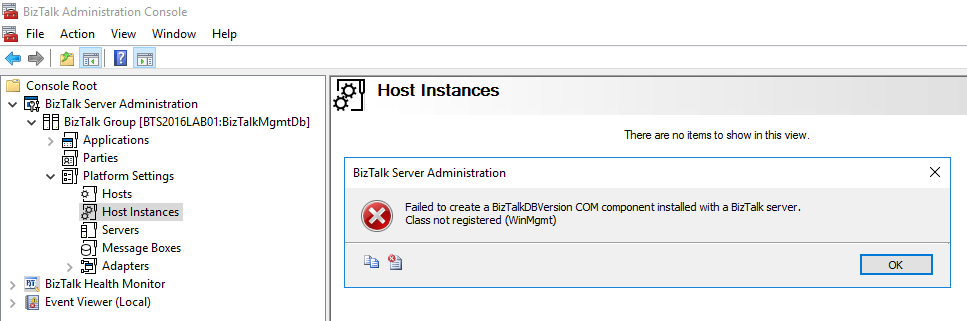
If you follow the BizTalk Server hashtag #msbts on social media like twitter or if you follow BizTalk Server MSDN forum, you will notice one disturbed thread recently: Security Updates released by Microsoft in July 10, 2018 will break you BizTalk Server Administration Console and as a result, you will not be able to access to BizTalk Server “Platform Settings”, getting the following error:
TITLE: BizTalk Server Administration
——————————
Failed to create a BizTalkDBVersion COM component installed with a BizTalk server.
Class not registered (WinMgmt)
——————————
BUTTONS:
OK
——————————
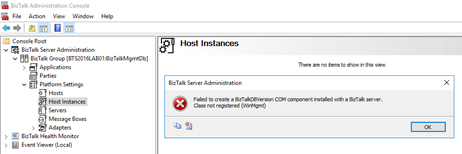
You will not be able for example to: restart the host instances from the BizTalk Server Administration console.
As far as I notice in my clients and in my dev machine, the BizTalk Server engine will still work properly as if nothing happened, it will still be able to receive, process and send all your messages.
Cause
The cause of the problem is still unclear, and Microsoft is still working on how to solve it. And this problem will happen depending in witch SO or BizTalk Server you will have. It has already been registered problems in BizTalk Server 2010, 2013, 2013 R2 and/or BizTalk Server 2016.
What is causing the problem are security updates that were released by Microsoft on July 10, 2018.
Solution
For now, there isn’t a fancy solution, Microsoft is working on a resolution and estimates a solution will be available mid-July.
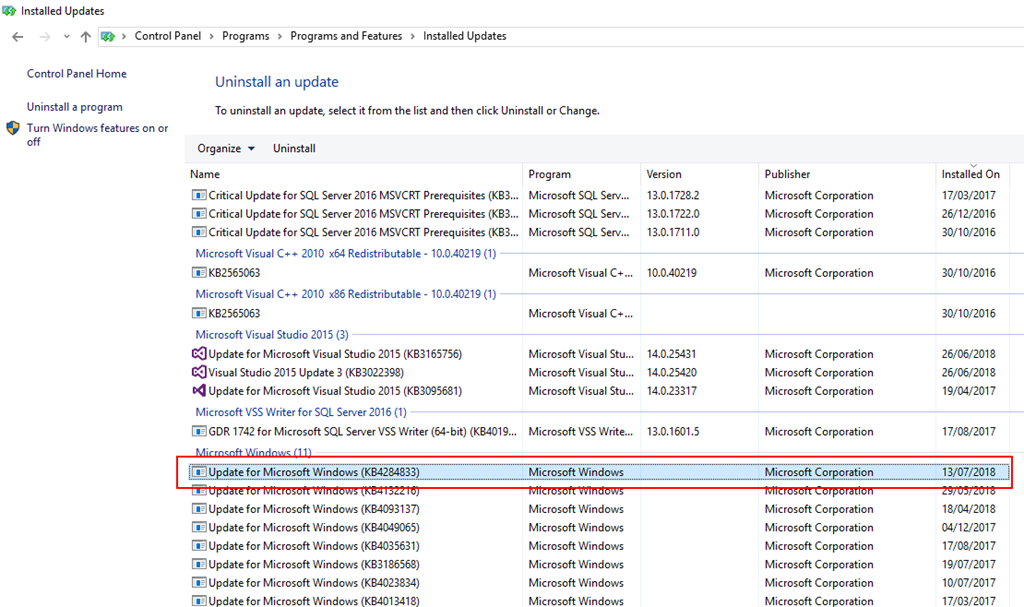
With that said, the only “solution” or let us call workaround to solve this issue is to uninstall all the “critical” security updates that were installed: in my case, uninstalling the “KB4284833” solved my case.
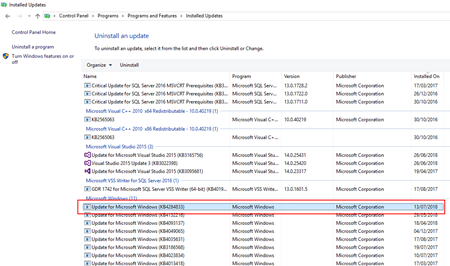
To do that you need to:
- Press the “Windows key” to open the Start menu and type “Control Panel” and click on “Control Panel” option from the Search window
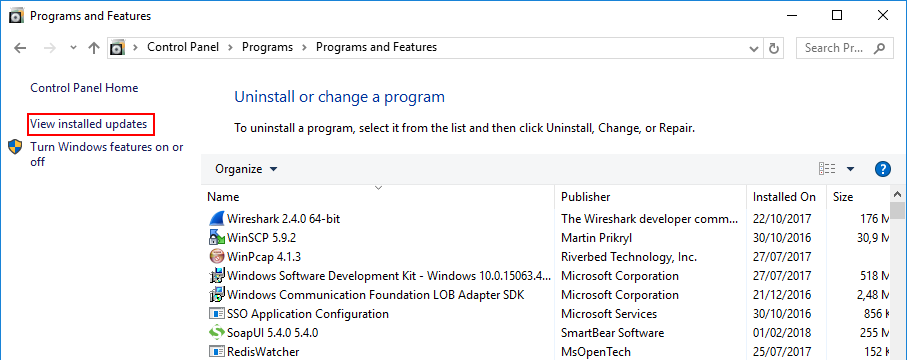
- On the “Control Panel” windows, select “Programs” and then “Programs and Features” option.
- On the “Programs and Features” panel, select “View installed updates” option.
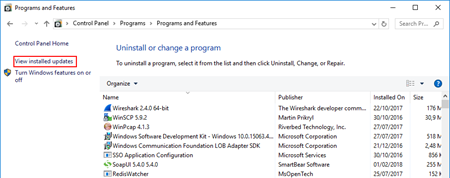
- And then you just need to select the update you want to uninstall and then right-click and select “Uninstall”.
In the end, you will need to reboot your machine.
You can always check this forum thread: Microsoft Security Updates cause BizTalk Admin Console errors: An internal failure occurred for unknown reasons (WinMgmt) to check to have an idea what updates you should uninstall depending on your OS version:
- BizTalk Server 2013 R2: KB4338600 and/or KB4338601
- BizTalk Server 2010: KB4338602
- Others: This includes KB4338600, KB4338605, KB4338613, KB4338614, KB4338424, KB4338419
All of them to be checked in your environment and analyzed by your internal teams.
Author: Sandro Pereira
Sandro Pereira lives in Portugal and works as a consultant at DevScope. In the past years, he has been working on implementing Integration scenarios both on-premises and cloud for various clients, each with different scenarios from a technical point of view, size, and criticality, using Microsoft Azure, Microsoft BizTalk Server and different technologies like AS2, EDI, RosettaNet, SAP, TIBCO etc. He is a regular blogger, international speaker, and technical reviewer of several BizTalk books all focused on Integration. He is also the author of the book “BizTalk Mapping Patterns & Best Practices”. He has been awarded MVP since 2011 for his contributions to the integration community. View all posts by Sandro Pereira
by Sandro Pereira | Jul 12, 2018 | BizTalk Community Blogs via Syndication
It’s fair to say that we all know the default Database Lookup functoid. It allows you to connect and extract information from a database. This functoid requires four input parameters in the following order:
- A lookup value – value for which to search in the specified database, table, and column (next parameters);
- A database connection string – The full connection string for the database with a provider, machine name, database and authentication (an ActiveX Data Objects .NET (ADO.NET) connection string);
- A table name – name of the table in the database in which to search
- A column name for the lookup value – name of the column in the table in which to search – the first parameter
The functoid is quite simple to use, however, the main problem that developers face when they use it, refers to the second parameter: the connection string.
How to know the correct value of the connection string to be set in the Database Lookup Functoid
Is hard to remember the correct syntax/value to specify in the connection string to be used inside the Database Lookup Functoid.
For you to be sure that you don’t make any mistakes, which could lead to future waste of time by diagnosing and rectifying the connection string, the simple and easy way to guarantee that we are using the correct connection string value – but also for not having to remember this by head – is to:
- Create a simple Universal Data Link (.udl) File
- Set the OLE DB provider connection parameters
- And finally, test the connection to check if everything is correct
To accomplish this, we need to:
- Create a text file and name it “ODBCConnectionTest.udl” on your file system
- Preferably on the BizTalk Server machine
- The name of the file is not important, the important part is the extension, it must be “.udl”
- Double-click the Universal Data Link file that you just created
- On the Provider Tab, select the appropriate OLE DB provider for the type of data you want to access and then Next
- In my case, it is “Microsoft OLE DB Provider for SQL Server”
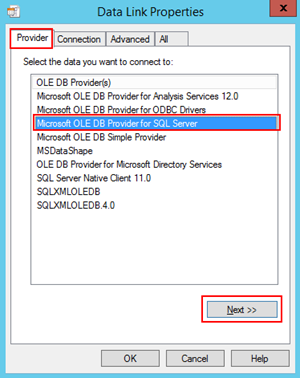
- In the Connection tab, specify:
- The SQL Server instance that hosts the database
- The authentication method: Use Windows NT integrated security or Use a specific user name and password
- And finally, the database name to which you want to connect
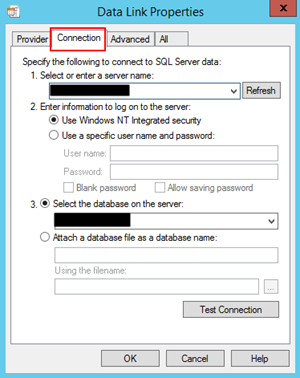
- After specifying these properties, you then should click on “Test Connection…” button to attempt a connection to the specified data source. If no connection is made, review the settings. Otherwise, click “Ok”
Now that we have our Universal Data Link file created and properly configured, you can open the UDL file in Notepad and you will have access to the connection string value that you should use inside the Database Lookup Functoid. You just need to copy and paste it inside the second parameter of the Functoid.
Note: you should paste the connection string statically inside the Database Lookup Functoid but that is a different topic that we will address in another BizTalk Server Tips and Tricks.
I hope this small trick will the useful, enjoy and stay tuned for new BizTalk Server Tips and Tricks!
Author: Sandro Pereira
Sandro Pereira is an Azure MVP and works as an Integration consultant at DevScope. In the past years, he has been working on implementing Integration scenarios both on-premises and cloud for various clients, each with different scenarios from a technical point of view, size, and criticality, using Microsoft Azure, Microsoft BizTalk Server and different technologies like AS2, EDI, RosettaNet, SAP, TIBCO etc. View all posts by Sandro Pereira

by Sandro Pereira | Jul 5, 2018 | BizTalk Community Blogs via Syndication
To finalize, maybe, these series of Errors and Warnings… Causes and Solutions let’s describe and address a fairly simple one that from time to time appears: Login Failed. While trying to communicate to a SQL Server database to invoke a stored procedure thru BizTalk WCF-SQL adapter I got this following error:
A message sent to adapter “WCF-Custom” on send port “STAGING_SQL_WCF_SEND” with URI “mssql://SQL-SERVER-NAME//AsyncTransactions?InboundId=ins” is suspended.
Error details: Microsoft.ServiceModel.Channels.Common.ConnectionException: Cannot open database “AsyncTransactions” requested by the login. The login failed.
Login failed for user ‘DOMAINBTSHostSrvc’. —> System.Data.SqlClient.SqlException: Cannot open database “AsyncTransactions” requested by the login. The login failed.
Login failed for user ‘DOMAINBTSHostSrvc’.
at System.Data.SqlClient.SqlInternalConnectionTds..ctor(DbConnectionPoolIdentity identity, SqlConnectionString connectionOptions, SqlCredential credential, Object providerInfo, String newPassword, SecureString newSecurePassword, Boolean redirectedUserInstance, SqlConnectionString userConnectionOptions, SessionData reconnectSessionData, DbConnectionPool pool, String accessToken, Boolean applyTransientFaultHandling)
at System.Data.SqlClient.SqlConnectionFactory.CreateConnection(DbConnectionOptions options, DbConnectionPoolKey poolKey, Object poolGroupProviderInfo, DbConnectionPool pool, DbConnection owningConnection, DbConnectionOptions userOptions)
at System.Data.ProviderBase.DbConnectionFactory.CreatePooledConnection(DbConnectionPool pool, DbConnection owningObject, DbConnectionOptions options, DbConnectionPoolKey poolKey, DbConnectionOptions userOptions)
at System.Data.ProviderBase.DbConnectionPool.CreateObject(DbConnection owningObject, DbConnectionOptions userOptions, DbConnectionInternal oldConnection)
at System.Data.ProviderBase.DbConnectionPool.UserCreateRequest(DbConnection owningObject, DbConnectionOptions userOptions, DbConnectionInternal oldConnection)
at System.Data.ProviderBase.DbConnectionPool.TryGetConnection(DbConnection owningObject, UInt32 waitForMultipleObjectsTimeout, Boolean allowCreate, Boolean onlyOneCheckConnection, DbConnectionOptions userOptions, DbConnectionInternal& connection)
at System.Data.ProviderBase.DbConnectionPool.TryGetConnection(DbConnection owningObject, TaskCompletionSource`1 retry, DbConnectionOptions userOptions, DbConnectionInternal& connection)
at System.Data.ProviderBase.DbConnectionFactory.TryGetConnection(DbConnection owningConnection, TaskCompletionSource`1 retry, DbConnectionOptions userOptions, DbConnectionInternal oldConnection, DbConnectionInternal& connection)
at System.Data.ProviderBase.DbConnectionInternal.TryOpenConnectionInternal(DbConnection outerConnection, DbConnectionFactory connectionFactory, TaskCompletionSource`1 retry, DbConnectionOptions userOptions)
at System.Data.ProviderBase.DbConnectionClosed.TryOpenConnection(DbConnection outerConnection, DbConnectionFactory connectionFactory, TaskCompletionSource`1 retry, DbConnectionOptions userOptions)
at System.Data.SqlClient.SqlConnection.TryOpenInner(TaskCompletionSource`1 retry)
at System.Data.SqlClient.SqlConnection.TryOpen(TaskCompletionSource`1 retry)
at System.Data.SqlClient.SqlConnection.Open()
at Microsoft.Adapters.Sql.SqlAdapterConnection.OpenConnection()
— End of inner exception stack trace —
Server stack trace:
at Microsoft.Adapters.Sql.SqlAdapterConnection.OpenConnection()
at Microsoft.Adapters.Sql.ASDKConnection.Open(TimeSpan timeout)
at Microsoft.ServiceModel.Channels.Common.Design.ConnectionPool.GetConnection(Guid clientId, TimeSpan timeout)
at Microsoft.ServiceModel.Channels.Common.Design.ConnectionPool.GetConnectionHandler[TConnectionHandler](Guid clientId, TimeSpan timeout, MetadataLookup metadataLookup, String& connectionId)
at Microsoft.ServiceModel.Channels.Common.Channels.AdapterRequestChannel.OnOpen(TimeSpan timeout)
at System.ServiceModel.Channels.CommunicationObject.Open(TimeSpan timeout)
at Microsoft.BizTalk.Adapter.Wcf.Runtime.OneWayOperationSendPortRequestChannel`1.OnOpen(TimeSpan timeout)
at System.ServiceModel.Channels.CommunicationObject.Open(TimeSpan timeout)
at System.ServiceModel.Channels.ServiceChannel.OnOpen(TimeSpan timeout)
at System.ServiceModel.Channels.CommunicationObject.Open(TimeSpan timeout)
at System.ServiceModel.Channels.CommunicationObject.Open()
Exception rethrown at [0]:
at System.Runtime.Remoting.Proxies.RealProxy.HandleReturnMessage(IMessage reqMsg, IMessage retMsg)
at System.Runtime.Remoting.Proxies.RealProxy.PrivateInvoke(MessageData& msgData, Int32 type)
at System.ServiceModel.ICommunicationObject.Open()
at Microsoft.BizTalk.Adapter.Wcf.Runtime.WcfClient`2.GetChannel[TChannel](IBaseMessage bizTalkMessage, ChannelFactory`1& cachedFactory)
at Microsoft.BizTalk.Adapter.Wcf.Runtime.WcfClient`2.SendMessage(IBaseMessage bizTalkMessage)
MessageId: {71CDC883-AE8D-4303-A72E-ADA9ECE91981}
InstanceID: {1EA7B77C-924F-4C74-87DE-BCC4D1AD8E6A}
The cause of the problem is quite obvious and the error message, this time because sometimes is not quite true like we saw in my last post, the error message clearly identifies the origin of the problem.
This problem occurs because the user account that you used to access the database, in my case the BizTalk Host Instance Account, don’t have permissions to connect the database.
Simple problem, simple solution. You need to grant permission to the user to access database
Once again, given “sysadmin” or “db_owner” would solve all our problems but it goes against security best practices and sometimes these tables contain sensitive data or personal data, and nowadays with General Data Protection Regulation (GDPR) in EU this sometimes can be a backdoor for other possible problems and teams need to start taking into considerations these security policies.
You always should give the minimum rights to a certain user for him to do the necessary tasks. Nothing more, nothing less… as things should be.
![BizTalk WCF-SQL Error: Microsoft.ServiceModel.Channels.Common.MetadataException: Object [dbo].[StoredProcedureName] of type StoredProcedure does not exist](https://www.biztalkgurus.com/wp-content/uploads/2018/07/BizTalk-WCF-SQL-Object-type-StoredProcedure-does-not-exist_thumb-1-150x150.png)
by Sandro Pereira | Jul 4, 2018 | BizTalk Community Blogs via Syndication
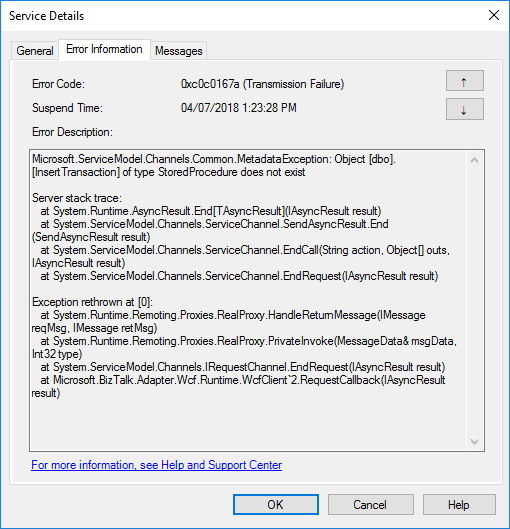
I told you in my last blog post an error never comes alone … when an error appears, it always appears two or three. Or that, or I have a tendency to attract, or find weird errors! This time I was completely stunned: StoredProcedure does not exist, while trying to invoke a stored procedure thru BizTalk WCF-SQL adapter:
Microsoft.ServiceModel.Channels.Common.MetadataException: Object [dbo].[InsertTransaction] of type StoredProcedure does not exist
Server stack trace:
at System.Runtime.AsyncResult.End[TAsyncResult](IAsyncResult result)
at System.ServiceModel.Channels.ServiceChannel.SendAsyncResult.End(SendAsyncResult result)
at System.ServiceModel.Channels.ServiceChannel.EndCall(String action, Object[] outs, IAsyncResult result)
at System.ServiceModel.Channels.ServiceChannel.EndRequest(IAsyncResult result)
Exception rethrown at [0]:
at System.Runtime.Remoting.Proxies.RealProxy.HandleReturnMessage(IMessage reqMsg, IMessage retMsg)
at System.Runtime.Remoting.Proxies.RealProxy.PrivateInvoke(MessageData& msgData, Int32 type)
at System.ServiceModel.Channels.IRequestChannel.EndRequest(IAsyncResult result)
at Microsoft.BizTalk.Adapter.Wcf.Runtime.WcfClient`2.RequestCallback(IAsyncResult result)
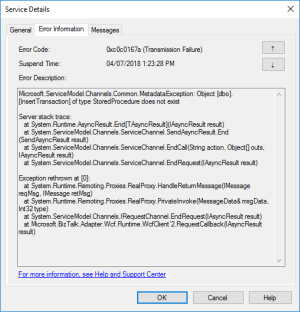
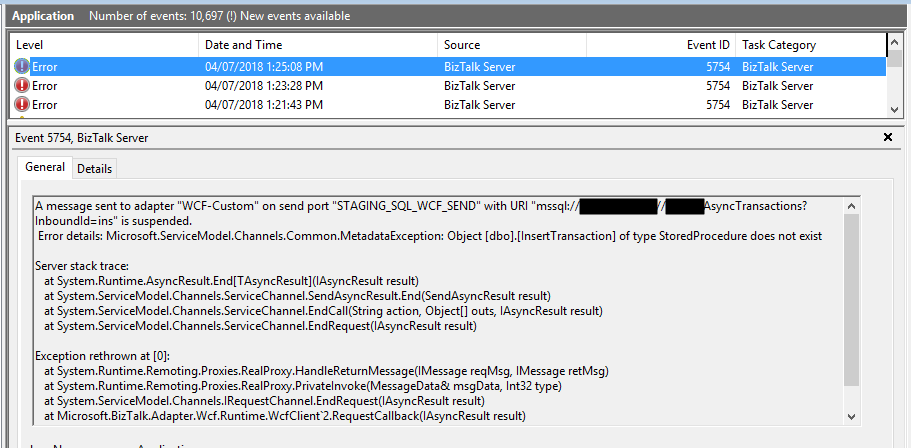
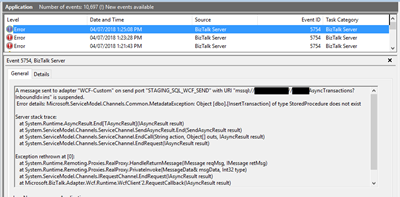
or in the event viewer:
A message sent to adapter “WCF-Custom” on send port “STAGING_SQL_WCF_SEND” with URI “mssql://SQL-SERVER-NAME//AsyncTransactions?InboundId=ins” is suspended.
Error details: Microsoft.ServiceModel.Channels.Common.MetadataException: Object [dbo].[InsertTransaction] of type StoredProcedure does not exist
Server stack trace:
at System.Runtime.AsyncResult.End[TAsyncResult](IAsyncResult result)
at System.ServiceModel.Channels.ServiceChannel.SendAsyncResult.End(SendAsyncResult result)
at System.ServiceModel.Channels.ServiceChannel.EndCall(String action, Object[] outs, IAsyncResult result)
at System.ServiceModel.Channels.ServiceChannel.EndRequest(IAsyncResult result)
Exception rethrown at [0]:
at System.Runtime.Remoting.Proxies.RealProxy.HandleReturnMessage(IMessage reqMsg, IMessage retMsg)
at System.Runtime.Remoting.Proxies.RealProxy.PrivateInvoke(MessageData& msgData, Int32 type)
at System.ServiceModel.Channels.IRequestChannel.EndRequest(IAsyncResult result)
at Microsoft.BizTalk.Adapter.Wcf.Runtime.WcfClient`2.RequestCallback(IAsyncResult result)
MessageId: {71CDC883-AE8D-4303-A72E-ADA9ECE91981}
InstanceID: {1EA7B77C-924F-4C74-87DE-BCC4D1AD8E6A}
As I normally say, doubt what you read – even if it is on my blog – because there are many conspiracy theories, and we can find so-called solutions by googling it… but a lot of them are just that: conspiracy theories.
Cause
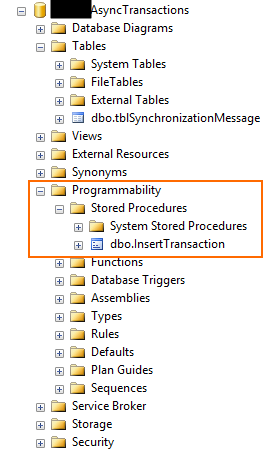
Personally, I usually like to start with the simplest thing: If it says that doesn’t exist… let’s check, and in this case, the error raised by the adapter it’s just stupid because the stored procedure exists in that specific database as you may see in the picture below:
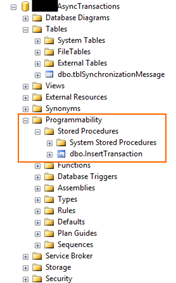
At a first glimpse, it seems that was not a security issue because I was able to connect to the database, otherwise, I would get the following error:
Error details: Microsoft.ServiceModel.Channels.Common.ConnectionException: Cannot open database “AsyncTransactions” requested by the login. The login failed.
Again, some conspiracy theories may let you think that:
- you should regenerate schemas;
- or that may be a mismatch in the namespaces;
- the operation is not properly set;
- that the “?” character that you normally find in the URI is causing this problem;
- and my favorite is that you should give “sysadmin” rights to the service account that is running the host instance.
Lucky, I remembered to double check the security permission directly on SQL Server, so I opened the SQL Server Management Console with the service account and try to execute the stored procedure and… guest what… I didn’t have permissions!
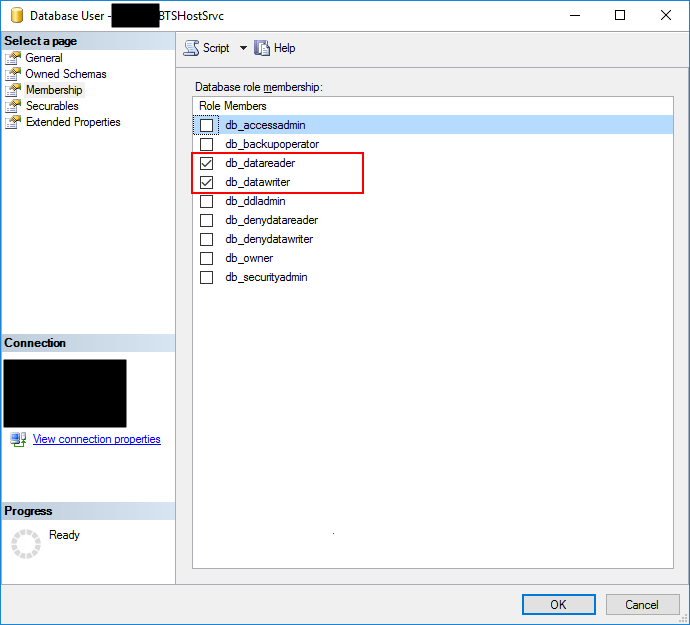
When I double check the permissions to that service account, it had: db_datareader and db_datawriter… that in some situations are enough:
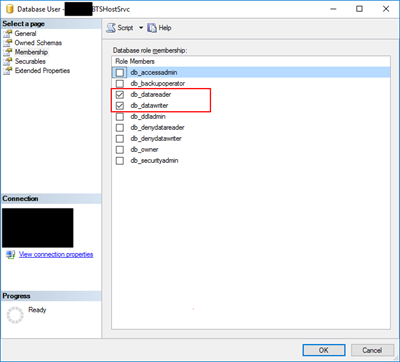
Of course, given “sysadmin” or “db_ower” would solve all my problems but sometimes you are not allowed to do that for security reasons and also is not a best practice, special now with GDPR.
So the problem was clear that the service account that is running the host instance bind to that send port didn’t have the right permissions to execute the stored procedure… unfortunately, the error raised by the adapter is out of context.
Solution
The best approach for you to solve this problem is to create a new server role, for that particular database, in SQL Server:
- In Object Explorer, access to your database and expand it.
- Expand the Security folder.
- Right-click the “Database Roles” folder and select “New Database Role…”
- In the “New Database Role” window
- On the “Role name” property, on the General page, enter a name for the new database role, for example, “db_spexecution”
- On the “Owner” property, inherit from db_datareader and db_datawriter (optional)
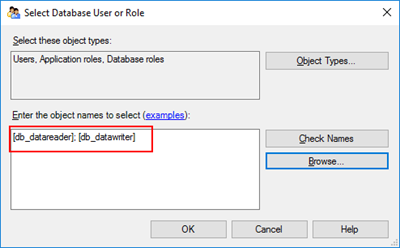
- On the Securables page, under Securables, click “Search” button.
- On “Add Objects” window, select “Specific objects…” and click “OK”
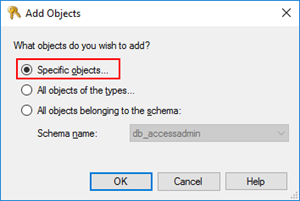
-
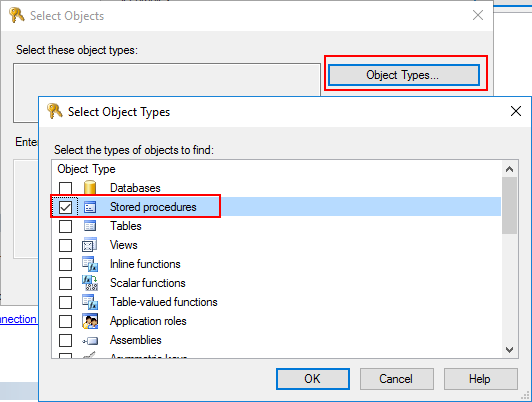
- On “Select Objects” windows, click “Object Types…” and then select “Stored Procedures”
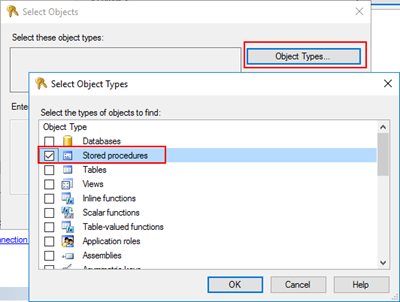
-
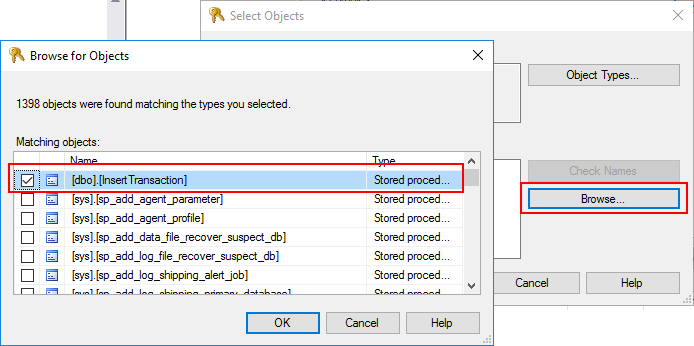
- After selecting the object type, click “Browse…” and from the “Browser for Objects” windows select the stored procedures you want to invoke. (only the one that you need)
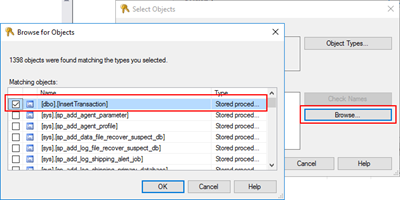
-
- Click “Ok” and again “OK” to return to the main “New Database Role” window.
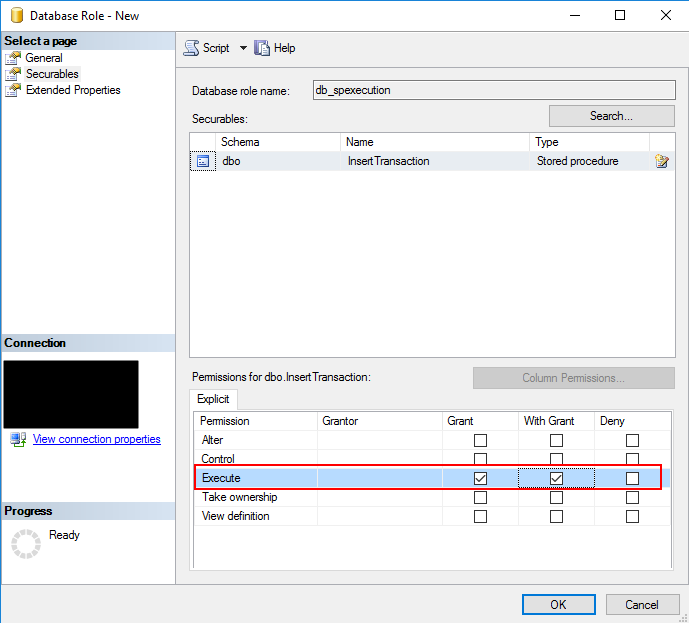
- The last step, on the Securables page, is to give Execute permissions “Grant” and “Grant with”.
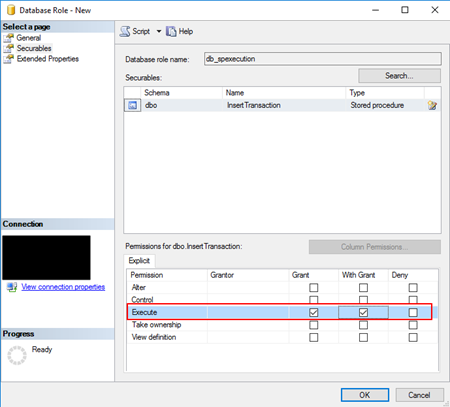
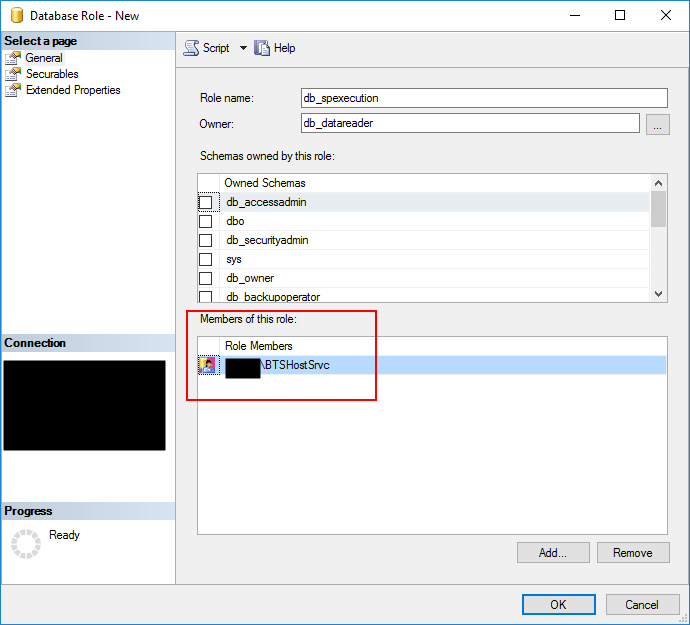
- And finally give, on the General tab, add the service account that is running the host instance to the Role Members for that role.
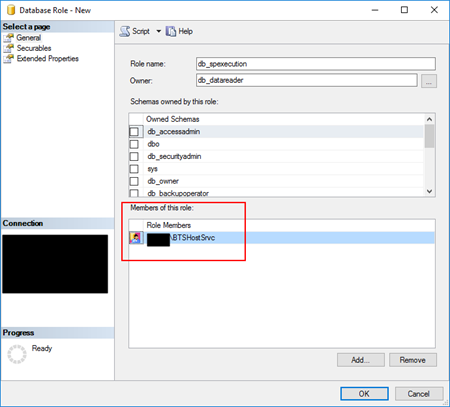
You can now try to resend the suspended messages or send new ones, and you will be able to communicate and execute the stored procedures without any problem.
Author: Sandro Pereira
Sandro Pereira lives in Portugal and works as a consultant at DevScope. In the past years, he has been working on implementing Integration scenarios both on-premises and cloud for various clients, each with different scenarios from a technical point of view, size, and criticality, using Microsoft Azure, Microsoft BizTalk Server and different technologies like AS2, EDI, RosettaNet, SAP, TIBCO etc. He is a regular blogger, international speaker, and technical reviewer of several BizTalk books all focused on Integration. He is also the author of the book “BizTalk Mapping Patterns & Best Practices”. He has been awarded MVP since 2011 for his contributions to the integration community. View all posts by Sandro Pereira

by Sandro Pereira | Jul 3, 2018 | BizTalk Community Blogs via Syndication
An error never comes alone … When an error appears, it always appears two or three, and I still have thousands to published, but this one but this one made me crazy for a few minutes: The type or namespace name ‘SerializableAttributeAttribute’ does not exist in the namespace!
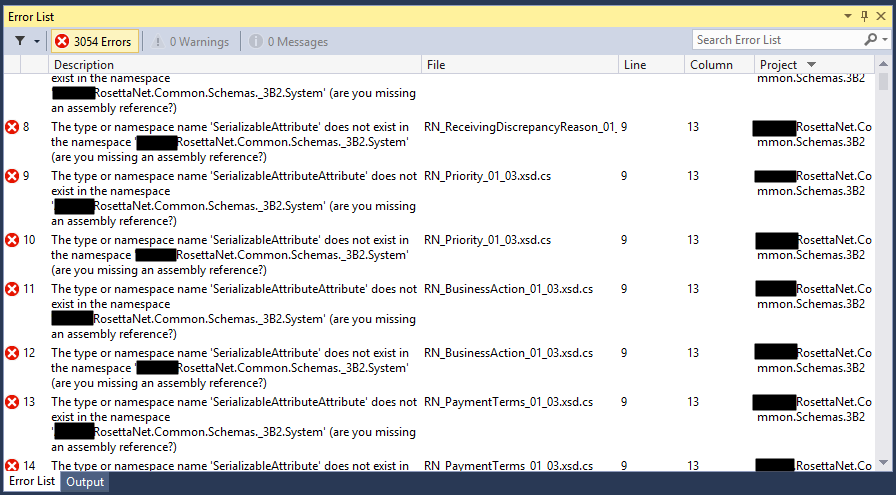
Yes, you read it right, while I was trying to compile a RosettaNet schemas projects, in this particular case a PIP3B2 Advance Shipment Notification I got thousands of errors, 3054 to be exact saying:
Error 1 The type or namespace name ‘SerializableAttributeAttribute’ does not exist in the namespace
RosettaNet.Common.Schemas._3B2.System’ (are you missing an assembly reference?)
C:TFS…RosettaNet.Common.Schemas.3B2DomainLogisticsCodeListRN_FreightPaymentTerms_01_03.xsd.cs 9 13 RosettaNet.Common.Schemas.3B2 …
Error 3054 The type or namespace name ‘NonSerializedAttribute’ does not exist in the namespace ‘RosettaNet.Common.Schemas._3B2.System’ (are you missing an assembly reference?) C:TFS… RosettaNet.Common.Schemas.3B2DomainProcurementINT_Procurement_02_07_01_09.xsd.cs 5072 21 RosettaNet.Common.Schemas.3B2
… and several other schemas as you may see in the picture below.
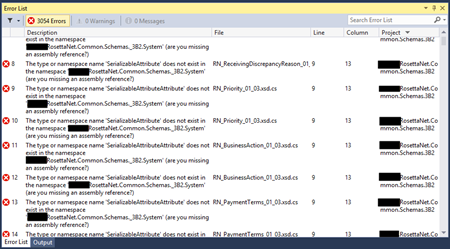
But do not be fooled into thinking this is a problem related exclusively to RosettaNet, it is not, and it can happen with any “normal” or any kind of schemas.
Cause
There are certain keywords, type names, and identifier names that you should use because they are internally used by BizTalk and it way enter in conflict and sometimes originate problems and errors, keywords like activate, atomic, body, task, compensate, method and several ones, you can see the full list here XLANG-s Reserved Words. But there are other keywords that depending on the artifact, may give you problems like:
- BTS (associated with Microsoft.BizTalk.GlobalPropertySchemas assembly)
- “-“ in RootNode Typename inside schemas
- …
And “System”!
If you use the keyword “System” inside a schema namespace like:
- “RosettaNet.Common.Schemas._3B2.System”
- “MyNamspace.System.Schemas”
You will not be able to compile your schema project.
The problem, if you download from the GS1 RosettaNet Standards certain PIP’s they will have the following structure:
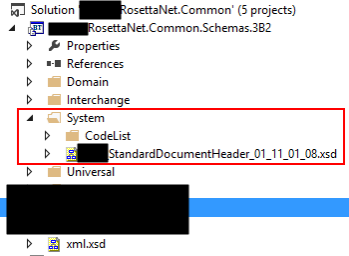
And as you see, there is a folder “System” that inside have several schemas and normally the schema namespace is composed by the project name or (assembly name) and the path to the schema, for example in this case:
- RosettaNet.Common.Schemas._3B2.System.CodeList
- Or RosettaNet.Common.Schemas._3B2.System
And this is causing all of these problems because in this case, “System” is a reserved keyword that shouldn’t be used.
Solution
The difficult part of this error was finding the cause of the problem. Once you know what is causing the problem the solution is quite simple. You just need to:
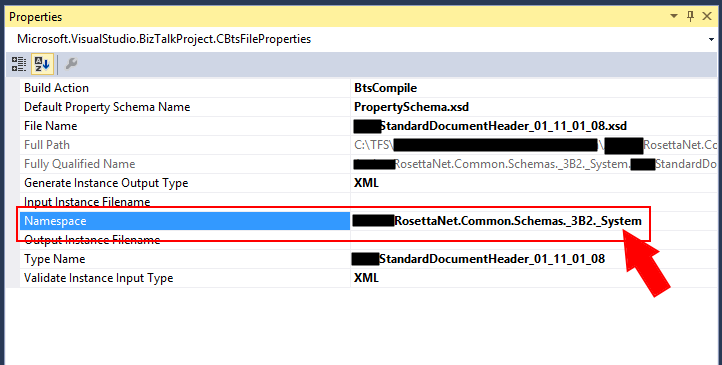
- Change the “Namespace” property on all the schemas the word “System” to another name, for example, “_System” (to maintain the consistency but it can be other word/value)
In my case, I hade the change the “Namespace” property of the schemas in the “System” folder
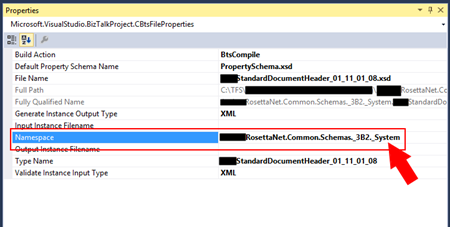
You can now rebuild your schema solution and this error should go away.
Author: Sandro Pereira
Sandro Pereira lives in Portugal and works as a consultant at DevScope. In the past years, he has been working on implementing Integration scenarios both on-premises and cloud for various clients, each with different scenarios from a technical point of view, size, and criticality, using Microsoft Azure, Microsoft BizTalk Server and different technologies like AS2, EDI, RosettaNet, SAP, TIBCO etc. He is a regular blogger, international speaker, and technical reviewer of several BizTalk books all focused on Integration. He is also the author of the book “BizTalk Mapping Patterns & Best Practices”. He has been awarded MVP since 2011 for his contributions to the integration community. View all posts by Sandro Pereira