BizTalk Server 2020 – 20 days, 20 posts – day 20. Finally, the last blog post of this season. What supposed to be 20 blog posts in 20 days has become a challenge difficult to fulfill because of the current circumstances all over the world, in which parents are working from home with their children, also studying from home. Nevertheless, I only needed the double of time (additional 22 days) to finish the initial goal.
And to finalize this season, I reserved the best for the end :). My new BizTalk Server Lord Darth Vader sticker. I wasn’t supposed to share this sticker in this way, the initial intention was to present and give it away (physical sticker) at the INTEGRATE 2020 event in London but do the circumstances and the fact that INTEGRATE 2020 will be an online event now, I decided to share here the support files for you to print it in a graphics shop if you want to have this Welcome To The Dark Side of the force sticker :).
Welcome To The Dark Side of the force
BizTalk Server was always the bad boy of integration, the one that nobody likes (but everyone admires or wish to have its skills). As a reference, the first marketing campaign produced by Microsoft, BizTalk was a T-Rex (a bad boy).
Because I’m a star wars fan, and when I decide to create this new sticker version coincided a little bit as the release of the last film, I decide to create this new Lord BizTalk Darth Vader version maintaining the bad boy concept.
This package is a collection of 3 different image formats of the new Lord BizTalk Darth Vader sticker, two of them are available in vector format that will allow you to use and resize without losing quality:
BizTalk-Darth-Vader.ai
BizTalk-Darth-Vader.pdf
BizTalk-Darth-Vader-01.png
All of the
resources are in the original size ready to print in a graphics shop.
Thanks to Cristóvão Silva (Graphic & Web Designer @ DevScope) for helping me creating these resources.
I hope you enjoy!
I already have several stickers printed that I will give away in future events or ship for some of you that will organize events.
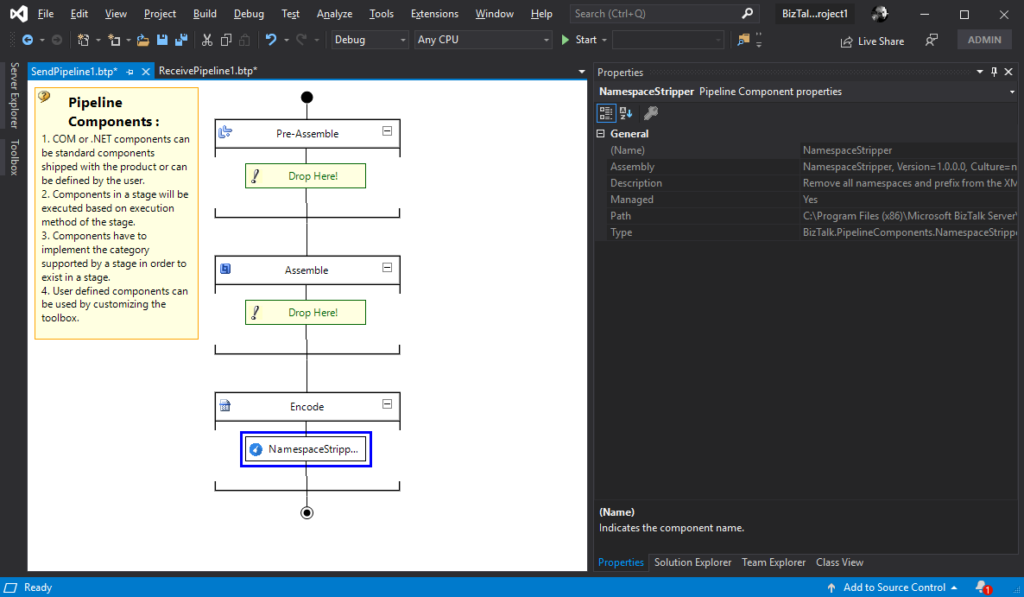
BizTalk Server 2020 – 20 days, 20 posts – day 19. To finalize this topic about the BizTalk Pipeline Components Extensions UtilityPack project, here another brand new component: XML Namespace Stripper Pipeline Component. I actually create this component for a need in a recent RosettaNet project.
XML Namespace Management Pipeline Component
This custom XML Namespace Stripper Pipeline Component is a pipeline component for BizTalk Server which can be used in a Send Pipeline (Encode stage) to remove all namespaces and prefix from an XML message.
Once again, the goal of this component is to clean up all namespaces and prefix present in XML outbound messages, transforming the the message from this:
To use this pipeline component in your projects you just copy the NamespaceStripper.dll file into the Pipeline Components folder that exists in the BizTalk Server installation directory:
You do not need to add this custom pipeline component to be used by the BizTalk Runtime to the Global Assembly Cache (GAC).
What is BizTalk Pipeline Components Extensions Utility Pack?
BizTalk Pipeline Components Extensions Utility Pack is a set of custom pipeline components (libraries) with several custom pipeline components that can be used in received and sent pipelines, which will provide an extension of BizTalk out-of-the-box pipeline capabilities.
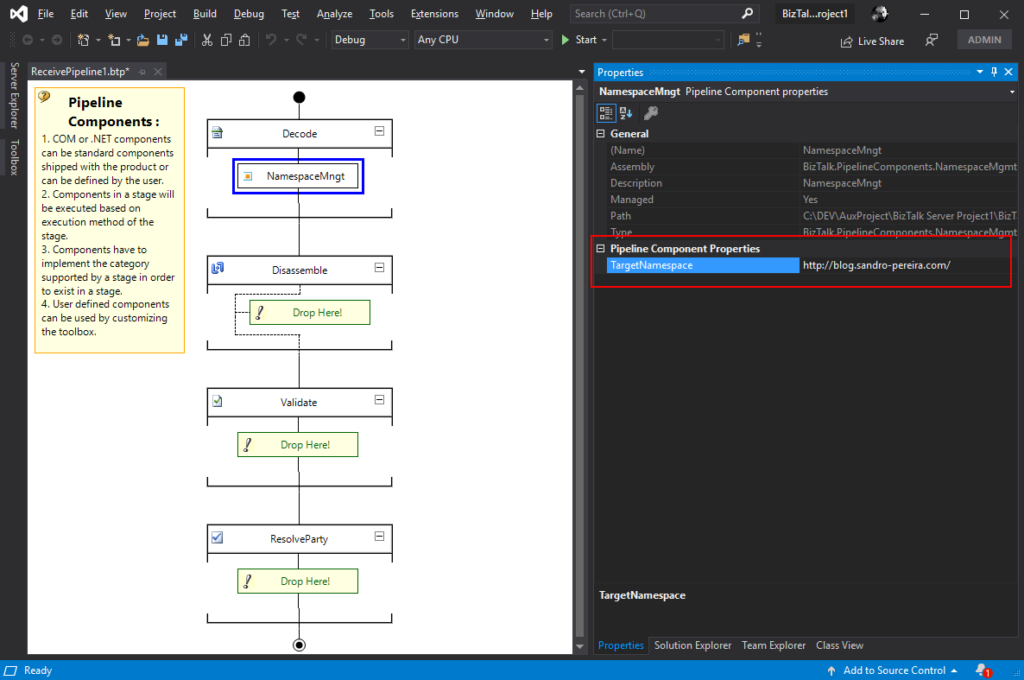
BizTalk Server 2020 – 20 days, 20 posts – day 18. Another blog post about the topic and project BizTalk Pipeline Components Extensions UtilityPack, but this time it is a brand new component: XML Namespace Management Pipeline Component.
XML Namespace Management Pipeline Component
This custom XML Namespace Management Pipeline Component it is basically the opposite of the XML Namespace Remover Pipeline Component. It is a pipeline component for BizTalk Server which can be used in any stage of both receive and send pipelines that allow you to add or change the namespace to inbound and outbound BizTalk Messages.
Once again, this component allow you to add a namespace to inbound and outbound BizTalk Messages, transforming the root of the message from this:
This component requires one configuration that is the TargetNamespace in which you specify the namespace you want to set on the message.
To use this pipeline component in your projects you just copy the BizTalk.PipelineComponents.NamespaceMgmt.dll file into the Pipeline Components folder that exists in the BizTalk Server installation directory:
You do not need to add this custom pipeline component to be used by the BizTalk Runtime to the Global Assembly Cache (GAC).
What is BizTalk Pipeline Components Extensions Utility Pack?
BizTalk Pipeline Components Extensions Utility Pack is a set of custom pipeline components (libraries) with several custom pipeline components that can be used in received and sent pipelines, which will provide an extension of BizTalk out-of-the-box pipeline capabilities.
BizTalk Server 2020 – 20 days, 20 posts – day 17. I have to confess I didn’t try yet the default JSON Encoder, but I trust this component is still useful in this new release, so today we are migrating the custom JSON Encoder component available in BizTalk Pipeline Components Extensions UtilityPack project: JSON Encoder Pipeline Component.
Carry SOAPHeader To WCF-BasicHttp Pipeline Component
This custom JSON Encoder Pipeline Component is a pipeline component for BizTalk Server which can be used in a Send Pipeline (Encode stage) to encode any XML message into a JSON equivalent in a simple and effective way. It is also 100% compatible with the default JSON Encoder component provided by Microsoft.
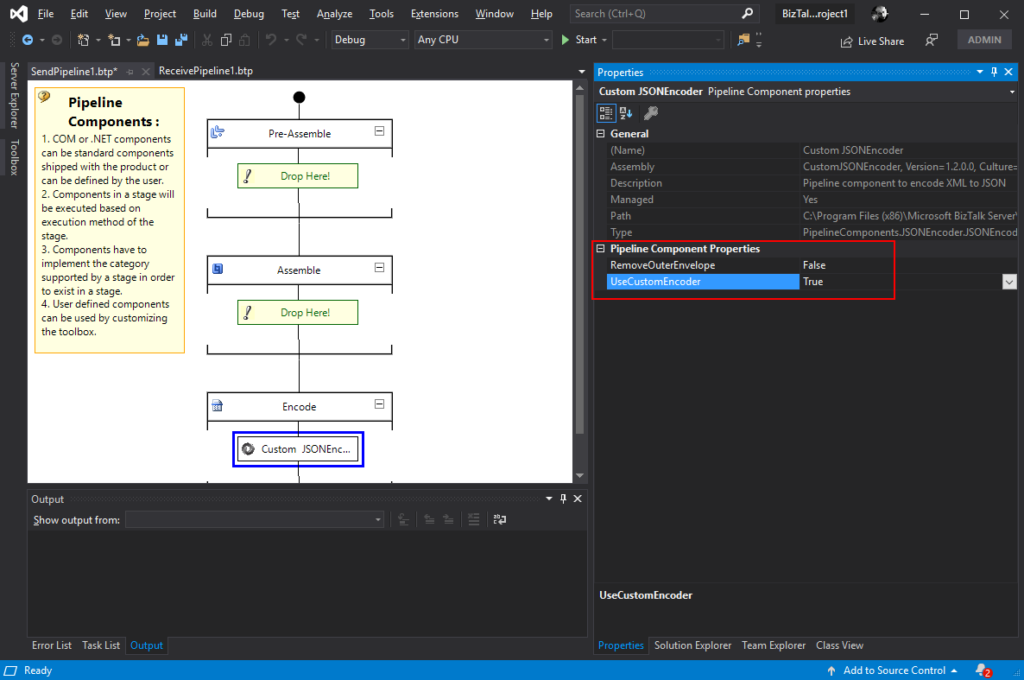
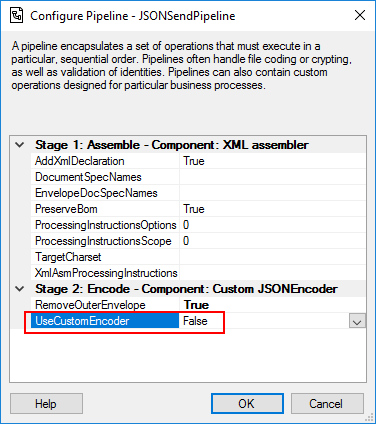
This component will allow you to choose between using the default pipeline component provide by Microsoft, at least the internal behavior because I build this pipeline component as an extension of the default JSON Encoder pipeline component, or use the custom behavior that I created. So, from the BizTalk Administration console you will be able to decide if:
You want to use
the behavior of the default JSON Encoder pipeline component provide by
Microsoft by setting the UseCustomEncoder property to False;
or use the custom
behavior to generate the JSON message by setting the UseCustomEncoder property
to True;
To use this pipeline component in your projects you just copy the CustomJSONEncoder.dll file into the Pipeline Components folder that exists in the BizTalk Server installation directory:
You do not need to add this custom pipeline component to be used by the BizTalk Runtime to the Global Assembly Cache (GAC).
What is BizTalk Pipeline Components Extensions Utility Pack?
BizTalk Pipeline Components Extensions Utility Pack is a set of custom pipeline components (libraries) with several custom pipeline components that can be used in received and sent pipelines, which will provide an extension of BizTalk out-of-the-box pipeline capabilities.
BizTalk Server 2020 – 20 days, 20 posts – day 16. We are almost finishing migrating all the BizTalk Pipeline Components Extensions UtilityPack project, today is the component: Carry SOAPHeader To WCF-BasicHttp Pipeline Component.
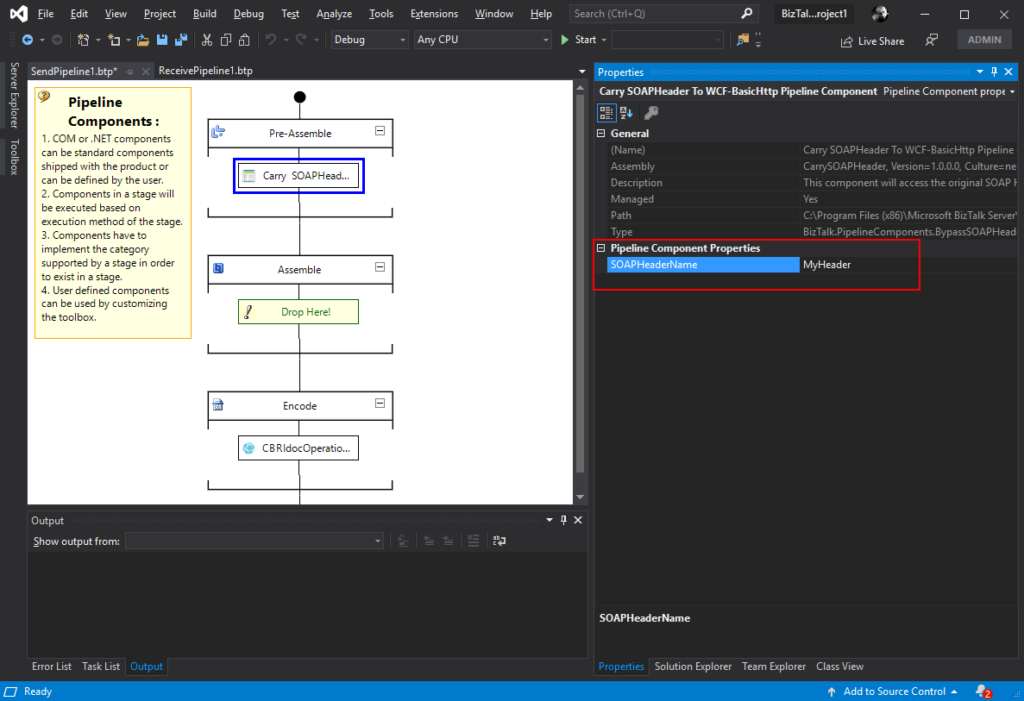
Carry SOAPHeader To WCF-BasicHttp Pipeline Component
The Carry SOAPHeader To WCF-BasicHttp Pipeline Component is a pipeline component for BizTalk Server which can be used in a send pipeline and is intended to carry forward the received custom SOAP Header to the outgoing message, in other words:
This component will read the Custom SOAPHeader from the Message Context Properties
The custom header name will be defined on the component configuration and we can read it from the target http://schemas.microsoft.com/BizTalk/2003/SOAPHeader
and will configure this custom header in the OutboundCustomHeaders property used by the WCF-BasicHTTP Adapter.
The OutboundCustomHeaders property is used if you want to specify the custom SOAP headers for outgoing messages. When this property is used, the property must have the <headers> element as the root element. All of the custom SOAP headers must be placed inside the <headers> element
If the custom SOAP header value is an empty string, you must assign <headers></headers> or <headers/> to this property.
This component is useful if you are implementing CBR operations on legacy service (SOAP – .asmx) using the new WCF-Adapters in BizTalk Server. Notice that the SOAP adapters, still present in BizTalk Server 2020, are obsolete and discontinued.
This component requires one configuration that is the SOAPHeaderName where you should specify the SOAP Header name present in the inbound message to be passed to the OutboundCustomHeaders in the outgoing message.
To use this pipeline component in your projects you just copy the CarrySOAPHeader.dll file into the Pipeline Components folder that exists in the BizTalk Server installation directory:
You do not need to add this custom pipeline component to be used by the BizTalk Runtime to the Global Assembly Cache (GAC).
What is BizTalk Pipeline Components Extensions Utility Pack?
BizTalk Pipeline Components Extensions Utility Pack is a set of custom pipeline components (libraries) with several custom pipeline components that can be used in received and sent pipelines, which will provide an extension of BizTalk out-of-the-box pipeline capabilities.
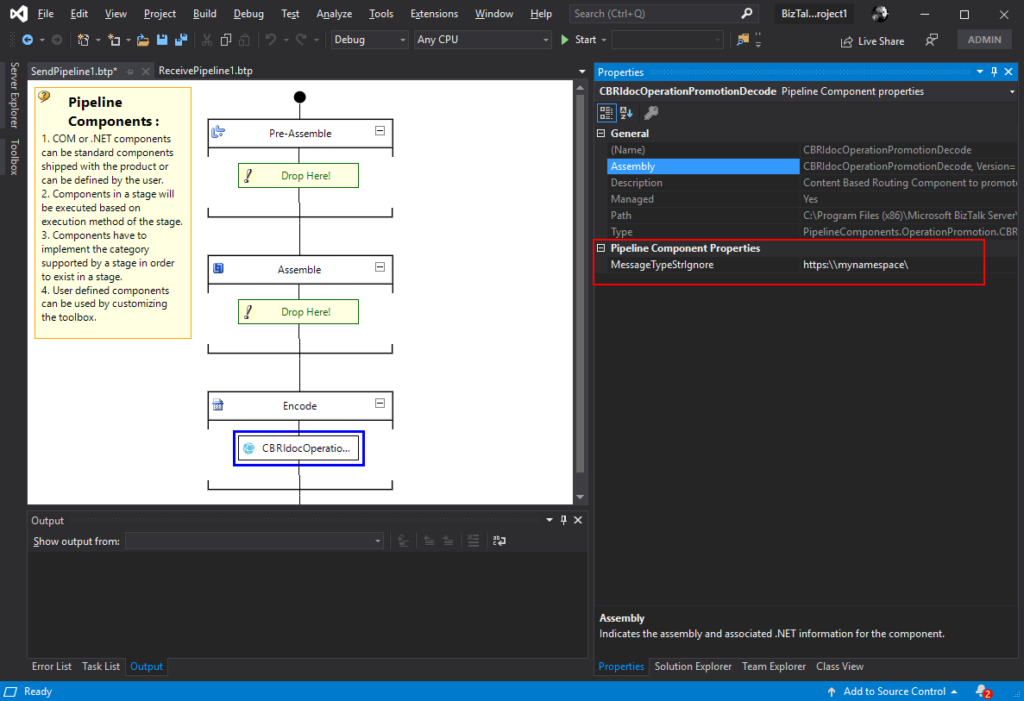
The CBR IDoc Operation Promotion Encode Pipeline Component is a pipeline component for BizTalk Server which can be used in send pipelines, Encode stage, to promote IDOC Operation property. This component is useful to implement a pure Content-Based Routing solution to integrate with SAP Server.
This component requires one configuration that is the MessageType string to be ignored. Then it will take the last string (word) from the MessageType Message Context Property and promote it to the Operation Message Context Property.
To use this pipeline component in your projects you just copy the CBRIdocOperationPromotionDecode.dll file into the Pipeline Components folder that exists in the BizTalk Server installation directory:
You do not need to add this custom pipeline component to be used by the BizTalk Runtime to the Global Assembly Cache (GAC).
What is BizTalk Pipeline Components Extensions Utility Pack?
BizTalk Pipeline Components Extensions Utility Pack is a set of custom pipeline components (libraries) with several custom pipeline components that can be used in received and sent pipelines, which will provide an extension of BizTalk out-of-the-box pipeline capabilities.
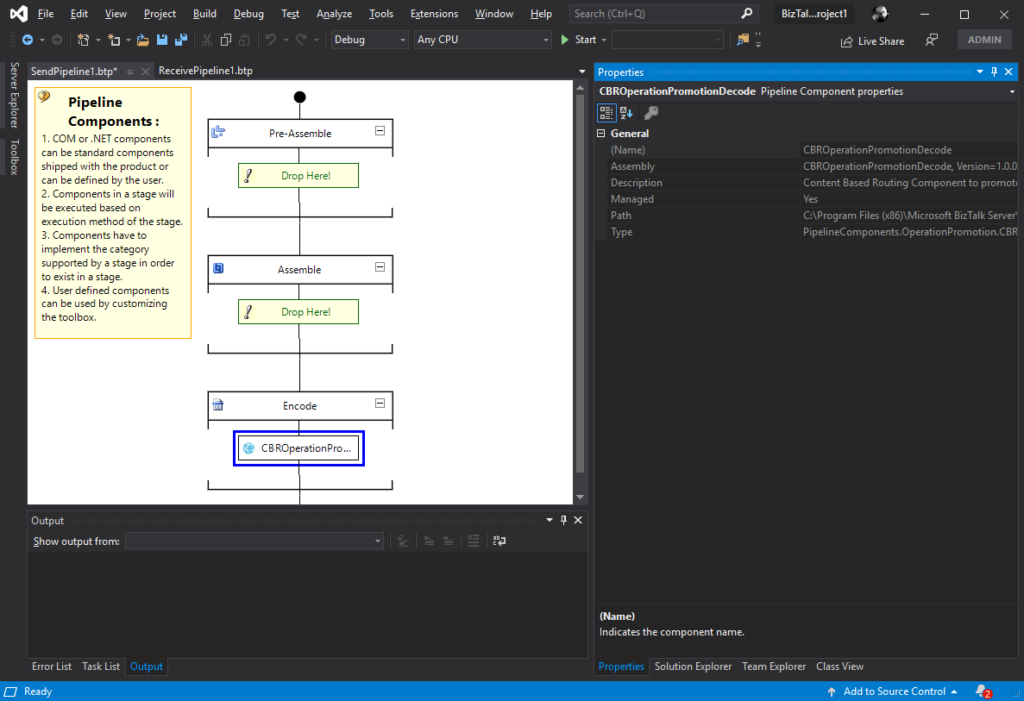
BizTalk Server 2020 – 20 days, 20 posts – day 14. Continuing the BizTalk Pipeline Components Extensions UtilityPack project topic, today I released the: CBR Operation Promotion Encode Pipeline Component.
CBR Operation Promotion Encode Pipeline Component
The CBR Operation Promotion Encode Pipeline Component is a pipeline component for BizTalk Server which can be used in send pipelines, Encode stage, to promote Operation property. This component is useful to implement a pure Content-Based Routing solution to integrate with SQL Server.
The component will promote Operation property by taking the value (word) which lies ahead of the cardinal (#) from the MessageType message context property and promote it to the Operation Message Context Property.
This component doesn’t require any configuration.
To use this pipeline component in your projects you just copy the CBROperationPromotionDecode.dll file into the Pipeline Components folder that exists in the BizTalk Server installation directory:
You do not need to add this custom pipeline component to be used by the BizTalk Runtime to the Global Assembly Cache (GAC).
What is BizTalk Pipeline Components Extensions Utility Pack?
BizTalk Pipeline Components Extensions Utility Pack is a set of custom pipeline components (libraries) with several custom pipeline components that can be used in received and sent pipelines, which will provide an extension of BizTalk out-of-the-box pipeline capabilities.
BizTalk Server 2020 – 20 days, 20 posts – day 13. Once again, here is another pipeline component migrate to BizTalk Server 2020 that makes part of my BizTalk Pipeline Components Extensions UtilityPack project: XML Namespace Remover Pipeline Component. This component was initially developed by Johan Hedberg.
XML Namespace Remover Pipeline Component
The XML Namespace Remover Pipeline Component is a pipeline component for BizTalk Server which can be used in any stage of both receive and send pipelines to remove XML namespaces from XML documents.
This component has the availability to transform the root of the message from this:
If you have the option, you shouldn’t remove the namespace from the messages. However, we don’t leave in a perfect world and we need to deal with legacy systems and sometimes they required, for unknown reasons for me, that we deliver messages without namespace.
To use this pipeline component in your projects you just copy the RemoveXmlNamespace.PipelineComponents.dll file into the Pipeline Components folder that exists in the BizTalk Server installation directory:
You do not need to add this custom pipeline component to be used by the BizTalk Runtime to the Global Assembly Cache (GAC).
What is BizTalk Pipeline Components Extensions Utility Pack?
BizTalk Pipeline Components Extensions Utility Pack is a set of custom pipeline components (libraries) with several custom pipeline components that can be used in received and sent pipelines, which will provide an extension of BizTalk out-of-the-box pipeline capabilities.
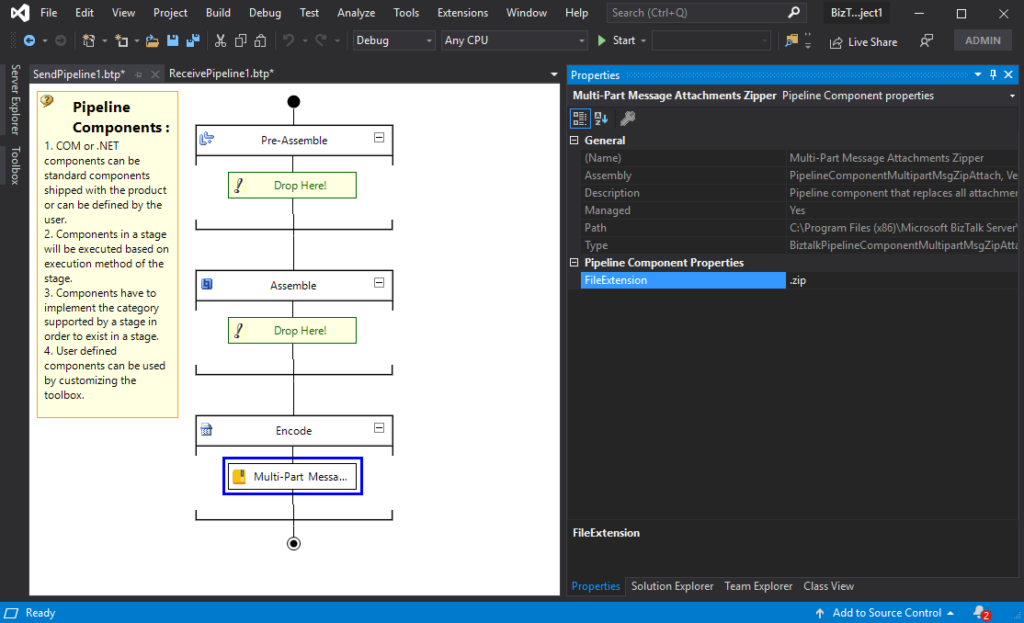
BizTalk Server 2020 – 20 days, 20 posts – day 12. Once again, following my recent blog posts here is another pipeline component migrate to BizTalk Server 2020 that makes part of my BizTalk Pipeline Components Extensions UtilityPack project: Multi-Part Message Attachments Zipper Pipeline Component.
The Multi-Part Message Attachments Zipper is a pipeline component for BizTalk Server which can be used in a send pipeline and is intended to replace all attachments of a multi-part message for its zipped equivalent.
The capabilities are similar to those available in compression software such as WinZip or 7-zip:
Attachments Compression – Extracts, in a send pipeline, all message parts include in a multi-part message that is not included in the message body (Message Body Part = False), compresses it and attaches the compressed attachment back to the message.
No compression/decompression software needs to be installed in the BizTalk Server machines.
This component requires one configuration that is the FileExtension where you can specify if you want for example a .zip or .gz file.
To use this pipeline component in your projects you just copy the PipelineComponentMultipartMsgZipAttach.dll file into the Pipeline Components folder that exists in the BizTalk Server installation directory:
You do not need to add a custom pipeline component to be used by the BizTalk Runtime to the Global Assembly Cache (GAC).
What is BizTalk Pipeline Components Extensions Utility Pack?
BizTalk Pipeline Components Extensions Utility Pack is a set of custom pipeline components (libraries) with several custom pipeline components that can be used in received and sent pipelines, which will provide an extension of BizTalk out-of-the-box pipeline capabilities.
BizTalk Server 2020 – 20 days, 20 posts – day 11. Following my recent blog posts here is another pipeline component migrate to BizTalk Server 2020 that makes part of my BizTalk Pipeline Components Extensions UtilityPack project: Zip File Pipeline Component.
Zip File Pipeline Component
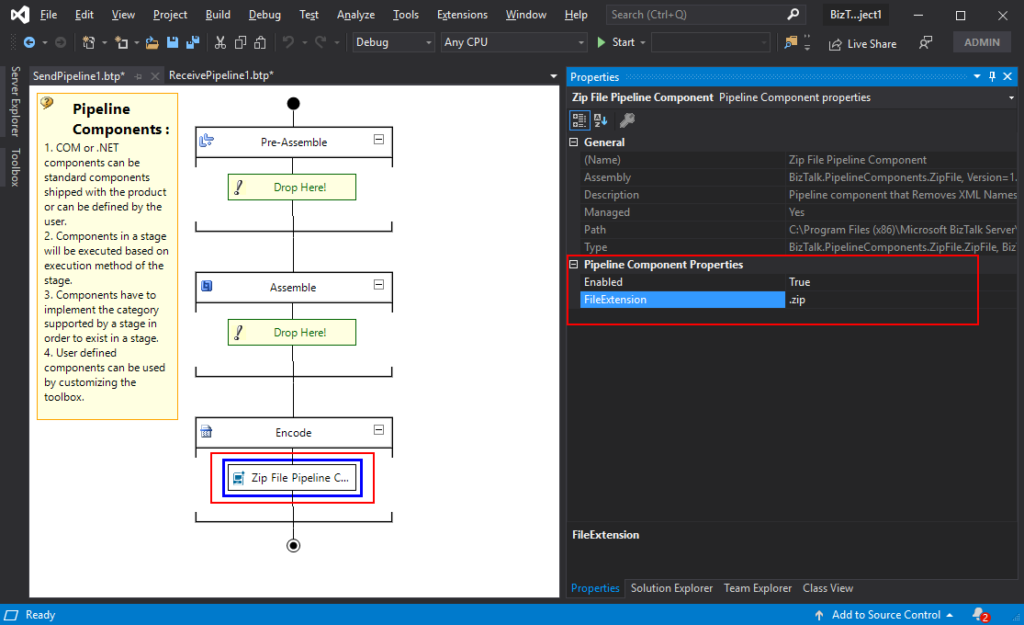
The Zip File Pipeline Component is a pipeline component for BizTalk Server which can be used in a send pipeline (encode stage) and is intended to compress (zip/gzip) outgoing messages.
The capabilities are similar to those available in compression software such as WinZip or 7-zip.
No compression/decompression software needs to be installed in the BizTalk Server machines.
To use this pipeline component in your projects you just copy the BizTalk.PipelineComponents.ZipFile.dll file into the Pipeline Components folder that exists in BizTalk Server Installation directory: “..Program Files (x86)Microsoft BizTalk ServerPipeline Components” on every server.
You do not need to add a custom pipeline component to be used by the BizTalk Runtime to the Global Assembly Cache (GAC).
This component requires two configurations that are:
the FileExtension: where you can specify if you want for example a .zip or .gz file.
and Enabled: that is a true or false value to activate the compression.
What is BizTalk Pipeline Components Extensions Utility Pack?
BizTalk Pipeline Components Extensions Utility Pack is a set of custom pipeline components (libraries) with several custom pipeline components that can be used in received and sent pipelines, which will provide an extension of BizTalk out-of-the-box pipeline capabilities.



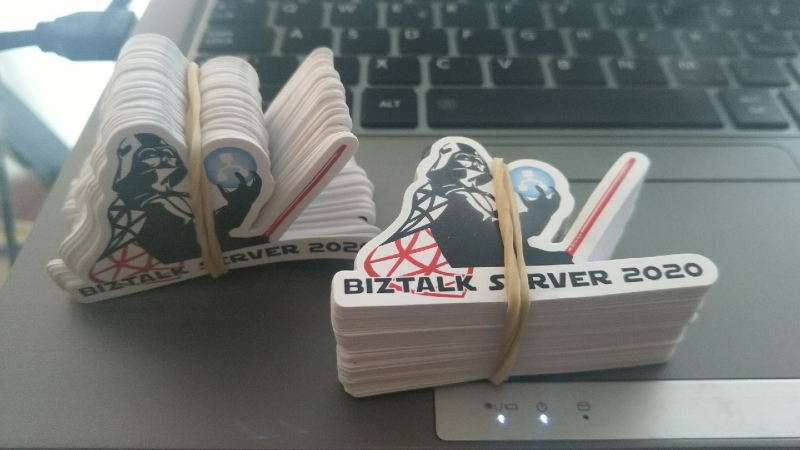
 Lord BizTalk Darth Vader sticker