by community-syndication | Dec 6, 2013 | BizTalk Community Blogs via Syndication
Windows Azure BizTalk Services (WABS) is general available now as a service within Windows Azure. Nice, so now I can update my local installation in my VM. The upgrade is pretty straight forward. Thanks to pointers I got from Nick Hauenstein in BizTalk Integration Summit 2013 Recap.
You download the new SDK(Tools and WindowsAzureBizTalkServicesSetup-x64.exe or
by community-syndication | Dec 6, 2013 | BizTalk Community Blogs via Syndication
On occasion you see these questions. Can I run X number of host instances? What will happen? Without diving deep into the reason why you think you need to, or the details of what is happening inside BizTalk Server when you do, I will present some results of doing that.
First, I needed a machine to play around with. I also wanted a reasonably powerful machine, so I where better to go than to Windows Azure? I selected a BizTalk Server 2013 Evaluation Edition pre-configured image.
Choose the Extra Large size – that’s 8 cores and 14 GB of RAM.
When that machine was provisioned for me, this was how the performance of it looked:
Now I am fully aware that viewing only the Task Managers idea of the processor is a very limited view of “performance” but I am purposefully using that view so that you, the reader, understand that this is NOT intended to be a DeepDive. It is merely an indication.
So, I configured a script I have to create 100 hosts and host instances for me, along with handlers for FILE Adapter for those hosts. But so far no ports and no traffic. This is how that looked.
You can see the Processor churning away at about 20% utilization, while Memory is largely unaffected.
Taking it one step further I wanted to make sure that the host instances actually had something to check for, so I created 1 receive port and 100 send ports. One send port for each of the host instances (the Send Port has that hosts handler for the FILE transport).
That put the machine under a little more pressure. Obviously it is doing something more when it actually has ports configured. Processor is at ~60%. Memory again not really affected.
Remember now, this is all just doing nothing at this point. Let’s see what happens if we actually do something:
That piece of the graph marked in blue above, that’s when I dropped a file into the receive port and receive location that all the 100 send ports (one for each of the hosts) were subscribed on. It went to 100% quickly. All files went through quickly though, and the event didn’t last long enough for BizTalk to start throttling.
So what about the Memory though. Is that really not affected? How much does a BizTalk instance use and wont 100 of them make an impact? Well, it turns out that each host instance will, at this particular point, only use about 20 MB.
But ok, 100 host instance is a lot. What about 50? Still the same config as above, but only 50 host instances are started.
A bit jagged, but still, running only 50 takes Processor utilization down from 60% to 20%. Now what if we send something through?
A short spike when sending the document through to its 50 subscribers.
Taking a little bit of a deeper look at that spike we can see that SQL Server is the main contributor to that spike.
Hmmm. Ok, “But” says the customer, I want all of this to be Low Latency. 50 ms polling. Do it!
CPU goes up from ~20% to a little under 40%. But it also changes characteristics. When it before was jagged, it now becomes more or less a straight line. The processor does not get to rest, and it does not get spikes in the same way.
Unless of course you send a message through, in which case it does again spike.
But it’s just a very short spike. Nothing at all in the way that you can or cannot say that this would be a bottleneck based on this simple test. I have not done any extended tests to see what the MST would be for this machine.
What if we raise the number of host instances just slightly? To 75.
See that marked point in time above? That’s where I enabled the host instances. Proc goes to about 60%. 100 again you say? Let’s try it
%u00a8
Again a visible increase in power needed. And the proc now at about 70% and pretty flat.
Sending a message through again spikes it.
And SQL is the thing that is grabbing most of that processing power.
So there you go. That’s what would happen if you run 100 hosts and 100 host instances on a single machine, and if you put them all to poll the database at 50 ms.
This was done on a Windows Azure Virtual Machine with the BizTalk Server Evaluation image in its default configuration. I did nothing to it. No updates, no tuning, no alterations. I know for certain that I can improve the performance of what we see above.
You can draw your own conclusion from the above. My own conclusion is “in-conclusive” ;). That is – I can see that running 100 host instances with 50ms polling on a machine where both BizTalk and SQL share the same machine and the machine is not optimized does not bring down the machine by the share volume of polling alone. However when running even simple traffic through we hit the roof. If this load would be placed on a distributed environment, with SQL and BizTalk on separate machines and SQL with a more optimized storage architecture etc, BizTalk with other configuration such as Global Tracking disabled etc, I should think that the scenario is doable.
I would however highly question why you think you need 100 hosts and 100 host instances. There are a lot of functionality in BizTalk, for example SSO Affiliate Applications, that solve some of the reasons why you would think you need that many. My recommendation is certainly not to go there unless absolutely necessary.
HTH,
/Johan
Blog Post by: Johan Hedberg

by community-syndication | Dec 5, 2013 | BizTalk Community Blogs via Syndication
2013 %u5e74 12 %u6708%u306e%u6708%u4f8b%u30bb%u30ad%u30e5%u30ea%u30c6%u30a3 %u30ea%u30ea%u30fc%u30b9%u306e%u4e8b%u524d%u901a%u77e5%u3092%u516c%u958b%u3057%u307e%u3057%u305f%u3002
2013 %u5e74 12 %u6708 11 %u65e5%u306b%u516c%u958b%u3092%u4e88%u5b9a%u3057%u3066%u3044%u308b%u65b0%u898f%u6708%u4f8b%u30bb%u30ad%u30e5%u30ea%u30c6%u30a3%u60c5%u5831%u306f%u3001%u5408%u8a08 11 %u4ef6 (%u7dca%u6025 5 %u4ef6%u3001%u91cd%u8981 6 %u4ef6) %u3067%u3059%u3002
%u307e%u305f%u3001%u6765%u9031%u516c%u958b%u4e88%u5b9a%u306e%u30bb%u30ad%u30e5%u30ea%u30c6%u30a3%u66f4%u65b0%u30d7%u30ed%u30b0%u30e9%u30e0%u3067 2013 %u5e74 11 %u6708 6 %u65e5 (%u65e5%u672c%u6642%u9593) %u306b%u30bb%u30ad%u30e5%u30ea%u30c6%u30a3%u30a2%u30c9%u30d0%u30a4%u30b6%u30ea 2896666 %u3067%u8aac%u660e%u3057%u3066%u3044%u308b Microsoft Windows%u3001Microsoft Office%u3001%u304a%u3088%u3073 Microsoft Lync %u306b%u5f71%u97ff%u3059%u308b Microsoft Graphics %u30b3%u30f3%u30dd%u30fc%u30cd%u30f3%u30c8%u306e%u8106%u5f31%u6027%u306b%u3064%u3044%u3066%u3082%u89e3%u6c7a%u3059%u308b%u4e88%u5b9a%u3067%u3059%u3002
2013 %u5e74 11 %u6708 28 %u65e5%u306b%u3001%u30bb%u30ad%u30e5%u30ea%u30c6%u30a3 %u30a2%u30c9%u30d0%u30a4%u30b6%u30ea 2914486%u300cMicrosoft Windows %u30ab%u30fc%u30cd%u30eb%u306e%u8106%u5f31%u6027%u306b%u3088%u308a%u3001%u7279%u6a29%u304c%u6607%u683c%u3055%u308c%u308b%u300d%u3092%u516c%u958b%u3057%u307e%u3057%u305f%u304c%u3001%u3053%u306e%u554f%u984c%u306b%u5bfe%u5fdc%u3059%u308b%u30bb%u30ad%u30e5%u30ea%u30c6%u30a3%u66f4%u65b0%u30d7%u30ed%u30b0%u30e9%u30e0%u306f%u3001%u4eca%u6708%u306e%u30bb%u30ad%u30e5%u30ea%u30c6%u30a3%u60c5%u5831%u306b%u306f%u542b%u307e%u308c%u307e%u305b%u3093%u3002%u30bb%u30ad%u30e5%u30ea%u30c6%u30a3 %u30a2%u30c9%u30d0%u30a4%u30b6%u30ea 2914486 %u3092%u3054%u78ba%u8a8d%u3044%u305f%u3060%u304d%u3001%u56de%u907f%u7b56%u306e%u9069%u7528%u3092%u3054%u691c%u8a0e%u304f%u3060%u3055%u3044%u3002
%u306a%u304a%u3001%u6700%u65b0%u306e%u30bb%u30ad%u30e5%u30ea%u30c6%u30a3%u60c5%u5831%u306e%u6982%u8981%u3092%u52d5%u753b%u3068%u97f3%u58f0%u3067%u304a%u4f1d%u3048%u3059%u308b%u30b9%u30c8%u30ea%u30fc%u30df%u30f3%u30b0 %u30d3%u30c7%u30aa (Web %u30ad%u30e3%u30b9%u30c8) %u306e%u300c%u4eca%u6708%u306e%u30de%u30a4%u30af%u30ed%u30bd%u30d5%u30c8 %u30ef%u30f3%u30dd%u30a4%u30f3%u30c8 %u30bb%u30ad%u30e5%u30ea%u30c6%u30a3%u300d%u3082%u540c%u65e5%u5348%u5f8c%u306b%u516c%u958b%u3059%u308b%u4e88%u5b9a%u3067%u3059%u3002
%u516c%u958b%u4e88%u5b9a%u306e%u30bb%u30ad%u30e5%u30ea%u30c6%u30a3%u60c5%u5831%u306e%u8a73%u7d30%u306f%u3001%u4ee5%u4e0b%u306e%u4e8b%u524d%u901a%u77e5%u306e%u30b5%u30a4%u30c8%u3092%u3054%u89a7%u304f%u3060%u3055%u3044%u3002
http://technet.microsoft.com/ja-jp/security/bulletin/ms13-dec
|
%u30bb%u30ad%u30e5%u30ea%u30c6%u30a3%u60c5%u5831 ID
|
%u6700%u5927%u6df1%u523b%u5ea6
|
%u8106%u5f31%u6027%u306e%u5f71%u97ff
|
%u518d%u8d77%u52d5%u306e%u5fc5%u8981%u6027
|
%u5f71%u97ff%u3092%u53d7%u3051%u308b%u30bd%u30d5%u30c8%u30a6%u30a7%u30a2*
|
|
%u30bb%u30ad%u30e5%u30ea%u30c6%u30a3%u60c5%u5831 1
|
%u7dca%u6025
|
%u30ea%u30e2%u30fc%u30c8%u3067%u30b3%u30fc%u30c9%u304c%u5b9f%u884c%u3055%u308c%u308b
|
%u8981%u518d%u8d77%u52d5
|
Windows Vista%u3001Windows Server 2008%u3001Office 2003%u3001Office 2007%u3001Office 2010%u3001Office %u4e92%u63db%u6a5f%u80fd%u30d1%u30c3%u30af%u3001Lync 2010%u3001Lync 2010 Attendee%u3001Lync 2013%u3001%u304a%u3088%u3073 Lync Basic 2013
|
|
%u30bb%u30ad%u30e5%u30ea%u30c6%u30a3%u60c5%u5831 2
|
%u7dca%u6025
|
%u30ea%u30e2%u30fc%u30c8%u3067%u30b3%u30fc%u30c9%u304c%u5b9f%u884c%u3055%u308c%u308b
|
%u8981%u518d%u8d77%u52d5
|
Windows XP%u3001Windows Server 2003%u3001Windows Vista%u3001Windows Server 2008%u3001Windows 7%u3001Windows Server 2008 R2%u3001Windows 8%u3001Windows 8.1%u3001Windows Server 2012%u3001Windows Server 2012 R2%u3001Windows RT%u3001%u304a%u3088%u3073 Windows RT 8.1 %u4e0a%u306e Internet Explorer
|
|
%u30bb%u30ad%u30e5%u30ea%u30c6%u30a3%u60c5%u5831 3
|
%u7dca%u6025
|
%u30ea%u30e2%u30fc%u30c8%u3067%u30b3%u30fc%u30c9%u304c%u5b9f%u884c%u3055%u308c%u308b
|
%u8981%u518d%u8d77%u52d5
|
Windows XP%u3001Windows Server 2003%u3001Windows Vista%u3001Windows Server 2008%u3001Windows 7%u3001Windows Server 2008 R2%u3001Windows 8%u3001Windows 8.1%u3001Windows Server 2012%u3001Windows Server 2012 R2%u3001Windows RT%u3001%u304a%u3088%u3073 Windows RT 8.1
|
|
%u30bb%u30ad%u30e5%u30ea%u30c6%u30a3%u60c5%u5831 4
|
%u7dca%u6025
|
%u30ea%u30e2%u30fc%u30c8%u3067%u30b3%u30fc%u30c9%u304c%u5b9f%u884c%u3055%u308c%u308b
|
%u518d%u8d77%u52d5%u304c%u5fc5%u8981%u306a%u5834%u5408%u3042%u308a
|
Windows XP%u3001Windows Server 2003%u3001Windows Vista%u3001Windows Server 2008%u3001Windows 7%u3001Windows Server 2008 R2%u3001Windows 8%u3001Windows 8.1%u3001Windows Server 2012%u3001Windows Server 2012 R2%u3001Windows RT%u3001%u304a%u3088%u3073 Windows RT 8.1
|
|
%u30bb%u30ad%u30e5%u30ea%u30c6%u30a3%u60c5%u5831 5
|
%u7dca%u6025
|
%u30ea%u30e2%u30fc%u30c8%u3067%u30b3%u30fc%u30c9%u304c%u5b9f%u884c%u3055%u308c%u308b
|
%u518d%u8d77%u52d5%u306f%u5fc5%u8981%u3042%u308a%u307e%u305b%u3093
|
Microsoft Exchange Server 2007%u3001Exchange Server 2010%u3001%u304a%u3088%u3073 Exchange Server 2013
|
|
%u30bb%u30ad%u30e5%u30ea%u30c6%u30a3%u60c5%u5831 6
|
%u91cd%u8981
|
%u30ea%u30e2%u30fc%u30c8%u3067%u30b3%u30fc%u30c9%u304c%u5b9f%u884c%u3055%u308c%u308b
|
%u518d%u8d77%u52d5%u304c%u5fc5%u8981%u306a%u5834%u5408%u3042%u308a
|
Microsoft SharePoint Server 2010%u3001SharePoint Server 2013%u3001%u304a%u3088%u3073 Office Web Apps 2013
|
|
%u30bb%u30ad%u30e5%u30ea%u30c6%u30a3%u60c5%u5831 7
|
%u91cd%u8981
|
%u7279%u6a29%u306e%u6607%u683c
|
%u8981%u518d%u8d77%u52d5
|
Windows XP%u3001Windows Server 2003%u3001Windows Vista%u3001Windows Server 2008%u3001Windows 7%u3001Windows Server 2008 R2%u3001Windows 8%u3001Windows 8.1%u3001Windows Server 2012%u3001Windows Server 2012 R2%u3001%u304a%u3088%u3073 Windows RT
|
|
%u30bb%u30ad%u30e5%u30ea%u30c6%u30a3%u60c5%u5831 8
|
%u91cd%u8981
|
%u7279%u6a29%u306e%u6607%u683c
|
%u8981%u518d%u8d77%u52d5
|
Windows XP %u304a%u3088%u3073 Windows Server 2003
|
|
%u30bb%u30ad%u30e5%u30ea%u30c6%u30a3%u60c5%u5831 9
|
%u91cd%u8981
|
%u7279%u6a29%u306e%u6607%u683c
|
%u518d%u8d77%u52d5%u306f%u5fc5%u8981%u3042%u308a%u307e%u305b%u3093
|
ASP.NET SignalR %u304a%u3088%u3073 Microsoft Visual Studio Team Foundation Server 2013
|
|
%u30bb%u30ad%u30e5%u30ea%u30c6%u30a3%u60c5%u5831 10
|
%u91cd%u8981
|
%u60c5%u5831%u6f0f%u3048%u3044
|
%u518d%u8d77%u52d5%u304c%u5fc5%u8981%u306a%u5834%u5408%u3042%u308a
|
Microsoft Office 2013 %u304a%u3088%u3073 Office 2013 RT
|
|
%u30bb%u30ad%u30e5%u30ea%u30c6%u30a3%u60c5%u5831 11
|
%u91cd%u8981
|
%u30bb%u30ad%u30e5%u30ea%u30c6%u30a3%u6a5f%u80fd%u306e%u30d0%u30a4%u30d1%u30b9
|
%u518d%u8d77%u52d5%u304c%u5fc5%u8981%u306a%u5834%u5408%u3042%u308a
|
Microsoft Office 2007 %u304a%u3088%u3073 Office 2010
|
|
%u4e0a%u8a18%u306e%u30b5%u30de%u30ea%u306e%u8868%u306b%u8a18%u8f09%u3057%u3066%u3044%u308b%u5f71%u97ff%u3092%u53d7%u3051%u308b%u30bd%u30d5%u30c8%u30a6%u30a7%u30a2%u306e%u4e00%u89a7%u306f%u8981%u7d04%u3067%u3059%u3002%u5f71%u97ff%u3092%u53d7%u3051%u308b%u30b3%u30f3%u30dd%u30fc%u30cd%u30f3%u30c8%u306e%u5168%u4e00%u89a7%u306f%u3001%u4e0a%u8a18%u300c%u4e8b%u524d%u901a%u77e5%u306e Web %u30da%u30fc%u30b8%u300d%u306e%u30ea%u30f3%u30af%u5148%u304b%u3089%u300c%u5f71%u97ff%u3092%u53d7%u3051%u308b%u30bd%u30d5%u30c8%u30a6%u30a7%u30a2%u300d%u306e%u30bb%u30af%u30b7%u30e7%u30f3%u3092%u3054%u89a7%u304f%u3060%u3055%u3044%u3002
|

Blog Post by: JSECTEAM
by community-syndication | Dec 5, 2013 | BizTalk Community Blogs via Syndication
Finally the wait is over, come join us for 2 days of exclusive Integration fun on 3rd and 4th of March 2014. For the past few months we are working hard on sorting out the logistics for BizTalk Summit 2014, London. Last year event was held in January and it was an overwhelming success with […]
The post BizTalk Summit 2014, London – March 3rd & 4th – Book your diary appeared first on BizTalk360 Blog.
Blog Post by: Saravana Kumar

by community-syndication | Dec 5, 2013 | BizTalk Community Blogs via Syndication
My last couple of posts I wrote about failures that can happen in the Backup BizTalk Server job for two reason: First because I like to write about Errors, Warnings, Causes and Solutions, this is a good way to understand and have a good documentation of possible issues that can happen. Second to create a […]
Blog Post by: Sandro Pereira

by community-syndication | Dec 4, 2013 | BizTalk Community Blogs via Syndication
News from BizTalk summit The next version of BizTalk Server, BizTalk Server 2013 R2 will be due some time mid of next year. Some of the core capabilities will include Support latest Platforms and Standards Visual Studio 2013, Windows Server 2012 R2, SQL Server 2014, Office 2013, System Center 2012 SP1 SWIFT 2012 Message Pack […]
Blog Post by: Jeremy Ronk
by community-syndication | Dec 3, 2013 | BizTalk Community Blogs via Syndication
This blog post will talk about a problem I experienced with Microsoft Clustering on Vmware. And why the BizTalkMsgBoxDb entered ‘Recovery Pending’ mode.

by community-syndication | Dec 3, 2013 | BizTalk Community Blogs via Syndication
Who never need to create a datatable from xsd schema. Every time, I designed it by hand but this one I have 70 fields and 5 join tables. I bing a little and find this tool : Xsd2dbhttp://xsd2db.sourceforge.net It’s a c# command line tool which create the datatable. For more informations : please visit http://xsd2db.sourceforge.net/index.html#documentation […]
Blog Post by: Jeremy Ronk

by community-syndication | Dec 1, 2013 | BizTalk Community Blogs via Syndication
The week before this last holiday week was quite a time to be in the BizTalk world. The BizTalk Integration Summit 2013 kicked off at the swanky Fairmont Olympic Hotel in Seattle, Washington bringing with it a defined release cadence and roadmap, new cloud-based product announcements, and even a peek into the plans for the […]
Blog Post by: Nick Hauenstein
by community-syndication | Dec 1, 2013 | BizTalk Community Blogs via Syndication
On November 21st and 22nd I had the opportunity to spend a couple days at the 2nd annual BizTalk Summit held by Microsoft in Seattle. At this summit there were approximately 300 Product Group members, MVPs, Partners and Customers. It was great to see a lot of familiar faces from the BizTalk community and talk shop with people who live and breathe integration.
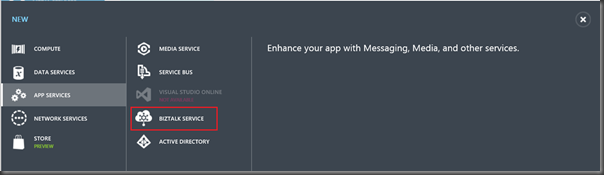
Windows Azure BizTalk Services reaches GA
The Summit started off with a bang when Scott Gu announced that Windows Azure BizTalk Services has reached General Availability (GA)!!! What this means is that you can receive production level support from Microsoft with 99.9% uptime SLA.
During the preview period, Microsoft was offering a 50% discount on Windows Azure BizTalk Services (WABS). This preview pricing ends at the end of the year. So if you have any Proof of Concept (POC) apps running in the cloud that you aren’t actively using, please be aware of any potential billing implications.
Release Cadence
The next exciting piece of news coming from Microsoft is the release cadence update for the BizTalk Server product line. As you have likely realized, there is usually a BizTalk release shortly after the General Availability of Platform updates. So when a new version of Windows Server, SQL Server or Visual Studio is launched, a BizTalk Server release usually closely follows. Something that is changing within the software industry is the accelerated release cadences by Microsoft and their competitors. A recent example of this accelerated release cadence is Windows 8.1, Windows Server 2012 R2 and Visual Studio 2013. These releases occurred much sooner than they have in the passed. As a result of these new accelerated timelines the BizTalk Product Group has stepped-up, committing to a BizTalk release every year! These releases will alternate between R2 releases and major releases. For 2014, we can expect a BizTalk 2013 R2 and in 2015 we can expect a full release.
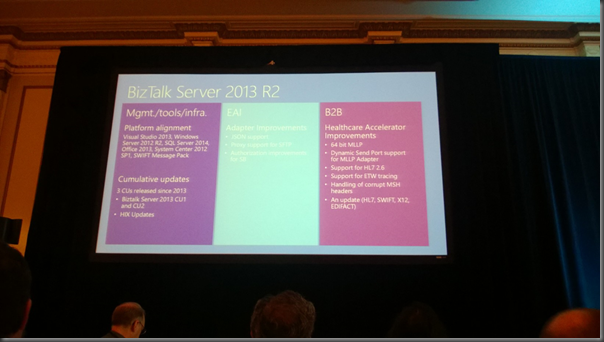
BizTalk Server 2013 R2
So what can we expect in the upcoming release?
- Platform alignment(Windows, SQL Server, Visual Studio) and industry specification updates (SWIFT).
- Adapter enhancements including support for JSON (Yay!), Proxy support for SFTP and authorization enhancements for Windows Azure Service Bus. A request I do have for the product team is please include support for Windows Server Service Bus as well.
- Healthcare Accelerator improvements. What was interesting about this vertical is it is the fastest growing vertical for BizTalk Server which justifies the additional investments.
Hybrid Cloud Burst
There were a lot of good sessions but one that I found extremely interesting was the session put on by Manufacturing, Supply Chain, and Information Services (MSCIS). This group builds solutions for the Manufacturing and Supply Chain business units within Microsoft. You may have heard of a “little” franchise in Microsoft called XBOX. The XBOX franchise heavily relies upon Manufacturing and Supply chain processes and therefore MSCIS needs to provide solutions that address the business needs of these units. As you are probably aware, Microsoft has recently launched XBOX One which is sold out pretty much everywhere. As you can imagine building solutions to address the demands of a product such as XBOX would be pretty challenging. Probably the biggest hurdle would be building a solution that supports the scale needed to satisfy the messaging requirements that many large Retailers, Manufacturers and online customers introduce.
In a traditional IT setting you throw more servers at the problem. The issue with this is that it is horribly inefficient. You essentially are building for the worst case (or most profitable) but when things slow down you have spent a lot of money and you have poor utilization of your resources. This leads to a high total cost of ownership (TCO).
Another challenge in this solution is that an ERP is involved in the overall solution. In this case it is SAP(but this would apply to any ERP) and you cannot expect an ERP to provide the performance to support ’cloud scale’. At least not in a cost competitive way. If you have built a system in an Asynchronous manner you can now throttle your messaging and therefore not overwhelm your ERP system.
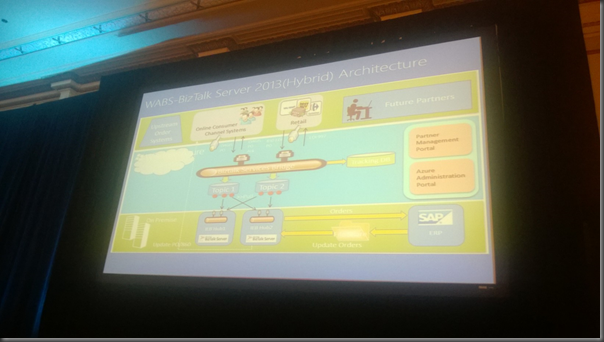
MSCIS has addressed both of these major concerns by building out a Hybrid solution. By leveraging Windows Azure BizTalk Services and Windows Azure Service Bus Queues/Topics in the cloud they can address the elasticity requirements that a high demand product like XBOX One creates. As demand increases, additional BizTalk Services Units can be deployed so that Manufacturers, Retailers and Customers are receiving proper messaging acknowledgements. Then On-Premise you can keep your traditional capacity for tools and applications like BizTalk Server 2013 and SAP without introducing significant infrastructure that will not be fully utilized all the time.
Our good friend, Mandi Ohlinger ,who is a technical writer with the BizTalk team, worked with the MSCIS to document the solution. You can read more about the solution on the BizTalk Dev Center. I have included a pic of the high-level architecture below.
While Microsoft is a large software company(ok a Devices and Services company) what we often lose sight of is that Microsoft is a very large company (>100 000) employees and they have enterprise problems just like any other company does. It was great to see how Microsoft uses their own software to address real world needs. Sharing these types of experiences is something that I would really like to see more of.
Symmetry
(These are my own thoughts and do not necessarily reflect Microsoft’s exact roadmap)
If you have evaluated Windows Azure BizTalk Services you have likely realized that there is not currently symmetry between the BizTalk Service and BizTalk Server. BizTalk Server has had around 14 years (or more) of investment where as BizTalk Services, in comparison, is relatively new. Within Services we are still without core EAI capabilities like Business Process Management (BPM)/Orchestration/Workflow, Business Activity Monitoring (BAM), Business Rules Engine (BRE), comprehensive set of adapters and complete management solution.
With BizTalk Server we have a mature, stable, robust Integration platform. The current problem with this is that it was built much before people started thinking about cloud scale. Characteristics such as MSDTC and even the MessageBox have contributed to BizTalk being what it is today (a good platform), but they do not necessarily lend themselves to new cloud based platforms. If you look under the hood in BizTalk Services you will find neither of these technologies in place. I don’t necessarily see this as a bad thing.
A goal of most, if not all, products that Microsoft is putting is the cloud is symmetry between On-Premise and Cloud based offerings. This puts the BizTalk team in a tough position. Do they try to take a traditional architecture like BizTalk Server and push it into the cloud, or built an Architecture on technologies that better lend themselves to the cloud and then push them back on premise? The approach, going forward, is innovating in the cloud and then bringing those investments back on-premise in the future.
Every business has a budget and priorities have to be set. I think Microsoft is doing the right thing by investing in the future instead of making a lot of investments in the On-Premise offering that we know will be replaced by the next evolution of BizTalk. There were many discussions between the MVPs during this week in Seattle on this subject with mixed support across both approaches. With the explosion of Cloud and SaaS applications we need an integration platform that promotes greater agility, reduces complexity and addresses scale in a very efficient manner instead of fixing some of the deficiencies that exist in the current Server platform. I do think the strategy is sound, however it will not be trivial to execute and will likely take a few years as well.
Adapter Eco-system
Based upon some of the sessions at the BizTalk Summit, it looks like Microsoft will be looking to create a larger ISV eco-system around BizTalk Services. More specifically in the Adapter space. The reality is that the current adapter footprint in BizTalk Services is lacking compared to some other competing offerings. One way to address this gap is to leverage trusted 3rd parties to build and make their adapters available through some sort of marketplace. I think this is a great idea provided there is some sort of rigor that is applied to the process of submitting adapters. I would not be entirely comfortable running mission critical processes that relied upon an adapter that was built by a person who built it as a hobby. However, I would not have an issue purchasing an adapter in this fashion from established BizTalk ISV partners like BizTalk360 or /nSoftware.
Conclusion
All in all it was a good summit. It was encouraging to see the BizTalk team take BizTalk Services across the goal line and make it GA. It was also great to see that they have identified the need for an accelerated release cadence and shared some news about the upcoming R2 release. Lastly it was great to connect with so many familiar faces within the BizTalk community. The BizTalk community is not a huge community but it is definitely international so it was great to chat with people who you are used to interacting with over Twitter, Blogs or LinkedIn.
In the event you still have doubts about the future of BizTalk, rest assured the platform is alive and well!



