Taking a look back at CloudBrew
Taking a look back at CloudBrew from last Saturday, an event from the Azure User Group (AZUG).

Taking a look back at CloudBrew from last Saturday, an event from the Azure User Group (AZUG).
BizTalk Server environments are normally as critical as the most critical system they integrate with; this normally means highly critical, in this scenarios high availability and disaster recovery are very important topics. If BizTalk is critical then the monitoring/operations software that looks after BizTalk environment becomes even more critical. Considering this we included support for […]
The post High Availability and Disaster Recovery of BizTalk360 appeared first on BizTalk360 Blog.
Blog Post by: Ricardo Torre
%u672c%u8a18%u4e8b%u306f%u3001Security Research & Defense %u306e%u30d6%u30ed%u30b0 “Assessing risk for the December 2013 security updates” (2013 %u5e74 12 %u6708 10 %u65e5%u516c%u958b) %u3092%u7ffb%u8a33%u3057%u305f%u8a18%u4e8b%u3067%u3059%u3002
%u672c%u65e5%u300124 %u4ef6%u306e CVE %u3092%u89e3%u6c7a%u3059%u308b 11 %u4ef6%u306e%u30bb%u30ad%u30e5%u30ea%u30c6%u30a3%u60c5%u5831%u3092%u30ea%u30ea%u30fc%u30b9%u3057%u307e%u3057%u305f%u3002%u30bb%u30ad%u30e5%u30ea%u30c6%u30a3%u60c5%u5831%u306e%u5185%u30015 %u4ef6%u306f%u6700%u5927%u6df1%u523b%u5ea6%u304c%u300c%u7dca%u6025%u300d%u3001%u305d%u3057%u3066 6 %u4ef6%u304c%u300c%u91cd%u8981%u300d%u3067%u3057%u305f%u3002%u304a%u5ba2%u69d8%u306e%u74b0%u5883%u306b%u6700%u9069%u306a%u66f4%u65b0%u30d7%u30ed%u30b0%u30e9%u30e0%u306e%u9069%u7528%u512a%u5148%u9806%u4f4d%u306e%u6c7a%u5b9a%u304c%u884c%u3048%u308b%u3088%u3046%u3001%u4ee5%u4e0b%u306e%u8868%u3092%u3054%u6d3b%u7528%u304f%u3060%u3055%u3044%u3002
|
%u30bb%u30ad%u30e5%u30ea%u30c6%u30a3%u60c5%u5831 |
%u6700%u3082%u8d77%u3053%u308a%u3046%u308b%u653b%u6483%u30d9%u30af%u30bf%u30fc |
%u30bb%u30ad%u30e5%u30ea%u30c6%u30a3%u60c5%u5831%u6700%u5927%u6df1%u523b%u5ea6 |
%u6700%u5927%u60aa%u7528%u53ef%u80fd%u6027%u6307%u6a19 |
%u516c%u958b 30 %u65e5%u4ee5%u5185%u306e%u5f71%u97ff |
%u30d7%u30e9%u30c3%u30c8%u30d5%u30a9%u30fc%u30e0%u7de9%u548c%u7b56%u3001%u304a%u3088%u3073%u7279%u8a18%u4e8b%u9805 |
|
(GDI+ TIFF%u89e3%u6790) |
%u88ab%u5bb3%u8005%u304c%u60aa%u610f%u306e%u3042%u308b Office %u30c9%u30ad%u30e5%u30e1%u30f3%u30c8%u3092%u958b%u304f%u3002 |
%u7dca%u6025 |
1 |
CVE-2013-3906 %u3092%u4f7f%u7528%u3057%u305f Office %u30c9%u30ad%u30e5%u30e1%u30f3%u30c8%u3078%u306e%u653b%u6483%u304c%u7d9a%u304f%u53ef%u80fd%u6027%u304c%u3042%u308a%u307e%u3059%u3002 |
%u30bb%u30ad%u30e5%u30ea%u30c6%u30a3 %u30a2%u30c9%u30d0%u30a4%u30b6%u30ea 2896666 %u3067%u521d%u3081%u3066%u89e3%u8aac%u3055%u308c%u305f%u8106%u5f31%u6027%u3092 |
|
(Internet Explorer) |
%u88ab%u5bb3%u8005%u304c%u60aa%u610f%u306e%u3042%u308b Web %u30da%u30fc%u30b8%u3092%u95b2%u89a7%u3059%u308b%u3002 |
%u7dca%u6025 |
1 |
30 %u65e5%u4ee5%u5185%u306b%u60aa%u7528%u30b3%u30fc%u30c9%u304c%u4f5c%u6210%u3055%u308c%u308b%u53ef%u80fd%u6027%u304c%u3042%u308a%u307e%u3059%u3002 |
5 %u4ef6%u306e%u300c%u30ea%u30e2%u30fc%u30c8%u3067%u30b3%u30fc%u30c9%u304c%u5b9f%u884c%u3055%u308c%u308b%u300d%u3001%u304a%u3088%u3073 2 %u4ef6%u306e%u300c%u7279%u6a29%u306e |
|
(VBScript) |
%u88ab%u5bb3%u8005%u304c%u60aa%u610f%u306e%u3042%u308b Web %u30da%u30fc%u30b8%u3092%u95b2%u89a7%u3059%u308b%u3002 |
%u7dca%u6025 |
1 |
30 %u65e5%u4ee5%u5185%u306b%u60aa%u7528%u30b3%u30fc%u30c9%u304c%u4f5c%u6210%u3055%u308c%u308b%u53ef%u80fd%u6027%u304c%u3042%u308a%u307e%u3059%u3002 |
%u76f4%u63a5%u7684%u306b%u306f%u3001%u30d6%u30e9%u30a6%u30b6%u30fc%u5185%u306e%u8106%u5f31%u6027%u3067%u306f%u3042%u308a%u307e%u305b%u3093%u3002%u305f%u3060%u3057%u3001 |
|
(Exchange) |
%u653b%u6483%u8005%u304c%u3001%u60aa%u610f%u306e%u3042%u308b%u6dfb%u4ed8%u30d5%u30a1%u30a4%u30eb%u4ed8%u304d%u306e%u96fb%u5b50%u30e1%u30fc%u30eb%u3092%u9001%u308a%u3001%u88ab%u5bb3%u8005%u304c%u305d%u306e%u6dfb%u4ed8%u30d5%u30a1%u30a4%u30eb%u3092 Outlook Web Access %u5185%u306e Web %u30da%u30fc%u30b8%u3068%u3057%u3066%u95b2%u89a7%u3059%u308b%u3088%u3046%u8a98%u5c0e%u3059%u308b%u3002%u653b%u6483%u8005%u306f%u3001Web %u30da%u30fc%u30b8%u3092%u4f5c%u6210%u3059%u308b%u3053%u3068%u3067%u3001%u30b5%u30fc%u30d0%u30fc%u5074%u306e%u30d7%u30ed%u30bb%u30b9%u3092%u5371%u967a%u306b%u3055%u3089%u3059%u53ef%u80fd%u6027%u304c%u3042%u308b%u3002 |
%u7dca%u6025 |
1 |
30 %u65e5%u4ee5%u5185%u306b%u60aa%u7528%u30b3%u30fc%u30c9%u304c%u4f5c%u6210%u3055%u308c%u308b%u53ef%u80fd%u6027%u304c%u3042%u308a%u307e%u3059%u3002 |
2013 %u5e74 10 %u6708%u306e%u30bb%u30ad%u30e5%u30ea%u30c6%u30a3%u66f4%u65b0%u30d7%u30ed%u30b0%u30e9%u30e0%u306b%u63b2%u8f09%u3055%u308c%u3066%u3044%u308b |
|
(Authenticode) |
%u30e6%u30fc%u30b6%u30fc%u304c%u4fe1%u983c%u6e08%u307f%u306e%u30b5%u30fc%u30c9%u30d1%u30fc%u30c6%u30a3%u30fc%u304c%u7f72%u540d%u3057%u305f%u60aa%u610f%u306e%u3042%u308b%u30a4%u30f3%u30b9%u30c8%u30fc%u30e9%u30fc%u3092%u5b9f%u884c/%u30c0%u30d6%u30eb%u30af%u30ea%u30c3%u30af%u3059%u308b%u3053%u3068%u3067%u3001%u88ab%u5bb3%u8005%u306e%u30b3%u30f3%u30d4%u30e5%u30fc%u30bf%u30fc%u304c%u611f%u67d3%u3057%u3001%u305d%u308c%u306b%u7d9a%u3044%u3066%u3001%u60aa%u610f%u306e%u3042%u308b%u5b9f%u884c%u30d5%u30a1%u30a4%u30eb%u3092%u30c0%u30a6%u30f3%u30ed%u30fc%u30c9%u3059%u308b%u3088%u3046%u306b%u653b%u6483%u8005%u304b%u3089%u8b66%u544a%u3055%u308c%u308b%u3002 |
%u7dca%u6025 |
1 |
30 %u65e5%u4ee5%u5185%u306b%u9650%u5b9a%u7684%u306a%u6a19%u7684%u578b%u653b%u6483%u304c%u7d99%u7d9a%u3059%u308b%u53ef%u80fd%u6027%u304c%u3042%u308a%u307e%u3059%u3002 |
%u3053%u306e%u554f%u984c%u306f%u3001%u521d%u3081%u306b%u60aa%u610f%u306e%u3042%u308b%u30d0%u30a4%u30ca%u30ea%u3092%u5b9f%u884c%u3059%u308b%u3053%u3068%u3092%u9078%u629e%u3057%u305f |
|
(SharePoint) |
%u8106%u5f31%u6027%u306e%u3042%u308b SharePoint %u30b5%u30fc%u30d0%u30fc%u3092%u8a8d%u8a3c%u3067%u304d%u308b%u653b%u6483%u8005%u306f%u3001%u4e0d%u6b63%u78ba%u306b%u9006%u30b7%u30ea%u30a2%u30eb%u5316%u3055%u308c%u305f%u30c7%u30fc%u30bf blob %u3092%u9001%u308b%u3002%u7d50%u679c%u3001%u30b5%u30fc%u30d0%u30fc%u5074%u3067%u30b3%u30fc%u30c9%u5b9f%u884c%u304c%u8d77%u3053%u308a%u3048%u308b%u3002 |
%u91cd%u8981 |
1 |
30 %u65e5%u4ee5%u5185%u306b%u60aa%u7528%u30b3%u30fc%u30c9%u304c%u4f5c%u6210%u3055%u308c%u308b%u53ef%u80fd%u6027%u304c%u3042%u308a%u307e%u3059%u3002 |
%u653b%u6483%u304c%u6210%u529f%u3057%u305f%u5834%u5408%u3001%u8a8d%u8a3c%u30e6%u30fc%u30b6%u30fc%u304c SharePoint %u30b5%u30a4%u30c8%u4e0a%u306e |
|
(%u30ab%u30fc%u30cd%u30eb %u30e2%u30fc%u30c9 %u30c9%u30e9%u30a4%u30d0%u30fc) |
%u7279%u6a29%u306e%u4f4e%u3044%u72b6%u614b%u3067%u30b3%u30fc%u30c9%u3092%u5b9f%u884c%u3057%u3066%u3044%u308b%u653b%u6483%u8005%u306f%u3001SYSTEM %u306b%u6607%u683c%u3059%u308b%u305f%u3081%u306b%u60aa%u7528%u30d0%u30a4%u30ca%u30ea%u3092%u5b9f%u884c%u3059%u308b%u3002 |
%u91cd%u8981 |
1 |
30 %u65e5%u4ee5%u5185%u306b%u60aa%u7528%u30b3%u30fc%u30c9%u304c%u4f5c%u6210%u3055%u308c%u308b%u53ef%u80fd%u6027%u304c%u3042%u308a%u307e%u3059%u3002 |
%u4e3b%u306b%u3001win32k.sys %u30ed%u30fc%u30ab%u30eb %u306e%u7279%u6a29%u306e%u6607%u683c%u306e%u8106%u5f31%u6027%u3092%u89e3%u6c7a%u3057%u307e%u3059%u3002 |
|
(LPC) |
Windows XP%u3001%u3042%u308b%u3044%u306f Windows Server 2003 %u4e0a%u3067%u3001%u7279%u6a29%u306e%u4f4e%u3044%u72b6%u614b%u3067%u30b3%u30fc %u30c9%u3092%u5b9f%u884c%u3057%u3066%u3044%u308b%u653b%u6483%u8005%u306f%u3001 SYSTEM %u306b%u6607%u683c%u3059%u308b%u305f%u3081%u306b %u60aa%u7528%u30d0%u30a4%u30ca%u30ea%u3092%u5b9f%u884c%u3059%u308b%u3002 |
%u91cd%u8981 |
1 |
30 %u65e5%u4ee5%u5185%u306b%u60aa%u7528%u30b3%u30fc%u30c9%u304c%u4f5c%u6210%u3055%u308c%u308b%u53ef%u80fd%u6027%u304c%u3042%u308a%u307e%u3059%u3002 |
Windows Vista%u3001%u3082%u3057%u304f%u306f%u305d%u308c%u4ee5%u964d%u306e Windows %u306e%u30d0%u30fc%u30b8%u30e7%u30f3%u306b%u306f |
|
(hxds.dll ASLR %u30d0%u30a4%u30d1%u30b9%u7de9%u548c) |
%u653b%u6483%u8005%u306f%u3053%u306e%u8106%u5f31%u6027%u3092%u3001%u30b7%u30b9%u30c6%u30e0%u3092%u5371%u967a%u306b%u3055%u3089%u3059%u305f%u3081%u306b%u3001(%u5225%u306e) %u30b3%u30fc%u30c9%u5b9f%u884c%u306e%u8106%u5f31%u6027%u3068%u7d44%u307f%u5408%u308f%u305b%u308b%u3002 |
%u91cd%u8981 |
%u306a%u3057 |
%u3053%u306e%u554f%u984c%u306f%u3001%u5b9f%u74b0%u5883%u3067%u306e%u30d6%u30e9%u30a6%u30b6%u30fc %u30d9%u30fc%u30b9%u306e%u653b%u6483%u306b%u304a%u3044%u3066%u60aa%u7528%u30b3%u30f3%u30dd%u30fc%u30cd%u30f3%u30c8%u3068%u3057%u3066%u4f7f%u7528%u3055%u308c%u307e%u3059%u3002 |
%u3053%u306e%u8106%u5f31%u6027%u306f%u76f4%u63a5%u7684%u306b%u306f%u30b3%u30fc%u30c9%u5b9f%u884c%u306f%u3082%u305f%u3089%u3057%u307e%u305b%u3093%u3002%u305f%u3060%u3057%u3001 |
|
MS13-104 (Office) |
%u653b%u6483%u8005%u304c%u3001%u88ab%u5bb3%u8005%u306b%u5bfe%u3057%u60aa%u610f%u306e%u3042%u308b%u30b5%u30fc%u30d0%u30fc%u3078%u306e%u30ea%u30f3%u30af%u3092%u9001%u4fe1%u3059%u308b%u3002%u88ab%u5bb3%u8005%u304c%u30ea%u30f3%u30af%u3092%u30af%u30ea%u30c3%u30af%u3057%u305f%u5834%u5408%u3001%u30e6%u30fc%u30b6%u30fc %u30c8%u30fc%u30af%u30f3%u304c%u60aa%u610f%u306e%u3042%u308b%u30b5%u30fc%u30d0%u30fc%u306b%u30ad%u30e3%u30d7%u30c1%u30e3%u30fc%u3055%u308c%u308b%u3088%u3046%u306a%u65b9%u6cd5%u3067%u3001%u30d6%u30e9%u30a6%u30b6%u30fc%u304c%u88ab%u5bb3%u8005%u306e%u4ee3%u308f%u308a%u306b Microsoft Office 365 %u30b5%u30fc%u30d0%u30fc%u306b%u30ea%u30af%u30a8%u30b9%u30c8%u3092%u9001%u308b%u3002%u305d%u306e%u7d50%u679c%u3001%u60aa%u610f%u306e%u3042%u308b%u30b5%u30fc%u30d0%u30fc%u306e%u30aa%u30fc%u30ca%u30fc%u304c%u3001%u88ab%u5bb3%u8005%u3067%u3042%u308b%u30e6%u30fc%u30b6%u30fc%u304c%u30ed%u30b0%u30a4%u30f3%u3057%u3066%u3044%u305f%u306e%u3068%u540c%u3058%u65b9%u6cd5%u3067 SharePoint %u30aa%u30f3%u30e9%u30a4%u30f3%u306b%u30ed%u30b0%u30a4%u30f3%u3067%u304d%u308b%u3088%u3046%u306b%u306a%u308b%u3002 |
%u91cd%u8981 |
%u306a%u3057 |
%u3053%u306e%u554f%u984c%u306f%u3001Adallom %u304c%u3053%u306e%u8106%u5f31%u6027%u3092%u4f7f%u7528%u3059%u308b%u6a19%u7684%u578b%u653b%u6483%u3092%u691c%u51fa%u3057%u3001%u30de%u30a4%u30af%u30ed%u30bd%u30d5%u30c8%u306b%u5831%u544a%u3055%u308c%u307e%u3057%u305f%u3002 |
Office 365 SharePoint %u30aa%u30f3%u30e9%u30a4%u30f3 %u30de%u30eb%u30c1%u30c6%u30ca%u30f3%u30c8%u578b%u306e%u30b5%u30fc%u30d3%u30b9%u306b |
|
(SignalR) |
%u653b%u6483%u8005%u304c%u3001%u30a4%u30f3%u30c8%u30e9%u30cd%u30c3%u30c8 Visual Studio Team Foundation Server (TFS) %u4e0a%u306e%u30af%u30ed%u30b9%u30b5%u30a4%u30c8 %u30b9%u30af%u30ea%u30d7%u30c6%u30a3%u30f3%u30b0 (XSS) %u306e%u8106 %u5f31%u6027%u3092%u60aa%u7528%u3059%u308b%u30ea%u30f3%u30af%u3092%u30a2%u30af %u30bb%u30b9%u6a29%u3092%u6301%u3064%u88ab%u5bb3%u8005%u5b9b%u306b%u9001%u308b%u3002%u88ab%u5bb3%u8005%u304c%u30ea%u30f3%u30af%u3092%u30af%u30ea %u30c3%u30af%u3059%u308b%u3068%u3001TFS %u30b5%u30fc%u30d0%u30fc%u4e0a %u3067%u88ab%u5bb3%u8005%u306e%u4ee3%u308f%u308a%u306b%u3001%u672c%u6765%u306f %u5b9f%u884c%u3057%u305f%u304f%u306a%u3044%u3067%u3042%u308d%u3046%u81ea%u52d5 %u30a2%u30af%u30b7%u30e7%u30f3%u304c%u5b9f%u884c%u3055%u308c%u308b%u3002 |
%u91cd%u8981 |
1 |
30 %u65e5%u4ee5%u5185%u306b%u60aa%u7528%u30b3%u30fc%u30c9%u304c%u4f5c%u6210%u3055%u308c%u308b%u53ef%u80fd%u6027%u304c%u3042%u308a%u307e%u3059%u3002 |
|
%u30b8%u30e7%u30ca%u30b5%u30f3%u30fb%u30cd%u30b9%u3001MSRC %u30a8%u30f3%u30b8%u30cb%u30a2%u30ea%u30f3%u30b0
Blog Post by: JSECTEAM
When you are using Windows Azure as part of a member offer such as the MSDN benefit or the Microsoft Partner Network Cloud Essentials program, you are protected from getting charged beyond the credits from your Windows Azure subscription by a spending limit.
If you are prepared to pay for using more resources, you could use a switch on your account page with which you can turn off the spending limit. Unfortunately until a couple of months ago it was not possible to turn that switch back on!
Luckily it’s now possible to turn that spending limit switch on! See the short manual below.
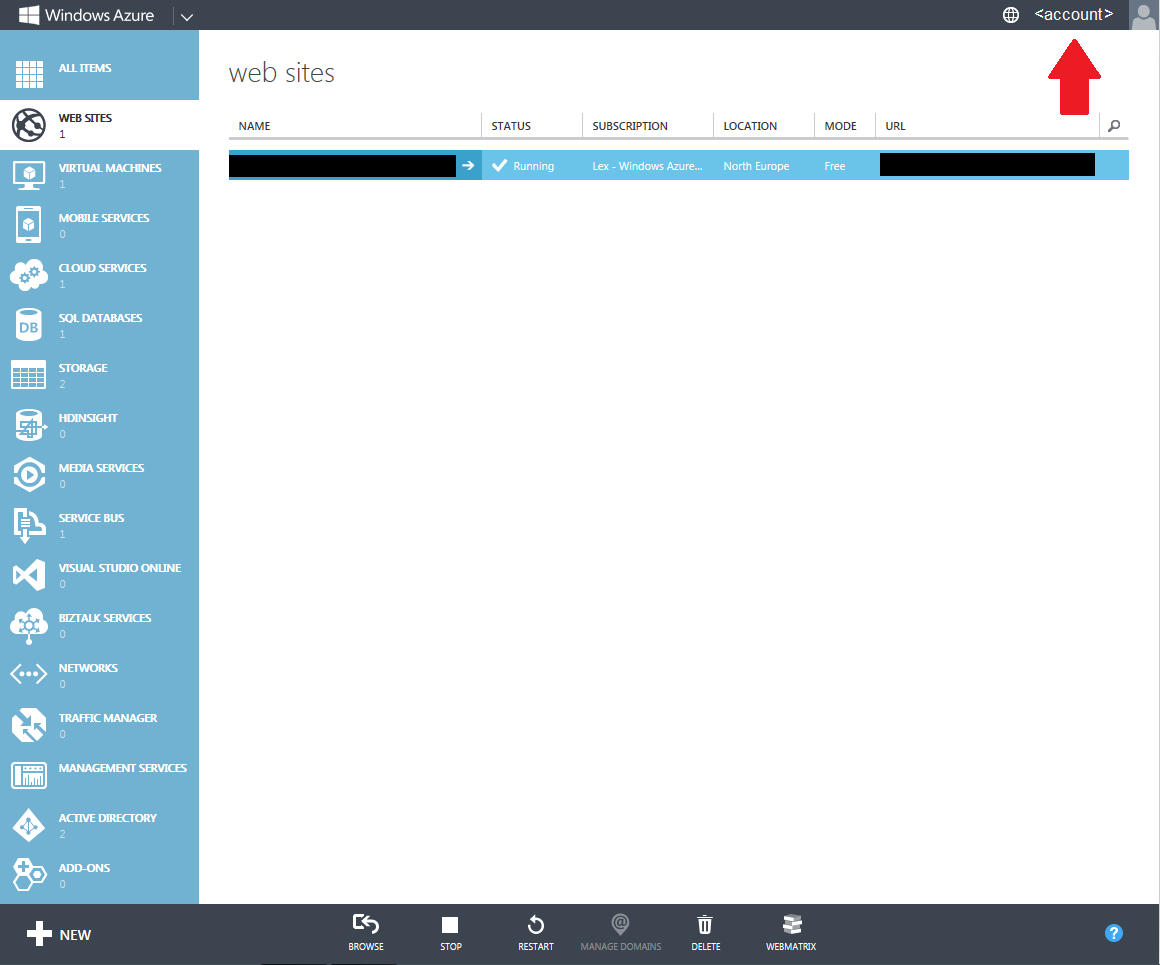
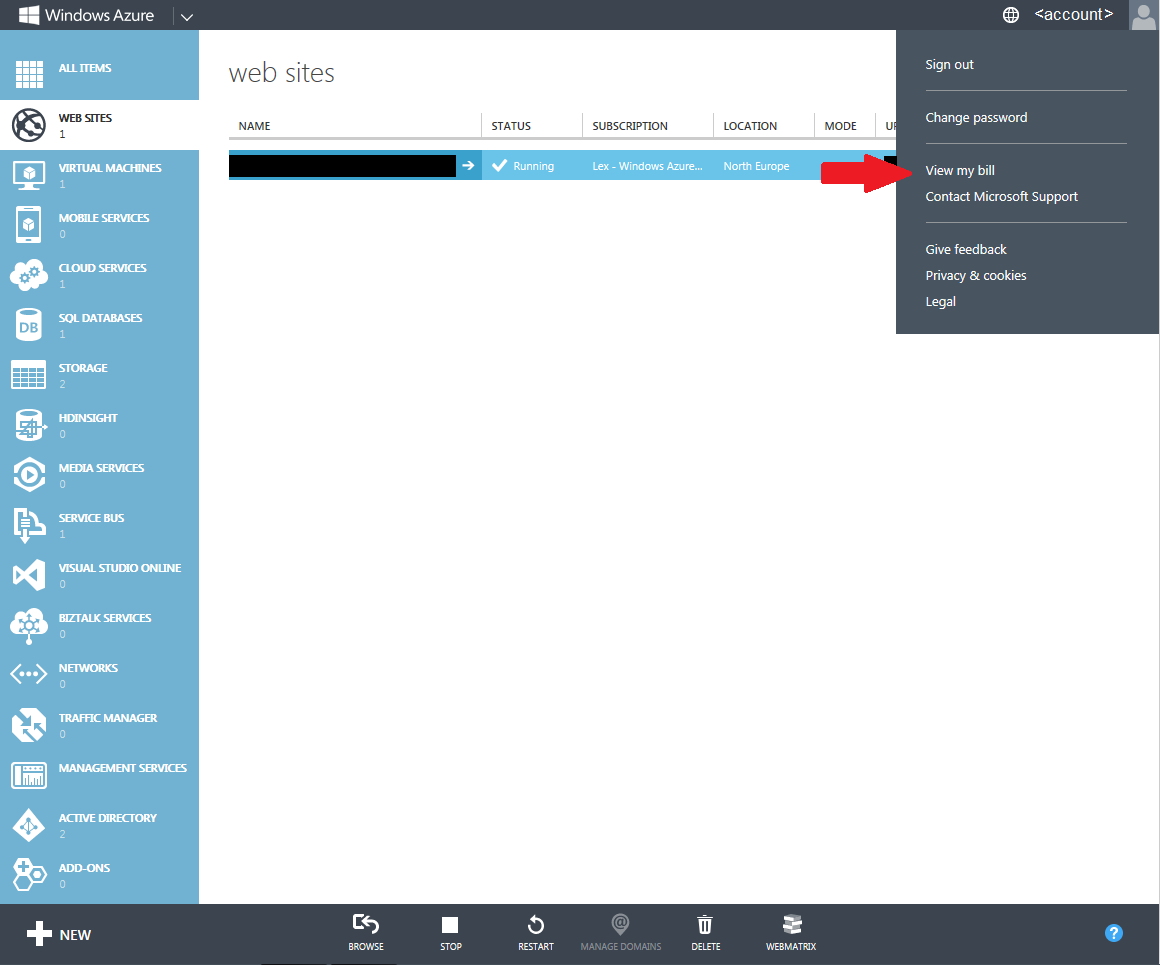
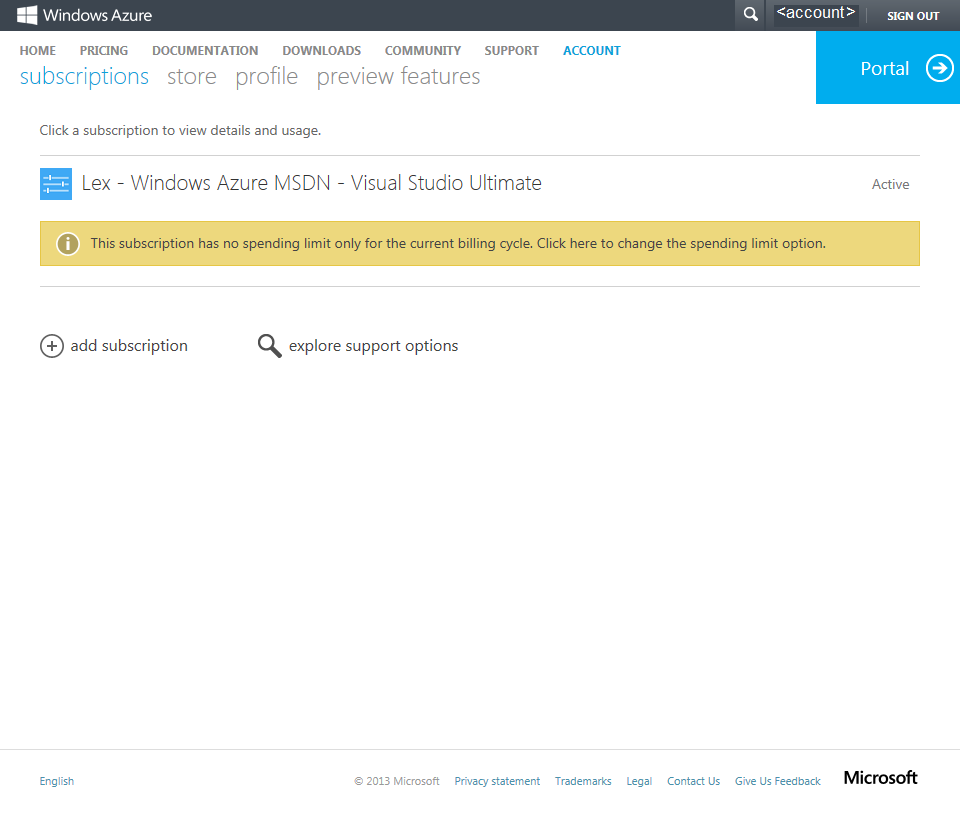
From the Windows Azure Management Portal, go to the menu in the upper right corner and select ‘View My Bill’.
You arrive at your Account Page.
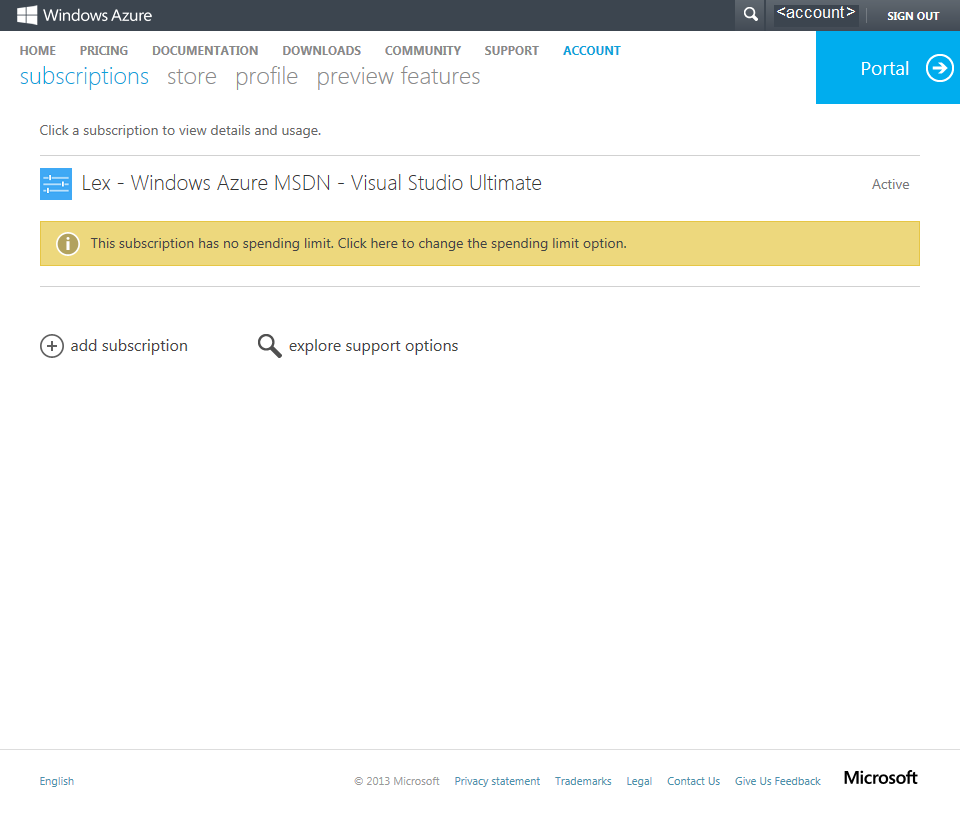
As you can see in the yellow banner, this subscription has no spending limit. So if you use more resources than available in your subscription, you’ll have to pay for that.
By clicking the link in the yellow banner, you can change the spending limit option.

By selecting the upper option and hit the check mark below, you switch on the spending limit as of the start date of the next billing period.
After some processing, you’ll return to your Account Page. The yellow banner now reflects the choice you made in the previous dialog.
See also this article: http://msdn.microsoft.com/en-us/library/windowsazure/dn465781.aspx

The “integration as a service” space continues to heat up, and Microsoft officially entered the market with the General Availability of Windows Azure BizTalk Services (WABS) a few weeks ago. I recently wrote up an InfoQ article that summarized the product and what it offered. I also figured that I should actually walk through the […]
Blog Post by: Richard Seroter
I have recently encountered a requirement where we had to integrate a legacy Document Management system with Amazon in order to support a Mobile-Field Worker application. The core requirement is that when a document reaches a certain state within the Document Management System, we need to publish this file to an S3 instance where it can be accessed from a mobile device. We will do so using a RESTful PUT call.
Introduction to Amazon S3 SDK for .Net
Entering this solution I knew very little about Amazon S3. I did know that it supported REST and therefore felt pretty confident that BizTalk 2013 could integrate with it using the WebHttp adapter.
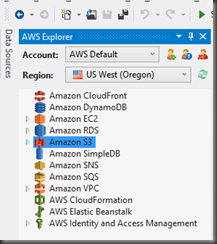
The first thing that I needed to do was to create a Developer account on the Amazon platform. Once I created my account I then downloaded the Amazon S3 SDK for .Net. Since I will be using REST technically this SDK is not required however there is a beneficial tool called the AWS Toolkit for Microsoft Visual Studio. Within this toolkit we can manage our various AWS services including our S3 instance. We can create, read, update and delete documents using this tool. We can also use it in our testing to verify that a message has reached S3 successfully.

Another benefit of downloading the SDK is that we can use the managed libraries to manipulate S3 objects to better understand some of the terminology and functionality that is available. Another side benefit is that we can fire up Fiddler while we are using the SDK and see how Amazon is forming their REST calls, under the hood, when communicating with S3
Amazon S3 Accounts
When you sign up for an S3 account you will receive an Amazon Key ID and a Secret Access Key. These are two pieces of data that you will need in order to access your S3 services. You can think of these credentials much like the ones you use when accessing Windows Azure Services.

BizTalk Solution
To keep this solution as simple as possible for this Blog Post, I have stripped some of the original components of the solution so that we can strictly focus on what is involved in getting the WebHttp Adapter to communicate with Amazon S3.
For the purpose of this blog post the following events will take place:

The most challenging part of this Message Assignment Shape was populating the WCF.HttpHeaders context property. In C# if you want to populate headers you have a Header collection that you can populate in a very clean manner:
headers.Add(“x-amz-date”, httpDate);
However, when populating this property in BizTalk it isn’t as clean. You need to construct a string and then append all of the related properties together. You also need to separate each header attribute onto a new line by appending “\n” .
Tip: Don’t try to build this string in a Helper method. \n characters will be encoded and the equivalent values will not be accepted by Amazon so that is why I have built out this string inside an Expression Shape.
After I send a message(that I have tracked by BizTalk) I should see an HTTP Header that looks like the following:
<Property Name=”HttpHeaders” Namespace=”http://schemas.microsoft.com/BizTalk/2006/01/Adapters/WCF-properties” Value=
“x-amz-acl: bucket-owner-full-control
x-amz-storage-class: STANDARD
x-amz-date: Tue, 10 Dec 2013 23:25:43 GMT
Authorization: AWS <AmazonKeyID>:<EncryptedSignature>
Content-Type: application/x-pdf
Expect: 100-continue
Connection: Keep-Alive”/>
For the meaning of each of these headers I will refer you to the Amazon Documentation. However, the one header that does warrant some additional discussion here is the Authorization header. This is how we authenticate with the S3 Service. Constructing this string requires some additional understanding. To simplify the population of this value I have created the following helper method which was adopted from the following post on StackOverflow:
public static string SetHttpAuth(string httpDate)
{
string AWSAccessKeyId = “<your_keyId>”;
string AWSSecretKey = “<your_SecretKey>”;
string AuthHeader = “”;
string canonicalString = “PUT\n\napplication/x-pdf\n\nx-amz-acl:bucket-owner-full-control\nx-amz-date:” + httpDate + “\nx-amz-storage-class:STANDARD\n/<your_bucket>/310531500150800.PDF”;
// now encode the canonical string
Encoding ae = new UTF8Encoding();
// create a hashing object
HMACSHA1 signature = new HMACSHA1();
// secretId is the hash key
signature.Key = ae.GetBytes(AWSSecretKey);
byte[] bytes = ae.GetBytes(canonicalString);
byte[] moreBytes = signature.ComputeHash(bytes);
// convert the hash byte array into a base64 encoding
string encodedCanonical = Convert.ToBase64String(moreBytes);
// finally, this is the Authorization header.
AuthHeader = “AWS ” + AWSAccessKeyId + “:” + encodedCanonical;
return AuthHeader;
}
The most important part of this method is the following line(s) of code:
string canonicalString = “PUT\n\napplication/x-pdf\n\nx-amz-acl:bucket-owner-full-control\nx-amz-date:” + httpDate + “\nx-amz-storage-class:STANDARD\n/<your_bucket>/310531500150800.PDF”;
The best way to describe what is occurring is to borrow the following from the Amazon documentation.
The Signature element is the RFC 2104HMAC-SHA1 of selected elements from the request, and so the Signature part of the Authorization header will vary from request to request. If the request signature calculated by the system matches the Signature included with the request, the requester will have demonstrated possession of the AWS secret access key. The request will then be processed under the identity, and with the authority, of the developer to whom the key was issued.
Essentially we are going to build up a string that reflects that various aspects of our REST call (Headers, Date, Resource) and then create a Hash using our Amazon secret. Since Amazon is aware of our Secret they can decrypt this payload and see if it matches our actual REST call. If it does – we are golden. If not, we can expect an error like the following:
A message sent to adapter “WCF-WebHttp” on send port “SendToS3” with URI http://<bucketname>.s3-us-west-2.amazonaws.com/ is suspended.
Error details: System.Net.WebException: The HTTP request was forbidden with client authentication scheme ‘Anonymous’.
<?xml version=”1.0″ encoding=”UTF-8″?>
<Error><Code>SignatureDoesNotMatch</Code><Message>The request signature we calculated does not match the signature you provided. Check your key and signing method.</Message><StringToSignBytes>50 55 54 0a 0a 61 70 70 6c 69 63 61 74 69 6f 6e 2f 78 2d 70 64 66 0a 0a 78 2d 61 6d 7a 2d 61 63 6c 3a 62 75 63 6b 65 74 2d 6f 77 6e 65 72 2d 66 75 6c 6c 2d 63 6f 6e 74 72 20 44 65 63 20 32 30 31 33 20 30 34 3a 35 37 3a 34 35 20 47 4d 54 0a 78 2d 61 6d 7a 2d 73 74 6f 72 61 67 65 2d 63 6c 61 73 73 3a 53 54 41 4e 44 41 52 44 0a 2f 74 72 61 6e 73 61 6c 74 61 70 6f 63 2f 33 31 30 35 33 31 35 30 30 31 35 30 38 30 30 2e 50 44 46</StringToSignBytes><RequestId>6A67D9A7EB007713</RequestId><HostId>BHkl1SCtSdgDUo/aCzmBpPmhSnrpghjA/L78WvpHbBX2f3xDW</HostId><SignatureProvided>SpCC3NpUkL0Z0hE9EI=</SignatureProvided><StringToSign>PUT
application/x-pdf
x-amz-acl:bucket-owner-full-control
x-amz-date:Thu, 05 Dec 2013 04:57:45 GMT
x-amz-storage-class:STANDARD
/<bucketname>/310531500150800.PDF</StringToSign><AWSAccessKeyId><your_key></AWSAccessKeyId></Error>
Tip: Pay attention to these error messages as they really give you a hint as to what you need to include in your “canonicalString”. I discounted these error message early on and didn’t take the time to really understand what Amazon was looking for.
For completeness I will include the other thresshelper methods that are being used in the Expression Shape. For my actual solution I have included these in a configuration store but for the simplicity of this blog post I have hard coded them.
public static string SetAmzACL()
{
return “bucket-owner-full-control”;
}
public static string SetStorageClass()
{
return “STANDARD”;
}
public static string SetHeaderDate()
{
//Use GMT time and ensure that it is within 15 minutes of the time on Amazon’s Servers
return DateTime.UtcNow.ToString(“ddd, dd MMM yyyy HH:mm:ss “) + “GMT”;
}
The next part of the Message Assignment shape is setting the standard context properties for WebHttp Adapter. Remember since we are using a Dynamic Send Port we will not be able to manipulate these values through the BizTalk Admin Console.
msgS3Request(WCF.BindingType)=”WCF-WebHttp”;
msgS3Request(WCF.SecurityMode)=”None”;
msgS3Request(WCF.HttpMethodAndUrl) = “PUT”; //Writing to Amazon S3 requires a PUT
msgS3Request(WCF.OpenTimeout)= “00:10:00”;
msgS3Request(WCF.CloseTimeout)= “00:10:00”;
msgS3Request(WCF.SendTimeout)= “00:10:00”;
msgS3Request(WCF.MaxReceivedMessageSize)= 2147483647;
Lastly we need to set the URI that we want to send our message to and also specify that we want to use the WCF-WebHttp adapter.
Port_SendToS3(Microsoft.XLANGs.BaseTypes.Address)=”http://<bucketname>.s3-us-west-2.amazonaws.com/310531500150800.PDF”;
Port_SendToS3(Microsoft.XLANGs.BaseTypes.TransportType)=”WCF-WebHttp”;
Note: the last part of my URI 310531500150800.PDF represents my Resource. In this case I have hardcoded a file name. This is obviously something that you want to make dynamic, perhaps using the FILE.ReceivedFileName context property.
InboundHttpStatusCode
InboundHttpStatusDescription

Overall the Orchestration is very simple. The complexity really exists in the Message Assignment shape.

Testing
Not that watching files move is super exciting, but I have created a quick Vine video that will demonstrate the message being consumed by the FILE Adapter and then sent off to Amazon S3.
Conclusion
This was a pretty fun and frustrating solution to put together. The area that caused me the most grief was easily the Authorization Header. There is some documentation out there related to Amazon “PUT”s but each call is different depending upon what type of data you are sending and the related headers. For each header that you add, you really need to include the related value in your “canonicalString”. You also need to include the complete path to your resource (/bucketname/resource) in this string even though the convention is a little different in the URI.
Also it is worth mentioning that /n Software has created a third party S3 Adapter that abstracts some of the complexity in this solution. While I have not used this particular /n Software Adapter, I have used others and have been happy with the experience. Michael Stephenson has blogged about his experiences with this adapter here.
2013 %u5e74 12 %u6708 11%u65e5 (%u65e5%u672c%u6642%u9593)%u3001%u30de%u30a4%u30af%u30ed%u30bd%u30d5%u30c8%u306f%u8a08 11 %u4ef6 (%u7dca%u6025 5 %u4ef6%u3001%u91cd%u8981 6 %u4ef6) %u306e%u65b0%u898f%u30bb%u30ad%u30e5%u30ea%u30c6%u30a3%u60c5%u5831%u3092%u516c%u958b%u3057%u307e%u3057%u305f%u3002%u65b0%u898f%u30bb%u30ad%u30e5%u30ea%u30c6%u30a3%u60c5%u5831%u3092%u516c%u958b%u3059%u308b%u3068%u5171%u306b%u3001%u65b0%u898f%u306e%u30bb%u30ad%u30e5%u30ea%u30c6%u30a3%u30a2%u30c9%u30d0%u30a4%u30b6%u30ea 3 %u4ef6%u306e%u516c%u958b%u3001%u65e2%u5b58%u306e%u30bb%u30ad%u30e5%u30ea%u30c6%u30a3 %u30a2%u30c9%u30d0%u30a4%u30b6%u30ea 2 %u4ef6%u306e%u66f4%u65b0%u3092%u884c%u3044%u307e%u3057%u305f%u3002%u306a%u304a%u3001%u4eca%u6708%u306e%u300c%u60aa%u610f%u306e%u3042%u308b%u30bd%u30d5%u30c8%u30a6%u30a7%u30a2%u306e%u524a%u9664%u30c4%u30fc%u30eb%u300d%u3067%u306f%u3001%u65b0%u305f%u306b%u78ba%u8a8d%u3057%u305f 1 %u7a2e%u985e%u306e%u30de%u30eb%u30a6%u30a7%u30a2%u306b%u5bfe%u5fdc%u3057%u3066%u3044%u307e%u3059%u3002
%u306a%u304a%u3001%u5148%u65e5%u3053%u3061%u3089%u306e%u30d6%u30ed%u30b0%u3067%u3082%u304a%u77e5%u3089%u305b%u3057%u305f%u30bb%u30ad%u30e5%u30ea%u30c6%u30a3 %u30a2%u30c9%u30d0%u30a4%u30b6%u30ea 2896666%u300cMicrosoft Graphics %u30b3%u30f3%u30dd%u30fc%u30cd%u30f3%u30c8%u306e%u8106%u5f31%u6027%u306b%u3088%u308a%u3001%u30ea%u30e2%u30fc%u30c8%u3067%u30b3%u30fc%u30c9%u304c%u5b9f%u884c%u3055%u308c%u308b%u300d%u3067%u5831%u544a%u3055%u308c%u3066%u3044%u305f%u8106%u5f31%u6027%u306b%u3064%u3044%u3066%u306f%u3001%u672c%u65e5%u3001%u30bb%u30ad%u30e5%u30ea%u30c6%u30a3%u60c5%u5831 MS13-096 %u3092%u516c%u958b%u3057%u3001%u8106%u5f31%u6027%u3092%u89e3%u6c7a%u3059%u308b%u30bb%u30ad%u30e5%u30ea%u30c6%u30a3%u66f4%u65b0%u30d7%u30ed%u30b0%u30e9%u30e0%u3092%u30ea%u30ea%u30fc%u30b9%u3057%u307e%u3057%u305f%u3002
%u304a%u5ba2%u69d8%u306f%u3067%u304d%u308b%u3060%u3051%u65e9%u671f%u306b%u3001%u4eca%u6708%u516c%u958b%u306e%u30bb%u30ad%u30e5%u30ea%u30c6%u30a3%u66f4%u65b0%u30d7%u30ed%u30b0%u30e9%u30e0%u3092%u9069%u7528%u3059%u308b%u3088%u3046%u304a%u9858%u3044%u3057%u307e%u3059%u3002%u4f01%u696d%u306e%u304a%u5ba2%u69d8%u3067%u9069%u7528%u306b%u512a%u5148%u4ed8%u3051%u304c%u5fc5%u8981%u306a%u5834%u5408%u306f%u3001%u3044%u305a%u308c%u3082%u7dca%u6025%u306e%u6b21%u306e 3 %u3064%u306e%u30bb%u30ad%u30e5%u30ea%u30c6%u30a3%u60c5%u5831 MS13-096 (Graphics), MS13-097(Internet Explorer), MS13-099(Scripting) %u306e%u30bb%u30ad%u30e5%u30ea%u30c6%u30a3%u66f4%u65b0%u30d7%u30ed%u30b0%u30e9%u30e0%u3092%u512a%u5148%u7684%u306b%u9069%u7528%u3059%u308b%u3053%u3068%u3092%u63a8%u5968%u3044%u305f%u3057%u307e%u3059%u3002
%u25a0 %u65b0%u898f%u306e%u30bb%u30ad%u30e5%u30ea%u30c6%u30a3 %u30a2%u30c9%u30d0%u30a4%u30b6%u30ea%u306e%u516c%u958b (3 %u4ef6)
%u25a0 %u65e2%u5b58%u306e%u30bb%u30ad%u30e5%u30ea%u30c6%u30a3 %u30a2%u30c9%u30d0%u30a4%u30b6%u30ea%u306e%u66f4%u65b0 (%uff12 %u4ef6)
%u25a02013%u5e74 12%u6708%u306e%u30bb%u30ad%u30e5%u30ea%u30c6%u30a3%u60c5%u5831%u4e00%u89a7
%u5404%u30bb%u30ad%u30e5%u30ea%u30c6%u30a3%u60c5%u5831%u306e%u6982%u8981%u3001%u5404%u8106%u5f31%u6027%u306e%u60aa%u7528%u53ef%u80fd%u6027%u6307%u6a19 (Exploitability Index)%u3001%u66f4%u65b0%u30d7%u30ed%u30b0%u30e9%u30e0%u306e%u30c0%u30a6%u30f3%u30ed%u30fc%u30c9%u5148%u306a%u3069%u304c%u3054%u89a7%u3044%u305f%u3060%u3051%u307e%u3059%u3002
http://technet.microsoft.com/ja-jp/security/bulletin/ms13-dec
%u30de%u30a4%u30af%u30ed%u30bd%u30d5%u30c8%u306f%u65b0%u305f%u306b%u78ba%u8a8d%u3057%u305f%u8106%u5f31%u6027%u306b%u3064%u3044%u3066%u3001%u6b21%u306e 11 %u4ef6%u306e%u65b0%u3057%u3044%u30bb%u30ad%u30e5%u30ea%u30c6%u30a3%u60c5%u5831%u3092%u516c%u958b%u3057%u307e%u3057%u305f%u3002
|
%u30bb%u30ad%u30e5%u30ea%u30c6%u30a3%u60c5%u5831 ID |
%u30bb%u30ad%u30e5%u30ea%u30c6%u30a3%u60c5%u5831%u30bf%u30a4%u30c8%u30eb |
%u6700%u5927%u6df1%u523b%u5ea6 |
%u8106%u5f31%u6027%u306e%u5f71%u97ff |
%u518d%u8d77%u52d5%u306e%u5fc5%u8981%u6027 |
%u5f71%u97ff%u3092%u53d7%u3051%u308b%u30bd%u30d5%u30c8%u30a6%u30a7%u30a2 |
|
Microsoft Graphics %u30b3%u30f3%u30dd%u30fc%u30cd%u30f3%u30c8%u306e%u8106%u5f31%u6027%u306b%u3088%u308a%u3001%u30ea%u30e2%u30fc%u30c8%u3067%u30b3%u30fc%u30c9%u304c%u5b9f%u884c%u3055%u308c%u308b (2908005) |
%u7dca%u6025 |
%u30ea%u30e2%u30fc%u30c8%u3067%u30b3%u30fc%u30c9%u304c%u5b9f%u884c%u3055%u308c%u308b |
%u518d%u8d77%u52d5%u304c%u5fc5%u8981%u306a%u5834%u5408%u3042%u308a |
Windows Vista%u3001Windows Server 2008%u3001Office 2003%u3001Office 2007%u3001 Office 2010%u3001Office %u4e92%u63db%u6a5f%u80fd%u30d1%u30c3%u30af%u3001Lync 2010%u3001Lync 2010 Attendee%u3001Lync 2013%u3001%u304a%u3088%u3073 Lync Basic 2013 |
|
|
Internet Explorer %u7528%u306e%u7d2f%u7a4d%u7684%u306a%u30bb%u30ad%u30e5%u30ea%u30c6%u30a3%u66f4%u65b0%u30d7%u30ed%u30b0%u30e9%u30e0 (2898785) |
%u7dca%u6025 |
%u30ea%u30e2%u30fc%u30c8%u3067%u30b3%u30fc%u30c9%u304c%u5b9f%u884c%u3055%u308c%u308b |
%u8981%u518d%u8d77%u52d5 |
Windows XP%u3001Windows Server 2003%u3001Windows Vista%u3001Windows Server 2008%u3001Windows 7%u3001 Windows Server 2008 R2%u3001Windows 8%u3001 Windows 8.1%u3001Windows Server 2012%u3001Windows Server 2012 R2%u3001 Windows RT%u3001%u304a%u3088%u3073 Windows RT 8.1 %u4e0a%u306e Internet Explorer |
|
|
Windows%u306e%u8106%u5f31%u6027%u306b%u3088%u308a%u3001%u30ea%u30e2%u30fc%u30c8%u3067%u30b3%u30fc%u30c9%u304c%u5b9f%u884c%u3055%u308c%u308b (2893294) |
%u7dca%u6025 |
%u30ea%u30e2%u30fc%u30c8%u3067%u30b3%u30fc%u30c9%u304c%u5b9f%u884c%u3055%u308c%u308b |
%u8981%u518d%u8d77%u52d5 |
Windows XP%u3001Windows Server 2003%u3001Windows Vista%u3001Windows Server 2008%u3001Windows 7%u3001 Windows Server 2008 R2%u3001Windows 8%u3001 Windows 8.1%u3001Windows Server 2012%u3001Windows Server 2012 R2%u3001 Windows RT%u3001%u304a%u3088%u3073 Windows RT 8.1 |
|
|
Microsoft Scripting Runtime %u30aa%u30d6%u30b8%u30a7%u30af%u30c8 %u30e9%u30a4%u30d6%u30e9%u30ea%u306e%u8106%u5f31%u6027%u306b%u3088%u308a%u3001%u30ea%u30e2%u30fc%u30c8%u3067%u30b3%u30fc%u30c9%u304c%u5b9f%u884c%u3055%u308c%u308b (2909158) |
%u7dca%u6025 |
%u30ea%u30e2%u30fc%u30c8%u3067%u30b3%u30fc%u30c9%u304c%u5b9f%u884c%u3055%u308c%u308b |
%u518d%u8d77%u52d5%u304c%u5fc5%u8981%u306a%u5834%u5408%u3042%u308a |
Windows XP%u3001Windows Server 2003%u3001Windows Vista%u3001Windows Server 2008%u3001Windows 7%u3001 Windows Server 2008 R2%u3001Windows 8%u3001 Windows 8.1%u3001Windows Server 2012%u3001Windows Server 2012 R2%u3001 Windows RT%u3001%u304a%u3088%u3073 Windows RT 8.1 |
|
|
Microsoft SharePoint Server %u306e%u8106%u5f31%u6027%u306b%u3088%u308a%u3001%u30ea%u30e2%u30fc%u30c8%u3067%u30b3%u30fc%u30c9%u304c%u5b9f%u884c%u3055%u308c%u308b (2904244) |
%u91cd%u8981 |
%u30ea%u30e2%u30fc%u30c8%u3067%u30b3%u30fc%u30c9%u304c%u5b9f%u884c%u3055%u308c%u308b |
%u518d%u8d77%u52d5%u304c%u5fc5%u8981%u306a%u5834%u5408%u3042%u308a |
Microsoft SharePoint Server 2010%u3001SharePoint Server 2013%u3001%u304a%u3088%u3073 Office Web Apps Server 2013 |
|
|
Windows %u30ab%u30fc%u30cd%u30eb%u30e2%u30fc%u30c9 %u30c9%u30e9%u30a4%u30d0%u30fc%u306e%u8106%u5f31%u6027%u306b%u3088%u308a%u3001%u7279%u6a29%u304c%u6607%u683c%u3055%u308c%u308b (2880430) |
%u91cd%u8981 |
%u7279%u6a29%u306e%u6607%u683c |
%u8981%u518d%u8d77%u52d5 |
Windows XP%u3001Windows Server 2003%u3001Windows Vista%u3001Windows Server 2008%u3001Windows 7%u3001 Windows Server 2008 R2%u3001Windows 8%u3001 Windows 8.1%u3001Windows Server 2012%u3001Windows Server 2012 R2%u3001 Windows RT%u3001%u304a%u3088%u3073 Windows RT 8.1 |
|
|
LRPC %u30af%u30e9%u30a4%u30a2%u30f3%u30c8%u306e%u8106%u5f31%u6027%u306b%u3088%u308a%u3001%u7279%u6a29%u304c%u6607%u683c%u3055%u308c%u308b (2898715) |
%u91cd%u8981 |
%u7279%u6a29%u306e%u6607%u683c |
%u8981%u518d%u8d77%u52d5 |
Windows XP %u304a%u3088%u3073 Windows Server 2003 |
|
|
ASP.NET SignalR %u306e%u8106%u5f31%u6027%u306b%u3088%u308a%u3001%u7279%u6a29%u304c%u6607%u683c%u3055%u308c%u308b (2905244) |
%u91cd%u8981 |
%u7279%u6a29%u306e%u6607%u683c |
%u518d%u8d77%u52d5%u4e0d%u8981 |
ASP.NET SignalR %u304a%u3088%u3073 Microsoft Visual Studio Team Foundation Server 2013 |
|
|
MS13-104 |
Microsoft Office %u306e%u8106%u5f31%u6027%u306b%u3088%u308a%u3001%u60c5%u5831%u306e%u6f0f%u3048%u3044%u304c%u8d77%u3053%u308b (2909976) |
%u91cd%u8981 |
%u60c5%u5831%u6f0f%u3048%u3044 |
%u518d%u8d77%u52d5%u304c%u5fc5%u8981%u306a%u5834%u5408%u3042%u308a |
Microsoft Office 2013 %u304a%u3088%u3073 Office 2013 RT |
|
Microsoft Exchange Server %u306e%u8106%u5f31%u6027%u306b%u3088%u308a%u3001%u30ea%u30e2%u30fc%u30c8%u3067%u30b3%u30fc%u30c9%u304c%u5b9f%u884c%u3055%u308c%u308b (2915705) |
%u7dca%u6025 |
%u30ea%u30e2%u30fc%u30c8%u3067%u30b3%u30fc%u30c9%u304c%u5b9f%u884c%u3055%u308c%u308b |
%u518d%u8d77%u52d5%u4e0d%u8981 |
Microsoft Exchange Server 2007%u3001Exchange Server 2010%u3001%u304a%u3088%u3073 Exchange Server 2013 |
|
|
Microsoft Office %u5171%u6709%u30b3%u30f3%u30dd%u30fc%u30cd%u30f3%u30c8%u306e%u8106%u5f31%u6027%u306b%u3088%u308a%u3001%u30bb%u30ad%u30e5%u30ea%u30c6%u30a3%u6a5f%u80fd%u306e%u30d0%u30a4%u30d1%u30b9%u304c%u8d77%u3053%u308b (2905238) |
%u91cd%u8981 |
%u30bb%u30ad%u30e5%u30ea%u30c6%u30a3%u6a5f%u80fd%u306e%u30d0%u30a4%u30d1%u30b9 |
%u518d%u8d77%u52d5%u304c%u5fc5%u8981%u306a%u5834%u5408%u3042%u308a |
Microsoft Office 2007 %u304a%u3088%u3073 Office 2010 |
%u25a0%u6700%u65b0%u306e%u30bb%u30ad%u30e5%u30ea%u30c6%u30a3%u60c5%u5831%u3092%u52d5%u753b%u3068%u97f3%u58f0%u3067%u307e%u3068%u3081%u3066%u78ba%u8a8d
%u30de%u30a4%u30af%u30ed%u30bd%u30d5%u30c8 %u30bb%u30ad%u30e5%u30ea%u30c6%u30a3%u30ec%u30b9%u30dd%u30f3%u30b9 %u30c1%u30fc%u30e0%u304c IT %u30d7%u30ed%u306e%u7686%u3055%u307e%u306b%u5411%u3051%u3066%u3001%u77ed%u6642%u9593%u3067%u6700%u65b0%u306e%u30bb%u30ad%u30e5%u30ea%u30c6%u30a3%u66f4%u65b0%u30d7%u30ed%u30b0%u30e9%u30e0%u306e%u77e5%u308a%u305f%u3044%u30dd%u30a4%u30f3%u30c8%u3092%u52d5%u753b%u3068%u97f3%u58f0%u3067%u3054%u7d39%u4ecb%u3059%u308b%u4eca%u6708%u306e%u30de%u30a4%u30af%u30ed%u30bd%u30d5%u30c8%u30ef%u30f3%u30dd%u30a4%u30f3%u30c8%u30bb%u30ad%u30e5%u30ea%u30c6%u30a3%u60c5%u5831%u306f%u672c%u65e5%u5348%u5f8c%u516c%u958b%u4e88%u5b9a%u3067%u3059%u3002%u3054%u8996%u8074%u3044%u305f%u3060%u304f%u3053%u3068%u3067%u3001%u6700%u65b0%u306e%u30bb%u30ad%u30e5%u30ea%u30c6%u30a3%u66f4%u65b0%u30d7%u30ed%u30b0%u30e9%u30e0%u306e%u9069%u7528%u512a%u5148%u5ea6%u3084%u518d%u8d77%u52d5%u30fb%u56de%u907f%u7b56%u306e%u6709%u7121%u3001%u78ba%u8a8d%u3057%u3066%u3044%u308b%u65e2%u77e5%u306e%u554f%u984c%u306a%u3069%u3092%u307e%u3068%u3081%u3066%u5165%u624b%u3067%u304d%u307e%u3059%u3002Web %u30ad%u30e3%u30b9%u30c8%u516c%u958b%u5f8c%u306b%u3001%u3053%u3061%u3089%u306e%u30d6%u30ed%u30b0%u3067%u3082%u304a%u77e5%u3089%u305b%u3057%u307e%u3059%u3002
Blog Post by: JSECTEAM
[2013/12/13 %u8ffd%u8a18]
Windows XP %u304a%u3088%u3073 Windows Server 2003 %u7528%u306e%u66f4%u65b0%u30d7%u30ed%u30b0%u30e9%u30e0%u304c%u3054%u5229%u7528%u3044%u305f%u3060%u3051%u308b%u3088%u3046%u306b%u306a%u308a%u307e%u3057%u305f%u3053%u3068%u3092%u304a%u77e5%u3089%u305b%u3057%u307e%u3059%u3002
2013 %u5e74 12 %u6708 10%u65e5%u3001%u30bb%u30ad%u30e5%u30ea%u30c6%u30a3 %u30a2%u30c9%u30d0%u30a4%u30b6%u30ea 2916652%u300c%u4e0d%u6b63%u306a%u30c7%u30b8%u30bf%u30eb%u8a3c%u660e%u66f8%u306b%u3088%u308a%u3001%u306a%u308a%u3059%u307e%u3057%u304c%u884c%u308f%u308c%u308b%u300d%u3092%u516c%u958b%u3057%u307e%u3057%u305f%u3002
%u30c7%u30b8%u30bf%u30eb%u8a3c%u660e%u66f8%u306f%u3001Web %u30b5%u30a4%u30c8%u304c%u6b63%u898f%u306e%u30b5%u30a4%u30c8%u3067%u3042%u308b%u3053%u3068%u3092%u78ba%u8a8d%u3059%u308b%u305f%u3081%u306b%u5229%u7528%u3055%u308c%u307e%u3059%u3002%u4e0d%u6b63%u306a%u30c7%u30b8%u30bf%u30eb%u8a3c%u660e%u66f8%u306f%u3001%u306a%u308a%u3059%u307e%u3057%u3001%u30d5%u30a3%u30c3%u30b7%u30f3%u30b0%u3001%u307e%u305f%u306f%u4e2d%u9593%u8005%u653b%u6483%u306b%u60aa%u7528%u3055%u308c%u308b%u53ef%u80fd%u6027%u304c%u3042%u308a%u307e%u3059%u3002%u3053%u306e%u30c7%u30b8%u30bf%u30eb%u8a3c%u660e%u66f8%u306e%u60aa%u7528%u304b%u3089%u304a%u5ba2%u69d8%u3092%u4fdd%u8b77%u3059%u308b%u305f%u3081%u306b%u3001%u30de%u30a4%u30af%u30ed%u30bd%u30d5%u30c8%u306f%u8a3c%u660e%u66f8%u4fe1%u983c%u30ea%u30b9%u30c8 (CTL) %u3092%u66f4%u65b0%u3057%u4e0d%u6b63%u306a%u8a3c%u660e%u66f8%u306e%u4fe1%u983c%u3092%u6392%u9664%u3059%u308b%u66f4%u65b0%u3092%u884c%u3044%u307e%u3057%u305f%u3002
%u5f71%u97ff%u3092%u53d7%u3051%u308b%u88fd%u54c1%u304a%u3088%u3073%u56de%u907f%u7b56%u306e%u5c55%u958b%u65b9%u6cd5%u306a%u3069%u3001%u8a73%u7d30%u306b%u3064%u3044%u3066%u306f%u30bb%u30ad%u30e5%u30ea%u30c6%u30a3 %u30a2%u30c9%u30d0%u30a4%u30b6%u30ea 2916652 %u3092%u53c2%u7167%u3057%u3066%u304f%u3060%u3055%u3044%u3002
%u63a8%u5968%u3059%u308b%u30a2%u30af%u30b7%u30e7%u30f3
Windows 8%u3001Windows 8.1%u3001Windows RT%u3001Windows RT 8.1%u3001Windows Server 2012%u3001Windows Server 2012 R2%u306b%u304a%u3044%u3066%u306f%u3001%u8a3c%u660e%u66f8%u306e%u81ea%u52d5%u66f4%u65b0%u30c4%u30fc%u30eb%u304c%u65e2%u5b9a%u3067%u5b9f%u88c5%u3055%u308c%u3066%u304a%u308a%u3001%u81ea%u52d5%u7684%u306b%u4fdd%u8b77%u304c%u884c%u308f%u308c%u308b%u306e%u3067%u3001%u63aa%u7f6e%u3092%u8b1b%u3058%u308b%u5fc5%u8981%u306f%u3042%u308a%u307e%u305b%u3093%u3002
Windows Vista%u3001Windows 7%u3001Windows Server 2008%u3001Windows Server 2008 R2 %u306b%u304a%u3044%u3066%u3001%u8a3c%u660e%u66f8%u306e%u81ea%u52d5%u66f4%u65b0%u30c4%u30fc%u30eb%uff08%u30b5%u30dd%u30fc%u30c8%u6280%u8853%u60c5%u5831 2677070%uff09%u3092%u5229%u7528%u3057%u3066%u3044%u308b%u5834%u5408%u3001%u81ea%u52d5%u7684%u306b%u4fdd%u8b77%u304c%u884c%u308f%u308c%u308b%u306e%u3067%u3001%u63aa%u7f6e%u3092%u8b1b%u3058%u308b%u5fc5%u8981%u306f%u3042%u308a%u307e%u305b%u3093%u3002
Windows XP %u304a%u3088%u3073 Windows Server 2003%u3001%u307e%u305f%u306f%u5931%u52b9%u3057%u305f%u8a3c%u660e%u66f8%u306e%u81ea%u52d5%u66f4%u65b0%u30c4%u30fc%u30eb%u3092%u30a4%u30f3%u30b9%u30c8%u30fc%u30eb%u3057%u3066%u3044%u306a%u3044%u3001%u3042%u308b%u3044%u306f%u7121%u52b9%u306b%u3057%u3066%u3044%u308b%u74b0%u5883%u3067%u5229%u7528%u3067%u304d%u308b%u66f4%u65b0%u30d7%u30ed%u30b0%u30e9%u30e0%u306f%u73fe%u6642%u70b9%u3067%u306f%u63d0%u4f9b%u3055%u308c%u3066%u3044%u307e%u305b%u3093%u3002
%u305d%u306e%u4ed6%u306e%u7de9%u548c%u7b56
EMET 4.0 %u4ee5%u964d%u306b%u642d%u8f09%u3055%u308c%u3066%u3044%u308b%u8a3c%u660e%u66f8%u30c1%u30a7%u30c3%u30af%u6a5f%u80fd%u3092%u5229%u7528%u3057%u3001%u4e0d%u6b63%u306a%u8a3c%u660e%u66f8%u306e%u60aa%u7528%u3092%u7de9%u548c%u3059%u308b%u3053%u3068%u3082%u3067%u304d%u307e%u3059%u3002%u8a73%u7d30%u306f%u3001%u300c%u8106%u5f31%u6027%u7de9%u548c%u30c4%u30fc%u30eb EMET 4.0 %u30ea%u30ea%u30fc%u30b9%u300d%u3092%u53c2%u7167%u3057%u3066%u304f%u3060%u3055%u3044%u3002
%u95a2%u9023%u30ea%u30f3%u30af
%u30eb%u30fc%u30c8%u8a3c%u660e%u66f8%u30d7%u30ed%u30b0%u30e9%u30e0%u304a%u3088%u3073%u81ea%u52d5%u66f4%u65b0%u30c4%u30fc%u30eb%u306b%u3064%u3044%u3066%u306f%u4ee5%u4e0b%u306e%u30d6%u30ed%u30b0%u3082%u5408%u308f%u305b%u3066%u53c2%u7167%u3057%u3066%u304f%u3060%u3055%u3044%u3002
Blog Post by: JSECTEAM

Some time ago, I do not remember when or where I was asked to provide some examples of diagrams that I use in my documentation or some diagrams representations in which I use the Visio Stencils for BizTalk Server I know that no one likes to create documentation, is boring, it can be a challenging […]
Blog Post by: Sandro Pereira
A team of Microsoft consultants developed Managed Services Engine(MSE) as an open source project a few years ago. End of December 2009 it was the final CTP release. MSE was meant to facilitate service virtualization to support versioning, abstraction, management, routing, and run-time policy enforcement for Services. It used a service repository to provide easier and faster deployment of services