by community-syndication | Nov 16, 2008 | BizTalk Community Blogs via Syndication
Someone emailed me a question about whether or not you can specify credentials when
using the OOB SendActivity in WF 3.5 because they heard that you had to write a custom
activity to accomplish this. You do not have to write a custom activity.
While it is true that the SendActivity links to a named endpoint, and if you use the
configuration file to configure your endpoint you can’t specify specific credentials
(a username and password for example), WF 3.5 has a OOB WorkflowRuntime Service
named the ChannelManagerService. The ChannelManagerService (which I described
in my article on MSDN – here http://msdn.microsoft.com/en-us/library/cc626077.aspx)
allows you to pre-populate some or all of the endpoints you want the SendActivities
running inside of your WorkflowRuntime to use. So you definitely can programmatically
configure an Endpoint that the SendActivity can use without having to write a custom
activity.

Check out my new book on REST.
by community-syndication | Nov 15, 2008 | BizTalk Community Blogs via Syndication
Hi all
I have often wondered why the built-in functoids doesn’t encompass an If-Then-Else
functoid. The Value Mapping functoid only has an If-Then-part and not the Else-part.
This is the first of two blog posts. This post will explore how to solve the issue
with the built-in functionality of BizTalk. The next post will be about creating a
custom functoid to do the job instead and the issues that come with this task.
So, using the built-in functionality:
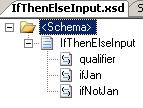
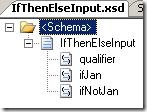
Imagine this input schema:
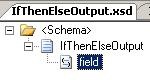
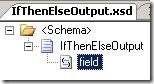
And imagine this output schema:
My goal, now is to create a map that will map the value of the “ifJan” element to
the destination IF the “qualifier” element equals the word “Jan” and otherwise the
value of the “ifNotJan” element should be mapped.
So basically, given this input:
<ns0:IfThenElseInput xmlns:ns0=”http://IfThenElse.IfThenElseInput”>
<qualifier>Jan</qualifier>
<ifJan>ifJan</ifJan>
<ifNotJan>ifNotJan</ifNotJan>
</ns0:IfThenElseInput>
I want this output:
<ns0:IfThenElseOutput xmlns:ns0=”http://IfThenElse.IfThenElseOutput”>
<field>ifJan</field>
</ns0:IfThenElseOutput>
And given this input:
<ns0:IfThenElseInput xmlns:ns0=”http://IfThenElse.IfThenElseInput”>
<qualifier>NotJan</qualifier>
<ifJan>ifJan</ifJan>
<ifNotJan>ifNotJan</ifNotJan>
</ns0:IfThenElseInput>
I want this output:
<ns0:IfThenElseOutput xmlns:ns0=”http://IfThenElse.IfThenElseOutput”>
<field>ifNotJan</field>
</ns0:IfThenElseOutput>
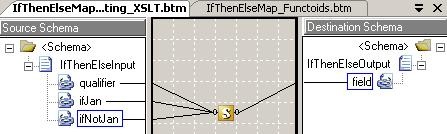
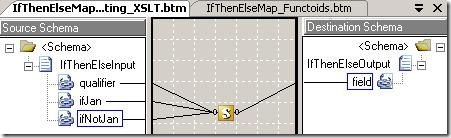
Using a map and the built-in functoids, that would look like this:
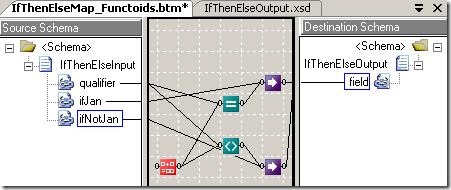
Basically, you need one value mapping functoid for each possible value to pass on,
and a logical functoid for each value as well, to use in the value mapping functoid.
The “String Concatenate” functoid is just my way of returning the string to use for
the qualifier – in this case: “Jan”.
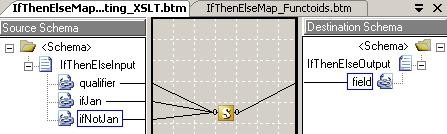
You can also do it using one scripting functoid like this:
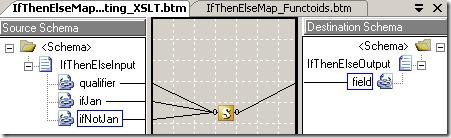
where the scripting functoid is an “Inline XSLT Call Template” scripting type, and
the script looks likes this:
<xsl:template name=”IfThenElse”>
<xsl:param name=”qualifier” />
<xsl:param name=”ifJan” />
<xsl:param name=”ifNotJan” />
<xsl:element name=”field”>
<xsl:choose>
<xsl:when test=”$qualifier=’Jan'”>
<xsl:value-of select=”$ifJan” />
</xsl:when>
<xsl:otherwise>
<xsl:value-of select=”$ifNotJan” />
</xsl:otherwise>
</xsl:choose>
</xsl:element>
</xsl:template>
Now… IF my good friend Henrik Badsberg is reading this, then by now he is screaming:
“USE A BLOODY C# SCRIPTING FUNCTOID!!!!!” 🙂
This, naturally is also an option:
with an “Inline C#” script containing this script:
public string IfThenElse(string qualifier, string ifJan, string ifNotJan)
{
if (qualifier == “Jan”)
return ifJan;
else
return ifNotJan;
}
Both scripting solutions can be altered to accept the output of a logical functoid
as the first input. Just change the string “Jan” to “true” in the scripts, and change
the name of the parameter if you want.
Now then… I am not a big fan of either of these three options. Generally, I avoid
scripting functoids when I can because it is difficult for a new developer to know
what is happening when he opens the map because he will have to open up all scripting
functoids and find out (and remember) what they do. Also, I am not really a big fan
of the first solution either. First of all, there are too many functoids, and it can
messy if this solution is needed several times in a map. Secondly, you get a warning
every time you compile, because you have two inputs to one element.
You can find my project with the three working maps here.
In my next post, I will look into creating a custom functoid that does the job and
I can tell you right now; That isn’t as easy as I had imagined…
—
eliasen
by community-syndication | Nov 15, 2008 | BizTalk Community Blogs via Syndication
I’ve just published a couple of webcasts looking at Workflow Foundation 4.0.
WF 4.0 Sequential Workflow Designer
This webcast takes a look at the new designer in WF 4.0 and features simple workflows to input and output data. It also focuses on the new DbUpdate activity and shows how it can be used to insert data to a SQL database (modelled in “M” of course 🙂 from a workflow.
Building Custom Activities in WF 4.0
This webcasts focuses on developing custom activities for WF 4.0 and also at using the new WPF activity designer. We start off with a simple WriteLine activity, then add aWPF based designer to allow properties to be edited in the workflow designer. We then look at creating a custom While activity that can be used to create a loop in a workflow (actually quite useful as there is no while activity in the toolbox at present.
by community-syndication | Nov 15, 2008 | BizTalk Community Blogs via Syndication
Hi all
On October 29’th I did a BizTalk presentation for the Aalborg
.NET User Group. It was the first in AANUG, so it makes sense that the topic should
be the best topic ever 🙂
Those who were present will remember that I completely broke the time frame I was
bound by, and didn’t even make it all the way through my presentation.
Weird, how I always get side tracked when I talk about something I am good at and/or
like 🙂
Anyway, this blog post has two purposes:
-
Just a little more advertising for Aalborg
.NET User Group. If you live close by, sign up and come to our meetings
-
To make the slides available.
Only in Danish, I am afraid.
—
eliasen
by community-syndication | Nov 14, 2008 | BizTalk Community Blogs via Syndication
Moving a directory that is already under SVN using Tortoise SVN isn’t as straightforward as this question and answer on Stackoverflow.com appears to suggest – the SVN Move versioned files here option isn’t always available…
So how do you move versioned directories to another location in the repository?
Create the new directory and add that directory to […]
by community-syndication | Nov 14, 2008 | BizTalk Community Blogs via Syndication
Finally!! We now have an end-to-end walk-through published on Code Gallery. According to Jean-Marc Prieur, the author of the lab,
“The idea is that, if you complete this Lab until the end, you’ll be able to create your own modeling graphical designers using the DSL Tools technology, and the code generator that will generate code, documentation, […]
by community-syndication | Nov 14, 2008 | BizTalk Community Blogs via Syndication
Hi all
So, I have just added one more functoid to the collection of functoids. This time,
I have added a string replace functoid, as I think that is really missing from the
standard functoids that BizTalk supplies.
You can get version 3 of my functoid collection here: http://www.eliasen.eu/DownloadSoftware.aspx
And for those of you that are not bothered to read further on the download page than
the download section, let me just repeat some text from the download page:
— BEGIN QUOTE
As you can probably see from my extremely lousy icons, layouts, and so on, graphics
really isn’t one of my strong sides. So if you are good at creating icons and so on,
and would like to help me with this part, please contact me.
— END QUOTE
—
eliasen
by community-syndication | Nov 14, 2008 | BizTalk Community Blogs via Syndication
In a previous post, I called out the fact that the GAT technology is now evolving into its next version, Blueprints, and also shared why I think this is a great idea and how Blueprints makes up for deficiencies in GAT. In this series, my aim is to learn this technology and share it with […]