by community-syndication | Dec 30, 2008 | BizTalk Community Blogs via Syndication
I recently published a free video on Configuring MEX endpoints on WCF Services.

In this short WCF screencast, you'll learn how to configure your WCF services with Metadata Exchange (MEX) endpoints – both over HTTP and TCP – allowing consumers to automatically retrieve metadata from your services at runtime. Enjoy!
Check out our growing collection of free .NET screencasts and videos. Subscribe to the Pluralsight feed to be notified when new screencasts are published. Also, check out our growing library of online .NET training courses — see what you can learn with Pluralsight On-Demand!

by community-syndication | Dec 29, 2008 | BizTalk Community Blogs via Syndication
I have received this error when testing my adapter I am creating:
The Messaging Engine failed to create the transport adapter “SQLBulkXML”.
OutboundAssemblyPath: “D:\Eric\Warehouse\Adapter\Run-Time\SQLBulkXMLTransmit\bin\Debug\SQLBulkXMLTransmitAdapter.dll”
OutboundTypeName: “StottIS.BizTalk.Adapters.Runtime.SQLBulkXMLTransmitter.SQLBulkXMLTransmitAdapter”
Exception Details: “Guid should contain 32 digits with 4 dashes (xxxxxxxx-xxxx-xxxx-xxxx-xxxxxxxxxxxx).”
The issue is using the adapter wizard, it had the following code in the SQLBulkXML.transmitter.cs:
        public SQLBulkXMLTransmitAdapter() : base(
                "SQLBulkXML Transmit Adapter",
                "1.0",
                "Allows data to be inserted into database using bulk xml import",
                "SQLBulkXML",
                new Guid(""),
                SQLBulkXMLNamespace,
                typeof(SQLBulkXMLTransmitterEndpoint), 10)
The problem is the new Guid(“”) is not filled in.
by community-syndication | Dec 29, 2008 | BizTalk Community Blogs via Syndication
Background
I was recently reviewing a BizTalk application where there were around a dozen orchestrations which had been exposed as either SOAP or WSE web services. The typical pattern that had been used in these orchestrations is illustrated in the below picture. You can see that there is a Request/Response port and in the orchestration initialises based of the request message then returns a very simple acknowledgement type message (just a message of .net type System.Int32 with a value of 0) to indicate the orchestration has the message and is going to do some additional work.
This is a pattern I’ve seen implemented particularly with inexperienced teams. Often when I’ve seen this pattern the code also had poor testing and the team did not have much confidence in their implementation. They ended up with this pattern to ensure that the caller knew they had the message. The main issue the customer had was that occasionally they would experience a timeout at the client end particularly during load, it wasn’t a major issue as it only happened occasionally and the client could recover from this ok, but although the client got a timeout the orchestration still processed anyway and would make the appropriate updates to the original application to update it on the progress.
The Challenge
The challenge in this refactoring exercise was as follows:
- The application was already in use so we are not able to change any of the contracts used by client applications. This means the WSDL for the published WSE and SOAP web services can not change.
- We wanted to reduce the number of receive instances waiting around for a meaningless response and as result reduce the load a little
Before we get into the details of the refactoring, we will first look at the code samples from the previously generated SOAP and WSE services.
Existing WSE Web Service
In the below code snippet you can see that firstly I’ve had to censor some of the code from this article, but secondly it’s a standard web service generated with the WSE adapter. It inherits from the WSEReceiver class and invokes the receive method and indicates that it’s a 2 way call, then returns the response.
Existing SOAP Web Service
The below picture shows a sample of one of the SOAP web services generated from an orchestration. Again pretty standard generated web service using the SOAP generating wizard.
Additional Notes
In addition to what I’ve mentioned above, some other things which affect this refactoring are:
- The web services are generated every time we run a build and they are also versioned
The Refactoring
The following sections will describe how we refactored the solution to implement our desired improvements.
Manually Implementing the Web Service Projects
The first thing we needed to do was to change the web services from being automatically generated to being two projects within the solution. We creates these two projects but with the request and response types being generated from schemas within the solution we wanted to maintain the ability to update these web services automatically so that any changes to schema were reflected in the web services. In the msbuild for the new web services projects we extended the build process so that C# classes were generated in the web projects representing the schemas using xsd.exe. In the below picture you can see we are generating these files into a folder called Contract within the web services.
After this we basically copied the artefacts from the generated web services to the manually build web service projects. We also needed to ensure the correct references were added.
Changing the SOAP Web Service
In each of the web services we needed to make a few small changes from what was generated. The first change (the top red circle) was to change how we assign the bodyTypeAssemblyQualifiedName variable. In the generated web services this is hardcoded by inspecting the assembly, but when we want to do this manually I added a reference to the schemas assembly and then just used the highlighted code snippet to get that name.
The second change (the bottom red circle) is the change to the call into the BizTalk assemblies where we change the oneway parameter to indicate that we are not waiting for a response. Previously the zero response message came from the orchestration meaning the messages route had been into the message box, into an orchestration, back into the messagebox and then finally back to the waiting instance to reply to the caller. By doing this as a one way call the code will basically wait until the message has been persisted to the messagebox and then continue.
You can see I then return my own integer of value 0 to indicate it has worked.
Note I’ve also implemented some custom logging to log any errors.
Changing the WSE Web Service
The WSE Web service changes are very similar to the soap ones. In the picture you can again see the change to how the schema qualified name is obtained. We have also changed the oneway parameter when we call the invoke method (although I’ve missed this off the right of the screen shot)
Changing the Orchestration
Now we are managing the web services as projects within our solution we need to change the orchestrations. The picture below shows we now have a one way receive port which is no longer late bound like previously, but is now direct bound based on the message type. By the time we have initiated the orchestration the caller already knows its request hit the messagebox and it does not need to wait around for confirmation that the orchestration has started.
Changing the bindings
We finally needed to update our binding file template to change the receive locations to be one way.
Testing
We had already implemented a number of BizUnit tests and were able to use these to confirm everything that had worked before the refactoring still worked exactly as it did now and that none of the web service contracts had changed.
Summary
In this post we discussed a common anti-pattern you seen implemented with BizTalk. We were able to take a pragmatic approach to addressing some of the issues the customer was facing with this implementation while minimising the affects to the consumers of services published from this application.
![[OT] Happy Holidays!](https://static.flickr.com/3117/3138268386_547377ffd8.jpg)
by community-syndication | Dec 27, 2008 | BizTalk Community Blogs via Syndication

by community-syndication | Dec 26, 2008 | BizTalk Community Blogs via Syndication
I’ve been looking around the new project system introduced in the BizTalk Server 2009
beta. As you might have heard before, it’s now based on MSBuild. This is an extremely
welcome change from the obscure compilation model in previous BizTalk versions that
caused so much frustration.
BizTalk Projects now look much like regular C# projects (they even have the same icon
in solution explorer) but they can contain BizTalk artifacts like schemas, orchestrations,
maps and pipelines.
Opening up the .btproj file reveals some of the differences and custom
MSBuild tasks used by the new BizTalk project system. Two things are initially important
to mark an MSBuild file as a BizTalk project.
The first one is the <ProjectTypeGuids/> value:
<ProjectTypeGuids>{EF7E3281-CD33-11D4-8326-00C04FA0CE8D};{FAE04EC0-301F-11D3-BF4B-00C04F79EFBC}</ProjectTypeGuids>
This means:
-
{EF7E3281-CD33-11D4-8326-00C04FA0CE8D}: This represents the
BizTalk project factory, and tells VS where to find the item templates for BizTalk
artifacts and so on.
-
{FAE04EC0-301F-11D3-BF4B-00C04F79EFBC}: This represents the
C# project system.
So, in fact, a BizTalk Project is a C# project. Right now you can’t add C#
artifacts to the project without editing the .btproj file by hand, but
one can hope this will be supported in upcoming builds.
The second part important to making a .btproj is importing the BizTalk
MSBuild tasks, which is accomplished by this line:
<Import Project="$(MSBuildExtensionsPath)\Microsoft\BizTalk\BizTalkC.targets" />
If we look at the BizTalkC.targets file, we can see that the BizTalk MSBuild tasks
are implemented in the Microsoft.VisualStudio.BizTalkProject.BuildTasks assembly,
which you’ll find in your ‘Microsoft BizTalk Server 2009\Developer Tools’ folder.
Global Project Properties
There are several properties that will get set in the project files depending on your
project settings that are BizTalk-specific:
-
<BpelCompliance/>: This is a Boolean (true, false) property
that indicates if the generated assembly should be marked as BPEL compliant (I think).
-
<EnableUnitTesting/>: Corresponds to the Enable Unit Testing
option in the Deployment tab of the project settings dialog, and controls whether
the unit testing features for
pipelines, schemas and maps are enabled.
Other settings are per-user settings and stored in the .btproj.user file:
-
<Server/>: The name of the SQL Server instance that has
the BizTalk databases for deployment.
-
<ConfigurationDatabase/>: The name of the BizTalkMgmt
database.
-
<ApplicationName/>: The name of the BizTalk application
you want to deploy to.
-
<Redeploy/>: Boolean property that indicates if you want
to allow redeployments from within Visual Studio.
-
<RestartHostInstance/>: If true, the BizTalk hosts will
be restarted after each deployment.
-
<Register/>: If true, the generated assembly will be registered
in the Global Assembly Cache (GAC).
Per-File Project Properties
The per-user project file (.btproj.user) can also include a bunch of item-specific
properties, which are visible when you select a file in Solution Explorer and open
the Properties window.
In this category you’ll find properties for setting paths for map input and output
files for testing/debugging as well as paths for input and output files for testing
schemas.
Here’s an example:
<File Path="E:\Projects\BizTalk\PipelineTesting\SampleSchemas\Map1.btm">


   <ValidateTestMapInput>True</ValidateTestMapInput>


   <ValidateTestMapOutput>True</ValidateTestMapOutput>


   <TestMapInputInstanceFilename></TestMapInputInstanceFilename>


   <TestMapOutputInstanceFilename></TestMapOutputInstanceFilename>


   <TestMapSourceType>0</TestMapSourceType>


   <TestMapTargetType>0</TestMapTargetType>


   <EditorOutputInstanceFilename></EditorOutputInstanceFilename>


   <EditorInputInstanceFilename></EditorInputInstanceFilename>


   <GenerateInstanceOutputType>0</GenerateInstanceOutputType>


   <ValidateInstanceInputType>0</ValidateInstanceInputType>


   <PropertySchemaFileName>PropertySchema.xsd</PropertySchemaFileName>


   <AutoRefreshSchema>0</AutoRefreshSchema>


</File>


<File Path="E:\Projects\BizTalk\PipelineTesting\SampleSchemas\NoNS.xsd">


   <ValidateTestMapInput>True</ValidateTestMapInput>


   <ValidateTestMapOutput>True</ValidateTestMapOutput>


   <TestMapInputInstanceFilename></TestMapInputInstanceFilename>


   <TestMapOutputInstanceFilename></TestMapOutputInstanceFilename>


   <TestMapSourceType>0</TestMapSourceType>


   <TestMapTargetType>0</TestMapTargetType>


   <EditorOutputInstanceFilename></EditorOutputInstanceFilename>


   <EditorInputInstanceFilename></EditorInputInstanceFilename>


   <GenerateInstanceOutputType>0</GenerateInstanceOutputType>


   <ValidateInstanceInputType>0</ValidateInstanceInputType>


   <PropertySchemaFileName>PropertySchema.xsd</PropertySchemaFileName>


   <AutoRefreshSchema>0</AutoRefreshSchema>


</File>
Building Pipelines
To build a pipeline, you can use the PipelineCompilerTask:
<ItemGroup>


   <Pipeline Include="CSV_FF_RecvPipeline.btp">


      <Namespace>SampleSchemas</Namespace>


      <TypeName>CSV_FF_RecvPipeline</TypeName>


   </Pipeline>


</ItemGroup>
Building Schemas
BizTalk Schemas can be compiled using the new SchemaCompiler task:
<ItemGroup>


   <Schema Include="Schema1_NPP.xsd">


      <Namespace>SampleSchemas</Namespace>


      <TypeName>Schema1_NPP</TypeName>


   </Schema>


</ItemGroup>
Building Maps
BizTalk Maps can be compiled using the new MapperCompiler task:
<ItemGroup>


   <Map Include="Map1.btm">


      <TypeName>Map1</TypeName>


      <Namespace>SampleSchemas</Namespace>


      <SubType>Task</SubType>


   </Map>


</ItemGroup>
I’m not sure yet what the <Subtype/> element does.
Building Orchestrations
BizTalk Orchestrations can be built with the new XLangTask:
<ItemGroup>


   <XLang Include="BizTalk

Orchestration1.odx">


      <TypeName>BizTalk_Orchestration1</TypeName>


      <Namespace>SampleSchemas</Namespace>


      <SubType>Task</SubType>


   </XLang>


</ItemGroup>


<ItemGroup>
by community-syndication | Dec 24, 2008 | BizTalk Community Blogs via Syndication
Now that the a public beta release of BizTalk Server 2009 is out, I thought I’d download
it and try building and testing PipelineTesting on
the new release.
After downloading and installing the beta, I proceeded to import the existing Visual
Studio 2005 project file into Visual Studio 2008 with the new BizTalk project system
(a huge improvement over the old one, if I may say so [1]). The import worked just
fine overall.
The only change I had to make was remove the reference to PipelineObjects.dll from
the projects and add it again with the new version in BizTalk 2009. The new version
seems to be slightly different than the one in R2 (it’s 3KB smaller), but I haven’t
looked closely to see what the differences might be.
In either case, PipelineTesting builds perfectly with the new version, and all Unit
Tests are still passing in the green!
[1] I did hit a small snag with the project system: When building the imported solution,
only the SampleSchemas project gets built, though all are selected to build in the
configuration manager. Had to manually build the other projects from the project context
menu.
by community-syndication | Dec 23, 2008 | BizTalk Community Blogs via Syndication
Hi all
I have added a new program to be downloaded for free from http://www.eliasen.eu/DownloadSoftware.aspx.
This time it is a program to help you do two things:
-
Check an XML file to see if it is well formed
-
Validate an XML file against an XSD schema
I have had the need for a small utility to do this several times, in case a customer
has some XML, and they want to know if the XML is even valid. The check for well formed-ness
can be done by simply opening the file in Internet Explorer, but that is just soooo
slow for large files. I tried a 70MB XML file once. It took IE a couple of hours to
open it and tell me what was wrong with the XML. My utility did it in a few seconds.
So, use it if you want…
—
eliasen
by community-syndication | Dec 23, 2008 | BizTalk Community Blogs via Syndication
Hi all
Today, I took the 70-241 exam
in BizTalk 2006 R2.
I passed, and am now MCTS: BizTalk Server 2006 R2 🙂
I have now passed the exams in BizTalk 2000, BizTalk 2004, BizTalk 2006 and BizTalk
2006 R2. Anyone else out there who has done this? 🙂
—
eliasen
by community-syndication | Dec 23, 2008 | BizTalk Community Blogs via Syndication
Hi all
At Logica we often participate
in different events where employees compete to see who rides their bike more often
to work, who walks the most steps in a month, and so on. After a month of competition,
we end up with a spreadsheet, where I may have walked 180.000 steps, but my colleague
Henrik only walked 78.000 steps (He is kind of a wimp 🙂 )
So lets say that we want to give a prize to one of us, and Henrik should have a chance
of 78000/(78000+180000) (30,23%) of winning and I should have a chance of 180000/(78000+180000)
(69,77%) of winning. As the number of points and the number of contestants get bigger,
this becomes increasingly difficult to manage.
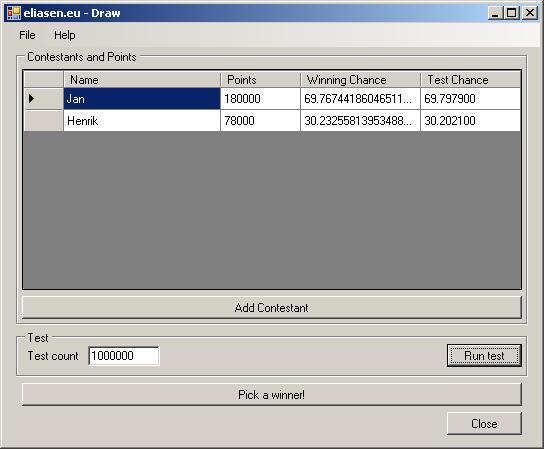
Therefore, I have written a small winforms program, that helps you manage this. You
can add as many contestants as you like, and give them points. If you are only interested
in a “normal” draw, you can just give all contestants one point.
Screen shot:
The program not only does the draw, it will also:
-
Give you an overview of the contestants, their points and their chance of winning,
which is dynamically updated each time a contestant is added
-
Give you the opportunity to simulate any number of draws, to ensure that the program
is random. When doing the simulation, the percentage of wins by each contestant is
shown next to the chance of winning, so they can be compared.
I will gladly take comments, bug reports, suggestions, postcards, et cetera 🙂
The documentation can be found at http://www.eliasen.eu/DownloadSoftware.aspx#documentation and
the program can be downloaded at http://www.eliasen.eu/DownloadSoftware.aspx#winform.
I hope this comes in handy to someone.
—
eliasen
by community-syndication | Dec 23, 2008 | BizTalk Community Blogs via Syndication
Hi all
I am using http://www.last.fm to keep track of what
I listen to, and to get inspired to listen to some new music that I didn’t know I
liked.
You can find my profile at http://www.last.fm/user/eliasen and
you can find information about an excellent Danish band Baal at http://www.last.fm/music/Baal.
Please note, though, that I listen to the Danish band Baal, and not the Japanese band
that unfortunately shares the band name Baal with the Danish band.
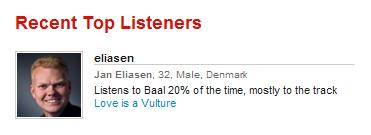
Anyway, the point of this blog post is, that it seems that I am currently the top
listener of Baal:
🙂
This means that I listen to more Baal than all that listen to either the Danish or
the Japanese band…
I know… Get a life, damn it! 🙂
Baal have a web site at http://www.baalworld.com –
try it! 🙂
—
eliasen