by community-syndication | Apr 16, 2009 | BizTalk Community Blogs via Syndication
As I’m looking into sizing up systems currently for a project, the question that you
always ask “Is my CPU choice any good?” “Should I go Dual Quad Core or Quad Dual Core?”
and the questions just keep on coming, even in your sleep sometimes 🙂
I recently came across a gem of a site that gave me all my answers. There’s a bunch
of other CPUs and options available also. Check it out.
http://www.cpubenchmark.net/cpu_lookup.php?cpu=%5BDual+CPU%5D+Intel+Xeon+E5420+%40+2.50GHz
by community-syndication | Apr 16, 2009 | BizTalk Community Blogs via Syndication
We had a little problem a few days ago when we were reviewing the testing of a B2B solution implemented with BizTalk.
This implementation was basically the collection of a file via FTP and then a splitter pattern which would break up a batch and cascade updates to appropriate systems. The file which was recieved was a moderately complex file containing multiple rows containing different types of positional records.
We had implemented this as per the specification and were moving from testing this internally to test it with the business partner. One of our limitations was that we could not do integration testing as early as we would like due to some external constraints.
Our internal tests were fine, but during integration testing we found some unexpected behaviour from the partners FTP service. A summary of this behaviour is:
- The server would store multiple files with the exact same file name. If the partner uploaded 2 files we could see them as seperate instances with seperate file creation dates, but they would both have the same name.
- When we executed a GET command on a file it would get the file and then mark it as collected and prevent us from downloading the file again. To be able to get a file if transmittion had failed we need the partner to make the file available again
- We are unable to delete files from the server
- If 2 files with the same name can be seen on the remote server, if we execute a get it will actually merge the files together to give us one file locally containing all of the date from both remote files. The data positions the content of the files in date order
We experienced a little problem and became aware of this unexpected behaviour and our first thoughts were that we would need to do some custom coding to deal with this. On closer inspection our problem seemed to be something else and BizTalk was actually dealing with this FTP behaviour in a way that worked well for us. Our setup basically had the FTP adapter polling the remote server when files were downloaded they were streamed through a custom pipeline which contained the FFDasm pipeline component which used a schema based on the partners message specification.
The way BizTalk was dealing with this additional FTP requirements was as follows:
- It didnt matter that BizTalk couldnt delete the file from the remote server because once the file was downloaded it was no longer available anyway.
- When 2 or more files were merged together when downloaded the FFDasm component was recognising this and actually still broke the message up correctly. If 2 files were downloaded and merged together we would actually get 2 disassembled messsages in the messagebox which had been handled correctly by FFDasm
I guess in hindsight this kind of makes sense, but it was nice to come across a situation where something like this happens and you done end up having to pull together some hack to workaround it.
In terms of the partners FTP service we didnt get confirmation on the vendor specific setup but based on some googling (sorry I mean Live searching) I believe that the it could be based on a VAX file system where you can have multiple versions of a fileand the FTP service could be either HP/UX Enterprise Secure FTP or possible an offering from Sterling
by community-syndication | Apr 16, 2009 | BizTalk Community Blogs via Syndication
| The Australian BizTalk User Groups (Sydney Connected Systems User Group, Brisbane BizTalk Community (BrizTalk) and Melbourne BizTalk User Group, would like to invite you to attend one of the BizTalk Server 2009 Hands On Days being presented in May and June 2009.
The event is targeted for those using previous version of BizTalk Server and those wishing to learn more about BizTalk Server. The attendees will have an a dedicated BizTalk 2009 development environment to use during the event. The attendees can either work on the hands on labs or to experiment with the feature of BizTalk 2009. The BizTalk 2009 development environment will include BizTalk 2009, RFID, ESB 2.0, Windows 2008, SQL 2008, Team Foundation Server 2008, Visual Studio 2008 Team Suite. |
|
The Hands On Days will be on the following dates:
|
Melbourne
|
Brisbane
|
Sydney
|
Canberra
|
Perth
|
Adelaide
|
|
Saturday May 30th
|
Saturday June 13th
|
Saturday June 20th
|
TBA
|
TBA
|
TBA
|
|
|
Registration Opens Soon |
Register Your Interest |
Register Your Interest |
Register Your Interest |
| Register early as there are limited seats. |
The Event cost is $200* (inc GST) and will include lunch.
The event fee will be used to cover the venue and travel expenses of the presenters, any left over funds will be used for food and drinks at upcoming user group events.
* Please note that the registration fee will be processed via PayPal by Chesnut Consulting Services
|
Agenda for the Days
|
|
Presenters
|
|
Time
|
Topic
|
Duration
|
Melbourne
|
Brisbane
|
Sydney
|
| 9:00 AM |
Intro |
15 minutes |
Bill Chesnut |
Daniel Toomey |
Mick Badran |
| 9:15 AM |
What’s New in 2009 |
60 minutes* |
Bill Chesnut |
Daniel Toomey |
Mick Badran |
| 10:15 AM |
TFS Integration (Unit Testing & Automated Build) |
60 minutes |
Bill Chesnut |
Dean Robertson |
Bill Chesnut |
| 11:15 AM |
RFID |
60 minutes |
Mick Badran |
Mick Badran |
Mick Badran |
| 12:15 PM |
Lunch / Networking |
45 minutes |
|
|
|
| 1:00 PM |
Enterprise Integration (WCF LOB adapters, EDI, AS2 and Accelerators) |
60 minutes |
Miguel Herrera |
Miguel Herrera |
Miguel Herrera |
| 2:00 PM |
ESB 2.0 |
60 minutes |
Bill Chesnut |
Bill Chesnut |
Bill Chesnut |
| 3:00 PM |
Trouble Shooting & Problem Determination |
60 minutes |
Miguel Herrera |
Miguel Herrera |
Miguel Herrera |
| 4:00 PM |
Q & A |
30 minutes |
All |
All |
All |
| 4:30 PM |
End of Day |
|
|
|
|
* Each presentation will finish in time for the attendees to have a chance to put what they have learned to use on the BizTalk 2009 Environments that will be provided.

by community-syndication | Apr 16, 2009 | BizTalk Community Blogs via Syndication
I am building a BizTalk 2009 book library for my team at work and thought I’d share the list of books with some comments. They can all be pre-ordered from Amazon (with the exception of Pro Mapping in BizTalk 2009 that is already shipping).
Must have books:
SOA Patterns with BizTalk Server 2009 by Richard Seroter
Very much […]
by community-syndication | Apr 15, 2009 | BizTalk Community Blogs via Syndication
Hi all
I have had posts about the context accessor functoid here and here.
Just a couple of notes about the context accessor functoids (plural – because there
are two functoids at codeplex):
-
One of the functoids will only work when called from a map that is
executed inside an orchestration.
-
The other functoid will only work when called from a map in a receive
port AND only if the pipeline component that ships with the functoid
has been used in the receive pipeline.
As you can see, creating a map based on either of these functoids makes your map impossible
to use in either an orchestration or a receive port based on which functoid you chose.
So you are creating a pretty hard coupling between your map and where it should be
used. This can be ok, but if other developers mess around with your solution in a
year or so, they wont know that and things can start breaking up.
My self: I am a user of the functoids – I would use them instead of assigning values
inside an orchestration using a message assignment shape.. but this discussion is
pretty much academic and about religion 🙂
Anyway, beware the limitations!
—
eliasen
by community-syndication | Apr 15, 2009 | BizTalk Community Blogs via Syndication
Hi all
I had a post about one of the context
accessor functoids which can be seen here: http://blog.eliasen.dk/2009/04/01/TheContextAccessorFunctoidPartI.aspx
This post is about the other one – the one that can only be used in a map that is
used in a receive port.
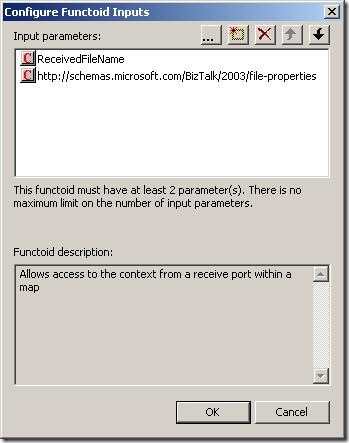
Basically, the functoid takes in three inputs:
The first is the name of the property and the second parameter is the namespace of
the property schema this property belongs to. The third parameter is an optional string
that is returned in case the promoted property could not be read.
This functoid only works in a map that is called in a receive port
and only if the receive location uses a pipeline that uses the ContextAccessorProvider
pipeline component that is included in he same DLL as the functoids.
What the pipeline component does is, that it takes the context of the incoming message
and saves it in a public static member. This way, the functoid can access this static
member of the pipeline component and read the promoted properties this way.
Good luck using it.
—
eliasen
by community-syndication | Apr 15, 2009 | BizTalk Community Blogs via Syndication
[Source: http://geekswithblogs.net/EltonStoneman]
Managing concurrency within an application boundary can be straightforward where you own the database schema and the application’s data representation. By adding an incrementing lock sequence to tables and holding the current sequence in entity objects, you can implement optimistic locking at the database level without a significant performance hit. At the service level, the situation is more complicated. Even where the database schema can be extended, you wouldn’t want the internals of concurrency management to be exposed in service contracts, so the lock sequence approach isn’t suitable.
An alternative pattern is to compute a data signature representing the retrieved state of an entity at the service level, and flow the signature alongside the entity in Get services. On Update calls, the original data signature is passed back and compared to the current signature of the data; if they differ then there’s been a concurrency violation and the update fails. The signature can be passed as a SOAP header across the wire so it’s not part of the contract and the optimistic locking strategy is transparent to consumers.
The level of transparency will depend on the consumer, as it needs to retrieve the signature from the Get call, retain it, and pass it back on the Update call. In WCF the DataContract versioning mechanism can be used to extract the signature from the header and retain it in the ExtensionData property of IExtensibleDataObject. The contents of the ExtensionData property are not directly accessible, so if the same DataContract is used on the Get and the Update, and the signature management is done through WCF extension points, then concurrency control is transparent to users.
I’ve worked through a WCF implementation for this pattern on MSDN Code Gallery here: Optimistic Locking over WCF. The sample uses a WCF behavior on the server side to compute a data signature (as a hash of the serializable object – generating a deterministic GUID from the XML string) and adds it to outgoing message headers for all services which return a DataContract object. On the consumer side, a parallel behaviour extracts the data signature from the header and adds it to ExtensionData, by appending it to the XML payload and using the standard DataContractSerializer to extract it.
The update service checks the data signature passed in the call with the current signature of the object and throws a known FaultException if there’s been a concurrency violation, which the WCF client can catch and react to:
Sixeyed.OptimisticLockingSample
The sample solution consists of four projects providing a SQL database for Customer entities, WCF Get and Update services, a WCF client and the ServiceModel library which contains the data signature behaviors. DataSignatureServiceBehavior adds a dispatch message formatter to each service operation, which computes the hash for any DataContract objects being returned, and adds it to the message headers. DataSignatureEndpointBehavior on the client adds a client message formatter to each endpoint operation, which extracts the hash from incoming calls, stores it in ExtensionData and adds it back to the header on outgoing calls.
Concurrency checking is done on the server side in the Update call, by comparing the given data signature to the signature from the current object state:
Guid dataSignature = DataSignature.Current;
if (dataSignature == Guid.Empty)
{
//this is an update method, so no data signature to
//compare against is an exception:
throw new FaultException<NoDataSignature>(new NoDataSignature());
}
Customer currentState = CustomerEntityService.Load(customer);
Guid currentDataSignature = DataSignature.Sign(currentState);
//if the data signatures match then update:
if (currentDataSignature == dataSignature)
{
CustomerEntityService.Update(customer);
}
else
{
//otherwise, throw concurrency violation exception:
throw new FaultException<ConcurrencyViolation>(new ConcurrencyViolation());
}
A limitation of the sample is the use of IExtensibleDataObject to store the data signature at the client side. Although this is fully functional and allows a completely generic solution, it relies on reflection to extract the data signature and add it to the message headers for the update call, which is a brittle option. Where you have greater control over the client, you can use a custom solution which will be more suitable – e.g. creating and implementing an IDataSignedEntity interface, or if consuming the services in BizTalk, by using context properties.
by community-syndication | Apr 15, 2009 | BizTalk Community Blogs via Syndication
[Source: http://geekswithblogs.net/EltonStoneman]
The venerable log4net library enables cheap instrumentation with configured logging levels, so logs are only written if the log call is on or above the active level. However, the evaluation of the log message always takes place, so there is some performance hit even if the log is not actually written. You can get over this by using delegates for the log message, which are only evaluated based on the active log level:
public static void Log(LogLevel level, Func<string> fMessage)
{
if (IsLogLevelEnabled(level))
{
LogInternal(level, fMessage.Invoke());
}
}
Making the delegate call with a lambda expression makes the code easy to read, as well as giving a performance saving:
Logger.Log(LogLevel.Debug,
() => string.Format(“Time: {0}, Config setting: {1}”,
DateTime.Now.TimeOfDay,
ConfigurationManager.AppSettings[“configValue”]));
For simple log messages, the saving may be minimal, but if the log involves walking the current stack to retrieve parameter values, it may be worth having. The sample above writes the current time and a configuration value to the log, if set to Debug. With the log level set to Warn, the log isn’t written. Executing the call 1,000,000 times at Warn level consistently takes over 3.7 seconds if the logger call is made directly, and less than 0.08 seconds if the Lambda delegate is used:
With a Warn call, the log is active and the direct and Lambda variants run 5,000 calls in 8.6 seconds, writing to a rolling log file appender:
I’ve added the logger and test code to the MSDN Code Gallery sample: Lambda log4net Sample, if you’re interested in checking it out.
by community-syndication | Apr 15, 2009 | BizTalk Community Blogs via Syndication
I’ve added some functionality to the PGP Pipeline component to enable it to Sign and Encrypt files.
Properties Explained:
ASCIIArmorFlag – Writes out file in ASCII or Binary
Extension – Final File’s extension
Operation – Decrypt, Encrypt, and now Sign and Encrypt
Passphrase – Private Key’s password for decrypting and signing
PrivateKeyFile – Absolute path to private key file
PublicKeyFile – Absolute path to public key file.
TempDirectory – Temporary directory used for file processing.
Email me if you could use this.

by community-syndication | Apr 15, 2009 | BizTalk Community Blogs via Syndication
With the release of SQL Server 2005 SP3, many of us are wondering if BizTalk Server 2006 is supported with SP3. I asked Microsoft this question and here was the reply:
“The BizTalk test team has planned complete testing of this. However, the Rangers team has tested this setup in a in-house test setup and […]