Almost 3 years ago, I wrote a blog post about How to get Key-values from Azure App Configuration within Logic Apps, and this is still valid today since we still don’t have an App Configuration Connector available out of the box. But I realize that I never blog about this resource in my blog.
There are many ways to store application configurations in Azure. At the top of the list is Key Vault which is ideal for storing secrets like passwords that should have limited access to the number of people that can see and modify these values.
However, not all configurations should need that tremendous restricted access. Neither all configurations are secrets. Of course, you can also use Key Vault to store non-secret information. But there are other options available like:
Using a SQL database with an app configuration table to store key values.
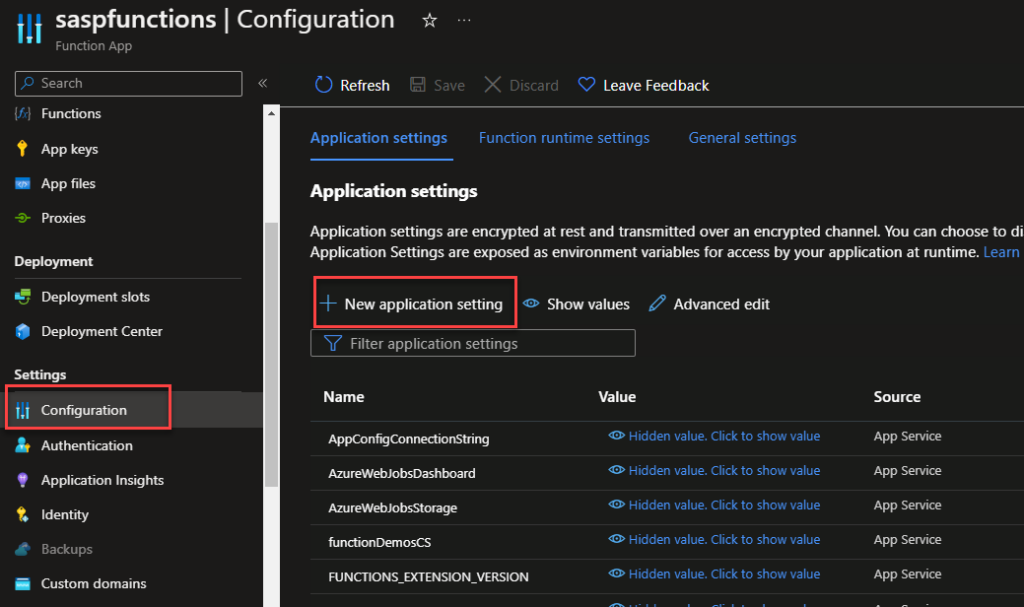
Depending on the services you are using, you can also use the default built-in App Configuration settings. For example, Azure Functions have it:
But you can also make use of the Azure App Configuration service.
Azure App Configuration stores configuration data as key-values. Key-values are a flexible and straightforward representation of developers’ application settings to make these configurations settings dynamic without redeploying your application if changes are required. However, they are not encrypted like the Key Vault, so it is a good solution to store non-sensitive data that you want to make dynamic in your application.
Combining Azure App Configuration to store and manage your configurations and Azure Key Vault to store your secrets, we will obtain apowerful configuration management nearly for free.
App Configuration makes it easier to implement the following scenarios:
Centralize management and distribution of hierarchical configuration data for different environments and geographies
Dynamically change application settings without the need to redeploy or restart an application
Control feature availability in real-time
The only problem was that unlike Key Vault, which has an available connector to be used inside Logic Apps, App Configuration doesn’t have a connector available.
Get Azure App Configuration Value Function
This Function App is intended to close this gap and for you to be able to use it inside Logic Apps (or any other resource) and read App Configurations.
You can download the complete code for the function from GitHub. The link is below at the bottom of the blog post. Here is a small code snippet:
public static class GetAzureAppConfigurationValue
    {
        [FunctionName("GetAzureAppConfigurationValue")]
        public static async Task Run(
            [HttpTrigger(AuthorizationLevel.Function, "get", Route = null)] HttpRequest req,
            ILogger log)
        {
            string appKey = req.Query["appKey"];

            ....

            try
            {
                ...
                var builder = new ConfigurationBuilder();
                builder.AddAzureAppConfiguration(connectionString);
                var build = builder.Build();

                string keyValue = build[appKey.ToString()];

                if (string.IsNullOrEmpty(keyValue))
                {
                    ...
                }
                else return new OkObjectResult(keyValue);
            }
            catch(Exception ex)
            {
                var result = new ObjectResult(ex.Message);
                result.StatusCode = StatusCodes.Status500InternalServerError;
                return result;
            }
        }
    }
This function requires that you pass as a query parameter the appKey parameter:
https://URL?appKey=’’
Where can I download it?
You can download the complete Azure Function source code here:
Hope you find this helpful! So, if you liked the content or found it helpful and want to help me write more content, you can buy (or help buy) my son a Star Wars Lego!
Author: Sandro Pereira
Sandro Pereira lives in Portugal and works as a consultant at DevScope. In the past years, he has been working on implementing Integration scenarios both on-premises and cloud for various clients, each with different scenarios from a technical point of view, size, and criticality, using Microsoft Azure, Microsoft BizTalk Server and different technologies like AS2, EDI, RosettaNet, SAP, TIBCO etc.
He is a regular blogger, international speaker, and technical reviewer of several BizTalk books all focused on Integration. He is also the author of the book “BizTalk Mapping Patterns & Best Practices”. He has been awarded MVP since 2011 for his contributions to the integration community.
View all posts by Sandro Pereira
This is just another post for the sake of my mental sanity because I hate that Microsoft will induce, based on my location, that I intend for the Azure Portal to have my beloved Portuguese as the default language!
Don’t get me wrong, I’m proud to be Portuguese, and I do love my native language, but technically speaking, I hate to translate technical names into Portuguese for several reasons:
Sometimes direct translations do not work properly, and in some cases, the names/concepts are strange:
A queue (service bus) in Portuguese is “Fila” but “Fila” can be in English a row, a line, or indeed a queue > and this one is simple.
But most importantly, if I try or need to search for documentation or issues regarding some services, most of the resources will be in English.
Also, because I do have multiple clients across the world, speaking with them and sharing the screen with them will be easier if everything is in English.
I usually have all the portals and tools in English, but every now and then, I need to create a new profile on my browser, and there you go. I will end up with the Azure Portal in Portuguese and fighting to remember where to change the language, which by the way, is quite simple to achieve :).
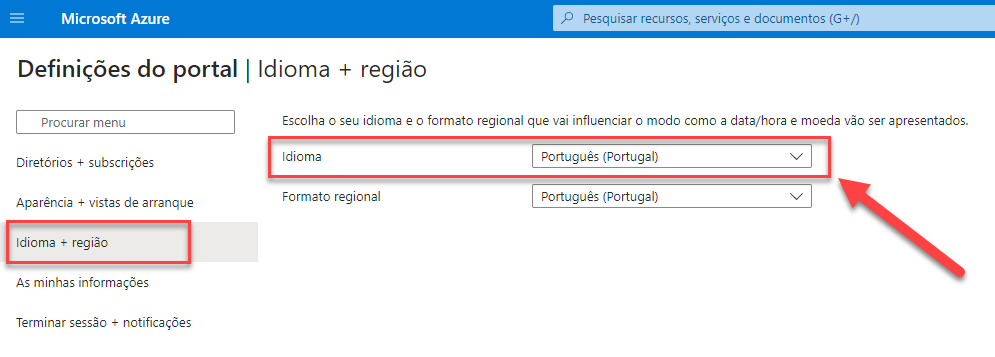
To change the language settings in the Azure portal:
Click the Settings menu in the global page header.
Click the Language & region tab. Of course, depending on the current language, you will get a different name. Mine is “Idioma + região” (Portuguese).
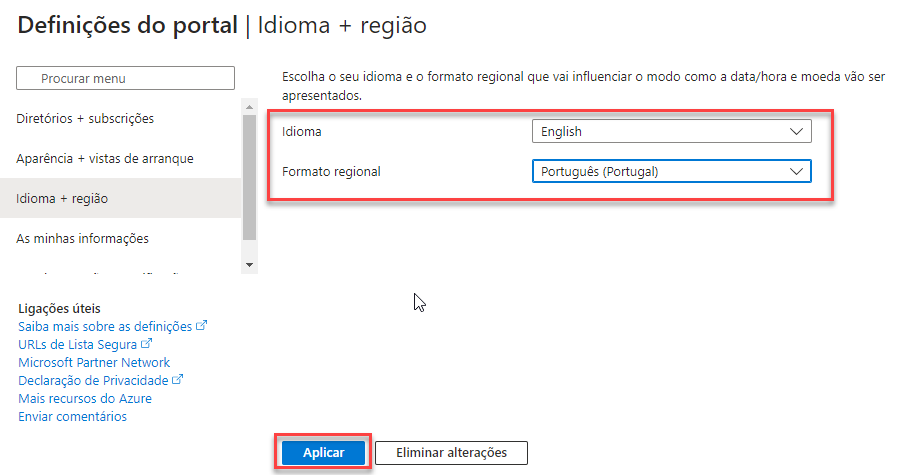
Use the drop-downs to choose your preferred language and regional format settings.
Click Apply, in my case “Aplicar“, to update your language and regional format settings.
Hope you find this helpful! So, if you liked the content or found it helpful and want to help me write more content, you can buy (or help buy) my son a Star Wars Lego!
Author: Sandro Pereira
Sandro Pereira lives in Portugal and works as a consultant at DevScope. In the past years, he has been working on implementing Integration scenarios both on-premises and cloud for various clients, each with different scenarios from a technical point of view, size, and criticality, using Microsoft Azure, Microsoft BizTalk Server and different technologies like AS2, EDI, RosettaNet, SAP, TIBCO etc.
He is a regular blogger, international speaker, and technical reviewer of several BizTalk books all focused on Integration. He is also the author of the book “BizTalk Mapping Patterns & Best Practices”. He has been awarded MVP since 2011 for his contributions to the integration community.
View all posts by Sandro Pereira
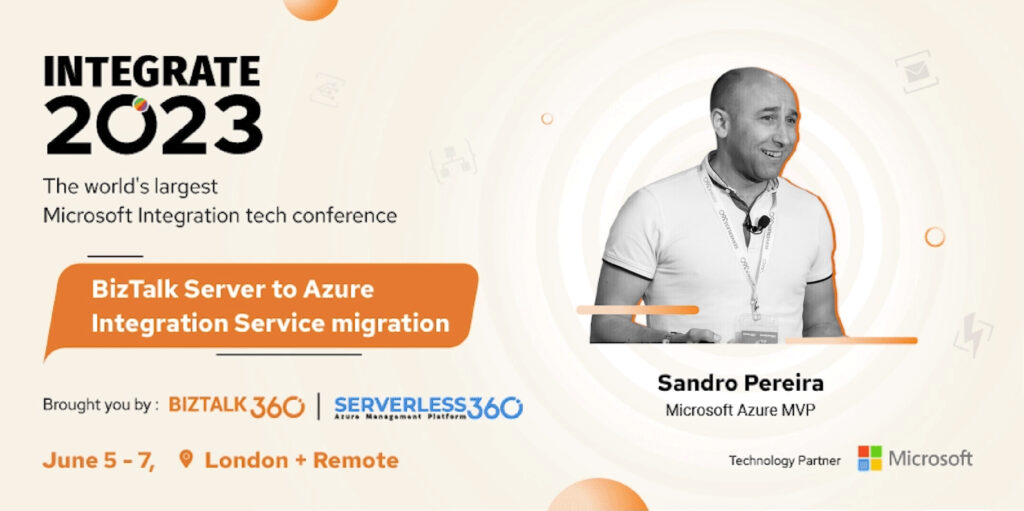
INTEGRATE (formerly known as BizTalk Summit) is the primary conference for professionals working in the Microsoft Integration space and once again is back in London. From June 5 to 7, 26 speakers – 12 MVPs, 1 former MVP, and 12 Microsoft PM – will address the entire Microsoft Integration Platform landscape on topics like BizTalk Server, Logic Apps, Service Bus, Event Grid, Event Hubs, Microsoft Flow, API Management, Azure Functions and many more.
And once again, I will be there delivering a session! Since the first BizTalk Summit event, I’ve been a constant presence as a speaker at these events! However, this will be the first time I’m not going to deliver a session 100% dedicated to BizTalk Server. This time I’ll be talking about how you can migrate your BizTalk Server solution to Azure Integration Services.
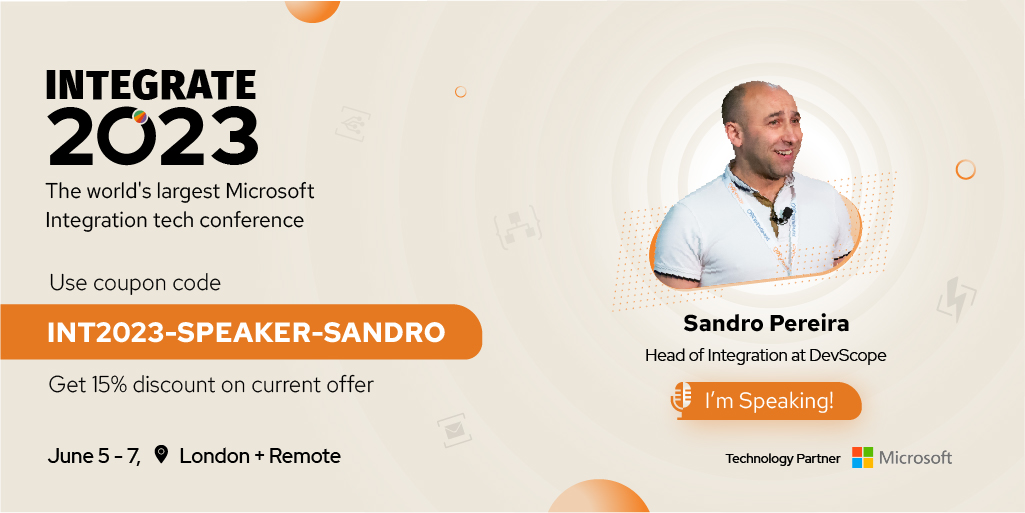
You could also get an exclusive 15% discount on top of the existing early bird offer using the coupon code “INT2023-SPEAKER-SANDRO”.
About my session
Session Name: BizTalk Server to Azure Integration Services migration
Abstract: If you are embracing the journey to move your current BizTalk Server environment to the cloud, we will discuss what you need to be aware of in this session. From the preparation phase – the assessment phase to the tools and technology you can use, some best practices you may implement, what to do and not to do, and finally, presenting some samples.
Content is not all you get from this event…
Content is hugely important, and as you read previously, this event will address the entire Microsoft Integration Platform landscape… but that’s not all!
This will also be a fantastic opportunity to Network, Connect, and Reconnect with Colleagues. Meet some of the people you have been following on Twitter and blogs and network with them and others who are interested in the same things you are. To hang out with the most brilliant people you know – and I’m not talking about the speakers or Microsoft PMs! I’m talking about you guys! – last year, we had more than 200 attendees from several companies across many countries attending the event, and it was the first personal event after COVID-19, this year will be bigger! Imagine the experience that all of us have combined!
The knowledge and experience of all the attendees, speakers, and product group members at these events are unreal!!! You will not find an opportunity like this every day.
So, this event is a massive opportunity for you to:
Get insight and answers to your questions from these real-world experts: attendees, MVPs, and/or Microsoft PMs;
Know and become friends with people you are interested in or that you follow on social media and participate in post-event activities like coffee breaks and dinner with speakers and/or other attendees.
Build your personal Business Networking, and it is also a good opportunity for Partnerships… and new business opportunities.
And finally: Refresh and recharge and have some fun!
Fill free to contact DevScope at [email protected] if you want to know more about us, what we do, and/or how we can help you and your business.
INTEGRATE 2023 Registration
You are still on time to register for the conference here.
Author: Sandro Pereira
Sandro Pereira lives in Portugal and works as a consultant at DevScope. In the past years, he has been working on implementing Integration scenarios both on-premises and cloud for various clients, each with different scenarios from a technical point of view, size, and criticality, using Microsoft Azure, Microsoft BizTalk Server and different technologies like AS2, EDI, RosettaNet, SAP, TIBCO etc.
He is a regular blogger, international speaker, and technical reviewer of several BizTalk books all focused on Integration. He is also the author of the book “BizTalk Mapping Patterns & Best Practices”. He has been awarded MVP since 2011 for his contributions to the integration community.
View all posts by Sandro Pereira
Unfortunately, until this date, there isn’t available an Azure Logic Apps Tools for Visual Studio Extension for Visual Studio 2022, which means that we still need to use Visual Studio 2019 to create Logic App Consumption projects with Visual Studio.
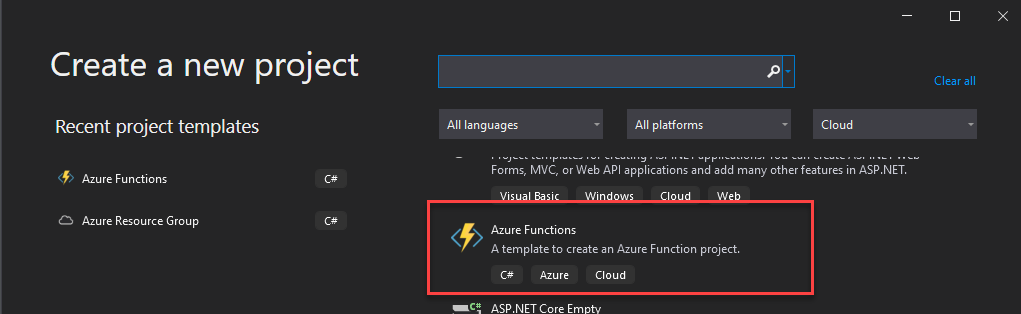
An opposite to other Azure Services like Azure Functions that have a dedicated Azure Function project Template:
There isn’t a Logic App Consumption Visual Studio project template. Instead, we need to use the Azure Resource Group project template, and inside we will select that it will be applying a Logic App template.
Creating a Visual Studio Logic App Consumption project
The Logic Apps designer integrates with the current Azure Resource Group project. That saying, you will not find any Logic App template in the list of templates. Instead, we need to create an Azure Resource Group project to get started, and to do that, we need:
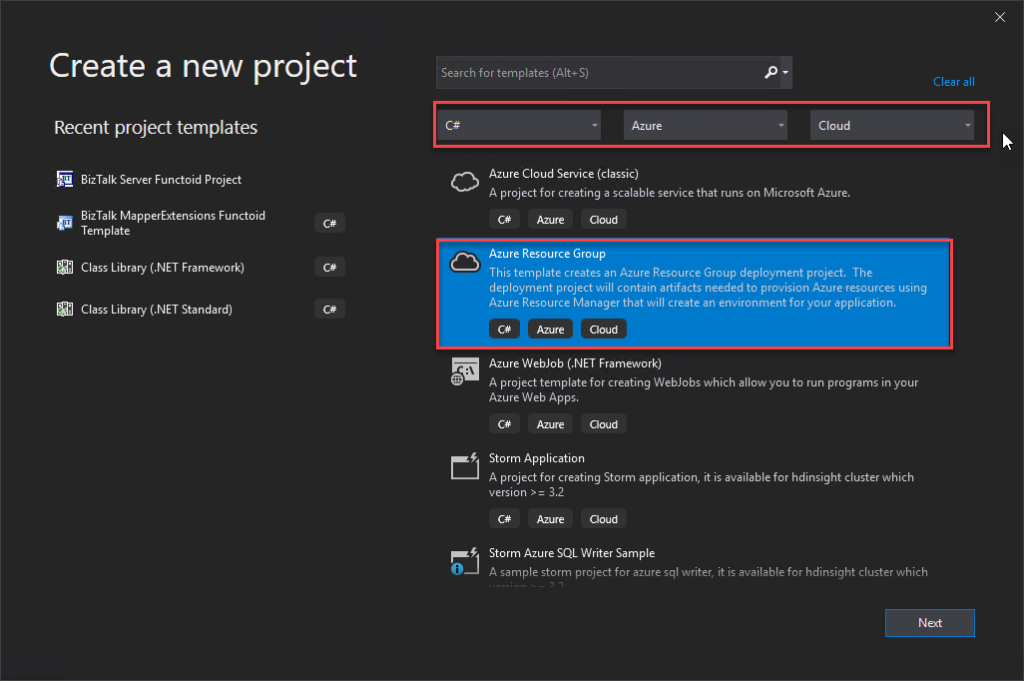
Open Visual Studio, and on the Create a new project panel, select C# -> Azure -> Cloud, or search for Azure Resource Group:
From the list of project templates, select the Azure Resource Group template.
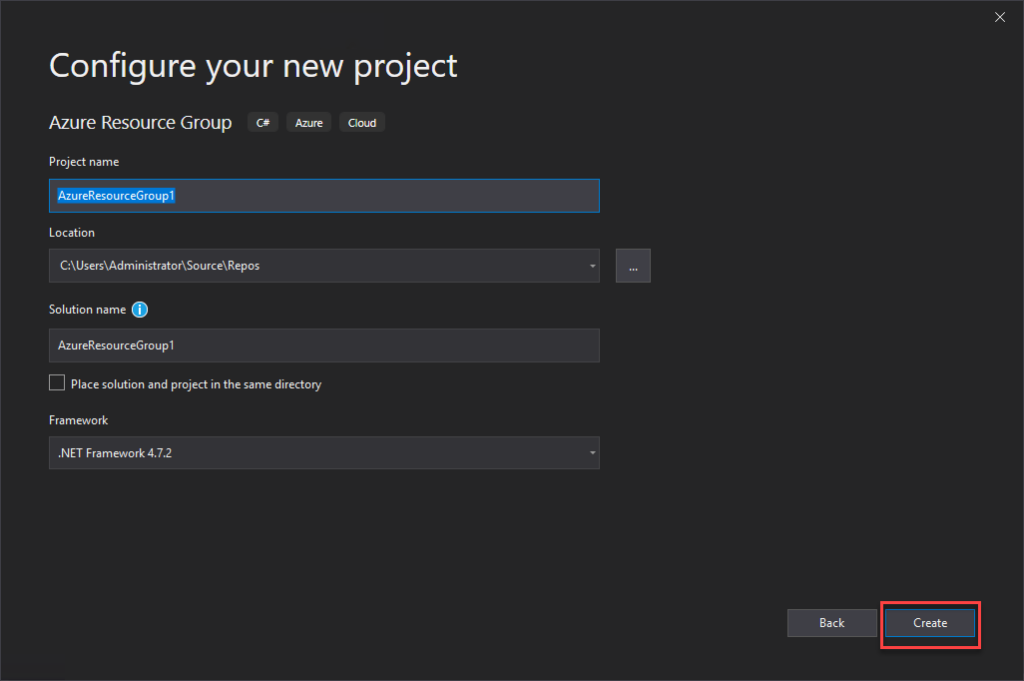
On the Configure your new project panel, give a proper Project name, Location, and Solution name. Leave the Framework as .NET Framework 4.7.2 and select Create.
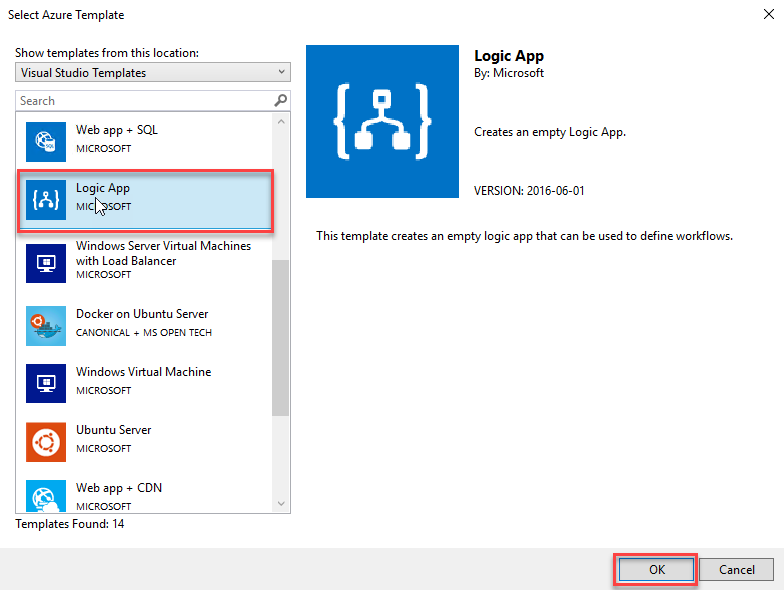
Finally, on the Select Azure Template panel, from the Visual Studio Templates list, select the Logic App template and select OK.
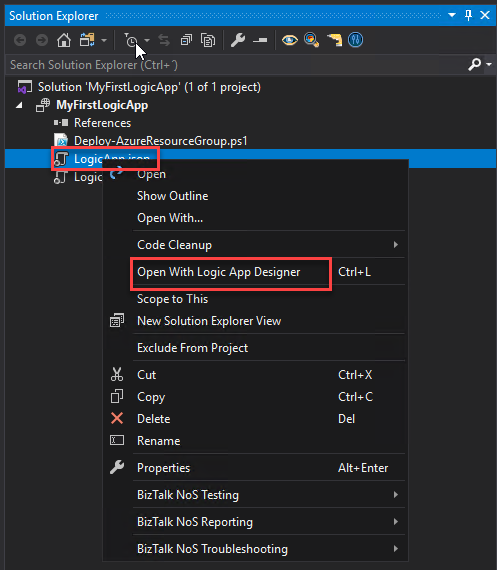
This will create an empty Visual Studio Logic App solution. Now on the Visual Studio solution:
Right-click on the LogicApp.json file and select Open With Logic App Designer.
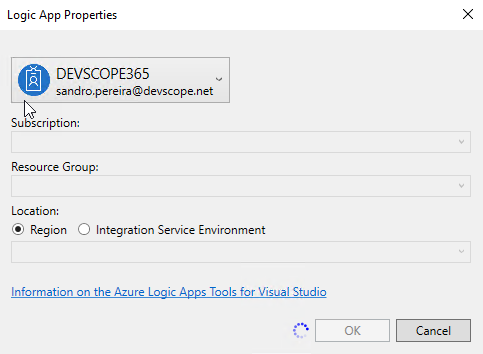
This will open a Logic App Properties window, where you need to:
Define the credentials to authenticate on the Azure subscription.
Define the Subscription and Resource Group where you want to create these resources.
Define if you want the Location to be in the same Region or in an Integration Service Environment (ISE) – be aware the ISE is being deprecated.
And then select OK.
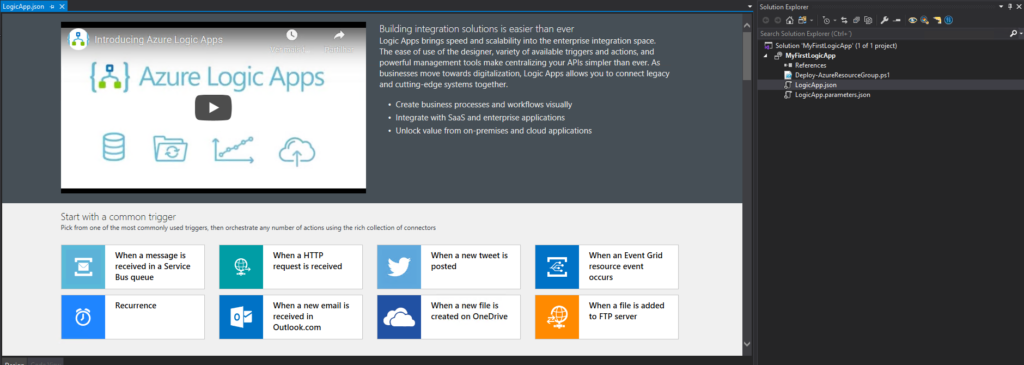
This will embed the Logic App designer inside the Visual Studio.
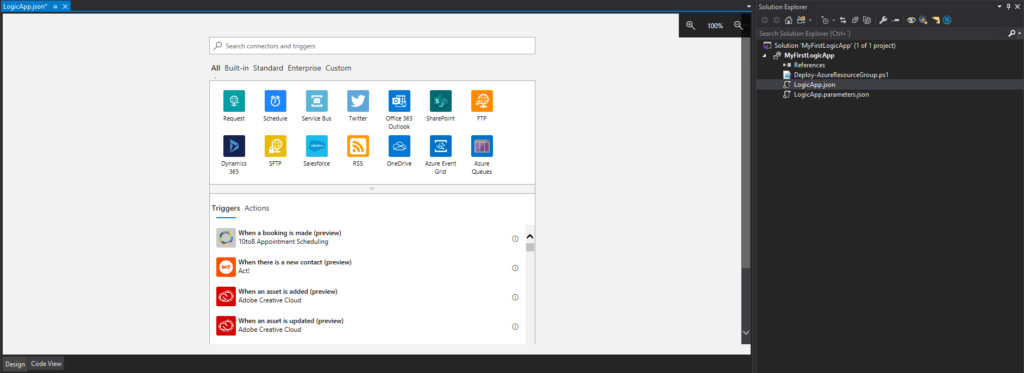
Now you need to select a common trigger, a template, or use a blank Logic App to start creating your business process.
Hope you find this helpful! So, if you liked the content or found it helpful and want to help me write more content, you can buy (or help buy) my son a Star Wars Lego!
Author: Sandro Pereira
Sandro Pereira lives in Portugal and works as a consultant at DevScope. In the past years, he has been working on implementing Integration scenarios both on-premises and cloud for various clients, each with different scenarios from a technical point of view, size, and criticality, using Microsoft Azure, Microsoft BizTalk Server and different technologies like AS2, EDI, RosettaNet, SAP, TIBCO etc.
He is a regular blogger, international speaker, and technical reviewer of several BizTalk books all focused on Integration. He is also the author of the book “BizTalk Mapping Patterns & Best Practices”. He has been awarded MVP since 2011 for his contributions to the integration community.
View all posts by Sandro Pereira
It is Friday, and just for fun and also because I would like to have a watch (one of my passions) in the cover picture, I decided to migrate a subset of an old project of mine: BizTalk MapperExtensions UtilityPack to Azure Functions, in this case, DateTime Conversion Functoids. You never know if they will be handy someday!
This project includes a list of Azure Functions that make data conversions easy to accomplish and that you can use anywhere, but most likely, I was thinking of using them inside Logic Apps if I will have a need to do this kind of task if they are not available out-of-the-box inside Logic Apps – and I know that some of them are not:
Convert from human-readable to epoch date function.
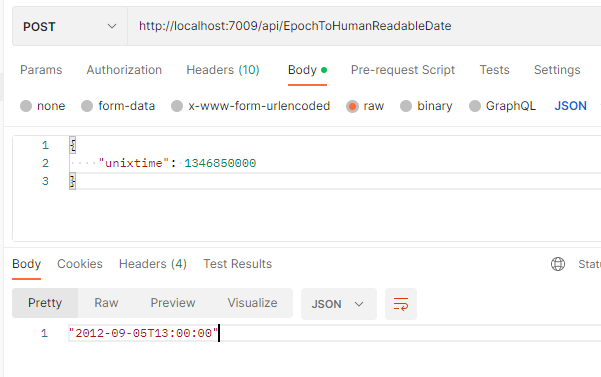
Convert from epoch to human readable date function.
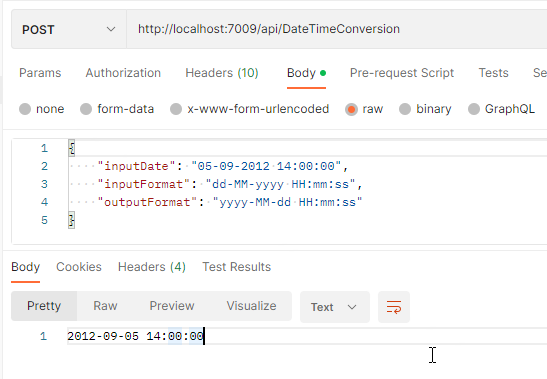
And Convert date time format function.
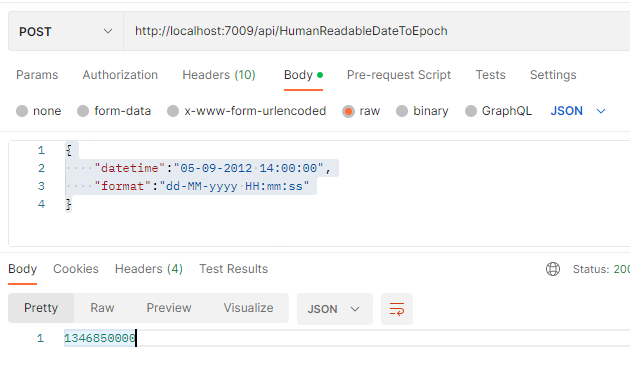
Convert from human-readable to epoch date function.
This function allows you to convert a traditional date (Human Readable Date) into a Unix date (Epoch Date).
What is epoch time?
The Unix epoch (or Unix time or POSIX time or Unix timestamp) is the number of seconds that have elapsed since January 1, 1970 (midnight UTC/GMT), not counting leap seconds (in ISO 8601: 1970-01-01T00:00:00Z). Literally speaking, the epoch is Unix time 0 (midnight 1-1-1970), but ‘epoch’ is often used as a synonym for ‘Unix time’. Many Unix systems store epoch dates as a signed 32-bit integer, which might cause problems on January 19, 2038 (known as the Year 2038 problem or Y2038).
The function receives a JSON payload with two properties:
The input Date or DateTime.
And a string describing the input format of the first parameter
The function’s output is a DateTime string according to the output format specified : “2012-09-05 14:00:00”
Where can I download it
You can download the complete Azure Functions source code here:
Hope you find this helpful! So, if you liked the content or found it helpful and want to help me write more content, you can buy (or help buy) my son a Star Wars Lego!
Author: Sandro Pereira
Sandro Pereira lives in Portugal and works as a consultant at DevScope. In the past years, he has been working on implementing Integration scenarios both on-premises and cloud for various clients, each with different scenarios from a technical point of view, size, and criticality, using Microsoft Azure, Microsoft BizTalk Server and different technologies like AS2, EDI, RosettaNet, SAP, TIBCO etc.
He is a regular blogger, international speaker, and technical reviewer of several BizTalk books all focused on Integration. He is also the author of the book “BizTalk Mapping Patterns & Best Practices”. He has been awarded MVP since 2011 for his contributions to the integration community.
View all posts by Sandro Pereira
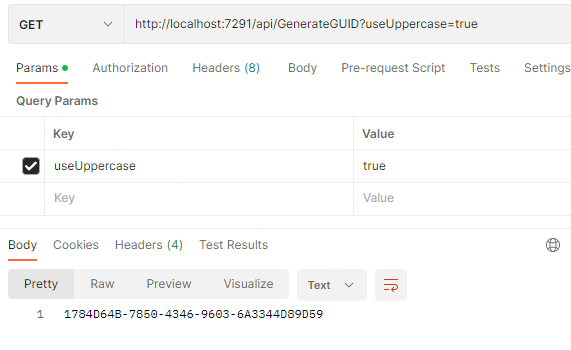
There are so many scenarios that I faced in more than 18 years doing integration that required me to generate a unique id that I don’t know how to start explaining all of them. Unique identifiers are handy when an automation process needs to generate a unique reference “number” to identify an object or entity like a Customer account, a document id, and so on. Most of the time, we use GUIDs, which stands for a globally unique identifier, and it is usually a 128-bit text string that represents an identification (ID) that is unlikely ever to repeat or create a collision to address these scenarios unless requirements don’t allow us to use a GUID.
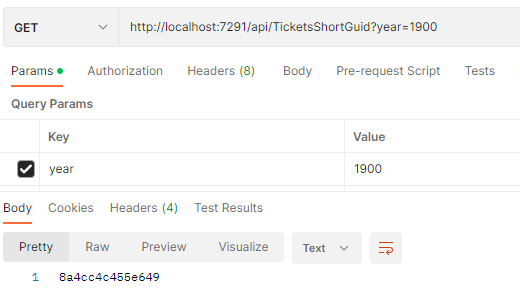
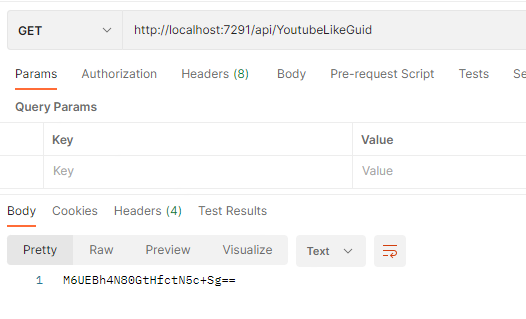
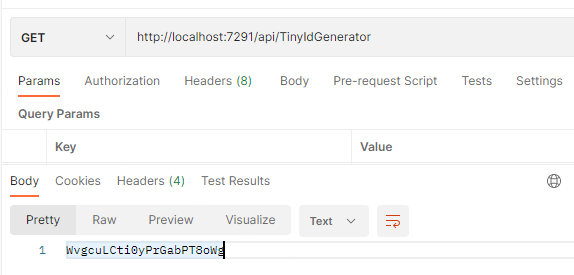
This is a list of 4 Functions that will allow you to generate unique identifiers:
This function is another way that I used in the past, in BizTalk Server projects, to generate a tiny identifier. But looking now that I’m writing this blog post, it looks like a Youtube-like GUID.
Here is a small sample of the code behind this function:
You can download the complete Azure Functions source code here:
Once again, thank my team member Luis Rigueira for testing and helping me develop some of these function with me!
Hope you find this helpful! So, if you liked the content or found it helpful and want to help me write more content, you can buy (or help buy) my son a Star Wars Lego!
Author: Sandro Pereira
Sandro Pereira lives in Portugal and works as a consultant at DevScope. In the past years, he has been working on implementing Integration scenarios both on-premises and cloud for various clients, each with different scenarios from a technical point of view, size, and criticality, using Microsoft Azure, Microsoft BizTalk Server and different technologies like AS2, EDI, RosettaNet, SAP, TIBCO etc.
He is a regular blogger, international speaker, and technical reviewer of several BizTalk books all focused on Integration. He is also the author of the book “BizTalk Mapping Patterns & Best Practices”. He has been awarded MVP since 2011 for his contributions to the integration community.
View all posts by Sandro Pereira
We all must love this Logic App team for engagement with the community over the last few months! Always trying to listen to the client and community feedback in order for them to prioritize investments in Logic Apps based on our real needs.
And once again, the Logic App team wants to listen to our feedback! And this time, on the topic we all developers or consultants were also anxiously waiting for Developer Experience and Tools. At least I was!
Logic Apps Developer Experience and Tools Survey
With this new survey, the Logic App team seeks feedback on how you guys want to have or imagine having XML Support inside Logic Apps. They want to learn about your needs and feedback on the current Logic Apps workflows support for XML and to provide us information about potential scenarios that you want to see covered around XML and SOAP:
Which Logic Apps model(s) are you using today?
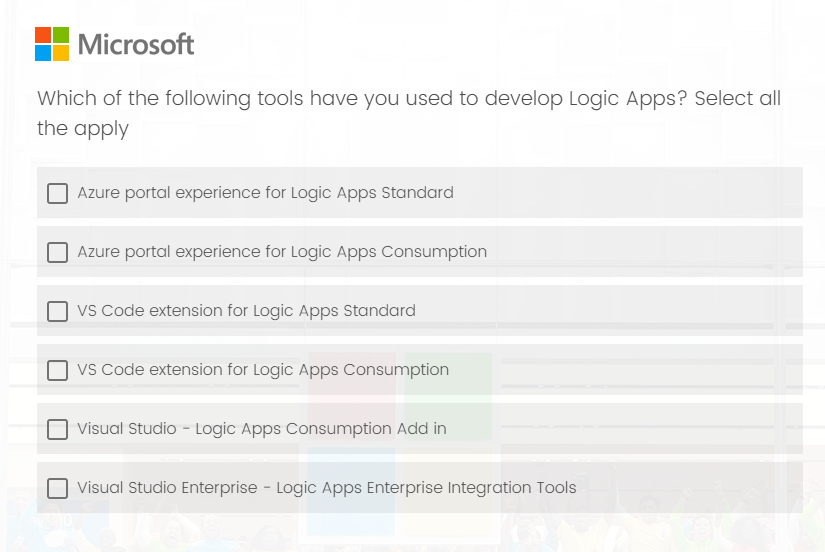
Which tools have you used to develop Logic Apps?
When developing Logic Apps Standard, which environment do you mainly use?
In what scenarios do you use Azure portal more for developing Logic Apps Standard?
Rank the new capabilities of Azure Portal experience for Logic Apps Standard.
If you can choose one IDE for developing Logic Apps Standard locally, which IDE do you want to use? Visual Studio Code or Visual Studio.
Why do you want to use Visual Studio instead of VS Code for developing Logic Apps Standard locally?
Rank the new capabilities of IDE experience for Logic Apps Standard.
THIS IS YOUR OPPORTUNITY! Don’t complain that the developing experience is not that good or you prefer using Visual Studio rather than Visual Studio Code for developing Logic Apps in the future if you don’t fill out this form. The survey does not take long to respond to, and this is your opportunity to try to change and influence the next set of features.
I did my part!
Please fill out the following survey to help Azure Logic Apps:
On a final note, congratulations to the Logic App team for being so engaged with the community!
Author: Sandro Pereira
Sandro Pereira lives in Portugal and works as a consultant at DevScope. In the past years, he has been working on implementing Integration scenarios both on-premises and cloud for various clients, each with different scenarios from a technical point of view, size, and criticality, using Microsoft Azure, Microsoft BizTalk Server and different technologies like AS2, EDI, RosettaNet, SAP, TIBCO etc.
He is a regular blogger, international speaker, and technical reviewer of several BizTalk books all focused on Integration. He is also the author of the book “BizTalk Mapping Patterns & Best Practices”. He has been awarded MVP since 2011 for his contributions to the integration community.
View all posts by Sandro Pereira