by BizTalk Team | Sep 25, 2017 | BizTalk Community Blogs via Syndication
If you missed the chance to attend INTEGRATE 2017 in London this year, now is your chance to participate in INTEGRATE 2017 USA at the Microsoft Redmond Campus. Come see Scott Guthrie, Executive Vice President for the Cloud and Enterprise division, deliver the keynote address. Have a chance to network with Microsoft employees along with Microsoft Integration MVPs.
Further details and registration information can be found at https://www.biztalk360.com/integrate-2017-usa/
by Gautam | Sep 24, 2017 | BizTalk Community Blogs via Syndication
Do you feel difficult to keep up to date on all the frequent updates and announcements in the Microsoft Integration platform?
Integration weekly update can be your solution. It’s a weekly update on the topics related to Integration – enterprise integration, robust & scalable messaging capabilities and Citizen Integration capabilities empowered by Microsoft platform to deliver value to the business.
If you want to receive these updates weekly, then don’t forget to Subscribe!
On-Premise Integration:
Cloud and Hybrid Integration:
Feedback
Hope this would be helpful. Please feel free to let me know your feedback on the Integration weekly series.

by Sandro Pereira | Sep 19, 2017 | BizTalk Community Blogs via Syndication
I decided to update my Microsoft Integration (Azure and much more) Stencils Pack with a set of 24 new shapes (maybe the smallest update I ever did to this package) mainly to add the Azure Event Grid shapes.
One of the main reasons for me to initially create the package was to have a nice set of Integration (Messaging) shapes that I could use in my diagrams, and during the time it scaled to a lot of other things.
With these new additions, this package now contains an astounding total of ~1311 shapes (symbols/icons) that will help you visually represent Integration architectures (On-premise, Cloud or Hybrid scenarios) and Cloud solutions diagrams in Visio 2016/2013. It will provide symbols/icons to visually represent features, systems, processes, and architectures that use BizTalk Server, API Management, Logic Apps, Microsoft Azure and related technologies.
- BizTalk Server
- Microsoft Azure
- Azure App Service (API Apps, Web Apps, Mobile Apps and Logic Apps)
- API Management
- Event Hubs & Event Grid
- Service Bus
- Azure IoT and Docker
- SQL Server, DocumentDB, CosmosDB, MySQL, …
- Machine Learning, Stream Analytics, Data Factory, Data Pipelines
- and so on
- Microsoft Flow
- PowerApps
- Power BI
- Office365, SharePoint
- DevOpps: PowerShell, Containers
- And much more…
The Microsoft Integration (Azure and much more) Stencils Pack v2.6 is composed by 13 files:
- Microsoft Integration Stencils v2.6
- MIS Apps and Systems Logo Stencils v2.6
- MIS Azure Portal, Services and VSTS Stencils v2.6
- MIS Azure SDK and Tools Stencils v2.6
- MIS Azure Services Stencils v2.6
- MIS Deprecated Stencils v2.6
- MIS Developer v2.6
- MIS Devices Stencils v2.6
- MIS IoT Devices Stencils v2.6
- MIS Power BI v2.6
- MIS Servers and Hardware Stencils v2.6
- MIS Support Stencils v2.6
- MIS Users and Roles Stencils v2.6
These are some of the new shapes you can find in this new version:

- Azure Event Grid
- Azure Event Subscriptions
- Azure Event Topics
- BizMan
- Integration Developer
- OpenAPI
- APIMATIC
- Load Testing
- API Testing
- Performance Testing
- Bot Services
- Azure Advisor
- Azure Monitoring
- Azure IoT Hub Device Provisioning Service
- Azure Time Series Insights
- And much more
You can download Microsoft Integration (Azure and much more) Stencils Pack from:
 Microsoft Integration Stencils Pack for Visio 2016/2013 (11,4 MB)
Microsoft | TechNet Gallery
Author: Sandro Pereira
Sandro Pereira lives in Portugal and works as a consultant at DevScope. In the past years, he has been working on implementing Integration scenarios both on-premises and cloud for various clients, each with different scenarios from a technical point of view, size, and criticality, using Microsoft Azure, Microsoft BizTalk Server and different technologies like AS2, EDI, RosettaNet, SAP, TIBCO etc. He is a regular blogger, international speaker, and technical reviewer of several BizTalk books all focused on Integration. He is also the author of the book “BizTalk Mapping Patterns & Best Practices”. He has been awarded MVP since 2011 for his contributions to the integration community. View all posts by Sandro Pereira

by Sivaramakrishnan Arumugam | Sep 19, 2017 | BizTalk Community Blogs via Syndication
In my previous blog, I spoke about one of the issues we encountered during our support. In this blog, I will specifically be talking about the custom widgets in BizTalk360, which a lot of our customers use to display data that is important to them. Users are able to create custom widgets and associate them with a dashboard. Custom widgets allow integration with BizTalk360’s own API’s, as well as third-party API’s.
The below code in a custom widget shows analytical data in graphical form. In recent times, we received a support case where the customer was trying to create a custom widget referencing the blog. Following should be the result of the custom widget in the dashboard.
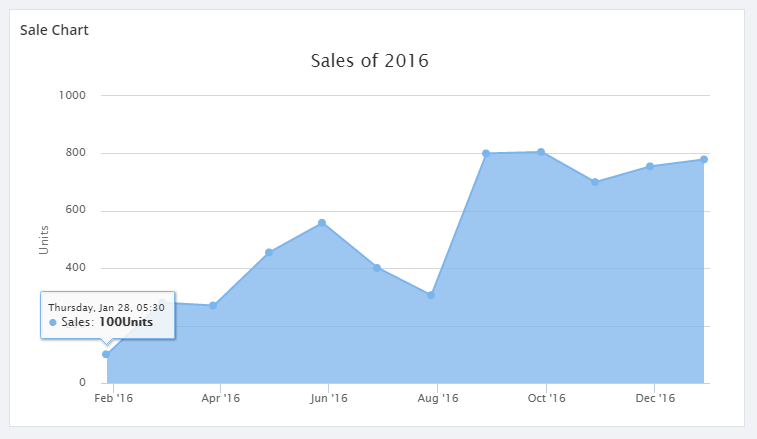

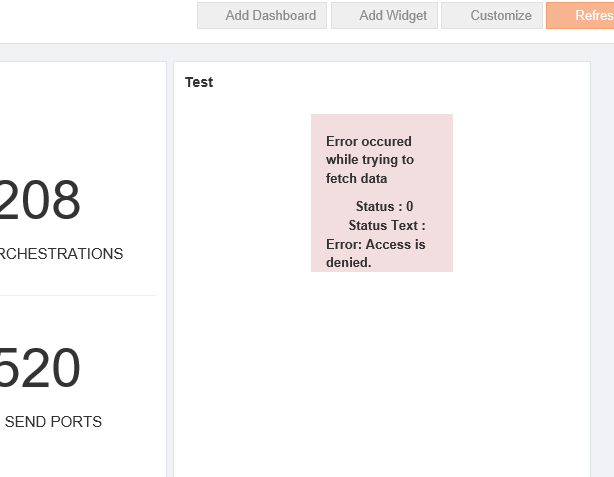
But the customer ended up with the below error after integrating the custom widget.
A script for the custom widget:
<script>
//URL used to get JSON Data for the Charts
this.URL = 'http://rawgit.com/cyberkingvb/CustomWidgetWithChart/master/sales2016.json';

//Refresh interval in milliseconds 60000 milliseconds = 60 seconds
this.REFRESH_INTERVAL = 60000;

//flag to check if widget should auto Refresh
this.AUTO_REFRESH_ENABLED = true;

//Highcharts Options
this.HIGHCHART_OPTIONS = {
            chart: {
                type: 'line',
                zoomType: 'x'
            },
            exporting: {
                enabled: false
            },
            credits: {
                enabled: false,
                title: '',
                style: {
                    display: 'none'
                }
            },
            title: {
                text: 'Sales of 2016'
            },
            xAxis: {
                type: 'datetime'
            },
            yAxis: {
                min:0,
                title: {
                text: 'Units'
                },
            },
            tooltip: {
                crosshairs: true,
                shared: true,
                valueSuffix: 'Units'
            },
            legend: {
                enabled: false
            },
            series: [{
                name: 'Sales',
                data: []
            }]
        };

this.widgetDetails = ko.observable();
this.error = ko.observable(null);
var _this = this;
var getdata = function()
    {
$.getJSON(_this.URL, function (data)
            {
                _this.HIGHCHART_OPTIONS.series[0].data = data;
                _this.widgetDetails(_this.HIGHCHART_OPTIONS);
            _this.error(null);
            }).fail(function(errorObject,error)
            {
    console.log(errorObject);
    _this.error(errorObject);
});
    }

//loading data for the first time
getdata();

//handles auto refresh
if(this.AUTO_REFRESH_ENABLED)
    setInterval(getdata, this.REFRESH_INTERVAL);

</script>

<!-- ko if: error() == null -->
<div data-bind="highCharts: widgetDetails()" style="height:380px; width:700px"></div>
<!-- /ko -->

<!-- ko if: error() != null -->
<div class="row">
  <div class="col-md-offset-4 col-md-4 bg-danger">
    <b>
      <p>Error occured while trying to fetch data </p>
        <span>Status : </span><span data-bind="text:error().status"></span><br>
      <span>Status Text : </span><span data-bind="text:error().statusText"></span>
    </b>
</div>
</div>
<!-- /ko -->
Script Explained
This code consists of 4 configuration variables.
URL
URL variable will allow you configure the API URL from where you fetch the JSON data. Based on the High charts options, the formatting for the data may also change. Here in the above example, the API returns the data as JSON array and date-time stamp as a Unix Timestamp.
AUTO_REFRESH_ENABLED
This flag determines if your widget should be auto-refreshed or not. For instance, if the service call that feeds your chart is very expensive and you don’t want to call that every now and then, then you can probably disable this flag or set the refresh interval to a higher value.
REFRESH_INTERVAL
Refresh interval lets you configure the interval after which the widget data should be refreshed. Note that the interval is in milliseconds. So, if you want it to refresh every one minute then you should set the refresh interval to 60000. Note that for an auto-refresh to work, AUTO_REFRESH_ENABLED flag must be set to true.
HIGHCHART_OPTIONS
BizTalk360 uses High charts for all data analytics. We already have the underlying binding handler framework to apply the options and this makes analytic widget creation a lot easier. To modify the charts, you simply need to update the HIGHCHART_OPTIONS. In this example,
the “data” property inside series array (where the data is supposed to be) is left as an empty array intentionally. It will be filled with the data that is retrieved from the URL that you have specified. High charts support a variety of charts and you can follow this link to get the type of chart that you want to bring into your custom widget.
The line chart that we have created here can be converted into an Area chart or a Column chart by simply changing “type” under “charts” options in HIGHCHART_OPTIONS.
Investigation of the Issue
Initially, we suspected that the customer might not be able to fetch the JSON data using the http://rawgit.com/cyberkingvb/CustomWidgetWithChart/master/sales2016.json URL. When we asked to browse the URL and they could browse and view the results. So, the next step was to isolate the case at the customer end. Whenever such a situation arises we require more information about the customer’s environment, we would go for a web meeting with a screen sharing session. We went for the screen sharing session and we started with the basic troubleshooting steps like checking the configuration, environment etc.
At last, we found that the customer is using https://localhot/biztalk360 and he is trying to monitor http://rawgit.com/cyberkingvb/CustomWidgetWithChart/master/sales2016.json.
Using HTTPS, there is a security code being generated and shared to accept the information between computers. (Say, in client and server architecture). This keeps the information safe from the hackers.
They use the “code” on a Secure Sockets Layer (SSL), sometimes called Transport Layer Security (TLS) to send the information back and forth.
Resolution Provided
When the HTTP is used inside the HTTPS URL, the HTTPS expected a “code” from HTTP. When the response from the widget URL was coming without the code it threw the error message “Access is denied” on the widget.
Hence, It is not possible to create custom widgets with the cross-domain URL. If the HTTPS is used, all the related URL must use the HTTPS.
If you have any questions, contact us at [email protected]. Also, feel free to leave your feedback in our forum.
Author: Sivaramakrishnan Arumugam
Sivaramakrishnan is our Support Engineer with quite a few certifications under his belt. He has been instrumental in handling the customer support area. He believes Travelling makes happy of anyone. View all posts by Sivaramakrishnan Arumugam
by shadabanwer | Sep 18, 2017 | BizTalk Community Blogs via Syndication
Hi All,
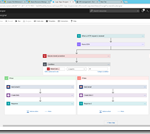
In this post we will show how we can validate Json schema against the message in Logic Apps. I and Krishna Pochanapeddi working on building an interface service in Logic Apps. We need to send a request message to Logic Apps request connector. We need to validate the same message against the Json schema. There is no capability within Logic Apps to validate the names of the fields in the Json message. We can do this easily using Azure Function by passing the Schema and request message using Azure Function connector. However, we do not want to use Azure function to validate schema. We want to use Logic Apps as a complete solution for these validation issues. It is easy to validate XML Schema using Integration Account but Json message cannot be validated.
After wondering for few hours; reading Json best practices; we found the basic and powerful Json capability which is the object option “required”. Now we can mentioned the required fields (field names) in the schema itself.
We created below mentioned Json schema
{
“$schema”: “http://json-schema.org/draft-04/schema#”,
“definitions”: {},
“id”: “http://example.com/example.json”,
“properties”: {
“ChangePasswordRequest”: {
“id”: “/properties/ChangePasswordRequest”,
“properties”: {
“CurrentPassword”: {
“default”: “currenthashedpassword”,
“description”: “An explanation about the purpose of this instance.”,
“id”: “/properties/ChangePasswordRequest/properties/CurrentPassword”,
“title”: “The currentpassword schema”,
“type”: “string”
},
“Identifier”: {
“default”: “126”,
“description”: “An explanation about the purpose of this instance.”,
“id”: “/properties/ChangePasswordRequest/properties/Identifier”,
“title”: “The identifier schema”,
“type”: “string”
},
“IdentifierScheme”: {
“default”: “test”,
“description”: “An explanation about the purpose of this instance.”,
“id”: “/properties/ChangePasswordRequest/properties/IdentifierScheme”,
“title”: “The identifierscheme schema”,
“type”: “string”
},
“MessageIdentifier”: {
“default”: “f7b351fb-ade4-4361-bfc3-9bb7df783880”,
“description”: “An explanation about the purpose of this instance.”,
“id”: “/properties/ChangePasswordRequest/properties/MessageIdentifiers”,
“title”: “The messageidentifiers schema”,
“type”: “string”
},
“MessageTimeStamp”: {
“default”: “2016-04-04T14:15:02.6476354+10:00”,
“description”: “An explanation about the purpose of this instance.”,
“id”: “/properties/ChangePasswordRequest/properties/MessageTimeStamp”,
“title”: “The messagetimestamp schema”,
“type”: “string”
},
“NewPassword”: {
“default”: “Pass126”,
“description”: “An explanation about the purpose of this instance.”,
“id”: “/properties/ChangePasswordRequest/properties/NewPassword”,
“title”: “The newpassword schema”,
“type”: “string”
},
“NotificationAddress”: {
“default”: “[email protected]”,
“description”: “An explanation about the purpose of this instance.”,
“id”: “/properties/ChangePasswordRequest/properties/NotificationAddress”,
“title”: “The notificationaddress schema”,
“type”: “string”
},
“NotificationPreference”: {
“default”: “Email”,
“description”: “An explanation about the purpose of this instance.”,
“id”: “/properties/ChangePasswordRequest/properties/NotificationPreference”,
“title”: “The notificationpreference schema”,
“type”: “string”
},
“OriginatingSystem”: {
“default”: “test”,
“description”: “An explanation about the purpose of this instance.”,
“id”: “/properties/ChangePasswordRequest/properties/OriginatingSystem”,
“title”: “The originatingsystem schema”,
“type”: “string”
}
},
“required”: [
“MessageIdentifier”,
“NotificationAddress”,
“CurrentPassword”,
“Identifier”,
“OriginatingSystem”,
“NotificationPreference”,
“NewPassword”,
“IdentifierScheme”,
“MessageTimeStamp”
],
“type”: “object”
}
},
“required”: [
“ChangePasswordRequest”
],
“type”: “object”
}
Added this schema in the Logic app request connector and Parse Json connector.
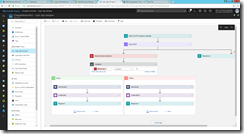
If we send a invalid message as per below:
{
“ChangePasswordRequest”: {
“MessageIdentifier”: “f7b351fb-ade4-4361-bfc3-9bb7df783880”,
“OriginatingSystem”: “test”,
“MessageTimeStamp”: “2016-04-04T14:15:02.6476354+10:00”,
“Identifie”: “125”, <Invalid field name; valid is Identifier>
“IdentifierScheme”: “test”,
“CurrentPassword”: “currenthashedpassword”,
“NewPassword”: “YGU0PCPEM”,
“NotificationPreference”: “Email”,
“NotificationAddress”: “[email protected]”
}
}
The above message fails in the parse Json with the message “Requred properties are missing from object…” as per the below screen:
Now this can be handled in Logic Apps using “Add a Parallel branch->Add an Action” as per below screen.
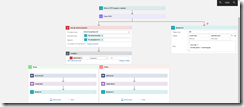
Click on eclipses on action “Execute stored procedure” and “Response 4” and click on configure run after to configure the appropriate action.
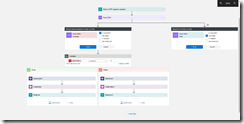
Yay!!! Well Done Krishna .
Regards
Shadab
by BizTalk Team | Sep 18, 2017 | BizTalk Community Blogs via Syndication
Microsoft has a lot of great partners, and one of our missions is to highlight these, if you want to do a partner post on our team blog reach out to us either over mail or through comments on this post.
This post is written by BizTalk360 to highlight how they take advantage of BizTalk Server to help customers achieve more with our product.
Today BizTalk360 has become an inherent part for anyone using Microsoft BizTalk Server. Since its inception in 2011, the product has matured significantly with continuous improvement mainly driven by industry & customer feedback. BizTalk360 takes one critical pain point of every Microsoft BizTalk Server customer BizTalk Server Operations & Monitoring and solves the problem extremely well.
Today the product comes with some 70+ features to address the BizTalk Server Operations and Monitoring challenges; in this blog let’s take a look at the top 5 reasons why every Microsoft BizTalk Server customer should consider using BizTalk360.
1. Modern Web based Management Experience
The out of the box BizTalk Server Administration tool that comes with BizTalk Server is a MMC based Windows Application. It requires installing on every administrator or support person’s computer.
BizTalk360, is a modern on-premise web based management tool that provides the user with a modern web experience and increases productivity as a result with regard to BizTalk Server Administration and Management.
With the single installation of BizTalk360, many BizTalk Server environments (Production, UAT, Staging etc.) in the organization can be configured and managed. Administrators and operators can access the web portal from any modern web browser.
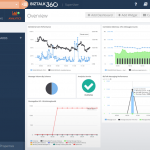
BizTalk360 comes with a lot of out of the box dashboards and widgets to make management of BizTalk Server easier.
2. Enterprise grade Security and Auditing
The majority of the tasks performed by using the BizTalk Admin console require elevated Administrator rights and it also lacks the ability to restrict users to specific BizTalk Applications running in the environment.
The other important limitation of BizTalk Admin console is the auditing and governance capability. The tool does not audit any user operational activities. For example: If someone accidentally or purposely stops an important Orchestration or Send Port it will heavily interrupt the message processing. It will not be possible to pinpoint who performed that action.
Whereas when you are using BizTalk360 every single user operational activity on the BizTalk Environments is stored for governance and audit purpose. The customers can keep the data for as long as they want by a simple setting.
3. Monitoring designed for BizTalk Server
There are many general purpose monitoring tools in the market which claim they cover BizTalk Server monitoring, but when you start using them you’ll start realizing they just scratch the surface with generic things like Memory, CPU, Event Log etc. and won’t go any deeper. Whereas BizTalk360 is designed from the ground up to address the monitoring challenges of Microsoft BizTalk Server. It covers the breadth and width of BizTalk Server Monitoring needs.
There are unique requirements like Transaction or Data Monitoring which is specific to BizTalk Server, for example did we process 1000 messages (invoices) from SAP today (or every hour), this is addressed only in BizTalk360, a general purpose monitoring tool.
Auto healing is another important aspect, where BizTalk360 will try to rectify the problem itself whenever possible. Example: An FTP Receive Port may go down for various transient reasons like a network outage, temporary unavailability of FTP location and so on. In these circumstances, BizTalk360 will bring the FTP Receive Port back online with automatic healing capability.
4. Productivity with Single Unified Tooling
On a day to day basis, a BizTalk Server Administrator can use anywhere from 5-8 different tools like BizTalk Admin console, SQL Management Studio, BAM Portal, ESB Portal, Windows Event Viewers, Perfmon, BizTalk Health Monitor, SCOM console to name a few. This creates several challenges, lost productivity due to context switching between tools, security concerns (every single tool across environments needs to be secured), and training people for day-to-day support is time-consuming and expensive (you need very skilled resources).
BizTalk360 addresses all these challenges by providing a unified web based management administration tool for BizTalk Server. All the features are built from the ground up within BizTalk360 for example BizTalk360 comes with its own enhanced BAM portal and ESB portal. BizTalk360 also comes with some key productivity features like a centralized Event Viewer, team knowledge base, Secure SQL Query management, Throttling analyzer, Web based Rules Composer etc.
5. Analytics for Environment Transparency
Most organizations treat their BizTalk Environments like a black box. The standard tools like BizTalk Admin console provide very little transparency on the health of the environment. It doesn’t come with any analytical information like charts and graphs to showcase the failure rates, transaction volume, message processing latency, messaging patterns, throttling analysis etc.
BizTalk360 has a dedicated section for Analytics to address all the above challenges. It makes it super easy for administrators to view the health of your BizTalk Environments, you can create your own custom dashboards based on your scenarios like SAP to Dynamics CRM integration, Oracle to IBM MQ integration etc.
Summary
The above 5 points explain clearly why BizTalk Server customer should use BizTalk360. Microsoft as a platform company always focus on the scalability and reliability of the platform and it depends on partners like BizTalk360 to address the tooling gap. At one end of the spectrum is the platform (Microsoft BizTalk Server) and at the other end are the custom solutions built using BizTalk Server (by customers and consulting companies). BizTalk360 positions itself in the middle and bridges the gap with regard to BizTalk Server Administration and Management.
Today there are over 2500 installations of BizTalk360 in the world; some of the mission critical businesses including Microsoft IT (responsible for the entire retail and supply chain operations) rely on BizTalk360 for their day to day operations and monitoring.
Trial Download: You can try BizTalk360 trial version for 14 days on your own BizTalk Environments and validate the benefits.
by Gautam | Sep 17, 2017 | BizTalk Community Blogs via Syndication
Do you feel difficult to keep up to date on all the frequent updates and announcements in the Microsoft Integration platform?
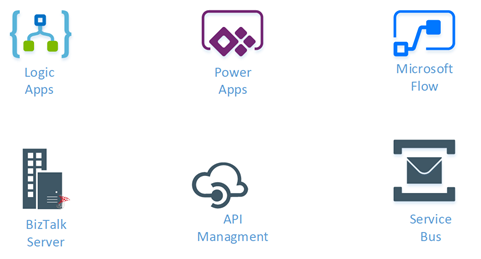
Integration weekly update can be your solution. It’s a weekly update on the topics related to Integration – enterprise integration, robust & scalable messaging capabilities and Citizen Integration capabilities empowered by Microsoft platform to deliver value to the business.
If you want to receive these updates weekly, then don’t forget to Subscribe!
On-Premise Integration:
Cloud and Hybrid Integration:
Feedback
Hope this would be helpful. Please feel free to let me know your feedback on the Integration weekly series.
by Sandro Pereira | Sep 15, 2017 | BizTalk Community Blogs via Syndication
The funniest part of having an intern working and learning from you, especially for a person like me that really love to write about “Errors and Warnings, Causes and Solutions”, is that they are able to make the funniest and unexpected questions, they will find things that because we are so accustomed to doing the job and to avoiding them, that we do not even realize anymore that they exist and they are there.
So yesterday, after a solution deployment, my intern was complaining that he was always receiving the following error while creating a receive port:
TITLE: BizTalk Server Administration
——————————
Concurrency Violation encountered while Updating the ReceivePort ‘rprtReceive’. The local, cached version of the BizTalk Server group configuration is out of date. You must refresh the BizTalk Server group configuration before making further changes. (Microsoft.BizTalk.ExplorerOM)
For help, click: http://go.microsoft.com/fwlink/?LinkId=47400&ProdName=Microsoft+BizTalk+Server+2016&ProdVer=3.12.774.0&EvtSrc=Microsoft.BizTalk.ExplorerOM.Resources&EvtID=IDS_ERR_OBJECT_CONCURRENCY
——————————
BUTTONS:
OK
—————————–
Cause
While open and navigating in the BizTalk Administration Console you will notice that the first request on expanding the navigation tree or open a BizTalk Server Application or Host Instance will take longer time that further interactions, this because in the first request the Administration Console will query your BizTalk databases for information and after that in cache the result.
So, unless you force a refresh it will use that cache information, nevertheless it will have some kind of mechanism (like a hash) to verify if the cache is updated will the current BizTalk Server Configuration on the database when you try to perform an operation like create or change a Receive Location.
Assuming that you deploy a new version or new artifact to a BizTalk Application, you need to refresh that Application before you perform any kind of operations, otherwise, you will receive this or similar errors.
The reason for this error to happen was that my intern already had the BizTalk Administration Console running and he was already focused (selected) the Application in concern before he went and deploy a new version of the solution from Visual Studio. After he deploy
SOLUTION
This is, in fact, a simple problem to solve:
- Concurrency Violation encountered while Updating the ReceivePort – Option 1:
- Close the BizTalk Administration Console and open again (stupid and simple)
- Concurrency Violation encountered while Updating the ReceivePort – Option 2:
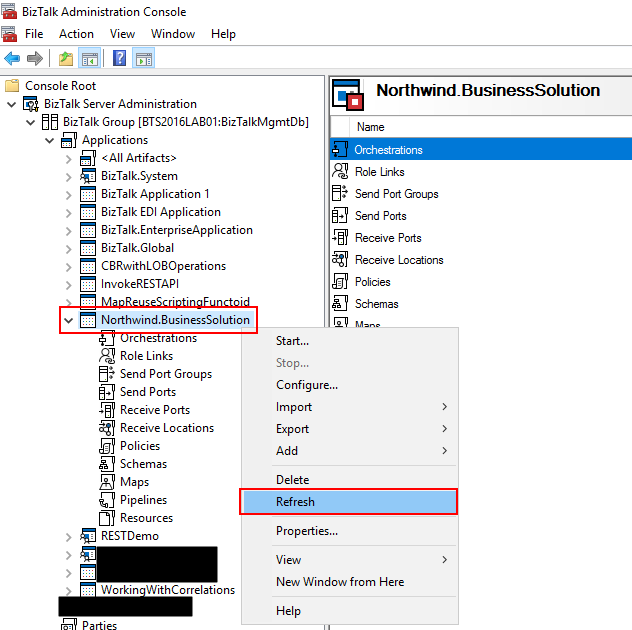
- Right-click on the BizTalk Application you want to refresh, and then select the “Refresh” option
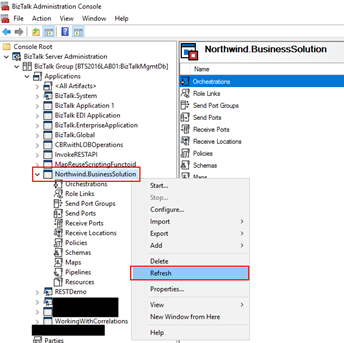
- Concurrency Violation encountered while Updating the ReceivePort – Option 3:
- Select the resource inside your BizTalk Application you want to refresh, for example, “Receive Locations” and press F5
There are several alternatives. The important is to refresh the BizTalk Administration Console if something had changed in your BizTalk Server environment.
Author: Sandro Pereira
Sandro Pereira lives in Portugal and works as a consultant at DevScope. In the past years, he has been working on implementing Integration scenarios both on-premises and cloud for various clients, each with different scenarios from a technical point of view, size, and criticality, using Microsoft Azure, Microsoft BizTalk Server and different technologies like AS2, EDI, RosettaNet, SAP, TIBCO etc. He is a regular blogger, international speaker, and technical reviewer of several BizTalk books all focused on Integration. He is also the author of the book “BizTalk Mapping Patterns & Best Practices”. He has been awarded MVP since 2011 for his contributions to the integration community. View all posts by Sandro Pereira
by ninocrudele | Sep 14, 2017 | BizTalk Community Blogs via Syndication
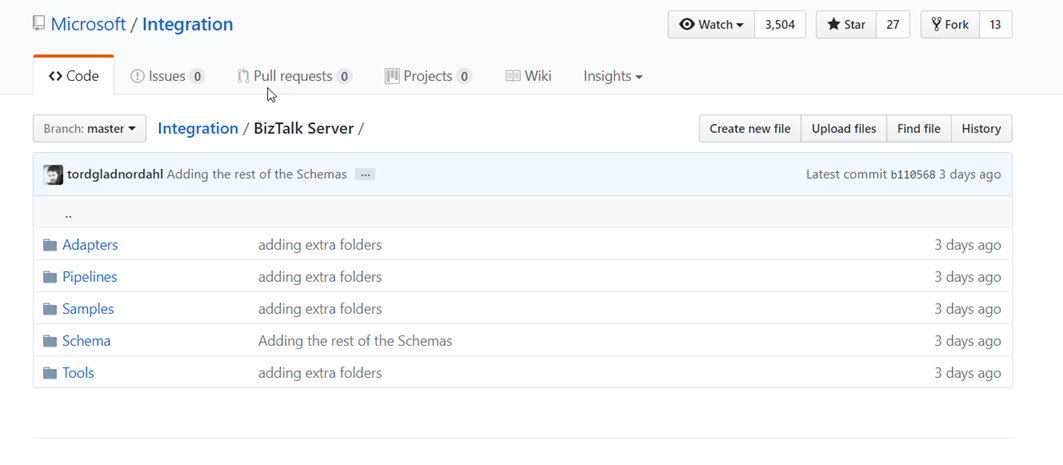
3 days ago Microsoft started sharing the BizTalk Server stack source code in GitHub.
This is an historical decision for me, more than two years ago I started fighting to make this happen and I am very happy for this Microsoft decision.
I strongly believe in the source code approach from the big companies and for many reasons but let have a look what we can really do now.
How to start?
The source code is under Contributor License Agreement (CLA), to start contributing you need to sign the license agreement here https://cla.microsoft.com.
You need to sign the document using DocSign and you will be able to access to the repo.
The Git repo is in GitHub at this address
https://github.com/Microsoft/Integration/tree/master/BizTalk%20Server
What we can do?
Microsoft started shared some main areas, let have a look what we can really do for each of them.
Adapter
This is a very critical area, we know about some many issue around them, one for example is the famous zero file adapter in the BizTalk File adapter.
We can extend the adapters with new capabilities and these will be immediately available to the product.
We can fix all known issues, the difference now is that, we have a development collaboration portal to work together.
Pipeline
We can extend pipeline capabilities and new components, very interesting will be the possibility to create a repo with an extensive catalogue of components.
Schemas
We can add the documentation to may important schemas and we can extend all the EDI stack with many new EDI formats.
Tools
Many people know how much I’m care about tools and productivity, this area is critical.
Years ago I develop a tool named BizTalk NOS Addin which was able to improve the BizTalk development productivity about the 1000%.
We can add a lot of new tools here.
We are full of tools that we normally use every day, we just only need to put them in the repo and working all together in the refactoring.
I’d like to see the development tool area (Visual Studio), I hope it will be included in the Tools area.
Sample
How many time we reuse the same code and template for any new project, this is the area to put this our amazing stuff.
What I’d like to see more
I’m working in BizTalk since the 2000 version and I see 3 main areas in BizTalk where we can work and able to give an amazing contribution to the product.
-
Development
- Think about the possibility to extend the Visual Studio development capabilities with, searching, automation test and development, fix many well-known issue, improving the
Visual Studio UI integrating new capabilities in the designer.
Improve migration, we can extend a lot the migration capabilities into Azure, extend orchestration capabilities, extend the pipeline development capabilities and testing, integrate PowerShell in the UI and more.
This are is the most critical in order to provide the maximum value to the product.
-
Admin Console
- We can do so much here, improving the console for monitoring, management, searching, integrating PowerShell in the UI, we are full of amazing PowerShell scripts able to provide many interesting features to the admin UI.
Alerting, advisory, auditing, integration with other stack like Visual studio and more.
- Migration
I am sure we will be able to do a lot for the product now.
by Sandro Pereira | Sep 14, 2017 | BizTalk Community Blogs via Syndication
BizTalk Server Administration Console cannot connect to WMI provider? The things I found from playing around with all kind of different environments from different clients and my personal ones (Hehe)… and I thought that I had already found all type of real or imaginary BizTalk errors, but once again I BizTalk Server prove me that I was wrong, this issue was new for me – who says that my BizTalk Consultant life is boring? (hehe).
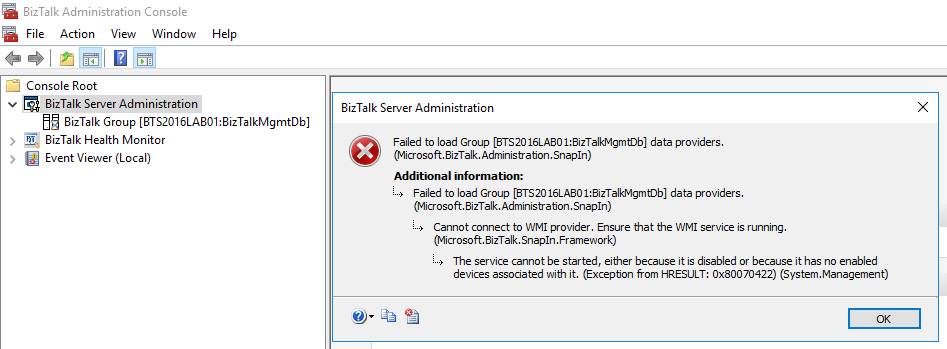
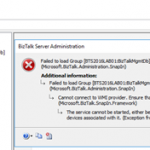
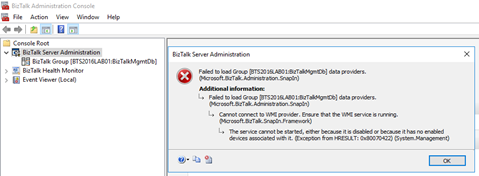
Joking apart, I got the following error while trying to navigate in the BizTalk Server Administration Console in one of my personal environments:
TITLE: BizTalk Server Administration
——————————
Failed to load Group [BTS2016LAB01:BizTalkMgmtDb] data providers. (Microsoft.BizTalk.Administration.SnapIn)
For help, click: http://go.microsoft.com/fwlink/?LinkId=47400&ProdName=Microsoft+BizTalk+Server+2016&ProdVer=3.12.774.0&EvtSrc=Microsoft.BizTalk.Administration.SnapIn.Properties.Errors&EvtID=FailedLoadingGroupProviders&EvtChain=Microsoft.BizTalk.Administration.SnapIn.Properties.Errors+%2cFailedLoadingGroupProviders%3bMicrosoft.BizTalk.SnapIn.Framework.Properties.ErrorMessages+%2cConnectToWMIProviderFailed
——————————
ADDITIONAL INFORMATION:
Failed to load Group [BTS2016LAB01:BizTalkMgmtDb] data providers. (Microsoft.BizTalk.Administration.SnapIn)
For help, click: http://go.microsoft.com/fwlink/?LinkId=47400&ProdName=Microsoft+BizTalk+Server+2016&ProdVer=3.12.774.0&EvtSrc=Microsoft.BizTalk.Administration.SnapIn.Properties.Errors&EvtID=FailedLoadingGroupProviders&EvtChain=Microsoft.BizTalk.SnapIn.Framework.Properties.ErrorMessages+%2cConnectToWMIProviderFailed
——————————
Cannot connect to WMI provider. Ensure that the WMI service is running. (Microsoft.BizTalk.SnapIn.Framework)
For help, click: http://go.microsoft.com/fwlink/?LinkId=47400&ProdName=Microsoft+BizTalk+Server+2016&ProdVer=3.12.774.0&EvtSrc=Microsoft.BizTalk.SnapIn.Framework.Properties.ErrorMessages&EvtID=ConnectToWMIProviderFailed
——————————
The service cannot be started, either because it is disabled or because it has no enabled devices associated with it. (Exception from HRESULT: 0x80070422) (System.Management)
——————————
BUTTONS:
OK
—————————–
Cause
The reason for the BizTalk Server Administration Console cannot connect to WMI provider is because the BTS Administration Console relies on Windows Management Instrumentation (WMI) service, more specifically, the BizTalk WMI Provider (BTSWMIProvider.dll) to perform all type of different queries into BizTalk Environment (or BizTalk databases)
And for that reason, Windows Management Instrumentation (Winmgmt) service need to be enabled and running on the server in which you are running the BizTalk Server Administration Console.
In my case, the problem was that while I was investigating the unnecessary services that I could disable to optimize BizTalk Server performance, I disable this important service.
Solution
As I mentioned above, the solution to this problem is to Enable and Start the Winmgmt service, you can accomplish that by:
- If the service is Disabled:
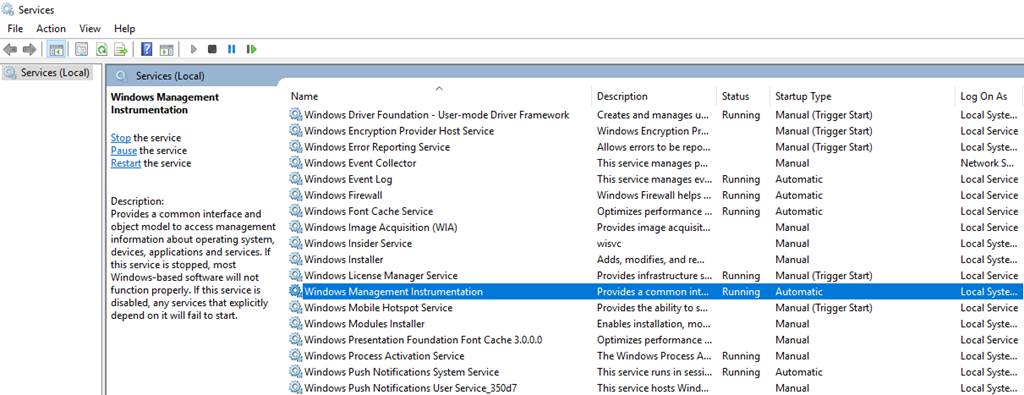
- Press the “Windows key” to open the Start menu, type “Services” and click on “View local services” option from the Search window.
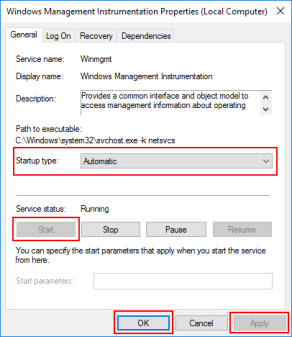
- In the Services window, on the Services (Local) panel select the Windows Management Instrumentation service, right click and select “Properties” option.
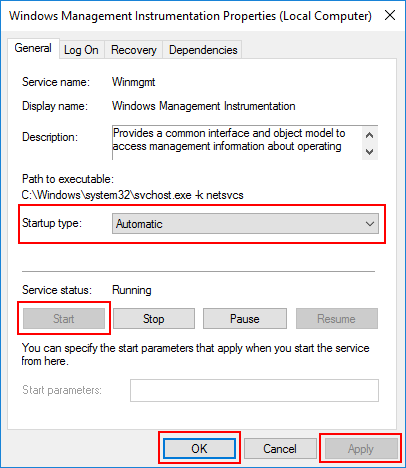
- On the Windows Management Instrumentation Properties (Local Computer) window:
- On the General tab apply the following configuration.
- Startup type: “Automatic”
- And then click “Start” and “Apply”.
- If the service is Enable, you can simply:
- Open a command prompt as administrator by pressing the “Windows key” to open the Start menu and type “cmd” in the Start Search box, right-click in “Command Prompt” and select from the context menu the “Run as administrator” option
- And type the following command: net stat winmgmt
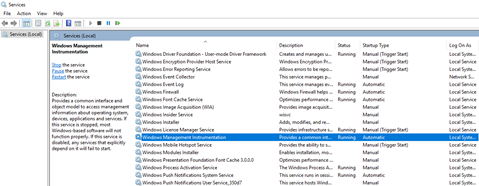
Once the Winmgmt service is running you will be able to use the BizTalk Server Administration Console without this error/problem happening.
Author: Sandro Pereira
Sandro Pereira lives in Portugal and works as a consultant at DevScope. In the past years, he has been working on implementing Integration scenarios both on-premises and cloud for various clients, each with different scenarios from a technical point of view, size, and criticality, using Microsoft Azure, Microsoft BizTalk Server and different technologies like AS2, EDI, RosettaNet, SAP, TIBCO etc. He is a regular blogger, international speaker, and technical reviewer of several BizTalk books all focused on Integration. He is also the author of the book “BizTalk Mapping Patterns & Best Practices”. He has been awarded MVP since 2011 for his contributions to the integration community. View all posts by Sandro Pereira