Jeroen Luitwieler | BizTalk Integration & IoT Consultant
Ik probeer in plaats van het probleem op te lossen, de oorzaak weg te nemen
Blog Post by: AxonOlympus

Ik probeer in plaats van het probleem op te lossen, de oorzaak weg te nemen
Blog Post by: AxonOlympus
Geef klanten wat ze nodig hebben, niet wat ze willen
Blog Post by: AxonOlympus

The Service Bus Preview does not display Azure Service Bus Relays in my hands. The Service bus is in preview in the new Azure Portal and I used it to create this service bus. I created a Azure Service bus relay but could not find it anywhere in the new portal. Without this it is […]
Blog Post by: mbrimble
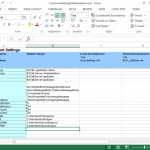
One of the great features of the BizTalk Deployment Framework is the ability to use a SettingsFileGenerator file to set your environment specific settings in an excel file, and use this in your other files, so you can have generic files like portbindings and BRE rules, being updated with the correct settings for the environment we’re working on, like DEV, TEST or PROD. If you are like me, you will probably also have placed a lot of common settings which are used accross all your applications in this file, like SSO user groups, host instance names, common endpoints, webservice users, etc. This means we end up with a lot of duplicate settings accross our environment settings files, which becomes cumbersome to maintain. Fortunatly, there is a way to work around this.
The BTDF has a nice option which we can use, to have a single SettingsFileGenerator file for all our applications. In this example we have two applications, with a couple of common settings, as well as some application specific settings. The applications were already set up with BTDF, so we already have all necessary placeholders in the PortBindingsMaster file. Lets start by creating a CommonSettingsFileGenerator file which has all these settings in one place. To do this, copy the SettingsFileGenerator from one of my projects to a general Tools directory, rename it, and update it with all the common and application specific settings.
For easy access to this common file, we can add it to our solution by going to Add -> Existing Item and selecting the file we just created. Also, if you still have the old SettingsFileGenerator file in your solution, make sure to delete it, so we don’t use that by accident when updating our settings at a later time.
Now open your btdfproj file, and in the first PropertyGroup add the next line at the bottom.
<SettingsSpreadsheetPath>EnvironmentSettingsMergedSettingsFileGenerator.xml</SettingsSpreadsheetPath> |
Now when you use BTDF to deploy your solution locally, or you build an MSI for remote deployment, our CommonSettingsFileGenerator will be used for our settings.
Now this is really nice, as we only have a single place to maintain our settings, but if you have a lot of applications with a lot of application specific settings, this does make our SettingsFileGenerator quite large. It would be even better if we could have one settings file for our common settings, and another settings file for our application specific settings. Luckily, we also have this option, thanks to Giulio Vian. On my search for an easy way to merge two setting files, I came accross this post about a SettingsMerger project, where Giulio mentions the tool has been merged into Environment Settings Exporter, the tool which the BTDF uses to do all its goodness with the environment settings. At this moment, Giulio’s changes are not part yet of the Environment Settings Exporter which is shipped with BTDF, but we can download and build the code ourselves (or you can download the built exe from here) and use it from a custom target in our btdfproj file. The BTDF comes with a couple of custom targets out of the box, which gives us the ability to run custom commands at certain stages of the deployment or build of the MSI.
For this example we are going to use another application which has already been set up with the BizTalk Deployment Framework, so it already has the PortBindingsMaster file configured, as well as a SettingsFileGenerator with the application’s settings as well as the common settings. Make sure you have the new version of Environment Settings Exporter which we downloaded or built earlier on in your Tools directory. Now copy the application’s SettingsFileGenerator file to our Tools directory as well, and rename it to CommonSettingsFileGeneratorMerge. Now in the application’s SettingsFileGenerator remove all the common settings so this only has the settings intended for that application, and in CommonSettingsFileGeneratorMerge remove all the application specific settings so this now has the common settings which we want to use accross multiple applications.
For easy access to the common file, we can also add it to our solution by going to Add -> Existing Item and selecting the file we just created, placing it alongside SettingsFileGenerator in our solution.
Now open your btdfproj file, and in the first PropertyGroup add the next line at the bottom (if you allready added this line in the previous part, just update its value).
<SettingsSpreadsheetPath>EnvironmentSettingsMergedSettingsFileGenerator.xml</SettingsSpreadsheetPath> |
Next place the following code in the btdfproj file after <Import Project=”$(DeploymentFrameworkTargetsPath)BizTalkDeploymentFramework.targets” />.
<!-- Merge the settings file in case of local deployment --> <Target Name="CustomPreExportSettings" Condition="$(Configuration) != 'Server'"> <Exec Command='C:ProjectsToolsEnvironmentSettingsUtil.exe Merge /input:C:ProjectsToolsCommonSettingsFileGeneratorMerge.xml /input:.EnvironmentSettingsSettingsFileGenerator.xml /output:.EnvironmentSettingsMergedSettingsFileGenerator.xml' /> </Target> <!-- Merge the settings file in case of building MSI for remote deployment --> <Target Name="CustomPreRedist"> <Exec Command='C:ProjectsToolsEnvironmentSettingsUtil.exe Merge /input:C:ProjectsToolsCommonSettingsFileGeneratorMerge.xml /input:.EnvironmentSettingsSettingsFileGenerator.xml /output:.EnvironmentSettingsMergedSettingsFileGenerator.xml' /> </Target> |
This will use the EnvironmentSettingsUtil to merge the common settings and application specific settings into a new file, which we earlier told BTDF to use in our deployments.
Now when you use BTDF to deploy your solution locally, or you build an MSI for remote deployment, you will find that the application will have access to all the common settings, as well as it’s application specific settings.
The code for the examples can be downloaded here.

In this period, I’m supporting different development teams to implement a big integration solution using different technologies such as BizTalk Server, Web API, Azure, Java and other and involving many other actors and countries.
In a situation like that is quite normal to find many different problems in many different areas like integration, security, messaging, performances, SLA and more.
One of the most important aspects that I like to consider is the productivity, writing code we spend time and time = money.
Many times a developer needs to find a solution or he needs to decide a specific pattern to solve a problem and we need to be ready to provide the most productive solution for it.
For instance, a .Net developer can decide to use a plain function to solve a specific loop instead using a quicker lambda approach, a BizTalk developer can decide to use a pure BizTalk approach instead using a quicker and faster approach using code.
To better understand this concept, I want to provide you a classic and famous sample in the BizTalk planet.
An usual requirement in any solution is, for example, the possibility to pick up data in composite pattern and cycling for each instance inside the composite batch, in BizTalk server this is the classic situation where we are able to understand how much the developer is BizTalk oriented J
By nature, the BizTalk development approach is more closed to a RAD approach rather than a pure code approach.
To cycle in a composite message in BizTalk we can use different ways and looking in internet we can find many solution, one of the most used by BizTalk developer is creating an orchestration, create the composite schema, execute the mediation, receive the composite schema in the orchestration, in the orchestration cycle trough the messages using a custom pipeline called in the orchestration.
Quite expensive approach in term of productivity and performances.
Another way is using for example a System.Collections.Specialized.ListDictionary in the orchestration.
Create a variable in the orchestration type System.Collections.Specialized.ListDictionary
Create a static class and a method named for example GetAllMessages
Inside your method write the code to pick up you messages and stream and load into the ListDictionary
Create an expression shape and execute the method to retrieve the ListDictionary
xdListTransfers = new System.Collections.Specialized.ListDictionary();
MYNAMESPACE.Common.Services.SpgDAL.GetAllMessages(ref xdListTransfers,
ref numberOfMessages,
ref dataValid);
Use variable by ref to manage the result, the variable numberOfMessages
is used to cicle in the orchestration loop.
Because we use a ListDictionary we can easily get our item using a key in the list, as below using the numberOfMessagesDone variable.
xmlDoc = new System.Xml.XmlDocument();
transferMessage = new MYNAMESPACE.Common.Services.TransferMessage();
transferMessage = (MYNAMESPACE.Common.Services.TransferMessage)xdListTransfers[numberOfMessagesDone.ToString()];
Where numberOfMessagesDone
is the increment value in the loop
Using this method, we keep our orchestration very light and it’s very easy and quick to develop.
I have many other samples like that, this an argument which I’m really care about because able to improve our productivity and performance and first of all the costs.

We cannot rely on documentation, if they exist, to be accurate, special regarding to the status of the machines present in the environment – I never found this kind of document that tell me what is installed on the machine, what are the updates (or CU) or service pack installed and so on and regarding […]
Blog Post by: Sandro Pereira

In the previous post I provide a fix to the PowerShell script to that is able to configure the Deployment Properties of a BizTalk project, keeping my word, at least half of it, because I also found the same problems in the PowerShell script to fix or configure the Signing Properties of a BizTalk Project, […]
Blog Post by: Sandro Pereira

It is nothing new that before you can deploy a solution from Visual Studio into a BizTalk application, you must first set project properties, especially the Server and the Configuration Database. Otherwise two things may happen: Deployment will fail when you try do to deploy it through Microsoft Visual Studio or will you are redeploying […]
Blog Post by: Sandro Pereira
August 15, 2016
One of the many challenges with an integration project is typically the mapping of messages from one API to another. The difficulty most often lies not with the technical implementation (although some former projects mapping SAP iDocs to EDI X12 are still giving me nightmares), but rather with forming the specification of the mapping itself, including understanding the semantical meaning behind each element. This is difficult because it requires expert knowledge of both the source and target system, as well as an analysts who can correct “draw the connecting line” between the two. The correct end result is only achieved through significant collaboration amongst the relevant parties.
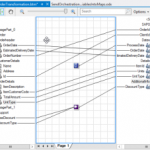
The BizTalk Mapper goes a long way to facilitating this task with it’s graphical mapping interface. Aside from providing the developer a means of rapidly implementing a transformation, it also servers as a visual representation of the mapping that can be understood by a business analyst (if not too complex):
(image courtesy of MSDN)
There are two problems with this approach, however:
Enter api-map.com – a new free online tool created by my colleague Joseph Cooney specifically to address these particular challenges. api-map provides a medium to formulate, display and share mapping documentation which can eventually be handed over to a developer for implementation on any chosen platform.
As a first step, the tool allows you to upload schemas (either JSON or XML) with the ability to display, edit and annotate them:
These schemas can then be used to define mappings, even providing automatic hints along the way using very clever heuristics. You can specify direct mappings or indicate that a transformation is required – including a description of the necessary condition and/or logic that defines the transformation. You can also map multiple source elements to a single target, and specify constant values to be assigned where appropriate.
Once this is completed, you can then display the mapping in a clear visual diagram that is easily understood by any analyst. Even better, you can combine multiple diagrams into one composite “end-to-end” view – providing a traceability which you cannot achieve within BizTalk maps. This is incredibly useful in the situation where canonical business schemas are employed within an ESB (a common scenario for most of my projects). And by selecting any element involved in a mapping, you get an independent end-to-end view of all elements involved in a mapping:
Finally, when everything has been sorted, you can export the mapping to a handy Excel spreadsheet, serving as documentation within a source repository for developers to work from:
A few other nifty features include the ability to tag items to make them searchable, join teams in order to share project artefacts, and an option to attach images of a user interface to clarify the association of an element with a system control.
Watch Joseph’s video to see a live demonstration of the tool. Still in beta, Joseph is continually adding new features, but already I believe this will be a handy utility on many of my upcoming projects!
July 25th was a big week for Microsoft’s Azure Logic Apps with the announcement that Logic Apps Reaches General Availability, and it was a big week for QuickLearn as well. We have been working for months on honing our expertise with Logic Apps so that we would be ready to deliver the new and improved Cloud-Based Integration Using Azure App Services course in conjunction with Microsoft’s release. This course has been expanded from the original three-day version to a five-day version that includes a full one-day workshop where attendees build a complete integration solution using Logic Apps, Azure Service Bus, and various API App connectors.
Nick Hauenstein and Rob Callaway worked tirelessly over the last few weeks putting the finishing touches on what I have to say is a killer course. The rest of the team provided support in testing and editing but those two did the heavy lifting in truly getting up to speed. Nick did a Herculean job delivering the course to a truly international audience with attendees in London, Sydney and of course our office in Kirkland.
I had the opportunity to attend the class as a student. I have been following the development of Azure App Services as I’m sure many of you have, and felt I had a pretty good handle on how they all work, but I have to admit I came away with a much better idea of how all the parts can work together. Nick has a way of building great scenarios and explaining how the available parts can be used to build a complete integration.
For those of you keeping track, the timing meant that Nick had to shift gears mid-week as Microsoft pushed the GA bits into production. It was interesting to see things work one way in one demo and literally an hour later work a different way!
We also had a real treat when Jeff Hollan, Program Manager for Azure Logic Apps dropped by and spent about an hour talking about Logic Apps and answering questions for the students. Its great being so close to the Microsoft campus, we always appreciate visits from our friends there.
I wish I had a nickel for every time a student has asked that question in class. It has been puzzling since the story coming out of Redmond has been evolving over the last few years. Fortunately, the story is a good one.
Everyone needs integration. For years if you wanted to build a robust integration solution using .NET, you really only had two options. Start from scratch and build the whole thing yourself, a very time consuming process, or buy BizTalk Server. Although BizTalk is an awesome and powerful product, the learning curve is rather steep and the cost of ownership often high. What was needed was integration for the little guys.
Azure App Service is (becoming) the solution to this problem. Azure App Service is a fully managed platform for web, mobile, and integration scenarios. Our course focuses on connecting your on-premises resources to cloud services such as Service Bus and on building complexity into your solutions via Logic Apps. Although it isn’t a replacement for BizTalk, it shares many of the capabilities and features that BizTalk developers would be familiar with.
Does that mean you don’t need BizTalk anymore? Not at all! BizTalk still provides a very powerful processing engine whether you choose to run it in Azure or on your own hardware. Azure App Services simply provide an option to do some of the things BizTalk is capable of. It is probably best suited for .NET developers who aren’t familiar with BizTalk Server but are looking to integrate with Azure resources.
From time to time I have been asked about how Microsoft Flow fits into all of this. Flow uses the same connectors and services that are built into App Services, it just doesn’t have the ability for developers to extend it using Logic Apps and API Apps. With Flow you are moving into a home that is all furnished for you. With Azure App Services you have the house and a toolbox and a pile of wood to finish it off just the way you want it.
If you happen to be new to integration and are looking for a good place to start, this course is it. On the other hand, if you are an experienced BizTalk developer and you are interested in exploring the future, this is also the course for you. The amount of crossover between the two products is surprisingly small as far as the tools that you use, although of course the concepts will seem very familiar to you.
There are still seats available for the September 19th delivery being presented by Rob Callaway at out Kirkland location (also available for remote attendance). If you are in Europe, you have two opportunities coming up. I will be delivering the class in Oslo Norway with our partner Bouvet on October 24th or you can celebrate Halloween with an American (October 31st) with our partner InfoSupport in Utrecht, Netherlands.