by community-syndication | May 11, 2016 | BizTalk Community Blogs via Syndication
Today was the first day of the Integrate 2016 event held in London (http://www.biztalk360.com/integrate-2016) and after attending most of today’s sessions (more on this later), here are some highlights.
Blog Post by: AxonOlympus
by [email protected] Steef-Jan Wiggers | May 11, 2016 | BizTalk Community Blogs via Syndication
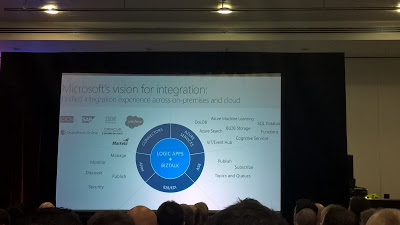
Microsoft is bringing the technologies around integration together in their vision for integration. API Management, Logic Apps, Connectors, Service Bus, and BizTalk are shaped into a hybrid type of platform. BizTalk and the logic apps form the heart in their vision to provide a seamless hybrid experience. Jim Harrer, the new PM for integration, shared the vision, services, and roadmap with us today at Integrate 2016. This event is the only integration focused event worldwide in the London Excel.
Below the picture that tells it all. And around BizTalk will see a release of the CTP2 version soon, including a first version of a logic app adapter, which will broaden the connectivity spectrum of BizTalk.
The vision shows Microsoft commitment in the integration space. Many thought that the BizTalk product was on life support and that there was no integration story. Well there is one and the roadmap shows a lot of promise. And what Microsoft has planned for us can be seen in the next picture.
The Visual Studio Integration is one of the much anticipated features that many integration professionals cheered. And it shows a good step forward. The product team shows what investments the Product team is making, which will enhance our confidence in integration with Microsoft technologies.
Integrate 2016 started with a blast and demonstrates that this is event is much needed to reestablish Microsoft as frontrunner in the integration space and that their technology and services are very relevant.
Thanks BizTalk360, their team, MVP’s, the attendees and Microsoft for making this event happening.
Cheers,
Steef-Jan
by Nick Hauenstein | May 4, 2016 | BizTalk Community Blogs via Syndication
I’m happy to announce that I’ve been asked to speak at the BizTalk 360 Integrate 2016 conference May 11th-13th in London. When brainstorming for the session topics I had lots of ideas of fun things that could be accomplished with Logic Apps and API Apps, but decided to take things in a slightly different direction.
Over the last few years, I’ve seen BizTalk Server developers who are skilled as general .NET developers, but who may not have the time or energy to keep up-to-date with the evolution of Logic Apps, API Apps – and all of the things that come with them Web API, node.js, Swagger, etc. That is perfectly understandable because as a developer building enterprise integrations exchanging X12 or EDIFACT data using BizTalk Server, you might not have needed to interact with JSON serialization in the past.
This Will Make Your Dreams Come True
This last year, my team and I have been working hard to stay on top of changes to Microsoft’s cloud-based integration technologies. Time and again we’ve fallen, and seen others do it as well, into the trap of looking at a tool and then trying to figure out how it can solve all of our problems – even to the point of searching out problems (imagined or otherwise) that it could tackle. It happens anytime there’s a sufficiently impressive tool, or sufficiently impressive salesperson (or both). Go ahead, click the link, I’ll wait. But if you do click that link, you will end up trying to find how you too could buy a 10 pack of vegetable peelers. Then you would be trying to figure out how to incorporate zucchini strands into dessert.
Getting Back on Track
Whenever that happens we’ve been able to course correct by forgetting about the tool and focusing on the problem we want to solve, or even better, the ideal solution to the problem. When describing the solution using Enterprise Integration Patterns as our vocabulary, we can quickly model an answer that works without assigning a particular tool or technology. Maybe a given solution needs a content enricher, or a resequencer, or guaranteed delivery, or whatever – not necessarily a specific technology applied.
As a BizTalk Developer, I know how to implement these patterns using BizTalk; the real question that we keep running into is can we implement these patterns using API Apps and/or Logic Apps – and better yet should we?
My session is designed to help BizTalk Developers learn how to answer those questions for themselves. Specifically, identifying the capabilities of the new additions to our toolset, and then showing how to use them without assumptions of in-depth knowledge of the underpinnings. In the talk, you will see API App that creates promoted properties from an XML document (just like BizTalk Server) so that we could then potentially reach out to other Azure capabilities and implement publish-subscribe in concert with content-based routing and correlation.
by community-syndication | May 4, 2016 | BizTalk Community Blogs via Syndication
I’m happy to announce that I’ve been asked to speak at the BizTalk 360 Integrate 2016 conference May 11th-13th in London. When brainstorming for the session topics I had lots of ideas of fun things that could be accomplished with … Continue reading →
The post API Apps 101 for BizTalk Developers at Integrate 2016 appeared first on QuickLearn Blog.
Blog Post by: Nick Hauenstein

by community-syndication | May 4, 2016 | BizTalk Community Blogs via Syndication
Bigger and better this is what to expect in this fourth conference that will take place in London. I think we can say with great certainty that this will be the biggest integration conference in the world that will happen this year! (of course related to Microsoft technologies, I don’t want to compare with other […]
Blog Post by: Sandro Pereira

by community-syndication | May 3, 2016 | BizTalk Community Blogs via Syndication
Exciting news Version 1.9.0.0 of BizTalk Mapper Extensions UtilityPack for BizTalk Server 2013 R2 and 2013 is now available! Here’s the change-log for this release: Ten new functoids: Advance Logical AND Functoid Advance Equal Functoid Advance Greater Than Functoid Advance Greater Than or Equal To Functoid Advance Less Than Functoid Advance Less Than or Equal […]
Blog Post by: Sandro Pereira

by Abhishek kumar Pathak | May 3, 2016 | BizTalk Community Blogs via Syndication
Recently there was a chance to implement the Power Shell script which re-start the BizTalk host instances.
————————————————————-
[ARRAY]$hostInstances = get-wmiobject MSBTS_HostInstance -namespace ‘rootMicrosoftBizTalkServer’ -Filter ‘(HostType = 1)’
write-host (‘Total Number of Host Instance : ‘+$hostInstances.Count) -Fore Yellow
Write-Host “Re-starting Host instance” -Fore Yellow
foreach ($hostInstance in $hostInstances)
{
$hostInstance.Stop()
$hostInstance.Start()
}
Write-Host “Host instances are restarted successfully” -Fore Yellow
———————————————————-

by shadabanwer | May 1, 2016 | BizTalk Community Blogs via Syndication
Hi All,
I just came across connectivity issue with the Azure Service Bus topics with SB-Messaging Adapter in BizTalk. The detail about the error is below. It took us sometime to figure out or resolve this connectivity issue. That is why wanted to document it so that we know the resolution.
“A message sent to adapter “SB-Messaging” on send port “Send__MEL_Topic” with URI “sb://m-dev-integration-.servicebus.windows.net/test” is suspended. Error details: System.ServiceModel.CommunicationException: Unable to connect to Service Bus using HTTP connectivity mode. —> System.ServiceModel.CommunicationException: Unable to connect upstream. “
In this post I’ll demonstrate how to create Topics in Azure Service Bus and using SB-Messaging adapter to connect.
1- Create Service Bus Topic in Azure.
a- Go to Service Bus Menu
b- Create Namespace .
c- Navigate to Newly created Namespace, in my case “m-dev-integration-”.
d- Click New – Click “Topic” – Click Custom Create.
e- Add name to the new topic.
f- Click Next and Next.
g- Click on Newly created topic “Test”
h- Create Subscription.
i- Configure Topic “Test”. Click on configure, you need to add shared access policies.
Test- will be used to Send messaged to the Topic, and BizTalk is used to listen/receive messages from the Topic.
j- You need connection string and SAS information for BizTalk connectivity. Please copy the Access connection string for both Test and BizTalk.
2- Go to BizTalk Admin Console.
a- Create One-way send port to send out messages to Service Bus Topic “Test”.
b- Go to authenticate tab. Enter shared access key name – “Test” and access key from the connection string on the Topics configure page.
c- Create properties, add label to identify messages in the Service Bus/ BizTalk.
d- Send any Json message to the send port.
If you get the below error the follow the steps mention below:
“A message sent to adapter “SB-Messaging” on send port “Send_MEL_Topic” with URI “sb://m-dev-integration.servicebus.windows.net/test” is suspended. Error details: System.ServiceModel.CommunicationException: Unable to connect to Service Bus using HTTP connectivity mode. —> System.ServiceModel.CommunicationException: Unable to connect upstream. – “
Resolution to the above error is very simple. This might be issue with your Proxy settings if you are within the firewall. Check your internet explorer Lan Settings, you should be using proper proxy address and port number (please make sure you use correct port number).
or you can edit your BTS config file to include proxy setting, this setting will be used for all the users accessing the machine, otherwise in DEV vm each user need to edit the internet explorer settings.

by community-syndication | May 1, 2016 | BizTalk Community Blogs via Syndication
http://www.geeksforgeeks.org/ https://en.wikipedia.org/wiki/Competitive_programming https://www.topcoder.com/community/competitive-programming/ https://www.codechef.com/ http://codeforces.com/ http://blog.hackerearth.com/2013/09/competitive-programming-getting-started_11.html http://cpbook.net/
Blog Post by: vijaymstech

by community-syndication | May 1, 2016 | BizTalk Community Blogs via Syndication
https://en.wikipedia.org/wiki/DevOps http://www.vminstall.com/devops-for-beginners/ http://devops.com/2015/04/20/9%C2%BD-simple-steps-start-devops-today/ http://devops.com/category/blogs/devops-institute/ https://seroter.wordpress.com/2014/07/28/new-pluralsight-course-devops-the-big-picture-just-released/
Blog Post by: vijaymstech