
by Dan Toomey | May 20, 2016 | BizTalk Community Blogs via Syndication
Last week I had the privilege of attending the world’s largest integration event this year, Integrate 2016 in London. A big thanks to my employer Mexia for sending me. As is typical for events organised by BizTalk360, it was on an especially grand scale (27 sessions with 25+ speakers) and did not disappoint in the content presented by members of the Microsoft product team and the MVP community.
Day 1 of the three day event featured a number of announcements from Microsoft that clarified their vision and direction for integration, even more so than the Integration Roadmap delivered at the end of last year. Showing their commitment to BizTalk Server as the on-premises integration platform and Logic Apps as the cloud platform provided some much-needed reassurance and comfort to the community. “BizTalk and Logic Apps better together” is the mantra underpinned by the addition of a Logic Apps adapter in the upcoming BizTalk 2016 CTP2 release and the new BizTalk Connector soon to be introduced in Logic Apps.
Without explicitly stating it, it also became rather apparent as to what is “on the outs” in the integration space:
- Microsoft Azure BizTalk Services (MABS) is likely to be deprecated as both the VETER pipelines and the EDI/B2B functionality moves into Logic Apps by way of the Enterprise Integration Pack;
- Azure Stack is no longer being touted as the on-premises integration platform; rather BizTalk Server will continue to be king of that domain.
I’ve already posted an article on Mexia’s blog giving my rundown on all the sessions presented by Microsoft and the significant announcements. Soon after I followed up with a summary of the many MVP sessions that rounded out the conference. In addition, there are plenty of other blog posts from the community giving their thoughts and recaps of the event; here are just a few:
Besides Microsoft’s clear roadmap message and the excellent presentations, perhaps the best thing about this conference was the opportunity to catch up with colleagues and friends from around the world – and meet new ones as well!
(photo by Thomas Canter)
(photo courtesy of BizTalk360)
(photo by Tara Motevalli)
(photo by Steef-Jan Wiggers)
Kudos again to Saravana Kumar, BizTalk360, Microsoft and all the sponsors for making this such an outstanding event! Looking forward to Integrate 2017!

by Dan Toomey | May 20, 2016 | BizTalk Community Blogs via Syndication
Last week I had the privilege of attending the world’s largest integration event this year, Integrate 2016 in London. A big thanks to my employer Mexia for sending me. As is typical for events organised by BizTalk360, it was on an especially grand scale (27 sessions with 25+ speakers) and did not disappoint in the content presented by members of the Microsoft product team and the MVP community.
Day 1 of the three day event featured a number of announcements from Microsoft that clarified their vision and direction for integration, even more so than the Integration Roadmap delivered at the end of last year. Showing their commitment to BizTalk Server as the on-premises integration platform and Logic Apps as the cloud platform provided some much-needed reassurance and comfort to the community. “BizTalk and Logic Apps better together” is the mantra underpinned by the addition of a Logic Apps adapter in the upcoming BizTalk 2016 CTP2 release and the new BizTalk Connector soon to be introduced in Logic Apps.
Without explicitly stating it, it also became rather apparent as to what is “on the outs” in the integration space:
- Microsoft Azure BizTalk Services (MABS) is likely to be deprecated as both the VETER pipelines and the EDI/B2B functionality moves into Logic Apps by way of the Enterprise Integration Pack;
- Azure Stack is no longer being touted as the on-premises integration platform; rather BizTalk Server will continue to be king of that domain.
I’ve already posted an article on Mexia’s blog giving my rundown on all the sessions presented by Microsoft and the significant announcements. Soon after I followed up with a summary of the many MVP sessions that rounded out the conference. In addition, there are plenty of other blog posts from the community giving their thoughts and recaps of the event; here are just a few:
Besides Microsoft’s clear roadmap message and the excellent presentations, perhaps the best thing about this conference was the opportunity to catch up with colleagues and friends from around the world – and meet new ones as well!
(photo by Thomas Canter)
(photo courtesy of BizTalk360)
(photo by Tara Motevalli)
(photo by Steef-Jan Wiggers)
Kudos again to Saravana Kumar, BizTalk360, Microsoft and all the sponsors for making this such an outstanding event! Looking forward to Integrate 2017!

by community-syndication | May 20, 2016 | BizTalk Community Blogs via Syndication
It is a miserable rainy Saturday morning in Auckland and I decided to have look BizTalk 2016 CTP1. I had set up two SQL servers, many Always on instances and then configured a BizTalk server. Before going further to set up the SQL Always On availability groups I wanted to check that i had configured […]
Blog Post by: mbrimble

by Steve | May 20, 2016 | BizTalk Community Blogs via Syndication
BizTalk: “Package does not contain compatible branch patch”
You may have encountered the error message “Package does not contain compatible branch patch” while installing Microsoft BizTalk Server 2013 R2 CU2.
If yes, than you have installed the Swift Accelerator with Swift Message Pack. The only workaround was to uninstall all the Swift Components, run the CU2 Update and install again the Swift Components.
This was really a nightmare and Microsoft brought finally out the Microsoft BizTalk Server 2013 R2 CU3 🙂
KB Issue : https://support.microsoft.com/en-us/kb/3163970
Microsoft BizTalk Server 2013 R2 CU3 : https://support.microsoft.com/en-us/kb/3158677

by Steve | May 20, 2016 | BizTalk Community Blogs via Syndication
BizTalk: “Package does not contain compatible branch patch”
You may have encountered the error message “Package does not contain compatible branch patch” while installing Microsoft BizTalk Server 2013 R2 CU2.
If yes, than you have installed the Swift Accelerator with Swift Message Pack. The only workaround was to uninstall all the Swift Components, run the CU2 Update and install again the Swift Components.
This was really a nightmare and Microsoft brought finally out the Microsoft BizTalk Server 2013 R2 CU3 🙂
KB Issue : https://support.microsoft.com/en-us/kb/3163970
Microsoft BizTalk Server 2013 R2 CU3 : https://support.microsoft.com/en-us/kb/3158677

by community-syndication | May 20, 2016 | BizTalk Community Blogs via Syndication
Some us still do classical BizTalk Server development and recently I was faced with an old age problem namely “limiting the number of calls to a web service”. This Oracle CRM on Demand service would only allow a maximum of 5 concurrent calls. Up until now we had just limited the number of connections with […]
Blog Post by: mbrimble

by vijaymstech | May 20, 2016 | BizTalk Community Blogs via Syndication
BizTalk Random Interview Questions
In separate blog, which I maintain to prepare for Interviews; I posted few article on BizTalk Interview Question and Answer based on below blog. I answered those questions to best of my knowledge and research. Hope it helpful for Job aspirants.
https://social.msdn.microsoft.com/Forums/en-US/8012b6d3-6846-4390-9e2b-6d513d7b763e/biztalk-server-advanced-question?forum=biztalkgeneral
https://vijayinterviewquestions.wordpress.com/2016/05/20/biztalk-random-interview-questions-part-1/
https://vijayinterviewquestions.wordpress.com/2016/05/20/biztalk-random-interview-questions-part-2/
https://vijayinterviewquestions.wordpress.com/2016/05/20/biztalk-random-interview-questions-part-3/

by community-syndication | May 18, 2016 | BizTalk Community Blogs via Syndication
A new critical warning has appeared in the BizTalk Health Monitor for all of our BizTalk 2013 R2 servers after the latest repository update from Microsoft as shown in the screenshot below. How did this occur? We built our BizTalk servers using .Net 4.5. This is the supported version of .Net for BizTalk servers. On […]
Blog Post by: mbrimble
by Tomasso Groenendijk | May 17, 2016 | BizTalk Community Blogs via Syndication
I’d like to build tools for other developers and in the past I created some small tools for BizTalk 2010 and BizTalk 2013 to test your maps. This time I wanted to create something else because nowadays I’m focusing more and more on functionality in Azure. Therefore I created an XSLT API that you can use to transform XML messages with XSLT. The API can also be used to execute BizTalk maps as long you don’t have Custom Functoids.
Prerequisites
The only thing what you have to do is to create account on Apigize.com. Then you get secure and optimized cloud storage for free that is only accessible by yourself. You can upload up to 10 XSLT files without any costs!
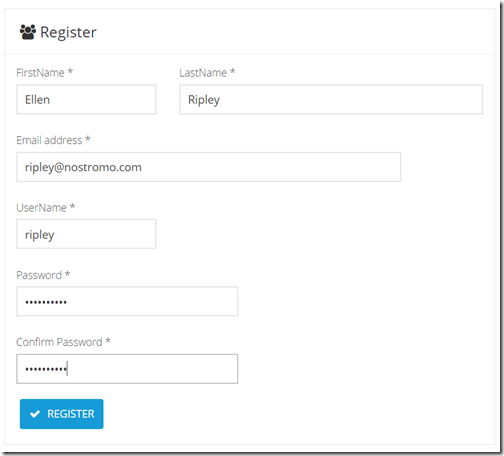
| On the Register page enter your details and then click on the Register button. |
|
| |
| Copy the Primary key value from Your subscription details. |
|
Note:
Every API request you make to the Web API must be authenticated by including an Authorization Header with your API Key. |
| |
| Click on Files API in the Documentation menu to see the operations of the Files API. |
|
| |
How to upload a XSLT map?
You can create a XSLT map by using the Visual Studio Enterprise Integration SDK or for example another XSLT tool like MapForce and XMLSpy from Altova. When you are finished creating the XSLT transformation, you upload the XSLT file into your integration account.
Use a tool like Postman to call the Files API.
Select POST and enter: https://free.apigize.io/v1/files in the Request URL.
In the Header enter “Ocp-Apim-Subscription-Key” as the key name and your Primary key as the value. |
|
| |
In the Body select the form-data radio button and then select the file that you want to upload.
Click on the Send button to upload the file. |
|
| |
How to create a XSLT transform?
With the XSLT API you can transform an .XML message.
Select POST and enter: https://free.apigize.io/v1/xslt/{XSLT filename} in the Request URL.
In the Header enter “Ocp-Apim-Subscription-Key” as the key name and your Primary key as the value. Also specify the Content-Type and what you want to Accept. |
|
| |
In the Body select the raw radio button and then enter the XML message that you want to transform.
Click on the Send button to transform the message. |
|
| |
Conclusion
In this blog post I only showed how to upload a file with the Files API and how to use the XSLT API. Of course there are more operations available on the API’s but these work similar. I want to add even more functionality to the API’s so stay tuned!
by community-syndication | May 17, 2016 | BizTalk Community Blogs via Syndication
Als wetenschapper kan ik complexe zaken goed abstraheren. Als IT-er los ik zaken in relatief korte tijd op
Blog Post by: AxonOlympus
