by community-syndication | Jul 22, 2015 | BizTalk Community Blogs via Syndication
I really like the way Azure Logic Apps team is taking a community-driven approach in building new features and maintaining the transparency on what’s happening inside the team. It’s really important given the current market conditions, for any problem you are trying to solve, there is at least a dozen competing products in the market. […]
The post Azure Logic Apps – Monthly Update July 2015 appeared first on BizTalk360 Blog.
Blog Post by: Saravana Kumar
by community-syndication | Jul 21, 2015 | BizTalk Community Blogs via Syndication
Now that Visual Studio 2015 has been officially released and TFS 2015 is only weeks away, it’s time to look at your training plan to ensure your team is able to maximize the benefits this new version offers. We’re been … Continue reading →
The post Need TFS 2015 training? We’ve got you covered. appeared first on QuickLearn Blog.
Blog Post by: Anthony Borton
by community-syndication | Jul 21, 2015 | BizTalk Community Blogs via Syndication
Monday 20th July was a big day for Visual Studio with the official release of Visual Studio 2015, .NET 4.6 and much more. There are a number of compelling features that will likely mean that many organizations will choose to … Continue reading →
The post Visual Studio 2015 is officially released! appeared first on QuickLearn Blog.
Blog Post by: Anthony Borton
by community-syndication | Jul 21, 2015 | BizTalk Community Blogs via Syndication
The new Build automation system included in TFS 2015 and Visual Studio Online is a huge improvement over the previous XAML based builds in previous releases. To help people get an appreciation for just how powerful and flexible the … Continue reading →
The post A DeVOps walkthrough using Visual Studio 2015 appeared first on QuickLearn Blog.
Blog Post by: Anthony Borton

by community-syndication | Jul 20, 2015 | BizTalk Community Blogs via Syndication
I had a very enjoyable day at the Integration Saturday event, organised by the Auckland Connected Systems User Group(ACSUG), of which I’m a member. Many thanks to the organizers and sponsors (Datacom, Mexia, Adaptiv, Theta and Microsoft). I hope that we do this again next year (Integration Saturday 2016!!) and also that this kicks off […]
Blog Post by: James Corbould

by community-syndication | Jul 14, 2015 | BizTalk Community Blogs via Syndication
Have you had the time to think about what is some features like RosettaNet, ESB or UDDI have in common? Well, all of them have custom databases and all of them are optional features. But the most important question here, because they have custom databases, is: Do you think that these databases are being backedup? […]
Blog Post by: Sandro Pereira
by ShaheerA | Jul 10, 2015 | BizTalk Community Blogs via Syndication
We’ve had a number of people run into the following issue so I just wanted to provide an explanation and solution.
Issue:
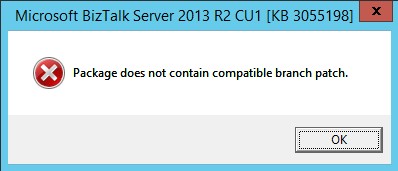
BizTalk 2013 R2 Cumulative Update 1 (CU1) install fails with “Package does not contain compatible branch patch” error:
Explanation:
This issue is happening in environments where a version of BizTalk Health Monitor (BHM) from the Microsoft Download Center has been placed within the BizTalk installation folder.
There are 2 branches of BHM:
- OOB BHM – shipped out-of-the-box with BTS2013 R2
- DLC BHM – shipped via Microsoft Download Center
OOB BHM has had 2 released versions so far. Version 2.0.0.0 shipped with BizTalk 2013 R2 RTM and version 3.1.5632.20684 shipped with BizTalk 2013 R2 CU1.
OOB BHM is located at SDKUtilitiesSupport ToolsBizTalkHealthMonitor within the BizTalk installation folder (default installation folder is C:Program Files (x86)Microsoft BizTalk Server 2013 R2)
DLC BHM has had many versions and is currently at 3.1.5654.28025.
The BTS2013R2 CU1 installer throws the above mentioned error if it finds any version of BHM within the BizTalk installation folder that is not a part of the OOB BHM branch.
We have seen this issue in environments where the user did one of the following:
- Replaced the OOB BHM binaries in the SDKUtilitiesSupport ToolsBizTalkHealthMonitor folder with a version of DLC BHM
- Created a new folder with a version of DLC BHM anywhere within the BizTalk installation folder
Solution:
To allow CU1 to install, simply move the folder containing DLC BHM out of the BizTalk installation folder and run the installer again.
Moving forward, never place any DLC BHM version within the BizTalk installation folder.
by community-syndication | Jul 9, 2015 | BizTalk Community Blogs via Syndication
We are very happy to announce the immediate availability of BizTalk360 version 7.10. For nearly 4 years now, we are continuing the trend of being agile and shipping out new versions of BizTalk360(with new features and improved product experience based on customer feedback)consistently. This is our 41st product release since our inception back in May […]
The post BizTalk360 – Version 7.10 Released appeared first on BizTalk360 Blog.
Blog Post by: Saravana Kumar

by stephen-w-thomas | Jul 8, 2015 | Stephen's BizTalk and Integration Blog
While my main passion in life is Integration with Microsoft Technologies, a close second is traveling. With traveling comes my “addiction” to earning airline miles, hotel points, and chasing status!
The way I see it is by using miles and points we can travel cheaper or even for free!
Have you ever wondered if it was really worth it though? Maybe you think you do not travel enough to benefit from miles and points? Or do not know the first thing about Loyalty programs? I cover this and more in my training course with Pluralsight titled “Traveling and Loyalty Programs Best Practices”.
It is broken down into 5 modules:
- Traveling Developer Best Practices
- Air Travel Deep Dive and Airline Best Practices
- Detailed Airline Loyalty Program Review
- Ins and Outs of Earning and Using Hotel Points
- Driving Off with Car Rental Credits
Here are two demo videos outlining the basics of loyalty programs and why having status matters.
[View:http://www.youtube.com/watch?v=7Kqd9wp_zwU]
[View:http://www.youtube.com/watch?v=CVsLFVeqcY0]
If you already have a Pluralsight account you can watch the course now. If you do not have an account, you can get a free 10 day, 200 minute trial using the banner below. What is even better – my course is 193 minutes long so anyone can get a free trial and watch the whole course.

Looking forward to hearing feedback, comments, and suggestions!
by community-syndication | Jul 8, 2015 | BizTalk Community Blogs via Syndication
If you want to test the deployment of API App or LogicApp templates, one of the easiest ways to do this is using the PostMan REST Client for Chrome. In this post I’ll show you how to authenticate against your Azure subscription, and show you how to call the API from PostMan. Although all of this information can be found on other sites, I wanted to bring it all into one post, with steps showing you what to do, and explanation of the various parts e.g. what a JWT is, and why the api-version value is so important…
Blog Post by: Daniel Probert
