by community-syndication | Jul 18, 2014 | BizTalk Community Blogs via Syndication
Axon Olympus maakt de eerstvolgende trainingsdata bekend voor haar BizTalk Server trainingen voor ontwikkelaars en beheerders. In 2014 vindt de volgende training BizTalk Server for Developersplaats op maandag 15, dinsdag 16, maandag 22 en dinsdag 23 september. Deze vierdaagse training […]
Blog Post by: AxonOlympus
by community-syndication | Jul 18, 2014 | BizTalk Community Blogs via Syndication
It can be complicated to deploy changed .XSD Schemas, Maps and Orchestrations because BizTalk artifacts depend on each other. Changes in one BizTalk application may affect other BizTalk applications therefore you usually deploy at a certain time or date all your changes when there is no “traffic”. This is because you first have to remove the Schemas, Maps and Orchestrations before you can deploy the changes. Also other processes in BizTalk that make use of these artifacts have to be stopped and can not run. Especially when you use a Canonical Data Model (CDM) it can be difficult to deploy changes because also Maps and Orchestrations in other BizTalk applications can use the same Canonical Schemas.
One of the advantages of the ESB toolkit is that you can easily deploy modified Maps and XSD schemas because Orchestration-based and messaging-based services in an Itinerary don’t depend on Schemas and Maps.
- Change in a Map
- Orchestrations are not bound to a specific map because transformations are performed by the MapHelper class. Therefore they don’t have to be removed when deploying a change.
- Change in a .XSD schema
- Orchestrations are not bound to a specific .XSD schema because the used Message Type is a XmlDocument. Therefore they don’t have to be removed when deploying a change.
When Schemas and Maps are removed from BizTalk, the ESB still can process the messages and map to the other message types because the maps are still in the GAC. This can be very useful in an 24*7 environment where it’s crucial that it is possible to deploy changes without stopping other processes that do not depend on the changed Schema or Map.
Please note that deploying changes with the ESB Toolkit is very powerful so you have to be careful and know what you are doing!
See Also
For more information on deploying changed BizTalk artifacts in the ESB Toolkit see:
- Deploying changed Schemas and Maps with the ESB Toolkit with NO Downtime for other Processes
by community-syndication | Jul 15, 2014 | BizTalk Community Blogs via Syndication
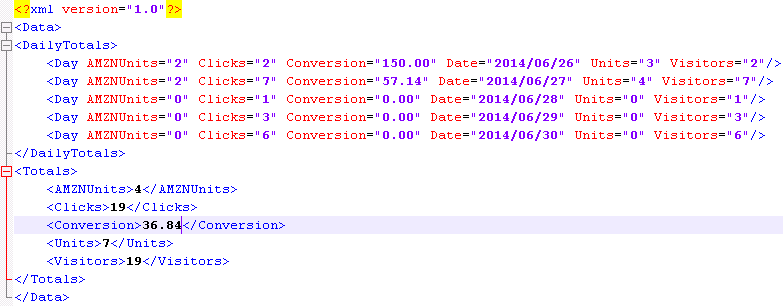
If you are an Amazon Associates it is possible to view a report over the Daily Trend for your account. This gives you the following information:
|
| Amazon Daily Trend report in XML format |
- AMZUnits (Items Ordered (Amazon) – how many products have been ordered, where Amazon is the seller
- Clicks (Clicks) – how many total visitors you have generated
- Conversion (Conversion)- how much did you sell compared to how many visitors you have. Note that it uses the total units sold, so if you have one customer that buys two products you have a Conversion rate of 200%
- Date (Date (yyyy/mm/dd)) – the day of the visit (Only in the Day structure)
- Units (Total Items Ordered) – the total amount of products that have been sold both with Amazon as the seller and 3rd party seller that uses Amazons platform.
- Visitors (Unique Visitors)- the unique number of visitors. If you refer the same customer twice it only counts as one unique visitor
In the above list the first name is the name in the XML file and the name in parents is the name of the column in the web page report.
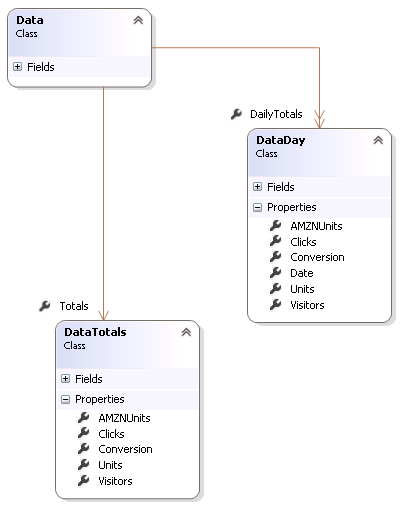 |
| Amazon daily trend report in diagram format |
So what can you use this data for? You can use this information to see how many you refer to Amazon on a daily basic. If you use the Unique Visitors and compare it to the same measure in Goggle Analytics you will be able to see what you conversion rate is to Amazon. How many of your users uses a link/ad/widget to go to Amazon to consider to buy a product.
You should use this information to find out where on your pages you have the most success to add links to Amazon that send users to Amazon. Try to place you links/ads/widgets on different locations on your pages to find the optimal way to send customers to Amazon and get a nice referral rate.

by community-syndication | Jul 14, 2014 | BizTalk Community Blogs via Syndication
BizTalk Services is far from the most mature cloud-based integration solution, but it’s viable one for certain scenarios. I haven’t seen a whole lot of demos that show how to send data to SaaS endpoints, so I thought I’d spend some of my weekend trying to make that happen. In this blog post, I’m going […]
Blog Post by: Richard Seroter
by community-syndication | Jul 13, 2014 | BizTalk Community Blogs via Syndication
Today I’ve released version 2.0 of my Viasfora extension for Visual Studio, which supports VS2010, VS2012 and VS2013. Lots of work went into this release, not only to add some cool new features, but also to clean up the existing
Blog Post by: Tomas Restrepo

by community-syndication | Jul 12, 2014 | BizTalk Community Blogs via Syndication
A lesson I learnt (the hard way) while working on the BRE Pipeline Framework was that if you use one of the out of box disassembler pipeline components such as the XML/EDI/Flat File disassembler and you rely on them to promote context properties from the body of your message, you will find that those context […]
Blog Post by: Johann
by community-syndication | Jul 12, 2014 | BizTalk Community Blogs via Syndication
A lesson I learnt (the hard way) while working on the BRE Pipeline Framework was that if you use one of the out of box disassembler pipeline components such as the XML/EDI/Flat File disassembler and you rely on them to promote context properties from the body of your message, you will find that those context […]
Blog Post by: Johann
by community-syndication | Jul 11, 2014 | BizTalk Community Blogs via Syndication
The Broker Service in the ESB Toolkit is a powerful Itinerary Service but it’s not heavily documented and therefore probably not often used. Which is a shame because the Broker Service is the only service that allows you to select the next Service in the Itinerary, and thus change the entire path of execution that the Itinerary takes. In the current implementations the Broker Service is only available as a Messaging Service that executes within the Pipeline. No Orchestration-based Broker Service is provided.
Note that because it can only execute within a Pipeline you can’t use an Orchestration Service to connect to it but the Broker Service itself can connect to other Orchestration Services.
See Also
For more information on the Itinerary Broker Service in the ESB Toolkit see:

by community-syndication | Jul 10, 2014 | BizTalk Community Blogs via Syndication
Let’s have a look to a little of inside information that will be in my upcoming Book about maps: demystify and clarify some features about the Table Looping Functoid. First of all this functoid requires at least 3 inputs and a maximum of 100, in which the official documentation states that: Parameter 1: A link […]
Blog Post by: Sandro Pereira

by community-syndication | Jul 10, 2014 | BizTalk Community Blogs via Syndication
I have just uploaded the BRE Pipeline Framework v1.5.1 installer to the CodePlex project page. If you have previously downloaded v1.5 then please uninstall it, download v1.5.1 and install that as it fixes a pretty major bug. The bug (issue #1767) results in context properties promoted by XML/FF/EDI disassemblers prior to BRE Pipeline Framework components […]
Blog Post by: Johann
