by community-syndication | Nov 20, 2012 | BizTalk Community Blogs via Syndication
The year 2012 has almost come to an end. Community wise it has been a fantastic year for BizTalk Server. Numerous new articles on the TechNet Wiki, blog posts on BizTalk 2013 (previously 2010 R2), and BizTalk related events taking place around the world. All of this is made possible by BizTalk community members. Genuine Basil is one of them and the following story is on him.
Genuine Basil, 30 years of age, was born in Kerala (an Indian state, also known as “God’s Own Country“). He migrated to Australia 2 years ago and is living with his beautiful wife Jis in Sydney.
Genuine’s overall IT experience is around 9 years and he has worked with some of the reputed organizations like Accenture, Wipro and CSC. He currently works as consultant at Burch Technologies,Sydney.
Genuine has around 7 years’ experience in BizTalk and worked with all versions of the product starting from BizTalk 2004. His main area of expertise is BizTalk development. Besides that he is also involved in design discussions and BizTalk server builds.
Genuine enrollment into the BizTalk world:
“I got trained in BizTalk while working at Accenture. I believe this was the turning point in my career. Being a BizTalk developer, it is important to have a good understanding about other technologies/standards you are integrating with, which means the learning opportunity is enormous. For me, the best thing about BizTalk is that every project is a new challenge and I am enjoying it.”
Genuine has the following to say about the community:
“First of all thanks to Steef-Jan for giving me this opportunity. BizTalk is blessed with its community members who are putting lots of effort to share their knowledge. I take this opportunity to thank all the community members for their contributions. Thank you !!”
In his spare time Genuine watches movies, soccer, and enjoys being with his family. He loves soccer and ManchesterUnited is his favorite team. He follows the EPL, ChampionsLeague and all other competitions, where Man United is involved. His long time dream is to visit Old Trafford one day. He hopes this day will come soon. In general Genuine likes to travel and explore new places.
Thanks Genuine for your time and contributions.
Cheers,
Steef-Jan
by community-syndication | Nov 19, 2012 | BizTalk Community Blogs via Syndication
While on SharePoint 2013 training we came across all the different ways of calling
SharePoint and it’s data through JavaScript, JQuery and all the bits.
It was all looking good until we needed to update sharepoint – e.g.
a list, a list item etc.
The MS Course notes say – “if you’re in SharePoint you can get the Form Digest from
the main SharePoint Form.”
What about if you’re running outside of SharePoint (a Provider App – they now call
it, or Cloud Hosteddepending on who wrote the help article)
The answer in the notes is go and make an old fashion call to Sites.asmx
SOAP WebService. from client side javascript this is going to be a feat.
.
The Answer – make a REST call to get the ’Context Info’ first, then
you’ll have the form digest and you’re done.
http://msdn.microsoft.com/en-us/library/fp142386(office.15).aspx#bk_synchronize (just
at the top of this page)
Table
1. SPContextWebInformation structure initialization properties
|
Property
|
Description
|
|
webFullUrl
|
Gets the server-relative URL of
the nearest site.
|
|
siteFullUrl
|
Gets the server-relative URL of
the root of the site collection that the site is contained within.
If the nearest web is the root
of a site collection, then the value of the webFullUrl property
is equal to the siteFullUrl property.
|
|
formDigestValue
|
Gets the server’s request form
digest.
|
|
LibraryVersion
|
Gets the current version of the
REST library.
|
|
SupportedSchemaVersions
|
Gets the versions of the schema
of the REST/CSOM library that are supported.
|
To access this information, use
the /contextinfo operator.
For example:
http://server/web/doclib/forms/_api/contextinfo
To increase security against
cross-site scripting attempts, the /contextinfo operator
accepts only POST requests.
Blog Post by: Mick Badran

by community-syndication | Nov 19, 2012 | BizTalk Community Blogs via Syndication
In my previous post, I looked at how the BizTalk Server 2013 beta supports the receipt of messages through REST endpoints. In this post, I’ll show off a couple of scenarios for sending BizTalk messages to REST service endpoints. Even though the BizTalk adapter is based on the WCF REST binding, all my demonstrations are […]
Blog Post by: Richard Seroter
by community-syndication | Nov 19, 2012 | BizTalk Community Blogs via Syndication
My speaking schedule has gotten a bit crazy this last few months and I haven’t had any time to schedule any local presentations. Thanks to my good friend Dave Noderer , tomorrow I will be doing a session about enterprise mobility at the South Florida…(read more)
Blog Post by: gsusx

by community-syndication | Nov 18, 2012 | BizTalk Community Blogs via Syndication
I am currently working with a customer that use Sybase (remember them?) Adaptive Server Enterprise, as their primary database environment. Sybase and Microsoft originally co-developed the early versions of SQL Server, so there are still enough similarities that it “feels” like working with MS-SQL, albeit an older version. However, the BizTalk Adapters are not so […]
Blog Post by: Brett
by community-syndication | Nov 15, 2012 | BizTalk Community Blogs via Syndication
In my previous post I discussed sending messages to a Service Bus queue. These messages send to the queue are then picked up by the SB-Messaging Adapter for BizTalk Server 2010 R2 CTP, which is running in a VM on Windows Azure. BizTalk will then process these messages by inserting them into a table. I used one client to send multiple messages to the queue. I measured the time it took to send messages to the queue not the time it took for BizTalk to insert each message in SQL Server 2008 R2 table. However, the latency between the queue and SQL Server 2008 R2 was relatively low. As soon as all the messages were sent the same amount of records were present in the table. Overall the performance is not bad when it comes to a few thousand messages. Latency and throughput are good.
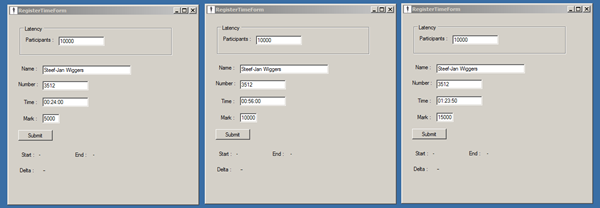
In this post I take a different approach. I will simulate a run with 10000 participants. The run is 15K and there are passing time marks at 5 and 10K. At 15K the finishing time will be registered. I will use multiple clients to send messages to Service Bus queue. I will use one client sending 10000 messages for 5K passing mark, one sending 10000 messages for 10K passing mark and one client for 15K finishing times.
I have changed some settings like batch size for WCF-SQL Adapter, which I set to a 1000. For SB-Messaging I have changed the Prefetch Count. I also modified the polling interval of processing host to 50 ms. These are just experimental to increase performance (latency and throughput).
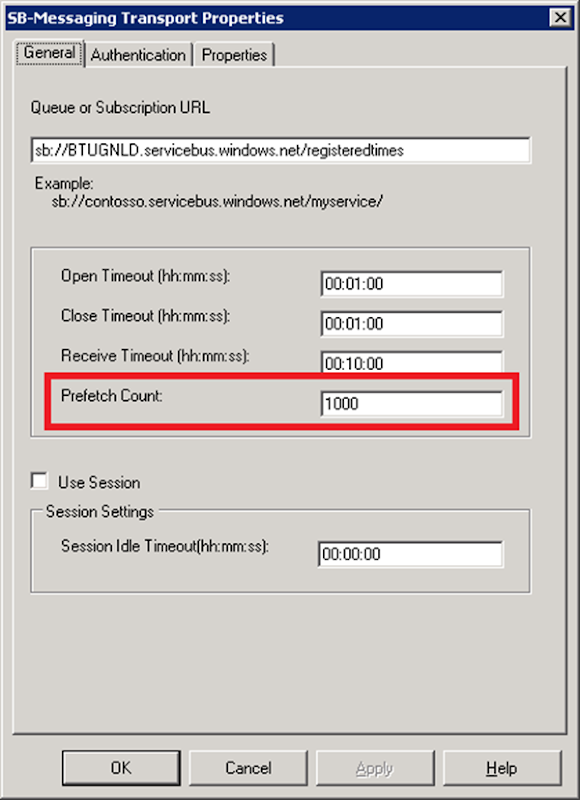
The Prefetch Count specifies the number of messages that are received simultaneously from the Service Bus Queue or a topic. I set this initially to a 1000 to observe what will happen in my BizTalk environment regarding throughput. More on prefetching see the Best Practices for Performance Improvements Using Service Bus Brokered Messaging.
| Number of clients |
Number of message per client |
Number of messages |
Duration (Latency) in seconds |
Msg/Sec |
| 3 |
10000 |
30000 |
2025 |
14.81 |
| 6 |
5000 |
30000 |
1430 |
20.98 |
| 9 |
3333 |
30000 |
968 |
30.99 |
| 12 |
2500 |
30000 |
556 |
53.96 |
With nine clients the duration to send messages to queue was less 1000 seconds, however BizTalk started throttling and finished processing a 180 seconds later. Still processing of 30000 messages was around 21 minutes. I changed the polling interval of the processing host back to its default of 500 ms. With subsequent test BizTalk throttled again after a few minutes.
BizTalk host BizTalkServerApplication throttled because InflightMessageCount exceeded the configured throttling limit.
With more clients the latency to send message to queue decreases. However, the throughput at the BizTalk end decreases and so does the latency for this complete process. This means performance decreases as BizTalk is not optimized to process that kind of load. Therefore tuning in the dashboard will be required to optimize BizTalk if possible. However, it may be better to consider to scale vertically with VM assigning more cores and memory (i.e. large or extra-large instance) or scale horizontally adding more instances of BizTalk. Scaling will mean incurring more cost as well.
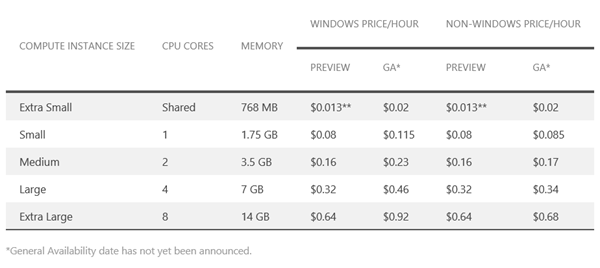
See Pricing Details Windows Azure.
With more clients and more queues you will be able to send up to a 100 or more messages per second to the Service Bus queues (see Scenarios paragraph of Best Practices for Performance Improvements Using Service Bus Brokered Messaging). This can be done easily. However your backend systems (i.e. BizTalk in this scenario) must be able to read and process the message in case performance (high throughput) is a requirement. So scalability will be an important quality attribute in this kind of scenarios. In upcoming posts I will delve into this scenario to further experiment with SB-Queues and Topics.

by community-syndication | Nov 15, 2012 | BizTalk Community Blogs via Syndication
One of my team members that is making some changes to a project that I started, called me saying that he was having problems in deploying the project. Whenever he tried to deploy the project he was stuck in the following error: Failed to add resource(s). Resource () is already in store and is either […]
Blog Post by: Sandro Pereira
by stephen-w-thomas | Nov 14, 2012 | Stephen's BizTalk and Integration Blog
I noticed today that the Platform Images for Windows Azure Virtual Machines has been updated to include a Windows Server 2008 R2 and Windows Server 2012 Image for October.
The great news is I re-tested installing BizTalk Server 2013 Beta on the new Windows Server 2012 Image and everything installed and is running without issues! This time I used a Medium Virtual Machine as compared to the Small to do the initial software installation. I noticed a huge difference in performance and installation time. Since I am not using the VM now, I have bumped it down to an extra-small that costs just over $0.01 per hour.
If you want to get BizTalk 2013 running before the official image is available, make sure you use the October Images. Best of luck.
by community-syndication | Nov 14, 2012 | BizTalk Community Blogs via Syndication
With BizTalk Server 2013 Beta, ESB Toolkit is now fully integrated with BizTalk Server. Also, the ESB Toolkit configuration experience is simplified to enable a quick setup. The installation and configuration is described on MSDN.
The Setup does not register the ESB Toolkit Itinerary Designer by default. (You can use the ESB Toolkit Itinerary Designer to create itineraries in Visual Studio.) The “Installation Guide.htm” in the Microsoft BizTalk ESB Toolkit folder describes that you can install the Itinerary Designer extensions by clicking Start> All Programs> Microsoft BizTalk Server 2010 ESB toolkit > Install Itinerary Designer Extensions. The Installation Guide is still for the ESB Toolkit 2.1 because in BizTalk 2013 Beta you don’t have this option. In Known Issues is described that you can find the Itinerary Designer Setup in the installation folder of BizTalk 2013 Beta.
Steps
Go to the installation folder of BizTalk 2013 Beta
| Double click on Microsoft.Practices.Services.Itinerary.DslPackage.vsix. |
|
| |
|
Test the ESB Toolkit installation
|
To test the installation I used a small BizTalk project with 2 schemas and a map to create a BizTalk application. You can open a BizTalk 2010 solution with Visual Studio 2012 and upgrade the projects in the solution to the new version of Visual Studio.
|
|
| Notice that the number of Adapter Providers are still the same as in the previous versions of the ESB Toolkit! |
| |
|
To send a message to one of the on-ramps that are provided by the BizTalk ESB Toolkit I used the sample “GlobalBank.ESB.Samples.Itinerary” application. This application is still in the samples in ESBSource.zip.
|
|
Run the Itinerary Test Client to send a message with an itinerary to the ESB.ItineraryServices on-ramp.
|
|
|
Conclusion
My BizTalk 2010 solution opened easily in Visual Studio 2012 and it ran without problems. Only Tracing in the ESB Toolkit did not seem to work,. Also it took a while before I had found the setup of the Itinerary Designer Extensions because at first I didn’t read the Known Issues on MSDN but now I know, first read the Known Issues when you’re working with a Beta version!
by community-syndication | Nov 14, 2012 | BizTalk Community Blogs via Syndication
In early November 2012 the Beta release from BizTalk 2013 has been released. That version number is interesting in itself, as the CTP was called BizTalk 2010 R2.
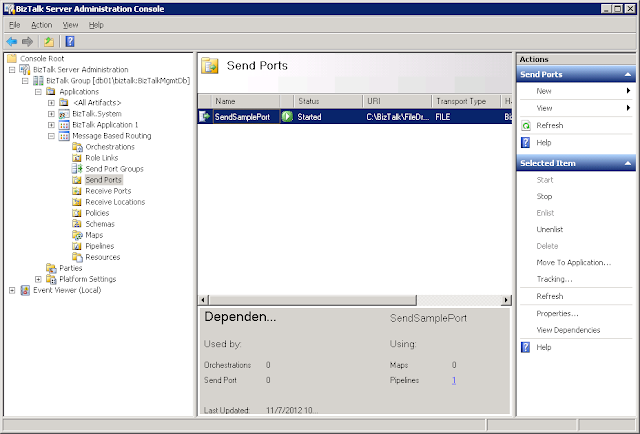
One on the new functionalities in this release, which was not yet available in the CTP is a Dependency Viewer. As the name already suggests, this functionality enables the user of the BizTalk Server Administration Console to view which BizTalk artifacts depend on other artifacts. This article intends to provide more information on how this functionality works.
The problem it solves
Most BizTalk Groups contain multiple BizTalk Applications which might contain hundreds of schemas, (custom) pipelines, maps, orchestrations and endpoints. These artifacts are not autonomous, they depend on other artifacts and those artifacts might also depend on other artifacts.
When it comes to subjects like deployment and troubleshooting, it’s handy to know which artifacts rely on each other. That’s the point where the Dependency Viewer comes in.
Where to find
The Dependency Viewer can be found in the Administration Console. It can’t be missed in the lower part of the screen under the following artifacts:
- Receive Ports
- Receive Locations
- Send Ports
- Send Port Groups
- Schemas
- Maps
- Pipelines
How it works
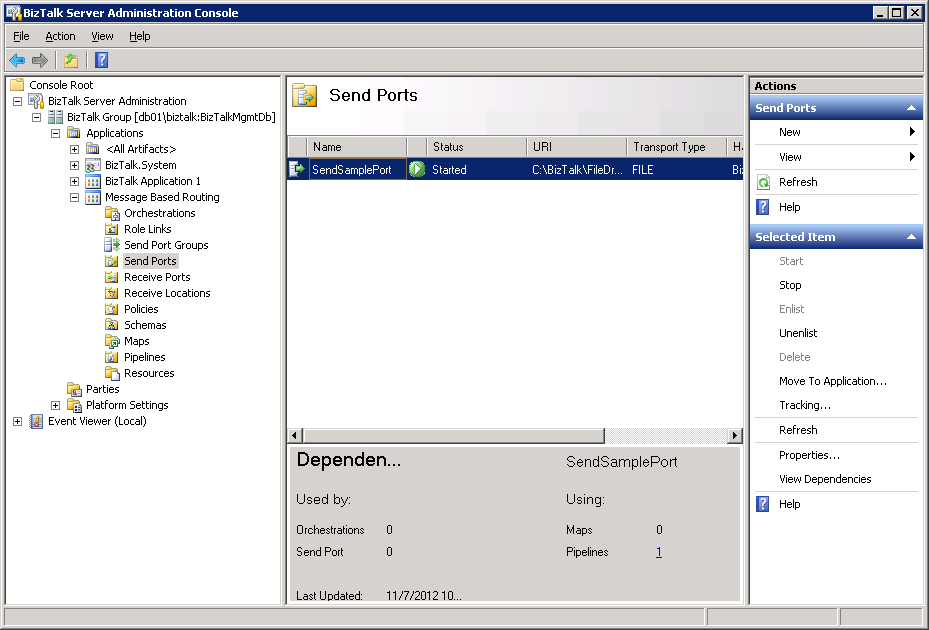
Whenever you select one of the mentioned categories, the Dependency Viewer appears in the lower part of the pane that shows the artifacts. To find out which dependencies a certain artifact has, you need to hit the ‘View Dependencies’ button in the right pane. So unfortunately the Admin Console does not automatically show the dependencies, whenever you click on another artifact. Hopefully this will be fixed in a later BizTalk 2013 version.
Once you click that hyperlink the Dependency Viewer shows the dependencies, if any, of the selected artifact. It does this per category.
If dependencies exist, the number of dependencies appears as a hyperlink. The dependencies themselves appear after you have clicked the hyperlink.

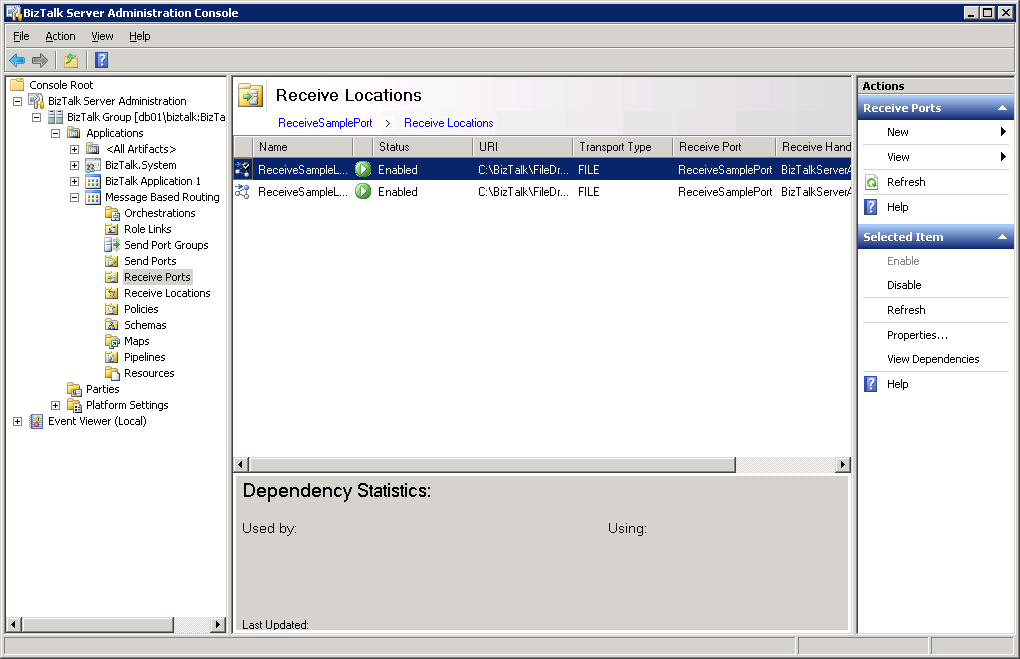
The screen above shows the dependencies for a Receive Port called ReceiveSamplePort. This port has 2 Receive Locations which are shown both.
Although the upper Receive Location is selected, no dependencies are shown. If you want to see its dependencies, click View Dependencies in the right pane again and in this case it would show that this Receive Location depends on one Receive Port and one Pipeline.
Conclusion
The way the Dependency Viewer is implemented in this Beta release is not (yet) very impressive. I mention a couple of down sides on the current implementation:
- no auto-retrieve. You need to hit the ‘View Dependencies’ button
- the Dependency Viewer is always there, it’s not possible to change its size or hide/show the viewer
- no dependencies shown in case of Message Based Routing scenarios, for example a Send Port with a filter to a Receive Port
- no dependencies shown relating to Hosts
I’m looking forward to the next BizTalk 2013 release and I am sure the Dependency Viewer will be implemented in a better and richer way.