by community-syndication | Jun 12, 2012 | BizTalk Community Blogs via Syndication
In my previous post I showed how to provision a Virtual Machine in Windows Azure. The Virtual Machine was used to create a BizTalk 2010 Development environment. Now in this post I would like to go into creating an image of this Virtual Machine and then use it to create a new Virtual Machine.
An image is a virtual hard disk (VHD) file that is used as a template for creating a virtual machine. This can be useful when you want to create multiple virtual machines that are set up the same way. Another reason can be to capture the image as you do not want to use it for a while and prevent incurring costs.
Capturing a Virtual Machine
To capture a Virtual Machine you need to perform a few steps. One is to sysprep the virtual machine. For Window Server 2008 R2, like my BizTalk Development environment, I followed instructions from article “How to Capture an Image of a Virtual Machine Running Windows Server 2008 R2“. After sysprepping your machine you need to capture it. Sysprepping the machine according to the article will shutdown the virtual machine and changes the status of the machine in the Management Portal to Stopped. Capturing the VM means selecting it. You will then fill some details in dialog box.
Now notice the name I gave to the image. This name was deemed invalid after I clicked check mark. The error was:
Failed to capture image BizTalk_Development of virtual machine BTS2010.
The image name is invalid.
I renamed it to BizTalkDev. It went trough and took a while before image was captured.

That is basically it. Image is created and Virtual Machine is deleted and you’ll not be billed.
Creating a virtual machine from the Image
If you want to create a new virtual machine you can select your image from the Gallery. Steps below a similar if you create a Windows 2008 R2 machine from scratch. From My Images you will see images you have created. In my case only BizTalkDev is available.

Next step (2) is filling in details for the VM Configuration.

Following step (3) is filling in details for VM mode.

Last step (4) is selecting the availability set in case you require a group a virtual machine in case of outages (i.e. higher availability).

Click the check mark and Virtual Machine is being provisioned. This may take a while before it is up and running. When it is up and running I can connect to machine again through remote desktop. Machine will need a few minutes to warm up again, before I could fire up BizTalk administration, SQL Server and Visual Studio.

This way I can spin up a Virtual Machine with BizTalk when I want it and remove it when I done. I can use it to spin up a few machines in case I want to work with a team or for training purposes at a client. There can be many more useful scenario’s than the ones I mention here.
If you are experiencing problems with Virtual Machines you can ask questions in the Windows Azure Virtual Machines for Windows forum or study the online documentation.
My experience so far with Virtual Machines and the Windows Azure Portal are positive. I am seeing more and more its potential. The User Experience (UX) with Portal is very satisfactory to me personally. I must say Microsoft Windows Azure team have done a good job.
Finally I also like to thank Thiago Almeida (Microsoft New Zealand) for giving me some tips that lead to this post.
Cheers,
– Steef-Jan
by community-syndication | Jun 12, 2012 | BizTalk Community Blogs via Syndication
I announced in a previus post that I joined the blogging team on biztalkadminsblogging.com.
However it took untill today before my first blog post was created.
I gave it a long thought what my first blog post should cover. the result is a post on some best practices for the usage of tracking in BizTalk… hope you like it!
The actual post can be found here http://www.biztalkadminsblogging.com/index.php/item/83-best-practices-for-tracking
by community-syndication | Jun 12, 2012 | BizTalk Community Blogs via Syndication
Original article from blog.biztalk360.com
In the previous post we explained how easy it’s to setup BizTalk servers in Windows Azure using the new durable virtual machine support.
In the article we mainly focused on some of the common low risk use cases like, setting up the environment for
- Development,
- QA,
- May be for support, training etc.
But, how about running your production BizTalk environment in the cloud. Is it a supported configuration?
Technically the virtual machines in windows azure are regular VHD files fully compatible with Hyper-V. One of the key offering from Microsoft in this space is, customer can freely move their VM’s between Azure and on-premise. One step ahead, during Scott Guthrie http://meetwindowsazure.com talk he demonstrated customers will be able to move the VHD files between cloud providers like Amazon freely.
Given the complete support of BizTalk running in Hyper-V (http://support.microsoft.com/kb/842301) as shown below
Production BizTalk environment in Windows Azure virtual machine should also be supported. But you need to be fully aware, the support will be within the SLA boundaries of Windows Azure for IaaS (Infrastructure as Service) offering, which currently is 99.95% monthly SLA.
If your application can coupe with the occasional downtime (it may not happen, but still there is .05% possible downtime), then you should be able to run your BizTalk production environment in Windows Azure virtual machine.
NOTE: There is no endorsement from Microsoft on this subject at this point, things will get much clearer when BizTalk 2010 R2 is released. However with one of the recent unofficial conversation I had with senior Microsoft executive, this is the statement I heard. I’m just giving you a head start, sure we will hear more official news in the future.
Nandri!
Saravana Kumar
by community-syndication | Jun 11, 2012 | BizTalk Community Blogs via Syndication
If you are interested in how Microsoft has changed Hyper-V in Windows Server 2012, you need to watch todays TechEd US sessions from Jeff Woolsey.
http://channel9.msdn.com/Events/TechEd/NorthAmerica/2012/VIR308
http://channel9.msdn.com/Events/TechEd/NorthAmerica/2012/VIR309
I think these change are a real game changer in the Virtualization Landscape, lookout VMware.
More …
by community-syndication | Jun 11, 2012 | BizTalk Community Blogs via Syndication
Today at TechEd US in Orlando, it was good to hear Scott Guthrie during his foundation session: Windows Azure Today and Tomorrow, mention BizTalk as a possible workload that could be hosted in the new Azure Infrastructure as a Service (IaaS) feature released last week. The new IaaS feature opens many possibilities for those workloads that are not easy to host in a Azure web or worker role; allowing them to move from your data centre to Azure. Some of the primary uses that I can see for BizTalk running in Azure IaaS are:
- Rapid POC of BizTalk solutions without the assistance of the client’s infrastructure group
- Rapid provisioning of BizTalk Developer environments with the use of the Azure IaaS virtual machine templating feature
- Occasional Demoing of BizTalk solutions, the IaaS virtual machine are only charged while running, otherwise you pay only for the storage of the VHD files in Azure Storage.
The use of BizTalk in the cloud will be further enhanced with the release of BizTalk 2010 R2 (Scheduled for release approximately 6 months after Windows 8)
To view Scott Guthrie complete session on Windows Azure Today and Tomorrow, it can be found on Channel9 at http://channel9.msdn.com/Events/TechEd/NorthAmerica/2012/FDN05
More …
by community-syndication | Jun 11, 2012 | BizTalk Community Blogs via Syndication
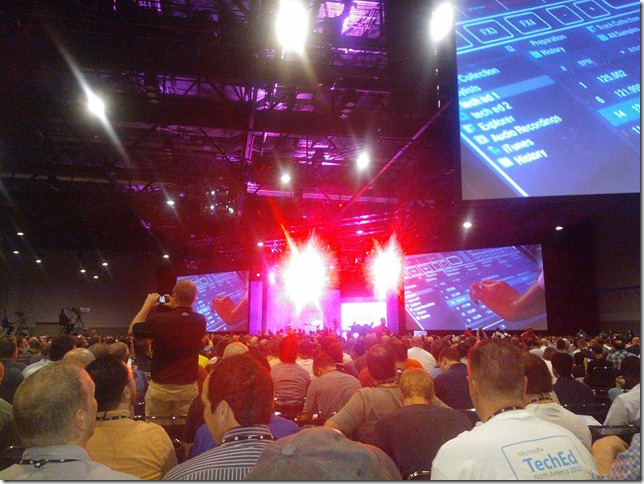
Keynote
The Keynote started off like a Keynote from another technology company. A DJ was spinning tunes and also showed off his new ’turntable’ that runs on Windows technology and is all the rage these days (so he says).
Post DJ dialog, Satya Nadella stepped up to the mic and provided some insight into the state of computing inside and outside of Microsoft. He provided the following:
- We are at the shift of a new paradigm. Much like at the dawn of Client-Server, we find ourselves in a position where we need to re-invent ourselves by leveraging new technologies such as the cloud.
- Microsoft is focused on providing Services at internet scale
- Microsoft currently runs some of the worlds biggest apps (Xbox live, Bing, Exchange, CRM)
- feedback loop
- global scale, 24 x7
- ultra-modularity.
- 16 major Microsoft Data centers around the world
- Bing 300 petabytes of data
- Microsoft battle testing each piece of new technology released
- Bing is running on top of the the Windows Server 2012 RC
- You can’t “head fake” this type scale
Next up was Jason Zander and he was here to speak about some of the advancements in the Windows Server and System Center product space. Jason added that datacenters, no matter on-premise or cloud, are required to be more responsive to ever changing business needs. Much like everything, it seems, these days people want services cheaper, faster and delivered yesterday. The advancements in Windows Server and System Center have been created to address these needs(well except the yesterday bit).
The Modern Datacenter needs to be:
Windows Server 2012
Mark Russinovich was up next. He wanted to discuss some of the advances that the Azure team has made in the area of supporting durable Virtual Machines in Azure. One of the more humorous moments was when he referred to a slide that had a Linux logo on it: “no we didn’t get hacked, we do support Linux”.
Provisioning Cloud infrastructure
-
New Metro interfaces in portal
-
VMs now supported includes
-
OpenLogic
-
SUSE
-
Ubunto
-
Windows Server 2008 R2
-
Windows Server 2012 RC
-
We can deploy a new VM into a segregated “corporate network” in Azure (I assume this means what previously was known as Brooklyn")
The CIO from Aflac, an insurance company, who has deployed a SharePoint solution to Azure was brought on stage to share his experiences with Azure. They have built a solution by provisioning VMs into Azure. Aflac chose Azure based upon the agility and flexibility that it provides.
Cloud and Aflac (CIO)
Requirements
-
Need Agility
-
Flexibility
-
Performance
Solution
-
SharePoint 2010
-
12 VMs support solution including
-
Use availability sets to further mitigate failure points
-
Looking to use Azure for extranet and customer scenarios
The Keynote then shifted towards the Developer experience including new Azure and Visual Studio 2012 functionality.
Inside the modern Application
-
Personal App experiences are now mandatory
-
Social is something that needs to be built into application and can’t be a “bolt” on
-
Build, Measure, Learn, Move
New Tools:
Frameworks
Comprehensive Runtime
ASP.NET MVC4/VS 2012 RC
HTML is now supported for LightSwitch
Keynote Summary
Having the DJ out there at the beginning was a nice touch. I am sure they wanted to pump up the crowd and generate some excitement. I think they hit the mark here but slowly the energy started to drain. There were several demos that didn’t work or required a second take for them to run. This is a bit of a let down as an attendee. Sure “stuff happens” but it seems like there could have been more rehearsing happening before hand.
I also felt Microsoft missed an opportunity to talk about Windows 8 and consumer devices. Arguably this is not the right time or place to do this but everyone in the building uses a computer on a day to day basis as part of their job. I would have loved to seen some demos of some slick new tablets or ultra books running the latest offerings. Ironically I heard more people talking about the newly released MacBook Pro today than Windows 8 devices. I see this as suitable evidence that they missed the mark considering the “pro” Microsoft audience at this conference.
Windows Azure Today and Tomorrow (Scott Guthrie)
If you have never seen Scott speakyou are missing out. He has this uncanny ability to take an awkward situation and make people laugh. He did this at Summit with his “Bob” Azure site and once again today with his “Dude” Azure site. He is very engaging and enjoys ’pop-star’ status amongst the Microsoft loyalists.
In his presentation, he elaborated on some of the recent news that he shared at the Meet Azure event. More specifically he focused on the new durable VM support, Azure Websites and ServiceBus. Surprisingly he even included “BizTalk” a couple times and he did not include the words “death, dead, soon to be dead or shot dead” in the same sentence.
General Update
-
Azure is flexible, open and solid
-
Microsoft has opened their minds to new platforms and open source
-
99.95% monthly SLA
-
Pay only for what you use
MSDN
Scott then reminded the attendees with MSDN that it includes Azure benefits
Durable VMs
-
Websites
-
Build with ASP.Net, Node.js or PHP
-
Deploy in seconds with FTP, GIT or TFS
-
Start for free, scale up as your traffic grows
-
Shared Mode (Free)
-
10 websites for free
-
other tenants co-hosted
-
Reserve Mode (Pay as you go)
-
Dedicated VMs
-
No other tenants
-
Charge for VMs on a per hour basis
-
Converting existing applications to cloud is easy
-
VMs are always being monitored and if a failure does exist, your application will be migrated to a new VM to ensure of business continuity
-
You have the granularity to spin up or down a particular worker role.
-
You can RDP into a Role instance as well
-
Cloud allows you to focus on apps and not infrastructure
-
Azure is great for the following scenarios:
-
Many SDKs are supported
-
.net
-
java
-
python
-
php
-
node.js
-
SQL Database
-
Relational SQL Server Engine in the cloud
-
Clustered for HA
-
Fully managed service
-
SQL Reporting support
-
Provisioned in seconds
-
Can scale to 150 gb in seconds
-
Can be accessed from ADO.Net
-
BLOB storage
-
HA, scalable and secure file system
-
Blobs can be exposed publically over http
-
Continuous geo-replication
-
Distributed Cache
-
low latency, in memory distributed cache
-
Dynamically grow and shrink cache size
-
ha support
-
memcached protocol support
-
Twitter demo went from 1.6 seconds to retrieve tweets from twitter down to .29 ms
-
ServiceBus
Windows Azure Today and Tomorrow Summary
Overall it was a good session. Like I mentioned before, Scott is a great speaker and I enjoyed listening to him. Some of the content he provided I have seen at Summit, but I certainly can’t hold that against him. I think this was a great introduction to Azure for people that have not seen it before or for those who took a look a few years back and are now interested in learning more about it.
by community-syndication | Jun 11, 2012 | BizTalk Community Blogs via Syndication
After the recent announcement of Windows Azure Virtual machines support, we created fully functioning BizTalk developer environment on Windows Azure VM.
The complete end to end steps is documented here in our blog
http://blog.biztalk360.com/post/2012/06/11/BizTalk-2010-Environment-in-Windows-Azure-Virtual-Machine-(IaaS).aspx
Nandri!
Saravana
by community-syndication | Jun 11, 2012 | BizTalk Community Blogs via Syndication
v\:* {behavior:url(#default#VML);}
o\:* {behavior:url(#default#VML);}
w\:* {behavior:url(#default#VML);}
.shape {behavior:url(#default#VML);}
Normal
0
false
false
false
false
EN-AU
X-NONE
X-NONE
MicrosoftInternetExplorer4
/* Style Definitions */
table.MsoNormalTable
{mso-style-name:”Table Normal”;
mso-tstyle-rowband-size:0;
mso-tstyle-colband-size:0;
mso-style-noshow:yes;
mso-style-priority:99;
mso-style-parent:””;
mso-padding-alt:0cm 5.4pt 0cm 5.4pt;
mso-para-margin-top:0cm;
mso-para-margin-right:0cm;
mso-para-margin-bottom:10.0pt;
mso-para-margin-left:0cm;
line-height:115%;
mso-pagination:widow-orphan;
font-size:11.0pt;
font-family:”Calibri”,”sans-serif”;
mso-ascii-font-family:Calibri;
mso-ascii-theme-font:minor-latin;
mso-hansi-font-family:Calibri;
mso-hansi-theme-font:minor-latin;
mso-bidi-font-family:”Times New Roman”;
mso-bidi-theme-font:minor-bidi;
mso-fareast-language:EN-US;}
I have a client scenario where weird 3rd party
system 1, sends me an update of some information, from time to time, about a
user, this information needs to be instantly replicated into SharePoint.
I could use BCS but it’s not instant It’s coming to me via BizTalk, so I have it in
near real time, so
I can update SharePoint can’t I?? well yes it seems you can
There is the web service that SharePoint quite nicely exposes:
http://{Server}/_vti_bin/userprofileservice.asmx
It has many methods one of these is: ModifyUserPropertyByAccountName
It’s a one way send in BizTalk.
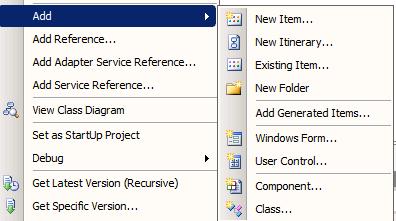
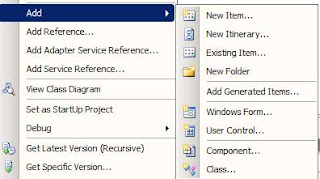
When you add a reference, you need to add a generated item,
that consumes a WCF Service.
You will get 2 schema s an orchestration and a port binding,
the schema s are useful, the orchestration you can choose to use it or not, it
contains a bunch of multi-part message types,
and a massive port for every single method.
The port is useful, because
it contains the operations, you will need to use when you create the port, so
one port can have many operations to the same web service, they give you the
binding for this port, which is very nice, I suggest you use it.
Here is where all the nice stuff ends, and the really interesting
stuff begins. If you use this, it does not work.
You may get:
Error details: System.ServiceModel.FaultException:
<soap:Envelope
xmlns:soap=”http://schemas.xmlsoap.org/soap/envelope/”
xmlns:xsi=”http://www.w3.org/2001/XMLSchema-instance”
xmlns:xsd=”http://www.w3.org/2001/XMLSchema”><soap:Body><soap:Fault><faultcode>soap:Server</faultcode><faultstring>Server
was unable to process request. —> Invalid String Value: Input must
match string data type.</faultstring><detail
/></soap:Fault></soap:Body></soap:Envelope>
This made no sense to me, as I was sending a string, and updating
a string..
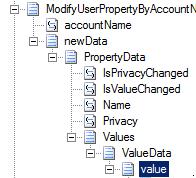
If you look at the schema for the message:
value is defined as xs:anyType, which means you can put anything
in here, which is correct, I want to, a string, a datetime, a int. So the
schema is flexible
The wsdl is very vague:
<s:complexType
name=”ValueData”>
<s:sequence>
<s:element
minOccurs=”0″ maxOccurs=”1″ name=”Value” />
</s:sequence>
</s:complexType>
The value is does not specify xs:anytype however because it
does not specify a type BizTalk interprets this, bad sharepoint.
However it does not go far enough and hence it is a real
let down when you have gotten past the authentication issue to find this. See
my other post to fix this.
If you call the method from .net code, it works however to
find out why it works, you look at the xml that this call generates:
<ValueData>
<Value
xsi:type=“xsd:dateTime“>2012-06-25T10:01:17.486123+10:00</Value> </ValueData>
The “value” has an
uppercase V, BizTalk puts is with a lower case V. so that’s the first fix.
The next problem: xsi:type ??
It’s not even in the schema, it’s ont in the wsdl. I try and try and try to get it in to the
schema, it’s not going to happen.
I managed to add an attribute to the value, called type,
however it’s coming up as:
<ns0:Value ns0:type
Now the values are being set in SharePoint, all to NULL
because it cannot interpret the type.
Now I know what I need to make the message look like, I have
BizTalk pipelines I can touch up the message before I send it to SharePoint.
So I go and touch up the message and the thing works perfectly.
!!
I can now communicate from BizTalk to SharePoint, to update
the user profiles.
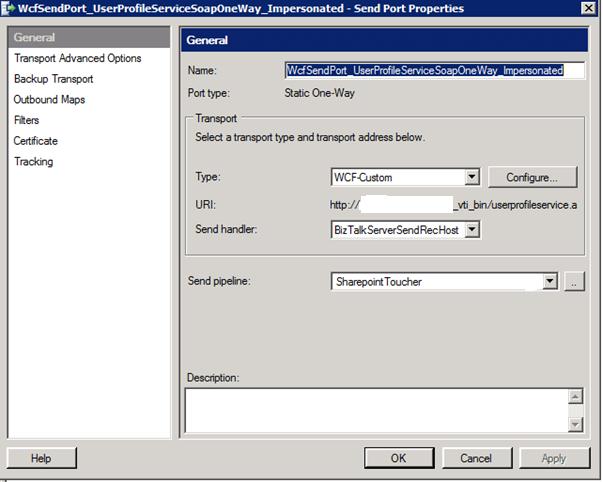
My port looked like this:

by community-syndication | Jun 11, 2012 | BizTalk Community Blogs via Syndication
One of the new Windows Azure services is Virtual Machines (see announcements). Virtual Machines in Window Azure support the ability to deploy and run durable VMs in the cloud. You can easily create these VMs using a new Image Gallery built-into the new Windows Azure Portal, or alternatively upload and run your own custom-built VHD images.
Virtual Machines
Virtual Machines give you application mobility, allowing you to move your virtual hard disks (VHDs) back and forth between on-premises and the cloud. You can migrate existing workloads such as Microsoft SQL Server or BizTalk Server to the cloud, or bring your own customized Windows Server or Linux images, or select from a gallery.
As you see from the screenshot above there are compatible operating systems and images available in the online gallery;
- Windows Server
- Windows Server 2008 R2 SP 1 May 2012
- Windows Server 2008 R2 with SQL Server 2012 Evaluation
- Windows Server 2012 RC
- Linux:
- OpenSUSE 12.1
- CentOS 6.2
- Ubuntu 12.04
- SUSE Linux Enterprise Server 11 SP2
- Custom images
This means you can for instance create a Virtual Machine Running Windows Server 2008 R2, where you can install BizTalk Server 2010. Like I described in the previous post you can provision a BizTalk Developer environment.
Creating a Virtual Machine in Windows Azure
Steps I performed to create a VM are as follows:
* Log into Windows Azure Management Portal (you need an account with Windows Azure, for instance you can start with a trail)
* Choose new Virtual Machine

* Fill in the details

* Click Create Virtual Machine

* Now the VM is being provisioned.This may take a few minutes.


* Connect to VM using Remote Desktop. It may take a few minutes before you can remotely connect with your VM.
* You have to wait until Status is Running. Status is going from stopped to starting, to running (provisioning) to Running.
* You can now connect to machine through Remote Desktop

* I had to run some update (windows update)
* Logged of as small instance is not enough resources for installing BizTalk I switch to Medium.

* I then save configuration and waited until provisioning was done
* Now it is time to install Visual Studio, SQL Server and BizTalk Server 2010
* After some time you will see resource utilization in the portal

Create a VM through Image Gallery
It is also possible to create a VM through using the Image Gallery:
1. Select an Image

2. Fill in details

3. Choose VM Mode, DNS Name, Region and Subscription you have

4. Choose whether or not you need a Availability set

5. Now VM is being provisioned.

Installation of SQL Server, Visual Studio and BizTalk took a few hours. Now I have my BizTalk development environment running up in the cloud. Now this will cost me for a month (pay as you go) according to calculator around 130 dollars.

My rationale is and I may be little of is that I have one medium VM, 100 Gb of storage and some bandwidth. According to question mark of the Virtual machine:

It may be possible I just have to pay the 115 dollar for VM only (best to study the pricing, billing and metrics section on the portal). You get billed by the pay as you go model. Now if you stop the machine you still get billed!

The billing stops if you delete the Virtual Machine!

As you can see setting up a VM looks pretty easy, though there are some considerations:
- Setting the environment using iso’s/media from local disk takes time, and I think it is better to create an image (VHD) locally and then upload that one;
- Uploading your installation media to disk on VM may take some time too, depending on the latency. Another option is to download the media from MSDN subscription or through Volume License subscription (latency is low, pretty amazing download speed);
- You need at least a medium VM to have some performance for you BizTalk development, so there are some costs involved. Now 115 US is the introduction price (preview), when it becomes general available the prices will go up a bit;
- Having your VM’s in the cloud for BizTalk development you’ll still may need access local systems, which you like to integrate with. Now these systems may not be accessible from your cloud VM. Yet you can resolve this by Windows Azure Virtual Network. This enables you to provision and manage virtual private networks (VPNs) in Windows Azure as well as securely link these with on-premises IT infrastructure (on-premise systems);
- If for some reason you do not have internet access then your environment is not accessible;
- Finally you will have to decide if having a BizTalk development environment in Windows Azure is fit-for-purpose (depending on your organizations IT strategy/policy).
BizTalk Server running in the VM on Windows Azure
Last bit is of course running BizTalk Server itself. Installation of all components for development environment went smoothly and exact the same as setting it up locally. BizTalk operates the same as having it running in VM locally on your laptop.

The same experience I have is shared by fellow MVP Saravana (see his post BizTalk 2010 Environment in Windows Azure Virtual Machine (IaaS)). Having VM’s in the Windows Azure offer new possibilities if it is around hosting your virtual machines. It shows Microsoft’s investment and movement towards IaaS offering like competitors Amazon.
Cheers,
– Steef-Jan
by community-syndication | Jun 11, 2012 | BizTalk Community Blogs via Syndication
I mentioned earlier that there will be an Admin deep dive training in London UK. The venue is set and the registering is ready. If you want to read more about this Administration deep dive course take a look here. The location is close to Heathrow Airport and can be found at: Renaissance London Heathrow
Blog Post by: Tord Glad Nordahl