by community-syndication | Jun 14, 2012 | BizTalk Community Blogs via Syndication
An Overview of Managing Applications, Services, and Virtual Machines in Windows Azure – Karandeep Anand
In this session Karandeep walked us through the new portal. The new portal does not include Service Bus endpoints like queues or topics and also does not include caching yet. I am told that Microsoft is hoping to have this functionality in the portal by end of the year. However, they have enabled single sign on so you should be able to toggle back and forth between the old and new portals quite easily.
Within the portal we can get the state of:
- Virtual Machine
- Websites
- Cloud Services (Web roles/Worker roles etc)
- SQL Databases
- Storage
- Networks
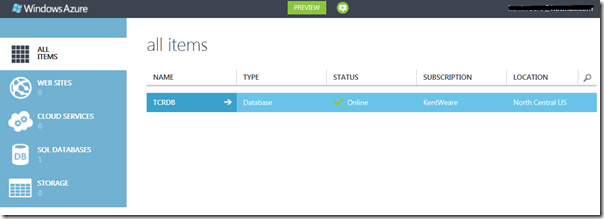
Below I have taken a screenshot of the Azure portal. I only have one SQL Database in the production portal but you can get a sense of the new look and feel.
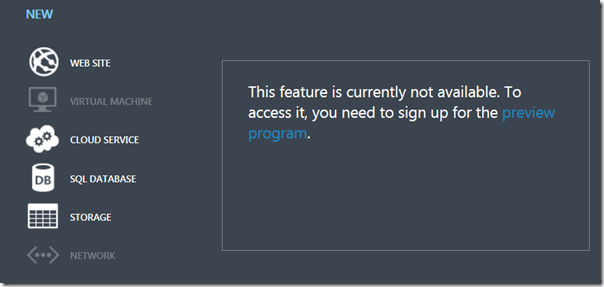
You also have the ability to add new assets by clicking on the “+ New” link.

You can then specify the type of service that you would like to provision. In the case of Virtual Machines, you need to sign up for the preview before you can actually provision a VM.
Scripting Management Support
Using the VM portal is not the only way to manipulate services in Azure. There is first class support for scripting in Windows, MAC and Linux. In the case of Windows admins will find comfort knowing that there is first class support for PowerShell. These PowerShell command lets will take advantage of the same underlying REST APIs that the portal is using
High Availability and Service Level Agreements
Having a third party, such as Microsoft, host IT services for your organization may create some concerns within your organization. What if your services go down? What “skin” does Microsoft have in the game. To put it bluntly, they have some skin in the game. Perhaps not as much as some would like but Microsoft will be reimbursing organizations for their usage should they fail to live up to their commitments.
Here is a, very, loose break down of Microsoft’s SLA policy:
- 99.95 uptime – monthly SLA
- 4.38 hours of downtime per year for multiple role instances
- 99.9 for single role instances
- What’s included?
- Compute Hardware failure (disk, CPU, memory)
- Datacenter failures – network failure, power failure
- Hardware upgrades, software maintenance – HOST OS updates
- Planned downtime – 6 day notice, 6 hour window, 25 minute downtime
What is not included?
- VM container crashes, Guest OS failures
Monitoring and Auto-Scaling applications
Now this was cool! A company called AppDynamics demonstrated their monitoring solution for Azure. Some of the features included:
-
Application performance management dashboard. This included a graphical representation of your distributed solution and provided the latency that exists between each component.
-
You also had the ability to interrogate the stack level trace to get very granular
-
The tool also supported the ability to auto scale your application based upon different criteria sets including
-
CPU
-
Message through-put
-
errors
-
specific business hours
-
critical conditions
Since Azure supports a “Pay as you go” model I found this tool to be extremely intriguing. Not only did it look nice, but it provides functionality can can allow you to reduce costs when your app is not very busy and also auto scale to ensure of a good user experience when your site is busy. To read more about this company and their product for Azure, please read the following press release.
Building HTTP Services with ASP.Net Web API – Daniel Roth
The other session that I wanted to talk about was the Building HTTP Services with ASP.Net Web API. For the past couple months I have been playing with MVC3, JQuery and AJAX so this session was rather timely.
What is Web API?
- An Http Service
- Designed for broad reach
- browsers
- phones
- devices
- set top boxes
- Uses HTTP as an application protocol, not a transport protocol. So what this really means is it takes advantage of existing verbs GET, POST, PUT, DELETE
Why build Web APIs?
- Reach More Clients
- Scale with Cloud
- Embrace HTTP – simplify things
- Web API Requirements
- Need a first class HTTP Programming model
- Easily map resources to URIs and implement the uniform interface
- Rich Support for formats and HTTP Content negotiation
- separate out cross cutting concerns
- Light weight
- ASP.NET WebAPI is the end result
WebAPI description
If you like self documenting APIs, then WebAPI has some built in features to support this type of functionality.
- Use the IApiExplorer Service to expose “contract”
- Provides runtime description of WEB API
- Renders content in a useful way
- Shows request and response formats
Hosting
- Many options – self host(console), IIS, Azure roles, other web servers
- MSDN code gallery and NuGet Code packages are available
Other
- ASP.NET Web API is available as part of MVC4
- Is part of the recent open source movement that Microsoft has been involved in
- Product team accepts 3rd party contributions
- Unprecedented transparency
- When Microsoft devs check in code, you have access to code through GIT repository
- Asp.net mvc4 and web api is included in Visual Studio 2012 RC
- WebAPI is now a Visual Studio project template
- Can also create a unit test project
- New MVC like map route for WebAPI
- JSON, XML and form-url-encoded supported out of the box for HTTP Request
- JSON and XML natively supported for HTTP Response
- Validation is run on the data from every request
- Check ModelState.IsValid to see if you have a valid request
- Support for ODATA queries
Conclusion
I realize that the release of this technology has been highly contested. There have been people using the WCF stack that are now in a tough spot to migrate away from this technology to WebAPI. For me, as someone new to this space I really liked how you organize your project and have clean separation from controller to controller. You can quickly expose services without the need for heavy WSDL type contracts.
I also like how most of Daniel’s presentation was run from Fiddler. Like he mentioned several times, WebAPI at its root is really just HTTP. So what better tool to craft requests than Fiddler.
In closing, I do a lot of System Integration. Primarily with BizTalk and must admit, I like contract based development where you are defining a firm contract upfront. I have never been a big fan of loosely based lightweight services as things can quickly to to hell when doing this type of stuff for EAI. However, I have woken up and seen the light. I really do feel there are good use cases for this type of technology for light weight application based services. I don’t necessarily think that this technology is a great fit for EAI, but for applications that may be surfaced using a variety of clients (mobile, web) I think this is a great way to expose back end services to front end client.
Stay tuned for Day 4 as I expect to have some encouraging BizTalk news to report!

by community-syndication | Jun 14, 2012 | BizTalk Community Blogs via Syndication
A new release of the SchedulerTask Adapter is available. remind,The BizTalk Scheduled Task Adapter is an in process receive adapter that can be implemented on a receive location to execute a prescribed task on a daily, weekly or monthly schedule. So Bye bye windows scheduler, this adapter is very powerfull and now it’s in native […]
Blog Post by: Jeremy Ronk
by community-syndication | Jun 13, 2012 | BizTalk Community Blogs via Syndication
This week I’m at the Apple Worldwide Developer’s Conference (WWDC 2012) in San Francisco and I want to share with you some of the new improvements made by Apple that will be available in the coming weeks. Instead of trying to break down each and every one of the fantastic new features, […]
Blog Post by: mkruczek
by community-syndication | Jun 13, 2012 | BizTalk Community Blogs via Syndication
In the TechEd US session Overview and Roadmap of Windows Azure Service Bus, Microsoft demoed some really neat new bit for working with Azure in Visual Studio (both VS2010 and VS2012).
We now have access to several Azure features from Server Explorer
I am going to show you how to use the Windows Azure Service Bus in Server Explorer
Select Add New Connection
Click OK, and then expand the namespace in Server Explorer
You can Do everything you need to do with Queues, Topics, Subscriptions and Rules: Create, Delete, Properties, Send and Receive. For those that have been using the Service Bus Explorer you can do most of it functionality in this new tool, there are still some enhanced send and receiving that Service Bus Explorer is still better doing.
Right Click on a Queue and you have these options
Click Properties
You can also do a send and receive
You can do the same operations on Topics and Subscriptions and also create, edit and delete the rules.
Hope you enjoyed this quick look at the new Server Explorer features in the Azure SDK 1.7
The Overview and Roadmap of Windows Azure Service Bus session can be viewed here: http://channel9.msdn.com/Events/TechEd/NorthAmerica/2012/AZR308
More …
by community-syndication | Jun 13, 2012 | BizTalk Community Blogs via Syndication
The Meet Windows Azure event last week saw some great announcements about the current and future developments on the Windows Azure platform. Microsoft Sweden will be hosting an event at their offices that will run through these releases and demo some of the new technologies.
It will be a great chance to see the new capabilities in action, and chat to Microsoft Evangelists, MVPs and other developers about the future of the platform. This will also be the last Sweden Windows Azure Group (SWAG) meeting before the summer break, so there will be food, drinks, and the chance of some “SWAG”. We will be back in force after the summer, and have a number of great events planned for the rest of the year. We will have a big announcement to make regarding one of these, so be there and get the chance to register!
Registration is here.
by community-syndication | Jun 13, 2012 | BizTalk Community Blogs via Syndication
I found a series of blogs on how to identify Performance bottlenecks in BizTalk Environments.
Also look at this article on finding and eliminating bottlenecks
Here’s an short overview of all the steps, including a link to the more detailed explanation:
The first place to measure the BizTalk performance can be done using Performance Counters. These counters let you monitor all components like the message box, orchestrations, adapters, etc .
A deeper look at the adapter performances, again using some performance counters.
It is important to understand the impact of Pipeplines that are used. Because each of the pipelines have a significant impact on the overall BizTalk performance as they perform actions on every single message that gets through BizTalk
One way to analyze what is really going on in pipelines is using an Application Performance Management Solution with Transactional Tracing capabilities, like dynaTrace for example.
Orchestration can get quite complex sometimes, but how to analyze the performance of these orchestrations?
The actual logic behind the Orchestration Definition is compiled into an assembly, loaded into BizTalk, and gets executed when messages are processed by that Orchestration Definition. A more detailed overview of the execution of such an orchestration can be generated with PurePath for example.
Another way to analyze the orchestration performance can again be done using performance counters. BizTalk provides a set of counters for the Orchestration Engine as well as for the MessageBox.
Often BizTalk Orchestration makes a call to an external web service. PurePath can also give you an idea of the time consumed for this external web service call.
FINAL NOTE
As a final note I would like to point out to use the MessageBox Viewer Tool. The tool gives an overview of what might be wrong in your installation.
This tool runs a set of tests and queries against the MessageBox database an creates a nice report. The result can be viewed using the tool or it can generate an HTML report.

by community-syndication | Jun 13, 2012 | BizTalk Community Blogs via Syndication
Day 2 Keynote
Day 2 opened with another Keynote this time led by Antoine Leblond. It did address some of my concerns with Day 1’s keynote. This time the focus was on Windows 8 and they did demonstrate the OS running on a few different devices. The demos were nice and relevant, however they did not demonstrate it on new hardware. They used the Samsung Series 7 slate with the Samsung Series 9 laptop. They also demonstrated Windows 8 on a Lenovo laptop(sorry nothing cool about a Lenovo). If they wanted to generate some excitement, and didn’t want to pull out a shiny new beta Samsung, they should have just bought a new MacBook Pro and run Windows 8 on it. I think Microsoft missed another big opportunity but I digress.
Line of Business Apps
They did demonstrate some good looking Metro applications on the devices. They did provide a quick overview of the Beer Ranger app that I mentioned in a previous post. They also demonstrated a native SAP application that is part of their Sales Automation Pipeline lineup. The application was a nice looking app, but much like many other SAP applications, I had no idea what it was suppose to do (opps did I say that out loud).
Trackpad
My primary personal (non-work) machine is a MacBook Air that runs Windows 7. Many people ask why I do this and how I am missing out on all of these touch gestures. For me I love my Microsoft Arc Touch mouse and quite frankly could care less about the gestures that you can use on a trackpad. But for those of you who like using gestures on a trackpad there is some good news for you. Windows 8 will support “Apple like” gestures including Semantic zoom and access to the new “App bar” to name a few.
Developing for Windows 8
Antoine provided us with a rundown of what is involved in building applications for Windows 8. Here are some of the highlights.
- Windows Runtime (WinRT)
- New API set that allows you to build apps and games
- Supports touch, keyboard and mouse
- Support for “contracts” so that apps can leverage OS functions like “share”. Much like you can Share “data’ on a Windows Phone 7, you will be able to perform a similar function with your own application but hooking into these contracts.
- Tool Support
- new release of Visual Studio (2012)
- C++, C#, JavaScript, css, html are all supported technologies
- Language and platform support for inline async calls.
- I really like this feature. I was never a big fan of all of the delegate spaghetti code a person previously had to write to support async methods. In a previous post, I had to write async REST methods to support calling REST based services from a Windows Phone 7 app. I expect it to get much simpler now.
- Visual Studio Simulators
- Can simulate different types of hardware(slates, desktops, large displays, small displays etc)
- Rotate screen
- Higher/lower resolutions
- Touch gestures
ARM Support
This was interesting to see as I have heard a little bit about ARM support but just have not seen it in action.
Some of the benefits of leveraging ARM based devices include:
- Low power consumption
- Long Battery life
- Trusted boot
- Validate all code in boot path before it runs
- Device encryption is always on
- App model
- Geared at making apps that don’t alter the state of the machine (Security benefit)
- Can use same Management infrastructure to manage devices
- Metro apps work on WinRT as well
- An RDP client does exist so that you can log into other Windows PCs/Servers
- Apps must be signed by known trusted authority or have appropriate cert
- Apps must must have been run through “WAC” approval application
- used to honor design principals about not altering the state of the machine
- Key office applications are available
Essential Tips for the Windows Azure Startup
This was a really interesting session. Michele Leroux Bustamante is well known in the WCF and MVP community as a person with deep technical skills. I have seen her speak before at a previous TechEd so I thought this would be a good session to attend. Something that I appreciate about Michele’s presentation style is that she remains composed through out the entire presentation. Even when she runs into some issues, such as a demo not quite working out, she is able to recover with a tremendous amount of poise. I believe she is Canadian, maybe this has something to do with it.
This time around she was giving guidance on developing a Startup based upon Windows Azure. It was a very enlightening session and it was quite evident that she “gets it”. She has acted as a consultant to many start-ups and provided the following tips when building applications for Start up companies. Something to keep in mind is that these principles, while applicable to Startups, also just good practices to follow even if you are a well established brick and mortar company.
- Startups need to show some traction early on
- Go fast, maintain quality
- Monitor status, analytics and adjust accordingly
- watch for conversion rates
- do visitors create accounts
10 Essential Tips
Here they are as they were presented to the audience:
1. Design for Role Scale out
- Needs to happen up front. By the time you need to scale it will probably be too late or more difficult to
- Need to design for scale, may want to segregate or isolate controllers to allow to further scale out functions that may be more popular or have more access patterns (Mobile, API)
- Domain Mapping
- Create a CNAME or A Record for the IP address of your production deployment
2. Use an SMTP relay service
- Most applications require some form of email communication
- Can use System.Net.Mail.SMTPClient
- Write email “messages” to a queue and then dequeue and send
- Need to use a relay service so that your “From Email” address does not get blocked/spam
- smtp4Dev is a great tool for use in Development
- authsmtp is a production ready email relay service that may be beneficial
3. Configuration Profiles
- Avoid web.config for
- settings that vary between staging, production
- settings that require experimentation for performance
- settings that support diagnostics and test
- Use the Azure Service config files instead
- ServiceConfig.Local.cscfg
- ServiceConfig.Cloud.cscfg
4. Don’t forget to Cache
- You don’t realize how much latency that accessing frequent data creates
- Co-locate Cache with across roles
- Together produce distributed cache total
- Any role can access
- Be careful, Cache is not durable, may not live forever
- Use for optimization
- Performance increases are phenomenal
5. Watch your Queuing costs
- Costs may escalate due to the amount of polling
- If you are polling, you are paying
- Understand the differences between Service Bus and Azure Storage Queues
- Message lifetime
- Max message size
- Max total storage
- Duplicate detection
- Order guarantees
- Dead letter queue
- Storage metrics
- Purge capability
- Long polling/manual back-off polling
- Initial decisions are about cost and agility
- consider Storage Queues due to back-off polling
6. Collect Diagnostics
- When writing new project, there is a lot of hacking going on because you are trying to be fast
- Difference between getting it done and getting it done properly
- Create a diagnostic helper and establish patterns
7. Monitor from outside
- Azure Ping free monitoring tools
- Sends SMS or email when monitoring
- Storage
- SQL
- Queues
- Is site running?
- Azure Watch
8. Don’t drink the no-SQL Kool-Aid
- VCs love “NoSQL”
- Can be pressure from VCs to use it
- VCs think it is cheaper to manage because you don’t need a DBA
- Asking for trouble if you don’t understand your relational data model
- Need people who understand SQL to look into NOSQL and report back to the group on what the pitfalls are
- Go to NoSQL for obvious stuff
- search indexes
- GEO data
- profile data (coming from social media)
- Keep core competencies in RDBMS
- Then reach out to NoSQL experts to help bridge the two worlds
9. Enable Social Logins and Simplify Sign Up
- You want conversion rates – make it dead simple then!
- ACS facilitates this – simple to use
- Dirt cheap per transaction
- The more you ask from a user to register, the less likely they are to sign up
- Keep it simple you will get conversions
- Pinterest – only email address to sign up?
10. Estimate your costs
- Layers of cost
- Storage
- Storage Transactions
- Bandwidth (# 1 thing if you have a lot of media)
- Cache
- ServiceBus
- SQL Azure
- Bandwidth
- Need to run estimates
- BizSpark may offer some cost savings for new startups
Service Bus Overview – Clemens Vasters and Abhishek Lal
As usual Clemens put on a good show. This time Abhishek joined him in this presentation and provided some solid demos. The first half of the presentation was largely a review for me as Service Bus is an area that I try to stay up to speed on. The second half of the presentation introduced some new tooling and features as part of the June 2012 release. Selfishly, I don’t want to go into too many details here as I would like to actually play with some of these features and then provide a more complete blog post(s) in order to provide these subjects with some additional context. Stay tuned!
by community-syndication | Jun 12, 2012 | BizTalk Community Blogs via Syndication
Hi folks, you’ve probably heard a fair bit about the make over of Azure into ‘Azure
2.0’ (the SDK is still 1.7)
There’s some great new tools within VS.NET to manage your environment better, even
a Service Bus ‘explorer’ which was much needed.
I’ve collected a few links to start with for you guys to read up on when you’ve got
a moment:
Azure 2.0 Details on:
-
Virtual Machines – FAQs etc – http://msdn.microsoft.com/en-us/library/windowsazure/jj156003
-
Windows Azure Virtual Network – http://msdn.microsoft.com/en-us/library/windowsazure/jj156007
-
Get slides from my previous presentation here – Azure
Virtual Network 2.0
-
Windows Azure Media Services – http://msdn.microsoft.com/en-us/library/windowsazure/hh973629
-
Create and Deploying WebSite walk through – https://www.windowsazure.com/en-us/manage/services/web-sites/how-to-create-websites/
-
(like we need this one – seriously takes 3 minutes! – well done MS!)
-
Azure Chalk Talk Videos – http://www.meetwindowsazure.com/DigitalChalkTalks
-
Azure Virtual Machines – Part
I & Part
II
-
Web
Sites with ASP.NET (NB: SSL
is not supported, but it will arrive when Win Server 2012)
-
Web
Sites with node.js
-
Web
Sites with OSS Apps & Web Matrix
-
Azure
Cross Platform Command Line Tools
-
Cloud
Services (aka perviously web+worker roles)
-
Apache
Hadoop Based Services On Windows Azure
-
TFS
Service Preview Intro
-
Azure
Websites – Continuous Integration with TFS.
-
Azure
SQL Databases Intro
-
Azure
Storage Introduction
Blog Post by: Mick Badran

by community-syndication | Jun 12, 2012 | BizTalk Community Blogs via Syndication
Introduction The BizTalk Scheduled Task Adapter is an in-process receive adapter that executes a prescribed task on a daily, weekly or monthly schedule. The adapter is configured entirely within BizTalk, all configurations is stored within the SSODB and can be exported and imported via binding files. The schedule capabilities are similar to those available with […]
Blog Post by: Sandro Pereira

by community-syndication | Jun 12, 2012 | BizTalk Community Blogs via Syndication
First of all I would like to thank Greg Forsythe for their kindness and for added me as coordinator on this project. In the past weeks I have been working on this new version of this adapter, mostly making small improvements and documentation, and now I can say A new version of BizTalk Scheduled Task […]
Blog Post by: Sandro Pereira



