by community-syndication | Nov 8, 2012 | BizTalk Community Blogs via Syndication
Tellago’s Technology Updates series continues throughout November and December. We would like your input to help us prioritize some of the topics. NFC, enterprise big data, enterprise mobility, gamification? the all sound exciting. Please take 5 seconds…(read more)
Blog Post by: gsusx
by community-syndication | Nov 7, 2012 | BizTalk Community Blogs via Syndication
In the last post BizTalk Server 2013 BETA I mentioned BizTalk Server 2013 beta will allow me install the software on a Windows 8 laptop and continue my BizTalk development, without getting stuck in the old OS. Thanks to the platform alignment in 2013. There were few comments on the blog asking whether BTS 2013 […]
The post BizTalk Server 2013 BETA–Window 8 Configuration issues appeared first on BizTalk360 Blog.
Blog Post by: Saravana Kumar

by community-syndication | Nov 7, 2012 | BizTalk Community Blogs via Syndication
In my last mapping pattern post, I explained how and described the pros and cons of four methods to accomplish a mapping from hierarchical schema to a name value pair so the logically next step would be to describe the inverse process. When I decided to implement this mapping I really thought it would be […]
Blog Post by: Sandro Pereira
by community-syndication | Nov 7, 2012 | BizTalk Community Blogs via Syndication
| I regularly use the following trick while writing an e-mail so that I don’t send it by error before it is fully written: |
J’utilise r%u00e9guli%u00e8rement le truc suivant lorsque j’%u00e9cris des e-mails, de fa%u00e7on %u00e0 ne pas envoyer par erreur un message encore en cours de r%u00e9daction et que je n’ai pas encore relu: |
| I put a user called “attendre” (this means “wait” in French). |
Je mets un utilisateur “attendre” en copie. |
| If by mistake, I press the send button before removing attendre, the e-mail doesn’t get sent because attendre does not exist, and it is not a valid address either. |
Si par erreur, j’appuie sur le bouton d’envoi avant d’avoir supprim%u00e9 attendre, l’e-mail ne part pas car attendre n’existe pas, et ne correspond pas non plus %u00e0 une adresse e-mail valide. |
| I use the trick with Outlook but I suppose this would work with most e-mail clients as well. |
J’utilise ce truc avec Outlook mais je suppose que cela fonctionnerait %u00e9galement avec la plupart des clients de messagerie %u00e9galement. |
Benjamin
Blog Post by: Benjamin GUINEBERTIERE

by community-syndication | Nov 7, 2012 | BizTalk Community Blogs via Syndication
Many of you will have noticed or heard the buzz that the new BizTalk release will be called 2013. It was not a surprise to me or a few others in the blogosphere. Mark Burch on his blog post in July already gave hints to the name or Johan Hedberg beginning of this year Why BizTalk Server 2010 R2 should be BizTalk Server 2013. Anyways the name is now officially 2013.
What will its beta bring us? Well you can find an overview on the BizTalk Server Team Blog. Basically it aligns with the new Microsoft Platform releases like Windows Server 2012, SQL Server 2012 and Visual Studio 2012. Besides that you will find the enhancements in adapters, new adapters like the SB-Messaging, and ESB Toolkit integration (no separate download anymore).
I downloaded the BizTalk 2013 beta and installed it on a new VM. I will not detail the complete installation and configuration here as it is a pretty straight forward experience as with the previous 2010 version. Do mind that there are some slight differences when you read the documentation. For instance when installing SQL Server 2012 you will need to install SQL Server Data Tools (documentation still mentions Business Intelligence Development Studio, yet you will not find this feature in the features list of SQL Server 2012).
What I will do now is share my installation and configuration experience regarding some of the new features.
Adapters
BizTalk Server 2013 has a few new adapters:
Also notice the Windows SharePoint Services adapter that is available by default. WCF-SQL or other LOB Adapters have to be installed separately through LOB Adapter Pack. This can be done through Installation Media.
ESB Toolkit Integration
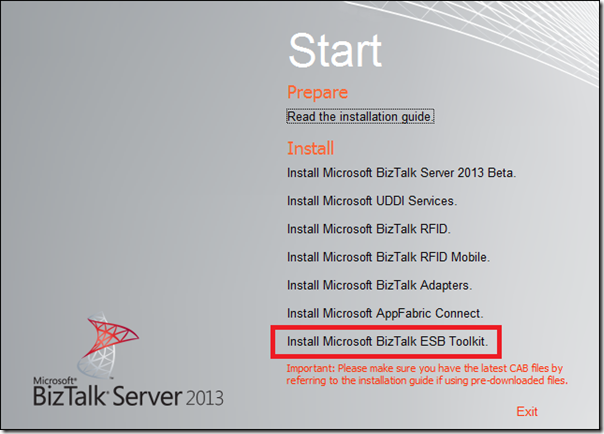
ESB Toolkit is now fully integrated with BizTalk Server, which means it does not require you to download it separately. So the ESB Toolkit is now packaged by BizTalk media like adapter pack was with the BizTalk 2010 release. The ESB Toolkit configuration experience is vastly simplified to enable a quick setup. Through Installation Wizard you can install the ESB Toolkit.
A wizard starts when clicking the Install Microsoft BizTalk ESB Toolkit link.
Click Next to continue the installation.
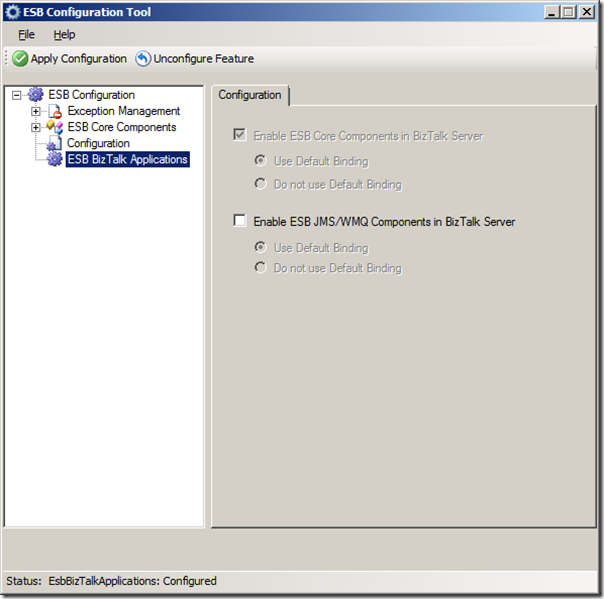
Click Install. The Installation ESB Toolkit is a very straight forward and quick. After installation you can configure the ESB Toolkit through ESB Configuration Tool. A dialog will appear where you fill detail for configuration of the ESB.
Click Apply Configuration. The ESB BizTalk Components under the ESB BizTalk applications is new.
Default the check boxes are not checked. Check the Enable ESB Core Components in BizTalk and click Apply Configuration.
Configuration is done and Microsoft.Practices.ESB application is available in the BizTalk runtime.
The final step is installing the Exception Management Portal, which needs to be installed the same way as with version 2.1. You will installation guide in C:\Program Files (x86)\Microsoft BizTalk ESB Toolkit.
Tracking Dependencies Between Artifacts in a BizTalk Server Application
In the BizTalk administration console the dependencies between artifacts can now be viewed and navigated. A BizTalk applications can have many dependencies and if for instance you need to adjust one of the artifacts. Dependency information of an artifact can be very valuable; you must know which artifacts in the dependency hierarchy must be stopped or re-deployed. The BizTalk Server Administration console displays the dependency information in modes – whether an artifact uses another artifact as well as whether an artifact is used by another artifact.
The Microsoft.Practices.ESB.Agents.Delivery has one dependency (Send Port)
Click Send Ports and you will the send port.
There are more enhancements and more new features than the ones I discussed here. I will be trying out some of the other features in the near future and share my experience.
Cheers,
Steef-Jan

by community-syndication | Nov 7, 2012 | BizTalk Community Blogs via Syndication
What a surprise today finding out that Microsoft has decided to brand it’s next versionof BizTalk Server as BizTalk Server 2013. Even better, they’ve already thrown a beta version atthe general publicwhich is a whole lot more full-fledged in terms of new features compared to some earlier builds made available to a select audience. While […]
Blog Post by: Johann

by stephen-w-thomas | Nov 6, 2012 | Stephen's BizTalk and Integration Blog
Over the past few months I have been blogging a lot about the new Windows Azure Virtual Machines. That is because I can see the huge impact on projects for having this type of infrastructure available literally at your fingertips – for pennies an hour.
Just yesterday I setup a full windows domain with 4 servers accessible worldwide in a matter of an hour or two.
I wanted to highlight the general complexity I see at many client related to setting up a new Virtual Machine. I created a video and entered it into the Windows Azure Makes Me FAST Contest. The video is called “The Story of your Life – Mr. Virtual Machine”. It is a “remake” of the old TV Show This Is Your Life well at least that was the goal.
Take a look at the video below and vote for it if you like what you see!
Step 1: Got to http://www.meetwindowsazure.com/fast and find my video. The videos are in the middle of the page. You might have to click the right arrow to see it.

Step 2: Look for video titled “The Story of your Life – Mr. Virtual Machine by Stephen W. Thomas”.

Step 3: Watch it and Vote for it if you like it.

Of course, if you do not like the video please do not vote for it. This website has a lot of other interesting videos. The coolest, next to mine of course, is the one by Alan Smith – “Rapid Massive On-Demand Scalability Makes Me Fast!”. It is well worth a watch.
by community-syndication | Nov 6, 2012 | BizTalk Community Blogs via Syndication
Congratulations to Anthony Borton on becoming a Microsoft Quality Enablement Specialist. Anthony is Quicklearn’s lead TFS trainer and courseware developer and earlier this week he passed Microsoft exam 70-497: Software Testing with Visual Studio 2012. This is one of three exams Microsoft have recently released focusing on TFS 2012.
If you’d like to become a Microsoft Quality Enablement Specialist, the best way to prepare yourself for the exam is to attend one of our upcoming courses.
- December 3rd & 4th, 2012
- February 7th & 8th, 2013
- April 15th & 16th, 2013
Our Software Testing with Visual Studio 2012 course is a 2-day course that gets you up to speed with all aspects of testing using Microsoft Test Manager 2012.
Student feedback from the most recent course has been overwhelmingly positive and here’s just one example from an attendee.
“Anthony was FANTASTIC! Did a great job of keeping it interactive for the full 2 days. He explained things very well and at a level for all attendees, especially with the diverse backgrounds and work experiences.” – October 2012.
by community-syndication | Nov 6, 2012 | BizTalk Community Blogs via Syndication
It’s finally happened!! Microsoft has officially opened a public beta for BizTalk Server 2013. The beta bits can be downloaded here.
Here are my personal top 5 new features of BizTalk Server 2013. I know that many of my customers have been asking for some of these features for a while.
- Too many new adapters to keep up with
- Integration with RESTful services – new BizTalk adapters provide CRUD operations using REST endpoints.
- New and Improved SharePoint adapter – Previous SharePoint versions did not support client-side API calls so the BizTalk Adapter required installing a special web service on the SharePoint front-end server(s). SharePoint 2010 and the soon-to-be-released SharePoint 2013 both support client-side API calls. The new BizTalk Adapter for SharePoint takes advantage of these client-side APIs to provide an easier, more seamless integration experience.
- Azure Service Bus integration – adapters to connect to Azure Service Bus endpoints
- SFTP adapter – If I had a dime for every time someone asked about an SFTP adapter…
- ESB Toolkit 2.2 – while the internals of the ESB Toolkit is largely untouched, the latest release boasts a better configuration experience, and full-fledged support.
- Dynamic send port configuration – You can now specify which adapter handler your dynamic send port will use rather than being stuck with the default handler.
- Artifact Dependency Tracking – The BizTalk Server Administration console provides better explanation of dependencies among artifacts (for example, orchestration X requires: schemas Y and Z).
- General Performance Improvements – Significant changes under the covers has improved the performance of send port when using ordered delivery as well as the mapping engine
Although not available yet, I’m also excited that a new Azure VM with the BizTalk Server 2013 Beta is on its way.
I’m also pleased to announce that QuickLearn Training is diligently working on new versions of all of our Developer and Administrator BizTalk Server courses designed for BizTalk Server 2013.
by community-syndication | Nov 6, 2012 | BizTalk Community Blogs via Syndication
It’s very exciting to see the new major release of BizTalk – BizTalk 2013 beta. There has been much speculation around what it will be called since the Tech Ed announcement this year in Orlando. Microsoft will continue to support the platform with BizTalk 2013 (not 2010 R2 as previously announced). I’m reassured that the […]
Blog Post by: Stan Kennedy