Some lines about XML validation in BizTalk
In the BizTalk toolbox, you have two standard pipeline components that can perform this XML validation. These components have a very different behavior. Let’s have a detailed look.

In the BizTalk toolbox, you have two standard pipeline components that can perform this XML validation. These components have a very different behavior. Let’s have a detailed look.
First of all, I would like to thank all of my regular reader and hope you’ve al enjoyed my blog posts for almost 2 years now. I already announced in one of my previous posts some time ago that I would join the contributors of the biztalk admin blog at http://www.biztalkadminsblogging.com/ .
Today, I’m proud to announce that there is another brand new blog I will be contributing to on BizTalk and Azure related news, problem solvement, etc…. My companies (Cnext) blog (http://blog.cnext.eu) . Well actually, the blog already existed quite some time (even longer than my own blog 🙂 ), but there wasn’t any new posts for over 2 years. Most recently I became the new administrator of the Cnext blog and had the task to revive it. After 1 month, 3 completely new posts, and still some blog posts in the making, it is ready to be shared with all of you… see for yourself at the Cnexts revived blog.
The first thing I did is restyle the entire blog to match the current branding of Cnext. And after publishing some new material, I can say that it is ready to be read!
Now go and check it out.. and keep following all of my blog posts.
More info on cnext can be found on http://www.cnext.eu. And as mentioned the blog will be situated at http://blog.cnext.eu… keep an eye out for all new material to be added soon!

Some of my colleagues asked me to help them out with a really hairy problem today. Their project involved the receipt of EDIFact files by email. The emails were being saved on the file system as .eml files which were then picked up and processed by BizTalk. The email would contain the message body which […]
Blog Post by: Johann
Forget about Steven Sinofski’s unexpected departure from Microsoft. The real news from Redmond is that, after approximately 72 years of utter stagnation, the latest version of Visio has been upgraded to support UML 2.x! It gets better. It looks like it actually supports the latest version of UML (2.4.1).
Unbelievable!
Hi folks, I’m just blown away by all the goodies in these 2 releases
1) the SP1
2) the Feature Pack SP1
Both have some pretty big improvements, especially around the SharePoint 2013 <->
SQL scenario and pivot tables, analysis, mining etc.
There’s even SQL Services that continuously copy data from Oracle to SQL – this I’ll
have to try on my next BizTalk project.
Check it out – http://www.microsoft.com/en-us/download/details.aspx?id=35580
Now I’d love to have a single download for them all.
Blog Post by: Mick Badran
Folks with the unforeseen skill from Christian
Longstaff, we could be unveiling something great.. kicking around a few
ideas and Christian’s talent for such things shone.
As with all amazing shiny new things it needed a place in the blog-sphere
Could the be a book.a show.a movie.or something more.
Stay tuned.
Blog Post by: Mick Badran
Published By: Bill Chesnut
There has been and off and on bug with the orchestration designer since BizTalk 2006, in BizTalk 2004 the call rules shape needed to be in an Atomic scope, but that restriction was removed in BizTalk 2006, but the designer has had an off and on bug with this change.
In BizTalk 2010: (greyed out and not available)
In BizTalk 2013 Beta: (Fixed)
Thanks to the BizTalk Group for fixing my Connect Bug

Last couple of months I have written and edited a number of wiki articles for TechNet Wiki. The TechNet Wiki is a place, where content is generated by the community (like myself, Tord Glad Nordahl, Steef-Jan Wiggers, Howard S. Edidin, Saravana Kumar, Michael Stephenson, Dan Rosanova, Lex Hegt and many more) and Microsoft employees about […]
Blog Post by: Sandro Pereira

The BizTalk Server 2013 beta is out there now and I thought I’d take a look at one of the key additions to the platform. In this current age of lightweight integration and IFTTT simplicity, one has to wonder where BizTalk will continue to play. That said, a clean support of RESTful services will go […]
Blog Post by: Richard Seroter

A few days ago BizTalk 2013 Beta was announced and released for download. The plan is to make this available as a Windows Azure Virtual Machine Image just like the CTP but it has not yet been released.
Since the prebuilt image is not available, I wanted to try to manually install BizTalk Server 2013 Beta on a Windows Azure Virtual Machine. I did the same thing with the BizTalk 2010 R2 CTP without any issues. Below is a quick overview of BizTalk 2013 and my experience trying to get this running in an Azure Virtual Machine.
Some of the top improvements I am excited about with BizTalk 2013 include:
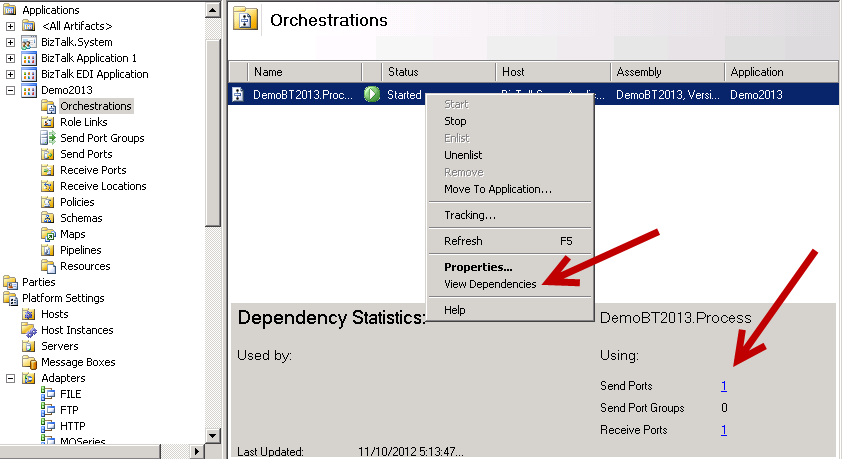
Below is what the Dependency Tracking looks like. It is somewhat basic but will be very helpful for someone new looking at an Application for the first time.
Below is my experience trying to get BizTalk 2013 running in a Windows Azure Virtual Machine.
Issues with Windows Server 2012 – End Result: Failure
I started off trying to get BizTalk 2013 to run on a Windows Server 2012 Image provided in the Image Gallery. While I admit I am still totally lost on the new Windows layout I figured no better way to learn than just jumping in.
I got SQL 2012 and Visual Studios 2012 installed without any issues. I installed and configured BizTalk 2013 Beta and also installed the ESB 2.2 from the main menu. Everything seemed fine, except the ESB 2.2 installation gave me a silent completion. That is, the install box just went away. I never got confirmation it was complete or if it had any errors.
I did not know anything was wrong until I tried to create my first project inside Visual Studios. Visual Studios was unable to find the BizTalk Template to create the project although the BizTalk Project was available as a selection. I have seen this in the past with other versions of BizTalk. I then went into the BizTalk Server Admin Console and got an error that it was unable to load the MMC.
I tried to do a BizTalk Repair, but that did not fix the issues, in fact I do not think it ever completed. I deleted the Virtual Machine and associated Virtual Hard Disk. I will give it a try again later when I have more time.
Issues with Windows Server 2008 R2 – End Result: Success, after fixing the issue
After already being in a down mood after my Windows 2012 experience I set out to try installing BizTalk on a Windows Server 2008 R2 Image. Like before, everything installed and configured fine. This time, I was able to create a new BizTalk project in Visual Studios. I was even able to deploy.
I ran into an issue when I tried to create a new Receive Port inside the BizTalk Admin Console. I received an error that pointed me to the Enterprise Single Sign-on Service. Sure enough, it was not started. I tried to start it and received the following error message. The error message was from source SideBySide:
“ Activation context generation failed for "C:\Program Files\Common Files\Enterprise Single Sign-On\ENTSSO.exe".Error in manifest or policy file "C:\Windows\WinSxS\manifests\amd64_microsoft.vc80.atl_1fc8b3b9a1e18e3b_8.0.50727.6195_none_8a1dd9552ed7f8d8.manifest" on line 5. Component identity found in manifest does not match the identity of the component requested. Reference is Microsoft.VC80.ATL,processorArchitecture="amd64",publicKeyToken="1fc8b3b9a1e18e3b",type="win32",version="8.0.50727.6195". Definition is Microsoft.VC80.ATL,processorArchitecture="amd64",publicKeyToken="1fc8b3b9a1e18e3b",type="win32",version="8.0.50727.42". Please use sxstrace.exe for detailed diagnosis.”
I was able to find the file named amd64_microsoft.vc80.atl_1fc8b3b9a1e18e3b_8.0.50727.6195_none_8a1dd9552ed7f8d8.manifest inside the above directory but the file was blank. This seems to be related to something in Visual Studios 2005. After an hour or two of research I found Johan fixed a similar issue related to SQL. I followed the same process to fix this issue.
To fix this issue I did the following :
1. From a command prompt I ran:
dropown C:\Windows\WinSxS\manifests\amd64_microsoft.vc80.atl_1fc8b3b9a1e18e3b_8.0.50727.6195_none_8a1dd9552ed7f8d8.manifesticacls C:\Windows\WinSxS\manifests\amd64_microsoft.vc80.atl_1fc8b3b9a1e18e3b_8.0.50727.6195_none_8a1dd9552ed7f8d8.manifest /grant Administrators:F.csharpcode, .csharpcode pre
{
font-size: small;
color: black;
font-family: consolas, “Courier New”, courier, monospace;
background-color: #ffffff;
/*white-space: pre;*/
}
.csharpcode pre { margin: 0em; }
.csharpcode .rem { color: #008000; }
.csharpcode .kwrd { color: #0000ff; }
.csharpcode .str { color: #006080; }
.csharpcode .op { color: #0000c0; }
.csharpcode .preproc { color: #cc6633; }
.csharpcode .asp { background-color: #ffff00; }
.csharpcode .html { color: #800000; }
.csharpcode .attr { color: #ff0000; }
.csharpcode .alt
{
background-color: #f4f4f4;
width: 100%;
margin: 0em;
}
.csharpcode .lnum { color: #606060; }2. Open the file and update as follows – I got this from a virtual machine running BizTalk Server 2010.
<?xml version="1.0" encoding="UTF-8" standalone="yes"?><!-- Copyright %u00a9 1981-2001 Microsoft Corporation --><assembly xmlns="urn:schemas-microsoft-com:asm.v1" manifestVersion="1.0"><noInheritable/><assemblyIdentity type="win32" name="Microsoft.VC80.ATL" version="8.0.50727.6195" processorArchitecture="amd64" publicKeyToken="1fc8b3b9a1e18e3b"/><file name="ATL80.dll" hash="c7e340d6abcbb023cbfd848a292f6583f4227105" hashalg="SHA1"/></assembly>
.csharpcode, .csharpcode pre
{
font-size: small;
color: black;
font-family: consolas, “Courier New”, courier, monospace;
background-color: #ffffff;
/*white-space: pre;*/
}
.csharpcode pre { margin: 0em; }
.csharpcode .rem { color: #008000; }
.csharpcode .kwrd { color: #0000ff; }
.csharpcode .str { color: #006080; }
.csharpcode .op { color: #0000c0; }
.csharpcode .preproc { color: #cc6633; }
.csharpcode .asp { background-color: #ffff00; }
.csharpcode .html { color: #800000; }
.csharpcode .attr { color: #ff0000; }
.csharpcode .alt
{
background-color: #f4f4f4;
width: 100%;
margin: 0em;
}
.csharpcode .lnum { color: #606060; }
I am now up and running with BizTalk Server 2013 Beta on a Windows Azure Virtual Machine!
Has anyone else tried to install the new BizTalk 2013 Beta on a Windows 2008 R2 or Windows 2012 Azure Virtual Machine?
I would love to hear about your experience.