by community-syndication | May 30, 2011 | BizTalk Community Blogs via Syndication
For BizTalk 360 we use several virtual machines with various OS/BizTalk Server combinations for functional testing purpose. One of the major issue we faced recently was around copying the newly created .msi files from our build machine to the test VM. The copying speed was not even close to acceptable level. It will be in the region of 15KB/sec or less and it completely unreliable, gets disconnected in the middle.
After searching through various solutions and trying various combination, this KB article from VM ware helped us resolve this issue.
http://kb.vmware.com/selfservice/microsites/search.do?language=en_US&cmd=displayKC&externalId=1006619
Basically it suggest to disable TCP Offload engine
To disable the TCP Offload Engine features:
-
Click Start > Run.
-
Type regedit and press Enter.
-
Browse to the following location:
HKEY_LOCAL_MACHINE\SYSTEM\CurrentControlSet\Services\Tcpip\Parameters
-
Create the key DisableTaskOffload (type: DWORD).
-
Set the value of the key to 1 .
-
Close the Registry Editor and restart the computer.
The heading actually doesn’t convey the problem we are facing, but it just fixed our issue. Now our installer (which were around 20MB) msi file get copied in few seconds rather than seeing the annoying file copy screen showing 39minutes left.
Nandri!
Saravana Kumar
by community-syndication | May 28, 2011 | BizTalk Community Blogs via Syndication
If you get the following error when configuring BAM tools for BizTalk 2010:
Microsoft SQL Server 2008 Data Transformation Services (DTS) for BAM Archiving is not installed on the local machine. Please install Microsoft SQL Server 2008 Integration Services. (Microsoft.BizTalk.Bam.CfgExtHelper.ToolsHelper)
For help, click: http://go.microsoft.com/fwlink/events.asp?ProdName=Microsoft+BizTalk+Server+2009&ProdVer=3.8.368.0&EvtSrc=Microsoft.BizTalk.Bam.CfgExtHelper.ToolsHelper&EvtID=error_DTS2008Archive
———-
ADDITIONAL INFORMATION:
Could not load file or assembly ’Microsoft.SqlServer.ManagedDTS, Version=10.0.0.0, Culture=neutral, PublicKeyToken=89845dcd8080cc91 or one of its dependencies. The system cannot find the file specified. (Microsoft.BizTalk.Bam.CfgExtHelper)
It has to do with installing BizTalk 2010 with a remote SQL 2008 server. Here’s the fix.
Install the Management Tools (Basic & Complete) SQL 2008 features as shown in the screenshot onto the BizTalk 2010 server:
N
Blog Post by: Eric StottN
by community-syndication | May 28, 2011 | BizTalk Community Blogs via Syndication
If you get the following error when configuring BAM tools for BizTalk 2010:
Microsoft SQL Server 2008 Data Transformation Services (DTS) for BAM Archiving is not installed on the local machine. Please install Microsoft SQL Server 2008 Integration Services. (Microsoft.BizTalk.Bam.CfgExtHelper.ToolsHelper)
For help, click: http://go.microsoft.com/fwlink/events.asp?ProdName=Microsoft+BizTalk+Server+2009&ProdVer=3.8.368.0&EvtSrc=Microsoft.BizTalk.Bam.CfgExtHelper.ToolsHelper&EvtID=error_DTS2008Archive
———-
ADDITIONAL INFORMATION:
Could not load file or assembly ’Microsoft.SqlServer.ManagedDTS, Version=10.0.0.0, Culture=neutral, PublicKeyToken=89845dcd8080cc91 or one of its dependencies. The system cannot find the file specified. (Microsoft.BizTalk.Bam.CfgExtHelper)
It has to do with installing BizTalk 2010 with a remote SQL 2008 server. Here’s the fix.
Install the Management Tools (Basic & Complete) SQL 2008 features as shown in the screenshot onto the BizTalk 2010 server:
Blog Post by: Eric Stott

by community-syndication | May 27, 2011 | BizTalk Community Blogs via Syndication
I’ve had several situation with large solutions in VS2010 where assemblies get locked and references need to be constantly fixed, failing compilations. I would get errors when copying the DLL’s from the OBJ into the BIN folders, or even copying a schema assembly into the bin folder of the maps project which uses it. One “detail” (or not) was that the BizTalk and C# projects in the solution where upgraded from previous versions (BTS2004).
Using SysInternal’s Handle.exe tool, I found it was Devenv itself locking the assemblies.
I’ve tried several solutions that didn’t work, including:
- disable vs extensions
- stop windows indexing service
- make sure Copy Local is set to True in all the references
- the same fix that was used with VS2008+BTS2009 (documented here) of setting Private True in the project file;
- adding the the famous GenerateResourceNeverLockTypeAssemblies config in the project files (documented here, see Benson’s response).
What eventually solved the issue was a variation of the first solution Benson gave in the previous link, and which is documented here in a StackOverflow response by Godeke: code a small command line tool (VisualStudioLockWorkaround) that removes locks and which you add as a pre-build script to the troublesome VS projects. It’s ugly, but it solved my problem, after some hours of trying to figure out what was happening.

Blog Post by: Jo%u00e3o Pedro Martins
by community-syndication | May 27, 2011 | BizTalk Community Blogs via Syndication
Next month I will attend the BizTalk User Group Sweden event: Top 10 Things to Know When Integrating with Line of Business Systems. Kent Weare and Richard Seroter will be coming to talk about Integrating with Line of Business Systems. They have written a book together with Thiago Almeida, Sergei Moukhnitski and Carl Darski called: Microsoft BizTalk 2010: Integrating with Line of Business Systems. In session packed with demoes they will walk through numerous key principles to follow when doing system integration like integrating BizTalk Server 2010 with SharePoint, Windows Azure, SAP and software-as-a-service providers (e.g. SalesForce). I am looking forward to these sessions and to see speakers, Johan Hedberg, Mikael Sand, Mikael H%u00e5kansson, Alan Smith and Saravana Kumar. I recommend the book if you integrating with previous named products and technologies and session if you can attend.

by community-syndication | May 26, 2011 | BizTalk Community Blogs via Syndication
In the past I publish an article about “An unhandled exception (‘<System.StackOverflowException>’) occurred in BTSNTSvc.exe” with the promise that I would explain in detail how I was able to debug the .NET stack using the Microsoft Symbol Server to obtain debug symbol files, and now is the time . Step 1: Prepare the environment for […]
Blog Post by: Sandro Pereira

by community-syndication | May 24, 2011 | BizTalk Community Blogs via Syndication
Introduction Over the past couple of days I have been doing some diagnostics with a partner to setup SSO over a SAMLHTTP POST using ADFS. The partner is using the SAML ComponentSpace component. An important part of the diagnostics has been collecting the HTTP POST trace and sending this to the partner for diagnostics. This […]
Blog Post by: clineer
by community-syndication | May 24, 2011 | BizTalk Community Blogs via Syndication
It has been a while ago I did a series of posts on monitoring tools for BizTalk solutions. Back then I discussed the following tools:
- BizMon now named Integration Platform Monitor (IPM);
- Minotaur currently it’s second release;
- Frends Helium.
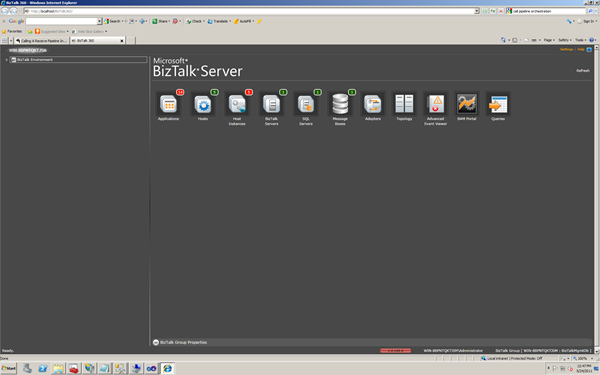
And now there is a new tool made by Saravana Kumar, who I met last MVP summit in person, called BizTalk360. During bus ride from summit back to hotel he demoed me this monitoring tool and I was impressed by functionality and look and feel. Finally there is way for administrators to have a tool similar to administration console, but now web based. The other tools also have a web interface and I still cannot understand why Microsoft hasn’t thought of bringing administration console also in web version (like SCOM 2007 R2!). BizTalk360 is feature rich and I suggest to look at it.
I am impressed by work Saravana has put into it and provided the tool with such a nice UI. User experience in my view is an important factor for a tool to be adopted.I definitely recommend developers and administrators to have a look at this tool and see if it fit for purpose in their environments.It can be download easily from the site after registering. Installation and configuration is easy and straight forward.
Above you have a screenshot of BizTalk360 in my VM, a single box installation of BizTalk Server 2010. In near future I hope a do a new comparison between current offerings for monitoring BizTalk solutions.

by community-syndication | May 23, 2011 | BizTalk Community Blogs via Syndication
The content from the BizTalk training course from Microsoft has now been publically released. You can download this video content and the VMs for learning BizTalk 2010 here: http://www.microsoft.com/downloads/en/details.aspx?FamilyID=38c2ccfc-510c-4627-a33c-95e9d19f3478. Enjoy!
Blog Post by: clineer
by community-syndication | May 23, 2011 | BizTalk Community Blogs via Syndication
Last week I presented two sessions at Microsoft Teched USA. This year my sessions were focus on Real World Windows Workflow Foundation and WCF Patterns. Do I like challenges or what? 😉 Well, both sessions received were jammed packed and received an amazing…(read more)
Blog Post by: gsusx

