by community-syndication | Aug 17, 2011 | BizTalk Community Blogs via Syndication
Wondering what your BizTalk skills are worth? Read the latest MCP magazine salary survey. The report indicates that BizTalk certified professionals command an average base salary in excess of $114,000, the highest of any of the Microsoft certifications!
QuickLearn offers BizTalk Server 2010 Immersion and Deep Dive courses to help you prepare for the BizTalk technical specialist exam #70-595: Developing Business Process and Integration Solutions by Using Microsoft BizTalk Server 2010.
by community-syndication | Aug 17, 2011 | BizTalk Community Blogs via Syndication
I’ve just published three webcasts looking at AppFabric Messaging, Introduction to Azure AppFabric Queues, AppFabric Duplicate Message Detection and AppFabric Messaging Message Expiration.
There are more webcasts on the AppFabric June CTP here.
This article will take a look at the code used in the duplicate detection webcast and explain the concepts involved.
Bear in mindthat this code is based on the AppFabric June CTP, things may change when the production version is released.
AppFabric Duplicate Message Detection
When developing message processing systems there can be scenarios where an identical message can be sent by an application more than once. In computer science if an operation is able to handle multiple instances of the same input without changing the result we say that it is idempotent. In AppFabric service bus messaging we are able to create idempotent messaging channels by leveraging the duplicate deletion functionality that is built into queues and topics.
The Enterprise Integration Patterns website provides a description of the Idempotent Receiver pattern here. |
Duplicate Message Detection
Duplicate message detection in queues and topics is based on the MessageId property of the messages that are sent by the sending application. When a message is created using one of the static CreateMessage methods the string value of a new GUID will be assigned to the MessageId property.
The following code will create 10 new messages and output their MessageID values.
|
for (int i = 0; i <= 9; i++)
{
// Create a test message.
BrokeredMessage testMsg = BrokeredMessage.CreateMessage(“Test”);
// Output the message ID
Console.WriteLine(“Message {0} has MessageId {1}”, i, testMsg.MessageId);
}
|
The output from the code is shown below.
Detecting duplicate messages based on the default message ID can be useful in scenarios where an application sending messages to a queue or topic needs to ensure that exactly one message is delivered.
Consider the following code.
|
try
{
// Send a message to a queue.
sender.Send(msg);
}
catch (TimeoutException ex)
{
// Has the message been sent?
}
|
If the message is sent to the queue and a timeout exception is thrown there is no way for the sending application to know that the message has been sent successfully. If the sending application chooses to resend the message it can ensure at-least-once delivery. If the sending application chooses not to resend the message it can ensure at-most-once delivery.
If the queue or topic that the message is being sent to is configured to detect duplicate messages the client can retry sending the message and the queue or topic will ignore any duplicates. This will ensure exactly-once delivery of the message.
In some scenarios message duplication may occur before the application places the message on the queue or topic. If a web service is called by a client places a message on the queue there is a chance that the client may make two calls to the service if a timeout exception occurs. As the two messages created in the service will have different message IDs the duplicate detection logic will not detect the second message as a duplicate. In order for duplicate detection to work in these scenarios we must replace the default message ID with an identifier that is linked to the content of the messages we are sending. The next scenario will explore how this can be implemented.
Duplicate Messaging Scenario
Consider a scenario where Radio Frequency Identification (RFID) tags are used for tracking goods passing an RFID reader on a store checkout. It is very easy for some of the RFID tags to be read more than once as a basket of goods is moved past the RFID reader. If the application processing the tag reads is not able to detect and remove these duplicate tag read messages it will result in the customer being billed too much for the transaction, and also cause chaos in the inventory and other systems that are dependent on this data.
A simple console application has been created to simulate this scenario. The RFID tag reads are represented using a data contract. When an instance of the RfidTag class is created it is assigned a unique tag id, and the price and product can be set.
|
[DataContract]
class RfidTag
{
[DataMember]
public string TagId { get; set; }
[DataMember]
public string Product { get; set; }
[DataMember]
public double Price { get; set; }
public RfidTag()
{
TagId = Guid.NewGuid().ToString();
}
}
|
In the Main method of the console application an order batch is created as an array of RfidTag objects using the following code. The order is for equipment for two children to play a ball game. The number of items in the order and the total value for the order are calculated and displayed.
|
// Create a sample order
RfidTag[] orderItems = new RfidTag[]
{
new RfidTag() { Product = “Ball”, Price = 4.99 },
new RfidTag() { Product = “Whistle”, Price = 1.95 },
new RfidTag() { Product = “Bat”, Price = 12.99 },
new RfidTag() { Product = “Bat”, Price = 12.99 },
new RfidTag() { Product = “Gloves”, Price = 7.99 },
new RfidTag() { Product = “Gloves”, Price = 7.99 },
new RfidTag() { Product = “Cap”, Price = 9.99 },
new RfidTag() { Product = “Cap”, Price = 9.99 },
new RfidTag() { Product = “Shirt”, Price = 14.99 },
new RfidTag() { Product = “Shirt”, Price = 14.99 },
};
// Display the order data.
Console.ForegroundColor = ConsoleColor.Green;
Console.WriteLine(“Order contains {0} items.”, orderItems.Length);
Console.ForegroundColor = ConsoleColor.Yellow;
double orderTotal = 0.0;
foreach (RfidTag tag in orderItems)
{
Console.WriteLine(“{0} – %u00a3{1}”, tag.Product, tag.Price);
orderTotal += tag.Price;
}
Console.ForegroundColor = ConsoleColor.Green;
Console.WriteLine(“Order value = %u00a3{0}.”, orderTotal);
Console.WriteLine();
Console.ResetColor();
|
The reading of the order tags is then simulated using a random number generator to create duplicate tag reads. The while loop will send messages containing the RfidTag objects to the queue. The random number generator is used to decide whether or not to advance the position in the array, and generate duplicate tag reads 40% of the time. During the sending process a count of messages is maintained and displayed in the console when the message have been sent.
|
// Send the order with random duplicate tag reads
int sentCount = 0;
int position = 0;
Random random = new Random(DateTime.Now.Millisecond);
Console.WriteLine(“Reading tags…”);
Console.WriteLine();
Console.ForegroundColor = ConsoleColor.Cyan;
while (position < 10)
{
// Create a new brokered message from the order item RFID tag.
BrokeredMessage tagRead =
BrokeredMessage.CreateMessage(orderItems[position]);
// Send the message
sender.Send(tagRead);
Console.WriteLine(“Sent: {0}”, orderItems[position].Product);
// Randomly cause a duplicate message to be sent.
if (random.NextDouble() > 0.4) position++;
sentCount++;
}
Console.ForegroundColor = ConsoleColor.Green;
Console.WriteLine(“{0} total tag reads.”, sentCount);
Console.WriteLine();
Console.ResetColor();
|
Once the tag read messages have been sent they can be received by the point of sale application and the customer billed. The code shown below will receive messages from the queue and display the product names. It will also count the number of items in the invoice and the invoice total, and display this information in the console.
|
Console.WriteLine(“Receiving tag read messages…”);
Console.WriteLine();
double billTotal = 0.0;
// Receive the order batch tag read messages.
Console.ForegroundColor = ConsoleColor.Magenta;
while (receiver.TryReceive(TimeSpan.FromSeconds(1), out receivedTagRead))
{
RfidTag tag = receivedTagRead.GetBody<RfidTag>();
Console.WriteLine(“Bill for {0}”, tag.Product);
receivedCount++;
billTotal += tag.Price;
}
// Bill the customer.
Console.ForegroundColor = ConsoleColor.Green;
Console.WriteLine(“Bill customer %u00a3{0} for {1} items.”, billTotal, receivedCount);
Console.WriteLine();
Console.ResetColor();
|
When the application is run the output is as follows.
The duplicate RFID tag reads meant that the unlucky customer was billed for 13 items instead of 10, and overcharged %u00a344.97.In order to generate an invoice for the correct amount the application will have to be modified to handle the duplicate RFID tag read messages.
Enabling Duplicate Detection
AppFabric queues and topics are able to suppress duplicate messages by setting the RequiresDuplicateDetection property of the relevant description class to true when creating the queue or topic. The default value of RequiresDuplicateDetection is false. The description classes also contain a DuplicateDetectionHistoryTimeWindow property that specifies the time window for the detection of duplicate messages, the default value is 10 minutes.
In the RFID messaging scenario the code used to create the queue is modified as follows. This will create a queue which will suppress any messages that are sent to the queue that have the same message ID as a message that was sent during the past minute.
|
// Create a QueueDescription that will suppress duplicate messages
// with a detection history window of one minute.
QueueDescription rfidCheckOutQueueDescription = new QueueDescription()
{
RequiresDuplicateDetection = true,
DuplicateDetectionHistoryTimeWindow = new TimeSpan(0, 1, 0)
};
// Create an order queue using QueueDescription
Queue rfidCheckoutQueue = serviceBusNamespaceClient.CreateQueue
(“rfidcheckout”, rfidCheckOutQueueDescription);
|
With this modification the application will still be susceptible to duplicate messages as the MessageId property for the messages that are created will have the default values. This means the message id will be unique even for duplicate RFID tag reads. In order for duplicate messages to be detected the message ID is set to the tag ID property of the RFID tag, which will be unique for that RFID tag. This will ensure that the messages for duplicate RFID tag reads will have the same message ID and duplicate messages will be detected by the queue.
|
while (position < 10)
{
// Create a new brokered message from the order item RFID tag.
BrokeredMessage tagRead =
BrokeredMessage.CreateMessage(orderItems[position]);
// Set the MessageId of the message to the TagId of the RFID tag.
tagRead.MessageId = orderItems[position].TagId;
// Send the message
sender.Send(tagRead);
Console.WriteLine(“Sent: {0}”, orderItems[position].Product);
// Randomly cause a duplicate message to be sent.
if (random.NextDouble() > 0.4) position++;
sentCount++;
}
|
When running the modified application the output is as follows.
The queue now successfully suppresses duplicate messages and the amount billed to the customer is correct.
by stephen-w-thomas | Aug 15, 2011 | Stephen's BizTalk and Integration Blog
I’m back in the action again working on a large BizTalk Healthcare project after some time off.
This is the first time I’ve worked with HIPAA transactions like 270, 271, and others and so far I have learned a lot.
Like other projects I have worked on in the past, one of the first things I do is create projects and namespaces for the new code we have to build. This is usually something you did not have to put much thought into. But with transactions like 270 I went to make a namespace like BizTalk.270. This is all great until you deploy your code. Visual Studios will add an “_” into the namespace like BizTalk._270 and never tells you it did this. This is because .net namespaces cannot start with a number. This extends to anything following the “.” In the namespace as well.
Then, I figured I would try BizTalk.X12-270. But nope, hyphens are not allowed in namespaces as well.
I ended up at BizTalk.X12_270 but in the meantime I had to update all the projects twice to end up there. Next time, I will test things out on one project before I go and update 50 projects with a specific namespace format.

by community-syndication | Aug 15, 2011 | BizTalk Community Blogs via Syndication
Here’s a trick that usually gets people new to BizTalk. The Business Rule Engine has the ability to call (public) static methods on any .Net class, without needing to assert an instance of the class first. However, when you execute your policy, nothing is returned into the policy, and your rules will not work as […]
Blog Post by: Brett
by community-syndication | Aug 15, 2011 | BizTalk Community Blogs via Syndication
One of the strong points of the BizTalk Server Integration suite is the inclusion of a very versatile, flexible and extendable Business rules engine.
This versatility, however, is the same thing that makes it widely underused in deployments using BizTalk Server. Even today, being on the market in various versions for more than 6 years, I see people often struggle with it.
The root problem: the same flexibility and versatility comes with a rather steep learning curve to master.
To help you get started, Microsoft has packed a hands-on learning guide into a Virtual Lab. You can get to it here.
Try it, you won’t be disappointed.
by community-syndication | Aug 15, 2011 | BizTalk Community Blogs via Syndication
There are some of the adapters that doesn’t support single-sign on with you domain users that are assigned to you BizTalk Host Instans. This is an issue in BizTalk when you come to deployment and where you don’t want your password for a FTP site to be listed in your binding files.
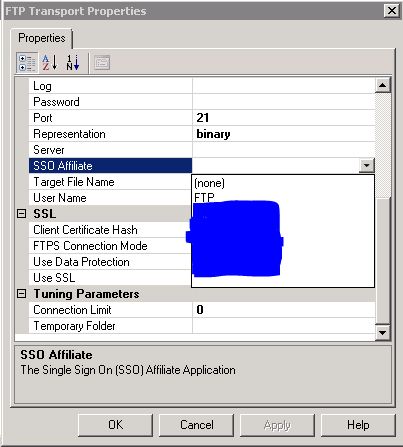
When you configure your FTP Send Port in Biztalk there is an option to select the SSO Affiliate, which lists your SSO Affiliate applications from Enterprise Single Sign-On. This is a part of what is needed.
The first thing you need is to have a promoted property on your message called “SSOTicket” and this have to have a specifict value. I do this in a pipeline component, but I thing you also can do this in an Orchestration. The code is as follows:
public Microsoft.BizTalk.Message.Interop.IBaseMessage Execute(Microsoft.BizTalk.Component.Interop.IPipelineContext pc, Microsoft.BizTalk.Message.Interop.IBaseMessage inmsg)
{
ISSOTicket ssoTicket = new ISSOTicket();
inmsg.Context.Write(“SSOTicket”, “http://schemas.microsoft.com/BizTalk/2003/system-properties“, ssoTicket.IssueTicket(0));
return inmsg;
}
Create a send pipeline that uses this pipeline component in the Encode phase.
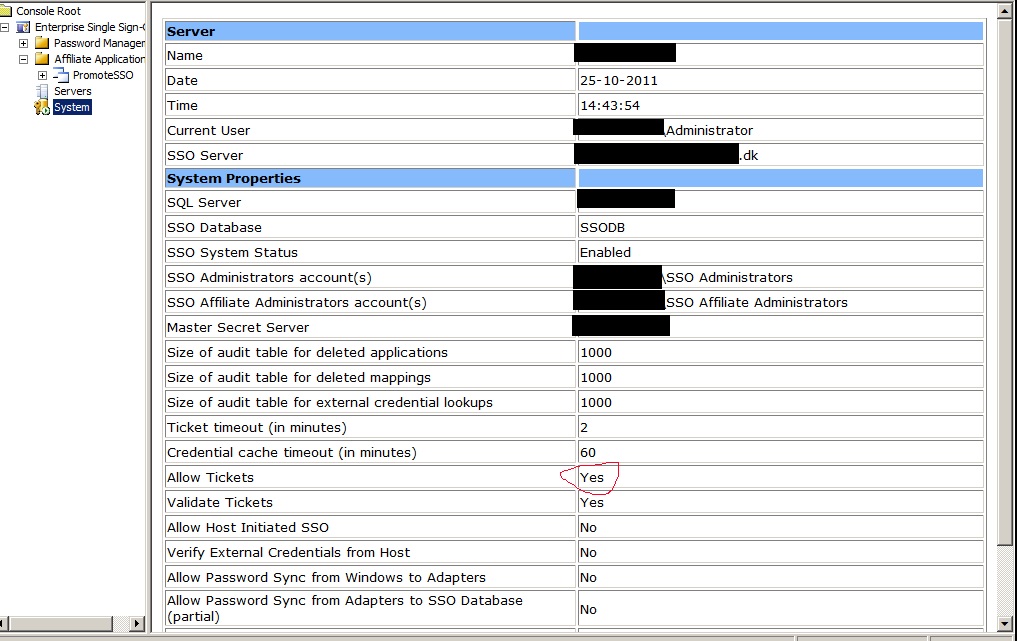
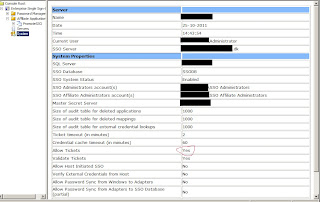
Set the “Allow Tickets” to yes on the system:
Then you need to create an affiliate application in Enterprise Single Sign-On:
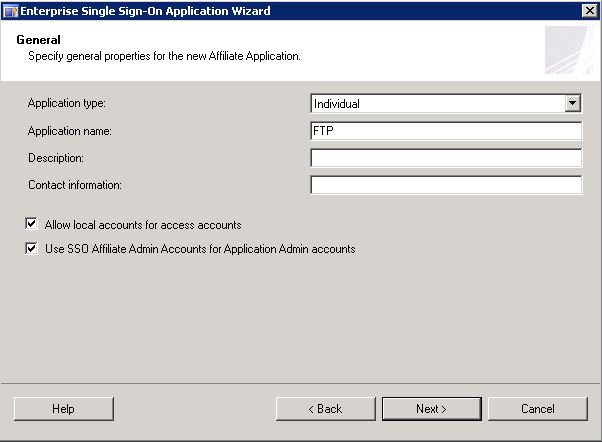
Give it a nice name and remember to check the check boxes:
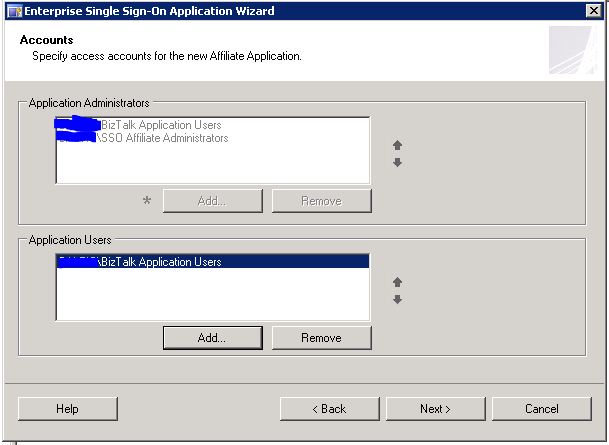
Use the Biztalk Group that has the host instanse as Application users
Check “Ticket Allowed” and then finish the Wizard.
Click new mapping on the new application you just have created. Check the “Credentials as Windows credentials”
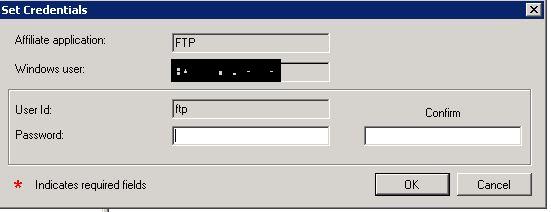
The Window user is the user used by the Biztalk Host Instanse and the External user is your FTP/SAP/Other user
Type in the password for your external user
Now on your FTP Send port you select the new SSO affiliate application.
This should be it. You now have single sign-on on your FTP sites and you can use your Enterprise Single Sign-on to manage your mappings between domain accounts and external accounts.
Sample code at http://code.msdn.microsoft.com/Use-single-signon-with-FTP-b6414ce8

by community-syndication | Aug 12, 2011 | BizTalk Community Blogs via Syndication
A couple months back I did a test for a client about whether the legacy Dynamics CRM 4 adapter would work successfully on BizTalk 2010. I know this is not the recommended configuration and that the CRM 2011 SDK does not mention this as an acceptable or supportable configuration. Many companies have made a significant […]
Blog Post by: clineer
by community-syndication | Aug 12, 2011 | BizTalk Community Blogs via Syndication
Charan: Hey Rohit I am getting the error “The published message could not be routed because no subscribers were found.” as shown below. Do you have any idea how I can get rid of it?
Rohit: As this error is stating that “the subscribing orchestration or send port has not been enlisted, or if some of the message properties necessary for subscription evaluation have not been promoted.” Let

by community-syndication | Aug 10, 2011 | BizTalk Community Blogs via Syndication
What a placethe Gold Coast!!!

Any chance to get back there and this year is looking to be a fantastic 2 day pre-conference
training together.
In the training there’ll be no MS speak!! I promise “We’re all in” (washing mouth
out with soap).
First things first – everyone you speak to will pronounce ’Azure’
differently (I once had 3 martial arts instructors all speak their own flavour of
’Korean’ to me).
You’ll get:
1) ’Aaaaaazzzzre’
2) ’Azzzz-cloud’
Now here in Australia we’re standardising (our English-Australian) to Azurey!
Azurey is our official term, which fits alongside ’Timmy’, ’Barbie’ and ’Daveo’
but not Shazza.
What I want to explore with you are all the different options and components that
you could utilise. Having been through several cloud based solutions and building
a cloud based solution over the last 2 years.
So we can use a combination of the available technologies to alleviate some of the
in-house problems (e.g. firewall settings, h/w order and provisioning, server space)
while still maintaining *very* good ownership over it.
One thing is clear right now – with this new landscape the focus has returned to the Developer to
be mindful of what resources they use and HOW they use them.
The price of your solution starts right now from the ground up with the Developer!
(Previously we’ve had limitless memory, disk, cpu, connections, sockets,
select * from customers – developers rarely care)
So the cost model – What do you get charged for?
(short answer – nearly everything)
If you can design a solution with:
1) no use for SQL Azure –as it currently costs a bomb to host a DB.
You could use – SQLCE locally or Azure Storage (Table, Queue, blob) which is cheap
as chips.
2) limit your Service Bus Connections – both client and server count as a
connection. The connections are averaged out over a day/month and are sampled
every 5 mins, but you certainly don’t want to rack up 100s of connections. A cheaper
alternative is to expose a WCF Endpoint (via a worker role) and have a process communicate
with the Servicebus endpoint handling the requests. This counts for 2 connections
(1 client, 1 server) and is well within the 5 pack.
3) Only data out is charged – not in.
4) Compute VM sizes limit bandwith – across all your compute VMs
e.g. small, there is bandwidth limitations that is enforced whether you have 1 or
10 VMs. Be mindful of that.
5) We can ’monitor’ our cloud machines and even get back perf counters on
each – just to give you that feel good feeling.
Well anyway I must go tweak some F# (best thing I’ve seen in a long whileanother
story)
Here’s the official story @ TechEd – hope to see you there folks!
http://australia.msteched.com/preconferencetraining
Official Blurb!
How “the Cloud” can help you integrate – Microsoft for Developers
With the excitement of technology moving towards “the Cloud” come and learn exactly
what this means to your business and how your development projects can leverage the
Windows Azure Platform without re-architecting your environment. Should you invest
in private cloud, move your application to the public cloud, choose a hybrid approach
or keep the application on-premise?
This two-day development workshop led by renowned Integration Experts provides delegates
with an early opportunity to gain insight and hands-on experience with the Windows
Azure Platform including Windows Azure AppFabric, SQL Azure, Windows Server AppFabric
and BizTalk AppFabric Connect.
This developer workshop focuses on maximising your existing integration technology
investment for an on-premise solution, including architectural design considerations,
real world tips and techniques and hands-on experience with using the integration
tools available today.
Delivered through workshop style presentations and hands-on lab exercises, this technology
focused pre conference training will assist with designing and developing your company
roadmap to the Cloud.
Blog Post by: Mick Badran
by community-syndication | Aug 10, 2011 | BizTalk Community Blogs via Syndication
OK, think fast! Name three features of BizTalk that you really love. Now name three that “need some work”. If you have been around BizTalk for more than a few weeks your answers to both of these questions included: “You mean I am limited to three?”, and the two lists likely have some overlap.
If you are reading this, you are interested in knowing what the future of BizTalk is, as am I. It seems that every time Microsoft releases a new technology such as the .NET framework 3.0 (with WF and WCF), Oslo, Dublin, Azure, AppFabric, whatever, the eminent demise of BizTalk is debated. These rumblings have been rolling around once again.
BizTalk isn’t perfect but warts and all it is, in my humble opinion, the best integration option out there. Most of what we know as BizTalk Server today has remained unchanged since BizTalk 2004. Sure there have been some improvements to the interface, and some performance tweaks, and some features have been added, (WCF and EDI support most notably) but the core processing engine has remained untouched.
In no small part I think this is because with an installed base of well over 10,000* customers worldwide Microsoft realizes that the transition to the next BIG version of BizTalk can’t look like the process of upgrading from BizTalk 2002 to 2004. That transition for those of you lucky enough to miss it was more of a wholesale rewrite then a simply upgrade.
The changes that are needed to bring integration into the current decade will be dramatic and will necessarily take some time; maybe even into the next decade if the timeline hinted at by Tony Meleg is anywhere near accurate. In a presentation given at the 2011 Microsoft Worldwide Partner Conference July , 2011, Tony outlined the roadmap for the next few versions of BizTalk and how that is going to play with technologies such as WF, WCF and AppFabric. http://digitalwpc.com/Videos/AllVideos/Permalink/e821e9f8-e379-45b0-8879-12fe271c86be#fbid=VRTVG4xyzMQ
In the presentation Tony identified some customer requests that they are hoping to address over the next few iterations of BizTalk and in the interim with Microsoft’s newest favorite buzzword “AppFabric”. I’ll discuss some of his requests later but for now on to…
My BizTalk Asks
Your list may vary from mine, and I am not going to limit myself to three “needs some improvement” features, but here goes, in no particular order:
Easier control over message box persistence: Since BizTalk always persists every message; it isn’t designed for super-low latency scenarios. Many people have asked for an easy switch to turn off persistence when it isn’t needed, and this happens more often than you might believe. Some competing products have taken a different approach, that is they don’t persist any messages, thus their throughput is much improved. In these systems when persistence is turned on, (frequently requiring additional servers and licenses) their performance positively tanks. This request is not a “simple-fix” since BizTalk at its very core is a publish/subscribe (hub and spoke if you prefer) engine.
Dynamic orchestration filtering: As BizTalk developers we are very aware changing the subscription for an orchestration isn’t a configuration change so much as a coding change. This typically requires versioning considerations, retesting, redeployment, etc. Although a well thought out orchestration design can reduce the frequency of these changes, when changes are necessary the process can be painful. Having a more loosely coupled holistic approach to the end-to-end design, including exposing the orchestration filter as configuration (much as send ports already are) would assist greatly in this area. This has been a long-term request of experienced BizTalk developers.
Support for mirrored databases: Many BizTalk administrators that we work with have asked why mirroring is not supported for the BizTalk databases. This is really more of an issue for the SQL team since that is where the issue originates. SQL server does not support mirroring of transactional databases (though clustering is of course supported). Since most of BizTalk’s core databases communicate with each other transactionally this is a big change and not one that can be implemented by the BizTalk team alone.
ESB like capabilities easier to implement: This is really two requests in one. First it seems that the ESB way of dealing with exceptions really should just become the default. Expecting operations personnel to troubleshoot problems using only the Group Hub and event logs seems rather arcane when compared to the slick web based interface available with the ESB management portal. Second for those companies that desire itinerary processing abilities as available in ESB I’d like a switch that turns that on. Of all the items in the list this one (seemingly) would be the easiest to implement, and may be coming to BizTalk sooner than some of the others.
Ability to change the host used by dynamic send ports: This is a sub-request related to the preceding one. Since the ESB toolkit so heavily leverages dynamic send ports, the ability to change what host they are running on would be really nice. While we are on the topic, how about the ability to dynamically change the pipeline and/or map used by a dynamic port. This feature is effectively offered using the ESB toolkit, but how about making it easier if I don’t want the “whole itinerary thing?”
Callback support for WCF adapters: I’d like to be able to have a client initiate a process via a web service call and then have the process call the client back when it completes. This is certainly supported in WCF itself but at present neither BizTalk’s WCF adapters nor AppFabric supports callbacks.
Microsoft’s BizTalk Asks
In his presentation Tony identified several additional Asks that Microsoft has identified. I don’t doubt that some customers have asked for these features but some of them are going to be big for Microsoft as well.
Low Latency: (already discussed above).
More Flexible Messaging: Tony ignored this point in the presentation so I’m going to say I have addressed it in my Asks above.
Alignment to Windows Workflow: This means different things to different people. Tony identified it as “replace the orchestration engine with the WF engine”. I myself don’t really care whether we call it an orchestration or a workflow what I want is scalability and robustness which at least (so far) we don’t really have in WF. Would it make sense to do this? Sure, having a single engine to maintain makes a lot more sense than two very similar engines but this will not be a trivial change, (Tony identified it as “heart surgery”!)
Put BizTalk on Azure: This seems to have become Microsoft’s solution to almost everything, and who can blame them? Instead of selling you software that you pay for and install once, how much better to sell you software as a service where you get the latest and greatest functionality instantaneously (plus for you) and Microsoft gets to charge you over and over again for it, (plus for Microsoft). That’s what we call a win-win situation? Considering the issues that all cloud providers have experienced over that last few months I think it is going to be a while until companies are going to be fully comfortable outsourcing something as mission critical as integration.
Service Virtualization/Discovery/Tooling: As services become more ubiquitous there is a definite need to enable automatic discovery and integration with these services. Whether the provider and/or consumers are BizTalk this need exists. UDDI held the initial promise for a part of this, while for other parts Microsoft hasn’t really offered a solution. This is one of those things that the BizTalk team likely won’t own, but they have a tight dependency on the eventual solution, whatever it may be.
And I’m going to lump Tony’s last two bullets together: Align Business Rules, and Invest in BAM, improve tooling and make them work across the Microsoft stack: As any of my former students can attest to, I am a huge proponent of using these two features of BizTalk. They are each easy enough to implement if you are using orchestrations, but their abilities go so far beyond that, and I don’t think Microsoft has done a good enough job selling them. For a long time I have seen these as two pieces that could certainly be spun off to stand alone and simply be used by BizTalk as they could be by any other .NET component. As much as I’d hate to see them go, I welcome all developers to use them, so long as we still can!
Any one of these features on its own could; if really fixed to my satisfaction, be quite an effort. Taken as a collection they are going to be very challenging and will necessarily take a long time. The cadence that has been identified is that the changes will come first to the AppFabric space and will be evolutionary, two to three releases per year. I see AppFabric as an incubator where some features will live, some will die, and where change will be frequent. If you are not comfortable with living on the bleeding edge I’d stay clear for now.
BizTalk will continue to be developed and new releases will come every couple of years. The best and the brightest of the AppFabric changes will be integrated a few at a time. If you remember WSE 1.0, 2.0, 3.0 which finally morphed into WCF, the cycle will be similar with AppFabric being the WSE releases and BizTalk being the WCF release.
When I look at BizTalk as a 10 year old product, and considering that the evolution to the eventual BizTalk replacement at least as Tony sees it is being 10 years, I’m feeling pretty good about my decision to stick with BizTalk Server, but I’m also going to keep a weather eye on WF, WCF, and all the AppFabric(s).
For anyone that read this whole thing and watched Tony’s presentation here is my concept of a cloudy thing! Asperatus is a new and upcoming type of cloud. Maybe this should be the code name for the BizTalk in the cloud. It has to be better than v-next right?
*The latest published numbers for customers is from the BizTalk 2009 release and at that time the number was 10,500. With the previous years’ rates of growth this is likely approaching 12,000, but we can only speculate since Microsoft has not released more recent numbers.