by community-syndication | Jun 21, 2010 | BizTalk Community Blogs via Syndication
If you’re interested in all the content that was prensented at TechEd US a couple of weeks ago the place to go to is http://www.msteched.com/2010
Certainly one to watch is Integrating LoB Systems (SAP, Mainframe) with the Cloud Using Microsoft BizTalk Server and the Windows Azure AppFabric http://www.msteched.com/2010/NorthAmerica/ASI305
And as we had last week Jon Flanders on an AppFabric training here with CODit in Brussels we can verify if AppFabric is what he promised us a few years ago 🙂 Framework and Microsoft BizTalk Best Practices with an Eye Toward Oslo http://www.msteched.com/2008/NorthAmerica/techtalk_41
by community-syndication | Jun 21, 2010 | BizTalk Community Blogs via Syndication
I have been talking to a few people latley about best pratices for BizTalk Solutions.
I looked at what was on the internet and put together a best practices, naming standards document.
Please download it from here
by community-syndication | Jun 20, 2010 | BizTalk Community Blogs via Syndication
In this episode, Michael McKeown describes how the Windows Server AppFabric Security Model works in a domain environment.
by community-syndication | Jun 20, 2010 | BizTalk Community Blogs via Syndication
I’ve been creating a lot of Native Activities lately and to do it I would add a new item to my project using the Code Activity template. I kept wishing for a Native Activity template so now I’ve created one.
Read more at Ron Jacobs Blog

by community-syndication | Jun 20, 2010 | BizTalk Community Blogs via Syndication
MockingBird v2 has almost reached RTM. Just a few more days to make some final touches and it will be ready. The team has been discussing how to take it further and one thing that’s been on my mind for a long time is the topic of mock BizTalk adapters. What I would like to […]
by community-syndication | Jun 20, 2010 | BizTalk Community Blogs via Syndication
I have been doing some work and research with ASP.NET MVC 2.0. My first interest was to try to figure out how to get Dependency Injection working with ASP.NET. I started doing investigating how to link in Springframework.net. This direction led me down a track that required some manual configuration. This is when i found […]
by community-syndication | Jun 19, 2010 | BizTalk Community Blogs via Syndication
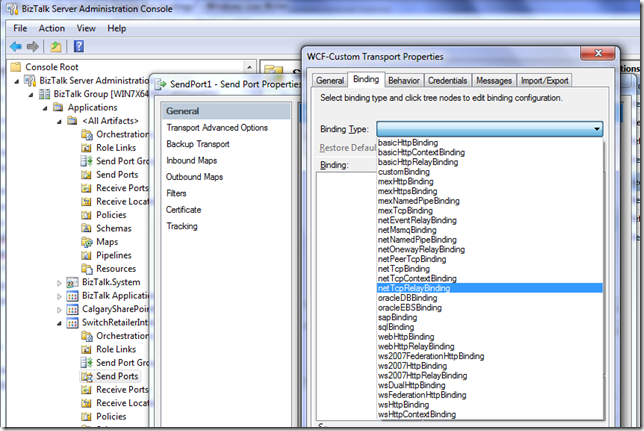
After installing the Windows Azure platform AppFabric SDK V1.0 – April Update I was expecting all of the AppFabric Service Bus relay bindings to be available inside of the BizTalk Admin Console but they were not. I could run the AppFabric Echo .Net Sample without any issues. After re-installing both the AppFabric SDK and BizTalk 2010 Beta I was still unable to find these bindings in the Admin console. I checked the machine.config files (both 32 bit and 64bit) and both files were updated. The problem with this is that I checked the .Net 2.0 config files.
After stumbling across Wade Wegner’s blog, the picture became much clearer. Wade explains “I soon realized that the issue was the machine.config file. When you install the Azure AppFabric SDK the relevant WCF extensions are added to the .NET Framework 2.0 machine.config file, which is shared by .NET Framework 3.0 and 3.5. However, .NET Framework 4.0 has its own machine.config file, and the SDK will not update the WCF extensions.”
To resolve the issue you need to run a utility called: RelayConfigurationInstaller.exe which can be found in C:\Program Files (x86)\Windows Azure platform AppFabric SDK\V1.0\Assemblies (64 bit machine) or C:\Program Files\Windows Azure platform AppFabric SDK\V1.0\Assemblies (32 bit machine) and provide an input file that includes
<?xml version ="1.0"?>
<configuration>
<startup>
<requiredRuntime safemode="true"
imageVersion="v4.0.30319"
version="v4.0.30319"/>
</startup>
</configuration>
The name of this file should be called RelayConfigurationInstaller.exe.config.
example:
C:\Program Files (x86)\Windows Azure platform AppFabric SDK\V1.0\Assemblies>RelayConfigurationInstaller.exe /i
After this command was run successfully, I could now see the “Cloud Bindings” including the NetTcpRelayBinding
by community-syndication | Jun 18, 2010 | BizTalk Community Blogs via Syndication
A recent friend asked me why he would be getting this error, and while debugging a splitting process, I came across this same error: hence this blog entry.
(not all of the time, but most of the time) What is going on is that the EDI data is being parsed by the EDI pipeline and resolving to a party, and I wanted to take a copy of that message and drop it to a folder so I can look at the claim to see what is really going on.
However when I assigned the data to the new message I simply sent it to the EDI assembler and assumed that it would create the EDI document and I could pass it along to the BA and they could tell me what needs to happen, yada yada yada.
All of the sudden I started getting these messages: Invalid character in data element.
What is actually going on is that when data is coming in, it is resolving to a particular party, but when going out, it does not have a party associated with it, so it defaults to the global party. The global party does not have a lot of the configuration options that are available to a defined party. One of those options are to allow decimals in EDI documents.
Here is what is in a defined party to get decimals to go in:
However, for the global party, the setting is not available.
This means that all data for a global party must be implicit decimal.
Change the following property to allow outbound decimals:
And in the orchestration, when you create the new message, make sure your code looks like this:
NewEDIMsg.MessagePart=EDIMsg.MessagePart;
NewEDIMsg(EDI.DestinationPartyName)=EDIMsg(MessageTracking.PartyName);
by community-syndication | Jun 18, 2010 | BizTalk Community Blogs via Syndication
Tomorrow is WCF day in New York city!!!!! My good friend and Tellago’s CTO Don Demsak will be doing a session WCF Data and RIA Services at the WCF fire-starter event to be hosted at the Microsoft offices in New York city. Don has a encyclopedic knowledge…(read more)
by community-syndication | Jun 18, 2010 | BizTalk Community Blogs via Syndication
Nearly a year ago I created a CancellationScope Activity sample and posted it on CodeGallery for .NET 4 Beta 1. I went back yesterday and updated it for .NET 4 RTM – the sample has some interesting points to demonstrate.
It shows how the CancellationScope Activity works but it also shows
- How to create a custom activity that causes the workflow to go idle for testing purposes
- How to create a unit test that verifies the behavior of a console application by simply verifying the text output to the console.
You can download the sample from http://code.msdn.microsoft.com/wf4CancellationScope
Read more at Ron Jacobs Blog

