
by community-syndication | Aug 11, 2010 | BizTalk Community Blogs via Syndication
Well it almost seems ages ago, but it almost two years ago Microsoft launched Windows Azure. After the PDC’08 I wrote a post called the future is in the cloud and some responded: “this cloud thing is going to be huge. But, the question if Microsoft will also be huge. I think the clear market leader at the moment is Amazon, followed by Google”.
Where is it now? According to this article ’Microsoft’s Windows Azure: What a difference a year makes’ a lot has changed. I notice it to as Windows Azure is getting more press releases here in the Netherlands in different magazine (on- and offline). Even I have just recently wrote another article around Service Bus for Dutch Technet magazine, which basically a little more detailed story found on Windows Azure website.
Cloud computing is starting to be big business and Microsoft will be one of the providers for it together with Google and Amazon. As IT professional I am starting to get more involved into it, like integration between on-premise systems with SalesForce (CRM Cloud application). See some of my previous posts.
I do believe that it will not take long before companies will fully embrace cloud computing and adopt Windows Azure or offerings by Google, Amazon and others. By then a lot of us will work on applications and services running in the cloud and connecting them to on-premise applications and systems. BizTalk certainly will play a role in it.
by community-syndication | Aug 11, 2010 | BizTalk Community Blogs via Syndication
Step 1:
Right-Click on the Project in the Solution Explorer and select Properties.
Step 2:
read more
by community-syndication | Aug 11, 2010 | BizTalk Community Blogs via Syndication
A few days ago we had the opportunity to sit down with Microsoft’s Technical Evangelist Ron Jacobs to record two Channel9’s Endpoint TV episodes on which we discuss the architecture and capabilities of SO-Aware (our WCF Registry). The episodes illustrate…(read more)
by community-syndication | Aug 11, 2010 | BizTalk Community Blogs via Syndication
SO-Aware is an exciting new tool you can use with your WCF Services. This is not just another UDDI registry. Rather, this is a tool that works for SOAP, REST, and OData services and…you just have to see it in action.
Tellago Studios SO-Aware
endpoint.tv – Meet SO-Aware (Part 2 – coming soon)
Ron Jacobs
blog http://blogs.msdn.com/rjacobs
twitter @ronljacobs
by community-syndication | Aug 11, 2010 | BizTalk Community Blogs via Syndication
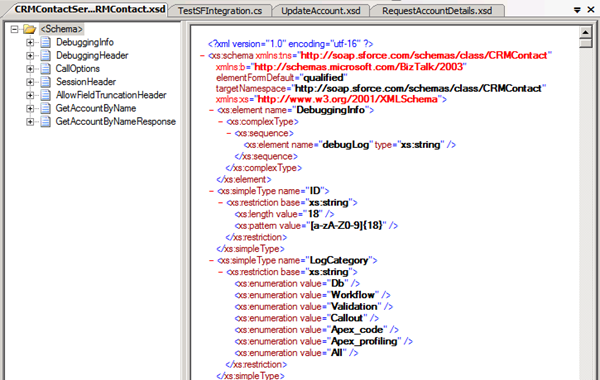
In this post I would like to continue, where I left of in Part I where a did a run down in setting up an account at SalesForce, building a service and how to consume its WSDL. Also explained some security details necessary for communication with your SalesForce service. In an orchestration you can consume a web service build in SalesForce, through running BizTalk WCF Service Consuming Wizard. If you run the wizard and pick WDSL generated for your service BizTalk will generate schema and binding file for you. Schema en binding file shown below.
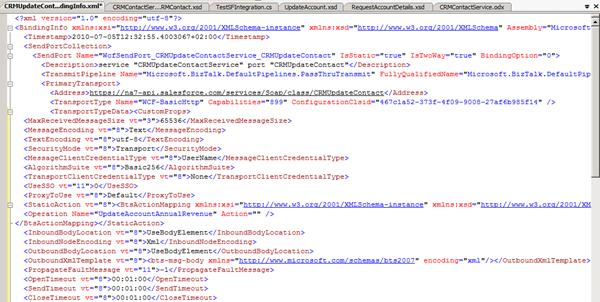
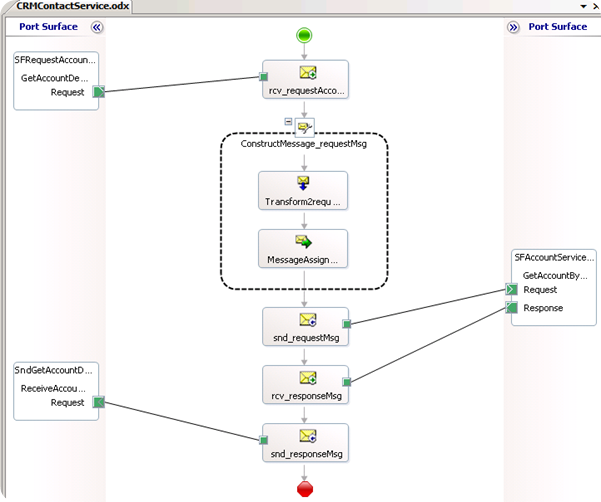
Binding file will be helpful in creating WCF-Custom send port. I have built an orchestration that consumes my created SalesForce web service. The orchestration is initiated (activated) by picking up a file form a folder location. Xml file contains account name I want to retrieve details from SalesForce. Information in the file will be used to call the service and response message is sent to MSMQ.
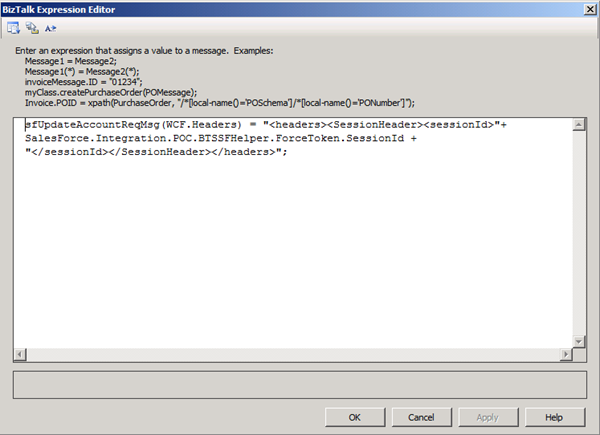
In MessageAssign shape code from ForceToken is called to obtain sessionId:
I have created a Windows Application to read message from the queue. Request message looks like this:

Response from web service using the request above will result in message containing it to queue.
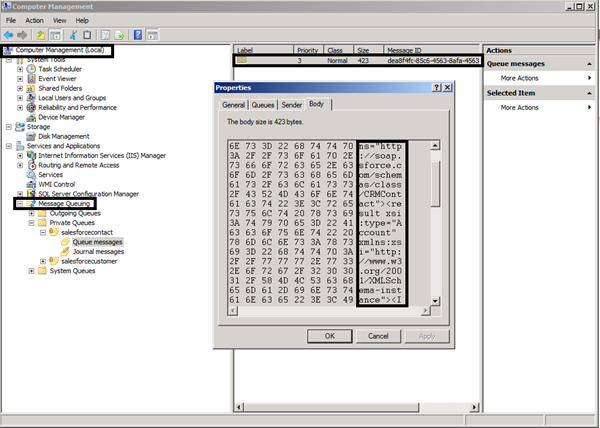
I have created a windows application (test application) to read the message from the queue.
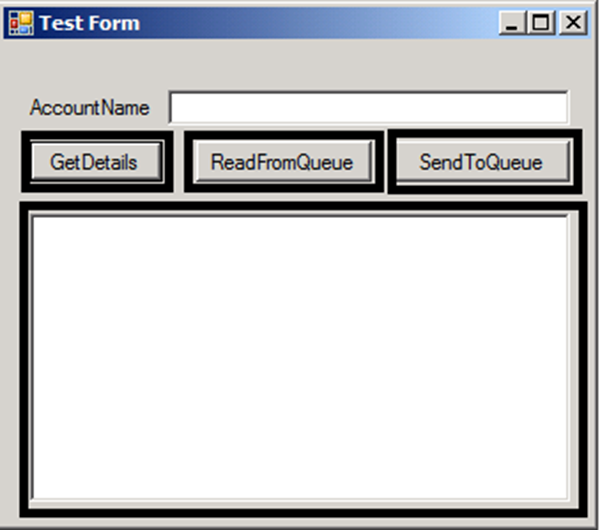
I can directly call my SalesForce service through .net (GetDetails), read from queue and write to queue. In .Net you are able to create proxy code from WSDL, through same steps as explained in part I (through adding a web reference).
Above you will find code used to test service.
One side note I would like to mention now is that if logins to SalesForce fail a couple of times you will be temporarily locked out of salesforce.com due to failed login attempts. So if forgot your password, that you have to ask for new one (I do not know how long your are locked out). Then take into account that your security token is tied to your password and subject to any password policies your administrators have configured. Whenever your password is reset, your security token is also reset. In first part you will see how. During writing of this post I was locked out.
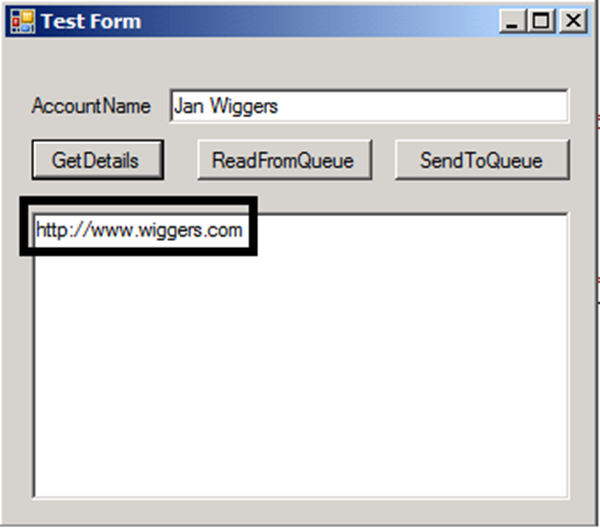
If I try to get details from an account I click GetDetails, which in this case only returns website from the account.
If I click ReadFromQueue I will get complete response from the web service.
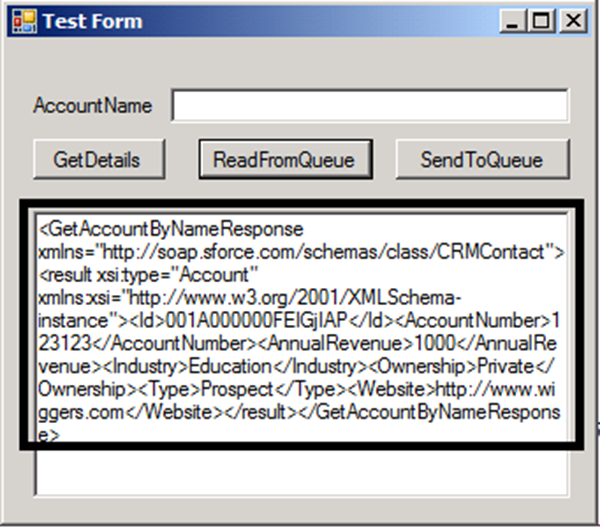
Code for ReadFromQueue:
I have created another web service on SalesForce in which I can update annual revenue for account.
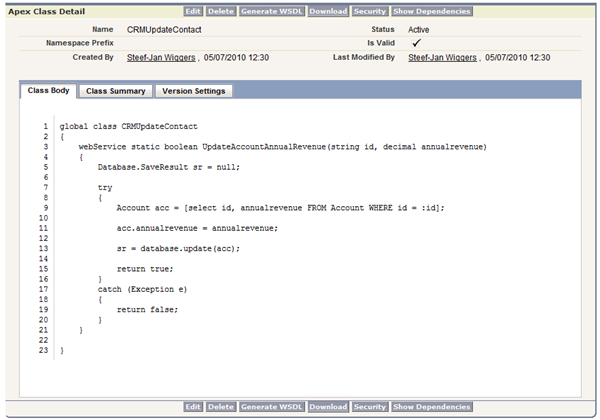
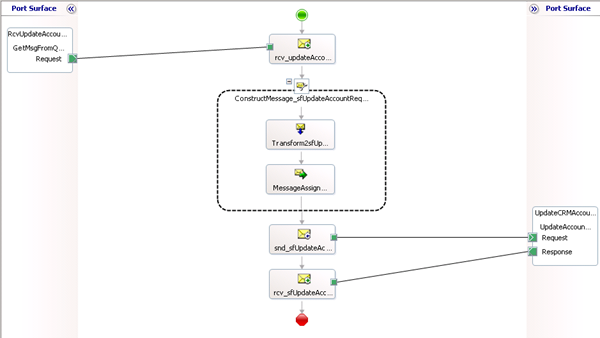
I followed basically same procedure as for first web service created in SalesForce. I generated the WSDL, saved it to file and through BizTalk WCF Service Consuming Wizard I got schema and binding file. I created a new orchestration that reads files from MSMQ with new annual revenue information to be updated.
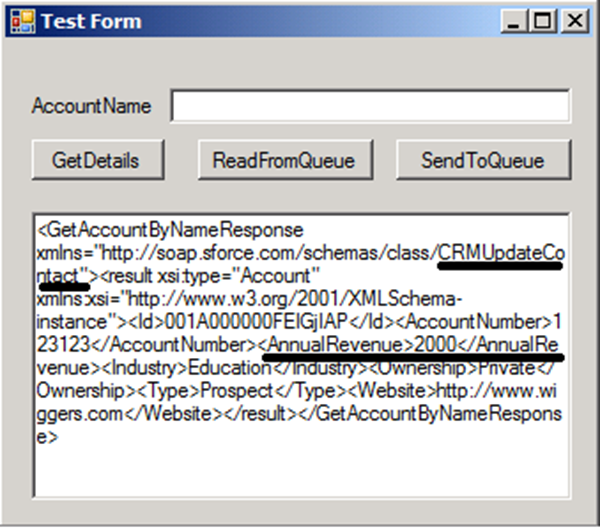
In my test application I can change to annual revenue from 1000 to 2000 and then click SendToQueue.
I change value inside my test app textbox including messagetype that has to be returned.
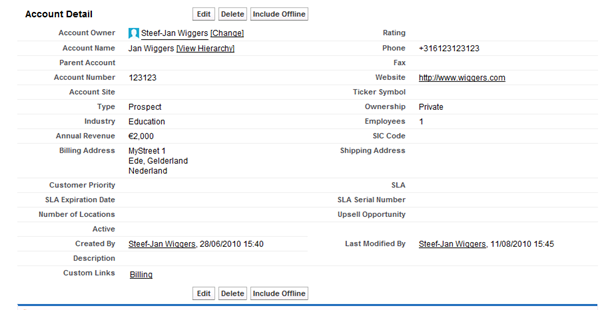
If I look at my account details now I see they changed.
With binding files generated by BizTalk you can import these inside your application through BizTalk Administrator console so that WCF-Custom send ports are generated for you.
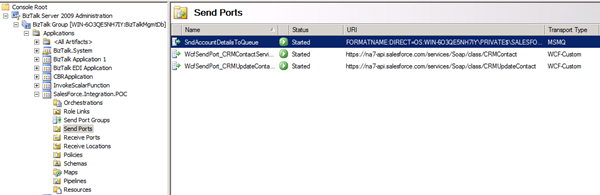
If you right click on one of these generated port and click properties and then configure you will see details.
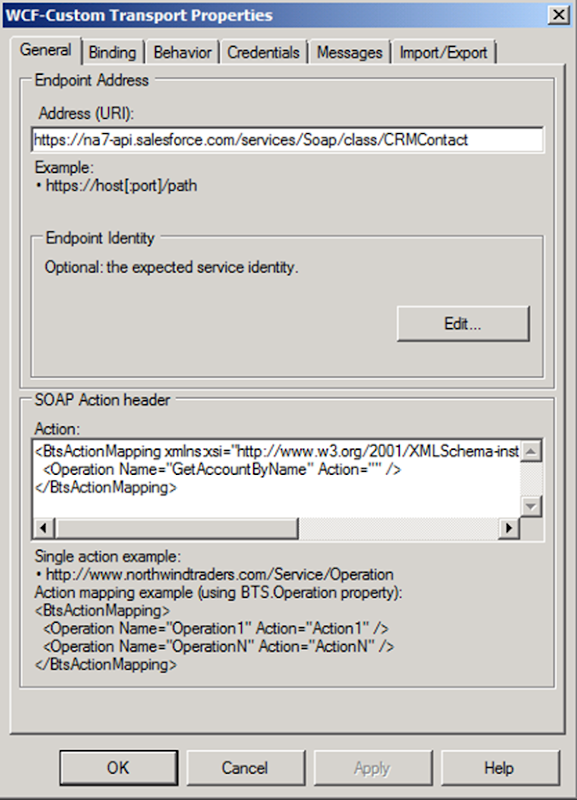
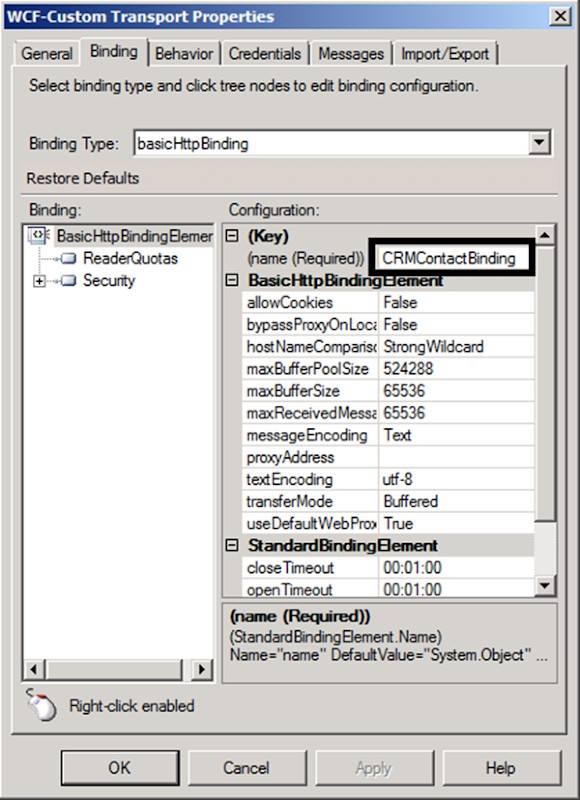
Action is filled in and URI and if you go to the net tab the binding then you also noticed that is filled in.
As you can see integration with SalesForce through web services is pretty straight forward. In coming posts I would like to share different implementations using same sample and dive into logging and support.
Cheers!
Technorati: BizTalkBizTalk Server 2009salesforce
by community-syndication | Aug 11, 2010 | BizTalk Community Blogs via Syndication
Recently I was in Redmond for the BizTalk VTS Summit, with a bunch of colleague BizTalk experts from all over the world. During one of the discussions we had, a question came up about the fact that it seemed that to host HTTP endpoints, it is required to have IIS as the real host configured.
After my suggestion that is was perfectly possible to bypass IIS in this process, it looked that quite a number of attendees didn’t know about this. And that’s the reason why I decided to add it to our blog
WCF-Custom vs WCF-CustomIsolated
First of all, I think it is a best practice to avoid using the non-WCF-custom adapters (like WCF-WSHttp, etc). I always suggest colleagues and customers to use the WCF-Custom or WCF-CustomIsolated adapter, since they are the only adapters that provide the maximum capabilities of WCF in BizTalk. The other WCF-* adapters only provide a subset of the various binding and behavior settings, specific for their binding, which results in an adapter change, when a more advanced setting is needed one day.
The WCF-Custom adapter, is the adapter that is used to host WCF endpoints inside BizTalk. The WCF-Isolated adapter is hosted in a BizTalk Isolated Host, which is typically IIS.
The BizTalk WCF Service Publishing wizard
To expose an orchestration or a schema as a WCF service in BizTalk, the BizTalk WCF Service Publishing wizard is the typical way to use. In this wizard, the orchestration or schema needs to be selected and a choice between three adapters is possible: WCF-BasicHttp, WCF-WSHttp, WCF-CustomIsolated.
The last step of the wizard is used to create a web directory in IIS, where the BizTalk svc file will be created that hosts the custom WCF Service Host that will link through to the BizTalk Receive location.
Unfortunately, the WCF Publishing wizard does not allow to select the ’In-Process’ adapters. All of the three adapters/bindings are only available through an isolated host and required IIS.
Hosting the endpoint in the BizTalk process
To host the endpoint inside the BizTalk process, we need to manually create the WCF receive location. To do so, we just need to select the WCF-Custom adapter and use the desired binding: BasicHttpBinding or WsHttpBinding.
The following steps need to be used for this:
- Create a new receive location with the desired name
- Select the WCF-Custom adapter and open the properties for this adapter
- Specify an address for the endpoint (picture 1) Take into account that when IIS is already running on the machine, you might need to specify a different available port.
- Select your binding (or use the customBinding for full flexibility) in the Binding tab page. (picture 2) and set all desired binding properties to their correct setting.
- In the Messages tab page, you can also specify that failed request messages need to be suspended and that exceptions should be returned to the consumer. (picture 3)
Metadata publication
One downside of this way of work is the metadata publishing. If you would query the exposed endpoint for the WSDL, you would get to see the WSDL of the generic BizTalk WCF Service Host with the 5 operations.
Therefore, it is needed to publish the metadata endpoint to IIS and provide that endpoint to the consumers of your in-process service. But this way of work, is similar to the other protocols (like netMsmq, netTcp)
Advantages
- Consistent approach for all binding types, independent of protocol.
- No extra configuration / deployment needed (specific IIS security on IIS application pools, etc)
- Performance (no extra hop)
Sam Vanhoutte, CODit
by community-syndication | Aug 10, 2010 | BizTalk Community Blogs via Syndication
Windows Workflow (WF4) Best Practices
read more
by community-syndication | Aug 10, 2010 | BizTalk Community Blogs via Syndication
Get sneak peak of QuickLearn’s BizTalk Online Anytime Training and learn about new features in BizTalk 2010 including:
- Enhancements to the BizTalk Mapper
- Adapter and Integration Changes
- Improved Trading Partner Management
- BizTalk Server Settings Dashboard
- New OpsMgr Management Pack
- Updated Platform Support
See all of QuickLearn’s BizTalk Training Courses
by community-syndication | Aug 10, 2010 | BizTalk Community Blogs via Syndication
In the last few days, various of our customers and partners have been interested on the capabilities of SO-Aware to integrate with the different technologies of the Windows Azure platform. This post will illustrate how to use SO-Aware to centralize the…(read more)
by community-syndication | Aug 10, 2010 | BizTalk Community Blogs via Syndication
I got great feedback from many users, and have made some updates to the bLogical adapter:.
Disabling the connection pool (only used for send ports)
Some SSH servers can not handle the connection pool very well. This can also be a problem if there is a limit set to number of connections a certain user can have. So I’ve been asked for the possibility to disable the connection pool for send ports, and this can now be done by setting the SSH Connection Limit to "0" in the admin console or BTSNTSvc.exe.config.
Logging and tracing
A much more verbose tracing as been added. If you care to save the trace info to file, you can use the TraceListener (System.Diagnostics):
- Enable Tracing in the port configuration.
- Open the BTSNTSvc.exe.config (or BTSNTSvc64.exe.config) file and add the following in the Config section:
<system.diagnostics>
  <trace autoflush="false" indentsize="4">
    <listeners>
      <add name="BTSListener"
           type="System.Diagnostics.TextWriterTraceListener"
           initializeData="bLogical.Shared.Adapters.Sftp.log" />
      <remove name="Default" />
    </listeners>
  </trace>
</system.diagnostics>
Public key authentication
There was a problem using identity file authentication as the password was sent as an empty string. This works for some but not all servers. The new version always set the password to null, which should work for all servers.
Macros
%UniversalDateTime% added to the list of supported macros
Misc
- temp folder and remote permissions no longer required properties.
- Empty files are no longer picked up or processed.
Special thanks to John Vestal at CSC and Antti.
Download the adapter from CodePlex



