by community-syndication | Sep 26, 2010 | BizTalk Community Blogs via Syndication
It’s been a very long time since I posted something here that is not technical, nothing to do with Azure/BizTalk/SOA/ESB, etc. However, I had a rather unusual adventure today that relates back to a long-ago post I did (one of my 5 “favorite posts” I’ve ever done, you can read it here), and as it was so unusual, I felt inspired to write about it.
For most people on the planet, I’ll bet if you were hiking and a rattlesnake dropped right in front of you, you’d probably say “What the .????”. However, I on the other hand, I can actually say “Oh no, not AGAIN!”.
I have now had 3 really-close incidents (in addition to numerous not-so-close encounters, but that’s not the topic here), and the pattern is always the same. It’s always near the end of a hike. The first time was a pretty grueling hike while I was “in training” for trekking in Thailand, there was one last year when I was backpacking with my daughter in the Cascades in Washington state (both of those were 10 mile-ish hikes before “The Incident”). The latest was earlier today. I was at the Olivenhain Water District recreation preserve near Elfin Forest, pretty close to home, and a place I like to go to get in a quick hike, or when I am “in training” for backpacking.
In case this is something you want to try for yourself, here’s how I do it:
- Hike fast and hard, get tired and hot. If you can get close to exhaustion, it really enhances the experience!
- Have a rattlesnake fall UNEPECTEDLY out of a bush directly in front of you and within striking distance, close enough that you’re about to step on it (this is that hard part, but I seem to be able to do it!)
- Deeply rooted ancient species memory going back to Neanderthal days triggers an immediate adrenaline rush. Before my eyes fully realize what I am seeing and have time to tell my brain, I find myself already propelled backwards by reflex action, arcing through the air. Then comes the pain of landing in some contorted position. I figure the time to get air-born is only about 200 milliseconds
There were SOOOO many ironies around today:
- There was a group of 5 people behind me, that had been out since 4:30am, who were looking for snakes, and had hiked 10 miles without seeing one
- They had cameras (I didn’t, because this is such a “routine” hike for me). THANK YOU Tamara for these awesome pictures
- Minutes before the snake “dropped”, I had been scanning side-to-side on the trail, looking for snakes, but had stopped and let my guard down. Not that it would have made much difference!
- I had my Zune cranking with some heavy jazz-rock fusion, a highly-modulated continuous wall of sound playing on high-end ear buds through which I should NOT have been able to hear ANYTHING external. Somehow, that faded into the background and I heard a rattle, although I’m not 100% certain if it was real or imagined (everything happened VERY quickly)
- Apparently my contorted arc through the air was an impressive/amusing thing to watch, unfortunately there is no video! I’d love to see what my body did. All I know is I hurt my arm a bit absorbing the impact of re-entry
From Tamara:
“My official title is "field herper." Field herping is a hobby that involves viewing "herps" (reptiles and amphibians) in their native environment. Some field herpers collect the herps as pets, but most (like me) just take photos. And to prove that I’m not alone, I’m a member of the North American Field Herping Association (NAFHA). NAFHA members document their herp finds and enter the information into a database. Researchers and professional herpetologists can then request to use that information relating to certain species or geographic areas. So our rattlesnake from today will end up as an entry in that database, in case anyone is ever interested. ”
[HERP stands for Herpetological Educational and Research Project ]
Given what seems to be my natural ability to have wildlife encounters (snakes, sharks, bears in remote regions, mountain goats, still looking for cougars/mountain lions), I will consider joining this group. It’s a cool idea, the public becomes the field eyes accumulating data that could not effectively be gathered otherwise.
And hey, if snakes keep seemingly dropping from the sky in front of me, seems to me I should mention it to someone
by community-syndication | Sep 26, 2010 | BizTalk Community Blogs via Syndication
I generally try not to blog about the same thing as countless others do, but being a BizTalk MVP I feel obliged to make some notes about the release of BizTalk Server 2010 as it really is big news.
BizTalk Server 2010 has actually been RTM for a while and available to Volume License customers for a short period of time already. It will become available for general purchase on October 1st – or so the official announcement on the BizTalk Team Blog says. That post does a good job of covering the news in the release, as does the microsoft.com New Features in BizTalk Server 2010 page. For an even more comprehensive write-up download the Microsoft BizTalk Server 2010 Technical Overview white paper.
There are also numerous other MS web pages that have been updated. I’ll try to highlight a few of the things I haven’t seen mentioned so far and provide links to the more important ones:
- Editions
- The Development Edition is now a FREE download and the page clearly states that it’s the one to use for development and testing environments, which is a relief since it’s a discussion I’ve been in more than once regarding the use of MSDN licenses.
- The BizTalk Adapter Pack is no longer licensed separately. You need at least STD for this.
- Pricing and Licensing Overview
- BizTalk Server has gotten slightly more expensive for the production environments ($44k ENT, $10k STD).
- Current limitations with STD are still there: Single Server, Two procs AND as it seems limited 64-bit support. The technet 64-bit Support pages seems to confirm that STD still has a 64-bit exception when compared to other versions.
- The AppFabric Connect feature is an installation option. Since I see now real licensing info about it I’m assuming it’s not stand alone. And since the pre-requisite of the Adapter Pack that makes some of that magic happen is packaged with STD (and up) I can only assume at this point that using the mapper in production also requires at least STD. I would still argue that it could be well worth it to enable scenarios like this.
- Pricing and Licensing FAQ
- There is a running discussion on how long Microsoft can continue to license per socket instead of heading in a slightly different direction as the number of cores become more and more. Whenever (if ever) that happens. It’s not now. BizTalk continues to be licensed per proc.
- The ISV Licensing (formerly Runtime Editions) is still there. This is not a really well known possibility but essentially it allows you to package BizTalk as part of you product. The customer can’t use it with any products except your own. It’s hard to get a quote for this as it isn’t publicly listed anywhere, but it’s way cheaper that ordinary licenses. I have a quote, but I don’t want to put it out there. You could probably just call your local MS rep or Licensing partner to get your own.
- System Requirements
- You should not be fooled by the fact that it says minimum 2GB of RAM. If you install BizTalk on a 64-bit system you will want at least 4GB or RAM. And I’m saying that even though Windows Server 2008 (R2) says that its minimum system requirements are 512MB. I suppose no one reading would want to try that either.
- BizTalk Developer Center
- Has been updated with a lot of new content for BizTalk Server 2010 and October’s theme is the BizTalk Server 2010 Launch.
- There’s also a BizTalk Server 2010 Training Kit available. It contains 6 labs for the Developer and 3 for the Admin that highlight new features. It’s great to see the Admin getting some much needed love on the training side. There is also 6 videos available weighing in at a 823MB download.
- Alot of other online content like the tutorial scenarios seems to have been getting an overhaul as well (as you would expect) showing of screenshots of the new mapper and other new features.
- Microsoft BizTalk Server 2010 Help
- Except for the updated online version there are numerous downloadable documents. The Installation and Upgrade guides as well as the CHM – which personally, I couldn’t do without.
- MSDN Subscriptions
- So far there is no availability through this channel. I would love to see an .iso for the Developer Edition as I’m not to fond of keeping extracted catalogs around, or self-executable zip files. Keep this feed in your feed reader to be notified when it arrives.
- Upgrading from Beta
- Although some people (like Brian Loesgen) seems to have been able to upgrade seamlessly from the beta, I couldn’t. I got an exception saying that the Enterprise version was installed and that I had to uninstall before installing. Fair enough. My Beta version does register as Enterprise in the Add/Remove programs dialog.
- Errors and issues
- Misc new features and updated tools
That ended up being quite a lengthy post. But then again I’m a superstar and that’s how I do it! I hope it helps.
by community-syndication | Sep 26, 2010 | BizTalk Community Blogs via Syndication
First of all – there is no new FTPS adapter. The already existing FTP adapter has been extended to support FTPS, which is really all you need anyway. However, several publications from Microsoft states there is a new FTPS adapter, which might be somewhat confusing.
So what is FTPS?
The support for FTPS was added with IIS 7.5, and is FTP over SSL, similar to HTTPS. Although it lacks some of the underlying infrastructure. When you visit an HTTPS site, you might be given various warnings if the certificate is not among your trusted ones. If you chose to ignore these warnings (and recommendations), you’re provided with the option of installing the public key in your certificate store. This logic is provided by your browser, and is a helpful way to manage your trusted sites.
The FTPS client (BizTalk in this case), however, require the public key to be installed manually before it can use it. When you’ve installed it, it works like a charm.
Create a Certificate
First you’ll need a certificate, a private key. There are several ways to create a certificate, but for the purpose of this sample, I’ll create one using IIS 7.5 manager.
Select the site root in the Connections pane on your left side. In the Action pane on your right, click the “Create Self-Signed Certificate”.
This will open a new dialog, where you can set a friendly name of your certificate:
When you’ve clicked Ok, you should be able to see the certificate in the list of Server Certificates. Select your newly created certificate and click “Export” in the Action pane. Set the path and password, and click Ok. this step will export the public key, which we’ll use later on.
Enable FTPS on your FTP site
As we now have a certificate created and registered on our server, we can proceed to enable our FTP site to use it. Select your FTP site, and double-click the “FTP SSL Settings” icon on your FTP Home page.
In the SSL Certificate dropdown list, select your certificate. You can choose either to Allow or to Require SSL connections. In this case I’ve chosen to “Require SSL Connections”. Click “Apply” in the Action pane, before you continue.
While in the FTP Home page, you might want to overlook the “FTP Authentication”, and “FTP Authorization Rules”.
Install the Public Key
Your FTP server is now ready to accept incoming SSL connections, and we can pursue with setting up the client (BizTalk). But first we need to install the public key, which you exported earlier. In my case, I’m logged in as Administrator, which happens to be the same account I use for my host instance. Hopefully, this is not the case for you, why you’ll need to log off, and log in as the same account as you’re running the host instance with.
Logged in as the host instance account, browse to the folder where you exported the certificate to. Double click the certificate, and proceed with default values.
(PS there is probably a better way to do this, without having to log on as the service account. If you know how, please let me know)
When you’re done installing the certificate, log off again, and log back on as your regular user.
Extract the Thumbprint
Open the Certificate Manager (Start->Run->certmgr.exe), browse to the Trusted Root Certificate Authorities\Certificates folder, and double-click the certificate. Select the “Details” tab on top. Scroll down to the Thumbprint field, select it, and copy the value.
Configure Your BizTalk Port
I assume you are familiar to the normal FTP transport settings, so when you’re done configuring the server, port, username and password, paste the thumbprint in the “Client Certificate Hash” property. Set the “Use SSL” property to “true”. Start the portYou are done!
HTH
by community-syndication | Sep 26, 2010 | BizTalk Community Blogs via Syndication
Well the announcement came over a week after I thought it would arrive, but BTS2010
is now officially released. And the developer edition is now free.
However, that doesn’t mean that you can do development for free: you still need to
pay for SQL Server and Visual Studio.
Although having said that, SQL Server 2008 Dev edition is fairly cheap (as in, about
%u00a320 on a select agreement), so the only real cost is Visual Studio… Still, it means
that there won’t be hoards of hobbyist devs out there trying out BTS, unless they
manage to get it running with Visual Studio Express (does that actually work? Never
tried it, but wouldn’t have thought so – might have a go tomorrow). Still, it means
that you no longer need an MSDN license to do BizTalk dev, which removes a huge barrier
for budding/hobbyist BizTalk devs. Especially if you want to start developing with
the AppFabric integration features in BTS 2010.
You can download the dev editions of BTS2010 and HIS2010 from here:
http://www.microsoft.com/downloads/en/details.aspx?FamilyID=938102b8-a677-4c20-906d-f6ae472b3a6a&displaylang=en

by community-syndication | Sep 26, 2010 | BizTalk Community Blogs via Syndication
As you are probably aware by now, BizTalk 2010 has RTM’d. You can catch the announcement here. I am not going to recap all of the new features as you can read about them here. However, here are a few points worth noting about the new release.
- The BizTalk 2010 Developer’s edition is now free. So if you are curious about BizTalk and getting a licensed copy has been a barrier for you in the past, now is your chance to test drive BizTalk at no cost. Full details and download may be found here.
- For those AppFabric/WCF/WF developers, there is a new compelling feature called BizTalk AppFabric Connect which allows you to leverage BizTalk components such as the BizTalk LOB Adapter Pack and BizTalk Mapper within your .Net projects. This is a true enabler for connecting your WF applications to Line of Business Systems (LOB)
- If you have written applications in the past that have used the traditional line of business adapters, you will now be forced to use the BizTalk Adapter pack when communicating with SQL Server, SAP, Oracle and Siebel. Microsoft had deprecated these adapters in BizTalk 2009 and they have been officially removed in 2010. For the past year or so, I have been using the BizTalk Adapter pack when communicating with LOB systems and there are some subtle differences between the legacy and new LOB adapters. Overall, I am satisfied with the experience and there are no “show stoppers” that we have run into when making the switch. So if you are planning a BizTalk 2010 upgrade and currently use the legacy adapters, ensure migrating these applications to use the BizTalk adapter pack is in your project plan as you will need to regenerate schemas using these new adapters.
by community-syndication | Sep 26, 2010 | BizTalk Community Blogs via Syndication
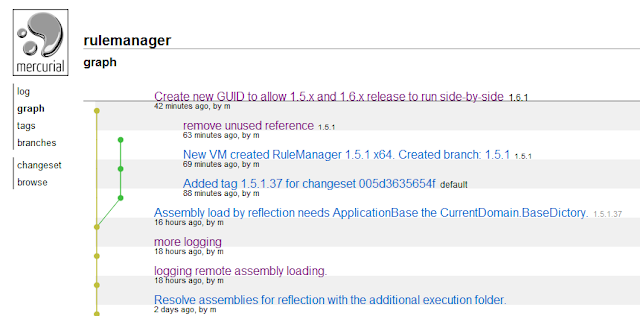
It takes time to get used to using a distributed SCM, but Mercurial HG visualization sure helps.
Branching default branch to 1.5.1 release and 1.6.1 release.
Created VM for 1.5.1 to build hotfixes if needed.
<target name=”refresh” depends=”clean-test” description=”Update the source from Mercurial”>
<!– create the source directory if needed –>
<mkdir dir=”${source.dir}” failonerror=”true” unless=”${directory::exists(‘source.dir’)}” />
<mkdir dir=”${drop.dir}” failonerror=”true” unless=”${directory::exists(‘drop.dir’)}” />
<exec program=”hg” commandline=’pull -u ${repository.mercurial.rulemanager} -R ${source.dir} -v –branch 1.5.1′ failonerror=”false” verbose=”${verbose}”/>
</target>
by community-syndication | Sep 26, 2010 | BizTalk Community Blogs via Syndication
I installed the new BizTalk Server 2010 Developer Edition, released a couple of days ago, on a Windows Server 2008 R2 virtual image. The installation went very smoothly, but I did notice one problem. Initially I attempted to upgrade the beta version of BizTalk Server.Brian Loesgen reports that this worked OK for him. However, I couldn’t do this.The installer reported that upgrade from the Enterprise Edition to the Developer Edition is not supported. I attempted to uninstall the beta, but got an error message which left my installation in an invalid state.
Fair enough.You have to expect this sort of problem when using betas.That’s one good reason for using virtualisation.
I installed the RTM Developer Edition on a fresh image, and as I say, everything went very smoothly. However, I tried re-running the BizTalk installer and, to my dismay, got a rude message saying:
Cannot uninstall or modify the Dev. edition of BTS 2010
Setup has detected that the Enterprise Edition of BizTalk Server 2010 was installed. Upgrading from the Enterprise Edition to the Developer Edition is not supported.
Please uninstall the Enterprise Edition and then run Setup again.
This is simply not true.This was a completely fresh build of Windows Server on which I have only installed the Developer Edition. I have not tried uninstalling BizTalk to see what happens.
So, be careful with the Developer Edition.My experience is that there is a problem with the installer.
by community-syndication | Sep 25, 2010 | BizTalk Community Blogs via Syndication
It’s been a while since I’ve said anything here about Windows Server AppFabric, so I thought I’d do a quick post about some great resources about the technology. I highly recommend both of these.
White paper: If you’re new to AppFabric, or want a better understanding of how the whole thing works at an architectural level, there’s a great new Architecture Guide that just became available at the Windows Server AppFabric site. You can get it here. Great job by my colleagues Emil Velinov of the Windows Server AppFabric Customer Advisory Team (CAT) and Michael McKeown.
Book: Then, if you want to go deeper, there’s a great book from Apress, Pro Windows Server AppFabric, details are here. Written by my colleagues Danny Garber and Stephen Kaufman, they do a great job of covering everything related to AppFabric. Regardless if you’re a BizTalk, WCF or WF developer, this book will have something for you. I particularly liked the “advanced concepts” chapter. Great job guys!
Enjoy!
by community-syndication | Sep 24, 2010 | BizTalk Community Blogs via Syndication
Microsoft has just released BizTalk Server 2010, and it is now generally available! Along with this release comes an updated licensing structure that will be a relief for consultants, and companies managing multiple BizTalk environments. While the cost of the Enterprise edition has increased, the cost of the Developer edition has been eliminated. The Developer edition includes the full capabilities of the Enterprise edition, with the limitation being only that you cannot use it in production.
The pricing and licensing page sums this up saying:
Note: Many customers who deploy BizTalk Server implement separate development, testing, and production environments for their BizTalk Server 2010 solution. For the development and testing environments, you can use the free download of the BizTalk Server Developer Edition.
For the production environment, you need a valid processor license of BizTalk Server 2010 Enterprise, Standard, or Branch Edition for each processor on which you install an edition of BizTalk Server 2010.
I applaud this move by Microsoft, as it could encourage a new generation of developers to download and experiment with this powerful platform. This is a move that could drive adoption while at the same time potentially lower the TCO for those organizations managing multiple environments. Given the nature of BizTalk Server, I trust that this will not result in an equivalent of Eternal September for the BizTalk community, but don’t quote me on that remark.
To further help out developers that are new to BizTalk Server in general, we are offering a major discount on our BizTalk Developer Fundamentals online course. Simply use promo code BT2010 when you register, and you will receive $295 off a self-paced registration. This offer expires at the end of September, so act fast!
Finally, go and get BizTalk Server 2010 while it’s still cached at a CDN server near you!
by community-syndication | Sep 24, 2010 | BizTalk Community Blogs via Syndication
Earlier this week I posted about an ASP.NET Vulnerability, and followed this up with another blog post that covers some Frequently Asked Questions about it.
We are actively working on releasing a security update that fix the issues, and our teams have been working around the clock to develop and test a fix that is ready for broad distribution across all Windows platforms via Windows Update. I’ll post details about this once it is available.
Revised Workaround and Additional URLScan Step
In my first blog post I covered a workaround you can apply immediately on your sites and applications to prevent attackers from exploiting it. Today, we are revising it to include an additional defensive measure.
This additional step can be done at a server-wide level, and should take less than 5 minutes to implement. Importantly, this step does not replace the other steps in the original workaround, rather it should be done in addition to the steps already in it. Below are instructions on how to enable it.
Install and Enable IIS URLScan with a Custom Rule
If you do not already have the IIS URLScan module installed on your IIS web server, please download and install it:
It takes less than a minute to install on your server.
Add an Addition URL Scan Rule
Once URLScan is installed, please open and modify the UrlScan.ini file in this location:
- %windir%\system32\inetsrv\urlscan\UrlScan.ini
Near the bottom of the UrlScan.ini file you’ll find a [DenyQueryStringSequences] section. Add an additional “aspxerrorpath=” entry immediately below it and then save the file:
[DenyQueryStringSequences]
aspxerrorpath=
.csharpcode, .csharpcode pre
{
font-size: small;
color: black;
font-family: consolas, “Courier New”, courier, monospace;
background-color: #ffffff;
/*white-space: pre;*/
}
.csharpcode pre { margin: 0em; }
.csharpcode .rem { color: #008000; }
.csharpcode .kwrd { color: #0000ff; }
.csharpcode .str { color: #006080; }
.csharpcode .op { color: #0000c0; }
.csharpcode .preproc { color: #cc6633; }
.csharpcode .asp { background-color: #ffff00; }
.csharpcode .html { color: #800000; }
.csharpcode .attr { color: #ff0000; }
.csharpcode .alt
{
background-color: #f4f4f4;
width: 100%;
margin: 0em;
}
.csharpcode .lnum { color: #606060; }
The above entry disallows URLs that have an “aspxerrorpath=” querystring attribute from making their way to ASP.NET applications, and will instead cause the web-server to return an HTTP error. Adding this rule prevents attackers from distinguishing between the different types of errors occurring on a server – which helps block attacks using this vulnerability.
After saving this change, run “iisreset” from a command prompt (elevated as admin) for the above changes to take effect. To verify the change has been made, try accessing a URL on your site/application that has a querystring with an aspxerrorpath and verify that an HTTP error is sent back from IIS.
Summary
If you’ve already implemented the workaround we’ve previously published, please add the above step to help block attackers from exploiting the vulnerability.
Our team is working around the clock to release an update via Windows Update that fixes the underlying product vulnerability. Until that update is available, you can use the above workaround to help prevent attackers from using the vulnerability against your applications.
Once we release the security update, you will no longer need to implement any workaround steps. You can learn more about this vulnerability and the workaround from:
Please post specific questions about the vulnerability in this forum on the www.asp.net web-site.
Thanks,
Scott


