by community-syndication | Jan 21, 2010 | BizTalk Community Blogs via Syndication
What does the persistence subsystem do?
The persistence subsystem is responsible for making a workflow instance durable. Durable workflow instances can be unloaded from memory and reloaded on the same or a different machine at a later point in time. This way, the persistence subsystem enables scenarios such as long-running workflow applications, increase system load by unloading idle instance, migration of instances between machines, scale out and load-balancing, and recovery of failed instances.
The persistence subsystem performs the following tasks:
%u00b7 Storing the state of workflow instances in a persistence store.
%u00b7 Recovery of durable workflow instances.
%u00b7 Activation of durable workflow instances with expired durable timers.
%u00b7 Instantaneous reactivation of durable workflow instances after a shutdown or crash of the Workflow Service Host.
Persistence for a workflow is enabled by defining an instance store for the Workflow Service Host. The .NET 4 framework comes with the SQL Workflow Instance Store, which is a SQL Server implementation of an instance store.
When a workflow instance persists, the SQL Workflow Instance Store (SWIS) saves the current instance state into the persistence store together with additional metadata that is required for activation, recovery and control. After the instance is persisted, the Workflow Service Host can unload the instance from memory. At a later point in time the Workflow Service Host may instruct the instance store to load the instance again. For example, the Workflow Service Host will automatically reload the workflow instance when a new message arrives for that instance or if any of the instance’s timers expire.
Persistence is triggered in multiple ways:
%u00b7 Some activities persist the instance. The SendReplyToReceive activityhas a PersistBeforeSend property, which can be set to persist the Workflow state before a reply is sent.
%u00b7 The user defines the Workflow Idle behavior and sets the PersistOnIdle time. When specified the Workflow Service Host persists the instance after the instance has been idle for the specified time. An instance can go idle when it is waiting on a receive or delay activity.
%u00b7 The user defines the Workflow Idle behavior and sets the UnloadOnIdle time. When specified the Workflow Service Host persists and unloads the instance after the instance has been idle for the specified time.
In addition to these mechanisms, the workflow can contain explicit persistence activities. Those explicit persist activities are only required to persist a workflow throughout a long episode of computation or to guarantee that certain well-known persist points are present.
How does the persistence subsystem work?
The persistence subsystem consists of four parts:
1. Persistence Framework API A set of persistent interfaces that define the contract with Workflow Service Host to persists its state. These enable you to build any type of persistence provider from database backed to say distributed in-memory cache.
2. The SQL Workflow Instance Store (SWIS) implements the abstract class InstanceStore of the Persistence Framework API. This class is used by the Workflow Service Host to create, load, save and delete durable instance data.
3. The SQL Server Persistence database stores all the durable instance state. It also stores the additional metadata that is used to activate and recover a service instance.
4. The Workflow Management Service (WMS) is a Windows Service that activates a Workflow Service Host whenever there are unloaded instances with expired durable timers, instances that need to be reactivated after a graceful shutdown or instances that need to be recovered after a crash. The WMS is also involved in the execution of instance control commands, which will be covered in a future blog post.
All workflow instances that are hosted by a Workflow Service Host that configures the SQL Workflow Instance Store save their instance state in the SQL Server Persistence Database. In addition to the instance state binary blob, the persistence store holds the following:
The message correlation key allows the Workflow Service Host to correlate an incoming message to a service instance if that instance is not loaded.
The instance lock indicates whether the service instance is loaded.
The service deployment information defines how the service is deployed in a IIS/WAS-hosted environment. It consists of site name, application path, service path and service name. Note that the instance store does not contain any deployment information for self-hosted workflows, meaning that the WMS is specifically tailored for IIS hosted services.
Loading and locking
If a workflow instance is loaded by a Workflow Service Host the persistence store locks that instance, and the instance cannot be loaded by any other service host. If the service host unloads the service instance the lock is released, and the instance can be loaded by a different service host. The new service host may reside on a different machine. This means that a workflow instance can run on multiple machines throughout its lifetime, whenever activation messages arrive. It also means that you can build a machine farm without employing an intelligent message router that remembers which machine is running a particular workflow instance. Instead, the router routes a message to any of the machines in the farm. If the message is correlated to an existing workflow instance, the instance will be loaded by that machine. Casually speaking, the service instance follows the message.
Processing of expired timers
If a workflow instance is executing a delay activity at the time it persists the instance store stores the expiration time of the activity. At the time the activity expires the SQL Workflow Instance Store notifies the Workflow Service Host, which then loads the workflow instance and processes the expired delay activity. If multiple machines are available, the instance may be loaded on any of these machines.
If no Workflow Service Host is running on a particular machine the WMS will activate a host on that machine. This causes the instances of a particular workflow type to be distributed among all machines in the farm.
Instance recovery
If a service host has loaded a workflow instance the Workflow Service Host must renew the instance’s lock on a regular basis. If not renewed on time, the lock expires. An expired lock indicates that the service host or the machine the service host ran on has crashed. In this case another Workflow Service Host will load the instance. If no other Workflow Service Host is running the WMS will activate a host.
If the Workflow Service Host shuts down (e.g., due to an app domain recycle) it releases the locks of all the service instances it has loaded.

by community-syndication | Jan 21, 2010 | BizTalk Community Blogs via Syndication
Dan Rosanova asked a great question on the MSDN forums – Does the BizTalk SharePoint Services Adapter work with SharePoint 2010?
I asked Microsoft and on other mailing lists and the answer came from none other than the SharePoint and BizTalk super MVP Mick Badran:
–
Yes the adapter will work.
You need to make sure the adapter is […]
by community-syndication | Jan 21, 2010 | BizTalk Community Blogs via Syndication
On Feb 11th, I’ll be co-presenting an MSDN Webcast with Ofer Ashkenazi (Senior Technical Product Manager). We will be focusing on how the ESB can accelerate the implementation of a dynamic and highly reusable messaging and integration framework. More details are included below as is the link to register. Hope to see you there.
http://msevents.microsoft.com/CUI/WebCastEventDetails.aspx?EventID=1032440359&EventCategory=4&culture=en-US&CountryCode=US
Language(s):
English.
Audience(s):
Pro Dev/Programmer.
Duration:
60 Minutes
Start Date:
Thursday, February 11, 2010 1:00 PM Pacific Time (US & Canada)
Event Overview
Businesses across the globe are trying to cope with a faster rate of change. The need to adapt rapidly to new internal and external requirements is pushing organizations to look for more flexible solutions to build and connect their applications. At the same time, IT departments are also pressured to reduce costs and reuse software assets and services. Enterprise Service Bus has emerged as an architectural pattern that can help achieve these goals. In this webcast, we introduce the Microsoft BizTalk Enterprise Service Bus Toolkit 2.0 and explain how it accelerates the implementation of a very dynamic and reusable messaging and integration infrastructure on top of Microsoft BizTalk Server 2009 and the Microsoft .NET Windows Communication Framework.
Cheers and keep on BizTalking
by community-syndication | Jan 21, 2010 | BizTalk Community Blogs via Syndication
Just wanted to forward this on to SBUG members that Udi Dahan has advised me theres still a couple of places available on his training course in Febuary
See the following link for details:
http://skillsmatter.com/course/open-source-dot-net/advanced-distributed-systems-design-with-soa/ps-510
by community-syndication | Jan 21, 2010 | BizTalk Community Blogs via Syndication
This is part five of a twelve part series that introduces the features of WCF WebHttp Services in .NET 4. In this post we will cover:
- Handling Errors with the WebFaultException class
Over the course of this blog post series, we are building a web service called TeamTask. TeamTask allows a team to track tasks assigned to members of the team. Because the code in a given blog post builds upon the code from the previous posts, the posts are intended to be read in-order.
Downloading the TeamTask Code
At the end of this blog post, you’ll find a link that will allow you to download the code for the current TeamTask Service as a compressed file. After extracting, you’ll find that it contains “Before” and “After” versions of the TeamTask solution. If you would like to follow along with the steps outlined in this post, download the code and open the “Before” solution in Visual Studio 2010. If you aren’t sure about a step, refer to the “After” version of the TeamTask solution.
Note: If you try running the sample code and see a Visual Studio Project Sample Loading Error that begins with “Assembly could not be loaded and will be ignored”, see here for troubleshooting.
Getting Visual Studio 2010
To follow along with this blog post series, you will need to have Microsoft Visual Studio 2010 and the full .NET 4 Framework installed on your machine. (The client profile of the .NET 4 Framework is not sufficient.) At the time of this posting, the Microsoft Visual Studio 2010 Ultimate Beta 2 is available for free download and there are numerous resources available regarding how to download and install, including this Channel 9 video.
Step 1: Handling Non-Existent Users
In the very first post of this series, we implemented the GetUser() service operation. The GetUser() service operation returns the details of a user given a username provided in the request URI.
A precondition of the GetUser() operation is that the given username exists in the database. But what happens when this precondition isn’t met? Unfortunately, the implementation from the first blog post does something quite awkward: It returns a response with an HTTP status code of 200 along with an empty message body.
Let’s improve the GetUser() operation to handle non-existent user errors in a manner more consistent with HTTP. To do this, we’ll use the WebFaultException class to both set the HTTP status code to 404 (Not Found) and provide an indication of the error in the message body.
If you haven’t already done so, download and open the “Before” solution of the code attached to this blog post.
Open the TeamTaskService.cs file in the code editor.
In the GetUser() operation add the code below after the LINQ query for the user. You’ll also need to add “using System.Net;” to the code file.
if (user == null)
{
throw new WebFaultException<string>(
string.Format(“There is no user with the userName ‘{0}’.”, userName),
HttpStatusCode.NotFound);
}
There are both generic and non-generic versions of the WebFaultException. The generic version is generally the more appropriate one to use, as it allows you to specify the exception details that will be serialized into the body of the response. In this case, the exception details are just a string, but any type that can be serialized can be used. We’re also setting the correct HTTP status code of 404 (Not Found).
As you can see, correctly handling errors with a WCF WebHttp Service is as simple as throwing an exception.
Helpful Tip: If you’ve used WCF to build SOAP services, you may notice that the WebFaultException is very similar to the FaultException class. This isn’t just a coincidence. The WebFaultException actually derives from the FaultException class. Therefore in the context of a SOAP service, the WebFaultException will behave as a FaultException-the detail will be serialized to the body of the SOAP message and the HTTP status code will be ignored as it isn’t relevant with SOAP. |
Step 2: Viewing the Error on the Client
We could verify that our improved implementation of the GetUser() operation correctly handles non-existent users with the browser, but we’ll write some client code to do this instead. This is because we want to demonstrate one of the more exciting features of the WebFaultException class-that it composes with automatic and explicit format selection.
With the WebFaultException, the detail of the exception that is serialized in the body of the response message will always be in the format (XML or JSON) that the client would have received had there not been an error. If the client was expecting XML, the client will get the exception detail serialized as XML. Likewise, if the client was expecting JSON, the client will get the exception detail serialized as JSON.
Open the Program.cs file of the TeamTask.Client project in the code editor and copy the following static method into the Program class:
static void GetUser(HttpClient client, string userName, string accepts)
{
Console.WriteLine(“Getting user ‘{0}’:”, userName);
using(HttpRequestMessage request = new HttpRequestMessage(“GET”,
“Users/”+ userName))
{
request.Headers.Accept.AddString(accepts);
using (HttpResponseMessage response = client.Send(request))
{
Console.WriteLine(” Status Code: {0}”, response.StatusCode);
Console.WriteLine(” Content: {0}”,
response.Content.ReadAsString());
}
}
Console.WriteLine();
}
The static GetUser() method is very similar to the client code we wrote in part two of this blog post series. The only thing to notice is that we are able to set the HTTP Accept header on the request.
Now we’ll implement the Main() method to call GetUser() twice: once with an XML content type in the Accept header and a second time with a JSON content type. Replace the Main() method implementation with the following code:
using (HttpClient client = new HttpClient(“http://localhost:8080/TeamTask/”))
{
GetUser(client, “noSuchUser”, “application/xml”);
GetUser(client, “noSuchUser”, “application/json”);
Console.ReadKey();
}
Start without debugging (Ctrl+F5) to get the TeamTask service running and then start the client by right clicking on the TeamTask.Client project in the “Solution Explorer” window and selecting “Debug”->”Start New Instance”. The console should contain the following output:
Notice that there is no such user with the username “noSuchUser” and that the status code for both responses is 404 (Not Found). With the first request, the response content is in XML. With the second request, the response content is in JSON, which happens to be just a quoted string for this simple example.
Step 3: Handling Errors in the UpdateTask() Operation
The UpdateTask() operation, which we added to the TeamTask service in the part three, could also benefit from some improved error handling.
First, in the current implementation of the UpdateTask() operation, we are parsing a UriTemplate path variable to get the id of the task to update. We assume that parsing the id will always be successful, but this isn’t a valid assumption. We’ll change the implementation of the UpdateTask() operation so that it returns an HTTP status code of 400 (Bad Request) when the request URI includes a id value that can’t be parsed as an integer.
Second, it is possible that a client could try to update a non-existent task. In the current implementation, this error will surface as a OptimisticConcurrencyException, which is thrown from the ADO.NET Entity Framework code on trying to persist the updated task to the database. This OptimisticConcurrencyException will result in an HTTP response with a status code of 400 (Bad Request) and HTML content that explains that the server encountered an error. This is the default behavior for unhandled, non-WebFaultExceptions. We’ll change this so that the UpdateTask() operation returns an HTTP status code of 404 (Not Found) when a client attempts to update a non-existent task.
Open the TeamTaskService.cs file in the code editor.
In the UpdateTask() operation replace the code for parsing the id with the following code:
// The id from the URI determines the id of the task
int parsedId;
if(!int.TryParse(id, out parsedId))
{
throw new WebFaultException<string>(
string.Format(
“The value ‘{0}’ is not a valid task id. The id must be an integer.”,
id), HttpStatusCode.BadRequest);
}
task.Id = parsedId;
Wrap the call to SaveChanges() on the ObjectContext with a try-catch block that will properly handle the OptimisticConcurrencyException as shown below. You’ll also need to add “using System.Data;” to the code file.
try
{
objectContext.SaveChanges();
}
catch (OptimisticConcurrencyException)
{
throw new WebFaultException<string>(
string.Format(“There is no task with the id ‘{0}’.”, parsedId),
HttpStatusCode.NotFound);
}
After implementing these error handling improvements, the UpdateTask() should look similar to the code below. We’ll leave it as an exercise for the reader to verify that these error handling improvements behave as expected.
[Description(“Allows the details of a single task to be updated.”)]
[WebInvoke(UriTemplate = “Tasks/{id}”, Method = “PUT”)]
public Task UpdateTask(string id, Task task)
{
// The id from the URI determines the id of the task
int parsedId;
if (!int.TryParse(id, out parsedId))
{
throw new WebFaultException<string>(
string.Format(
“The value ‘{0}’ is not a valid task id. The id must be an integer.”,
id), HttpStatusCode.BadRequest);
}
task.Id = parsedId;
using (TeamTaskObjectContext objectContext =
new TeamTaskObjectContext())
{
objectContext.AttachTask(task);
try
{
objectContext.SaveChanges();
}
catch (OptimisticConcurrencyException)
{
throw new WebFaultException<string>(
string.Format(“There is no task with the id ‘{0}’.”, parsedId),
HttpStatusCode.NotFound);
}
// Because we allow partial updates, we need to refresh from the dB
objectContext.Refresh(RefreshMode.StoreWins, task);
}
return task;
}
Next Steps: Using Routes to Compose WCF WebHttp Services
The TeamTask service can now handle possible client errors such as trying to update or retrieve non-existent tasks or users. Of course, there are still opportunities to improve the error handling of the service but we’ll leave such improvements as an exercise for the reader.
In part six of this blog post series we’ll continue to improve the TeamTask service. We’ll refactor our single TeamTaskService class into two separate classes (TaskService and UserService) as we learn about the ability to compose WCF WebHttp Services with the new ASP.NET routes integration feature introduced in .NET 4.
Randall Tombaugh
Developer, WCF WebHttp Services
by community-syndication | Jan 21, 2010 | BizTalk Community Blogs via Syndication
by community-syndication | Jan 20, 2010 | BizTalk Community Blogs via Syndication
A colleague and I have been working through some anomalies when it comes to SAP IDoc schemas that were generated using the BizTalk Adapter Pack 2.0 SAP Adapter. This is the adapter which is based upon WCF and NOT the .Net Connector based adapter.
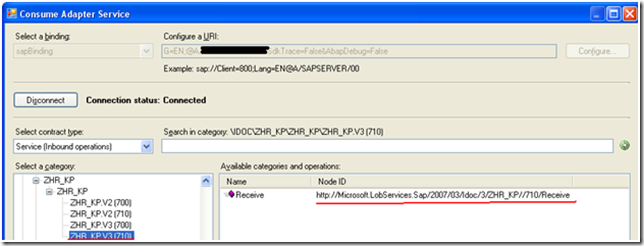
When you go to generate an IDoc using the Consume Adapter Service wizard in Visual Studio, you will be presented with a screen like this. You will most likely have a few options when selecting an IDoc and version to use. To be sure that you have selected the right version of IDoc, you should contact your BASIS admin.
As you select different versions of IDocs, notice that the Node ID changes. This Node ID will soon become your Target Namespace in the XSD schema that you are about to generate.
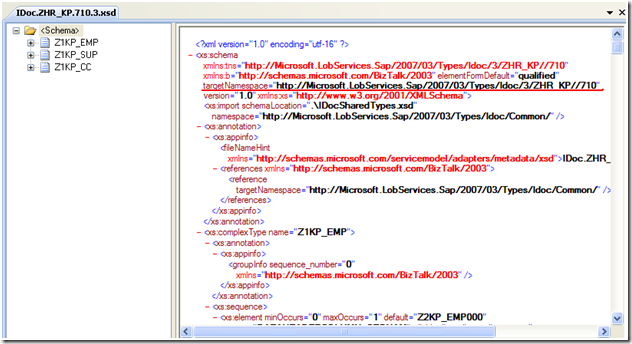
This Target Namespace is very important since BizTalk uses the Target Namespace and root node to determine subscriptions.

If you have chosen the wrong version of IDoc you will soon know. You will receive a subscription error indicating that you have received a message that BizTalk does not have a Schema for.
Event Type: Error
Event Source: BizTalk Server 2009
Event Category: BizTalk Server 2009
Event ID: 5719
Date: 1/17/2010
Time: 1:54:31 PM
User: N/A
Computer: Server
Description:
There was a failure executing the receive pipeline: “Microsoft.BizTalk.DefaultPipelines.XMLReceive, Microsoft.BizTalk.DefaultPipelines, Version=3.0.1.0, Culture=neutral, PublicKeyToken=31bf3856ad364e35” Source: “XML disassembler” Receive Port: “WcfReceivePort_SAPBinding_IdocZHR_KPV3R710_Custom” URI: “sap://CLIENT=XXX;LANG=EN;@a/SAPSERVER/XX?ListenerGwServ=SAPGWXX&ListenerGwHost=SAPSEVER& ListenerProgramId=XXXXXX&RfcSdkTrace=False&AbapDebug=False” Reason: Finding the document specification by message type “http://Microsoft.LobServices.Sap/2007/03/Idoc/3/ZHR_KP//700/Receive#Receive” failed. Verify the schema deployed properly.
If you refer to the first image in this blog post, you will see that the Node Id has a value of http://Microsoft.LobServices.Sap/2007/03/Idoc/3/ZHR_KP//710/Receive#Receive where as BizTalk has received an IDoc with a Namespace of http://Microsoft.LobServices.Sap/2007/03/Idoc/3/ZHR_KP//700/Receive#Receive. So how can this be? SAP by default generates an IDoc based upon the current release version. But you also have the ability to send a specific IDoc version as configured in the SAP Program ID. This provides some flexibility in the event you need to use a legacy IDoc version.
When SAP sends an IDoc out, it will populate this version information in the control record. I have turned on tracking on the receive port and as you can see this information has been populated by SAP.
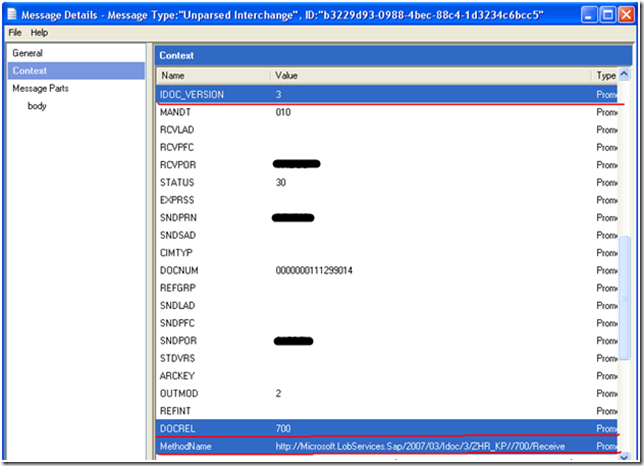
Since I am using an XML Receive pipeline and SAP has no idea what namespace BizTalk is requiring, the SAP Adapter is generating this namespace at run-time based upon the DOCREL and IDOC_VERSION elements.
The lesson here is to make sure you know what version of the IDoc is currently configured with your Program Id within SAP. I must also caution that while this approach does work, it may not live through your next SAP upgrade. At least not without updating your BizTalk projects. With each SAP major release, you can expect this DOCREL value and potentially the IDOC_Version to increase. So the next time you upgrade your SAP environment, you may get into the same situation that I have described(subscription errors) and it may take some significant refactoring to get your BizTalk schemas and maps back in sync with your SAP version.
In the next post of this series, I will discuss how you can use a Receive Pipeline and Flat File Pipeline Disassembler to override this namespace so that it does not become dependant upon the DOCREL and IDOC_VERSION elementsstay tuned.

by community-syndication | Jan 19, 2010 | BizTalk Community Blogs via Syndication
A couple weeks ago, Yossi Dahan followed up on a post of his where he noticed that when a message absorbed by a one-way receive port was published to the BizTalk MessageBox where more than one request-response port was waiting for it, an error occurred. Yossi noted that this appeared to be fixed in BizTalk […]
by community-syndication | Jan 19, 2010 | BizTalk Community Blogs via Syndication
Apologies for not having posted in a while. As some of you know, my wife and I just welcomed Adelaide Sanders to our clan.
As busy as technology related projects are, this one is a great deal more time consuming and requires even higher levels of attention.
Rest assured I’ll be returning in February 2010 with some new posts and reflections on technologies I’m playing with while on paternity leave.
Until then, feel free to contact me at jeff dot sanders at dynamicshift dot com.
Thanks —
by community-syndication | Jan 18, 2010 | BizTalk Community Blogs via Syndication
I have been spending my free time working on my next book. Danny Garber and I are co-authoring this book from APress.
The book will be available this spring and should coincide with the release of AppFabric.



