by community-syndication | Feb 5, 2010 | BizTalk Community Blogs via Syndication
[In addition to blogging, I am also now using Twitter for quick updates and to share links. Follow me at: twitter.com/scottgu]
Earlier this evening the ASP.NET team shipped ASP.NET MVC (Release Candidate 2) for VS 2008/.NET 3.5. You can download it here.
The RC2 release of ASP.NET MVC 2 is a follow-up to the first ASP.NET MVC 2 RC build that we shipped in December. It includes a bunch of bug fixes, performance work, and some final API and behavior additions/changes. Below are a few of the changes between the RC1 and RC2 release (read the release notes for even more details):
- The new ASP.NET MVC 2 validation feature now performs model-validation instead of input-validation (this means that when you use model binding all model properties are validated instead of just validations on changed values of a model). This behavior change was based on extensive feedback from the community.
- The new strongly-typed HTML input helpers now support lambda expressions which reference array or collection indexes. This means you can now write code like Html.EditorFor(m=>m.Orders[i]) and have it correctly output an HTML <input> element whose “name” attribute contains the index (e.g. Orders[0] for the first element), and whose “value” contains the appropriate value.
- The new templated Html.EditorFor() and Html.DisplayFor() helper methods now auto-scaffold simple properties (and do not render complex sub-properties by default). This makes it easier to generate automatic scaffolded forms. I’ll be covering this support in a future blog post.
- The “id” attribute of client-script validation message elements is now cleaner. With RC1 they had a form0_ prefix. Now the id value is simply the input form element name postfixed with a validationMessage string (e.g. unitPrice_validationMessage).
- The Html.ValidationSummary() helper method now takes an optional boolean parameter which enables you to control whether only model-level validation messages are rendered by it, or whether property level validation messages are rendered as well. This provides you with more UI customization options for how validation messages are displayed within your UI.
- The AccountController class created with the default ASP.NET MVC Web Application project template is cleaner.
- Visual Studio now includes scaffolding support for Delete action methods within Controllers, as well as Delete views (I always found it odd that the default T4 templates didn’t support this before).
- jQuery 1.4.1 is now included by default with new ASP.NET MVC 2 projects, along with a -vsdoc file that provides Visual Studio documentation intellisense for it.
- The RC2 release has some significant performance tuning improvements (for example: the lambda based strongly-typed HTML helpers are now much faster).
Today’s RC2 release only work with VS 2008 and .NET 3.5. We’ll shortly be releasing the VS 2010 RC (which will be available for everyone to download). It will include ASP. NET MVC 2 support built-in (no separate download required).
Hope this helps,
Scott
P.S. The source code for the ASP.NET MVC RC2 release (along with a MVC futures library that goes with it) can be downloaded here. You can learn even more about ASP.NET MVC 2 by reading the ASP.NET MVC 2 blog series I’m working on.

by community-syndication | Feb 4, 2010 | BizTalk Community Blogs via Syndication
I can’t imagine anyone that subscribes to my blog that doesn’t subscribe to Richard Seroter’s. Well, maybe one (hi mom!). But I would be remiss if I didn’t mention that I am now part of his interview series with BizTalk and CSD leaders around the world, so if you haven’t read it yet check it […]
by community-syndication | Feb 4, 2010 | BizTalk Community Blogs via Syndication
Microsoft Host Integration Server 2006 Service Pack 1 has been released and is available for download here
This Service Pack includes hotfixes based on customer request and other fixes initiated by the product team. It improves the quality, reliability and supportability of Host Integration Server 2006 and BizTalk Adapters for Host Systems.
The following KB articles regarding this Service Pack will be available soon on Microsoft support site:
%u00b7 KB 979238 – A list of the bugs that are fixed in Host Integration Server 2006 Service Pack 1 – http://support.microsoft.com/kb/979238
Regards,
Ofer
by community-syndication | Feb 3, 2010 | BizTalk Community Blogs via Syndication
Wow, it must be the week for Service Pack announcements. First we see the BizTalk 2006-R1 SP and now HIS 2006 gets its very own SP. Details from about the release are below. Please note, that the Knowledge Base articles listed below might not be active for a couple of days. So if you try and them and they don’t work, give it a day before you hammer me on posting dead links.
>>>>
Host Integration Server 2006 Service Pack 1 is now available for download at the following location:
http://www.microsoft.com/downloads/details.aspx?FamilyID=c0cc5e8d-fc47-41ac-bcad-67832249eb41
Host Integration Server 2006 Service Pack 1 provides the latest updates for Microsoft Host Integration Server 2006 and Microsoft BizTalk Adapters for Host Systems. It delivers customer requested hotfixes that improve the quality, reliability and supportability of Host Integration Server 2006 and BizTalk Adapters for Host Systems. The following two Knowledge Base articles will be available soon to describe the list of fixes and how to download the service pack:
KB 979238 – A list of the bugs that are fixed in Host Integration Server 2006 Service Pack 1 – http://support.microsoft.com/kb/979238
KB 979497 – How to obtain the latest Host Integration Server 2006 service pack – http://support.microsoft.com/kb/979497
Congratulations to the HIS Product Team, BPD Engineering Services team and CSS engineers who made this happen. Having this service pack available for our customers now allows us to efficiently support customers and focus on future releases of Host Integration Server.
>>>>
Cheers and keep on BizTalking
Peter
by community-syndication | Feb 3, 2010 | BizTalk Community Blogs via Syndication
About a month ago, Ed Pinto and I did an interview with the .NET Rocks guys on What is new in WCF for .NET 4 and it just went live today. Ed covered most of the detailed technical stuff, I filled in more along the value proposition side of things, and Carl and Richard added their usual comic relief and excellent interviewing skills. It was fun. Hope you enjoy!
by community-syndication | Feb 3, 2010 | BizTalk Community Blogs via Syndication
by community-syndication | Feb 3, 2010 | BizTalk Community Blogs via Syndication
by community-syndication | Feb 2, 2010 | BizTalk Community Blogs via Syndication
Event Type:Error
Event Source:BizTalk ESB Toolkit 2.0
Event Category:None
Event ID:6060
Date:1/31/2010
Time:7:06:00 AM
User:N/A
Computer:WS03_OFFICE07
Description:
Parameter name cannot be null or an empty string.
Parameter name: key
Source: Microsoft.Practices.ESB.Resolver.ResolverMgr
Method: System.Collections.Generic.Dictionary`2[System.String,System.String] Resolve(Microsoft.Practices.ESB.Resolver.ResolverInfo, Microsoft.BizTalk.Message.Interop.IBaseMessage, Microsoft.BizTalk.Component.Interop.IPipelineContext)
Error Source: Microsoft.Practices.EnterpriseLibrary.Caching
Error TargetSite: Void ValidateKey(System.String)
Error StackTrace: at Microsoft.Practices.EnterpriseLibrary.Caching.Cache.ValidateKey(String key)
at Microsoft.Practices.EnterpriseLibrary.Caching.Cache.GetData(String key)
at Microsoft.Practices.EnterpriseLibrary.Caching.CacheManager.GetData(String key)
at Microsoft.Practices.ESB.Cache.Cache`1.Get(String key, Boolean returnAndRemove)
at Microsoft.Practices.ESB.Cache.Cache`1.Get(String key)
at Microsoft.Practices.ESB.Resolver.ResolverMgr.GetResolver(ResolverInfo info)
at Microsoft.Practices.ESB.Resolver.ResolverMgr.Resolve(ResolverInfo info, IBaseMessage message, IPipelineContext pipelineContext)
For more information, see Help and Support Center at http://go.microsoft.com/fwlink/events.asp.
The issue was that I had the BRI string like this: BRI:// instead of BRI:\\ in the pipeline component’s configuration. The latter is the correct way
by community-syndication | Feb 2, 2010 | BizTalk Community Blogs via Syndication
Hi all
Lots of people think, that if they use a Parallel Actions shape, they get things done
in parallel. Well, rethink that. An orchestration executes in just one thread, so
no chance of getting anything to run in parallel. At runtime, the shapes in the parallel
shape are simply serialized.
But what is the algorithm, then?
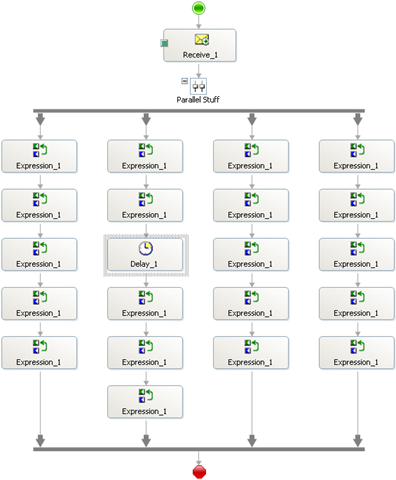
Well, I did some tests. First of all, I created this simple orchestration:
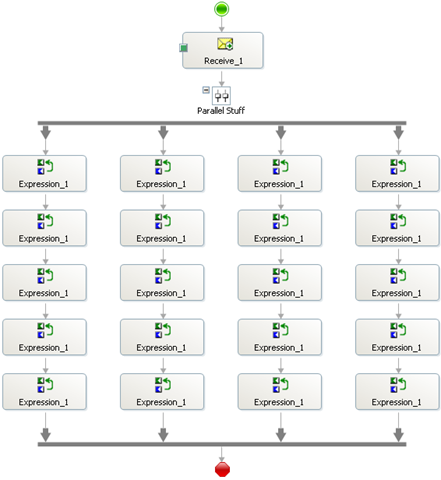
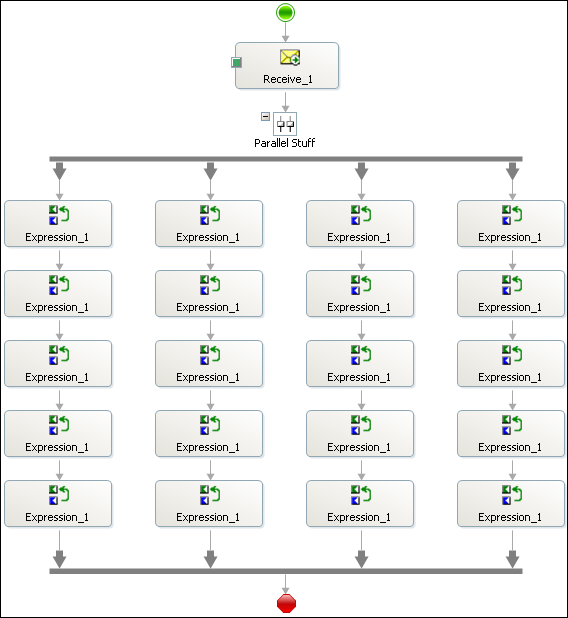
It’s a receive shape to fire up the orchestration and then a parallel shape with four
branches and five expression shapes in each. The code in each expression shape is
this:
 1: System.Diagnostics.Trace.WriteLine("X.
Y");
where X is a number indicating the branch and Y is a sequence number within the branch.
This means that X=2 and Y=3 is the third expression shape in the second branch and
X=4 and Y=1 is the first expression shape in the fourth branch.
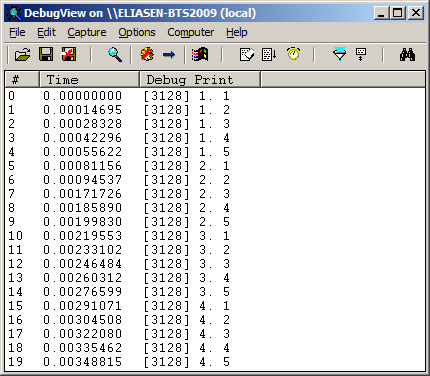
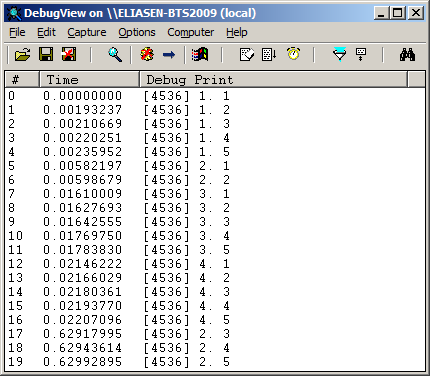
Running this orchestration I get this result from DebugView:
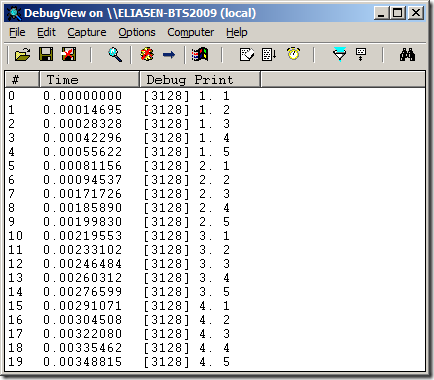
So as you can see, the entire first branch is executed, then the entire second branch,
and so on until the fourth branch has finished. Sounds easy enough. But lets try some
other scenarios like this one:
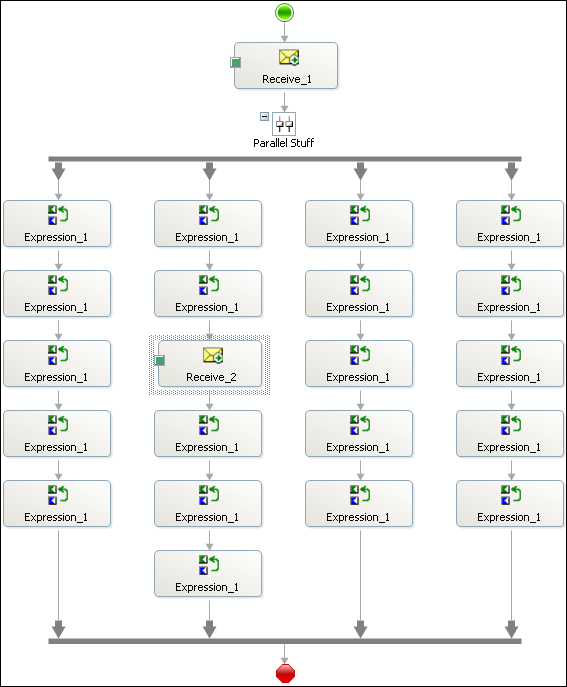
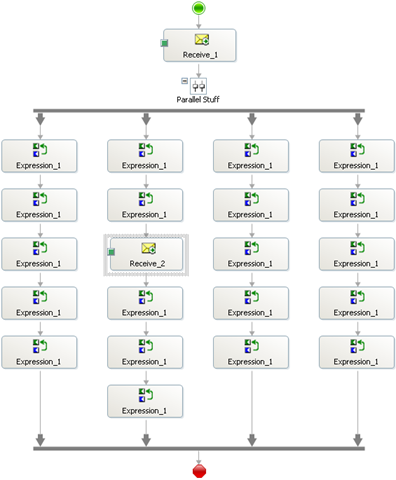
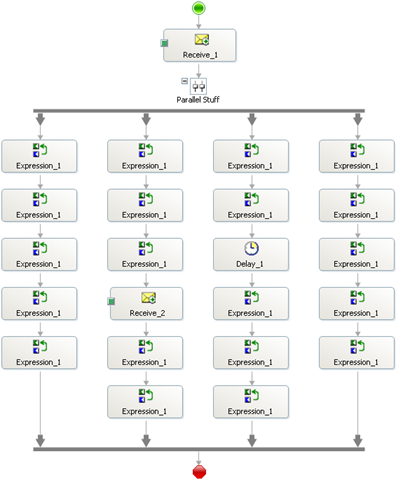
In essence I have thrown in a receive shape in branch 2 to see if branches three and
four will still have to wait until branch 2 has finished.
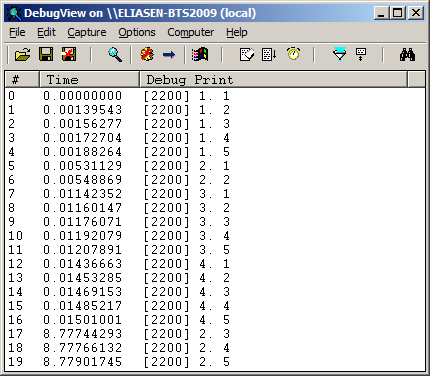
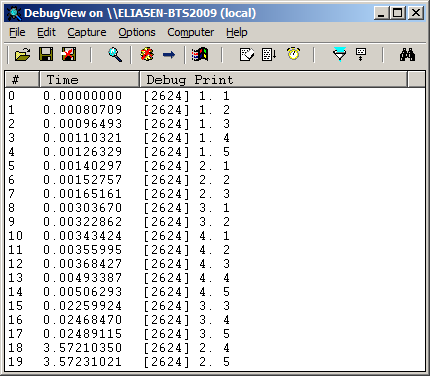
The result can be seen here:
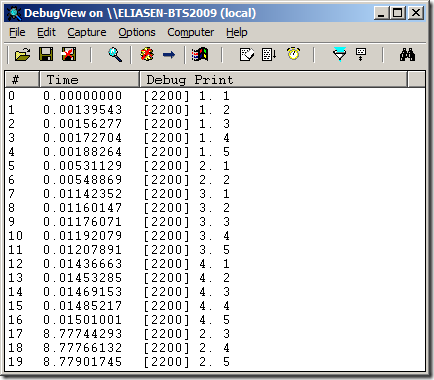
So as you can see, the second branch stops after the second shape because now it awaits
the receive shape. Branches three and four are then executed and after I send in a
message for the receive shape, the second branch completes.
So some form of parallelism is actually achieved, but only when a shape takes too
long to handle. Lets see what happens with a Delay shape instead like this:
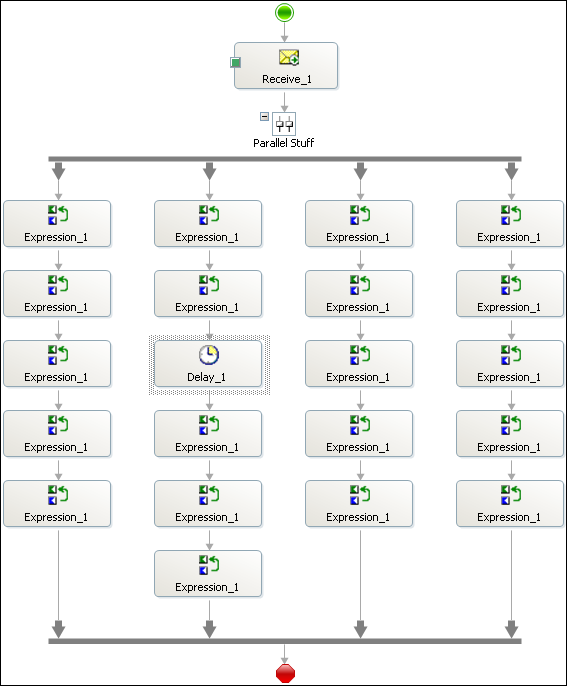
I have switched the Receive Shape for a Delay shape, and I have set the Delay shape
to wait for 100 milliseconds. The result of this is the same as with the Receive shape:
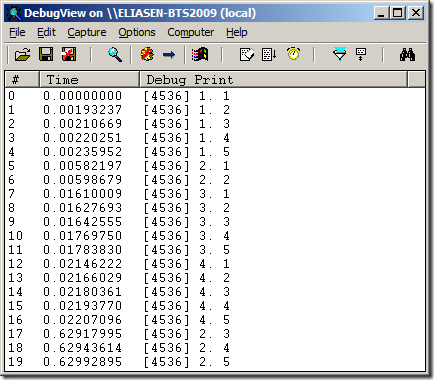
Then I tried setting the Delay shape to just 1 millisecond, but this gave the same
result.
With shapes that take time in two branches, like this:
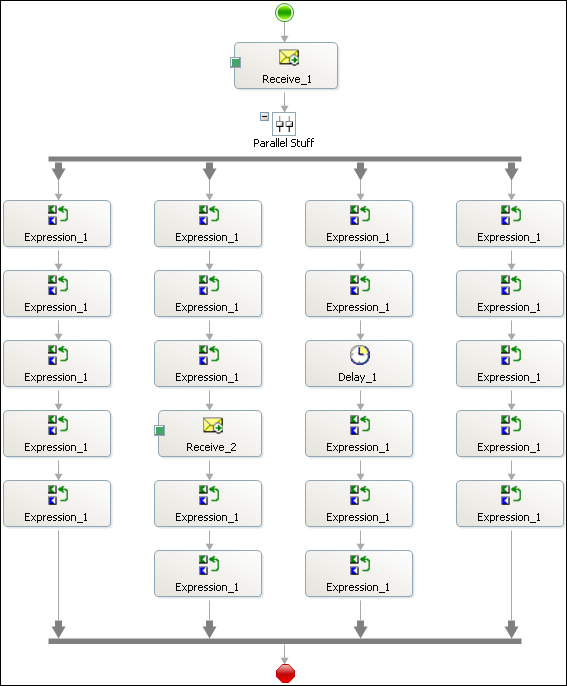
And the Delay is still set at one millisecond. I get the following result:
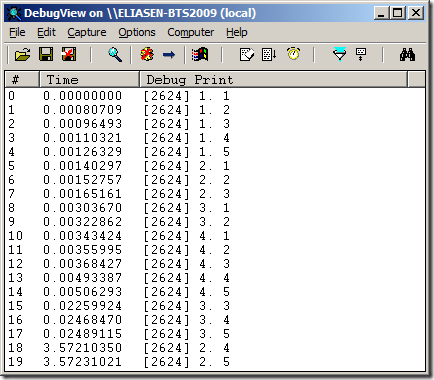
So as you can see, the Receive shape causes branch 2 to stop executing, and the Delay
shape causes branch 3 to stop executing, allowing branch 4 to execute. Branch 3 is
then executed because the Delay shape has finished and finally once the message for
the Receive shape has arrived, branch 2 is executed to its end.
Another thing to note is, that the Delay shape actually doesn’t make the thread sleep.
If it did, we couldn’t continue in another branch once a Delay shape is run. This
makes perfectly sense, since the shapes in one branch are to be seen as a mini-process
within the big process, and the delay that is needed for that mini-process shouldn’t
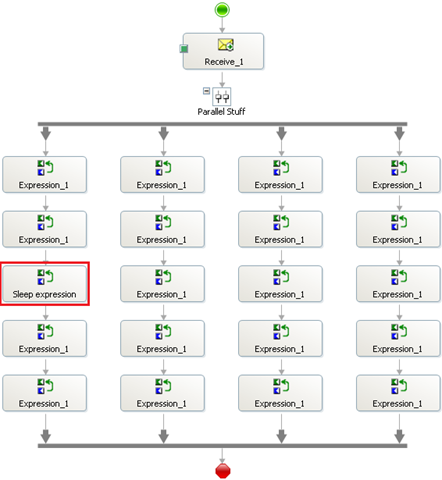
affect the other branches. This is exemplified in this process:
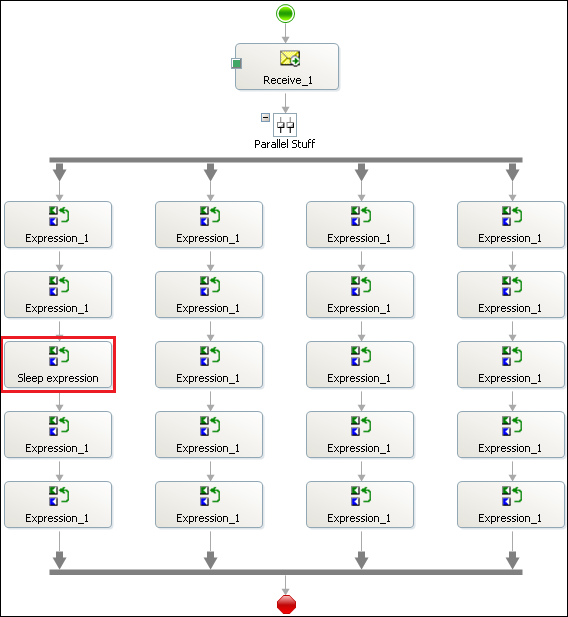
The third expression shape in the first branch has been updated to this code:
 1: System.Diagnostics.Trace.WriteLine("1.
3");
2: System.Threading.Thread.Sleep(2000);
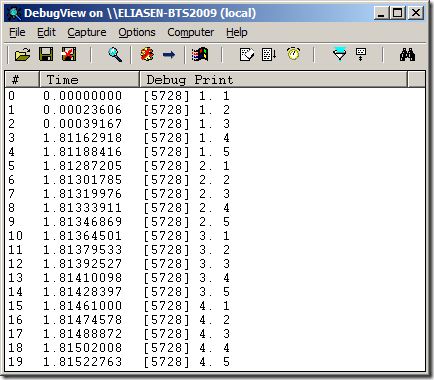
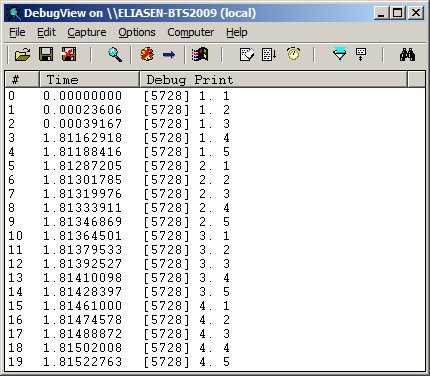
So as you can see, even though the first branch must wait for 2 seconds, it still
executes completely before the second branch is started.
So, takeaways:
-
The Parallel Actions shape does NOT mean you get any multi-threading execution environment.
-
Think of the PArallel Actions shape as a way of letting multiple Business Activities
happen and you don’t know in what order they will occur.
-
The Delay shape does not use Thread.Sleep, but instead handles things internally.
—
eliasen
by community-syndication | Feb 2, 2010 | BizTalk Community Blogs via Syndication
If you have been wondering so far whether an ESB implementation is the right solution for your integration problems, let us help you make the right decision.
On Feb 11th, Peter Kelcey (Technical Sales Professional from Microsoft Canada) and I, will be co-presenting an MSDN Webcast. Peter has extensive experience helping customers with ESB implementation using the BizTalk ESB Toolkit. We will articulate the business values that an ESB brings to integration solutions, specifically how it can promote flexibility and reuse. Being able to adapt rapidly to new business or technical requirements while minimizing development efforts, costs and risks is crucial in the current tough economic climate.
This is going to be a demo intensive session to illustrate with a series of live short demos the advantages and use cases of the BizTalk ESB Toolkit.
More details are included below as is the link to register. Hope to see you there.
http://msevents.microsoft.com/CUI/WebCastEventDetails.aspx?EventID=1032440359&EventCategory=4&culture=en-US&CountryCode=US
Language(s):
English.
Audience(s):
Pro Dev/Programmers. (would be also useful for Enterprise/Solution Architects)
Duration:
60 Minutes
Start Date:
Thursday, February 11, 2010 1:00 PM Pacific Time (US & Canada)
Event Overview
Businesses across the globe are trying to cope with a faster rate of change. The need to adapt rapidly to new internal and external requirements is pushing organizations to look for more flexible solutions to build and connect their applications. At the same time, IT departments are also pressured to reduce costs and reuse software assets and services. Enterprise Service Bus has emerged as an architectural pattern that can help achieve these goals. In this webcast, we introduce the Microsoft BizTalk Enterprise Service Bus Toolkit 2.0 and explain how it accelerates the implementation of a very dynamic and reusable messaging and integration infrastructure on top of Microsoft BizTalk Server 2009 and the Microsoft .NET Windows Communication Framework.
We hope this session will convince you to stop procrastinating and “dive into the ESB pool”
Cheers,
Ofer