by community-syndication | Feb 22, 2010 | BizTalk Community Blogs via Syndication
BAM Operations, a brief summary
Installing the BAM infrastructure
BAM infrastructure composed on the base of the SQL Analysis Services and the SQL Integration Services. The SQL Notification Service is an optional element.
1. Before installing BAM make sure the SQL Analysis Services and the SQL Integration Services are installed. If not, install them.
2. Create the BAMAnalysis and BAMStarSchema databases. It can be done in separate step or while the BizTalk configuration.
2.1. Start the BizTalk Server Configuration tool.
2.2. Choose the BAMTools on the left side of window.
2.3. Check on option the “Enable Analysis Services for BAM aggregations”.
2.4. Fill in Server Name with the same value as value for others databases. For example, “SQLDEV2\BIZTALK”.
2.5. Push the “Apply Configuration” button. Click “Next>” button.
2.6. Make sure there are no errors.
Development and Deploying
Deployment is separated to two parts. One is creating the logical data structure, second is mapping the logical structure to the BizTalk data.
There are two roles in development respectively. Business Analyst creates the logical tracking; BizTalk developer maps the logical tracking structure to the BizTalk application data.
Business Analyst uses the Microsoft Excel with special Add-In to create the Activities and Views, and then export them to the Xml file. It is the BAM Definitions.
BizTalk developer uses the Tracking Profile Editor (TPE) to map BAM Definitions to the BizTalk Orchestrations. TPE produces the Tracking Profile.
Deployer is another role in the process. In development environment it is a developer, in the production environment it is a System Administrator.
Deployer uses the bm.exe utility to deploy the BAM Definitions and TPE (in the development environment) or the BttDeploy.exe utility (in the production environment) to deploy Tracking Profile.
Development and Deployment Considerations
If we need to change something in BAM infrastructure first we have to undeploy old Tracking Profile and BAM Definitions then redeploy the new Tracking Profile and BAM Definitions. It is a simple process if we have the old Tracking Profile and BAM Definitions. If we lost them, the undeployment process is more complicated. That means we have to store deployed Tracking Profile and BAM Definitions!
Undeployment
Use deployed files <BAM Definitions>.xml and <Tracking Profile>.btt.
1. Open the Command line window (Start / Run/ >cmd.exe).
2. Go (>cd) to the <BizTalk>\Tracking\ folder.
3. Undeploy BAM Definitions:
a. >bm remove-all -DefinitionFile:< BAM Definitions>.xml -Server:<server>
4. Undeploy Tracking Profile:
a. >BttDeploy <Tracking Profile>.btt /remove [/mgdb <server name[,port]>\<database name>]
If we lost the <BAM Definitions>.xml and <Tracking Profile>.btt files, use the
>bm.exe get-defxml-FileName:<output file>[ -Server:<server> ] [ -Database:<database> ]
to get them. If we before that deployed several Definitions, we have to edit the new DefinitionFile.
Deployment
Use files from the BAM\Current folder.
5. Copy the <BAM Definitions>.xml and <Tracking Profile>.btt files to the <BizTalk>\Tracking\ folder.
6. Open the Command line window (Start / Run/ >cmd.exe).
7. Go (>cd) to the <BizTalk>\Tracking\ folder.
8. Deploy BAM Definitions:
a. >bm deploy-all -DefinitionFile:< BAM Definitions>.xml -Server:<server>
9. Deploy Tracking Profile:
a. >BttDeploy <Tracking Profile>.btt/mgdb <server name[,port]>\<database name>
10. 10. Set the access permissions for the BAM Portal users:
a. >bm add-account -AccountName:<BAMUsersGroup> -view:<ViewName>
– use it for each view in the BAM Definition.
This creates the database artifacts as tables, views, triggers, stored procedures in the databases.
Deployment scripts
Usually I create the deployment scripts and place them and BAM files to a predefined folder structure.
Folder structure:
o BAM\Scripts – folder for scripts
o BAM\Current – folder for the BAM files to be deployed. We can edit them.
o BAM\Last – folder for the BAM files deployed right now. We cannot edit them.
o BAM\Last-1 – folder for the BAM files deployed before. They are for undo.
%u00b7 Script user has to be in BAM administrators group.
Managing the BAM Infrastructure
The BAM infrastructure consists of the BAM workbook views, BAM Portal, BAM deployments, the BAM Data Transformation Services (DTS) packages, and the BAM databases. For more information about the BAM infrastructure, see
http://msdn.microsoft.com/en-us/library/aa561239.aspx .
by Richard | Feb 22, 2010 | BizTalk Community Blogs via Syndication
Recently there’s been a few really good resources on streaming pipeline handling published. You can find some of the here.aspx) and here.aspx).
The Optimizing Pipeline Performance.aspx) MSDN article has two great examples of how to use some of the Microsoft.BizTalk.Streaming.dl.aspx) classes. The execute method of first example looks something like below.
public IBaseMessage Execute(IPipelineContext context, IBaseMessage message)
{
    try
    {
        ...
        IBaseMessageContext messageContext = message.Context;
        if (string.IsNullOrEmpty(xPath) && string.IsNullOrEmpty(propertyValue))
        {
            throw new ArgumentException(...);
        }
        IBaseMessagePart bodyPart = message.BodyPart;
        Stream inboundStream = bodyPart.GetOriginalDataStream();
        VirtualStream virtualStream = new VirtualStream(bufferSize, thresholdSize);
        ReadOnlySeekableStream readOnlySeekableStream = new ReadOnlySeekableStream(inboundStream, virtualStream, bufferSize);
        XmlTextReader xmlTextReader = new XmlTextReader(readOnlySeekableStream);
        XPathCollection xPathCollection = new XPathCollection();
        XPathReader xPathReader = new XPathReader(xmlTextReader, xPathCollection);
        xPathCollection.Add(xPath);
        bool ok = false;
        while (xPathReader.ReadUntilMatch())
        {
            if (xPathReader.Match(0) && !ok)
            {
                propertyValue = xPathReader.ReadString();
                messageContext.Promote(propertyName, propertyNamespace, propertyValue);
                ok = true;
            }
        }
        readOnlySeekableStream.Position = 0;
        bodyPart.Data = readOnlySeekableStream;
    }
    catch (Exception ex)
    {
        if (message != null)
        {
            message.SetErrorInfo(ex);
        }
        ...
        throw ex;
    }
    return message;
}
We used this example as a base when developing something very similar in a recent project. At first every thing worked fine but after a while we stared getting an error saying:
Cannot access a disposed object. Object name: DataReader
It took us a while to figure out the real problem here, everything worked fine when sending in simple messages but as soon as we used to code in a pipeline were we also debatched messages we got the “disposed object” problem.
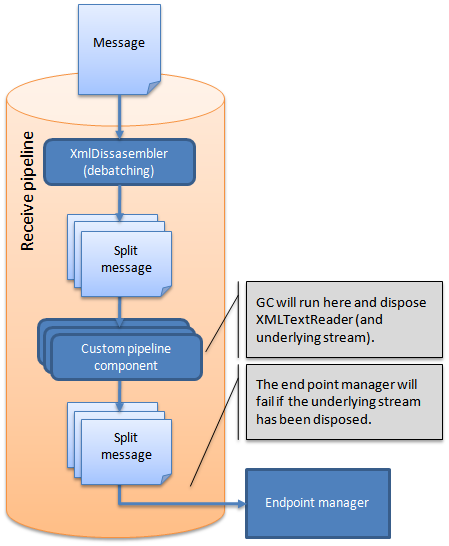
It turns out that when we debatched messages the execute method of the custom pipeline ran multiple times, one time for each sub-messages. This forced the .NET Garbage Collector to run.
The GC found the XmlTextReader that we used to read the stream as unreferenced and decided to destoy it.
The problem is that will also dispose the readOnlySeekable-Stream stream that we connected to our message data object!
It’s then the BizTalk End Point Manager (EPM) that throws the error as it hits a disposed stream object when trying to read the message body and save it to the BizTalkMsgBox!
ResourceTracker to the rescue!
Turns out that the BizTalk message context object has a nice little class connected to it called the ResourceTracker. This object has a “AddResouce”-method that makes it possible to add an object and the context will the hold a reference to this object, this will tell the GC not to dispose it!
So when adding the below before ending the method everything works fine – even when debatching messages!
context.ResourceTracker.AddResource(xmlTextReader);
by community-syndication | Feb 21, 2010 | BizTalk Community Blogs via Syndication
I rebuilt my laptop recently with Windows 7 and installed AppFabric, .net4, VS 2010, etc.
When I came to configure BIzTalk 2009 I got the error in the subject line because the SSOSQL assembly needed to be re-registered.
Follow the instructions here to get it to work http://tomas-simonavicius.blogspot.com/2010/02/sso-service-failed-to-start-after.html
by community-syndication | Feb 21, 2010 | BizTalk Community Blogs via Syndication
Here’s a handy set of commands when using in particular Virtual Machines with a ’demo’
environment.
We certainly create images for my students to take away with them and the common question
is:
“When will this OS expire?” or more likely on the 3rd day of a 5
day course I get the error popping up stating the OS has expired and will shutdown
every 2hrs.
To know when the OS may expire from the command prompt:
c:\slmgr -xpr
To possibly EXTEND to trial period for the OS
c:\slmgr -rearm
(note – you can only get away with this a few times)
If this fails, you can always jump to MS and try and get a trial key off their site.
by community-syndication | Feb 20, 2010 | BizTalk Community Blogs via Syndication
Every year Microsoft hosts an event they refer to as the MVP Global Summit in the Seattle area. This event is invitation only event where those who have been recognized as Microsoft MVPs get to meet with their product groups, discuss strategy, impart real-world scenarios, and learn what is coming down the pipe. The event is simply wonderful, where else can you get a chance to interact with the people directly responsible for parts of the Microsoft eco-system you care about most deeply. Of course, such openness does not come without restriction. The MVPs are all under a Non-Disclosure Agreement (NDA) which means that for 90%+ of what we are told, we cannot discuss it with other people.
You can’t discuss it? Why go then?!
A fair question, with at least four answers. So let’s go through them.
First – I can’t discuss things, but I still know them.
When thinking about the trip to the Summit you must remember that you’re learning things far before the public will, but that does not mean that the public will never learn these things. Much of what is discussed will eventually become public information, and once it is those who have been to the Summit will have had the most time to internalize and strategize on the information, often meaning they will be able to act on that information more quickly. Also just because I can’t share my knowledge does not mean I can’t share my judgment. I can use the information I have received to inform the choices I make for my own personal work and what I do for my clients.
Second – Meet the Team
Every Summit is a chance to meet new people within Microsoft who are working on your area of expertise and interest, to put a face with a name, and to collect business cards or email aliases. This can be wonderful later on if you want to provide feedback or ask a short question during the 99% of the year that isn’t the MVP Summit.
Third – Bond with your Local MVPs
When you travel to the MVP Summit you get a chance to spend time strengthening your relationships with the MVPs in your area. Your local MVPs are the backbone of your community, and getting to know them better will help you help your community better. You’ve got time during the Summit to discuss plans for future events, eat, drink and be merry.
Fourth – Meet MVPs from around the world
This may seem like a repeat of the entry above, but meeting MVPs from outside your local area has a different purpose. Your making connections that open up an exchange of ideas. You’re putting names with faces from Twitter, Facebook, StackOverflow and other sites. You never know when a passing conversation about your interest with some technology might not result in you being able to help a company half way around the world make a wiser technical decision. Absolutely key. Again, eat, drink and be merry.
Conclusion
Rather obviously a lot of what the MVP Summit is about is networking, but you’re and MVP right? You network, help people, organize meetings, answer questions, in general you are a community leader, and influencer. And so are ALL of those other MVPs. Even if every MVP touched merely as many people as a small user group, say 50/month people, then the 1400 MVPs who just left the Summit in 2010 represent 840,000 developer touches. And those numbers are low. From blog posts, to conferences, and more an MVP has huge reach which is why we were invited to begin with.
Thank you to Microsoft, the Product Groups, the Developer Evangelists, and the incredible MVP Leads for making this Summit a smashing success!
by community-syndication | Feb 20, 2010 | BizTalk Community Blogs via Syndication
While enhancing a custom ORU^R01 schema, there was a Z segment at the end (that I did not want to place in the ZSegments message part.
I went happily creating the schema, deployed it and ran it, and received the following errors:
Event Type: Error
Event Source: BizTalk Accelerator for HL7
Event Category: None
Event ID: 4097
Description:
Fatal error encountered in 2XDasm. Exception information is Object reference not set to an instance of an object.
followed by
Event Type: Error
Event Source: BizTalk Server 2009
Event Category: (1)
Event ID: 5719
Description:
There was a failure executing the receive pipeline: “BTAHL72XPipelines.BTAHL72XReceivePipeline, BTAHL72XPipelines, Version=1.3.0.0, Culture=neutral, PublicKeyToken=31bf3856ad364e35” Source: “BTAHL7 2.X Disassembler” Receive Port: “One Way Receive Port” URI: “D:\Data\Lab\Medicity\Input\*” Reason: Object reference not set to an instance of an object.
and
Event Type: Error
Event Source: BizTalk Server 2009
Event Category: (1)
Event ID: 5753
Description:
A message received by adapter “FILE” on receive location “Medicity Pickup” with URI “D:\Data\Lab\Medicity\Input\*” is suspended.
Error details: There was a failure executing the receive pipeline: “BTAHL72XPipelines.BTAHL72XReceivePipeline, BTAHL72XPipelines, Version=1.3.0.0, Culture=neutral, PublicKeyToken=31bf3856ad364e35” Source: “BTAHL7 2.X Disassembler” Receive Port: “One Way Receive Port” URI: “D:\Data\Lab\Medicity\Input\*” Reason: Object reference not set to an instance of an object.
MessageId: {E182624C-BD9A-422A-B13B-CD7E108B5B30}
InstanceID: {72120031-57DB-418B-AEE3-A4E3A039017F}
This is the schema that I had created:
If I look at the documentation on Z Segment creation I see this:
Type the name of the field, starting the name with the first three digits of the segment name, followed by a period and the number of the field, followed by an underscore and then a short description of the field. The description should be one or a series of words, without spaces, with the first letter of each word capitalized. Press Enter.
To create a field with components, create the field as a record, and then create a child element of that record for each component. To create a field with subcomponents, create the field and components as records, and the subcomponents as child elements. Note that subcomponents cannot be composite data types. For example, for the segment named ZPP_PatientPreferencesSegment, you might create a ZPP.1_Dietary field and a PD.1 Allergies component with a PD.1.1_FoodGroupAllergy subcomponent. The PD.1.1_FoodGroupAllergy subcomponent would have to be a simple data type.
So this is a special behavior for the Z Segments, where you MUST use the period instead of the underscore if the first character is a number, notice the difference between two segments:
by community-syndication | Feb 20, 2010 | BizTalk Community Blogs via Syndication
by community-syndication | Feb 19, 2010 | BizTalk Community Blogs via Syndication
Both Visual Studio 2008 and 2010 have a rather annoying issue relating to how XAML is highlighted in the Text Editor. I’ve complained in the past that the XAML designer team introduced a separate set of classifications (i.e. options in the Fonts and Colors dialog) to configure how XAML code would be highlighted by the […]
by community-syndication | Feb 19, 2010 | BizTalk Community Blogs via Syndication
Perhaps known to a smaller portion of general community of WCF developers and WF developers, there is a Connection for WCF and Connection for WF that enable you, our customers, to submit bugs and feature suggestions.
As the focusing for Visual Studio 2010 and .NET Framework 4 turns to polish and final tweaks, the team’s thoughts start to turn towards the next versions of Windows Communication Foundation (WCF) and Windows Workflow Foundation (WF). As we start to think about what to improve and where we should innovate, your feedback and suggestions are a core input to the process; and Connect is one of the best places for you to have your voice heard – and a place that is often overlooked by customers. I wanted to spend some time highlighting this feedback channel and encouraging you to head over and provide your suggestions as you think of them.
To jump into the fray and provide suggestions, use one of the links below and login. Once logged in, review the list of suggestions/bugs, and lend your voice to the list. You can either vote on existing feedback items (using the vote buttons), or add new ones (using the orange ’Submit Feedback’ button). Here are direct links to suggestion lists:
And, as a note, don’t let the ’Resolved’ status scare you from casting a vote. If you feel strongly about an item, cast a vote for it regardless of current status. Even if something is deemed as ’won’t fix’ or ’by design’ in the current release, knowing that there is a large number of developers that care about a topic helps us keep that item in the future.
What is Connect?
Microsoft Connect is the connection point between you and Microsoft. Microsoft teams host their TAPs (technology adoption programs) and betas on Connect (called ’Connections’ on the site), and allows you to provide bug submissions and feature suggestions to Microsoft teams. Almost all of the products have at least one Connection on the site; these Connections then link to back-end ALM (application lifecycle management) tools, which can be surfaced and triaged as part of the standard planning and servicing loops within Microsoft.
What can you do with Connect?
Each Connection on the Microsoft Connect portal provides different feedback opportunities (surveys, downloads for evaluation, and feedback/bug submission tools). Once you are registered with the Microsoft Connect site, you can participate within any of the Connections you have access to (any public Connection and any private Connections you have been invited/accepted into).
For the WCF Connection and the WF Connection, we ask for feedback on WCF and WF respectively. Here you can provide new feedback and you can also vote on existing feedback, voting them up or down. You can also provide additional comments on the feedback, adding your voice and clarifications on the topic.
Once you’ve provided feedback, it will be tracked and displayed on the ’Your Dashboard’ page of Microsoft Connect, letting you keep track of how your feedback is being taken by Microsoft.
What’s the Difference Between Feedback and Bugs?
There are two tabs in the feedback section of a Connection: ’Bugs’ and ’Suggestions’. In a nutshell, you use the ’Bug’ submission path if you feel that the existing feature isn’t operating the way it should, and use the ’Suggestion’ submission path if you feel that functionality is missing from the current feature set. The difference between a bug and feature is a debate that has raged on since the beginning of [programming] time – it is said that one man’s bug is another man’s featureand let’s leave this debate up to other websites. Either way, I encourage you to pick the one that you think fits best, and at least file the feedback. 🙂
While I’m on this topic, a quick mention of support mechanisms for WCF and WF developers. If you are encountering a real bug that is stopping you from doing work – I urge you to use one of the proper support channels (the MSDN forums or Microsoft Support Services). There isn’t a service level agreement (SLA) in place for feedback submitted via Connect, and you’re likely to get quite frustrated if you’re anxiously waiting for a Connect bug feedback entry to get serviced – while folks are working the Connect feedback queue, you’re likely to get much faster attention on the forums or Support Services.
How does Connect feedback get surfaced to the product group?
When you provide input via Connect, the feedback and bugs automatically get added to the Team Foundation Server (TFS) system here in Microsoft, to get worked on by folks here at Microsoft. Your bugs are worked by a dedicated servicing team, with immediate feedback to the Connect site, letting you know how your bug is resolved and providing suggested workarounds. Your feature suggestions are similarly triaged, giving you feedback on how the feedback is being taken (below is the ideal happy path for a bug/suggestion ^_^ ).
By voting for feedback provided, you can help let us know where you think our efforts should be placed. Most of our current feedback comes from depth customer interactions, chatting with you at events like TechEd and PDC, feedback related via your evangelists and account managers, and feedback in the forums. But even with these many input channels, this is only a small portion of the total developer audience that uses our technologies on a daily basis.
As you know, there is always more features and enhancements that need to be added than we have developers and time to throw at them. And, if there is sufficient interest/traffic on the Connect sites, we can even provide a leader board-style read-out here on the blog, letting you know where feature suggestions stand in the rankings. I would like to help provide greater transparency into how your input is used here in Redmond. 🙂 To help with this, the team recently reduced the effort required to provide feedback via the Connect sites. Last month, the site required a lot of registration information; now it only validates your name and email address (for follow-up should additional information be needed about your suggestion or bug).
I urge you to weigh in and help lend your voice to that decision process; it really is taken into account!
Have a great weekend; hope you’re enjoying the RC!
– Cliff
by community-syndication | Feb 19, 2010 | BizTalk Community Blogs via Syndication
I was looking over some of the industry news this morning, and spotted this gem from Miguel de Icaza’s blog:
We are also porting our C# compiler to work with Microsoft’s Reflection.Emit to enable us to run our C# Interactive Shell in Silverlight applications and to allow .NET developers to embed our compiler in their applications to support C# Eval.
For those that typically shy away from penguins: Miguel is heavily involved in the Mono project. Mono is a project under the wing of Novell to create an EMCA-334/335 compliant implementation of C# and the CLI. The project includes much of the base class library found in the .NET framework, and also includes more project specific classes. The big selling points for me are binary compatibility with existing .NET assemblies, and availability on multiple platforms.
This is certainly exciting technology (just look at the reaction Anders received demoing very similar functionality at PDC2008). Now imagine that same type of experience in the browser (minus the Windows Form popping up out of no where, since no one likes pop-ups anyway). Imagine games that can be scripted in-play, or instantly extensible rich client applications.
Naturally there will be security considerations, and testing considerations, but for now it is what it is: fairly awesome.