by community-syndication | Apr 8, 2010 | BizTalk Community Blogs via Syndication
Here is a nice intro to Windows Server Appfabric by a good friend and colleague Steve and Danny.Cutting through all the hype and misunderstandings especially between AppFabric in the Cloud vs. Windows Server AppFabric. Also on when to position BizTalk versus Windows Server AppFabric.
by community-syndication | Apr 7, 2010 | BizTalk Community Blogs via Syndication
The Windows Azure platform AppFabric April Release is now live. In addition to improvements in stability, scale, and performance, this release addresses two previously communicated issues in the March billing preview release. We recommend that you re-check your usage previews for April 7th or later per the instruction in the March Billing Preview announcement to ensure that you sign up for the appropriate pricing plan in preparation for AppFabric billing that will start after April 9. For more information about pricing and the billing related issues addressed in this release, please visit our pricing FAQ page.
Please refer to the release notes for a complete list of known issues and breaking changes in this release. To obtain the latest copy of the AppFabric SDK, visit the AppFabric portal or the Download Center.
Windows Azure platform AppFabric Team
by community-syndication | Apr 7, 2010 | BizTalk Community Blogs via Syndication
When I start talking to people about the caching functionality that is part of Windows Server AppFabric I am usually asked “What is the AppFabric Cache?” The MSDN page at http://msdn.microsoft.com/en-us/library/ee790954.aspx provides a great overview (below) as well as additional information. The Cache is defined as:
“Windows Server AppFabric caching features use a cluster of servers that communicate with each other to form a single, unified application cache system. As a distributed cache system, all cache operations are abstracted to single point of reference, referred to as the cache cluster. In other words, your client applications can work with a single logical unit of cache in the cluster regardless of how many computers make up the cache cluster. “
When you develop against the AppFabric Cache you utilize the cache-aside pattern. This pattern outlines the steps in which the application will first check to see if the data is in the cache. If not, then query a database (or other data source), load the cache, then return the value. The idea is that the cache will be populated over time as instances of the application call for data. The AppFabric Cache comes with a number of options around how long data should remain in the cache and provides you the flexibility to tune the performance to your needs.
One thing that the cache-aside pattern doesn’t provide for is the pre-population of data in the cache. This entry will walk through how we can provide this functionality.
The first thing we need to do is to create the cache. I outline how to create a cache in .NET code in my previous entry. You can check that out but I will also include the code in the sample below. As you go about creating the cache you also need to decide if you want eviction to occur and if so how long the data will stay in the cache until it is evicted. For this example I am going to setup the cache so that eviction is turned off (Expirable is set to false). Since I am preloading the cache I want to the data to remain in the cache. If I read your mind, the next question will be how will the code handle when new data is entered into the database. Through the use of the SQL Dependency functionality we can setup an event handler to respond when an event is raised when there is a change at the database layer. Once this event is caught we can empty the cache and reload it. We could also add code to take advantage of the cache-aside pattern and if we don’t the data in the cache then query the database and populate the cache on demand.
As we look at the code example below lets jump directly to the PopulateLookUpCache method. The first part of this method sets up the database connection, the SQL Dependency and loads the data into a dataset. The second part of the method focuses on the loading of the cache. This is the part that we will focus on.
Before we can use the cache we need to create an instance of the DataCacheFactory. This object requires configuration information. This can either be through entries in a config file as shown below:
<
dataCacheClient>
<hosts>
<host name=“AppFabricBeta2“ cachePort=“22233“ />
</hosts>
<localCache isEnabled=“true“ sync=“TTLBased“ objectCount=“100000“ ttlValue=“300“ />
</dataCacheClient>
or through code by creating a DataCacheFactoryConfiguration object and passing it to the DataCacheFactory as shown below:
var config = new DataCacheFactoryConfiguration();
config.Servers = new List<DataCacheServerEndpoint>
{
new DataCacheServerEndpoint(Environment.MachineName, 22233)
};
DataCacheFactory dcf = new DataCacheFactory(config);
We can now call the GetCache method which will return a cache object based on the name of the cache that is passed into the method. The Cache object has a number of methods which allow us to interact with the cache. I use the Put method as the Put will add or replace an object in the cache whereas the Add method only adds an entry. If there is already an object in the cache it will return an exception.
In the code below, I loop through the DataSet and call the Put method to populate the cache. The Put method takes two parameters. The first is the key that will be used and the second is the value. In this case, since I am using the AdventureWorks sample database, the Products table contains the product id and the product which works very nicely for this example.
Once the loop has been executed and the data is now in the cache we can double check that the cache has been populated through the use of a PowerShell cmdlet. Switch to a PowerShell command window and type in (without the quotes) “Get-CacheStatistics -CacheName <your cache name>” and hit enter. This will return a list of attributes related to the cache and will show you how many items are currently in the cache.
We now have a populated cache and a now can use the GetLookUpCacheData method to read data out of the cache for our application. Take a look at the code below to see how all of this was done as well as how to setup the SQL Dependency code to get events. As always this code is provided as is and there are a number of places that should be refactored – such as the repeating DataCacheFactory objects.
using
System;
using System.Collections.Generic;
using System.Linq;
using System.Text;
using System.Data.SqlClient;
using System.Data;
using Microsoft.ApplicationServer.Caching;
using System.Management.Automation;
using System.Management.Automation.Runspaces;
namespace AppFabricCacheWrapper
{
public class CacheHelper : IDisposable
{
private static DataSet lookUpDataset = null;
private string connString = string.Empty;
private string cacheName = “PreLoadSampleCache”;
public CacheHelper()
{
connString = “Data Source=(local);Initial Catalog=AdventureWorksLT;Integrated Security=SSPI;”;
SqlDependency.Start(connString);
CreateCache(cacheName);
PopulateLookUpCache(cacheName);
}
~CacheHelper()
{
SqlDependency.Stop(connString);
Dispose(false);
}
public void Dispose()
{
Dispose(true);
GC.SuppressFinalize(this);
}
protected virtual void Dispose(bool disposing)
{
}
public string GetLookUpCacheData(string keyValue)
{
var config = new DataCacheFactoryConfiguration();
config.Servers = new List<DataCacheServerEndpoint>
{
new DataCacheServerEndpoint(Environment.MachineName, 22233)
};
DataCacheFactory dcf = new DataCacheFactory(config);
var cache = dcf.GetCache(cacheName);
string data = cache.Get(keyValue) as string;
if (data == null)
{
//Determine if you are going to query the database
}
return data;
}
/// <summary> /// Retrieves look up data for the given key and type from database /// </summary>
private void PopulateLookUpCache(string CacheName)
{
SqlConnection conn = null;
SqlCommand comm = null;
SqlCommand commDependency = null;
SqlDataAdapter sqlAdapter = null;
//populate DataSet
try
{
//Connect to look up database and retrieve the names of the products.
conn = new SqlConnection(connString);
conn.Open();
comm = new SqlCommand();
comm.Connection = conn;
comm.CommandText = “select ProductID, Name from SalesLT.Product”;
comm.CommandType = CommandType.Text;
if (lookUpDataset == null)
{
lookUpDataset = new DataSet();
}
else
{
lookUpDataset.Clear();
}
sqlAdapter = new SqlDataAdapter(comm);
sqlAdapter.Fill(lookUpDataset);
//Command object used for subscribing to notifications
commDependency = new SqlCommand();
commDependency.Connection = conn;
commDependency.CommandText = “select ProductID, Name from SalesLT.Product”;
commDependency.Notification = null;
SqlDependency dependency = new SqlDependency(commDependency);
dependency.OnChange += new OnChangeEventHandler(dependency_OnChange);
commDependency.ExecuteNonQuery();
}
catch (Exception e)
{
throw new Exception(e.Message + e.StackTrace);
}
finally
{
</PBR
sqlAdapter.Dispose();
comm.Dispose();
commDependency.Dispose();
conn.Close();
conn.Dispose();
}
//populate cache
try
{
//This can also be kept in a config file
var config = new DataCacheFactoryConfiguration();
config.Servers = new List<DataCacheServerEndpoint>
{
new DataCacheServerEndpoint(Environment.MachineName, 22233)
};
DataCacheFactory dcf = new DataCacheFactory(config);
if (dcf != null)
{
var cache = dcf.GetCache(CacheName);
foreach (DataRow product in lookUpDataset.Tables[0].Rows)
{
cache.Put(product[“ProductID”].ToString(), product[“Name”].ToString());
}
}
}
catch (Exception e)
{
throw new Exception<FONT size=2 face=Consolas p e.StackTrace);
}
}
}
/// <summary>
/// Event which will be fired when there are any database changes done to the dependency query set
/// </summary>
private void dependency_OnChange(object sender, SqlNotificationEventArgs e)
{
if (e.Info != SqlNotificationInfo.Invalid)
{
PopulateLookUpCache(cacheName);
}
}
private void(<FONT size=2 face=Consolas font CreateCache(string CacheName)
{
//This can also be kept in a config file
var config = new DataCacheFactoryConfiguration();
config.Servers = new List<DataCacheServerEndpoint>
{
new DataCacheServerEndpoint(Environment.MachineName, 22233)
};
DataCacheFactory dcf = new DataCacheFactory(config);
if (dcf != null)
{
var state = InitialSessionState.CreateDefault();
state.ImportPSModule(new string[] { “DistributedCacheAdministration”, “DistributedCacheConfiguration” });
state.ThrowOnRunspaceOpenError = true;
var rs = RunspaceFactory.CreateRunspace(state);
rs.Open();
var pipe = rs.CreatePipeline();
pipe.Commands.Add(new Command(“Use-CacheCluster”));
var cmd = new Command(“New-Cache”);
cmd.Parameters.Add(new CommandParameter(“Name”, CacheName));
cmd.Parameters.Add(new CommandParameter(“Expirable”, false));
pipe.Commands.Add(cmd);
var output = pipe.Invoke();
}
}
}

by community-syndication | Apr 7, 2010 | BizTalk Community Blogs via Syndication
Hey – I know I haven’t been blogging much. One of the reasons is I’ve really busy working on courseware for Microsoft on Windows Server AppFabric. If you are in Europe and interested in AppFabric – you should come to Brussels in June – Codit sign
up today! Expect more blogging soon. I’ll also be in Las Vegas next week as part
of the Visual
Studio 2010 Launch – come by and say hi – I’ll give you a cool t-shirt! (can’t
talk about it until Monday ;-)) 
Check out my new book on REST.
by community-syndication | Apr 7, 2010 | BizTalk Community Blogs via Syndication
CODit invited ‘the legendary’ Jon Flanders to Belgium for a deep-dive AppFabric and .Net 4.0 workflow training. This training is open for customers and partners all over EMEA. The training has limited seats available and registrations are on a ‘first come / first served’ schedule.
This training will be a level-300 training and will be organized on June 15-18, 2010.
This is the agenda of the 4 days training:
Day 1
- Introduction to Windows Server AppFabric Monitoring and Hosting
- Introduction to Windows Workflow Foundation 4.0
- Building Declarative Services using WF 4.0 and WCF
Day 2
- Hosting Services with Windows Server AppFabric
- Configuring Windows Server AppFabric Services
- Windows Server AppFabric Management
Day 3
- Monitoring Services using Windows Server AppFabric
- Making your services robust and manageable
- Advanced Workflow Topics
Day 4
- Introduction to Windows Server AppFabric Caching
- What’s new in WCF 4.0
- Introduction to Windows Azure AppFabric
For more details and subscription, please visit the training page: http://www.codit.eu/deepdiveintoappfabric
by community-syndication | Apr 7, 2010 | BizTalk Community Blogs via Syndication
I only use WinDBG every once in a while, but, when I need it, I really need it and need it now. Kevin Dente pointed out earlier today that apparently, the latest versions of WinDBG was not available as a standalone installer, but only as part of the Windows Driver Kit ISO download.
That’s right. You […]

by community-syndication | Apr 7, 2010 | BizTalk Community Blogs via Syndication
SQL Server 2005 introduced query notifications which allow applications to subscribe to the database and receive notifications from the database based on the changes in the result set of the query on which the application is subscribed. This can change the behavior and performance of the application as the application does not have to query […]

by community-syndication | Apr 7, 2010 | BizTalk Community Blogs via Syndication
[In addition to blogging, I am also now using Twitter for quick updates and to share links. Follow me at: twitter.com/scottgu]
This is the nineteenth in a series of blog posts I’m doing on the upcoming VS 2010 and .NET 4 release.
Today’s post covers a small, but very useful, new syntax feature being introduced with ASP.NET 4 – which is the ability to automatically HTML encode output within code nuggets. This helps protect your applications and sites against cross-site script injection (XSS) and HTML injection attacks, and enables you to do so using a nice concise syntax.
HTML Encoding
Cross-site script injection (XSS) and HTML encoding attacks are two of the most common security issues that plague web-sites and applications. They occur when hackers find a way to inject client-side script or HTML markup into web-pages that are then viewed by other visitors to a site. This can be used to both vandalize a site, as well as enable hackers to run client-script code that steals cookie data and/or exploits a user’s identity on a site to do bad things.
One way to help mitigate against cross-site scripting attacks is to make sure that rendered output is HTML encoded within a page. This helps ensures that any content that might have been input/modified by an end-user cannot be output back onto a page containing tags like <script> or <img> elements.
How to HTML Encode Content Today
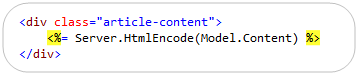
ASP.NET applications (especially those using ASP.NET MVC) often rely on using <%= %> code-nugget expressions to render output. Developers today often use the Server.HtmlEncode() or HttpUtility.Encode() helper methods within these expressions to HTML encode the output before it is rendered. This can be done using code like below:
While this works fine, there are two downsides of it:
- It is a little verbose
- Developers often forget to call the Server.HtmlEncode method – and there is no easy way to verify its usage across an app
New <%: %> Code Nugget Syntax
With ASP.NET 4 we are introducing a new code expression syntax (<%: %>) that renders output like <%= %> blocks do – but which also automatically HTML encodes it before doing so. This eliminates the need to explicitly HTML encode content like we did in the example above. Instead, you can just write the more concise code below to accomplish the exact same thing:

We chose the <%: %> syntax so that it would be easy to quickly replace existing instances of <%= %> code blocks. It also enables you to easily search your code-base for <%= %> elements to find and verify any cases where you are not using HTML encoding within your application to ensure that you have the correct behavior.
Avoiding Double Encoding
While HTML encoding content is often a good best practice, there are times when the content you are outputting is meant to be HTML or is already encoded – in which case you don’t want to HTML encode it again.
ASP.NET 4 introduces a new IHtmlString interface (along with a concrete implementation: HtmlString) that you can implement on types to indicate that its value is already properly encoded (or otherwise examined) for displaying as HTML, and that therefore the value should not be HTML-encoded again. The <%: %> code-nugget syntax checks for the presence of the IHtmlString interface and will not HTML encode the output of the code expression if its value implements this interface. This allows developers to avoid having to decide on a per-case basis whether to use <%= %> or <%: %> code-nuggets. Instead you can always use <%: %> code nuggets, and then have any properties or data-types that are already HTML encoded implement the IHtmlString interface.
Using ASP.NET MVC HTML Helper Methods with <%: %>
For a practical example of where this HTML encoding escape mechanism is useful, consider scenarios where you use HTML helper methods with ASP.NET MVC. These helper methods typically return HTML. For example: the Html.TextBox() helper method returns markup like <input type=”text”/>. With ASP.NET MVC 2 these helper methods now by default return HtmlString types – which indicates that the returned string content is safe for rendering and should not be encoded by <%: %> nuggets.
This allows you to use these methods within both <%= %> code nugget blocks:

As well as within <%: %> code nugget blocks:

In both cases above the HTML content returned from the helper method will be rendered to the client as HTML – and the <%: %> code nugget will avoid double-encoding it.
This enables you to default to always using <%: %> code nuggets instead of <%= %> code blocks within your applications. If you want to be really hardcore you can even create a build rule that searches your application looking for <%= %> usages and flags any cases it finds as an error to enforce that HTML encoding always takes place.
Scaffolding ASP.NET MVC 2 Views
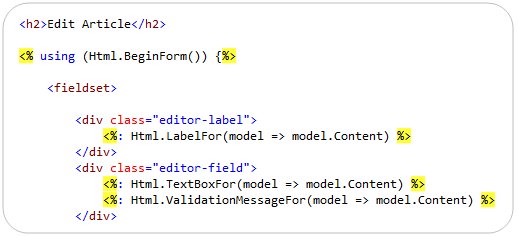
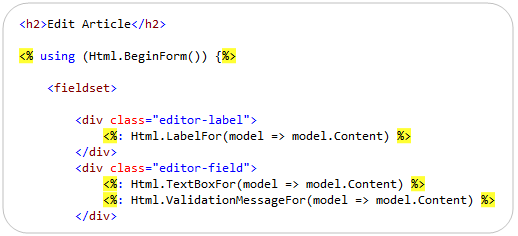
When you use VS 2010 (or the free Visual Web Developer 2010 Express) you’ll find that the views that are scaffolded using the “Add View” dialog now by default always use <%: %> blocks when outputting any content. For example, below I’ve scaffolded a simple “Edit” view for an article object. Note the three usages of <%: %> code nuggets for the label, textbox, and validation message (all output with HTML helper methods):
Summary
The new <%: %> syntax provides a concise way to automatically HTML encode content and then render it as output. It allows you to make your code a little less verbose, and to easily check/verify that you are always HTML encoding content throughout your site. This can help protect your applications against cross-site script injection (XSS) and HTML injection attacks.
Hope this helps,
Scott

by community-syndication | Apr 6, 2010 | BizTalk Community Blogs via Syndication
A few days back, the Software Engineering Institute (SEI) at Carnegie Mellon released a new paper called Testing in Service-Oriented Environments. This report contained 65 different SOA testing tips and I found it to be quite insightful. I figured that I’d highlight the salient points here, and solicit feedback for other perspectives on this topic.
The […]

by community-syndication | Apr 6, 2010 | BizTalk Community Blogs via Syndication
[In addition to blogging, I am also now using Twitter for quick updates and to share links. Follow me at: twitter.com/scottgu]
This is the eighteenth in a series of blog posts I’m doing on the upcoming VS 2010 and .NET 4 release.
A few days ago I blogged about two new language features coming with C# 4.0: optional parameters and named arguments.
Today I’m going to post about a few of my favorite new features being added to VB with VS 2010: Auto-Implemented Properties, Collection Initializers, and Implicit Line Continuation support.
Auto-Implemented Properties
Prior to VB 2010, implementing properties within a class using VB required you to explicitly declare the property as well as implement a backing field variable to store its value.
For example, the code below demonstrates how to implement a “Person” class using VB 2008 that exposes two public properties – “Name” and “Age”:
While explicitly declaring properties like above provides maximum flexibility, I’ve always found writing this type of boiler-plate get/set code tedious when you are simply storing/retrieving the value from a field. You can use VS code snippets to help automate the generation of it – but it still generates a lot of code that feels redundant. C# 2008 introduced a cool new feature called automatic properties that helps cut down the code quite a bit for the common case where properties are simply backed by a field. VB 2010 also now supports this same feature.
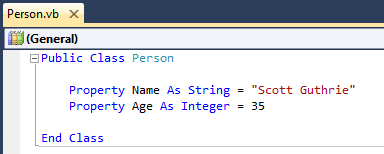
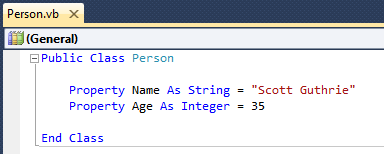
Using the auto-implemented properties feature of VB 2010 we can now implement our Person class using just the code below:

When you declare an auto-implemented property, the VB compiler automatically creates a private field to store the property value as well as generates the associated Get/Set methods for you. As you can see above – the code is much more concise and easier to read.
The syntax supports optionally initializing the properties with default values as well if you want to:
You can learn more about VB 2010’s automatic property support from this MSDN page.
Collection Initializers
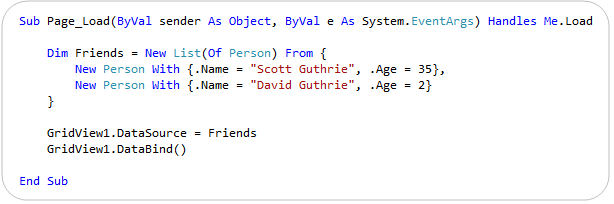
VB 2010 also now supports using collection initializers to easily create a collection and populate it with an initial set of values. You identify a collection initializer by declaring a collection variable and then use the From keyword followed by braces { } that contain the list of initial values to add to the collection.
Below is a code example where I am using the new collection initializer feature to populate a “Friends” list of Person objects with two people, and then bind it to a GridView control to display on a page:
You can learn more about VB 2010’s collection initializer support from this MSDN page.
Implicit Line Continuation Support
Traditionally, when a statement in VB has been split up across multiple lines, you had to use a line-continuation underscore character (_) to indicate that the statement wasn’t complete.
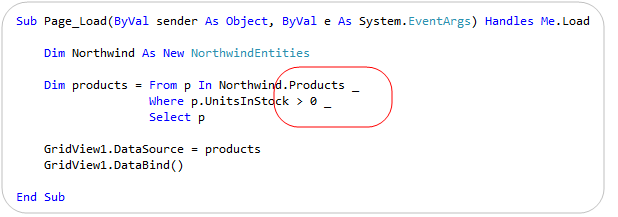
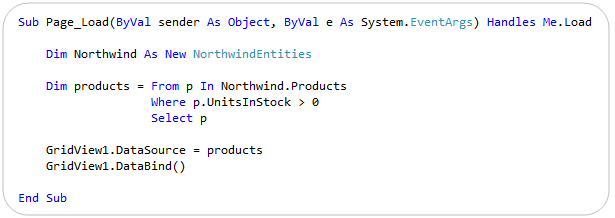
For example, with VB 2008 the below LINQ query needs to append a “_” at the end of each line to indicate that the query is not complete yet:

The VB 2010 compiler and code editor now adds support for what is called “implicit line continuation support” – which means that it is smarter about auto-detecting line continuation scenarios, and as a result no longer needs you to explicitly indicate that the statement continues in many, many scenarios. This means that with VB 2010 we can now write the above code with no “_” at all:
The implicit line continuation feature also works well when editing XML Literals within VB (which is pretty cool).
You can learn more about VB 2010’s Implicit Line Continuation support and many of the scenarios it supports from this MSDN page (scroll down to the “Implicit Line Continuation” section to find details).
Summary
The above three VB language features are but a few of the new language and code editor features coming with VB 2010. Visit this site to learn more about some of the other VB language features coming with the release.
Also subscribe to the VB team’s blog to learn more and stay up-to-date with the posts they the team regularly publishes.
Hope this helps,
Scott