by community-syndication | Feb 10, 2010 | BizTalk Community Blogs via Syndication
Since I have had to explain how to use the BulkXML adapter a few times, I decided to create a quick tutorial on how to use it. Also, this is a tutorial for me to follow, since every time I do this, I re-learn the same things over and over.
The first thing is we are going to create the tables in the database with the relationships. You can get a jump start by downloading this script:
You will have a table structure like this:
and an xml file that looks like this
<ns0:File xmlns:ns0="http://BulkXMLSample.Input">
  <FamilyRecord>
    <Name>Stott</Name>
    <Address>100 N 100 W</Address>
    <City>Logan</City>
    <State>UT</State>
    <Zip>84321</Zip>
    <Child><Name>Bob</Name><Sex>M</Sex></Child>
    <Child><Name>Susan</Name><Sex>F</Sex></Child>
    <Child><Name>Mary</Name><Sex>F</Sex></Child>
    <Child><Name>Jane</Name><Sex>F</Sex></Child>
    <Child><Name>Jeb</Name><Sex>M</Sex></Child>
  </FamilyRecord>
  <FamilyRecord>
    <Name>Dahl</Name>
    <Address>45 Polk Ave</Address>
    <City>Blaine</City>
    <State>MN</State>
    <Zip>54321</Zip>
    <Child><Name>Jason</Name><Sex>M</Sex></Child>
  </FamilyRecord>
  <FamilyRecord>
    <Name>Matthew</Name>
    <Address>232 Acadia Ave</Address>
    <City>St. Louis</City>
    <State>MO</State>
    <Zip>78223</Zip>
    <Child><Name>William</Name><Sex>M</Sex></Child>
    <Child><Name>Jennifer</Name><Sex>F</Sex>
    </Child>
  </FamilyRecord>
</ns0:File>
The next thing is to create the input and output schema
and the map
Now we need to create the ’mapping’ schema that maps the xml data that BizTalk creates and maps it into the database table.
To speed up the creation of the mapping download the following file and place it in the schema directory of Visual Studio (%InstallRoot%\Xml\Schemas):
Let’s open up the output schema using the XML Editor:
Make the following changes to the output schema:
<?xml version="1.0" encoding="utf-16"?>
<xs:schema xmlns:b="http://schemas.microsoft.com/BizTalk/2003" xmlns="http://BulkXMLSample.Output" targetNamespace="http://BulkXMLSample.Output" xmlns:xs="http://www.w3.org/2001/XMLSchema" xmlns:sql="urn:schemas-microsoft-com:mapping-schema">
  <!--Add xmlns:sql="urn:schemas-microsoft-com:mapping-schema" to xs:schema element-->
  <xs:annotation>
    <xs:appinfo>
      <b:schemaInfo root_reference="File" xmlns:b="http://schemas.microsoft.com/BizTalk/2003" />
    </xs:appinfo>
  </xs:annotation>
  <xs:element name="File" sql:relation="Header" sql:key-fields="fileid">
    <!--We want to 'map' the element File to the table Header, since they are different we have to use the sql:relation-->
    <!--We also need to tell which is the primary key column-->
    <xs:complexType>
      <xs:sequence>
        <xs:element name="FileName" type="xs:string" />
        <xs:element name="Date" type="xs:string" />
        <xs:element maxOccurs="unbounded" name="FamilyRecord" sql:relation="Family" sql:key-fields="FamilyId">
          <!--Now we need to start defining how this and its parent are related-->
          <xs:annotation>
            <xs:appinfo>
              <sql:relationship parent="Header" parent-key="fileid" child-key="HeaderId" child="Family" />
              <!--The parent and parent-key are defined in the parent table and child and child-key are the columns in the current table-->
            </xs:appinfo>
          </xs:annotation>
          <xs:complexType>
            <xs:sequence>
              <xs:element name="Name" type="xs:string" />
              <xs:element name="Address" type="xs:string" />
              <xs:element name="City" type="xs:string" />
              <xs:element name="State" type="xs:string" />
              <xs:element name="Zip" type="xs:string" />
              <xs:element maxOccurs="unbounded" name="Child" sql:relation="Child" sql:key-fields="ChildId">
                <!--Added the sql:relation and sql:key-fields annotations-->
                <xs:annotation>
                  <xs:appinfo>
                    <sql:relationship parent="Family" parent-key="FamilyId" child="Child" child-key="FamilyId" />
                  </xs:appinfo>
                </xs:annotation>
                <!--I added the entire xs:annotation section-->
                <xs:complexType>
                  <xs:sequence>
                    <xs:element name="Name" type="xs:string" sql:field="ChildName" />
                    <!--Added the sql:field since it was different-->
                    <xs:element name="Sex" type="xs:string" sql:field="Gender"/>
                    <!--Added the sql:field since it was different-->
                  </xs:sequence>
                </xs:complexType>
              </xs:element>
            </xs:sequence>
          </xs:complexType>
        </xs:element>
      </xs:sequence>
    </xs:complexType>
  </xs:element>
</xs:schema>
Now lets save a copy of this output schema in the send handler folder
The way the adapter knows which schema to use is it starts 7 characters into the target namespace and replaces # with _ and adds .xsd, so our http://targetnamespace#rootnode is http://BulkXMLSample.Output#File so it becomes BulkXMLSample.Output_File.xsd
In the orchestration, in the construct shape I have a message assignment shape that has the following code:
xpath(OutputMsg.MessagePart,"/*[local-name()='File' and namespace-uri()='http://BulkXMLSample.Output']/*[local-name()='FileName' and namespace-uri()='']")=System.IO.Path.GetFileName(InputMsg(FILE.ReceivedFileName));
I deploy it and set the send port to point to the database:
Bind it and run a file through:
I look in the event log and see this:
Event Type: Error
Event Source: SQLBulkXML
Event Category: None
Event ID: 0
Date: 2/9/2010
Time: 9:52:27 PM
User: N/A
Computer:
Description:
The column ‘Date’ was defined in the schema, but does not exist in the database.
at SQLXMLBULKLOADLib.SQLXMLBulkLoad4Class.Execute(String bstrSchemaFile, Object vDataFile)
at StottIS.BulkLoad.BulkLoadXML.ThreadProc()
SQLXMLBulkLoad4Class error: The column ‘Date’ was defined in the schema, but does not exist in the database.
The Visual Basic Script to test this message is here:C:\Users\Administrator\AppData\Local\Temp\1e0e7b04-92e1-4f39-a591-2bdedef93a8f.vbs
So without having to run data through again, I can go and look at the data that was attempting to be inserted into the database and run it manually.
I have one of the elements mapped incorrectly to the column, so I modify the schema:
        <xs:element name="Date" type="xs:string" sql:field="ImportDate" />
        <!--I need to map the Date element into the ImportDate column, I use the sql:field attribute to do it-->
        <xs:element maxOccurs="unbounded" name="FamilyRecord" sql:relation="Family" sql:key-fields="FamilyId">
If you run the vbs script and you experience this error
<?xml version="1.0"?>
<Result State="FAILED">
 <Error>
  <HResult>0x80004005</HResult>
  <Description>
   <![CDATA[No data was provided for column '{Primary Key Column}' on table '{Table}', and this column cannot contain NULL values.]]>
  </Description>
  <Source>General operational error</Source>
  <Type>FATAL</Type>
 </Error>
</Result>
Add this line to the vbs file
After that I ran the vbs file, I am successful.
I can open up the tables:
Now that I have perfected the annotations to the mapping schema, I can run it through BizTalk without error.
To look at the final schema that is used by the bulkload adapter here:
Here is the sample data:
If you want to change the vbs script, here are the things you can change in the Bulk Load Object Model
Here are more definitions for the Bulk Load Annotations
by community-syndication | Feb 9, 2010 | BizTalk Community Blogs via Syndication
I got an email from David Marsh telling me about this new world from MS. Let me share
a little
Way back whenLOGO was one of the first languages I learnt as a kid.
Moving a turtle around on a page with commands such as PenUp, PenDown, RightTurn
etc etc – pretty cool as a kid and then you could draw things (there was
a big version of the Turtle that interfaced into an Apple II via a ribbon cable as
wide as a 4 lane highway)
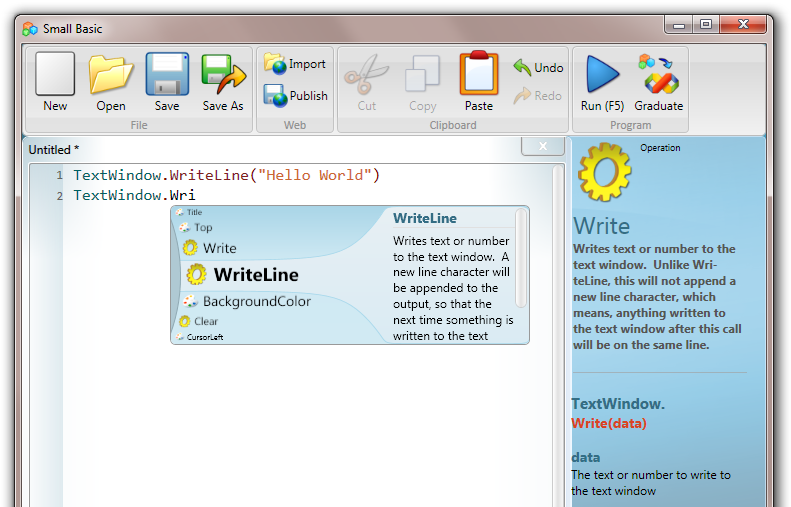
MS Dev Labs have released a great SmallBasic environment that is
very simple to pickup (great for kids).
It’s got a very simple set of commands AND it outputs straight to Silverlight.
Pretty quick ways of building silverlight apps.nice!
Check out http://smallbasic.com -only
if you have some free time 

by community-syndication | Feb 9, 2010 | BizTalk Community Blogs via Syndication
Triggered by a question on the MSDN Forums I did some digging in Reflector to find out the way to programmatically resume orchestration instances that have been stopped in a breakpoint via the Orchestration Debugger. I quickly realized that resuming the orchestration instances using the Operations dll does not work, so here is what I […]
by community-syndication | Feb 9, 2010 | BizTalk Community Blogs via Syndication
I ran into the error, below, because the host instance didn’t have permissions to read the C:\Program Files\Microsoft BizTalk ESB Toolkit 2.0\esb.config file. Also, don’t forget to restart your host instance (or run iisreset) after you update your permissions.
Event Type:Error
Event Source:BizTalk ESB Toolkit 2.0
Event Category:None
Event ID:6060
Date:2/9/2010
Time:2:03:58 PM
User:N/A
Computer:XXXXXXXXXXXXX
Description:
Error 194008: An error occurred reading the, esb, Section in the config file.
Source: Microsoft.Practices.ESB.Resolver.ResolverMgr
Method: System.Collections.Generic.Dictionary`2[System.String,System.String] Resolve(Microsoft.Practices.ESB.Resolver.ResolverInfo, Microsoft.BizTalk.Message.Interop.IBaseMessage, Microsoft.BizTalk.Component.Interop.IPipelineContext)
Error Source: Microsoft.Practices.ESB.Resolver
Error TargetSite: Microsoft.Practices.ESB.Configuration.ESBConfigurationSection get_ESBConfig()
Error StackTrace: at Microsoft.Practices.ESB.Resolver.ResolverConfigHelper.get_ESBConfig()
at Microsoft.Practices.ESB.Resolver.ResolverMgr.get_ResolverProviderCache()
at Microsoft.Practices.ESB.Resolver.ResolverMgr.GetResolver(ResolverInfo info)
at Microsoft.Practices.ESB.Resolver.ResolverMgr.Resolve(ResolverInfo info, IBaseMessage message, IPipelineContext pipelineContext)
by community-syndication | Feb 9, 2010 | BizTalk Community Blogs via Syndication
Note: This blog post is written using the .NET framework 4.0 RC 1
Using Workflow Foundation 4 the NativeActivity is the powerhouse when it comes to building native activities. One of its many capabilities is around error handling. Every so often I run into one of these things where things don’t quite work the way I expect them to and this is one of these cases.
The basics of error handling when scheduling child activities.
Whenever a NativeActivity is executed it is passed an instance of the NativeActivityContext which it can use to schedule other activities using the ScheduleActivity() function. This ScheduleActivity() function has a few overloads, one of them using an FaultCallback. This FaultCallback is called when some kind of exception occurs while executing the child activity being scheduled. The fault handling function is called with a couple of parameters including a NativeActivityFaultContext and the exception that is unhandled. The NativeActivityFaultContext contains a HandleFault() function used to indicate that the fault was handled. Not quite as straightforward as a try/catch block but given the asynchronous nature of workflow that would not work.
So I expected the following activity to catch any exceptions and continue.
public sealed class MyActivity : NativeActivity
{
public Activity Body { get; set; }
protected override void Execute(NativeActivityContext context)
{
context.ScheduleActivity(Body, FaultHandler);
}
private void FaultHandler(NativeActivityFaultContext faultContext, Exception propagatedException, ActivityInstance propagatedFrom)
{
Console.WriteLine(propagatedException.Message);
faultContext.HandleFault();
}
}
Do not use, this code has a serious error!
Lets test this code by executing the following workflow:
private static Activity CreateWorkflow()
{
return new Sequence
{
Activities =
{
new WriteLine { Text = "Start outer sequence." },
new MyActivity
{
Body = new Sequence
{
Activities =
{
new WriteLine { Text = "Start inner sequence." },
new Throw { Exception = new InArgument<Exception>(ctx => new DivideByZeroException()) },
new WriteLine { Text = "End inner sequence." }
}
}
},
new WriteLine { Text = "End outer sequence." }
}
};
}
Given this workflow I would expect the following output:
However what really happens is something else as I receive the following output:
As we can see the second inner WriteLine still executes even though the exception is caught at a higher level!
This behavior reminds me of the infamous VB6 On Error Resume Next where an error would just be ignored and the next statement executed. Not really what I was expecting or want.
So the fix is easy. All that is needed is to explicitly cancel the child activity being executed using the CancelChild() function. Below the correct version of my NativeActivity.
public sealed class MyActivity : NativeActivity
{
public Activity Body { get; set; }
protected override void Execute(NativeActivityContext context)
{
context.ScheduleActivity(Body, FaultHandler);
}
private void FaultHandler(NativeActivityFaultContext faultContext, Exception propagatedException, ActivityInstance propagatedFrom)
{
Console.WriteLine(propagatedException.Message);
faultContext.HandleFault();
faultContext.CancelChild(propagatedFrom);
}
}
The correct fault handler
Enjoy!
www.TheProblemSolver.nl
Wiki.WindowsWorkflowFoundation.eu
by community-syndication | Feb 9, 2010 | BizTalk Community Blogs via Syndication
[In addition to blogging, I am also now using Twitter for quick updates and to share links. Follow me at: twitter.com/scottgu]
This afternoon we made available the VS 2010 and .NET 4 release candidates. You can find download links here.
Right now the downloads are available only to MSDN subscribers. Starting Wednesday (Feb 10th) everyone will be able to download them (regardless of whether you are a MSDN subscriber or not).
Background on the Release Candidate
I blogged about us deciding to ship a public VS 2010 release candidate last December. The primary motivation behind releasing a public RC was to ensure that we could get broad testing and feedback on the performance and stability work we’ve been doing since the last public VS 2010 Beta 2 release.
Over the last few months we’ve been releasing interim builds to a small set of folks who have been helping us validate fixes and measure very large projects and solutions. The feedback from them has been extremely positive the last few weeks – which is why we are now opening up today’s build to a much wider set of people to people to try out.
The RC has only been out a few hours so far – but the feedback so far on Twitter has been nice to see:
- @DanWahlin: The performance improvements with Visual Studio 2010 RC compared to previous builds are huge. Really happy with what I’m seeing so far.
- @peterbromberg: VS2010 RC: I must admit, I am impressed. Major speed and performance improvements. They are obvious immediately!
- @Nick_Craver: RC performance is ridiculously faster, can’t wait to switch over full time!
- @Rlz2cool: Just tried VS2010 RC. One word incredible. Super fast, great build with things I saw in earlier releases fixed. So awesome.
- @ddotterer: Trying out VS2010 RC: Snappier UI, much faster intellisense, significant build time reduction, etc. Overall: AWESOME JOB
- @tomkirbygreen: Oh my goodness, VS2010 RC is much, much faster. Kudos to the VS perf team and everyone else. Uninstalling Visual Studio 2008 🙂
- @JoshODBrown The developers on the Visual Studio 2010 RC must have had their usual beverages replaced with unicorn tears or something. #VS2010 #awesome
- @jbristowe: Holy Butterball! VS 2010 RC is crazy fast. It makes me feel like this: http://bit.ly/cPaOvE
Reporting Issues
Our goal with releasing the public RC build today is to get a lot of eyes on the product helping to find and report the remaining bugs we need to fix. If you do find an issue, please submit a bug report via the Visual Studio Connect site and also please send me an email directly ([email protected]) with details about it. I can then route your email to someone to investigate and follow-up directly (which can help expedite the investigation).
If you do install and use the VS 2010 RC we’d also really appreciate if you would fill out this survey about your experiences.
Answers to a few questions and known issues
Here are a few answers to some questions/known issues:
- If you have previously installed VS 2010 Beta 2 on your computer you should use Add/Remove Programs (within Windows Control Panel) to remove VS 2010 Beta2 and .NET 4 Beta2 before installing the VS 2010 RC. Note that VS 2010 RC can be installed on the same machine side-by-side with VS 2008 and VS 2005.
- Silverlight 3 projects are supported with today’s VS 2010 RC build – however Silverlight 4 projects are not yet supported. We will be adding VS 2010 RC support for SL4 with the next public Silverlight 4 drop. If you are doing active Silverlight 4 development today we recommend staying with the VS10 Beta 2 build for now.
- We recently identified a crashing bug that can impact systems that have multi-touch and some screen-readers enabled. We are working on a patch for people who are impacted by it.
- We recently found an issue where project upgrades from VS 2008 can take a long time to complete if the project has .xsd files within them. If you think VS is taking a long time on a project upgrade give it a few more minutes to complete before assuming it has hung – you might be running into this slow upgrade issue. Note that once the project is upgraded the performance should return to normal. We are working to fix this with the final release.
Hope this helps,
Scott
by community-syndication | Feb 9, 2010 | BizTalk Community Blogs via Syndication
[In addition to blogging, I am also now using Twitter for quick updates and to share links. Follow me at: twitter.com/scottgu]
A few people have emailed me recently asking about the availability of a Visual Studio -vsdoc intellisense hint file for jQuery 1.4.1.
I blogged about -vsdoc files in the past – they provide additional intellisense help information for Visual Studio, and enable you to get a richer intellisense experience with dynamic Javascript libraries. If you are using VS 2008 SP1 you’ll want to download and install this patch in order to have VS 2008 automatically use -vsdoc files with intellisense. VS 2010 has support for -vsdoc files built-in.
jQuery 1.4.1 -vsdoc download
The good news is that you can download -vsdoc files for jQuery directly from the jQuery web-site (look for the “Documentation: Visual Studio” link under each major version). Here is a direct pointer to the recently released -vsdoc file for jQuery 1.4.1 that you can use.
Hope this helps,
Scott
by community-syndication | Feb 7, 2010 | BizTalk Community Blogs via Syndication
[In addition to blogging, I am also now using Twitter for quick updates and to share links. Follow me at: twitter.com/scottgu]
This is the fifteenth in a series of blog posts I’m doing on the upcoming VS 2010 and .NET 4 release. Today’s post covers a nice addition to ASP.NET and Windows Forms with .NET 4 – built-in charting control support.
ASP.NET and Windows Forms Charting Controls
A little over 14 months ago I blogged about how Microsoft was making available a free download of charting controls for both ASP.NET 3.5 and Windows Forms 3.5.
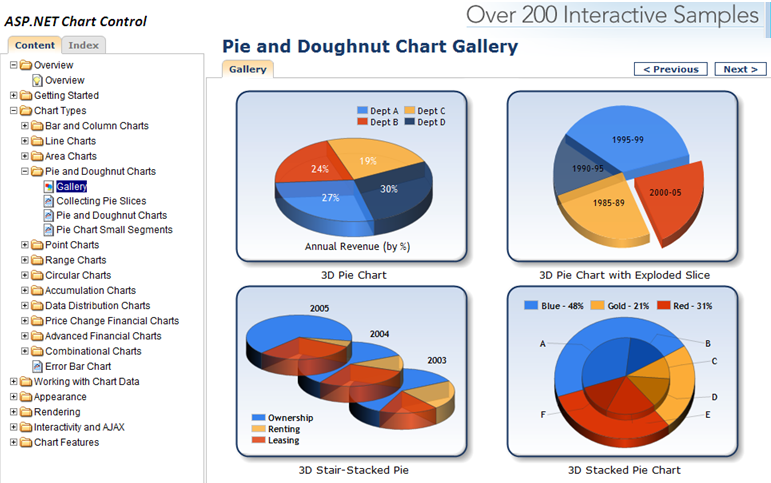
You can download and use these runtime controls for free within your web and client applications today. You can also download VS 2008 tooling support for them. They provide a rich set of charting capabilities that is easy to use. To get a sense of what all you can do with them, I recommend downloading the ASP.NET and Windows Forms sample projects which provide more than 200 samples within them. Below is a screen-shot of some pie and doughnut chart samples from the ASP.NET sample application:
Charting Controls Now Built-into .NET 4
With .NET 3.5 you had to separately download the chart controls and add them into your application. With .NET 4 these controls are now built-into ASP.NET 4 and Windows Forms 4 – which means you can immediately take advantage of them out of the box (no separate download or registration required).
Within ASP.NET 4 applications you’ll find that there is now a new built-in <asp:chart> control within the “Data” tab of the Toolbox:
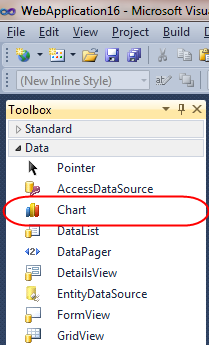
You can use this control without having to register or wire-up any configuration file entries. All of the charting control configuration is now pre-registered with ASP.NET 4 (meaning nothing has to be added to an application’s web.config file for them to work). This enables you to maintain very clean and minimal Web.config files.
Learning more about the <asp:chart> control
Scott Mitchell has written a great series of articles on the www.4guysfromrolla.com site on how to take advantage of the <asp:chart> control:
- Getting Started – walks through getting started using the Chart Controls, from version requirements to downloading and installing the Chart Controls, to displaying a simple chart in an ASP.NET page.
- Plotting Chart Data – examines the multitude of ways by which data can be plotted on a chart, from databinding to manually adding the points one at a time.
- Rendering the Chart – the Chart Controls offer a variety of ways to render the chart data into an image. This article explores these options.
- Sorting and Filtering Chart Data – this article shows how to programmatically sort and filter the chart’s data prior to display.
- Programmatically Generating Chart Images – learn how to programmatically create and alter the chart image file.
- Creating Drill Down Reports – see how to build drill down reports using the Chart control.
- Adding Statistical Formulas – learn how to add statistical formulas, such as mean, median, variance, and forecasts, to your charts.
- Enhancing Charts With Ajax – improve the user experience for dynamic and interactive charts using Ajax.
His articles are written using .NET 3.5 and the separate ASP.NET charting controls download – but all of the concepts and syntax work out of the box exactly the same with ASP.NET 4.
Michael Ceranski has also written a blog post demonstrating how to use the ASP.NET Chart control within an ASP.NET MVC application. I’m hoping someone will create some nice ASP.NET MVC Html.Chart() helper methods soon that will make this even easier to do in the future.
Hope this helps,
Scott
by community-syndication | Feb 7, 2010 | BizTalk Community Blogs via Syndication
Ive eventually managed to get the “Monitoring BizTalk with HP Openview” whitepaper complete and submitted to Microsoft to go through the publishing process. Not sure how long this takes?
Anyway it should be around soon
Big thanks to Saravana Kumar (BizTalk 24/7) and Dave Gerrish (a great HP Openview Consultant) for their input, and to Elton Stoneman for reviewing it
Cheers
Mike
by community-syndication | Feb 7, 2010 | BizTalk Community Blogs via Syndication
This blog post is about creating a custom configuration section in ASP.NET. This is an alternative to keeping website settings in web.config or appsettings.config.
Perhaps you’ve seen this…
Daniel Berg’s blog about ASP.NET, EPiServer, SharePoint, BizTalk