by community-syndication | Feb 2, 2010 | BizTalk Community Blogs via Syndication
Hi all
Lots of people think, that if they use a Parallel Actions shape, they get things done
in parallel. Well, rethink that. An orchestration executes in just one thread, so
no chance of getting anything to run in parallel. At runtime, the shapes in the parallel
shape are simply serialized.
But what is the algorithm, then?
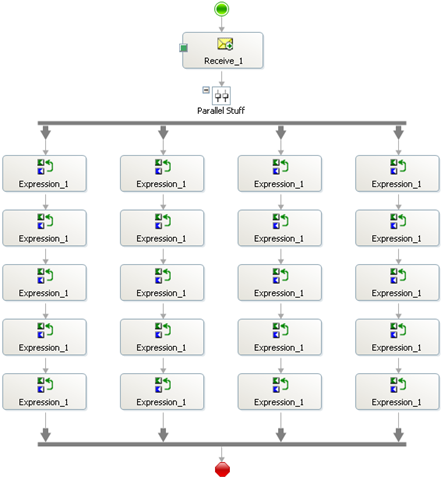
Well, I did some tests. First of all, I created this simple orchestration:
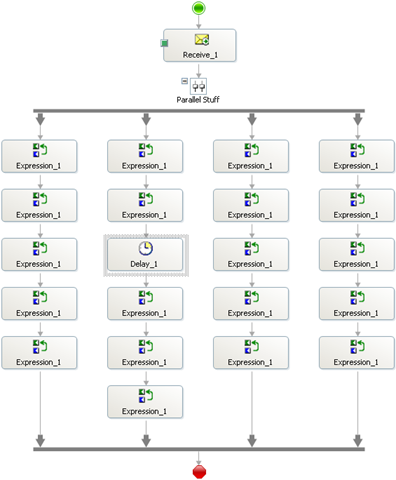
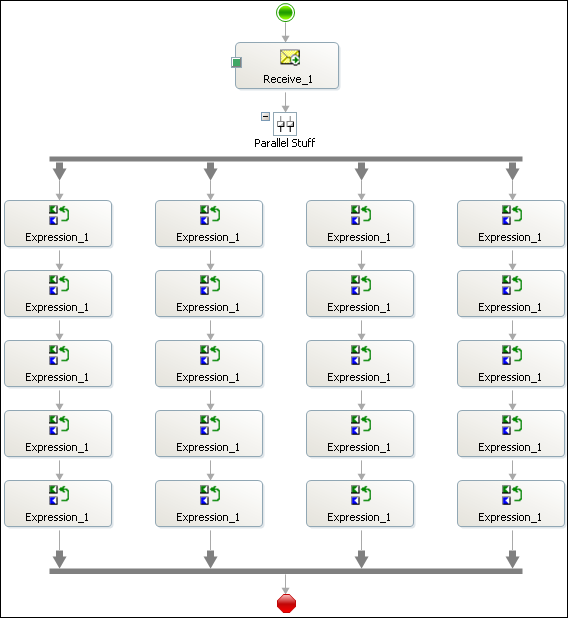
It’s a receive shape to fire up the orchestration and then a parallel shape with four
branches and five expression shapes in each. The code in each expression shape is
this:
 1: System.Diagnostics.Trace.WriteLine("X.
Y");
where X is a number indicating the branch and Y is a sequence number within the branch.
This means that X=2 and Y=3 is the third expression shape in the second branch and
X=4 and Y=1 is the first expression shape in the fourth branch.
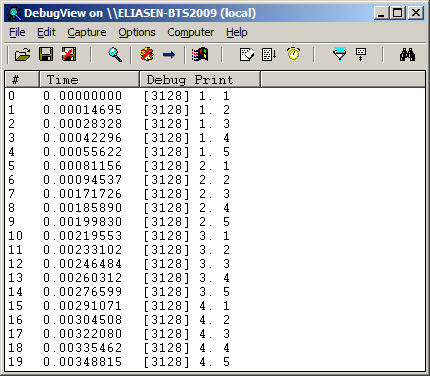
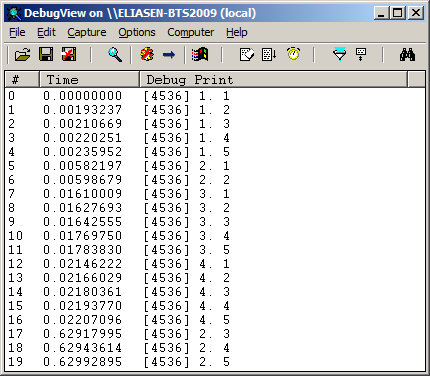
Running this orchestration I get this result from DebugView:
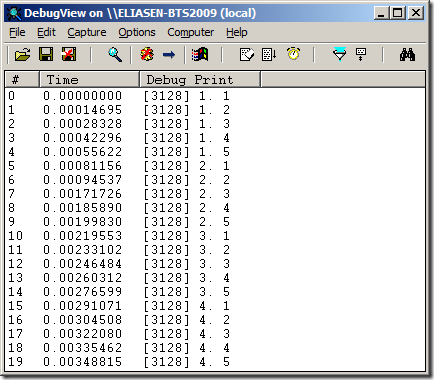
So as you can see, the entire first branch is executed, then the entire second branch,
and so on until the fourth branch has finished. Sounds easy enough. But lets try some
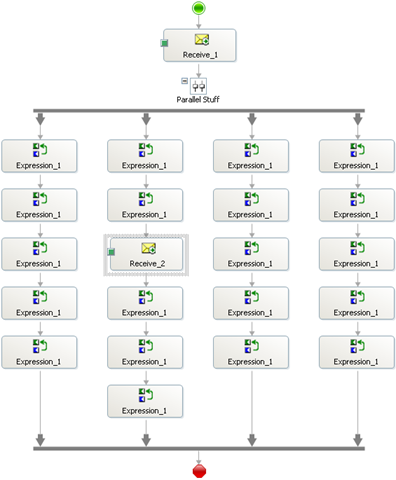
other scenarios like this one:
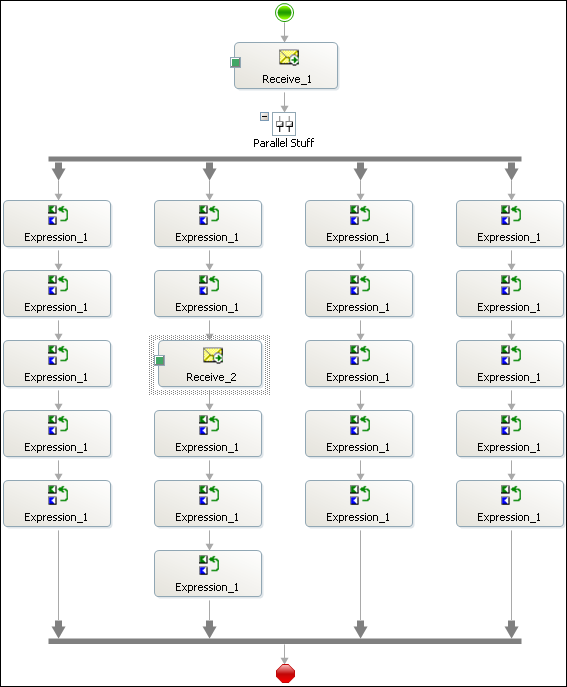
In essence I have thrown in a receive shape in branch 2 to see if branches three and
four will still have to wait until branch 2 has finished.
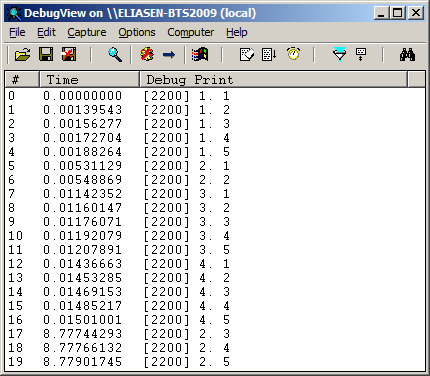
The result can be seen here:
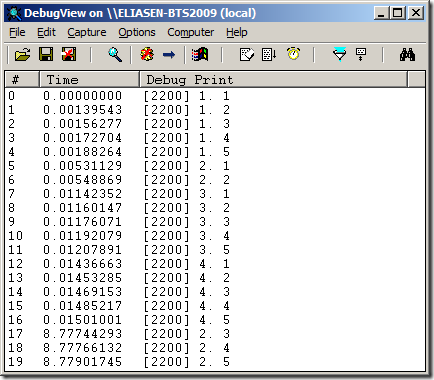
So as you can see, the second branch stops after the second shape because now it awaits
the receive shape. Branches three and four are then executed and after I send in a
message for the receive shape, the second branch completes.
So some form of parallelism is actually achieved, but only when a shape takes too
long to handle. Lets see what happens with a Delay shape instead like this:
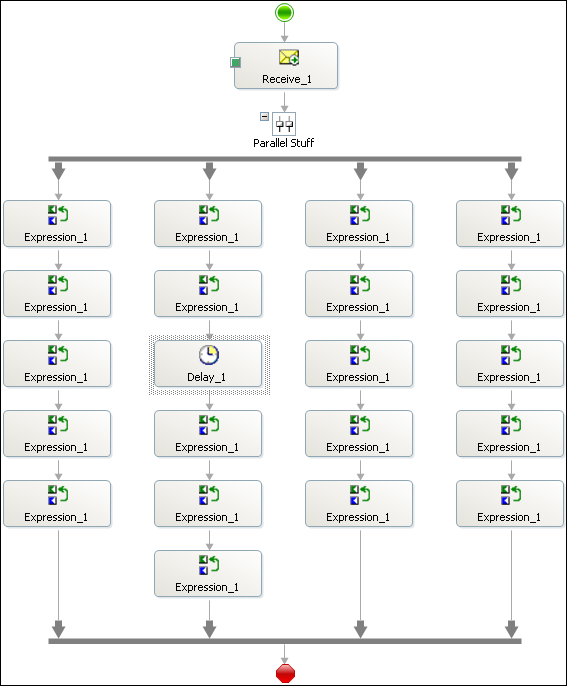
I have switched the Receive Shape for a Delay shape, and I have set the Delay shape
to wait for 100 milliseconds. The result of this is the same as with the Receive shape:
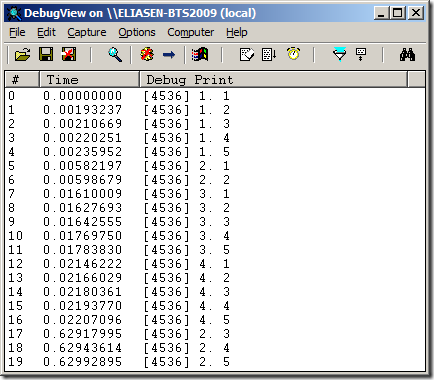
Then I tried setting the Delay shape to just 1 millisecond, but this gave the same
result.
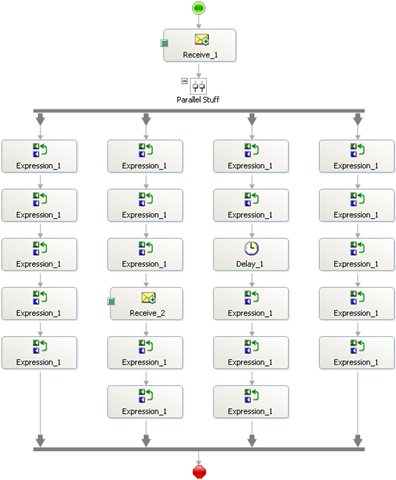
With shapes that take time in two branches, like this:
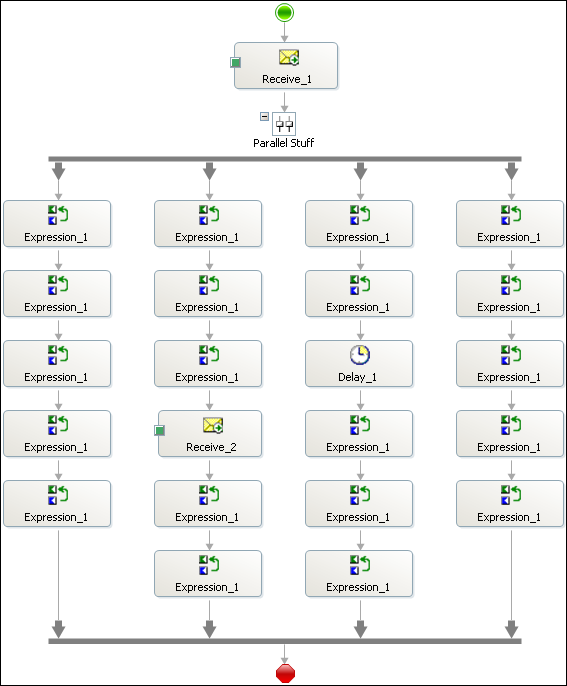
And the Delay is still set at one millisecond. I get the following result:
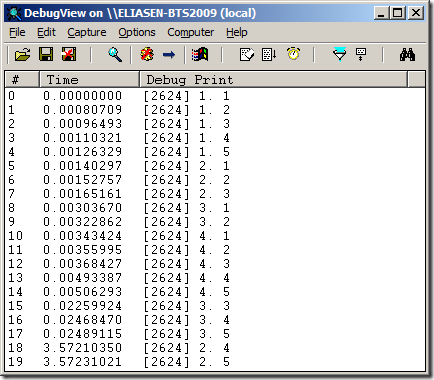
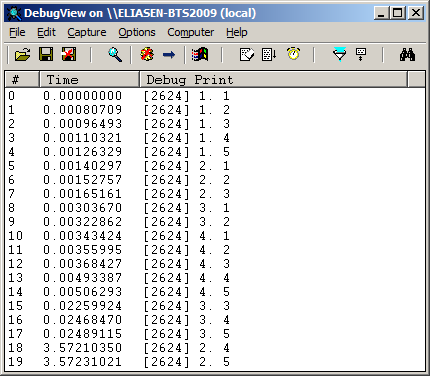
So as you can see, the Receive shape causes branch 2 to stop executing, and the Delay
shape causes branch 3 to stop executing, allowing branch 4 to execute. Branch 3 is
then executed because the Delay shape has finished and finally once the message for
the Receive shape has arrived, branch 2 is executed to its end.
Another thing to note is, that the Delay shape actually doesn’t make the thread sleep.
If it did, we couldn’t continue in another branch once a Delay shape is run. This
makes perfectly sense, since the shapes in one branch are to be seen as a mini-process
within the big process, and the delay that is needed for that mini-process shouldn’t
affect the other branches. This is exemplified in this process:
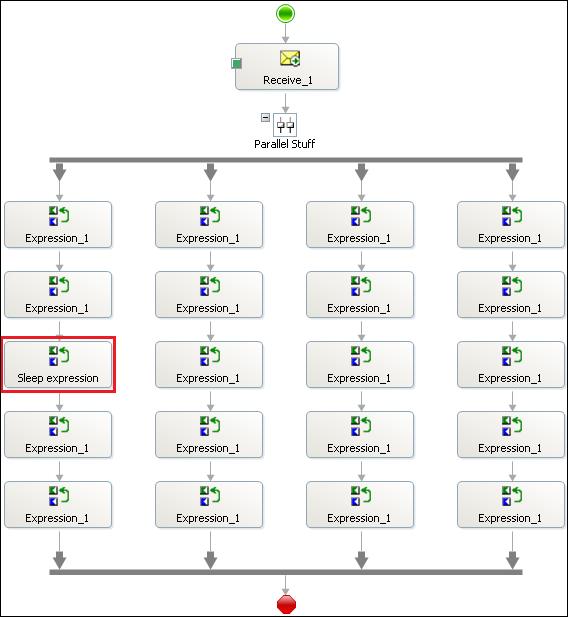
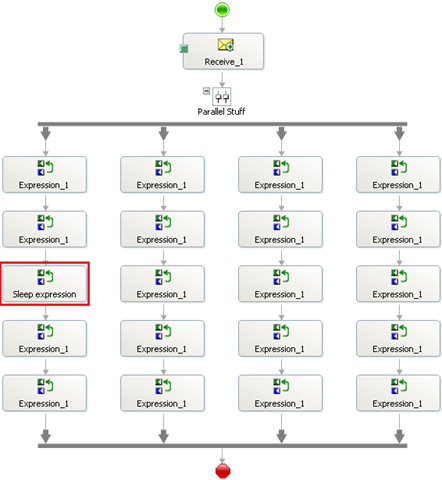
The third expression shape in the first branch has been updated to this code:
 1: System.Diagnostics.Trace.WriteLine("1.
3");
2: System.Threading.Thread.Sleep(2000);
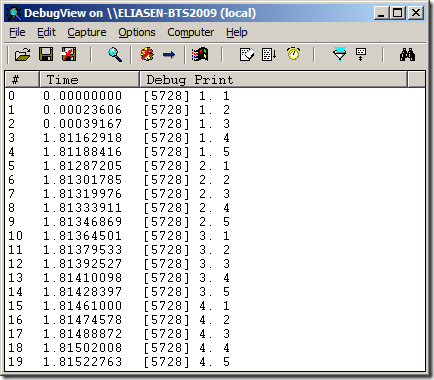
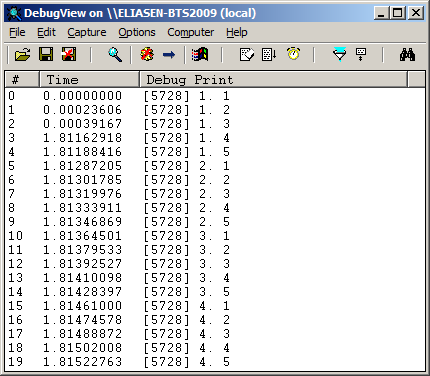
So as you can see, even though the first branch must wait for 2 seconds, it still
executes completely before the second branch is started.
So, takeaways:
-
The Parallel Actions shape does NOT mean you get any multi-threading execution environment.
-
Think of the PArallel Actions shape as a way of letting multiple Business Activities
happen and you don’t know in what order they will occur.
-
The Delay shape does not use Thread.Sleep, but instead handles things internally.
—
eliasen
by community-syndication | Feb 2, 2010 | BizTalk Community Blogs via Syndication
If you have been wondering so far whether an ESB implementation is the right solution for your integration problems, let us help you make the right decision.
On Feb 11th, Peter Kelcey (Technical Sales Professional from Microsoft Canada) and I, will be co-presenting an MSDN Webcast. Peter has extensive experience helping customers with ESB implementation using the BizTalk ESB Toolkit. We will articulate the business values that an ESB brings to integration solutions, specifically how it can promote flexibility and reuse. Being able to adapt rapidly to new business or technical requirements while minimizing development efforts, costs and risks is crucial in the current tough economic climate.
This is going to be a demo intensive session to illustrate with a series of live short demos the advantages and use cases of the BizTalk ESB Toolkit.
More details are included below as is the link to register. Hope to see you there.
http://msevents.microsoft.com/CUI/WebCastEventDetails.aspx?EventID=1032440359&EventCategory=4&culture=en-US&CountryCode=US
Language(s):
English.
Audience(s):
Pro Dev/Programmers. (would be also useful for Enterprise/Solution Architects)
Duration:
60 Minutes
Start Date:
Thursday, February 11, 2010 1:00 PM Pacific Time (US & Canada)
Event Overview
Businesses across the globe are trying to cope with a faster rate of change. The need to adapt rapidly to new internal and external requirements is pushing organizations to look for more flexible solutions to build and connect their applications. At the same time, IT departments are also pressured to reduce costs and reuse software assets and services. Enterprise Service Bus has emerged as an architectural pattern that can help achieve these goals. In this webcast, we introduce the Microsoft BizTalk Enterprise Service Bus Toolkit 2.0 and explain how it accelerates the implementation of a very dynamic and reusable messaging and integration infrastructure on top of Microsoft BizTalk Server 2009 and the Microsoft .NET Windows Communication Framework.
We hope this session will convince you to stop procrastinating and “dive into the ESB pool”
Cheers,
Ofer
by community-syndication | Feb 2, 2010 | BizTalk Community Blogs via Syndication
[Source: http://geekswithblogs.net/andym/archive/2010/02/02/137753.aspx]
I recently had the pleasure of installing and configuring the ESB Toolkit 2.0 in a multi-server environment.There are some notes on how to do this in the official documentation but they’re not exhaustive and they don’t include details on how to install the management portal in a multi-server environment.
Prerequisites:
%u00b7 Install and Configure BizTalk in your multi-server environment
%u00b7 Install and Configure UDDI in your multi-server environment:
o You install and configure the Database components on the SQL Server!Yes, your DBAs are going to be unhappy about this.
o Install and configure the other UDDI components on your BizTalk Servers
o Note that you can only run the Notification Service component on server (I assume you could cluster it but we didn’t get into this)
ESB Toolkit 2.0 Installation and Configuration:
%u00b7 Follow the documentation for “Installing the ESB Toolkit Core” on all of your servers
%u00b7 Please note that you can use the “File” configuration in a multi-server environment.To me, it seems that the docs are pushing the “SSO” configuration but you don’t have to use “SSO” for a multi-server environment.Just run the configuration tool on the second to “n” server and point toward the already created databases.Also I have heard that people have had a lot of problems with the SSO configuration
%u00b7 Double check the esb.config file and make sure all of the settings are correct
%u00b7 You may need to turn Kerberos on for IIS before you can successfully execute the Microsoft.Practices.ESB.UDDIPublisher.exe: http://support.microsoft.com/kb/215383
%u00b7 Make sure you unpack the samples C:\Program Files\Microsoft BizTalk ESB Toolkit 2.0\ESBSource.zip following the official documentation.(Basically just follow all of the instructions in the “Installing the ESB Toolkit Core” section of the docs
ESB Management portal Installation and Configuration in a Multi-Server Environment:
%u00b7 Keep in mind that the portal is a sample
%u00b7 You can’t use the Management_Install scripts on a server that doesn’t have Visual Studio on it because the scripts require the Visual Studio 2008 SDK to function; the Visual Studio 2008 SDK requires Visual Studio for it to be installed obviously VS won’t be installed in a multi-server environment
%u00b7 The Portals solution (.sln) does include a setup project.I wanted a debug build so I had to open the solution (on my developer workstation)and in Visual Studio and use Configuration Manager to make sure that the setup project would be built for a “debug” build
%u00b7 Build the solution, on your developer workstation,and find the .msi that was created for the portal
%u00b7 Now on each sever in your group, perform the following:
%u00b7 Create an application pool, in IIS, named EsbPortalNetworkAppPool and have it run under Network Service
%u00b7 Install the .msi on your first server; the .msi creates the appropriate Virtual Directories (but doesn’t configure them correctly, see the authentication changes, below); use the application pool you created, when prompted.This creates four virtual directories one for the portal and one for each of its three services.Please note that this installs the portal, the ESB.BAM.Service, ESB.Exceptions.Service and the ESB.UDDI.Services to c:\inetpub\wwwroot
%u00b7 Create the ESBAdmin db using the C:\projects\Microsoft.Practices.ESB\ESBSource\Source\Samples\Management Portal\SQL\ESB.Administration Database.sql file; it blew up at the bottom (find the “Create BizTalk Server Administrators Login” section) because my BizTalk Admin and BizTalk App Users groups were named differently; I manually added the appropriate permissions in SQL Server
%u00b7 Update the C:\Inetpub\wwwroot\ESB.Portal\web.config with the correct db location and group names (connectionStrings and authorization nodes)
%u00b7 Update the C:\Inetpub\wwwroot\ESB.Exceptions.Service\web.config to point to the EsbExceptionDb (connectionStrings node)
%u00b7 Update the C:\Inetpub\wwwroot\ESB.BAM.Service\web.config to point to the BAMPrimaryImport db (connectionStrings node)
%u00b7 Add Windows Integrated to the ESB.Exceptions.Service, ESB.BAM.Service and ESB.Portal virtual directories
%u00b7 Removed Anonymous from ESB.Exceptions.Service, ESB.BAM.Service and ESB.Portal virtual directories
%u00b7 Follow the installation and configuration steps for the “Installing the ESB Management Portal Alert Service” and “Installing the ESB Management Portal UDDI Publishing Service” sections.We did this on one server in the group, no more.
%u00b7 We also followed the “Configuring Exception Management InfoPath Form Template Shares” section but I don’t see how that is necessary at this point.
I hope this helps.If I run into issues or I find that I need to correct this post I will update it
by community-syndication | Feb 2, 2010 | BizTalk Community Blogs via Syndication
Mark Palmer , CEO of StreamBase , has posted a series of predictions about the Complex Event Processing (CEP) market in 2010. Generally, I am not a big fan of making or commenting on predictions related to the technology market but I wanted to add a few…(read more)
by community-syndication | Feb 2, 2010 | BizTalk Community Blogs via Syndication
In creating a process where SQL Server takes XML data that is stored in a table and populates a table, I have learned a few things on how to get SQL Server to more efficiently query XML data.
Setup:
Let’s first create a table to store the data:
CREATE TABLE dbo.XMLDataStore(
  link nvarchar(100) NULL,
  data xml NULL
) ON [PRIMARY]
GO
Let’s take a look at the XML that we are going to query (yes I know is is a large xml document, but I wanted to show the peformance in a real world situation, not a 3 node xml document that is normally demonstrated)
Now let’s insert it into the table:
INSERT INTO [XMLTutorial].[dbo].[XMLDataStore]
           ([link]
           ,[data])
     VALUES
           ('ABCDEFGHIJ'
           ,'<ns0:ORU_R01_231_GLO_DEF xmlns:fo="http://www.w3.org/1999/XSL/Format" xmlns:ns0="http://labratory/DB/2X">
               ...
            </ns0:ORU_R01_231_GLO_DEF>')
GO
The first query starts at the Observation record (all 64 records) and traverses the xml document and creates the necessary columns in 16 seconds.
select  Observation.ref.value('((../../Patient/PID_PatientIdentificationSegment/PID_5_PatientName/XPN_1_GivenName/text())[1])','nvarchar(100)') as FirstName,
    Observation.ref.value('((../../Patient/PID_PatientIdentificationSegment/PID_5_PatientName/XPN_0_FamilyLastName/XPN_0_0_FamilyName/text())[1])','nvarchar(100)') as LastName,
    Observation.ref.value('((../../Patient/PID_PatientIdentificationSegment/PID_7_DateTimeOfBirth/TS_0_TimeOfAnEvent/text())[1])','nvarchar(100)') as BirthDate,
    Observation.ref.value('((../../Patient/PID_PatientIdentificationSegment/PID_2_PatientId/CX_0_Id/text())[1])','nvarchar(100)') as InsuranceNumber,
    Observation.ref.value('((../OBR_ObservationRequestSegment/OBR_1_SetIdObr/text())[1])','nvarchar(100)')as [OBRID],
    Observation.ref.value('((../OBR_ObservationRequestSegment/OBR_7_ObservationDateTime/TS_0_TimeOfAnEvent/text())[1])','nvarchar(10)') as ObservationDate,
    Observation.ref.value('((../OBR_ObservationRequestSegment/OBR_4_UniversalServiceId/CE_1_Text/text())[1])','nvarchar(100)') as LabTestName,
    null as LabTestCode,
    Observation.ref.value('((./OBX_ObservationResultSegment/OBX_1_SetIdObx/text())[1])','nvarchar(100)') as [OBXID],
    Observation.ref.value('((./OBX_ObservationResultSegment/OBX_3_ObservationIdentifier/CE_4_AlternateText/text())[1])','nvarchar(100)') as LabResultName,
    Observation.ref.value('((./OBX_ObservationResultSegment/OBX_3_ObservationIdentifier/CE_0_Identifier/text())[1])','nvarchar(100)') as LabResultCode,
    Observation.ref.value('((./OBR_5_PriorityObr/text())[1])','nvarchar(100)') as [Priority],
    Observation.ref.value('((./OBX_ObservationResultSegment/OBX_14_DateTimeOfTheObservation/TS_0_TimeOfAnEvent/text())[1])','nvarchar(100)') as [ResultDate],
    Observation.ref.value('((./OBX_ObservationResultSegment/OBX_5_ObservationValue/CE_4_AlternateText/text())[1])','nvarchar(100)') as [ResultValue],
    Observation.ref.value('((./OBX_ObservationResultSegment/OBX_6_Units/CE_0_Identifier/text())[1])','nvarchar(100)') as [UnitOfMeasure],
    Observation.ref.value('((./OBX_ObservationResultSegment/OBX_7_ReferencesRange/text())[1])','nvarchar(100)') as [ReferenceRange]
from XMLDataStore x cross apply x.data.nodes('//Observation') Observation(ref)
where x.link='ABCDEFGHIJ'
The first optimization step is instead of using the Observation node and deriving all of the other columns from that, you can further use CROSS APPLY to create separate nodes to extract data from coupled with not using wild cards and diving directly to the exact node I need to. I went to the OBX_ObservationResultSegment as the originating node, and then from that node (named Observation), I derived two other nodes to reference in the query; Patient and Request.
This time the query completed in 4 seconds:
WITH XMLNAMESPACES ('http://labratory/DB/2X' AS "ns0")
select  Patient.node.value('(PID_5_PatientName/XPN_1_GivenName/text())[1]','nvarchar(100)') as FirstName,
    Patient.node.value('(PID_5_PatientName/XPN_0_FamilyLastName/XPN_0_0_FamilyName/text())[1]','nvarchar(100)') as LastName,
    Patient.node.value('(PID_7_DateTimeOfBirth/TS_0_TimeOfAnEvent/text())[1]','nvarchar(100)') as BirthDate,
    Patient.node.value('(PID_2_PatientId/CX_0_Id/text())[1]','nvarchar(100)') as InsuranceNumber,
    Request.node.value('(OBR_1_SetIdObr/text())[1]','nvarchar(100)')as [OBRID],
    Request.node.value('(OBR_7_ObservationDateTime/TS_0_TimeOfAnEvent/text())[1]','nvarchar(10)') as ObservationDate,
    Request.node.value('(OBR_4_UniversalServiceId/CE_1_Text/text())[1]','nvarchar(100)') as LabTestName,
    null as LabTestCode,
    Observation.node.value('(OBX_1_SetIdObx/text())[1]','nvarchar(100)') as [OBXID],
    Observation.node.value('(OBX_3_ObservationIdentifier/CE_4_AlternateText/text())[1]','nvarchar(100)') as LabResultName,
    Observation.node.value('(OBX_3_ObservationIdentifier/CE_0_Identifier/text())[1]','nvarchar(100)') as LabResultCode,
    Observation.node.value('(OBR_5_PriorityObr/text())[1]','nvarchar(100)') as [Priority],
    Observation.node.value('(OBX_14_DateTimeOfTheObservation/TS_0_TimeOfAnEvent/text())[1]','nvarchar(100)') as [ResultDate],
    Observation.node.value('(OBX_5_ObservationValue/CE_4_AlternateText/text())[1]','nvarchar(100)') as [ResultValue],
    Observation.node.value('(OBX_6_Units/CE_0_Identifier/text())[1]','nvarchar(100)') as [UnitOfMeasure],
    Observation.node.value('(OBX_7_ReferencesRange/text())[1]','nvarchar(100)') as [ReferenceRange]
from XMLDataStore x
cross apply x.data.nodes('ns0:ORU_R01_231_GLO_DEF/CompleteOrder/Order/Observation/OBX_ObservationResultSegment') Observation(node)
cross apply Observation.node.nodes('../../../Patient/PID_PatientIdentificationSegment') Patient(node)
cross apply Observation.node.nodes('../../OBR_ObservationRequestSegment') Request(node)
where x.link='ABCDEFGHIJ'
Never being satisfied, let’s add an index to the data. However, to add an xml index to the data, we need to create a clustered index on the table. If we simply try to add an xml index to the current table with this command:
CREATE PRIMARY XML INDEX PrimaryXMLIndex ON
dbo.XMLDataStore(data)
GO
We get the following error:
Msg 6332, Level 16, State 201, Line 1
Table 'dbo.XMLDataStore' needs to have a clustered primary key with less than 16 columns in it in order to create a primary XML index on it.
Not descriptive, so let’s create a new table:
CREATE TABLE dbo.OptimizedXMLDataStore(
  id INT IDENTITY PRIMARY KEY,
  link nvarchar(100) NOT NULL,
  data xml NOT NULL
) ON [PRIMARY]
GO
And creating the following indexes in the database:
CREATE PRIMARY XML INDEX PrimaryXMLIndex ON
dbo.OptimizedXMLDataStore(data)
GO
CREATE XML INDEX
XMLDataStore_XmlCol_PATH ON dbo.OptimizedXMLDataStore(data)
USING XML INDEX PrimaryXMLIndex FOR PATH
GO
Now that the indexes are created, let’s insert the data into this table:
INSERT INTO [XMLTutorial].[dbo].[OptimizedXMLDataStore]
           ([link]
           ,[data])
     VALUES
           ('ABCDEFGHIJ'
           ,'<ns0:ORU_R01_231_GLO_DEF xmlns:fo="http://www.w3.org/1999/XSL/Format" xmlns:ns0="http://labratory/DB/2X">
               ...
            </ns0:ORU_R01_231_GLO_DEF>')
GO
Now let’s run the same query (except pointing to the indexed table):
WITH XMLNAMESPACES ('http://labratory/DB/2X' AS "ns0")
select  Patient.node.value('(PID_5_PatientName/XPN_1_GivenName/text())[1]','nvarchar(100)') as FirstName,
    Patient.node.value('(PID_5_PatientName/XPN_0_FamilyLastName/XPN_0_0_FamilyName/text())[1]','nvarchar(100)') as LastName,
    Patient.node.value('(PID_7_DateTimeOfBirth/TS_0_TimeOfAnEvent/text())[1]','nvarchar(100)') as BirthDate,
    Patient.node.value('(PID_2_PatientId/CX_0_Id/text())[1]','nvarchar(100)') as InsuranceNumber,
    Request.node.value('(OBR_1_SetIdObr/text())[1]','nvarchar(100)')as [OBRID],
    Request.node.value('(OBR_7_ObservationDateTime/TS_0_TimeOfAnEvent/text())[1]','nvarchar(10)') as ObservationDate,
    Request.node.value('(OBR_4_UniversalServiceId/CE_1_Text/text())[1]','nvarchar(100)') as LabTestName,
    null as LabTestCode,
    Observation.node.value('(OBX_1_SetIdObx/text())[1]','nvarchar(100)') as [OBXID],
    Observation.node.value('(OBX_3_ObservationIdentifier/CE_4_AlternateText/text())[1]','nvarchar(100)') as LabResultName,
    Observation.node.value('(OBX_3_ObservationIdentifier/CE_0_Identifier/text())[1]','nvarchar(100)') as LabResultCode,
    Observation.node.value('(OBR_5_PriorityObr/text())[1]','nvarchar(100)') as [Priority],
    Observation.node.value('(OBX_14_DateTimeOfTheObservation/TS_0_TimeOfAnEvent/text())[1]','nvarchar(100)') as [ResultDate],
    Observation.node.value('(OBX_5_ObservationValue/CE_4_AlternateText/text())[1]','nvarchar(100)') as [ResultValue],
    Observation.node.value('(OBX_6_Units/CE_0_Identifier/text())[1]','nvarchar(100)') as [UnitOfMeasure],
    Observation.node.value('(OBX_7_ReferencesRange/text())[1]','nvarchar(100)') as [ReferenceRange]
from OptimizedXMLDataStore x
cross apply x.data.nodes('ns0:ORU_R01_231_GLO_DEF/CompleteOrder/Order/Observation/OBX_ObservationResultSegment') Observation(node)
cross apply Observation.node.nodes('../../../Patient/PID_PatientIdentificationSegment') Patient(node)
cross apply Observation.node.nodes('../../OBR_ObservationRequestSegment') Request(node)
where x.link='ABCDEFGHIJ'
The results came back in 0 seconds
Things I did not do:
- Actually see Clark Kent (I think he was born before June of 1938, but it was the first time he was writtent about)
- Question why the “The Last Son of Krypton” was actually getting lab work done
- Imported schemas into the database
by community-syndication | Feb 2, 2010 | BizTalk Community Blogs via Syndication
I’ve seen several posts of how to add .cs files to your VS2008 BizTalk projects (Yossi has a good post), but none of them shows how to use them, which is not that obvious.
First of all, you can not use classes defined in the same project as the orchestration where you plan to use them. Secondly, and this is where I got stuck, – You don’t get any Intellisense!
But it will compile and work just fine.
Thanks to Jan Eliasen for the help.
by community-syndication | Feb 1, 2010 | BizTalk Community Blogs via Syndication
Today, Feb 1st 2010, Windows Azure and SQL Azure have announced general availability and have started charging customers. Windows Azure platform AppFabric continues to be free until April 2010. Details available at http://blogs.msdn.com/windowsazure/archive/2010/02/01/windows-azure-platform-now-generally-available-in-21-countries.aspx
Windows Azure platform AppFabric Team

by community-syndication | Feb 1, 2010 | BizTalk Community Blogs via Syndication
BizTalk Documenterhas been updated to v3.3. This being a point release, there is still no links to other tools such as MapDocumenter, but thats on the list for the upcoming combined Documenter and Profiler.
The main changes are
The UI now allows selecting “Word” as an output option. This was always available in the command line but […]
by community-syndication | Feb 1, 2010 | BizTalk Community Blogs via Syndication
Some recent cases have highlighted a couple of issues with the WCF SAP adapter. After some digging it turns out these are too common. The point here is to get these on the BizTalk blog.
The first issue is intermittent failure to receive SAP documents. There is no pattern to the failures. In some cases the first documents in a batch fail and the rest process successfully. The failed documents eventually are processed. Research indicates there is a design flaw in the adapter.
Problem
An error is triggered whenever there is an interval greater than about 15 minutes between receives of IDOC’s. This error causes one IDOC (the one in the middle of being transmitted) to be stuck permanently in SAP (in the transmitting state). Once the error occurs, the WCF Adapter faults, and restarts itself. During the restart, the connection is down and all IDOC’s sent during this time end up in SAP’s retry queue (thanks to Xiao Dong Zhu).
Fortunately the fix for this issue is not too bad. Open the port to the SAP “Binding” tab. Scroll down to the “Standard Binding Element” section. Observe the “receiveTimeOut” property is set to “00:10:00”.
Solution
Update this setting to the maximum value (24.20:31:23.6470000).
The next issue can also be found in some Internet chatter.
Problem
WCF SAP tracing shows the following error.
[1]1810.0B34::01/26/2010-15:06:27.248 [CSharp]:[Wcf] BtsErrorHandler.HandleError called with Exception: Microsoft.ServiceModel.Channels.Common.XmlReaderGenerationException: An error occurred when trying to convert byte array: [32-00-30-00-31-00-30-00-30-00-30-00-30-00-30-00] of RFCTYPE: RFCTYPE_DATE with length: 8 and decimals: 0 to a .Net type. The parameter/field name is: CREDAT. —> System.ArgumentOutOfRangeException: Year, Month, and Day parameters describe an un-representable DateTime.
<E2ETraceEvent xmlns="http://schemas.microsoft.com/2004/06/E2ETraceEvent">
<System xmlns="http://schemas.microsoft.com/2004/06/windows/eventlog/system">
<EventID>0</EventID>
<Type>3</Type>
<SubType Name="Error">0</SubType>
<Level>2</Level>
<TimeCreated SystemTime="2010-01-26T20:54:27.3084730Z" />
<Source Name="Microsoft.Adapters.SAP" />
<Correlation ActivityID="{21868c20-2c8f-423e-8f1b-90291ad032cc}" />
<Execution ProcessName="BTSNTSvc64" ProcessID="4008" ThreadID="25" />
<Channel />
<Computer>PBGBT1LBD01</Computer>
</System>
<ApplicationData>
<TraceData>
<DataItem>
<TraceRecord Severity="Error" xmlns="http://schemas.microsoft.com/2004/10/E2ETraceEvent/TraceRecord">
<TraceIdentifier>An error occurred when trying to convert byte array: [32-00-30-00-31-00-30-00-30-00-30-00-30-00-30-00] of RFCTYPE: RFCTYPE_DATE with length: 8 and decimals: 0 to a .Net type. The parameter/field name is: CREDAT.</TraceIdentifier>
<Description>ConvertRfcBytesToNetType</Description>
<AppDomain>DefaultDomain</AppDomain>
<Source>System.ArgumentOutOfRangeException/2256335</Source>
</TraceRecord>
</DataItem>
</TraceData>
</ApplicationData>
</E2ETraceEvent>
Solution
Recreate the RFC-destination in the SAP system (http://msdn.microsoft.com/en-us/library/dd788587(BTS.10).aspx ). Set it to Unicode. SAP is trying to send out an Unicode-IDOC while the RFC-destination is set to non-Unicode and the data is being truncated (thanks John Bailey).
Hopefully these two items will make the switch to the WCF SAP adapter a smooth process.

by community-syndication | Feb 1, 2010 | BizTalk Community Blogs via Syndication
Hot on the heels of my previous talk on AppFabric at SBUG, I will be reprising the talk, but with more of a Workflow Services slant at VBUG in Bracknell on Feb 15th 2010.
A big thanks to all who attended the SBUG talk and cool to see the large Avanade contingent comprising many familiar faces […]