Follow BizTalk User Group Sweden on Twitter
For those of you that use Twitter, we have “created” a hash tag for BizTalk User Group Sweden, for use in conjunction with events, as well as pre and post discussions. #swebug…(read more)

For those of you that use Twitter, we have “created” a hash tag for BizTalk User Group Sweden, for use in conjunction with events, as well as pre and post discussions. #swebug…(read more)
Our User Group looking forward to a very exiting spring, with loads of sessions coming up as Microsoft are rolling out the RTM of BizTalk Server 2009. I feel really privileged that we’ve been able to engage such distinguished guest speakers in the past as Jon Flanders, Darren Jefford, Dwight Goins and Charles Young. I was not sure we’d be able to keep up the level of speakers from last year, but I’m proud to say we have:
Speakers:
Brian Loesgen is a Principal SOA Architect with Microsoft. Based in San Diego. Brian is a 6-time Microsoft MVP for BizTalk Server, and has been involved with BizTalk since prior to the BizTalk Server 2000 beta. Brian has extensive experience in building sophisticated enterprise, ESB and SOA solutions. Brian was a key architect/developer of the “Microsoft ESB Guidance”, initially released by Microsoft in Oct 2006. He is a co-author of 6 books, including “BizTalk Server 2004 Unleashed”, and is currently working on “SOA with .NET”.
Alan Smith is form the north of England, and living in Stockholm Sweden, he has been working as a developer with Microsoft technologies since 1995, starting out with C++, and working with VB, ASP, SQL Server before moving to .net with the early betas. He has worked as a multimedia developer, moved into web development, and then working as a systems architect.
Since November 2003 he has been focusing on BizTalk Server, working as a consultant in the UK, then taking up a full time position as BizTalk developer/architect for KnowIT Consulting in Stockholm.
He is also a certified trainer, and delivers BizTalk courses both from the Microsoft Official Curriculum, and the advanced “Deep Dive” training in partnership with QuickLearn.
He has always had a passion for evangelizing new technologies, and played the lead role in the adoption of .net at Razorfish in Stockholm, running after-hours labs, and mentoring other developers. His latest initiative is to publish “The Bloggers Guide to BizTalk” on a monthly basis, bringing to together the best ideas and resources from the BizTalk developer community.
Speaker:
Paolo Salvatori was born on 9th October 1969 in Pisa, the city of the leaning tower placed right in the heart of Tuscany. In 1988 he finished the high school with the maximum degree (60/60) and in 1993 he graduated with the maximum degree in Informatic Sciences at the University of Pisa. He had my military service as a Navy Officer (1 year and 3 months) and then started to work on January 1995 in Unisys. He joined Microsoft on 12th October of 1997 as an evangelist. After a couple of years decided to move to a new role so he started to work in the Services Division where he spent 8 years as a developer and architect. On July 2007 Paolo joined the Connected Systems Division to cover the role of EMEA BizTalk Ranger
Speaker:
Stephen W. Thomas started his career with a Chemical Engineering degree from the University of Iowa. After realizing his passion was actually in software, he went to work for a major consulting firm where he worked on his first Microsoft BizTalk project in early 2001.
Since then Stephen has done consulting work for a number of different clients including many in the Fortune 500. He was fortunate to get to work with the beta release of BizTalk 2004, BizTalk 2006, and BizTalk 2006 R2 and BizTalk 2009. Stephen now focuses on all Connected Systems Technologies including the latest improvement in .Net 4.0 (Window Communication Foundation and Windows Workflow) and Dublin.
Currently, Stephen is an independent consultant focused solely on Microsoft based integration solutions using BizTalk and other Connection System Technologies.
Stephen runs the BizTalk community site www.BizTalkGurus.com and is a 5 year Microsoft Most Valuable Professional in BizTalk Server (https://mvp.support.microsoft.com/profile=7C702F76-09BA-4102-992B-5E23518A3482). Recent speaking engagements are at the Microsoft’s SOA and BP Conference in January 2009 in Seattle, WA and at Tech Ed in Orlando in 2007. Book credits include tech reviewer of the BizTalk 2006 Recipes book published by APress.
My last post about splitting the Top Navigation Bar of a WSS site in two with the help of jQuery, triggered a little discussion (in a good way) in the comments. As a result Christophe from the Path to SharePoint blog wrote some Javascript to accomplish the same thing, without using jQuery at all. Now Christophe started the “Jan Tielens Challenge” on his blog: “I have already talked about Jan in a previous post. End users who visit his blog can certainly feel like a kid in front of a bakery display: so many goodies that are out of reach!
So here is my proposal: if you find on Jan’s site a tool you’d like to have as an end user, send me the challenge! If a topic gets enough votes, I’ll work on a solution that can be implemented on the client side.”
So, make sure you send Christophe all your challenges. Good luck Christophe! 🙂

![mvcsource[1]](https://weblogs.asp.net/blogs/scottgu/mvcsource1_7F7BFE6E.png "mvcsource[1]") Two weeks ago at MIX we released ASP.NET MVC 1.0. ASP.NET MVC is a free, fully supported, Microsoft product that enables developers to easily build web applications using a model-view-controller pattern. ASP.NET MVC provides a “closer to the metal” web programming option for ASP.NET. It enables full control over HTML markup and URL structure, and facilitates unit testing and a test driven development workflow.
Two weeks ago at MIX we released ASP.NET MVC 1.0. ASP.NET MVC is a free, fully supported, Microsoft product that enables developers to easily build web applications using a model-view-controller pattern. ASP.NET MVC provides a “closer to the metal” web programming option for ASP.NET. It enables full control over HTML markup and URL structure, and facilitates unit testing and a test driven development workflow.
I’m excited today to announce that we are also releasing the ASP.NET MVC source code under the Microsoft Public License (MS-PL). MS-PL is an OSI-approved open source license. The MS-PL contains no platform restrictions and provides broad rights to modify and redistribute the source code. You can read the text of the MS-PL at: http://www.opensource.org/licenses/ms-pl.html
To learn more about ASP.NET MVC, you can read my free ASP.NET MVC PDF tutorial that covers building an end-to-end application (starting literally with File->New Project).
There were a number of great ASP.NET MVC talks at MIX this year. Below are links to several of them:
There are also several great ASP.NET MVC tutorials at http://www.asp.net/mvc. You can also read the ASP.NET MVC MSDN Documentation.
Click here to download and install ASP.NET MVC 1.0. You can also install it using the new Microsoft Web Platform Installer V2 – which provides an integrated setup experience for the entire Microsoft web stack.
The ASP.NET MVC 1.0 source code is now available. Scroll down to the bottom of the ASP.NET MVC download page and you’ll find links to both the ASP.NET MVC 1.0 integrated MSI setup, as well as a .zip file that contains the ASP.NET MVC source code. The ASP.NET MVC source code includes a VS 2008 project file that enables you to build it.
Hope this helps,
Scott
Hello,
I create this post just to announce that I will make available very soon a tool to build queries for MBV : MBVQueryBuilder.
Let me explain quickly role of this tool as I will make a more detailed post on that later :
As you noticed, I added already a lot queries embeded in MBV exe but because more and more MBV users, inside or outside Microsoft, suggest me to add some queries in MBV, I decided for a while to change MBV Architecture to be easily extensible in term of queries to add (MBV version 10.12 allow you to add also your own rules).
So it means that MBV accept “custom” queries to be added in its lists of queries via an XML file.
To achieve that, you will just have to use MBVQueryBuilder tool to create your custom queries with also their rules (warnings they can generate) in a queries repository XML file.
To create a query, you will have to provide some information like its Type (SQL, WMI, BAT, CMD, VBS), Caption, Comment, Target Type (MsgBox db, Mgmt db, ALL BT servers, ALL Biztalk SQL Servers,etc…) , and of course its body (ex: “Select @@ServerName” for a SQL query, or “Select * from MSBTS_SendPort” for a BizTalk WMI one)
MBV contain a query execution engine for queries of type SQL, WMI, CMD, .BAT, or VBS so it will automatically execute your queries knowing just its type and body.
Once you built your repository of queries, you can select in the same tool the specific queries you want to be visible in MBV and save them in an MBVEXT.XML file.
This file must be put in the same folder than MBV, and when MBV will be started you will see your custom queries in an additional listview in MBV Gui interface, that’s all !
you can then select/unselect your queries like for any embeded queries an start a Collect process. and output of your queries will be also visible in the resulting HTML report
To see a concrete sample of this MBV query extensibility, you can have a look on following Thiago’s Post (Thanks Thiago to have shared that) :
http://connectedthoughts.wordpress.com/2009/03/19/extending-msgboxviewer-with-biztalk-message-body-tracking-count-queries/
So stay tuned for availability of this tool !
JP
Hi all
At http://social.msdn.microsoft.com/Forums/en-US/biztalkgeneral/thread/ecaa2059-d78e-449f-8eb0-37696847b4b0 there
is a guy who is struggling to get the MessageID into a message inside a map.
I have been trying to help him and have come to a stand still, because I missed a
very important point. The MessageID is “written” and not promoted to the context base.
Therefore, it cannot be read using the functoid found at http://www.codeplex.com/ContextAccessor (The
one used inside an orchestration).
So basically, you can use the functoid to get hold of all the properties that were
promoted into the context, but the ones that were written, you need to get to some
other way.
I have created a small sample that illustrates how to do this inside an orchestration.
It can be downloaded here.
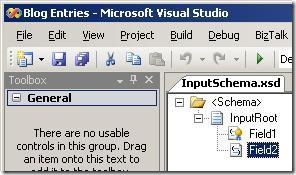
Basically, I have a schema for the input:
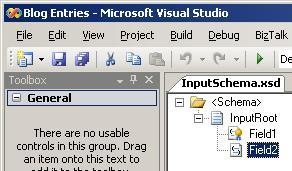
It has two fields, and I have promoted the first field.
The output schema looks like this:
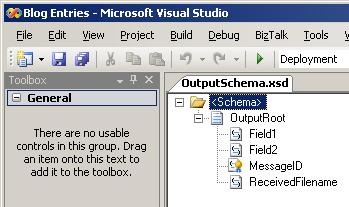
It has four fields.
What I want in the output is this:
The map looks like this:
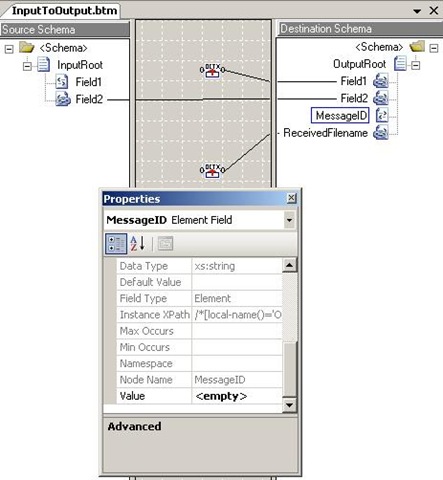
I am using the ContextAccessor (for orchestations) to fill a value into Field1 and
ReceivedFileName. I am mapping Field2 directly. The MessageID field I am not mapping,
since I need a message assignment shape for that. The element “MessageID” must be
present in the output, though. Otherwise i cannot fill in value. So, as you can see
in the screenshot, I have set the “Value” property to “<empty>”. This will create
an empty element. This feature is very handy for initializing elements that will later
on get values from message assignment shapes but also for creating the needed empty
fields for demotion.
Anyway, the parameters for the first functoid look like this:
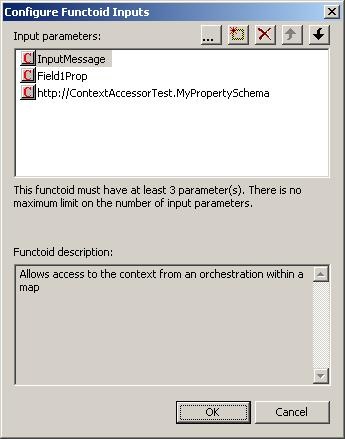
The parameters are:
The second functoid looks like this:
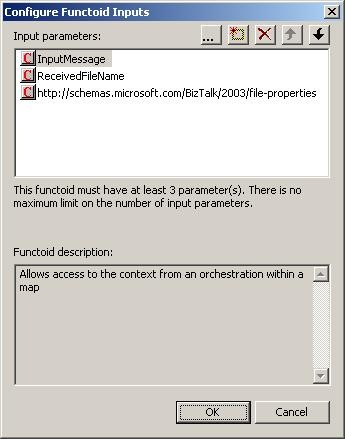
Now, the final touch is the orchestration:
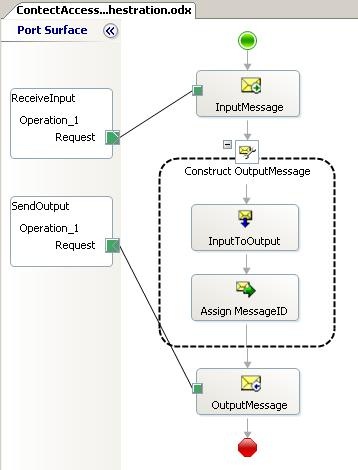
Quite simple A receive, a construct and a send port for the output. The construct
shape has two shapes inside it. The first is a transformation shape hat will execute
the map. The second is a message assignment shape hat will insert the messageid into
the destination schema.
The message assignment shape looks like this:
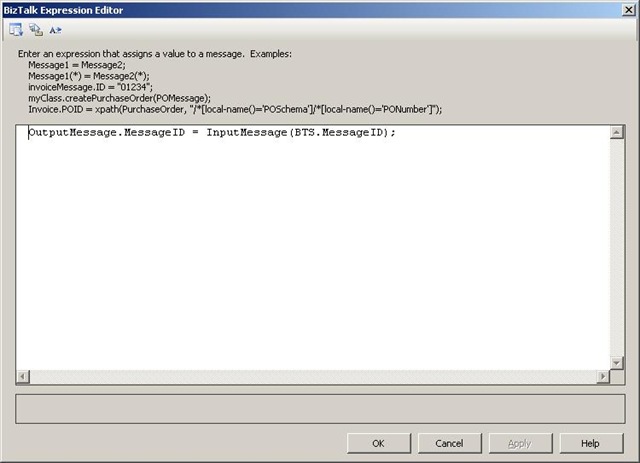
I made the MessageID field of he output a distinguished field and can therefore insert
values into it. This is quite clever . the way you can do several things to a message
as long as you are still inside the same Construct Message shape. After the map, where
I let the MessageID field be empty, I can insert a value into this field using a distinguished
field. I could also just as easily have used XPath to do that, but that is not as
readable, so I didn’t do it.
So This was the first post of two – next time I will look at the receive port version
of the Context Accessor functoid.
And one last point: If the idea i just to get an Id into a message and it doesn’t
have to be the message ID of a message, you can also just use the “New GUID” functoid
found at http://eebiztalkfunctoids.codeplex.com/
—
eliasen

[Series Overview: Part I / Part II / Part III]
In my first post of this series I looked at what Nintex workflow for SharePoint is. The second post looked at its web service integration capabilities. In this final post, we dig into the native BizTalk integration provided by the product.
Let’s start out with the use […]
Briefly back on my STS work –
Our STS implementation can already replace the authentication implementation of most of our applications; naturally we can’t do that just yet, given that the Geneva-framework has not been released yet, but all of my tests are quite positive so we’re just waiting for the opportunity to start using it.
However, so far, we were not in a position to replace the authorisation mechanism, not easily anyway, and that’s something that was on my list for some time now.
The STS provides a list of claims, which the applications can relatively easily access via code, as many samples show, and this proves very useful; application can investigate various claims about a user and drive their functionality from that.
It does mean, though, that the applications need to change to support this new claims based mode for authorisation, which is not something we can just assume we would be able to do; as a start, we just want to achieve an in-place replacement for our current authorisation logic.
Most of our web apps currently use ASP.net membership and roles and so they extensively use ’IsInRole’ checks to figure out user authorisation and drive the application behaviour, to start with, we had to hook to that mechanism.
Luckily the Geveva framework has a relatively good support for exactly this need – , out of the box, it would convert any claims of the Microsoft role namespace (’http://schemas.microsoft.com/ws/2008/06/identity/claims/role’) to roles; so – if a token included a claim of this type with a value of ’Manager’, a call to HttpContext.Current.User.IsInRole(“Manager”) would return true.
And so I made sure my STS adds any roles with the correct claim type, very easy.
However – this is very Microsoft centric. what about all those claims that come from systems that don’t follow Microsoft’s approach? (how dare they!) ? and what about us wanting to have our own claims, using our own types, some matching roles (while others may not) –
Well – we needed a way to map any claims to ms-role claims before the Geneva framework does its bit.
As is often the case – Dominick Baier was most helpful in posting on exactly that, and so, following his example, I created my RoleClaimsMapper –
    public class RoleClaimMapper : ClaimsAuthenticationManager
    {
        public override IClaimsPrincipal Authenticate(string endpointUri, IClaimsPrincipal incomingPrincipal)
        {
            //load configuration section for component
            RoleClaimsMapperConfigurationSection config =
                (RoleClaimsMapperConfigurationSection)ConfigurationManager.GetSection("RoleClaimsMapper");
            //create a collection of claim types and populate from configuratoin
            List<string> claimsToMap = new List<string>(config.RoleClaims.Count);
            foreach (RoleClaimConfigurationElement claimElement in config.RoleClaims)
                claimsToMap.Add(claimElement.ClaimType);

            //loop on all identities, we really only expect one, but can easily support multiple.
            foreach (IClaimsIdentity identity in incomingPrincipal.Identities)
            {
                //extract the claims that we need to map (matching the configured list of claims)
                IEnumerable<Claim> roleClaims =
                    identity.Claims.Where<Claim>(c => claimsToMap.Contains(c.ClaimType));
                //now create a role claim (using the MS role claim type) for each claim found;
                //need to keep this outside claim loop so we don't modify the collection while iterating
                List<Claim> claimsToAdd = new List<Claim>(roleClaims.Count());
                foreach (Claim claim in roleClaims)
                    claimsToAdd.Add(new Claim(Microsoft.IdentityModel.Claims.ClaimTypes.Role, claim.Value,claim.ValueType,"local",claim.Issuer));
                //add new claims to current identity
                identity.Claims.AddRange(claimsToAdd);
            }

            return incomingPrincipal;
        }
    }
I then configured my authentication manager with the framework –
<microsoft.identityModel>
    <claimsAuthenticationManager type="RoleClaimMapper,Identity.Utilities" />
and added my bit of custom configuration
  <RoleClaimsMapper>
    <RoleClaims>
      <add Type="http://someDomain.com/identity/claims/SomeRole"/>
      <add Type="http://someDomain.com/identity/claims/AnotherRole"/>
    </RoleClaims>
  </RoleClaimsMapper>
As you can see this code would take a list of claim types from configuration, and map all claims of these types to roles, adding them to the identity’s claims collection using the required claim type (leaving the original claim intact), and voila – when the app executes it can check the roles, corresponding to the values supplied in my custom claims using –
HttpContext.Current.User.IsInRole(“[custom claim value"]”);
Very nice indeed!
Two weeks ago we held our MIX conference in Las Vegas. MIX is my favorite conference of the year – since it nicely integrates development and design topics together in a single event, and is usually accompanied by some pretty cool product announcements.
I gave a first day MIX keynote again this year, and in it I talked about and announced a bunch of new Microsoft web development products. These included:
My keynote also included a ton of demos and highlighted a bunch of great customers including: StackOverflow, NetFlix, NBC, Bondi Publishing, and KEXP.
Click here to watch the day one MIX keynote online. Bill Buxton led off the keynote with a great talk about user experience for 20 minutes – I then talked for an hour and 50 minutes after him.
You can also watch all the breakout sessions from MIX online for free here (Greg Duncan has an easy to navigate list of them here as well).
I’ll be doing more in-depth blog posts in the days ahead on many of the technologies we introduced/announced and all the cool things you can do with them.
Hope this helps,
Scott