by community-syndication | Jun 15, 2009 | BizTalk Community Blogs via Syndication
Hi folks
Here’s video #3 in my “ESB Toolkit How To” series. In the last video (found here) we built out a complex itinerary that implemented dynamic mapping and dynamic routing. We also saw how to use the resolver mechanism to retrieve service information from a UDDI version 3.0 server. At the end of that video we used the Itinerary Test Client (which ships with the toolkit) to test our itinerary. When I show this demo in person, I’m always asked the same question. “Does the client always have to submit the itinerary along with the message when they call the ESB?” In version 1.0 of the ESB Toolkit, the was “Yes”. The ESB did require the client to provide the itinerary along with the message. This was of course an issue for many of the architects I spoke to. Most people wanted the ESB to be responsible for figuring out what itinerary was needed for an incoming message. Ideally, the client should just have to submit their message into the ESB and the bus would figure everything else out for them. Requiring the client to create, manage and submit an itinerary is just not a solid architectural pattern.
Fortunately, in the ESB Toolkit 2.0, this is no longer a problem. We now have a great new feature called Itinerary Resolution that allows the ESB to figure out what itinerary a message should have. Additionally, version 2.0 of the toolkit, gives us the new “ESB Itinerary Database”. This DB gives us a central location to store our itineraries in and the Itinerary Resolution component is actually able to dynamically retrieve messages from this central database. These two new features allow us to implement a solution where a client no longer has to have any knowledge of itineraries. Now, they simply have to pass in their message to the ESB where it will dynamically figure out what itinerary is needed and it will load that itinerary from the database.
In this video, I’ll show you how to implement this feature. To demo this feature, I use an InfoPath form which sends data to a generic OnRamp which uses the Itinerary Resolver. I’ll walk you through the process of storing your itinerary into the database, creating the new generic OnRamp that will use the itinerary resolution feature and I’ll show you how to configure the Itinerary resolver to retrieve the itinerary from the database.
Here’s the link to the video.
As always, I try to show as much detail as possible in these videos. If you feel that I have skimmed over something too quickly, or if some element is unclear, please let me know and I’ll post a follow up video.
Cheers and keep on BizTalking…
Peter
by community-syndication | Jun 14, 2009 | BizTalk Community Blogs via Syndication
Some time ago I’ve got an Amazon Flip camera. I loved it, but one thing did not worked well: I’ve got the basic one and it did not had the jack for a tripod. Not good… The answer happened to be simpler than I expected. You may want to watch this video if you have this camera. You’ll enjoy it a lot more afterward. I do now.
by community-syndication | Jun 14, 2009 | BizTalk Community Blogs via Syndication
I’ve been extending my Flow Control Classifier sample extension for Visual Studio 2010, and based on the new features, I decided to rename it to KeywordClassifier instead. I’ve renamed the GitHub repository as well, so make sure you’re heading to the new one.
I will continue playing with this, but besides a significant refactoring of the […]
by community-syndication | Jun 14, 2009 | BizTalk Community Blogs via Syndication
Microsoft .NET 4.0, and WCF 4 and WF 4 are all comming….. VS 2010 is availbe for beta 1 download…..
Now you need to get up to speed…. have a look at the training…
WCF / WF 4 Training Kit: http://code.msdn.microsoft.com/wcfwf4/Release/ProjectReleases.aspx?ReleaseId=2698
by community-syndication | Jun 13, 2009 | BizTalk Community Blogs via Syndication
Hi all
I have received numeral questions from people getting a compile time error when compiling
an orchestration that assigns a distinguished field of type xs:integer to a variable
of type int32. Without looking into anything, you would expect this would work.
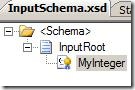
So lets say that we have a schema like this:
with this XSD:
<?xml version="1.0" encoding="utf-16"?>
<xs:schema xmlns:b="http://schemas.microsoft.com/BizTalk/2003" xmlns="http://IntegerDecimal.InputSchema" targetNamespace="http://IntegerDecimal.InputSchema" xmlns:xs="http://www.w3.org/2001/XMLSchema">
<xs:element name="InputRoot">
<xs:annotation>
<xs:appinfo>
<b:properties>
<b:property distinguished="true"
xpath="/*[local-name()=’InputRoot’ and namespace-uri()=’http://IntegerDecimal.InputSchema’]/*[local-name()=’MyInteger’ and
namespace-uri()=”]" />
</b:properties>
</xs:appinfo>
</xs:annotation>
<xs:complexType>
<xs:sequence>
<xs:element name="MyInteger"
type="xs:integer" />
</xs:sequence>
</xs:complexType>
</xs:element>
</xs:schema>
As you can see, it is a simple schema and the “MyInteger” field is of type xs:integer
and it is marked as a distinguished field.
In my orchestration, I have a variable of type int32 called “MyInt” and in an expression
shape I do this:
MyInt = InputMessage.MyInteger;
and it fails, which is quite surprising at first glance. At compile time I just get
this: "The expression that you have entered is not valid.". That doesn’t
help, so looking at my expression shape and reading the mouse over on the error in
the expression shape I get this: “cannot implicitly convert type ’System.Decimal’
to ’System.Int32’”. Changing the line in the expression shape to this:
MyInt = System.Convert.ToInt32(InputMessage.MyInteger);
will make it work, because now you are explicitly casting the value to an integer.
The first times I saw this error, I thought that the compiler had an error, because
I thought I was assigning an integer the value of another integer. It turns out, though,
that I wasn’t really – only sort of
If you look here: http://www.w3.org/TR/xmlschema-2/#integer you
can see that the xs:integer type is actually a decimal type restricted to whole numbers.
So the compiler actually thinks the field is a decimal and not an integer.
This is kind of silly, since the data type IS restricted to whole numbers. The actual
error should be that the xs:integer can contain the number 4567234987623409763546387623476149823497862354845
which really is way to large for an int variable in an orchestration.
Anyway, the way to handle this is, naturally, to avoid the xs:integer type if possible
and use the xs:int (or variants of this) instead. Sometimes it is needed, though,
and in that case you just need to declare your variables of a type that will be able
to contain all the possible values you receive. This can be an Int16 sometimes, if
the people who have created the schema just didn’t know what the xs:integer type is.
Sometimes the values received will be too large even for an Int64 variable, then consider
using a decimal, a string or some other data type.
—
eliasen
by community-syndication | Jun 13, 2009 | BizTalk Community Blogs via Syndication
Perhaps you are restarting a host instance, maybe you are deploying, whatever, it takes forever. The problem is really that there is a spike in CPU usage.
The hot fix can be downloaded here:
http://support.microsoft.com/kb/943165
FIX: A CPU usage spike occurs on all the BizTalk hosts after you install security bulletin MS07-040 on a server that is running Microsoft BizTalk Server 2006 or Microsoft BizTalk Server 2006 R2
by community-syndication | Jun 13, 2009 | BizTalk Community Blogs via Syndication
Don’t ever set port authentication if you are doing AS2, for your love that is all holy.
Event Type: Error
Event Source: BizTalk Server 2006
Event Category: BizTalk Server 2006
Event ID: 5719
Date: 6/13/2009
Time: 12:54:19 AM
User: N/A
Computer:
Description:
There was a failure executing the receive pipeline: “Microsoft.BizTalk.EdiInt.DefaultPipelines.AS2EdiReceive, Microsoft.BizTalk.Edi.EdiIntPipelines, Version=3.0.1.0, Culture=neutral, PublicKeyToken=31bf3856ad364e35” Source: “Pipeline ” Receive Port: “AS2Receive” URI: “/BTSHTTPReceive.dll” Reason: The party corresponding to the inbound message cannot be identified.
For more information, see Help and Support Center at http://go.microsoft.com/fwlink/events.asp.
The fix is to set the receive port to No Authentication
by community-syndication | Jun 12, 2009 | BizTalk Community Blogs via Syndication
You need to create a 32 bit host and its subsequent host instance, otherwise you will get the following error.
Event Type: Error
Event Source: BizTalk Server 2006
Event Category: BizTalk Server 2006
Event ID: 5754
Date: 6/12/2009
Time: 7:37:50 PM
User: N/A
Computer: HAL64
Description:
A message sent to adapter “HTTP” on send port “SendPort4” with URI http://server/BTSHTTPReceive.dll is suspended.
Error details: There was a failure executing the send pipeline: “Microsoft.BizTalk.EdiInt.DefaultPipelines.AS2Send, Microsoft.BizTalk.Edi.EdiIntPipelines, Version=3.0.1.0, Culture=neutral, PublicKeyToken=31bf3856ad364e35” Source: “Unknown ” Send Port: “SendPort4” URI: http://server/BTSHTTPReceive.dll Reason: Retrieving the COM class factory for component with CLSID {254B4003-2AA7-4C82-BB2E-18BA7F22DCD2} failed due to the following error: 80040154.
MessageId: {9B3DB552-386E-4C46-859F-732AC39E1281}
InstanceID: {24442524-9A98-4778-A29A-93FA21AFC92B}
For more information, see Help and Support Center at http://go.microsoft.com/fwlink/events.asp.
by community-syndication | Jun 12, 2009 | BizTalk Community Blogs via Syndication
So the ESB Toolkit is no longer going to be release through codeplex. So where do you register bugs and discuss issues? We have created a couple of new sites for this
You can register bugs on the Connect site at https://connect.microsoft.com/site/sitehome.aspx?SiteID=886&wa=wsignin1.0
There is also a new dedicate forum available at http://social.msdn.microsoft.com/Forums/en-US/biztalkesb/threads these are great for posting issues since this is a monitored forum.
Cheers and keep on BizTalking…
Peter
by community-syndication | Jun 12, 2009 | BizTalk Community Blogs via Syndication
Hi everyone, it was quite a long time since I posted the first “How-to” video (found here), but I have finally completed the second one. In this demo, I show you how to do a number of new things
- to create an itinerary that compose three services together into a single composite service
- How to setup your BizTalk environment to support this type of itinerary. Including how to create the send ports required for a composite service itinerary
- How to retrieve information from a UDDI v3 server from within your itinerary
- How to test resolvers inside visual studio using the resolver web service
- How to implement dynamic mapping and dynamic routing inside an itinerary
Based on feedback from my last video I understood that the AVI format I used sucked and that you didn’t want to have to download multiple ZIP archives just to watch a short video. Therefore, I’ve found a better recording tool that creates WMV files. Therefore this video is only 13 megs in size. Hopefully that is more convenient for everyone.
If you happen to hear a baby crying at the end, I apologize, that is my new daughter trying to make her first appearance on my blog 🙂
This video covers a lot of ground and I show a lot of things. So if I have gone too fast over something, or some element isn’t clear, let me know and I’ll post a follow up video.
Here’s the link to the video
Cheers and keep on BizTalking…
Peter