Here comes another bubble
Via Scott
Hanselman … fabulous! Thank you to The
Richter Scales for this.
Tim Rayburn is a consultant for Sogeti in the Dallas/Fort
Worth market.

Via Scott
Hanselman … fabulous! Thank you to The
Richter Scales for this.
Tim Rayburn is a consultant for Sogeti in the Dallas/Fort
Worth market.

I just noticed Amazon.com has a new BizTalk book available. It is called PRO EDI in BizTalk Server 2006 R2 by Mark Beckner.
I have not had a chance to look at this book myself, but with the new EDI changes in BizTalk 2006 R2 I’m sure this book would be a valuable resource – if you had to do EDI….
Please post any comments if you have read or reviewed this book and let us know what you think about it.

I’ve posted some points to consider and common error message when working with the new BizTalk WCF Adapters on Windows XP.
You can view the details here.
New Blog Address: http://www.biztalkgurus.com/blogs/biztalk/default.aspx
New RSS Address: http://www.biztalkgurus.com/blogs/biztalk/rss.aspx
_qacct=”p-03-ZsKAm7O3lI”;quantserve();

WCF support through the different WCF Adapters provided in BizTalk R2 is a powerful new feature. With the announcement of Oslo, working with the WCF Adapters now is even more critical to a BizTalk Developer.
If you are like me, you do a majority of your BizTalk work on a Windows XP computer or laptop. This can cause some problems when working with the WCF Adapters.
Lets take a look at what needs to be done in order to work with WCF and BizTalk on Windows XP.
First, lets look at the core issue – lack of Application Pools in Windows XP.
Here is what you need to do first in order to work with the WCF Adapters (using IIS – probably the most common scenario for beginners).
– Add your ASPNET user to the Isolated Host Users group
– Make sure your Receive Location is enabled
– Make sure the address in your Receive Location is correct – looks like “/BizTalkWcfServer1234/Service1.svc”
– Restart IIS
Important Note: You can only run one type of WCF Adapter per Application Pool. So on XP, you can only run one type of WCF Adapter at a time. If you want to switch from WCF-BasicHttp to WCF-WSHttp you will need to restart IIS.
On Windows 2003 boxes, each Adapter you want to run through IIS will need a different Application Pool in order to have them co-exist.
Of course, you can always use the Customer Adapter and do anything you want inside that adapter. That adapter is not as user friendly and not really a good place to start for beginners.
Below is a list of common WCF Errors you might encounter when working with the WCF Adapter. In most cases, the error messages give you enough information to correct the problem.
WCF Adapter Common Errors (the error messages are very specific and tell you what to do to fix the problem):
The Messaging Engine failed to register the adapter for “WCF-WSHttp” for the receive location “/BizTalkWcfService1234/Service1.svc”. Please verify that the receive location exists, and that the isolated adapter runs under an account that has access to the BizTalk databases.
Potential Causes: Application pool user doesn’t have correct permissions, Typo in the Receive location name
The Messaging Engine failed to register an adapter “WCF-BasicHttp”. Details: “Registering multiple adapter types within the same process is not a supported configuration. For e.g. HTTP and SOAP receive adapters cannot co-exist in the same process”
Potential Causes: Already have a different adapter type loaded into IIS, Adapter binding types do not match
Receive location for address “/MyService.WCF/MyService.svc” not found. (The BizTalk receive location may be disabled.)
Potential Causes: Receive location disabled, Typo in Receive Location name
The problem about Sharepoint implementations is that typically when you create your
Sharepoint Web Application from Central Admin, there is one ContentDB that you assign.
Then spare no more thought to it……
In update KB934525 MS added a
new command to stsadm called MergeDBs.
This handles it all for you in a single command. You need to specify, WebApp1 address,
contentDB1 and an excerpt of the stsadm -o enumsites command to specify
the site(s) you want to ‘migrate’ to ContentDB2.
Here’s a great step by step article by Todd
Well done!
I came across Reg Braithwaite’s weblog thru Steve Vinosky’s and I truly recommended it. This is one of the most prolific weblogs I’ve read in a long time. Check out this post about developer’s culture when comes to learn new programming paradigms….(read more)
Christmas came early this year…
I first heard of ESB Guidance at the SOA Conference in Redmond. And even though I attended Marty Wasznickys sessions, it took me a while to fully understand the concept. I mean, just looking at the ESB portal and the Exception Handling Framework, what more could a BizTalk developer ask for…
Marty kept on talking about Intineries, On- and Off Ramps and I, still focusing on the portal, couldn't really grasp it all.
Later, I got home and waited for the November release to be announced. And much like a kid, opening his first present on Christmas, I downloaded the ESB Guidance msi file, and got on with the installation.
This experience reminds me of being seven years old and wishing for a 3000+ pieces model ship for X-mas. Ripping the paper of the package, I didn't spear no time taking on the challenge of building the RMS Titanic, much without the help of the guided instructions I might add. Needless to say, the result was a disaster. But what do you know, some 30 years later, I came to learn from this experience.
You see, as it turns out, double-clicking that installation file was not enough. You have to proceed through a very tedious (but well documented) installation procedure before you get to taste the sweetness of ESB Guidance. Take my advice, be thorough and read the installation instruction carefully.
That said, -It's totally worth it!
ESB Guidancepart 2
The recent release of Visual Studio 2008 and .NET Fx 3.5 is causing some confusion. Microsoft released these two technologies together for good reason. The wonderful new LinQ technologies introduced in .Net 3.5 rely on explicit compiler-level support, and therefore require LinQ aware compilers in Visual Studio. The new version of visual Studio provides these compilers, allowing developers to take advantage of the new monadic syntax.In addition, Visual Studio has several new features designed to make it easier to exploit NET 3.5 features such as Ajax and the foundation libraries (WCF, WF and WPF).
The problem is that by tying the release of .NET 3.5 to Visual Studio 2008, the impression is given that, unless you are ready to upgrade to the new version of the IDE, there is no point thinking about upgrading to the new version of the framework. This is simply not the case. The .NET framework does not have any built-in dependency on Visual Studio, let alone a specific version of Visual Studio. More to the point, Microsoft has long since split the versioning of the framework from the versioning of the run-time environment..NET 3.5 continues to exploit version 2.0 of the CLR.Visual Studio 2005 is perfectly happy to compile your code against .NET 3.5 assemblies. They are just assemblies. Even more compelling is the realisation that most of the assemblies in .NET 3.5 are identical to those in .NET 3.0 (same version number). There are some new assemblies with new features..NET 3.5 is just .NET 3.0 with extra stuff.
Why is this important? Well, not everyone is ready to upgrade to Visual Studio 2008. Apart from the expense this involves, consider the dilemma of BizTalk Server developers. Currently, there are no Visual Studio 2008 bindings for BizTalk Server (i.e., you can’t create BizTalk Server project types in the new IDE). This, we are assured, will be addressed at some point, but that could be months away. For the time being, BizTalk developers are stuck with Visual Studio 2005 :-(Hence, some people are currently discounting the possibility of using .Net 3.5 because they believe, quite incorrectly, that it requires an upgrade to Visual Studio 2008.
There are issues, of course. As well as the absence of compiler support for LinQ, Visual Studio 2005 does not have access to various new project and file templates and tools that support the new version of the framework. Developers may need to do more coding in Visual Studio 2005 than would be necessary in Visual Studio 2008. This is often a small price to pay, however, in order to access the improvements in 3.5. As an example, consider the new integration between WF and WCF, provided in the new System.WorkflowServices assembly. The integration is provided via the new WorkflowServiceHost class and a couple of new activities. Visual Studio 2008 has new template support for building workflow services, and comes with a very useful new WCF test harness. However, exploiting this new functionality in Visual Studio 2005 is trivial. Create a WF workflow library, add a reference to System.WorkflowServices and add the new activities to your tool box. Finally, use the WCF Service template to add a service class to your project and you are just about in the same position as you would be in Visual Studio 2008 if you used the new Workflow Service project template. You’ll need to write a couple of lines of code to use WorkflowServiceHost to host your service, of course. Off you go, and enjoy .NET 3.5.
_qacct=”p-03-ZsKAm7O3lI”;quantserve();
For those of you who are unaware, XPath is a powerful query language for XML (ignoring
XQuery for now).
In my experience I’ve worked with a lot of BizTalk developers who have come from a
C# (and usually VB before that) background, and so haven’t always had the background
in XML, XSLT, XSD, and XPath needed to fully appreciate BizTalk.
Because let’s face it: before you were working on BizTalk, how often did you need
to deal directly with Xml? When writing ASP.NET web services, the .NET framework abstracts
away the need to understand XML, leaving you with classes which are handily serialised/de-serialised
across the wire for you.
Note: I have come across a similar pattern in the J2EE world – ask
many Java developers about an Xml document they received as a request in a J2EE Web
Service, and they’ll only know about Beans, as the framework looks after the de-serialization
from Xml into a Bean for them).
However, BizTalk is a different beastie: it works predominantly with data streams
containing Xml.
Therefore the ability to know how to query this Xml without having to resort to C#
code is very very important.
BizTalk 2004 and 2006/2006R2 support XPath 1.0 – as at this time, there is no support
for XPath 2.0 in BizTalk.
You can get a good idea of the functions available in XPath 1.0 here (which
is a useful summary of the W3
Recommendation)
(as a comparison, here’s what XPath
2.0 gives you – here’s hoping we get this in BizTalk sometime soon!)
For a good primer on XPath, look here.
Every time you use a Distinguished Field in BizTalk, you’re actually using XPath.
Every time you create a map you’re generating XSLT which uses XPath.
Using XPath to select an element/attribute value from an Xml instance is very easy.
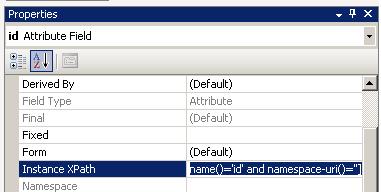
To see the XPath for the given element/attribute, open the Schema in the BizTalk Schema
Editor, select the element/attribute you want to get a value for, and in the properties
window select the value for Instance XPath:
This will give you an XPath statement something like:
/*[local-name()=’Employees’ and namespace-uri()=”]/*[local-name()=’Employee’
and namespace-uri()=”]
In an orchestration, you can make use of XPath through the use of the xpath() function:
xpath(message, string)
or
xpath(string)
The xpath() function can be used to
both write and read information to/from a message (although to write information to
a message, you need to call it from a Message Assignment shape, and the element/attribute
you’re setting the value of must already exist in the message).
Note that if you’re reading information from a message, you have to cast the result
back to an appropriate type, or use an XmlNode/XmlNodeSet variable.
For example, to get a string value you could use:
myXPath = “/*[local-name()=’Employees’
and namespace-uri()=”]/*[local-name()=’Employee’ and namespace-uri()=”]/@*[local-name()=’status’
and namespace-uri()=”]”;
myValue = System.Convert.ToString(xpath(MyMessage, myXPath));
Note: if you tried the above on an XPath query which returned a node
or node set, then instead of the element value in myValue, you’d get the text “System.Xml.XmlNodeSet” or
similar
This happens when your XPath selects an element, as opposed to the element’s value
(this doesn’t apply to attributes).
In this case you have to modify your XPath to select the value of the element, instead
of the actual element itself. You can do this by using the text() XPath
function:
/*[local-name()=’Employees’ and namespace-uri()=”]/*[local-name()=’Employee’
and namespace-uri()=”]/@*[local-name()=’status’ and namespace-uri()=”]/text()
The beauty of XPath is that you can use it to operate across node-sets, and then filter
(or query) the results through the use of predicates – similar to using a SQL query
to select values from a database table.
For example, using a predicate of [1] will give you the first occurrence of something
e.g.
/*[local-name()=’Employees’ and namespace-uri()=”]/*[local-name()=’Employee’
and namespace-uri()=”][1]
will give you the first Employee element
Correspondingly, [2] will give you the second, [3] the third, etc.
If you want to get a count of elements, you can use the count() function:
count(/*[local-name()=’Employees’ and namespace-uri()=”]/*[local-name()=’Employee’
and namespace-uri()=”])
And to use this in BizTalk:
myCount = System.Convert.ToInt32(xpath(MyMessage,
“count(/*[local-name()=’Employees’ and namespace-uri()=”]/*[local-name()=’Employee’
and namespace-uri()=”])“))
I use this all the time when I call a web service, and get back a response which contains
a collection of elements and I want to know how many I have.
You can even filter to find the number of elements which have a certain value.
For example, given the following XML:
<Employees xmlns:emp=”urn:schema.mine.com:employees”>
<Employee id=”1″ status=”Active”>
<FirstName>Sam</FirstName>
<LastName>Smith</LastName>
</Employee>
<Employee id=”2″ status=”Active”>
<FirstName>Jane</FirstName>
<LastName>Smith</LastName>
</Employee>
<Employee id=”2″ status=”Deceased”>
<FirstName>John</FirstName>
<LastName>Doe</LastName>
</Employee>
</Employees>
I might want to get a count of Active employees:
count(/*[local-name()=’Employees’ and namespace-uri()=”]/*[local-name()=’Employee’
and namespace-uri()=”]/@*[local-name()=’status’ and namespace-uri()=”][. = ‘Active’])
Note: because status is
an attribute and not an element, I used “.” to reference the value of the attribute,
rather than text() which I would use
for an element.
In my time I’ve seen a lot of developers create a class representation of a message
(using the xsd.exe tool), and de-serialise
a message into this class just so that they could get a value e.g. a count – why take
the hit of de-serialisation when you can just pull the value out of the message directly?
One of the tricky things about writing XPath queries is that it’s difficult to test
them – you need a tool like Altova
XmlSpy or Stylus Studio which
can test an XPath statement on an instance of an Xml document.
There’s no built-in support in Visual Studio for testing XPath queries.
Which is why I wrote DanSharp
XmlViewer.
This tool lets you get the XPath to select a given element/attribute from an Xml instance
document but more importantly acts as an XPath scratchpad so you can test your XPath
queries:
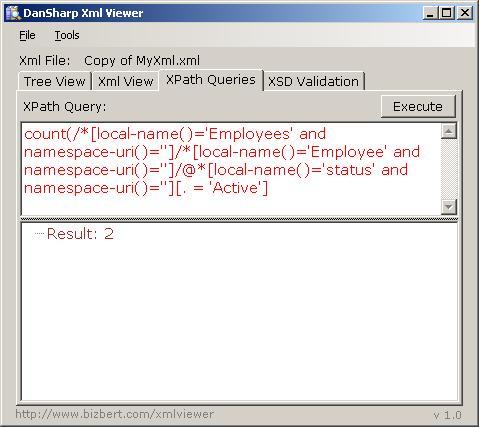
It even shows you when your syntax is incorrect (as in the above, highlighted red
– you can hover over the text to see the error).
I use this tool all the time to write XPath queries as I can test them before putting
them into BizTalk.
Get the tool here.
I’ve spent this week in Minneapolis at some BizTalk training and while I was there
had a chance to sit down with Delbert and
talk about the Microsoft
Certified Architect program, I think you’ll learn something about the program
I know I did.
Tim Rayburn is a consultant for Sogeti in the Dallas/Fort
Worth market.