by community-syndication | Mar 10, 2007 | BizTalk Community Blogs via Syndication
Despite my pain… I signed up for another Flickr Pro account and are requesting a dreaded Yahoo! ID.
So how did it go?
Step 1. Preferred Content
Didn’t Yahoo come to New Zealand recently? No option for NZ content here!

Step 2. What should I choose as my Yahoo! ID?


What about “allavailableyahooidssuck” ? Hope gone! grrrrr… seriously this 100x’s worse than trying to get a .com address!
Note to Yahoo… the use of AJAX to check availability of ID might reduce the pain a little here.
My favourite quote from a distressed Flickr Old Skool user..
“is yahoo offering any sort of counselling for people who go into fits of rage after the 387th attempt to find an available user ID that doesn’t suck? “
More here… sigh!
Step 3. No Yahoo Email Address Thanks!

I was guessing that “unchecked” meant “no thanks”… also note @yahoo.com.au… @yahoo.co.nz is not an option even though I selected New Zealand as my country of residence.
Next Screen

What the ?!
by community-syndication | Mar 10, 2007 | BizTalk Community Blogs via Syndication
Background: The large(ish)
BizTalk system I’ve been working on for the last few months consumes a few external
Web Services. Whilst doing some early performance tuning, I noticed that I was getting
pretty serious request-response latency from the primary BizTalk Web Service… Like
over 45 secs, instead of the expected 0.5 – 2 secs…
Fortunately, I routinely
put tracing/audit calls in my BizTalk code which includes timing info – and I always log
the times around orchestration entry/exit… So I was quite surprised to see that
a request to one of the external Web Services was taking 15secs to respond… especially
as the web service was hosted (temporarily) on the same server…
Although I didn’t
have the source code, with the help of Lutz Roeder’s trusty .NET
Reflector I was poking around the innards within minutes and couldn’t find anything
that would cause a delay of 15 secs.
What’s more, after
further testing I found that the problem only occurred the first time after IIS was
restarted. After the first time, it would return within 2 secs (still not very good,
but much better). One thing I noticed about the Web Service was that it made use of
some code in an unmanaged assembly (old school C++ DLL)…
On a hunch, I wrote
a simple test Web Service which simply referenced some functions in the DLL (using
the DllImport attribute)…
and bang, a 15 sec delay before the Web Service constructor was called.
I also tried the
same trick in a console app… and there was no delay.
By this time I was
fairly stumped. This issue only happened on our Load Test server: it didn’t happen
on the Dev or Test servers. And it seemed to only happen to code hosted under IIS.
I figured it was
time to dig a bit deeper and see what IIS was doing: starting up Process
Monitor (to monitor file and registry access) and TCP
View (to monitor network activity), I called my test Web Service.
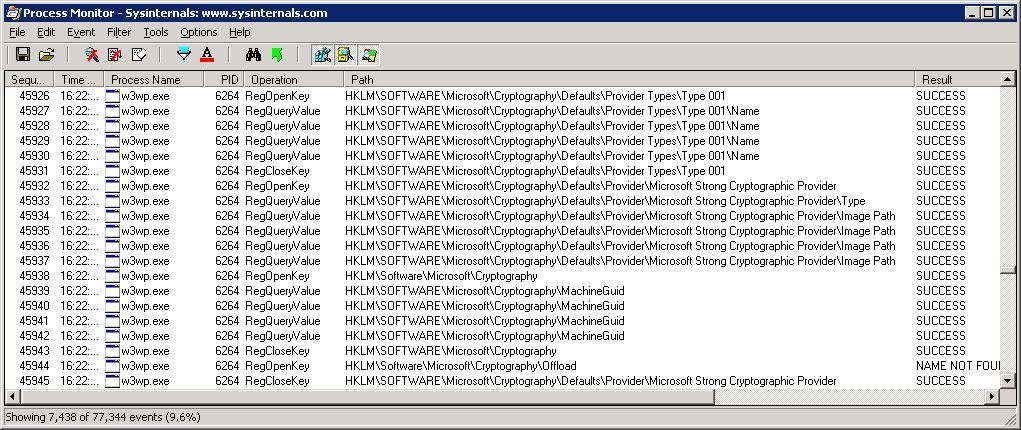
Filtering the Process
Monitor logs to the w3wp.exe process (the IIS Worker Process for Application
Pools) I noticed that w3wp was reading a lot of security and cryptography keys from
the registry:
Hmm. Interesting.
Then I looked at
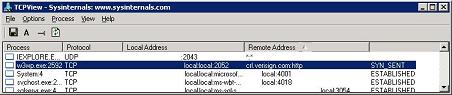
the TCP View log. And I noticed something very interesting coming from the w3wp process:
a connection was being attempted to http://crl.versign.com and
was being blocked.
How do I know it
was being blocked? Well, the TCP View log showed a SYN_SENT, which appeared and was
visible for 15 secs before disappearing:
Now if you’re not
familiar with how TCP
works, then you might
miss the significance of this: When a TCP client attempts to contact a TCP server,
the first thing performed is a handshake. This involves the client sending a SYN,
the server responding with a SYN-ACK, and the client sending a SYN-ACK-ACK.
In the TCP View tool,
the rightmost column indicates the state of the local TCP connection end-point. You’ll
see that in this case, the state is SYN_SENT: this state indicates that the local
TCP client is waiting for a SYN-ACK response from the SYN it sent.
Why would this be?
Well, many reasons, but mostly because the address can’t be reached e.g. a proxy server
is required, or a firewall rule is blocking the call.
And what’s the relevance
of crl.verisign.com? A CRL (Certificate Revocation List) is used to indicate which
Certificates (issued by a Certificate Authority) are no longer valid.
And this is only
done when you are using an assembly which has been digitally signed.
(Note:
Microsoft became really really serious about CRL’s back in 2001 when VeriSign
accidentally released two Microsoft certificates to a third party – which meant
that the third party could sign code that appeared to have come from Microsoft).
So what does this
have to do with
my Web Service and a 15 second
delay?
Looking through the
assemblies in the Web Service, I noticed that the unmanaged assembly was digitally
signed. Aha! So when the unmanaged assembly was referenced in a Web Service, IIS would
hand off control to the Windows Cryptography API (CAPI) and ask it to verify the certificate.
And this involves retrieving a CRL for the certificate.
After doing some
more poking
around, I found this blog
post (from one of the developers at Xceed
Software, a company specializing in .NET components).
The thing that drew
my attention was this comment:
Some people behind
a very strict firewall, ignoring outgoing connections instead of rejecting them, had
a timeout while loading our assemblies. That timeout (at least 15 seconds) is hardcoded
in WinVerifyTrust!
Eureka
! That’s exactly
my problem!
And it explained
why it was only happening on our Load Test server: Our Dev and Test servers have access
to the internet, whilst the Load Test server does not: it has no proxy server configured.
To test this theory,
I configured the Load Test server to use a proxy server. If you haven’t done this
before, you can’t do it via Internet Explorer settings – that only configures a proxy
for application which go via wininet.dll i.e.
the Internet Explorer API, which uses the proxy server settings in the Internet
Explorer/Internet Options/Connections/LAN Settings panel.
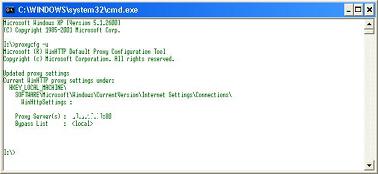
CAPI, however, uses winhttp.dll (Microsoft
Windows HTTP Services). And to set the proxy server for that, you need to use the proxycfg command
line tool which sets proxy server settings
for winhttp.
If you run proxycfg
-u, this will
import your
Internet Explorer proxy server settings:
So I did this, restarted
IIS and presto! The problem
went away.
However, giving the
Load Test server access to the Internet is a fairly large security hole (at least
it is in our network, where the Load test server is behind both the firewall
and DMZ).
So, we contacted
the vendor who supplied the unmanaged DLL, and managed to get them to release a new
version which wasn’t digitally signed.
Which solved the problem
of the latency in the Web Service (which accounted for 15 secs of the 45 secs latency).
Solving the remaining
30 secs latency is the subject of next week’s post.
by community-syndication | Mar 9, 2007 | BizTalk Community Blogs via Syndication
Off for a ‘conference’ which involves checking out Vancouver and being drawn to 3 days skiing at Whistler.
I’ve met more Aussies here than I do in Bondi!
The snow….about the snow………HOW GOOD!!!
Oh…the conference yes – very dedicated and will be dining with the product team
to talk about using the XBOX 360 as a ‘HAT extender’ 🙂 That way all biztalk people
need xbox360’s……it’s getting some traction 🙂
See you when I return……*IF*….
by community-syndication | Mar 9, 2007 | BizTalk Community Blogs via Syndication
When you access a MOSS site and click on a feature that requires Office, you may get the following error that will crash IE7:
The exception unknown software exception (0xc06d007f) occurred in the application at location 0x77e55e02.
…(read more)

by community-syndication | Mar 9, 2007 | BizTalk Community Blogs via Syndication
Well, what do you know, looks like Kevin Smith has turned up again after a long hiatus. The BizUnit project has now been moved to CodePlex and i just pinged him to check if he wants to collaborate with the Extensions project as well. Hope something good comes of this. The extensions project has had a huge number of hits since the content and structure got revised and i’m still trying to squeeze some time from my schedule to write up the tutorials and all that, so if you’ve been waiting, dont give up, or better still, email me and let me know you’re waiting. The last time someone did that, i wrote up the Context tutorial immediately so let me know if you want some information to be put on the site.
I should have taken Jon Fanceys advice (on his blog) seriously and “sacrificed chickens to the demo gods”. I had to give a brief workshop on Biztalk to some new clients a couple of days ago and took the classic messaging & CBR example of mapping an employee message to an executive message. As with most demos, this simplest of scenarios failed miserably. Why are demos always like this? Being still stuck in the 2004 world for my current project(s) and demo-ing 2006 for the new project might have contributed,but its really the same product with a rather more shiny interface on top so i guess i had to chalk it down as one of those unexplainable things.
The problem we had was a weird one. Initially when designing the schema, one of the fields (Salary) which i promoted, was a string and then as i refined the schema i changed it to a “long”. Unfortunately the property schema had already been set by then and that took me into a rather long loop of re-deploying, changing the prop schema etc since i needed to check the value of that field and set another element in the target (using a scripting functoid). The messaging error that popped up continually was “cannot convert string to long”. We just couldnt understand it because we literally wiped the schema and started again and the system seemed to have cached that message and kept throwing the same error. Even disabling the send port which did the mapping and retaining another port which forwarded the incoming message to another folder didnt work. Anyway, ultimately we just gave up in disgust cos we were running out of time and there were other things to work through.
Still, i wont take “no” for an answer from Biztalk and i gotta probe this and get to the bottom of it. Its kinda embarassing to see things like this happen after you have been working with the product for quite a while, but hey, i’ve seen it happen to well known gurus in the community so why should i be an exception!!
Next time you are planning a demo, dont forget the chickens!!

by community-syndication | Mar 9, 2007 | BizTalk Community Blogs via Syndication
Nick Malik published a thought-provoking article on rules engines recently. You can read it at http://blogs.msdn.com/nickmalik/archive/2007/03/06/perhaps-it-is-time-to-declare-victory-in-the-battle-of-rules-engines-vs-dependency-injection.aspx. He adopts a fairly negative attitude to rules engines in general, suggesting various reasons why he considers that they are not often useful. His preferred route is to use dependency injection patterns, implementing rule logic in code components that are then loaded in some dynamic or configurable fashion into consuming applications.
I believe Nick is quite wrong to contrast rules engines and dependency injection in this way. In reality, many modern rules engines provide the ideal mechanism for implementing and managing dependency injection patterns. You can read my response at http://geekswithblogs.net/cyoung/articles/108411.aspx.
Previously posted at http://blog.solidsoft.com/blogs/charles_young_mvp_biztalk/default.aspx

by community-syndication | Mar 9, 2007 | BizTalk Community Blogs via Syndication
I have been doing some tests/prototypes using Excel Services (included in MOSS2007). Excel Services is a new product, a server-side implementation of Excel. Its big selling point is that it allows business users to keep their excel sheets, where logic has accumulated over the years, but now expose it on the server, where it can be shared enterprise-wide.
The product includes 2 main components: Excel Web Access (EWA) and Excel Web Services (EWS). EWA is in essence a web part that displays a mostly read-only view of an Excel spreadsheet. You can input single-valued parameters and see the calculations being updated. EWS is a web services layer in the front of an Excel spreedsheet. You can input values, individual cells or ranges, and get both results of a binary snapshot of the spreadsheet.
I was really surprised about how much I can do with the product, and how easily. The ability to save a spreadsheet I half filled with Web Service calls, the ability to use Ajax to invoke the web services (with some sample code availablle on the net) on the browser, the power of the User Defined Functions, developed in C# and which can access databases or whatever, etc. It IS a very interesting product, and I strongly recommend it.
This said, I think this first version, included in MOSS 2007, still has space to evolve in a couple of different areas, improving it’s fit to several more design/architecture problems.
First, EWA has to be improved to support full read-write, instead of simple single-cell input, using ranges, lists-of-values, etc. While this doesn’t happen, it’s usefullness is mostly in data display and very simple usage scenarios.
The second is more strategic: the Excel “client” is not really a Client App to Excel Services. They are different applications. If would be nice if one could have Excel (client) open a spreadsheet and do the calculations and data access on the server only.
Let me give an example, related to the product’s main selling point: imagine you have an Excel spreadsheet initially developed in the 80’s. It has hundreds of formulas, some 20 sheets, reference data, dozens of input fields/ranges, charts, etc. A living nightmare to IT, not necessarily so to the business users. Now I can store this spreadsheet on the server, true, but what do use as a client? I know I can interact with it using EWS, but the development of a specific Smart Client to access it, replicating some of the rules, is clearly an expensive option. This should be done directly in Excel Client, because that is the application the the business users love and know how to use, and because that’s what minimizes development effort. I can use VSTA and develop in Excel Client to do this, and this is probably the best option at the moment.
Developing this idea, two more thoughts: it would be nice to have a “Excel Click-Once” functionallity, where a spreadsheet open in Excel (client) could be updated with the latest information from the server spreadsheet. Also, one of the problems with current Excel spreadsheets build up over the years, is that they get lost in people’s hard drives. Some kind of mechanism could be in place to avoid or control this, so that people are always using the most up-to-date version of the logic.
Two further aspects, non-technical: when a business user is presented with a solution based on Excel Services, the reaction can easily be of surprise: “is this it?!“. They are used to IT giving them apps, web sites, etc., not saying: “Just use Excel“. People still have the impression that, to be good, you have to pay for it.
Which brings me to the second aspect: licensing (which is where you do pay). To use Excel Services, one has to fully license MOSS2007 Enterprise. That is, to use Excel Services, you have to pay for SharePoint Server, Forms Services, BDC, etc. All the components of SharePoint Server. Interestingly, this does not happen with Forms Services: you can simply license WSS 3.0 + Forms Services.
Anyway, these were just some ideas. Excel Services is an excelent start for a new product, and will surelly have very interesting developments in the following years.
Most of the information I’ve used while developing my prototypes where based the SharePoint 2007 SDK, but I also recommend LuisBE’s blog, and *** Grano Salis (where you can find the Ajax library I mentioned). Also, this ExcelPackage CodePlex project seems very promising (don’t get me started in the power of the new formats :-)).

by community-syndication | Mar 9, 2007 | BizTalk Community Blogs via Syndication
The conference season is starting. I have a few presentations scheduled for the first part of the year including Microsoft Teched and SOAWorld . Next week I am heading towards Redmon for the MVPSummit where I’ll have the pleasure of sharing stage…(read more)
by community-syndication | Mar 9, 2007 | BizTalk Community Blogs via Syndication
Great! An even messier mechanism for organizing your desktop content! Although I am quite fond of the crumple documentfeature. 😉
by community-syndication | Mar 9, 2007 | BizTalk Community Blogs via Syndication
Since Wednesday was annoying-Vista-feature-day, I thought today I should focus on a very annoying OSX feature, or should I say lack thereof.
If you’ve spent much time on one of the latest Macbooks, you may have noticed that OSX doesn’t provide a way to defragment the hard drive. When I first discovered this, I thought I was surely mistaken. Think again, Aaron. This is Apple you’re talking about. I guess I’m just spoiled by Window’s quest for all things practical.
Apparently, in Apple’s ongoing (and sometimes silly) quest for simplicity, they designed OSX to handle it for you behind the scenes. For most home users, that’s probably ok, but when you need specific control over your drive usage and the OSX algorithm isn’t doing things the way you need it to you’re simply out of luck, unless of course you’re willing to break out the wallet. Most devs will run into this at some point.
The place I’ve seen this bite people the most, including myself, is when using
Apple’s Boot Camp— their drive partitioning software that makes it easy to dual-boot so you can run XP/Vista on your MacBook Intel-hardware. However, if your drive is seriously fragmented or simply not compact enough, Boot Camp will often fail when you ask it to create the Windows partition, complaining that “some files cannot be moved”. In my case, I was only using 20 GB for OSX and had 90 GB of disk space freeyet when I asked Boot Camp to create a 50 GB partition, it failed with that error. Again, what really sucks is that there is no way to diagnose or solve the problem using OSX provided tools. I had to resort to a 3rd party. Enter
iDefrag.
So I downloaded the
iDefrag trial and scanned my drive. I noticed a huge file (~2 GB, which happened to be the
swap file) in the second half of the physical drive space, so if OSX was unable to move that file, that explains why my 50 GB partition failed in Boot Camp. You can’t do much beyond a scan with iDefrag until you purchase it, so purchase it I did ($30). Then I created an iDefrag boot disk (using the CD creator software they provide), booted to the CD, and ran iDefrag (this is necessary because you cannot boot from the HD you wish to defragment, unless you use the simple/quick defragment algorithm, but that wouldn’t have done what I needed here). Then I ran the
compact algorithm to move everything to the front of the drive.
Once it finished, I rebooted to my HD and ran Boot Camp Assistant once again, and voila, it created the large partition no problem. In fact, I decided to dedicate 70 GB to my Vista partition since I’m spend more time there these days and it worked without a hitch.
In the end, I spent a bunch of time researching the issue, trying to figure out a built-in solution to no avail — what a waste of time. So my advice to those experiencing this problem: don’t waste time, spend the $30 and buy iDefrag or something like it. I personally found iDefrag to be a great product with great visuals:
Disclaimer: I have no affiliation with iDefrag, it’s authors, or the co. I simply found them on Google.
There were
a few forums that helped me survey the scene and offered other possible solutions, but in the end, the only deterministic solution is to defragment/compact the drive, and Apple doesn’t provide it.
This is probably my #1 complaint with Apple as a developer — they simply don’t provide the necessary system tools that serious developers need to operate on a daily basis. Instead we have to buy them individually, which gets tiring after a while. And if you can’t cater to us, I’m sorry Steve, you’ll never see huge grassroots movements around building software for the Mac.