MOSS Enterprise Search Presentations…check it out
Walkthroughs and webcast demonstrations on how the new Search works.
Enjoy
SharePoint
Server 2007 Presentations: Enterprise Search Deep Dives

Walkthroughs and webcast demonstrations on how the new Search works.
Enjoy
SharePoint
Server 2007 Presentations: Enterprise Search Deep Dives
yeah baby 🙂
I wrote before Christmas how these were coming out….grab them here…..
http://www.microsoft.com/technet/windowsserver/sharepoint/wssapps/templates/default.mspx
— snip —
Application Templates Available for Download
All forty application templates are available in English. The twenty server admin
templates are also available in ten additional languages: French, Italian, German,
Spanish, Portuguese (BR), Japanese, Korean, Hebrew, Chinese (simplified), and Chinese
(traditional).
Package Downloads
In addition to the following individual download links, you can get the Application
Templates for Windows SharePoint Services 3.0 in these three convenient packages.
Registration is required for package downloads.
Site
Admin Templates: Get all 20 Site Admin templates as a single package download.
Available in English only.
Server
Admin Templates: Get all 20 Server Admin templates as a single package download.
Multiple languages available.
All
40 Application Templates : Get all 40 Application Templates for Windows SharePoint
Services 3.0 as a single package download. Package only includes English versions.
Site Admin Templates
Board
of Directors
Business
Performance Reporting
Case
Management for Government Agencies
Classroom
Management
Clinical
Trial Initiation and Management
Competitive
Analysis Site
Discussion
Database
Disputed
Invoice Management
Employee
Activities Site
Employee
Self-Service Benefits
Employee
Training Scheduling and Materials
Equity
Research
Integrated
Marketing Campaign Tracking
Manufacturing
Process Management
New
Store Opening
Product
and Marketing Requirements Planning
Request
for Proposal
Sports
League
Team
Work Site
Timecard
Management
Server Admin Templates
Absence
Request and Vacation Schedule Management
Budgeting
and Tracking Multiple Projects
Bug
Database
Call
Center
Change
Request Management
Compliance
Process Support Site
Contacts
Management
Document
Library and Review
Event
Planning
Expense
Reimbursement and Approval
Help
Desk
Inventory
Tracking
IT
Team Workspace
Job
Requisition and Interview Management
Knowledge
Base
Lending
Library
Physical
Asset Tracking and Management
Project
Tracking Workspace
Room
and Equipment Reservations
Sales
Lead Pipeline
I’ve been teaching these MOSS 2007 Bootcamps with Dimension Data and Breeze Training here in Australia for the last couple of months. It has been a big team effort! One of our students, Sezai Komur gave me some nice feedback:
Thanks for the accolades Sezai
Sorry I went dark right after the MVP Summit but I've been on medical leave due to a bad reaction to my cholesterol medication. I returned from Seattle on Saturday afternoon and felt just fine until Monday evening when I began to feel extreme pain in both legs. It was honestly like someone had run over my legs with a truck. My doctor said I was experiencing an unusual (but no unheard of) side effect of my cholesterol medication ("statin") and it would take several days for the affects to wear off. So I've spent the past few days almost completely immobile and in incredible pain. Only now, a week later, can I walk around the house without feeling like a 94 year old. Luckily my blood tests came back and showed no liver or permanent muscle damage.
There is a moral to this story and a lesson that I've finally learned (it only took 47 years). When your doctor prescribes a long term medication, ALWAYS READ THE DESCRIPTION, especially the part that talks about possible side effects. And if you start feeling those side effects, CALL YOUR DOCTOR immediately, not after "toughing it out" for six weeks. The life legs you save may be your own!
Next post will be technical, I promise!
We covered the new WSS feature framework in a I was teaching last week. Using features you can item menu items to the Site Actions menu. It seems in all the example the menu will show up for all users. Someone asked “How do you restrict it so that the menu item only shows up for Site Administrators?”
I wasn’t sure but after a bit of hunting I found this article that had the answer:
http://sharepointsolutions.blogspot.com/2006/10/quick-site-settings-adding-sub-menus_16.html
All you need to do is add the RequireSiteAdministrator=”TRUE” attribute as in the following example:
<Elements xmlns=”http://schemas.microsoft.com/sharepoint/”>
<CustomAction
Id=”SiteActionsSubMenuCustomizer”
RequireSiteAdministrator=”TRUE”
GroupId=”SiteActions”
Location=”Microsoft.SharePoint.StandardMenu”
ControlAssembly=”SiteActionsSubMenuDemo, Version=1.0.0.0, Culture=neutral, PublicKeyToken=e9db3057acd9c0f6″
ControlClass=”SiteActionsSubMenuDemo.SiteActionsSubMenuCustomizer” >
</CustomAction>
</Elements>
Sorry I went dark right after the MVP Summit but I've been on medical leave due to a bad reaction to my cholesterol medication. I returned from Seattle on Saturday afternoon and felt just fine until Monday evening when I began to feel extreme pain in both legs. It was honestly like someone had run over my legs with a truck. My doctor said I was experiencing an unusual (but no unheard of) side effect of my cholesterol medication ("statin") and it would take several days for the affects to wear off. So I've spent the past few days almost completely immobile and in incredible pain. Only now, a week later, can I walk around the house without feeling like a 94 year old. Luckily my blood tests came back and showed no liver or permanent muscle damage.
There is a moral to this story and a lesson that I've finally learned (it only took 47 years). When your doctor prescribes a long term medication, ALWAYS READ THE DESCRIPTION, especially the part that talks about possible side effects. And if you start feeling those side effects, CALL YOUR DOCTOR immediately, not after "toughing it out" for six weeks. The life legs you save may be your own!
Next post will be technical, I promise!
Found my old research paper from 1994 “An object-oriented approach to knowledge representation in a biomedical domain”. Looked like they scanned the contents of the original paper.
It’s pretty outdated. Note that this was before the existence of Java or C#, but there was good old Smalltalk.
One thing is still relevant. The construction of a hybrid knowledge based system. Translated to 2007; the semantic web 3.0. Defining a clear terminological component (vocabulary) in order to make assertions from basic facts.
(This is the third in a series of three posts about CRLs – the first was Web
Services and the 15 Second Delay, and the second was BizTalk
and Certificate Revocation Lists (CRLs) – Part I).
Note: A lot of the information in this post comes from a great MSDN article
located here.
Caveat: My client uses 64-bit servers (AMD Opterons), running 64-bit
versions of Windows 2003 R2 and BizTalk 2006. IIS is running in 32-bit
compatibility mode (as we use Sharepoint). I haven’t yet worked out if the
CRL problem occurs on 32-bit servers – I definitely haven’t noticed the problem on
our 32-bit servers as of yet.
For 2 months, my BizTalk application was working fine. The system passed performance
testing, and was deployed on the Live servers in preparation for final connectivity
testing.
Then one Monday, last week, the test team complained that they were experiencing sporadic
timeouts. On the same day, I was doing some testing on an unrelated BizTalk application
on a separate server… and I noticed that I would occasionally get request-response
latency approaching 70 secs…
Given that the same day I’d noticed I no longer had access to iTunes Radio from that
morning (bah!), I assumed that changes had been made to our proxy sever or firewall.
I fired up TCP View on the server I was working on, and there was our old friend SYN_SENT:
something was blocking access to the CRL again. I spoke to the Tech Support team and
discovered that no changes had been made to the proxy server. Leaving them to check
for changes to our firewall and security policies, I decided to do some research into
why this delay exists (if the call is blocked) and if there was a way around it. Here’s
what I discovered (refer to this article
for a more in-depth explanation of Certificates and CRLs):
One thing I was curious about was this 15 second delay which kept popping up.
The Xceed
Software post I had read had made reference to there being a 15 second delay hard-coded
into the WinVerifyTrust API
call.
Looking through the
documentation for WinVerifyTrust I noticed two things:
I’m not about to trace what WinVerifyTrust does to actually check the CRL, but I’d
suspect that it ends up delegating to either CertGetCertificateChain or CertVerifyRevocation (and
I’d bet that internally, CertGetCertificateChain calls CertVerifyRevocation to verify
the CRL for a given certificate).
Suffice to say that CertGetCertificateChain will build a chain of certificates starting
from the given certificate, and building the chain all the way up to the root CA,
and will optionally check the revocation status for each certificate in the chain;
whilst CertVerifyRevocation will verify the revocation status for a single certificate.
And both of them take, as one of their parameters, a struct called CERT_REVOCATION_PARA.
The format of that structure is:
typedef
struct _CERT_REVOCATION_PARA {
DWORD cbSize;
PCCERT_CONTEXT pIssuerCert;
DWORD cCertStore;
HCERTSTORE* rgCertStore;
HCERTSTORE hCrlStore;
LPFILETIME pftTimeToUse;
DWORD dwUrlRetrievalTimeout;
BOOL fCheckFreshnessTime;
DWORD dwFreshnessTime;
LPFILETIME pftCurrentTime;
PCERT_REVOCATION_CRL_INFO pCrlInfo;
LPFILETIME pftCacheResync;
PCERT_REVOCATION_CHAIN_PARA pChainPara;
} CERT_REVOCATION_PARA,
*PCERT_REVOCATION_PARA;
Heh, look, there’s a member called dwUrlRetrievalTimeout.
Wonder if that’s relevant??? 😉
The documentation has this to say:
This member contains the time-out limit,
in milliseconds. If zero, the revocation handler’s default time-out is used.
And what’s the revocation handler’s default time-out?
Well, Microsoft doesn’t specify this directly… but I notice in a related
knowledge base post, that a value of 15000 milliseconds is used i.e. 15 seconds!
So that’s as far as we can go with that – unless IIS includes an option to configure
this timeout, then we can’t change it (and they do, sort of).
Whilst researching this post, I noticed that one solution that is frequently
touted is to modify the following registry key:
HKCU\Software\Microsoft\Windows\CurrentVersion\WinTrust\Trust
Providers\Software Publishing\State
But that’s not much use, as that’s for the Current User (hence the HKCU). Great if
I was using my own local user account for the application pools, bad if I’m using
a non-interactive user account (which we are). Plus I’m not sure this would work for
IIS maybe I’ll try it at some stage.
(Note: looks like Microsoft are aware of this issue, because in
Windows Vista/Longhorn there’s now a Group Policy setting which lets you set this
default timeout for non-interactive processes i.e. IIS App Pools!!)
So what’s the solution in this case?
Well, unless the technical support guys can work out what they changed to block CRL
access (I suspect they turned on authentication on the proxy), we have four choices:
Then when browsing through the PKI documentation, I noticed a reference to the same
registry keys, plus a note saying “this setting was first introduced with MS04-011”
(the IIS 5.0 update linked to above).
So it looks like it is possible to set the default timeout.
I haven’t tried this, so can’t verify that it works, but to me it’s not the correct
solution: the CRL should be available, either from AD or the URL, or by installing
it manually – setting the timeout to a lower value seems to be just ignoring the problem,
plus creates a potential security hole as you can’t be sure that the certificate used
to sign code is valid anymore.
Manually downloading and installing a CRL
Needless to say, I thought I’d have a go manually downloading the CRL and installing
it – and it worked a treat. Problem solved (at least until the next CRL update is
needed, which is August 2007). Still, gives us a breather to get it properly sorted.
Finding the URL to the certificate is easy: look in the certificate details for the
CRL Distribution Point, and copy the URL from there. In this case, it’s the Microsoft
Code Signing Public Certification Authority CRL: http://crl.microsoft.com/pki/crl/products/CodeSignPCA.crl
You can put this URL in a web browser, and download the certificate.
(Note: if you’re doing this in Windows Server 2003, you’ll need to add crl.microsoft.com
to your list of Trusted Sites, otherwise you won’t be able to download the CRL file)
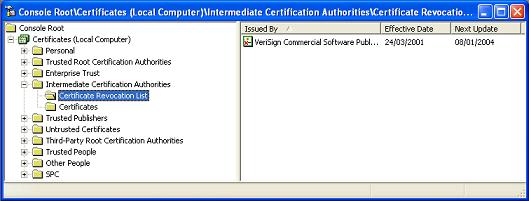
Once you have the file, you can install it following the instructions here:
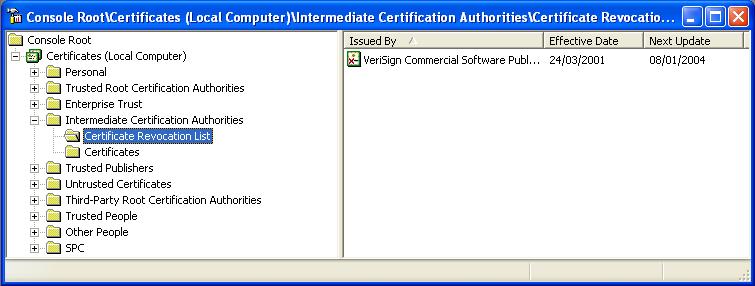
And lo and behold, the problem was fixed.
At least, it is fixed until August 30th 2007 when the CodeSignPCA.crl expires… 😉
But by then, I’m sure we’ll have found a permanent fix!
A few people asked for the demos from this presentation.
Links for the presentation are at the bottom of the post
If you have not already set up your development environment for Windows Workflow Foundation (WF) Development, follow the below steps:
Prerequisites:
a) Windows XP, Windows 2003, Windows Vista
b) Visual Studio 2005
Install the following:
1) .Net Framework 3.0 Redistributable
2) Visual Studio 2005 extensions for .NET Framework 3.0 (Windows Workflow Foundation)
3) You can also optionally download and install:
Microsoft%u00ae Windows%u00ae Software Development Kit for Windows Vista%u2122 and .NET Framework 3.0 Runtime Components
Before installing the above read the provided instructions.
Below are some resources for using/learning/developing with WF:
MSDN – Windows Workflow Foundation
MSDN – Windows Workflow Foundation Tutorials
MSDN – Windows Workflow Foundation General Reference
Getting Started with Windows Workflow Foundation Server Virtual Lab
Hands-on Labs for Windows%u00ae Workflow Foundation
Clinic 5136: Introduction to Developing with Windows%u00ae Workflow Foundation and Visual Studio%u00ae 2005
Windows Workflow Foundation Developer Centre
Also please read Paul Andrews blog (Windows Workflow Foundation Technical Product Manager at Microsoft) for the latest and greatest on WF.
Download the presentation demos here.
Please read this before trying to run.
I know its been rather quiet on the BizUnitExtensions front, but never fear, theres lots of stuff to come. But firstly, i do hope Kevin Smith responds to my comments on his workspace on joining forces. Im still waiting patiently. Although its good to see a new BizUnit core release with bug fixes and changes, its actually beginning to get problematic now because we have made changes to the core of the BizUnit class and other classes such as Context and now we have to port everything to the latest BizUnit codebase in order to keep things consistent and doing this to a code base which has now structurally changed is not easy. Added to that is the fact that we also wanted to change the structure of the code base (so we keep the standard test steps in one, biztalk specific things in another, msmq in yet another etc) so thats got to match up as well. I suppose these are the kind of scenarios where the C# 3.0 extension methods would come in really handy. Maybe its a good time now to break away from the BizUnit label and move to the more generic integration testing framework. What do BizUnit (and Extensions) users think about this?
Anyway, a good discussion has started on the forums at the extensions site (www.codeplex.com/bizunitextensions) with one of the new users querying BizUnits actual value (Why BizUnit) and finding some answers in the roadmap. I guess the reply to the question would be worth a blog post on its own!
So whats cooking with the Extensions project? Well, first of all I need to put down a release calendar showing whats coming up (based on the roadmap) in the next few releases, but right now the target is to get all the step properties, constructors etc public and to get entlib logging working. I have finished the entlib logging and will make it available as soon as possible. Its rather raw right now (ie) its a simple log format that more or less mirrors the console log but to a text log sink. i hope that this will stimulate some discussion in the community so we can improve the kind of logging (to event logs, perf counters etc).
Making the properties etc completely public is proving to be rather involved and raises lots of questions. For instance, if one could execute a step (for example, filecopy) independently (by just setting the properties and calling Execute) and could do the same for all steps in the test case, then the question arises as to what value does the BizUnit testRunner provide ? Some possible answers are that it provides
(A) Execution context (but this could also be set and passed in) and the ability to keep a constant thread of logging through all the steps and
(b) also provides parallel execution (but MbUnit could provide that). (Speaking of MbUnit, it definitely looks much better than NUnit and i should try running BizUnit inside MbUnit to see what extra stuff i can squeeze with MbUnit.)
I think it might be a better option to provide the ability to set step properties in code but once we create a collection of steps, we would pass the collection to BizUnit and say RunTest(TestStepCollection). This way BizUnit can manipulate context and keep full control. The Execute() methods would all then become “internal” and available to friend assemblies rather than public. If you are using the tool currently or planning to then head down to the codeplex site and post your thoughts on this or email me.