by community-syndication | Nov 28, 2007 | BizTalk Community Blogs via Syndication
Hi all and welcome to our last meeting of the year.
I know it’s Christmas soon and we’re all checking out the best gifts to get…….well
I got thinking….. why don’t we have a ‘try before you buy’ session
with a xbox360/media extender etc??
We also need to make it Educational as well, so here’s the line up
for next Dec 5th.
Where:
Microsoft, North Ryde
1 Epping Road
When:
6pm – Beer + Pizza
6.30pm – Kick off
Dec 5th 2007
1. Introduction to BizTalk RFID Services – 101
Presenter: Scott Scovell – Scott has extensive experience in EDI and BizTalk
RFID Services.
He has recently been part of a team that has created the Microsoft BizTalk RFID Courseware,
and is always eager to share his knowledge and lend an ear.
Session Outline:
BizTalk RFID Services is new to the BizTalk Product Suite, being able to enable production
lines, track and trace and various other scenarios with RFID technology is key for
companies to maintain a competitive edge.
This presentation will cover:
1. Setting up and configuring BizTalk RFID Services
2. Plugging in a real RFID Reader Device
3. Reading/Writing Tags within a BizTalk RFID Process.
4. Extending and customising RFID Services.
2. XBOX 360 ‘Christmas Evaluation’ Session
Come along and road test some XBOX 360’s with us for Christmas!
I’m looking forward to a great meeting and hope to see you all there.
Many thanks,
Mick.
p.s. Let me know if you’re coming (so I know how many xbox controllers to put out)
by community-syndication | Nov 28, 2007 | BizTalk Community Blogs via Syndication
A number of you have contacted me in recent months to report that the BizTalk Orchestration Profiler and BizTalk Documenter didn’t run on 64bit machines, this seems to have been down to compiler settings which I’ve now resolved.
I’ve uploaded a planned release for both tools to codeplex – if you’ve got a 64bit machine I’d appreciate it if you could install and test the tool to see if it works on your servers? Please let me know either way – I’ll then make the releases as the default released versions once I’ve got validation.
You can find the releases at the following URLs:
http://www.codeplex.com/BizTalkDocumenter/Release/ProjectReleases.aspx?ReleaseId=8689
http://www.codeplex.com/BiztalkOrcProfiler/Release/ProjectReleases.aspx?ReleaseId=8688
I’ve done some tidying up across the entire codebase to make it easier to support and also reworked and re-released the Word output option for the BizTalk Documenter thus allowing Word documents to be generated as well as CHM files. Let me know if the Word output doesn’t work as expected for you when compared to CHM output.
Please keep any feature suggestions coming…
by community-syndication | Nov 27, 2007 | BizTalk Community Blogs via Syndication
This short demo illustrates how to configure a WCF send port to invoke multiple WCF operations by configuring an operation name -> action mapping.
by community-syndication | Nov 27, 2007 | BizTalk Community Blogs via Syndication
WS-MetadataExchange is a wonderful thing. WCF implements this spec and provides support for it over several different transport protocols including HTTP(S), TCP, and named pipes. All you have to do is choose the appropriate MEX binding.
If you’re familiar with how bindings work in WCF, this all makes perfect sense. However, if you pull out .NET Reflector and begin looking for the various System.ServiceModel.Channels.Binding-derived classes, you might be surprised when you don’t find any.
I was surprised because when you specify MEX endpoints in configuration, there is a separate binding name for each supported MEX transport (mexHttpBinding, mexHttpsBinding, mexNamedPipeBinding, and mexTcpBinding). The trick is these binding element names don’t map to individual classes but rather to a single class named MetadataExchangeBindings, which provides four public static methods: CreateMexHttpBinding, CreateMexHttpsBinding, CreateMexNamedPipeBinding, and CreateMexTcpBinding, as illustrated here:
public static class MetadataExchangeBindings
{
// Methods
public static Binding CreateMexHttpBinding();
public static Binding CreateMexHttpsBinding();
public static Binding CreateMexNamedPipeBinding();
public static Binding CreateMexTcpBinding();
…
}
If you inspect the implementation of any of these methods, you’ll notice they just create one of the built-in bindings, adjusting some of the defaults, and then they override the binding name and namespace as illustrated here:
public static Binding CreateMexHttpBinding()
{
return CreateHttpBinding();
}
private static WSHttpBinding CreateHttpBinding()
{
WSHttpBinding binding = new WSHttpBinding(SecurityMode.None, false);
binding.Name = “MetadataExchangeHttpBinding”;
binding.Namespace = “http://schemas.microsoft.com/ws/2005/02/mex/bindings”;
return binding;
}
In the case of CreateMexHttpBinding, they use the WSHttpBinding but set the security mode to SecurityMode.None. Because they’re basically just using the other built-in bindings, they probably figured it wouldn’t make sense to define completely new binding classes just for the MEX scenarios…they’re really just slightly different configurations.
Obviously this also means that you don’t have to actually use the MEX binding element names (or MetadataExchangeBinding) when configuring endpoints to use MEX. Instead you can use the corresponding built-in binding directly as long as you configure it properly for the MEX scenario (like in the example above, I have to set the security mode to SecurityMode.None when using WSHttpBinding).

by community-syndication | Nov 27, 2007 | BizTalk Community Blogs via Syndication
As an IT geek, Dilbert has been my favourite cartoon for a long long time. It was the only cartoon that came close to reflecting my experience of the world as a cube rat.
However, Dilbert’s place has been usurped (sorry Scott Adams) by Randall Munroe at www.xkcd.com. Randall is brilliant (he built robots at NASA so its not really hyperbole to say that) techically and comically as well.
His creations are a fresh take on all things geeky and I’m becoming a big fan.
I predict Randall Munroe will be the next millionaire cartoonist a la Scott Adams. The tshirts have started. The books will follow soon.
here is a particular favourite

by community-syndication | Nov 27, 2007 | BizTalk Community Blogs via Syndication
We recently had an issue where we had a lot of a receive locations connecting to the same server (sum 1,200).
They kept going down complaining the Messaging Engine failed while notifying an adapter of its configuration
and The error threshold was exceeded
The fix is explained in the following KB article:
http://support.microsoft.com/kb/810886/en-us
For the MaxCmds and MaxMpxCt values, it should be set at 10000 (decimal)
This setting needs to be on all of the BizTalk machines AND the file server it is connecting to.
After you make the change, you have to reboot the machines where this registry change happened.
How to test:
Open up perfmon and add a counter from Redirector called Current Commands
In which you will see the number of connections open (in this case 627)
Did I mention the disclaimer on the side of my blog?
by community-syndication | Nov 27, 2007 | BizTalk Community Blogs via Syndication
This post follows on from yesterday’s post: Creating
BizUnit Test Cases for comparing Xml Files
If you are using the XmlValidationStep/XmlValidationStepEx BizUnit
steps and using XPath validation, then it can be a pain to write all these XPathValidation
statements by hand.
So I wrote a utility to generate the XPath statements for you.
In fact, it generates the entire BizUnit Test Case for validating an Xml file.
Once it has been generated, all you have to do is:
a. Change the location to copy input files and look for output files (or change
completely if not using the File adapter)
b. Change the location/namespace of the Xsd file (if performing validation)
c. Edit the list of XPath statements to remove any which are not necessary.
Generating a Test Case can be performed:
-
From the GUI (which will set the schema location in the Test Case if you have validated
against that schema in the GUI)
-
From the command line (useful for batch files and scripts)
-
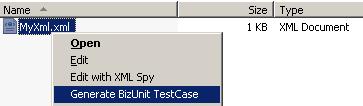
By right-clicking on an Xml file and choosing Generate BizUnit Test Case (assuming
you have installed the reg file):
The utility (and installation/help files) can be found here:
DanSharp XmlViewer
Note: I also have a suggestion for an improved version of XmlValidationStep –
you can find this here:
BizUnit:
XmlValidationStep using .NET 2.0 Schema Validation
This new version combines XmlValidationStep and XmlValidationStepEx into
a single step, allows you to not specify a namespace for the schema in the Test Case,
and uses the newer .NET 2.0 XmlReaderSettings mechanism
for validating schemas. I compile it into my own utility assembly and then refer to
it from a BizUnit TestCase via the assemblyPath attribute.
by community-syndication | Nov 27, 2007 | BizTalk Community Blogs via Syndication
This week I’m delivering a BizTalk development class for my colleagues, and during my preparation of demonstrations, I spent a few extra minutes confirming the behavior of members variables and atomic transactions.
Atomic transactions in BizTalk don’t necessarily behave like some folks expect. For instance, if a BizTalk orchestration calls a component with ADO.NET code which […]
by community-syndication | Nov 27, 2007 | BizTalk Community Blogs via Syndication
Warning, the following code is not pretty! Often times I get into a situation where I lose my confidence in the finesse of the Biztalk Mapper. That’s when I pull out my sledge hammer. This is one of those occasions.
The following map wouldn ‘t workwhen the STqualified or ship-toinformation wasnot in the 1st N1 loop.The output would always be blank.I tried fruitlessly using every combination oflooping functoid, value mapping functoid, and value mappingflattening functoid to no avail.
To make it work with functoids I created two “Functoid Array Strings”. The first string (IterationString_1 in the VB.Net Scripting Functoid parameter) contains the Looping Iteration followed by a “*” followed by the N1 qualifier I was searching for. Essentially my Iteration string would look like this – 1*CR2*IT3*ST4*IM. I bolded the ST to show that it is found in the 3rd iteration of the loop. Once i knew I was looking for Iteration 3 of the loop I could take in element I was looking for in the same “Iteration*Element” string format I created earlier. As soon as I found the 3rd iteration i can just pull out the element I need and never have to worry about looping, I get the value every time.
Here’s the functiod logic.
Public Function ReturnSTInfo_1(ByVal IterationSTring_1 As String, ByVal N104_1 As String) As String
Dim BeginningIndexValue_1 As Integer
Dim EndingIndexValue_1 As Integer
Dim LengthOfElement_1 As Integer
BeginningIndexValue_1 = System.Convert.ToInt32(IterationSTring_1.Substring((IterationSTring_1.IndexOf(“ST”) – 2), 1))
EndingIndexValue_1 = BeginningIndexValue_1 + 1
If N104_1.IndexOf(System.Convert.ToString(EndingIndexValue_1) + “*”) = -1 Then
Return N104_1.Substring((N104_1.IndexOf(System.Convert.ToString(BeginningIndexValue_1) + “*”) + 2))
Else
LengthOfElement_1 = (N104_1.IndexOf(System.Convert.ToString(EndingIndexValue_1) + “*”)) – (N104_1.IndexOf(System.Convert.ToString(BeginningIndexValue_1) + “*”) + 2)
Return N104_1.Substring((N104_1.IndexOf(System.Convert.ToString(BeginningIndexValue_1) + “*”) + 2), LengthOfElement_1)
End If
End Function
by stephen-w-thomas | Nov 26, 2007 | Stephen's BizTalk and Integration Blog
Last week, I released Volume 10 of The BizTalker. The headline for this issue is the release of Visual Studios 2008 and the .Net 3.5 framework.
View this issue here.
Be one of the first to receive the BizTalker by signing up for the free email newsletter here.
