by community-syndication | Oct 23, 2006 | BizTalk Community Blogs via Syndication
I’ve recently had the opportunity to build some advanced web services with BizTalk Server 2006, and wanted to show 4 interesting use cases over this 2 part blog post.
Over these 2 posts, I will demonstrate and investigate the following topics …
- Using the “bare” and “wrapped” settings during web service generation
- Creating multi-parameter web services via BizTalk
- How the “one way” flag affects the web service
- Decoupling the BizTalk web service from a particular assembly
This post will focus on the first two. [UPDATE: See Part II here]
I would venture to say that virtually no one has clicked the “Advanced” button in the Web Services Publishing Wizard and changed any of those values. The first option in that “Advanced Properties” window is SOAP Parameter Style of which your options are Default, Bare or Wrapped.
This isn’t anything BizTalk specific, but a way to design the WSDL. By default, when you build your web service from code, your SOAP request bears the name of the function call as a wrapper element. For instance, if I have a method called “PostOrder” on my web service, then my SOAP request expects an input such as …
<soap:Body>

    <PostNewOrder xmlns=”http://tempuri.org/”>

      <InsertOrder xmlns=”http://Microsoft.Demo.Blog.AdvancedServices.InsertOrder_XML”>

        <OrderID xmlns=””>string</OrderID>

        <CustomerName xmlns=””>string</CustomerName>

        <ItemID xmlns=””>string</ItemID>

        <Quantity xmlns=””>string</Quantity>

        <Status xmlns=””>string</Status>

      </InsertOrder>

    </PostNewOrder>

  </soap:Body>
Plus, if this is request/response, you end up with a response node automatically generated (method name + “response”). This is the default behavior, and thus not terrible, but arguably a bit lame (read more here and here).
A more purist approach is to change this setting in the “Advanced Properties” window to Bare so that the expected SOAP request looks like …
<soap:Body>

    <InsertOrder xmlns=”http://Microsoft.Demo.Blog.AdvancedServices.InsertOrder_XML”>

      <OrderID xmlns=””>string</OrderID>

      <CustomerName xmlns=””>string</CustomerName>

      <ItemID xmlns=””>string</ItemID>

      <Quantity xmlns=””>string</Quantity>

      <Status xmlns=””>string</Status>

    </InsertOrder>

  </soap:Body>
Since BizTalk always deals in “messages”, this is almost always a very solid and clean approach. Why is the default value set to be Wrapped? Because it’s the safest way to go. Why? If I have *multiple* parameters, and I do a Bare service, I end up with an invalid WSDL. Let’s see that next.
So my next point is how to do multi-parameter web services generated by BizTalk. When using the Web Services Publishing Wizard and doing a “generate service from schema” you can only create a web service method accepting a single “part.”
Not so with orchestration. Within a BizTalk orchestration, I can easily build multi-part messages. These are messages containing one or more documents. A multi-part message can only have one “Body” but any number of other additional parts. So, I’ve built a multi-part message which has a “body” node and “attachment” node.
Now, I go ahead and make the “Receive” shape accept that multi-part message, and connect it to a “public” receive port. Build and deploy. Now, I walk through the Web Services Publishing Wizard and build a web service from the orchestration. I first kept the default SOAP Parameter Style (which is Wrapped) when publishing, and ended up with a WSDL looking like this …
<soap:Body>

    <PostNewCustomer xmlns=”http://tempuri.org/”>

      <InsertContact xmlns=”http://Microsoft.Demo.Blog.AdvancedServices.InsertContact_XML”>

        <Name xmlns=””>string</Name>

        <Address xmlns=””>string</Address>

      </InsertContact>

      <InsertContactAttachment xmlns=”http://Microsoft.Demo.Blog.AdvancedServices.InsertContact_XML”>

        <Payload xmlns=””>string</Payload>

      </InsertContactAttachment>

    </PostNewCustomer>

 </soap:Body>
See that? I have *two* parameters for my web service, both of different message types. When I call this from code, it looks like …
//svc is the web service; “contact” and “attachment” are both messages
svc.PostNewCustomer(contact, attachment);
So everything looks good. I now have a multi-parameter web service generated from BizTalk. Lots of use cases for this. Let’s circle back, though. What happens if I do this web service with the SOAP Parameter Style set to Bare? As I mentioned above, this leads to invalid WSDL. Why? Because you’ve removed the wrapped, and provided two different root nodes in the body. When I build my service this way and view the service, I get this …
When I click the web method name, I see this SOAP request … <soap:Body>
<InsertContact xmlns=”http://Microsoft.Demo.Blog.AdvancedServices.InsertContact_XML”>
<Name xmlns=””>string</Name>
<Address xmlns=””>string</Address>
</InsertContact>
<InsertContactAttachment xmlns=”http://Microsoft.Demo.Blog.AdvancedServices.InsertContact_XML”>
<Payload xmlns=””>string</Payload>
</InsertContactAttachment>
</soap:Body>
Not good. This would be the same if you used Bare on a web method that took in two native types (e.g. pair of integer values). If you aren’t passing in a single object (native type, message, whatever), then you need to wrap it.
Conclusion
So, what have we figured out so far? The SOAP Parameter Style is a nice way to gain ownership over the WSDL and control exactly what’s in the <soap:Body> node. We also saw how you can very easily build multi-parameter web services in BizTalk using orchestrations and multi-part messages. However, be careful when mixing the two, since a multi-parameter web service must be wrapped up.
Part II coming up …
[UPDATE: See Part II here]
Technorati Tags: BizTalk, Web Services
by community-syndication | Oct 23, 2006 | BizTalk Community Blogs via Syndication
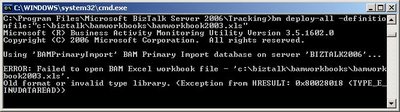
While trying to deploy a BAM workbook I created with Excel 2002, I received the following error message:
Since I was using an older version of Excel (2002) I thought that installing the 2003-version would fix my problem. Unfortunately it did not…
After some Googleing I found the blog from Don Glover, a Programming Writer for the BAM feature of BizTalk Server. He states that localization was the problem:
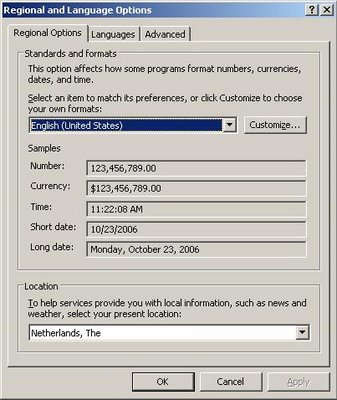
“BAM is made up of a number of separate components, SQL, web services, custom tools, and more. In order for each of the components to operate together effectively, they must all be set to the same locale/culture. In addition, your system and user locale/culture should match those set for BAM.”
In my case it was enough to change my ‘Regional options’ from Dutch to English (US).
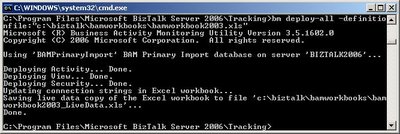
After firing the deployment command again, all went well.
Thanks Don!

by community-syndication | Oct 22, 2006 | BizTalk Community Blogs via Syndication

Hey All,
Just curious to know if any of you have actually taken a look at the first BizTalk 2006 book on the market? I have not gone out and bought it yet, but I am keen to know what some of your opinions are. You can actually buy it at Borders here in Australia for $59.99 http://www.bordersstores.com/search/title_detail.jsp?id=56056981&srchTerms=BizTalk&mediaType=1&srchType=Keyword
I will get out there at some stage soon, but in the interim, keen for your feedback….
by community-syndication | Oct 22, 2006 | BizTalk Community Blogs via Syndication
It’s been a crazy weekend, worked a ton of hours already. That said, I thought
I would archive here some information that can be found other places, but I wanted
at hand when next I needed it.
The following table contains the macro replacements that work within the File Adapter
for BizTalk Server.
|
Macro
name
|
Substitute
value
|
|
%datetime%
|
Coordinated
Universal Time (UTC) date time in the format YYYY-MM-DDThhmmss (for example, 1997-07-12T103508).
|
|
%datetime_bts2000%
|
UTC date time
in the format YYYYMMDDhhmmsss, where sss means seconds and milliseconds (for example,
199707121035234 means 1997/07/12, 10:35:23 and 400 milliseconds).
|
|
%datetime.tz%
|
Local date time
plus time zone from GMT in the format YYYY-MM-DDThhmmssTZD, (for example, 1997-07-12T103508+800).
|
|
%DestinationParty%
|
Name of the
destination party. The value comes from message the context property BTS.DestinationParty.
|
|
%DestinationPartyID%
|
Identifier of
the destination party (GUID). The value comes from the message context property BTS.DestinationPartyID.
|
|
%DestinationPartyQualifier%
|
Qualifier of
the destination party. The value comes from the message context property BTS.DestinationPartyQualifier.
|
|
%MessageID%
|
Globally unique
identifier (GUID) of the message in BizTalk Server. The value comes directly from
the message context property BTS.MessageID.
|
|
%SourceFileName%
|
Name of the
file from where the File adapter read the message. The file name includes extension
and excludes the file path, for example, foo.xml. When substituting this property,
the File adapter extracts the file name from the absolute file path stored in the
FILE.ReceivedFileName context property. If the context property does not have a value,
for example, if message was received on an adapter other than File adapter, then the
macro will not be substituted and will remain in the file name as is (for example,
C:\Drop\%SourceFileName%).
|
|
%SourceParty%
|
Name of the
source party from which the File adapter received the message.
|
|
%SourcePartyID%
|
Identifier of
the source party (GUID). The value comes from the message context property BTS.SourcePartyID.
|
|
%SourcePartyQualifier%
|
Qualifier of
the source party from which the File adapter received the message.
|
|
%time%
|
UTC time in
the format hhmmss.
|
|
%time.tz%
|
Local time plus
time zone from GMT in the format hhmmssTZD (for example, 124525+530).
|
by community-syndication | Oct 22, 2006 | BizTalk Community Blogs via Syndication
Mick Badran just reminded me of a new BizTalk Benchmarking Report that was released by INFOSYS this month comparing performance accross:
- BTS 2004 SP1 with SQL 2000 SP3
- BTS 2006 SQL 2000 SP4
- BTS2006 SQL 2005
I have posted the report to my OFFICEISP hosted site. Check it out at your convenience.
http://cjv.officeisp.net/biztalk/Shared%20Documents/Forms/AllItems.aspx?RootFolder=%2fbiztalk%2fShared%20Documents%2fWhitepapers&FolderCTID=&View=%7b62310491%2dB568%2d4DFB%2d9F73%2d448028BF2812%7d
by stephen-w-thomas | Oct 22, 2006 | Stephen's BizTalk and Integration Blog
Another new BizTalk book is now available from APress.
This book, Pro BizTalk 2006, published by APress and written by George Dunphy (works for Microsoft Consulting Services) and Ahmer Metwally (works for Microsoft) is described as a high-end resource based on real feedback from developers. It covers topics not covered well in other BizTalk books like performance tuning, scalability, and administration.
Amazon.com also has a package so you can get both the Pro BizTalk 2006 book and the BizTalk 2006 Recipes book for one price.
Lots of other great BizTalk Books coming around the corner as well…

by community-syndication | Oct 22, 2006 | BizTalk Community Blogs via Syndication
Harry Pierson was in my WF/WCF course I taught a few weeks ago. He posted on his blog about features he thought were cool in WF here.
One of the ones that I thought was interesting that he caught during my course was
that the WorkflowLoaderService is actually a pluggable service (just like every other
service except for the WorkflowQueueingService). So of course it came
to my mind to show an example of why you might want to create a custom loader service.
The WorkflowLoaderService is a very simple API – it has two methods name CreateInstance
both which return an instance of Activity. Everytime a Host calls WorkflowRuntime.CreateWorkflow
– the WorkflowLoaderService is called to actually create the instance. One of
the CreateInstance methods is for compiled Activities (the one that takes as its argument
a Type) and one for XAML activation (the one that takes as its arguments two XmlReaders
– one for the workflow and one for rules).
The DefaultWorkflowLoaderService is fairly simple – the CreateInstance that takes
a Type uses Activator.CreateInstance to create an instance of the Activity Type.
The one that takes XAML is slightly more complex – but essentially uses the WorkflowMarkupSerializer
to turn the XAML into an Activity.
So why might you want to replace this service? Well – there are many scenarios
– but one that always comes to mind for me resolves around rule loading.
One of the great features of WF is to be able to model some of you logic in rules
versus code. In Visual Studio – whenever you add rules, those rules are stored
in a .rules file along side your workflow files. These .rules files are then
compiled into the assembly as resources. Whenever an Activity first needs a
rule, there is an infrastructure that loads the .rules file into a RuleDefinitions
type (containing both any RuleSets and RuleConditions) – and stuff the object into
a well-known DependencyProperty in the root Activity.
One of the features of rules that is so useful is being able to replace them at runtime
with a different set of rules – but with the DefaultWorkflowLoaderService – the only
way you can do that is if you use XAML activation. But what if you want to replace
rules on a compiled Activity type without having to recompile it. The default
infrastructure doesn’t allow this.
But – if you build your own WorkflowLoaderService – when a compiled Activity type
is requested – you could read the rules from an alternate location (based on configuration
or some other algorithm) and then dynamically create the RuleDefinitions and stick
it into the Activity using the well-known DependencyProperty. Here is the code
that does this in a simulated way (note that you’d have to change the algorithm that
loads the alternate rules to something useful):
public class DynamicRuleWorkflowLoader
: DefaultWorkflowLoaderService
{
protected override System.Workflow.ComponentModel.Activity
CreateInstance(Type workflowType)
{
Activity a = base.CreateInstance(workflowType);
WorkflowMarkupSerializer s = new WorkflowMarkupSerializer();
object o = s.Deserialize(XmlReader.Create(“AlternateRules.xml”));
a.SetValue(RuleDefinitions.RuleDefinitionsProperty, o);
return a;
}
protected override Activity
CreateInstance(System.Xml.XmlReader workflowDefinitionReader, System.Xml.XmlReader
rulesReader)
{
return base.CreateInstance(workflowDefinitionReader,
rulesReader);
}
}

by stephen-w-thomas | Oct 21, 2006 | Stephen's BizTalk and Integration Blog
If you live in the Dallas, TX area and are interested in Microsoft BizTalk Server then the Dallas BizTalk Users Group is for you!
Tim Rayburn and others are working hard to get things started. I never knew how much work it was to set up a new users group!
The first meeting is scheduled for Monday, November 13th, 2006 at 6 PM at the Microsoft campus in Las Colinas.
If you are interested, please register on the user group web site at http://biztalkusergroup.com
Hope to see you at the first meeting!
by community-syndication | Oct 21, 2006 | BizTalk Community Blogs via Syndication
Once again Andrew Leckie has sent through another gem – a performance document comparing
BTS04/SQL2000, BTS06/SQL2000 and BTS06/SQL2005. The tests were carried out by ‘InfoSys’
in the US – well done guys.
Some very interesting results
Grab the document here –
biztalk-2006-performance-benchmarking-Report.pdf
(674.5 KB)
Good stuff.
by community-syndication | Oct 21, 2006 | BizTalk Community Blogs via Syndication
If you live in the Dallas, TX area and interested in BizTalk then the Dallas BizTalk Users Group is for you!
Tim Rayburn and others are working hard to get things rolling. I never knew how hard it was to set up a users group!
The first meeting is scheduled for November 13th, 2006 at 6 PM. If you are interested, please register on the user group web site at http://biztalkusergroup.com
Hope to see you all at the first meeting!
