by community-syndication | Nov 7, 2006 | BizTalk Community Blogs via Syndication
“Hey Mark, whats with the name of this blog?” i hear you ask. Well I’m glad you asked. In most dialects of English, Torque and Talk are pronounced pretty much the same. “Torque”connotates torque wrenches, car mechanics, engine oilsoaked overalls and down to earth hardwork. And thats pretty much what this blog is about. Except for the wrenches, mechanics and overalls. This is kind of place you’ll want to come when you want to make sure your BizTalk Server is tuned up and running right.
Now that I’ve thrashed thatanalogy you wont have trouble remembering that its like “BizTalk” but with “Torque”.
And before you ask, the .com was taken already.
Mark

by community-syndication | Nov 6, 2006 | BizTalk Community Blogs via Syndication
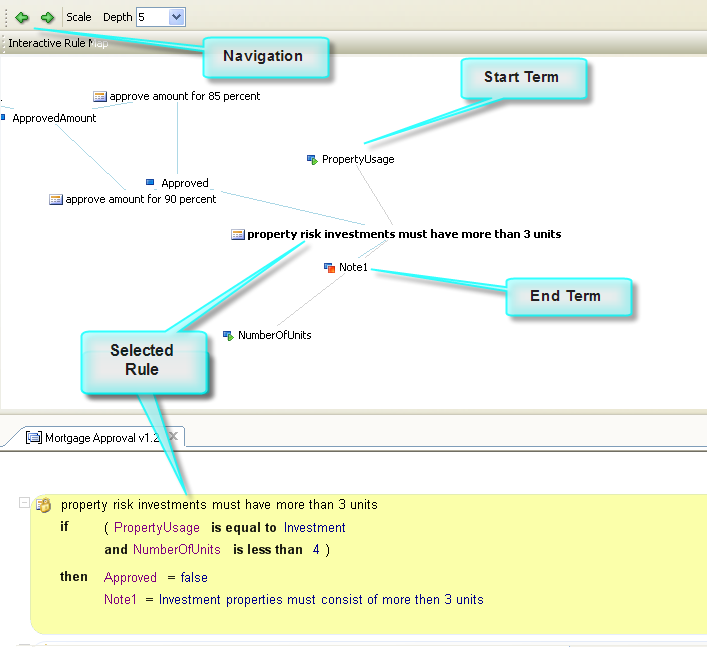
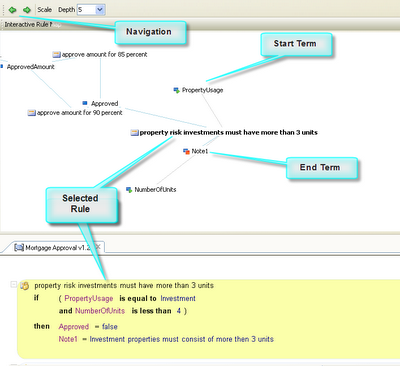
Business Rules Manager 1.4.0.20 showing the new enhancements in the Interactive Rule Map.
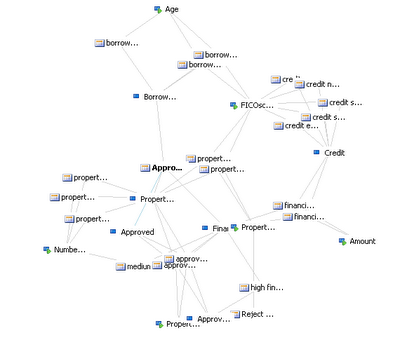
Discovery of new galaxies?
by community-syndication | Nov 6, 2006 | BizTalk Community Blogs via Syndication
Finally, working with released code!
Get it
here, along with the Visual Studio extensions and Windows SDK.
Now, if they could just get the Vista RTM out so I can do .NET 3.0 RTM development on my desktop.
by community-syndication | Nov 6, 2006 | BizTalk Community Blogs via Syndication
Does it make sense to have a collection of anti-patterns (ant-solutions) for BizTalk? Each anti-pattern might address the following: Anti-Pattern Name – gotta have a name. Pattern – A brief description of the pattern. Scenario / Cause – the event or events…(read more)
by community-syndication | Nov 6, 2006 | BizTalk Community Blogs via Syndication
I installed the BizTalk 2006 base EDI adapter for the first time last night to investigate the differences between the Covast EDI Accelerator and the Base EDI Adapter (the base adapter technology is produced by Covast).
While working through the XML-to-EDI tutorial it became apparent that things were not quite right with my configuration – I […]
by community-syndication | Nov 6, 2006 | BizTalk Community Blogs via Syndication
One of the noticeable omissions from the excellent SQL Server 2005 product is the Service Manager, a tool which provides a quick visual indication as to the state of a local or remote SQL Server instance.
It would appear that I’m not the first to notice this and an excellent freeware version has been produced by […]
by community-syndication | Nov 6, 2006 | BizTalk Community Blogs via Syndication
What a coincidence: last week a student asked a question that I couldn’t answer straight away and probably at the same time somebody posted a blog post solving the question! The question was how to customize the edit form that you get when you create or edit a list item in a SharePoint 2007 list (EditForm.aspx). In SharePoint 2003 you could do this trick by editing the page in FrontPage 2003, when your right clicked on the control on the page you could actually break the control into different controls. Optimistically I tried to do the same thing in the SharePoint Designer, although the right click menu didn’t show to option that I was looking for (there went my street credibility for that course 🙂 ). Kristian Kalsing explains it on this blog post how this works in the 2007 world:
-
Open your site in SharePoint Designer.
-
Browse to your list and open the 'NewForm.aspx' web form.
-
Go File > Save As… and give the form a new name such as 'NewForm2.aspx'.
-
Delete the default List Form Web Part from the page.
-
Go Insert > SharePoint Controls > Custom List Form.
-
In the List or Document Library Form dialog, select the appropriate list, content type and type of form.
-
Click OK and a new Data Form Web Part is added with controls representing all the fields from the list (in my environment all the controls show "Error Rendering Control" but this does not affect the final result).
-
In the newly added Data Form Web Part, delete the rows containing fields not to be shown to the user (ensure that fields being removed are not required fields without default values as this would prevent the user from submitting the form).
-
At this point, you can do other customisation such as rearranging the fields if you wish.
-
Save the site.
by community-syndication | Nov 6, 2006 | BizTalk Community Blogs via Syndication
Yesterday evening I arrived with my pal Patrick in the beautiful city of Barcelona for Microsoft Tech Ed: Developers. The complete U2U team will be present and we will have a boot as well. Make sure to drop by to say hi, and maybe get one of the beloved U2U goodies (say that Jan sent you).
On Thursday I’ll have a session together with Patrick about web parts:
DEV353 Building Web Parts the Smart Way (Thu Nov 9 17:30 – 18:45)
In this session, Web developers will get a wide but deep overview of Web Part development. You will first see how WSS v2 style Web Parts can be upgraded and deployed to a WSS v3 environment. Next, you'll learn about the Smart Part and the Son of the Smart Part providing an alternative but very productive way of creating Web Parts. You will see more than the usual Smart Part demos with a lot of tips and tricks to benefit the most from the Smart Part. ASP.NET 2.0 introduces its own Web Part infrastructure and you will get a quick overview of the essential steps of building ASP.NET 2.0 Web Parts. Guess what? WSS v3 utilizes the same Web Part infrastructure so all of your work can be re-used in WSS v3. But there are some pitfalls that will be discussed and you will see some demonstrations of scenarios where you are forced to choose for building Web Parts the WSS v2 style. Next, you will learn about what the combination WSS Features and Web Parts can do for you and the session concludes with the announcement and demonstration of the latest version of the Smart Part, appropriately called by Mike Fitzmaurice as the 'Return of the Smart Part'.
I’m sure it will be lots of fun to be on stage again with Profke! Make sure to check out his other sessions as well (and of course the rest of the Office 2007 content). This morning we already met Joris (aka Jopx), there seem to be a lot of Belgian developers so the Belgian/French country drink will be exciting too I guess!
See you at Tech Ed: Developers in Barcelona, Spain!
by community-syndication | Nov 6, 2006 | BizTalk Community Blogs via Syndication
Could it be that the first (to my knowledge) download has been made available for the 2007 Microsoft Office System? The download page doesn’t talk about beta so this could be the real thing!
Microsoft Visual Studio 2005 Tools for the 2007 Microsoft Office System
Install VSTO 2005 SE to create new application-level add-ins for six applications in the 2007 Microsoft Office system and five in Microsoft Office 2003. Use managed code to customize task panes and the Ribbon in the 2007 Microsoft Office system applications.
Microsoft Visual Studio 2005 Tools for the 2007 Microsoft Office System (also known as “Visual Studio 2005 Tools for Office Second Edition” or “VSTO 2005 SE”) is an add-on to Microsoft Visual Studio 2005 that enables you to build application-level add-ins for applications in the 2007 Microsoft Office system and the Microsoft Office 2003 System.
VSTO 2005 SE includes support for Microsoft Office InfoPath 2007 form template projects, previously available as a separate product known as the Microsoft Office InfoPath 2003 Toolkit for Visual Studio 2005. You can now design InfoPath 2007 form solutions right in the Visual Studio 2005 environment if you have InfoPath 2007 installed on your computer.
An important note can be found at the bottom of the page (for those of you who were looking for the document level customizations in VSTO 2005 SE): Note that if you install on top of Visual Studio 2005 Professional, no document-level customizations or other functionality that is part of the full version of Visual Studio 2005 Tools for Office (VSTO 2005) is installed. VSTO 2005 SE adds only the application-level features listed in the feature highlights section above. If you install on top of one of the Visual Studio Team editions or Visual Studio 2005 Tools for Office, you will have VSTO 2005 project types available side by side with VSTO 2005 SE projects.
The documentation can be found here (still talks about the beta stuff right now), the redistributable here.
by community-syndication | Nov 6, 2006 | BizTalk Community Blogs via Syndication
Wow, it has been a long time since my last blog post! For those of you wondering: your browser is not broken since my blog displayed the same page for more than 2 months, I’m still alive and kicking, I’m not stuck in China and I’m still knee-deep in Information Worker technologies at U2U. Those guys have kept my really busy the last couple of months and made it possible to travel to lots of great cities to “evangelize” the 2007 Microsoft Office System: Zurich, Dubai, Jeddah, Lisbon, … Thanks for all the people attending the gigs, it was great to show you around in Office 2007!
I’m writing this blog post from the Tech Ed: Developers speakers lounge, I figured out that Tech Ed would be a nice moment to give my blog a second start. Thanks for being patient! 🙂