Load Generation Tool For Testing BizTalk Server

A few days ago Microsoft released a Load Generation tool to help simulate load for testing Biztalk 2004 solutions.  You can download this testing tool here.


It seems that the installation package defaults the installation path for the testing tool to something other then your C drive.  In one case, my installation went to my E:\ drive and in the other two cases it went to my D:\ drive.  Just make sure during the installation you note (or change if you want to) the installation location.


Also, it appears that if you do not have MSMQ installed you will get an error saying MSMQTransmitter.dll did not register.  I said Ignore and it seemed to install correctly.  I tried this on the computer with MSMQ and did not have this problem.


I have not done anything more then install the program and briefly look at the documentation.  It seems quite powerful, but Larry Beck’s tool is much simpler and I didn’t have any problems installing it.


Thanks to Bryan Corazza for the release information.


New BizTalk Load Generation Tool Now Available

Overview


This tool is intended for developers and IT professionals to simulate load on a BizTalk Server. Using this tool, you can simulate load to instrument performance and stress against a BizTalk deployment. In addition, this tool may also be extended by developers to simulate load for custom transports. This tool should be used in a test environment only, and should not be used in a production environment. This tool is provided “as-is” and is not supported.


Download LoadGen Here: http://www.microsoft.com/downloads/details.aspx?FamilyId=C2EE632B-41C2-42B4-B865-34077F483C9E&displaylang=en


Dynamic Mapping Inside an Orchestration

This sample shows how a map can be called dynamically inside an Orchestration in Biztalk. This can allow for the map to be set at run time by setting a message context property or reading the value from the SSO or database. This can greatly reduce effort if a single business process is used for many different messages that need different maps.

This sample should work with BizTalk 2004 and BizTalk 2006.

Get more information from the original blog post on this topic: http://www.biztalkgurus.com/biztalk_server/biztalk_blogs/b/biztalk/archive/2005/08/28/using-dynamic-transforms-_2800_mapping_2900_-in-biztalk-2004-orchestrations.aspx

Mapper Improvements in Biztalk 2006

Mapper Improvements in Biztalk 2006

Biztalk Server 2006 introduces many exciting new features like Recoverable Message Processing and Suspended Message Routing.  With great new features like these, sometimes the map and schema editor improvements can get overlooked. 


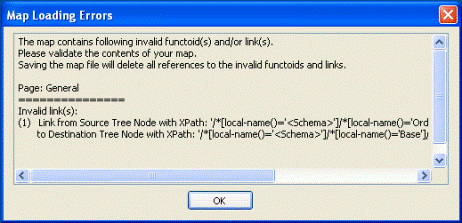
Anyone that has worked with Biztalk 2004 maps has probably seen this message pop up: “The map contains invalid links.  Please validate the contents of your map.  Saving the map file will delete all references to the invalid links.”  This is caused when the map references a schema that has changed and the changed fields are used inside the map. 


Since I have never been on a project that has successfully locked down the schemas after they were created, this message is something I have seen quite frequently.  In case you are lucky and haven’t seen this message before it looks like this:


Biztalk Server 2004 Map Error


In the past, these types of errors could be hard to track down.  If another developer made changes to the schema, the person working on the map may have to review the map field by field to track down the exact problem.  In the worse case scenario, a link could be broken and never fixed.


In Biztalk Server 2006, we now get this message:


Biztalk Server 2006 Map Error


This messages shows in great detail what links have been broken by the schema changes.


Since I have done my fair share of mapping in the past, I differently consider this one of the greatest enhancements to developer productivity in Biztalk 2006.  Now, if they could only make those property picker windows bigger…


While I’m on the developer productivity kick, another great enhancement is to right click on a host instance and select “Restart”.  Sure bests having to Stop, Wait, and Start again…


We also have a few new functoids available.  These include IsNil (Logical), Nil Value (Advanced) and Assert (Advanced). 


The IsNil functoid takes in one parameter and returns true if the input is set to Nil.


The Nil Value functoid sets the destination node to Nil.


The Assert functoid takes in 3 parameters.  1: expression to evaluate or result from logical functoid, 2: text to throw in the exception if 1 is false, 3: text to pass forward if 1 is true.  As expected, this only works for assemblies built in Development mode.

BizTalk 2006 Beta 1 First impressions Part 3 Workaround Group Hub Query

Yesterday I received an email from Microsoft with a workaround of issue (bug) I mentioned earlier , see  here. Indeed the error is a bug in Beta 1 and will be fixed in Beta 2. For a workaround follow the following instructions :

Workaround: Customers in the affected timezones should set the times on their machine to either GMT or to timezones lagging GMT. They should change the clock time prior to opening the Admin Console or open a new Admin Console window, where the changes will have taken effect. 

After opening the Admin Console with the clock set to GMT (or GMT lagging) and refreshing the Group Hub page (or running a specific query), users can reset the clock on their machine back to their GMT+ time. The Group Hub page will continue to work since certain cached time values are used. 

The workaround steps have to be followed for each new Admin Console window which is opened.

More Binding File Magic…

In my last entry, I discussed some ways that can making working with binding files
a bit easier.  Here is another post in that same vein that addresses a common
pain point…

Un-escaping TransportTypeData

One of the annoying things about binding files is that adapters only have a string
element available to store adapter-specific information for send ports and receive
locations.  As a result, adapters will store escaped XML (or even “doubly escaped”
xml…)  This can be extremely hard to manage, especially for adapters such as
MQSeries that keep quite a bit of information in this form. 

To solve this problem, I introduced a new command-line tool in the most recent version
of the Deployment
Framework called “ElementTunnel.exe” (the source for which is in the Tools download.) 
This utility will take in an xml file, along with a file containing xpaths to elements
that should be “encoded” or “decoded”.  The end result is that you can choose
to manage a “master” binding file (not directly useable) and run ElementTunnel on
it immediately prior to deployment.  (You may also run XmlPreProcess on the same
file for macro expansion! The sample in the deployment framework shows both occurring
– XmlPreProcess should occur first!) 

So what does this mean?  An example for a single Send Port snippet: It means
that, in the case of MQSeries, instead of storing and maintaining this mess:

<SendPort Name=”SomeQueue” IsStatic=”true” IsTwoWay=”false”>
<TransmitPipeline Name=”SomeAssembly.SomeQueue” FullyQualifiedName=”SomeAssembly.SomeQueue,
SomeAssembly, Version=1.0.0.0, Culture=neutral, PublicKeyToken=bb955d799cc915b9″ Type=”2″
/>
<PrimaryTransport>
<Address>MQS://SomeServer/SomeQM/SomeQueue</Address>
<TransportTypeData>&lt;CustomProps&gt;&lt;AdapterConfig vt=”8″&gt;&amp;lt;Config
xmlns:xsd=

;”http://www.w3.org/2001/XMLSchema” xmlns:xsi=”http://www.w3.org/2001/XMLSchema-instance”&
amp;gt;&amp;lt;uri&amp;gt;MQS://SomeServer/SomeQM/ SomeQueue& amp;lt;/uri&amp;gt;&amp;lt;queueDetails&
amp;gt;SomeServer/SomeQM/SomeQueue&amp;lt;/queueDetails&
amp;gt;&amp;lt;transactionSupported&amp;gt;yes&
amp;lt;/transactionSupported&amp;gt;&amp;lt;dataConversion&amp;gt;no&amp;lt;/dataConversion&
amp;gt;&amp;lt;segmentationAllowed&amp;gt;no&amp;lt;
/segmentationAllowed&amp;gt;&amp;lt;fragmentationSize&
amp;gt;500&amp;lt;/fragmentationSize&amp;gt;&amp;lt;ordered& amp;gt;no&amp;lt;/ordered&amp;gt;&amp;lt;/Config&
amp;gt;&lt;/AdapterConfig& gt;&lt;/CustomProps&gt;</TransportTypeData>
<RetryCount>3</RetryCount>
<RetryInterval>5</RetryInterval>

</SendPort>>  >

You can store and maintain this:

<SendPort Name=”SomeQueue” IsStatic=”true” IsTwoWay=”false”>
<TransmitPipeline Name=”SomeAssembly.SomeQueue” FullyQualifiedName=”SomeAssembly.SomeQueue,
SomeAssembly, Version=1.0.0.0, Culture=neutral, PublicKeyToken=bb955d799cc915b9″ Type=”2″
/>
<PrimaryTransport>
<Address>MQS://SomeServer/SomeQM/SomeQueue</Address>
<TransportTypeData>     <CustomProps>
        <AdapterConfig vt=”8″>
            <Config>
               
<uri>MQS://SomeServer/SomeQM/SomeQueue</uri>
               
<queueDetails>SomeServer/SomeQM/SomeQueue</queueDetails>
               
<transactionSupported>yes</transactionSupported>
               
<dataConversion>no</dataConversion>
               
<segmentationAllowed>no</segmentationAllowed>
               
<fragmentationSize>500</fragmentationSize>
               
<ordered>no</ordered>
            </Config>
        </AdapterConfig>
    </CustomProps> </TransportTypeData>
<RetryCount>3</RetryCount>
<RetryInterval>5</RetryInterval>

</SendPort> 

Ahhh, isn’t that better?  Of course, similar goodness for all other adapters. 
And, in the clean version, you’ll find it easier to place/maintain XmlPreProcess macros. 

In the Deployment Framework sample, you’ll see that we pass the following xpaths to
ElementTunnel (along with the “master” binding file itself):

/BindingInfo/ReceivePortCollection/ReceivePort/ReceiveLocations/ReceiveLocation/ ReceiveLocationTransportTypeData/CustomProps/AdapterConfig
/BindingInfo/ReceivePortCollection/ReceivePort/ReceiveLocations/ReceiveLocation/ ReceiveLocationTransportTypeData
/BindingInfo/SendPortCollection/SendPort/*/TransportTypeData/CustomProps/AdapterConfig
/BindingInfo/SendPortCollection/SendPort/*/TransportTypeData

If you want to “unescape” your binding file (generally a one-time thing, just to get
clean content) you’ll want to pass these xpaths in a slightly different order, because
of the “double escaping”:

/BindingInfo/ReceivePortCollection/ReceivePort/ReceiveLocations/ReceiveLocation/ ReceiveLocationTransportTypeData
/BindingInfo/ReceivePortCollection/ReceivePort/ReceiveLocations/ReceiveLocation/ ReceiveLocationTransportTypeData/CustomProps/AdapterConfig
/BindingInfo/SendPortCollection/SendPort/*/TransportTypeData
/BindingInfo/SendPortCollection/SendPort/*/TransportTypeData/CustomProps/AdapterConfig

So! If you are managing large binding files (where escaped xml is getting in your
way), you might find this technique handy…Grab the tool, and give it a go.

More Binding File Magic…

In my last entry, I discussed some ways that can making working with binding files
a bit easier.  Here is another post in that same vein that addresses a common
pain point…

Un-escaping TransportTypeData

One of the annoying things about binding files is that adapters only have a string
element available to store adapter-specific information for send ports and receive
locations.  As a result, adapters will store escaped XML (or even “doubly escaped”
xml…)  This can be extremely hard to manage, especially for adapters such as
MQSeries that keep quite a bit of information in this form. 

To solve this problem, I introduced a new command-line tool in the most recent version
of the Deployment
Framework called “ElementTunnel.exe” (the source for which is in the Tools download.) 
This utility will take in an xml file, along with a file containing xpaths to elements
that should be “encoded” or “decoded”.  The end result is that you can choose
to manage a “master” binding file (not directly useable) and run ElementTunnel on
it immediately prior to deployment.  (You may also run XmlPreProcess on the same
file for macro expansion! The sample in the deployment framework shows both occurring
– XmlPreProcess should occur first!) 

So what does this mean?  An example for a single Send Port snippet: It means
that, in the case of MQSeries, instead of storing and maintaining this mess:

<SendPort Name=”SomeQueue” IsStatic=”true” IsTwoWay=”false”>
<TransmitPipeline Name=”SomeAssembly.SomeQueue” FullyQualifiedName=”SomeAssembly.SomeQueue,
SomeAssembly, Version=1.0.0.0, Culture=neutral, PublicKeyToken=bb955d799cc915b9″ Type=”2″
/>
<PrimaryTransport>
<Address>MQS://SomeServer/SomeQM/SomeQueue</Address>
<TransportTypeData>&lt;CustomProps&gt;&lt;AdapterConfig vt=”8″&gt;&amp;lt;Config
xmlns:xsd=

;”http://www.w3.org/2001/XMLSchema” xmlns:xsi=”http://www.w3.org/2001/XMLSchema-instance”&
amp;gt;&amp;lt;uri&amp;gt;MQS://SomeServer/SomeQM/ SomeQueue& amp;lt;/uri&amp;gt;&amp;lt;queueDetails&
amp;gt;SomeServer/SomeQM/SomeQueue&amp;lt;/queueDetails&
amp;gt;&amp;lt;transactionSupported&amp;gt;yes&
amp;lt;/transactionSupported&amp;gt;&amp;lt;dataConversion&amp;gt;no&amp;lt;/dataConversion&
amp;gt;&amp;lt;segmentationAllowed&amp;gt;no&amp;lt;
/segmentationAllowed&amp;gt;&amp;lt;fragmentationSize&
amp;gt;500&amp;lt;/fragmentationSize&amp;gt;&amp;lt;ordered& amp;gt;no&amp;lt;/ordered&amp;gt;&amp;lt;/Config&
amp;gt;&lt;/AdapterConfig& gt;&lt;/CustomProps&gt;</TransportTypeData>
<RetryCount>3</RetryCount>
<RetryInterval>5</RetryInterval>

</SendPort>>  >

You can store and maintain this:

<SendPort Name=”SomeQueue” IsStatic=”true” IsTwoWay=”false”>
<TransmitPipeline Name=”SomeAssembly.SomeQueue” FullyQualifiedName=”SomeAssembly.SomeQueue,
SomeAssembly, Version=1.0.0.0, Culture=neutral, PublicKeyToken=bb955d799cc915b9″ Type=”2″
/>
<PrimaryTransport>
<Address>MQS://SomeServer/SomeQM/SomeQueue</Address>
<TransportTypeData>     <CustomProps>
        <AdapterConfig vt=”8″>
            <Config>
               
<uri>MQS://SomeServer/SomeQM/SomeQueue</uri>
               
<queueDetails>SomeServer/SomeQM/SomeQueue</queueDetails>
               
<transactionSupported>yes</transactionSupported>
               
<dataConversion>no</dataConversion>
               
<segmentationAllowed>no</segmentationAllowed>
               
<fragmentationSize>500</fragmentationSize>
               
<ordered>no</ordered>
            </Config>
        </AdapterConfig>
    </CustomProps> </TransportTypeData>
<RetryCount>3</RetryCount>
<RetryInterval>5</RetryInterval>

</SendPort> 

Ahhh, isn’t that better?  Of course, similar goodness for all other adapters. 
And, in the clean version, you’ll find it easier to place/maintain XmlPreProcess macros. 

In the Deployment Framework sample, you’ll see that we pass the following xpaths to
ElementTunnel (along with the “master” binding file itself):

/BindingInfo/ReceivePortCollection/ReceivePort/ReceiveLocations/ReceiveLocation/ ReceiveLocationTransportTypeData/CustomProps/AdapterConfig
/BindingInfo/ReceivePortCollection/ReceivePort/ReceiveLocations/ReceiveLocation/ ReceiveLocationTransportTypeData
/BindingInfo/SendPortCollection/SendPort/*/TransportTypeData/CustomProps/AdapterConfig
/BindingInfo/SendPortCollection/SendPort/*/TransportTypeData

If you want to “unescape” your binding file (generally a one-time thing, just to get
clean content) you’ll want to pass these xpaths in a slightly different order, because
of the “double escaping”:

/BindingInfo/ReceivePortCollection/ReceivePort/ReceiveLocations/ReceiveLocation/ ReceiveLocationTransportTypeData
/BindingInfo/ReceivePortCollection/ReceivePort/ReceiveLocations/ReceiveLocation/ ReceiveLocationTransportTypeData/CustomProps/AdapterConfig
/BindingInfo/SendPortCollection/SendPort/*/TransportTypeData
/BindingInfo/SendPortCollection/SendPort/*/TransportTypeData/CustomProps/AdapterConfig

So! If you are managing large binding files (where escaped xml is getting in your
way), you might find this technique handy…Grab the tool, and give it a go.

Binding File Magic…

With BizTalk 2004, it can be quite helpful to eventually maintain binding files as
“source code”.  After a solution has reached a certain point of stability (where
port definitions are not changing often), many projects will use the Deployment Wizard
to do one last export of the binding information — and then maintain it by hand for
any future changes (storing it in version control along with the rest of the solution.)

There are some interesting benefits that come along with this.  One such benefit
is the ability to use the XmlPreProcess tool
to merge environment-specific elements into the binding file (like URIs, retry counts,
etc.), using the SettingsFileGenerator.xls spreadsheet to assist — as has been discussed
on this blog before.  Even if you are not using the Deployment
Framework (which uses XmlPreProcess extensively), you should consider using XmlPreProcess as
a standalone tool.  The ability to easily maintain a matrix of logical names
(for physical endpoints, etc.) versus “environment names” (development, QA, production,
etc.) is a huge help.  See the example spreadsheet below.  (The Deployment
Framework also shows how to extend use of this same spreadsheet to manage run-time
configuration settings that are stored in the BizTalk SSO.)

(click)

Optional Deployment of Port Definitions

On to a bit more advanced topic: If you have a set of port definitions that you want
to conditionally deploy into a given environment, you can define a true/false
value within the spreadsheet and use simple “ifdef” logic in your binding file around
the port definition.  For instance, you might want a particular File Send Port
or Receive Location to only be active in your development and test environments. 
To do this, define a name such as “LogInboundPODocsToFile”, and set the default value
to “true” – and set it to “false” in the “production” column.  Mark up your binding
file accordingly.  See the example spreadsheet and binding file snippet below. 
(When XmlPreProcess is run on this binding file, the port definition will only be
included for environments where the LogInboundPODocsToFile value is true.)

(click)

<!-- ifdef ${LogInboundPODocsToFile} -->
<SendPort Name="LogSalesOrderResponse_FILE" IsStatic="true" IsTwoWay="false">
<TransmitPipeline Name="SendWithDefaultNamespaceFormat"        
FullyQualifiedName="SendWithDefaultNamespaceFormat, XYZCo.BizTalk.Pipelines, Version=1.0.0.0,
Culture=neutral,     PublicKeyToken=343bd7a15fff8d6e"
Type="2" />
<PrimaryTransport>
<Address>C:\Dev\FileLog\%MessageID%.xml</Address>
<TransportType Name="FILE" Capabilities="11" ConfigurationClsid="5e49e3a6-b4fc-4077-b44c-22f34a242fdb"
/>
...
</SendPort>
<!-- endif -->

Why would you want to conditionally deploy ports?  Like many, I have found it
useful to have an additional file-based Receive Location (associated with a Receive
Port bound to an orchestration) to kick off orchestrations during development – even
if the actual transport used in production will be something different.  In addition,
binding an orchestration to a Send Port Group allows you to have an additional
file-based Send Port that will create an easy log of outbound traffic.  Finally,
you might create a file-based Send Port that acts as an “additional” subscriber (by
Receive Port Name) to your inbound messages for an easy log of inbound traffic. 
(And, combined with a file-based receive port, these two mechanisms give you an easy
re-processing mechanism – just drag/drop in Explorer.)  But you might want all
of this machinery shut off in production, hence the technique we just discussed.

Macro Recursion

Another feature within XmlPreProcess is the ability to use “macro” recursion with
XmlPreProcess.  This means you can define a macro (logical name) such as QueueServer
(with a different value for development, QA, and production, etc.) and then define
additional values in the spreadsheet that build on this such as: POAckQueue = {$QueueServer}\private$\POAckQueue. 
This indirection can make maintaining large numbers of endpoint URIs even easier…See
the example below – where POAckQueue can now appear in the “default” column (applicable
to all environments.)

(click)

Multiple Environments

Note that the SettingsFileGenerator.xls spreadsheet provided with the Deployment Framework
sample (and with XmlPreProcess) has room for four environments (development, QA, staging,
and production.)  However, you can simply add columns to manage additional environments
if need be.  One such use of this would be to create a column for “unit testing”,
where the URIs and other binding file substitutions point to resources under the control
of your unit testing framework.

More to say on binding file management in another post…