It’s time to upgrade your BizTalk360 installation! We are here with our next release of BizTalk360, v9.0. We always aim to constantly improve our product based on customer’s feedback and their business needs. The features added in this release are typically chosen from our feedback portal and based on the impact and the number of requests.
Benefits out of this release
BizTalk360 Auditing – When you are a group of support people, diagnosing and solving problems in your production environment, it’s important to keep track of who is doing what in the environment. With BizTalk360 activities auditing, you can easily identify who did what.
SMTP Notification Channel – Managing the email recipients which are mapped to an alarm is very simple now. With the SMTP notification channel, you can configure email distribution lists which can be mapped to multiple alarms. In addition to this, you can also configure specific team member emails to receive Up and Auto Correct alerts.
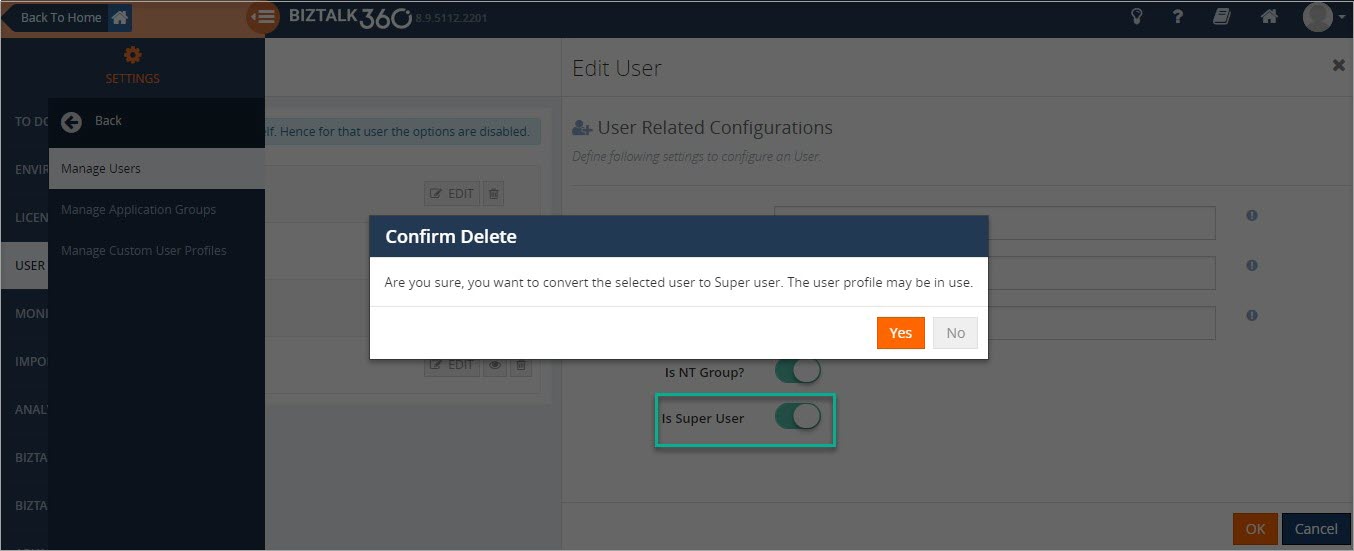
Switch User Role – The User roles can be changed in a single step. You can easily convert a super user to a normal user and vice versa.
Unmapped Application Artifacts – We don’t want you to miss artifacts for monitoring. With this new Unmapped application artifacts feature, you can determine the artifacts which are not (yet) mapped for monitoring.
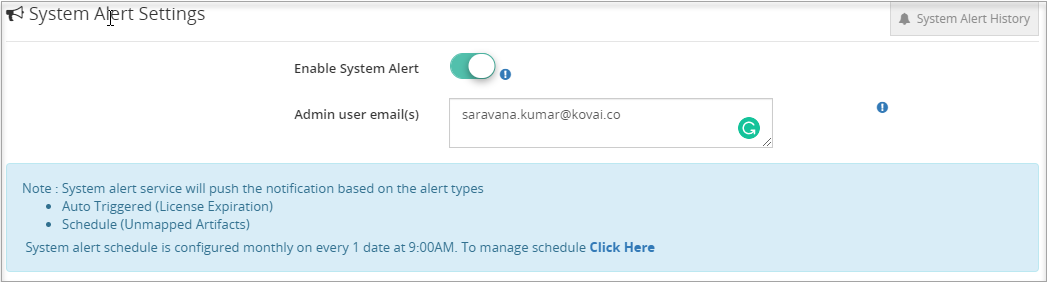
System Alerts – The BizTalk360 administrator can get to know about the health of BizTalk360 environment through System Alerts. The administrator can now get alerts about BizTalk360 License expiration, Unmapped application artifacts list and Monitor error details.
Copy to Clipboard – With this,user can copy the field values in a single click from the BizTalk360 UI.
Let’s jump into the features in detail
BizTalk360 Auditing
BizTalk360 has a powerful operational governance and auditing capability to maintain the logs of the user activities in the system. This feature helps the BizTalk administrators to find out “Who did what” in the environment over a period of time. BizTalk360 already has the capability to audit BizTalk level activities. You can think of actions on BizTalk Applications, Service Instances, Host Instances, BizTalk and SQL Servers, ESB Messages and Business Rules.
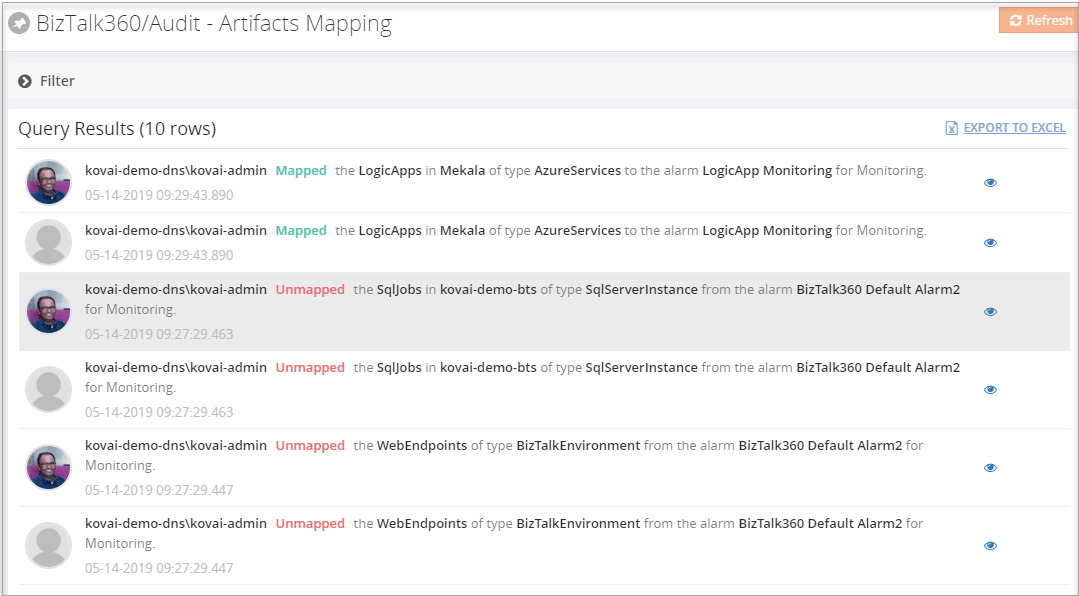
For this release we have implemented BizTalk360 activities auditing. This will give a clear insight about the various activities performed by the user in the Manage Alarm, Artifacts Mapping, and Secure SQL query sections.
Alarm operations such as new alarm creation, changing the alarm status (Enable/Disable), deleting an alarm, updating alarm details will be logged with the existing and new values, along with the user details. Administrator can also view the artefact mapping details. For instance, if any artifacts have been added or removed from an alarm mapping for monitoring, that will be logged.
Secure SQL query auditing includes Creating new query, Editing/Deleting the query and Query import.
SMTP Notification Channel
The SMTP Notification Channel provides an ability to create email distribution lists by grouping email ids based on the business needs.
Using the same email recipients for multiple alarms was not easy in earlier versions; the recipient’s details needed to be entered for each alarm. To overcome this, we have introduced the SMTP Notification channel, through which the user can configure email distribution lists under one channel and can be mapped to multiple alarms. In addition to this, we have added email grouping for Up Alert and Auto Correct Alert. With this, the user can configure different email ids to receive Up and Auto Correct alerts.
Switch User Roles
In earlier versions, there was no option to convert a Super user to a Normal user or vice versa. To change the user roles, the profile needed to be deleted and recreated again, which is a time-consuming process. This has been solved in this version; the user roles can quickly be converted in a single step, by editing the user and toggling the user roles.
Unmapped Application Artifacts List
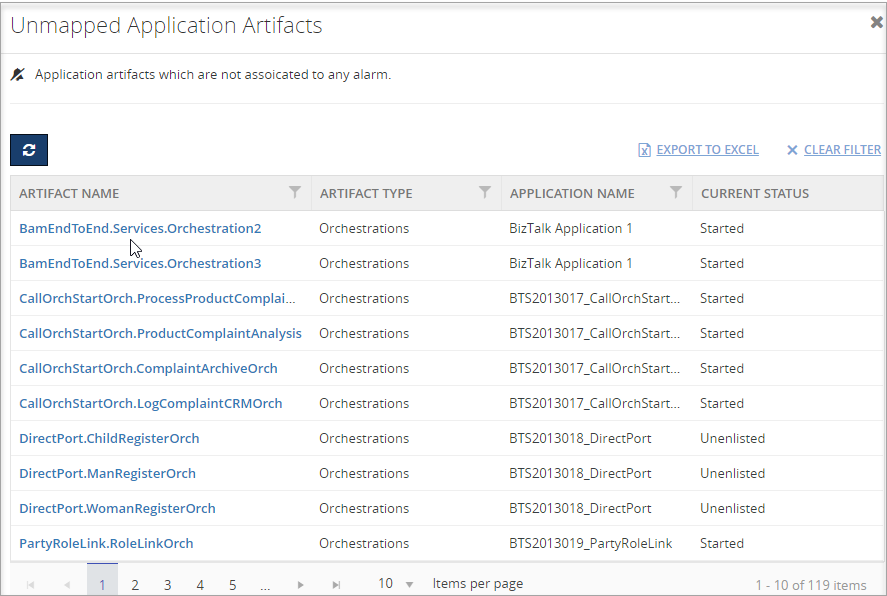
BizTalk360 can monitor amongst others BizTalk application artifacts. With this new Unmapped application artifacts feature, you are able to determine the artifacts which are not (yet) mapped for monitoring.
You will get a summarized list of unmapped application artifacts in the Monitoring Dashboard. This list contains the artifacts which are not mapped to any of the alarms for monitoring. For instance, if any new artifacts have been added in your BizTalk environment, we will bring that to your notice and you can easily map the artifacts for monitoring.
System Alerts
BizTalk360 is the single tool to manage operational activities, monitoring and analytics of the mission-critical BizTalk environment. Systems Alerts are sent to the BizTalk360 administrator about the health of BizTalk360 environment. The administrator can now easily get the alerts about BizTalk360 License expiration and Unmapped application artifacts list in the BizTalk environment.
The list of Unmapped application artifacts can be notified based on the alert schedule in the system settings. License Expiration notification will be automatically be triggered on 30, 15, 7 and 2 days before the license expiry.
Copy To Clipboard
Our business data is highly valuable. The information uses contain decision-making and problem-solving. From v9.0 on, the Copy to Clipboard option is provided to copy information in a single click from the BizTalk360 UI to the Windows Clipboard.
Few Enhancements and Bug Fixes
Besides these new features, we have also brought several enhancements and bug fixes.
Default Auto Correct Reset Interval
Auto healing is an existing feature which tries to bring the artifacts back to the expected state after a violation has occurred. The system will retry the auto healing process for a configured number of times. Once the retry limit is reached, the auto healing process will be stopped. The user can set the number of retries and reset it when the maximum limit is reached. However, it can be time-consuming to set the reset interval time for every configured auto correct. To overcome this, an option to set the default auto-correct reset interval is introduced in the System settings section.
Monitoring Dashboard Improvements
The BizTalk360 ‘Monitoring Dashboard‘ becomes the one-stop point for support people to view the health status of the BizTalk environment. You can see the summarized dashboard can be seen in a much enriched view.
Now the monitoring graph can be resized based on the screen resolution.
Blade Improvements
When multiple blades are opened, there was a partial inconsistency with the blades. Already opened blades remained open until the user close it manually. Now, the blade will get closed when the user clicks on another blade and the user is able to view only the relevant blades.
Conclusion
Considering the feedback from our customers, BizTalk360 will continue to provide more useful features. Why not give BizTalk360 a try! It takes about 10 minutes to install on your BizTalk environments and you can witness and check the security and productivity of your own BizTalk Environments.
Do you feel difficult to keep up to date on all the frequent updates and announcements in the Microsoft Integration platform and Azure iPaaS?
Integration weekly update can be your solution. It’s a weekly update on the topics related to Integration – enterprise integration, robust & scalable messaging capabilities and Citizen Integration capabilities empowered by Microsoft platform to deliver value to the business.
If you want to receive these updates weekly, then don’t forget to Subscribe!
Do you feel difficult to keep up to date on all the frequent updates and announcements in the Microsoft Integration platform?
Integration weekly update can be your solution. It’s a weekly update on the topics related to Integration – enterprise integration, robust & scalable messaging capabilities and Citizen Integration capabilities empowered by Microsoft platform to deliver value to the business.
If you want to receive these updates weekly, then don’t forget to Subscribe!
Ive recently added an article in the Integration Playbook talking about how messages can be correlated between processing instances. In particular this compares the approach in BizTalk against the approach you can use in Logic Apps by combining Logic Apps and Service Bus
The year 2018 passed away just like few months have passed phew…! As a support engineer, we receive different cases on daily basis. Every support case is unique because the problem will be faced by different customers in different environment architecture. But some of the support cases will be interesting by the root cause of the problem and the way of troubleshooting the case.
We have already written a series of blogs about the interesting support tickets we often receive.
In a similar way, this blog post highlights 5 interesting cases we have received and solved in the past year. We are sure this consolidated blog will be useful for our customers if they come across any of them in the near future.
Case 1: Custom port number
A customer tried to upgrade BizTalk360 to the latest version 8.9.3153.0310. The installer ran the upgrade process till the end, however, for some reason, it failed without a failure warning or exception message shown in the installer.
Troubleshooting
During the troubleshooting, the customer informed that while installing the BizTalk360 default URL has been used.
Say for example:
http://localhost/biztalk360
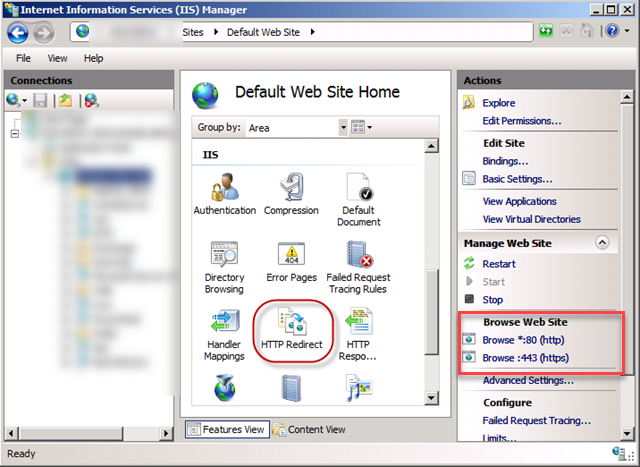
Later they have changed the URL from HTTP (80) to HTTPS (443). Once after changing to the new URL, they have deleted the default port (HTTP: 80) in IIS.
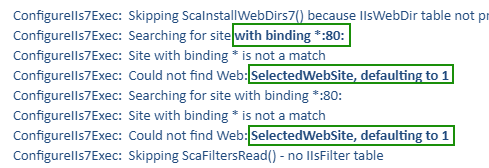
In the log file, we found that the installer is still trying to find the default port.
Solution
Most of the customers will not delete or remove the default port from IIS. During the upgrade process, the installer will look for the registry values for the default port information. If there is any mismatch in the stored port information and available in IIS, the installer will be forcefully stopped, which leads to unsuccessful installation.
As a best practice, we recommend before deleting the default port, the new values (Custom Port number) required to be updated in the registry to experience a seamless installation.
Case 2: Unable to view the BizTalk360 API documentation section
Web APIs are becoming increasingly vital to the organization across all sectors. We exposed our APIs specifically to facilitate the creation of their own scripts to ease the use of BizTalk Server integration space much better. To access the BizTalk360 API documentation you must contact [email protected] as we are providing this feature as an Add-on pack.
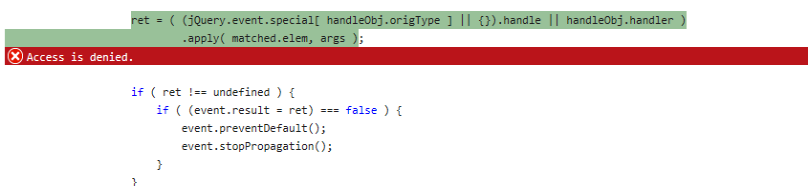
In this case, a customer can access all the features except the API documentation menu, though they have a valid license to access it. After the investigation, we have observed an error “Access is denied” in Internet Explorer browser.
Troubleshooting
Most of the customers wanted to access the BizTalk360 application in a secure way (HTTPS) based on their Organisation policy. As we progressed on our investigation, we had identified the root cause is because of deleted/removed the default port configuration in the IIS.
We suggested them to add the HTTP port into IIS and check the API. Yes, it helped after adding the HTTP and they were able to access the API documentation.
Solution
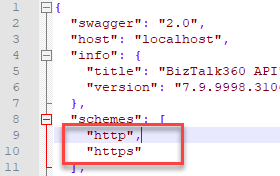
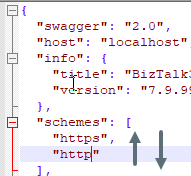
The interesting part was the fix to the problem. We are using Swagger for the API documentation. Since they removed the HTTP, Swagger kept on checking the HTTP as per mentioned in the configuration in the schemes. As a workaround, we recommended them to change the schemes upside down, it helped them to access the API documentation. Later we handled the part in the code for the permanent fix.
It took few months to solve this case because of the restricted access at a client side, we would like to appreciate the customer for their patience in this case as it took a long time to identify the root cause.
Case 3: Widgets moving around in the Dashboard
Sometimes we don’t believe our own eyes as the support ticket makes us think beyond the limit. One such interesting support case we have received is about the Analytics section. A customer added few widgets in the dashboard, but the changes were not persisted when they moved them around to different places and removed a few of the widgets. We suspect it’s a ghost activity, absolutely it’s an old joke, have a smile! 😛
Troubleshooting
As it is difficult to identify the root cause, we went for a web sharing session and found that a few widgets don’t have any data. We presumed that the issue is related to “Event Log data count” widget.
There were 4 Event log data count widgets added with different server names, out of that 2 were with data and 2 were empty.
In the generated widget, we were able to see two problems.
Related to permission
And with custom sources
Solution
The Event Log widget will collect information from all the servers (if permission is provided). When we check for the permissions in all the enabled servers, we were able to see some server hadn’t had local admin permission. After providing the necessary permission, they were able to remove the event log data count widget from the dashboard. The second widget is with custom sources, this was identified as an issue at our code and we provided the fix in the related stored procedure to resolve the issue.
Case 4: NT Service monitoring
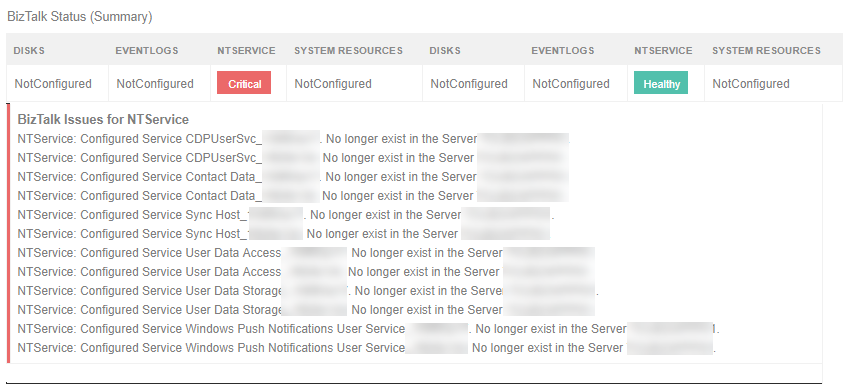
Monitoring few NT services leads to an exception “no longer exist in the server” in the alert email.
Troubleshooting
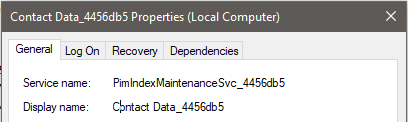
We monitor the NT services by using the service name. Every time while logging off the user, the monitored services were removed from the server and when logging in to the machine or once after a reboot, a new NT service was created with the addition of some random number (at prefix for both service name and display name).
This led to the “Orphaned” status as the originally mapped service was not found by the BizTalk360 monitoring service in the actual server
Example: If the service name is CDPUserSvc_159f93a17 once after the logout and login or after a reboot, the name will be changed to CDPUserSvc_29174f
We investigated the usage of the services where those services are structured with user data like contact info, calendars, messages, and other content in Windows 10 and Windows Server 2016.
Solution
The Fix is available in our latest version, where it handles the new services created with random numbers.
Case 5: Cross-domain file monitoring
An issue is that file monitoring is getting Orphaned once after configuring it with an alarm.
Troubleshooting
We started with the basic troubleshooting steps and understood that the configured File path in BizTalk Server is present in a different domain configuration than the domain of the actual BizTalk server. Technically, BizTalk360 will monitor the specific file location without any issues because BizTalk360’s monitoring service account is being used to fetch the configuration information by providing the necessary permissions
Solution
To find the exact root cause of the issue, we have developed a console application (with logs enabled) and provided it to the customer. At last, we have found that it is an issue with authentication for the service account in cross-domain architecture. We have found this as an issue at our end and fixed the same in our latest version.
This case helps me to explore more in cross-domain architecture.
Above are 5 interesting cases of 2018 which helped me to learn and explore new areas and technically learn new concepts. Wait for another blog post series where I would like to share another 5 more interesting cases.
Author: Sivaramakrishnan Arumugam
Sivaramakrishnan is our Support Engineer with quite a few certifications under his belt. He has been instrumental in handling the customer support area. He believes Travelling makes happy of anyone. View all posts by Sivaramakrishnan Arumugam
Do you feel difficult to keep up to date on all the frequent updates and announcements in the Microsoft Integration platform?
Integration weekly update can be your solution. It’s a weekly update on the topics related to Integration – enterprise integration, robust & scalable messaging capabilities and Citizen Integration capabilities empowered by Microsoft platform to deliver value to the business.
If you want to receive these updates weekly, then don’t forget to Subscribe!
Feedback
Hope this would be helpful. Please feel free to reach out to me with your feedback and questions.
Do you feel difficult to keep up to date on all the frequent updates and announcements in the Microsoft Integration platform?
Integration weekly update can be your solution. It’s a weekly update on the topics related to Integration – enterprise integration, robust & scalable messaging capabilities and Citizen Integration capabilities empowered by Microsoft platform to deliver value to the business.
If you want to receive these updates weekly, then don’t forget to Subscribe!
Feedback
Hope this would be helpful. Please feel free to reach out to me with your feedback and questions.
First of all, I’d like to apologise to all grandmothers out there… I mean you no disrespect. It’s just meant to be a catchy title, really. I know grandmothers who are smarter than most of us.
A couple of months ago I had the privilege of speaking at the API Days event in Melbourne. My topic was on Building Event-Driven Integration Architectures, and within that talk I felt a need to compare events to messages, as Clement Vasters did so eloquently in his presentation at INTEGRATE 2018. In a slight divergence within that talk I highlighted three common messaging patterns using a pizza based analogy. Given the time constraint that segment was compressed into less than a minute, but I thought it might be valuable enough to put in a blog post.
So before you can order a pizza, you need to know a couple of things. First of all, whether the pizza shop is open, and then of course what pizzas they have on offer. You really can’t do anything else without this knowledge, and those facts should be readily available – either by browsing a website, or by picking up the phone and dialling the shop. Essentially you make a request for information and that information is delivered to you straight away.
That’s what we expect with synchronous messaging – a request and response within the same channel, session and connection. And we shouldn’t have time to go get a coffee before the answer comes back. From an application perspective, that is very simple to implement as the service provider doesn’t have to initiate or establish a connection to the client; the client does all of that and service simply responds. However care must be take to ensure the response is swift, lest you risk incurring a timeout exception. Then you create ambiguity for the client who doesn’t really know whether the request was processed or not (especially troublesome if it were a transactional command that requires idempotency).
2) Asynchronous Messaging
So now you know the store is open and what pizzas to choose from. Great. So you settle on that wonderful ham & pineapple pizza on a traditional crust with a garnish of basil, and you place your order. Now if the shopkeeper hands you a pizza straight away, you’re probably not terribly inclined to accept it. Clearly you expect your pizza to be cooked fresh to order, not just pulled ready-made off a shelf. More likely you’ll be given an order number or a ticket and told your pizza will be ready in 20 minutes or so.
Now comes the interesting part – the delivery. Typically you will have two choices. You can either ask them to deliver the pizza to you in your home. This frees you up to do other things while you wait, and you don’t have to worry about chasing after your purchase. They bring it to you. But there’s a slight catch: you have to give them a valid address.
In the asynchronous messaging world, we would call this address a “callback” endpoint. In this scenario, the service provider has the burden of delivering the response to the client when it’s ready. This also means catering for a scenario where the callback endpoint it invalid or unavailable. Handling this could be as blunt as dropping the response and forgetting about it, or as robust as storing it and sending an out-of-band message through some alternate route to the client to come pick it up. Either way, in most cases this is an easier solution for the client than for the service provider.
But what if you don’t want to give out your address? In this case, you might say to the pizza maker, “I’ll come in and pick it up.” So they say fine, it’ll be ready in 20 minutes. Only you get there in 10 minutes and ask if it’s ready; they say not yet. You wait a few more minutes and ask again, and get the same response. Eventually it is ready and they hand you your nice fresh piping hot pizza.
This is an example of a polling pattern. The only burden on the service provider is to produce the response and then store it somewhere temporarily. The client has the job of continually asking if it is ready, and needs to cater for a series of negative responses before finally retrieving the result it is after. You might see this as a less favourable approach for the client – but sometimes this is driven by constraints on the client side, such as difficulties opening up a firewall rule to allow incoming traffic.
3) Publish & Subscribe
Now let’s say that the pizza was so good (even if a little on the pricey side) that you decide to compliment the manager. He asks if you’d like to be notified when there are special discounts or when new pizzas are introduced. You say “Sure!” and sign up on his mailing list.
Now the beauty of this arrangement is that it costs the manager no extra effort to have you join his mailing list. He still produces the same newsletter and publishes it through his mailing agent. The number of subscribers on the list can grow or shrink, it makes no difference. And the manager doesn’t even have to be aware of who is on that list or how many (although he/she may care if the list becomes very very short!) You as the subscriber have the flexibility to opt in or opt out.
It is precisely this flexibility and scalability that makes this pattern so attractive in the messaging world. An application can easily be extended by creating new subscribers to a message, and this is unlikely to have an impact on the existing processes that consume the same message. It is also the most decoupled solution, as the publisher and subscriber need not know anything about each other in terms of protocols, language, endpoints, etc. (except of course for the publishing endpoint which it typically distinct and isolated from either the publisher or consumer systems). This is the whole concept behind a message bus, and is the fundamental principle behind many integration and eventing platforms such as BizTalk Server and Azure Event Grid.
The challenge comes when the publisher needs to make a change, as it can be difficult sometimes to determine the impact on the subscribers, particularly when the details of those subscribers are sketchy or unknown. Most platforms come with tooling that helps with this, but if you’re designing complex applications where many different services are glued together using publish / subscribe, you will need some very good documentation and some maintenance skills to look after it.
So I hope this analogy is useful – not just for explaining to your grandmothers, but to anyone who needs to grasp the concept of messaging patterns. And now… I think I’m going to go order a pizza.
When you are working with API’s and Logic Apps and there is lots of rows of data involved you will sometimes come up with the following problems:
An API often pages the data once you go beyond a certain number of records
When you want to insert lots of rows with a Logic App into SQL you will usually have a loop which iterates over a dataset and does inserts
This takes a long time to execute
There is a cost implication to your implementation when you pay for each action
I recently had a scenario in this space and used quite a cool approach to solve the problem which I wanted to share.
Scenario
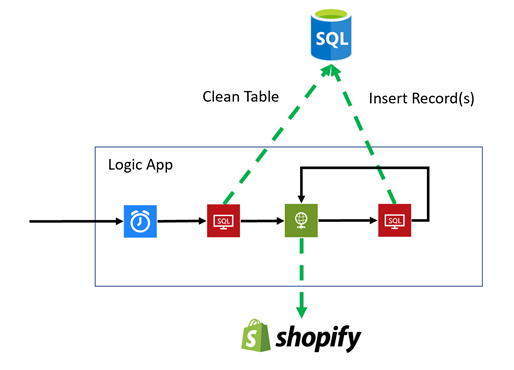
The scenario I had started in Shopify. When I add products & collections to my online store in Shopify I wanted to have a daily extract from Shopify to synchronise these new product/collections to my Azure SQL database which I use for reporting with Power BI.
To achieve this I would have a Logic App with a nightly trigger which would take the following actions:
Clean the table of which product is in which collection
Extract all products in collections via the Shopify API
Insert them all into the SQL table
The end result is I have a table which has all of the products in each collection listed for my analysis.
At a high level the scenario looks like the below diagram:
Implementation
As I mentioned above the problem is two folded here, when we query Shopify there many be thousands of products so we need to use a paging approach to query their API, secondly I want to insert into SQL in batches to try to minimise the number of action calls on SQL to improve performance and reduce cost.
Lets look at how I did this.
Paging API calls to Shopify
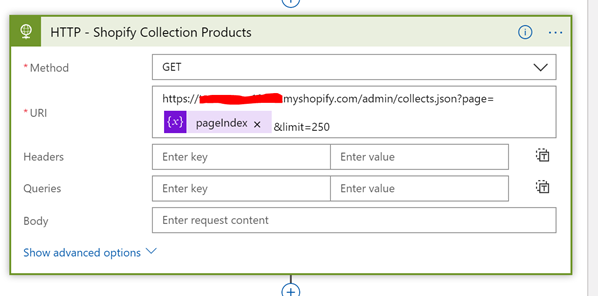
When it comes to the Shopify API you are able to execute a GET operation against the collection and it will return the products within it. If you have lots of products you can get them in pages. I chose to get 250 per time and you need to pass a page index to the API as a query parameter. The below picture shows you what a call to Shopify would look like with the paging parameters set.
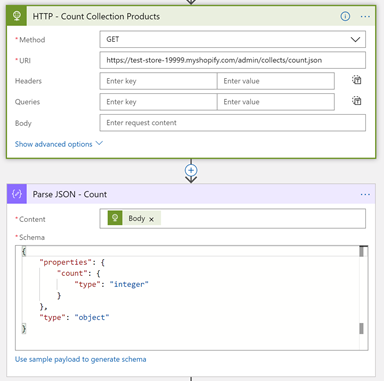
Once I can make this single call I can then use a loop around the call to Shopify, but before I do this I need to know how many pages there are. I can do this by executing a GET against the collections API with the count extension on the url. This will return me the number of products in collections. You can see this below.
From the response I can parse the count and then I would set a variable which is the number of pages which I will work out with a calculation of dividing the number of products by the number of products I will get per page. I will also add 1 to this so I get 1 more page than the count incase the division is not a whole number. The calculation is shown below.
Now I know the number of pages I can implement the loop where I will increment the page index each time until we have matched the number of pages. Within the loop we will get the next page of data from the API as shown in the picture below.
SQL Json Insert
It would be possible to just call the insert action for SQL in the logic app but if there are say 10000 products then the loop will do 10000 iterations which will take quite a while to run and also there is a cost associated with that. I wanted to look at options for inserting the data in batches. If I could insert the entire page returned from the API as a batch then with my 250 records at a time I could reduce the 10000 iterations down to 40. That should be a lot less time and a much lower cost.
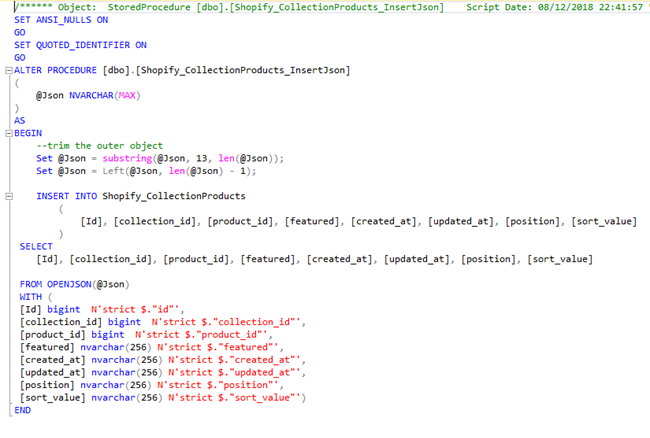
To do this I developed a stored procedure where I passed the entire JSON string from the API response to the stored procedure as an NVARCHAR(max) parameter. In the stored procedure I was fortunate that the format of the json in this case was very table/row like making it easy to do this insert. I used SQL’s OPENJSON feature and was able to insert the entire page of data from the API in a simple insert statement as you can see in the SQL below.
Summary
Once it was all put together I was able to run my Logic App to refresh my SQL database each night and the process took 10 seconds to copy across 2500 records. This took 10 iterations of the loop.
That’s a nice and easy to support and run Logic App which does a nice job in this case.
Do you feel difficult to keep up to date on all the frequent updates and announcements in the Microsoft Integration platform?
Integration weekly update can be your solution. It’s a weekly update on the topics related to Integration – enterprise integration, robust & scalable messaging capabilities and Citizen Integration capabilities empowered by Microsoft platform to deliver value to the business.
If you want to receive these updates weekly, then don’t forget to Subscribe!
Feedback
Hope this would be helpful. Please feel free to reach out to me with your feedback and questions.

 System Alerts