
by Nino Crudele | Jul 1, 2016 | BizTalk Community Blogs via Syndication
Today Microsoft renews my MVP award for the 10th time.
I would like to tank Microsoft for these 10 years, thank to my family and my wife for the patience and the support, thank to all my MVPs friends for the great moments together in these 10 years and a huge thank you to all my followers, supporters and the integration animals around the world for the great challenges in these 10 years, next year with the new features incoming in Azure and the great job around BizTalk Server we will raise the level 🙂
10 years as MVP is a long journey, full of greats and bad moments, big challenges, wins and losses, many conferences around the world, thousands of hours during the evenings study new patterns and writing code and a lot of time invested to share big passion to many people as possible.
Why?
Because this is a Microsoft MVP.
Proud to be a member of this awesome family.
by Nino Crudele | Jun 20, 2016 | BizTalk Community Blogs via Syndication
In the last period I worked in some new GrabCaster features like the encoding and extensibilities and about the extensibilities I implemented the possibilities to use a chain of components inside the engine.
Some people confuse the meaning of chain with the concept of pipeline but they are very different, a pipeline, as the name quote, is a pipe + line, a number of blocks executed in a sequence and a pipeline has a starting and an ending.
I like to compare the meaning using the real objects, a pipe cannot be closed otherwise the liquid stop flowing, the liquid enters in to the pipe end it come out from the end.
Interesting the idea to connect different pipelines in sequence but I see a lot more potential in the chain pattern.
A chain does not contain a real concept of starting and ending and can be closed and also executed in cycle.
Different chains can be opened and hooked together to create a longer chain and so on, I really love this concept because it gives me the opportunity to extend the capabilities in many ways and combinations.
A GrabCaster chain is composed by components and triggers and events can execute chains.
A chain component is a generic Interface able to ingest data, manage it and share the result with the other components in the chain.
I’m very interesting to provide more powerful options in BizTalk Server, BizTalk is a great framework and I like the idea to provide to it more interesting options and extensibility.
For that reason the first chain components I have implemented are the BizTalk pipeline component and the BizTalk transform component.
The BizTalk pipeline component executes a BizTalk pipeline DLL component and the BizTalk transform component is able to execute a BizTalk map and using a DLL like a Map storage provider, this is very powerful because it gives me the opportunity to use the BizTalk Server artefacts inside GrabCaster and use the same BizTalk features in real time performances, thousands messages a second using BizTalk Pipelines and BizTalk Transformations, I will write another post very soon about that.
The other interesting thing is the opportunity to execute GrabCaster inside BizTalk using the GrabCaster BizTalk Adapter which uses the chains as well.
To configure a chain, I use a json configuration file as below
In this pipeline I execute two chain components, the BizTalk pipeline and the BizTalk Transform.
I use a json file to configure the BizTalk pipeline component as below
Where:
AssemblyFile is the Dll component containing the BizTalk pipeline
PipelineTypeName is the pipeline type name to use
PipelinePathFile is the BizTalk pipeline file
I use a json file to configure the BizTalk transform component as below
Where
AssemblyFile is the Dll component containing the BizTalk pipeline
TransformTypeName is the transform type name to use
To assign a chain to a Trigger or event I add the chain specification to the Trigger json configuration file as below
I can use the chains in Triggers and Events and I can connect chains to other chains together.
In this test I imported the flat file as below
serialized as xml using the BizTalk pipeline and transform it as below
I will write a lot more about that in the next posts, for more information about GrabCaster you can refer here
Please contact me for any more information or if you want to collaborate inside the project.

by Nino Crudele | Jun 9, 2016 | BizTalk Community Blogs via Syndication
Microsoft Azure is now a consolidate technology stack able to offer a large number of technologies, in the last years I saw a lot of changes and a very important revolution inside the cloud.
I like to use any Microsoft Azure stack and I like to combine them in any way, I think this is the real power of that, being focused to use a specific technology can limit our creativity.
Entering in the Azure portal https://portal.azure.com and browsing the features is the best way to realize how many things we can use now, I think is impressive, it’s very important to understand the best strategy to combine them to obtain the best result in fast, smart and best productivity way.
I spent the last ten years using BizTalk Server, I definitely love this framework, this framework has born during the 2000 and with the 2004 version it has opened the way for the new frontiers in the world of integration.
BizTalk Server was the first one able to offer concept like reliability, mediation, adaptation, pub/sub, abstraction and more, all the other frameworks copied the concept and they have got the ideas from BizTalk Server, in the same time Microsoft started extending this idea 8 years ago creating the concept of BizTalk Services, some people still trying to correlate this concept with a specific Azure technology but in my opinion this is wrong.
The concept of BizTalk Services in Azure is a group of technologies and not a specific one, best way to understand the concept is doing a nice exercise translating the BizTalk Server stacks into the cloud.
Below the most famous picture and I love it, the story of integration, what we used for years to explain to people how to integrate technologies and to explain these concepts, the BizTalk messaging flow.
Below how I translate it using the most relevant Azure stacks.
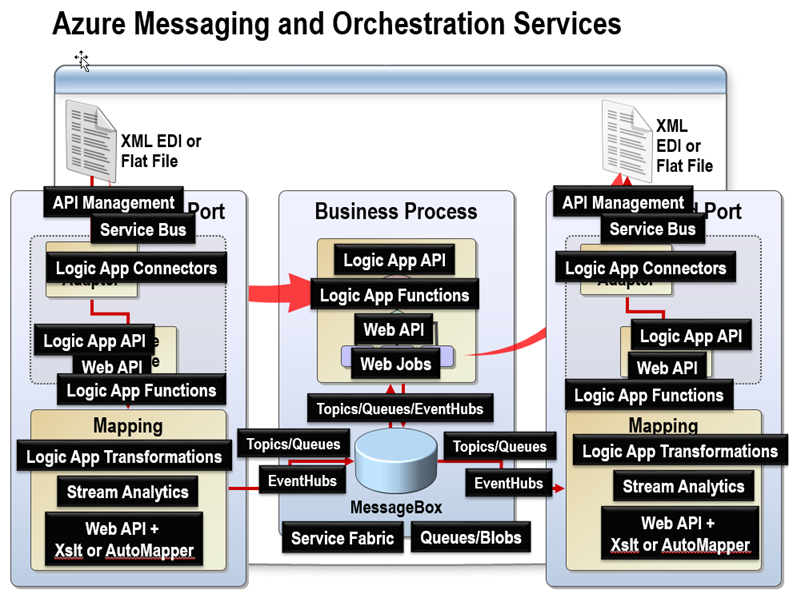
These stacks are the most relevants and I like to call them the Azure Dream Team, below some of my preferred.
API Management is everywhere and it provide anything we need for communication, mediation, security, services management and governance, metrics and more.
Simple to use using the UI and it’s able to solve many complicate problems, for example like security and metrics, in very simple way, Microsoft has done a great job on it.
Service Bus is the door and the internal neural system in the cloud, it covers the communication with relays for example, the messaging aspect, the reliability using queues and the pub/sub using topics.
Service Fabric is the stack which covers the reliability and scalability, all the Microsoft technologies use this stack, starting from Skype for business to SQL Server or the entire Microsoft Azure.
The clever idea in this stack is the possibility to make your code reliable just using specific Reliable Collections and Reliable Queues, if you need to be reliable and scalable this is the stack to use.
Logic App is the way to cover the integration and mediation aspect, not only, Logic App is able to offer a very simple way to build flows in the cloud, this because Microsoft starts using the term Microsoft flow.
Logic App contains a lot of connectors, the concept of mediation and of BizTalk, we can extend the capabilities using the Logic App functions which are the way to provide scripting code in the blocks and the possibility to use maps and transformations as well.
Logic App is the stack we need to use to provide orchestration, mediation, transformation and strictly patterns to drive our processes in the cloud like Web API which is the way to build our application blocks and the Web Jobs for background processing.
About transformations we can also use Stream Analytics, the concept is very clever, receive streams from any other stack, use an internal scripting language based on a very well-known language like TSQL and push the stream to any other Azure stack.
EventHubs is the messaging ingestor, millions of messages a second, the interesting aspect is the possibility to use it as pub/sub engine, it is fast and reliable, for performances reasons the message size limit is 256 Kb and we can use Blobs as temporary message storage, this is for example one of the ways used by GrabCaster to exchange messages between the points.
About devices we can use Azure IoT Hub which covers any specific aspect related to IoT, one of the thing I more like is the easy way to create IoT scenarios in a minute using the internal templates, IoT is a very complex topic and this is the best way to understand how to use this technology in the best way.
There are many other stacks to use for any specific topic, I will write more in the next articles.
by Nino Crudele | Jun 9, 2016 | BizTalk Community Blogs via Syndication
Microsoft Azure is now a consolidate technology stack able to offer a large number of technologies, in the last years I saw a lot of changes and a very important revolution inside the cloud.
I like to use any Microsoft Azure stack and I like to combine them in any way, I think this is the real power of that, being focused to use a specific technology can limit our creativity.
Entering in the Azure portal https://portal.azure.com and browsing the features is the best way to realize how many things we can use now, I think is impressive, it’s very important to understand the best strategy to combine them to obtain the best result in fast, smart and best productivity way.
I spent the last ten years using BizTalk Server, I definitely love this framework, this framework has born during the 2000 and with the 2004 version it has opened the way for the new frontiers in the world of integration.
BizTalk Server was the first one able to offer concept like reliability, mediation, adaptation, pub/sub, abstraction and more, all the other frameworks copied the concept and they have got the ideas from BizTalk Server, in the same time Microsoft started extending this idea 8 years ago creating the concept of BizTalk Services, some people still trying to correlate this concept with a specific Azure technology but in my opinion this is wrong.
The concept of BizTalk Services in Azure is a group of technologies and not a specific one, best way to understand the concept is doing a nice exercise translating the BizTalk Server stacks into the cloud.
Below the most famous picture and I love it, the story of integration, what we used for years to explain to people how to integrate technologies and to explain these concepts, the BizTalk messaging flow.
Below how I translate it using the most relevant Azure stacks.
These stacks are the most relevants and I like to call them the Azure Dream Team, below some of my preferred.
API Management is everywhere and it provide anything we need for communication, mediation, security, services management and governance, metrics and more.
Simple to use using the UI and it’s able to solve many complicate problems, for example like security and metrics, in very simple way, Microsoft has done a great job on it.
Service Bus is the door and the internal neural system in the cloud, it covers the communication with relays for example, the messaging aspect, the reliability using queues and the pub/sub using topics.
Service Fabric is the stack which covers the reliability and scalability, all the Microsoft technologies use this stack, starting from Skype for business to SQL Server or the entire Microsoft Azure.
The clever idea in this stack is the possibility to make your code reliable just using specific Reliable Collections and Reliable Queues, if you need to be reliable and scalable this is the stack to use.
Logic App is the way to cover the integration and mediation aspect, not only, Logic App is able to offer a very simple way to build flows in the cloud, this because Microsoft starts using the term Microsoft flow.
Logic App contains a lot of connectors, the concept of mediation and of BizTalk, we can extend the capabilities using the Logic App functions which are the way to provide scripting code in the blocks and the possibility to use maps and transformations as well.
Logic App is the stack we need to use to provide orchestration, mediation, transformation and strictly patterns to drive our processes in the cloud like Web API which is the way to build our application blocks and the Web Jobs for background processing.
About transformations we can also use Stream Analytics, the concept is very clever, receive streams from any other stack, use an internal scripting language based on a very well-known language like TSQL and push the stream to any other Azure stack.
EventHubs is the messaging ingestor, millions of messages a second, the interesting aspect is the possibility to use it as pub/sub engine, it is fast and reliable, for performances reasons the message size limit is 256 Kb and we can use Blobs as temporary message storage, this is for example one of the ways used by GrabCaster to exchange messages between the points.
About devices we can use Azure IoT Hub which covers any specific aspect related to IoT, one of the thing I more like is the easy way to create IoT scenarios in a minute using the internal templates, IoT is a very complex topic and this is the best way to understand how to use this technology in the best way.
There are many other stacks to use for any specific topic, I will write more in the next articles.

by Nino Crudele | May 31, 2016 | BizTalk Community Blogs via Syndication
I like to share a couple of my white papers, I normally use these during a BizTalk migration, moving or update.
A BizTalk Server migration or moving is a good opportunity to review our environment, one of the most critical point are the risks we can find and avoid in the during.
There are a lot of issues to consider, some of these are very simple and, because simple, are the most dangerous.
The best thing to do is using a reference document to keep track about our risks, I like to call it the Risk Board.
In the Risk Board I normally put everything I think needs to be considered and covered, some of these points are critical by personal experience and, if we cover them in the first period, we will be able to do a great job.
I will keep update these whitepaper, please feel free to use them and to collaborate with your feedback and experience.
You can find the white papers here in my BizTalk documents folder on GitHub.
https://github.com/ninocrudele/BizTalk-Documents

by Abhishek kumar Pathak | May 3, 2016 | BizTalk Community Blogs via Syndication
Recently there was a chance to implement the Power Shell script which re-start the BizTalk host instances.
————————————————————-
[ARRAY]$hostInstances = get-wmiobject MSBTS_HostInstance -namespace ‘rootMicrosoftBizTalkServer’ -Filter ‘(HostType = 1)’
write-host (‘Total Number of Host Instance : ‘+$hostInstances.Count) -Fore Yellow
Write-Host “Re-starting Host instance” -Fore Yellow
foreach ($hostInstance in $hostInstances)
{
$hostInstance.Stop()
$hostInstance.Start()
}
Write-Host “Host instances are restarted successfully” -Fore Yellow
———————————————————-

by Abhishek kumar Pathak | Apr 29, 2016 | BizTalk Community Blogs via Syndication
Recently there was a chance to implement the Power Shell script which will monitor the BizTalk application . It is very simple script which get executed by windows task scheduler at predefined time period. It will start all artifacts of BizTalk which will in stop/disable/unlisted state. If the artifacts are up and running, it will not do anything.
#BizTalk Application Monitoring
$Date = Get-Date
$Logfile = "C:ScriptLogs$(gc env:computername)_$(get-date -f yyyy-MM-dd).log"
Function LogWrite
{
   Param ([string]$logstring)
   Add-content $Logfile -value $logstring
}
$test = '----------------------------------------------------------'
LogWrite  $test
$test = 'Script Started-BizTalk Monitor at '+$Date.DateTime
LogWrite  $test

 # Get local BizTalk DBName and DB Server from WMI

 $btsSettings = get-wmiobject MSBTS_GroupSetting -namespace 'rootMicrosoftBizTalkServer'

 $dbInstance = $btsSettings.MgmtDbServerName

 $dbName = $btsSettings.MgmtDbName

 # Load BizTalk ExplorerOM

 [void] [System.reflection.Assembly]::LoadWithPartialName("Microsoft.BizTalk.ExplorerOM")

 $BizTalkOM = New-Object Microsoft.BizTalk.ExplorerOM.BtsCatalogExplorer

 $BizTalkOM.ConnectionString = "SERVER=$dbInstance;DATABASE=$dbName;Integrated Security=SSPI"

 [ARRAY]$apps=$BizTalkOM.Applications
  Foreach ($app in $apps)
    {
       if ($app.Name -like 'BizTalkAppName*')
        {
         $app.Start(63)
         $BizTalkOM.SaveChanges()

         $test = $app.Name+ " Started"
         LogWrite  $test
       }

    }
 $test = 'Script executed sucessfully at '+$Date.DateTime
 LogWrite  $test

 $test = '----------------------------------------------------------'
 LogWrite  $test

by Abhishek kumar Pathak | Apr 29, 2016 | BizTalk Community Blogs via Syndication
Recently there was a chance to implement the Power Shell script which will monitor the BizTalk application . It is very simple script which get executed by windows task scheduler at predefined time period. It will start all artifacts of BizTalk which will in stop/disable/unlisted state. If the artifacts are up and running, it will not do anything.
#BizTalk Application Monitoring
$Date = Get-Date
$Logfile = "C:ScriptLogs$(gc env:computername)_$(get-date -f yyyy-MM-dd).log"
Function LogWrite
{
   Param ([string]$logstring)
   Add-content $Logfile -value $logstring
}
$test = '----------------------------------------------------------'
LogWrite  $test
$test = 'Script Started-BizTalk Monitor at '+$Date.DateTime
LogWrite  $test

 # Get local BizTalk DBName and DB Server from WMI

 $btsSettings = get-wmiobject MSBTS_GroupSetting -namespace 'rootMicrosoftBizTalkServer'

 $dbInstance = $btsSettings.MgmtDbServerName

 $dbName = $btsSettings.MgmtDbName

 # Load BizTalk ExplorerOM

 [void] [System.reflection.Assembly]::LoadWithPartialName("Microsoft.BizTalk.ExplorerOM")

 $BizTalkOM = New-Object Microsoft.BizTalk.ExplorerOM.BtsCatalogExplorer

 $BizTalkOM.ConnectionString = "SERVER=$dbInstance;DATABASE=$dbName;Integrated Security=SSPI"

 [ARRAY]$apps=$BizTalkOM.Applications
  Foreach ($app in $apps)
    {
       if ($app.Name -like 'BizTalkAppName*')
        {
         $app.Start(63)
         $BizTalkOM.SaveChanges()

         $test = $app.Name+ " Started"
         LogWrite  $test
       }

    }
 $test = 'Script executed sucessfully at '+$Date.DateTime
 LogWrite  $test

 $test = '----------------------------------------------------------'
 LogWrite  $test

by Abhishek kumar Pathak | Mar 21, 2016 | BizTalk Community Blogs via Syndication
Recently I got a chance to install and configure the ESB Tool Kit and ESB Management portal in multi-server environment.
Below are the steps which I followed to successfully configure and deploy the ESB Management portal.
- Install Enterprise Library 5 from http://www.microsoft.com/en-in/download/details.aspx?id=15104
- Install Chart Control from Microsoft Chart Controls for .Net Framework 4 & Framework 3.5
- Install Microsoft Report Viewer Redistributable 2008 from http://www.microsoft.com/en-in/download/confirmation.aspx?id=6576
- Copy the ESB portal source code from the development server in C:Projects folder and Remove the read-only attribute of this folder.
- Update database server name in the web config file of ESB portal (located in “C:ProjectsMicrosoft.Practices.ESBESBSourceSourceSamplesManagement PortalESB.PortalWeb.Config” )
- Update Database server name in web config of ESB Exception Service (Located in “C:ProjectsMicrosoft.Practices.ESBESBSourceSourceSamplesManagement PortalESB.Exceptions.ServiceESB.Exceptions.ServiceWeb.config”)
- To turn on unrestricted access for Power Shell, execute the following command using the Power Shell 32-bit and 64-bit consoles:
- set-executionpolicy unrestricted
- To verify, run the following command
- get-executionpolicy
- Note: If you face any issue with above script, use “Set-ExecutionPolicy Unrestricted -Scope CurrentUser”
- Go to the C:ProjectsMicrosoft.Practices.ESBESBSourceSourceSamplesManagement PortalInstallScripts location and edit Management_Install.ps1 script.
- Comment the [BuildManagementSolution] function of Power Shell script. (This is required because there is no need to build the solution again).
- Update the [RunDatabaseScript $relativePath”SQLESB.Administration Database.sql” “Database server Name“] command. (This is required because It will try to create the database in local server)
- Step 10 is only required for first server configuration. Later comment this line of script for other server (This is because SQL Server will be same for Both BizTalk instance)
- Open a command prompt using “Run as administrator”.
- Execute the Management_Install.cmd command located in “C:ProjectsMicrosoft.Practices.ESBSourceSamplesManagementPortalInstallScripts”.
- Open the IIS manager, Select the ESB portal and check the authorization. If all fine, Browse the ESB portal directly from here.
- If some error occurred, Change the authorization and app pool setting by checking user access.
Repeat the same step to other server.
Note: Multi-Server Environment – (Two BizTalk Server and one SQL server)
Please let me know If any suggestion on this or Feel free to add some point.

by Abhishek kumar Pathak | Mar 21, 2016 | BizTalk Community Blogs via Syndication
Recently I got a chance to install and configure the ESB Tool Kit and ESB Management portal in multi-server environment.
Below are the steps which I followed to successfully configure and deploy the ESB Management portal.
- Install Enterprise Library 5 from http://www.microsoft.com/en-in/download/details.aspx?id=15104
- Install Chart Control from Microsoft Chart Controls for .Net Framework 4 & Framework 3.5
- Install Microsoft Report Viewer Redistributable 2008 from http://www.microsoft.com/en-in/download/confirmation.aspx?id=6576
- Copy the ESB portal source code from the development server in C:Projects folder and Remove the read-only attribute of this folder.
- Update database server name in the web config file of ESB portal (located in “C:ProjectsMicrosoft.Practices.ESBESBSourceSourceSamplesManagement PortalESB.PortalWeb.Config” )
- Update Database server name in web config of ESB Exception Service (Located in “C:ProjectsMicrosoft.Practices.ESBESBSourceSourceSamplesManagement PortalESB.Exceptions.ServiceESB.Exceptions.ServiceWeb.config”)
- To turn on unrestricted access for Power Shell, execute the following command using the Power Shell 32-bit and 64-bit consoles:
- set-executionpolicy unrestricted
- To verify, run the following command
- get-executionpolicy
- Note: If you face any issue with above script, use “Set-ExecutionPolicy Unrestricted -Scope CurrentUser”
- Go to the C:ProjectsMicrosoft.Practices.ESBESBSourceSourceSamplesManagement PortalInstallScripts location and edit Management_Install.ps1 script.
- Comment the [BuildManagementSolution] function of Power Shell script. (This is required because there is no need to build the solution again).
- Update the [RunDatabaseScript $relativePath”SQLESB.Administration Database.sql” “Database server Name“] command. (This is required because It will try to create the database in local server)
- Step 10 is only required for first server configuration. Later comment this line of script for other server (This is because SQL Server will be same for Both BizTalk instance)
- Open a command prompt using “Run as administrator”.
- Execute the Management_Install.cmd command located in “C:ProjectsMicrosoft.Practices.ESBSourceSamplesManagementPortalInstallScripts”.
- Open the IIS manager, Select the ESB portal and check the authorization. If all fine, Browse the ESB portal directly from here.
- If some error occurred, Change the authorization and app pool setting by checking user access.
Repeat the same step to other server.
Note: Multi-Server Environment – (Two BizTalk Server and one SQL server)
Please let me know If any suggestion on this or Feel free to add some point.
