by Nino Crudele | Dec 16, 2016 | BizTalk Community Blogs via Syndication
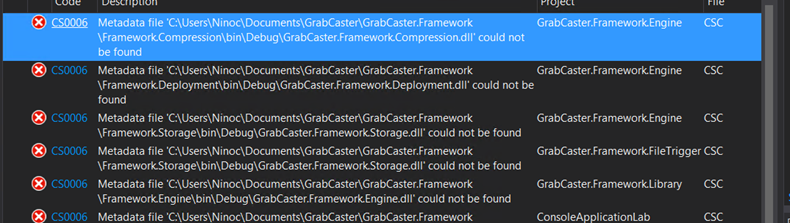
In the last 2 days, I struggled against this error and it was a real nightmare and, because the solution is really wired and complicate to find I decided to keep note about that in my blog and hopefully help some other people.
One day and without any real specific reason I was not able to build my solution anymore, hundreds of CS0006 errors, so my first and usual actions were:
- Clean the solution, nothing…
- Restart VS, nothing…
- Clean and restart the solution, nothing…
At that point I started looking in the network and I found so many articles, tips and hints like, remove all the references and re add again, check the build settings in the configuration manager, fix precedencies but nothing and, to be honest, with 90 projects in the solution, was not a feasible option for me.
Two main assumptions drive me to the solution:
- Previously the solution was able to build and I didn’t touch any code
- I copied the solution in another machine and, with my surprise, it was able to build.
I used process explorer to check what Visual Studio does during the compilation and I noticed a quite interesting number of temporary files related to the nugget packages were created.
The length of the path generated was interesting so I decided for moving my project folder in the C: ROOT and the problem has been solved.
The biggest problem I think was because I added a new nugget package to a project and VS was not able to generate specific temp files and unfortunately, I didn’t receive any exception or warning about that.
So, in case of CS0006 error the first test to do is trying to copy the solution in a shorter path and hopefully is going to fix the issue.
Author: Nino Crudele
Nino has a deep knowledge and experience delivering world-class integration solutions using all Microsoft Azure stacks, Microsoft BizTalk Server and he has delivered world class Integration solutions using and integrating many different technologies as AS2, EDI, RosettaNet, HL7, RFID, SWIFT. View all posts by Nino Crudele

by Nino Crudele | Dec 15, 2016 | BizTalk Community Blogs via Syndication
In the last month, I’ve been speaker in two events, the WPC 2016 in Milan and the BTUG.be in Belgium, in both the events I presented the results of my studies around the holistic approach and my point of view about integration.
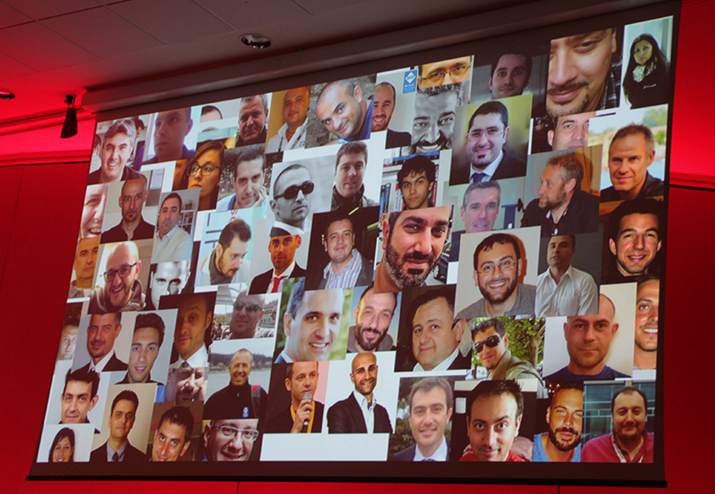
WPC 2016 Milan, 77 speakers for +400 attendees, makes this event the first event in Italy about IT, technology and innovation, great content and very prepared speakers.
BTUG.be is a technical event focused on Integration and organized by the BizTalk User Group in Belgium, the guys invited me 2 month ago, and I was very happy to accept because I was sure to find an audience of very strong and expert technical people.
In the BTUG.be I enjoyed all the sessions, Microsoft presented a session around integration patterns and SOLID concepts, Pieter presented a very interesting session, What’s new in BizTalk Server 2016, he has been able to present a very detailed session about the new features, Glenn, about Azure Functions, presented a very interesting point of view and of comparison between Azure Functions and the other stacks like Logic App and WebJobs.
In both the event I present my session In my session, my point of view about Integration and what means Holistic approach, I received an impressive great feedback by both the events and I’m very happy by the spontaneous feedbacks that I’m receiving via LinkedIn and email.
Looking in the feedbacks, one of the sentences which I most like is:
“finally someone that makes sense regarding integration, I know exactly what you mean with your holistic approach.
I have tried for many years to explain to people that what you’re saying, and you do it too.
So you have shown me the way”
This was exactly the scope of my session, given to people something to think about, a new view about how to use technologies and how to combine them together.
I think that, in a moment full marketing messages, thousands of technologies and options, this is one of the most important aspect of interest.
Sometime we don’t realize the potential of a technology because focused around the messages we received by the network, some other time we don’t see the technology in a different point of view.
When I approach to a new technology I’m like a child with a new toy, I normally don’t care about how the network defines or categorizes it, I just get the main marketing message and I start playing with this technology.
I like to see any technology from a different point of view, any time, this is the best approach to use to better understand the potentials.
I also use GrabCaster to explain these concepts because it contains all of my studies, GrabCaster is my personal laboratory, it’s a space which contains all of my studies and ideas, I start seeing other companies implementing patterns and concepts already implemented in GrabCaster long time ago and this is a great pleasure for me.
People are following and are looking in GrabCaster code to get new ideas and patterns like, open pattern, layering abstraction, dynamic deployment, open mediation, how to achieve real time performances in BizTalk Server and more, I still need to create more videos and tutorials and I will, family and sport activities permitting.
At the moment GrabCaster contains a lot of great features but this is probably the 10% about what I have in my mind, I will keep going implementing on it and if you like to collaborate please do it.
I will improve this session in the time and I will create more scenarios using, combining and extending what I consider the best technologies to use together at the moment.
Author: Nino Crudele
Nino has a deep knowledge and experience delivering world-class integration solutions using all Microsoft Azure stacks, Microsoft BizTalk Server and he has delivered world class Integration solutions using and integrating many different technologies as AS2, EDI, RosettaNet, HL7, RFID, SWIFT. View all posts by Nino Crudele
by ShaheerA | Dec 14, 2016 | BizTalk Community Blogs via Syndication
I just wanted to announce that the final version of the standalone BizTalk Terminator tool – v2.5 – has just been released.
Terminator functionality is not going away.
All further development will continue via the maintenance node in BizTalk Health Monitor (BHM).
Below is a quick comparison of the two versions of Terminator:
| Tool Version |
Standalone Terminator |
BHM Terminator |
| Available as |
a standalone tool |
maintenance node within BHM |
| Recommended for |
BizTalk 2004 – 2009 |
BizTalk 2010 and above |
| Supports |
BizTalk 2004 – 2013 R2 |
BizTalk 2010 and above |
| Future Tool Updates |
No
Version 2.5 is the final version.
Support for BTS2016 or above will not be added. |
Yes
All tool updates happen here.
BTS2016 support just added in BHM v4 |
| Future Task Repository Updates |
Yes
Via Update Task Repository menu item (see below).
Only repository updates for BTS2013R2 or below. |
Yes
Via auto-update mechanism.
All repository updates will apply |
| Tool Expiration |
No more time bomb with v2.5 |
No |
Update Task Repository Menu Item in Standalone Terminator
- When you open Terminator, click the Help menu at the top left and you will see the Update Task Repository menu item.
- Clicking this does the following:
- Renames the existing MaintenanceRep.dll (located in the same folder as Terminator) to MaintenanceRep[DATETIME].dll
- Downloads the current MaintenanceRep.dll from Azure
- This feature requires external internet access as well as .NET 4.0 or above for Azure connectivity. If you don’t have either of those on your BizTalk machine, you will need to run Terminator on a box that does and then just copy over the new MaintenanceRep.dll onto your BizTalk machine. The box where you do this does not need to have access to BizTalk.
- The Update Task Repository menu item is disabled once Terminator connects to a BizTalk environment. You will need to close and re-open Terminator for it to be re-enabled.
- See here for a list of repository updates released so far (only the Maintenance Repository is relevant to Terminator)
by Bill Chesnut | Dec 12, 2016 | BizTalk Community Blogs via Syndication
If you are interested in learning about Azure API Management, Azure Functions, API Apps and Azure Logic Apps in an hands on 1 day training course, we have just what you are looking for, The course will be offered on the following dates and locations:
Wether you are looking a moving some of your On-premises integration to the cloud or start from scratch in the cloud this course will give you the information that you need to get started. This course is intended for developers who are responsible for developing cloud based integration solutions and includes hands-on-labs for API Management, Azure Functions and Logic Apps.
A complete syllabus and pre-requisites can be found at the registration link above or contact SixPivot here
The post Cloud Integration Training–January 2017 appeared first on biztalkbill.
by Mark Brimble | Dec 4, 2016 | BizTalk Community Blogs via Syndication
This blog will describe how we can publish a message using Biztalk server and the Apache ActiveMQ Rest API. In previous blog I wrote about consuming a message from a AMQ and in this article show how to do it the other way.
To begin with we tried to use a BizTalk WCF-WebHTTP adapter to POST a message to the AMQ with a request URL like http://servername:8161/api/message/MISC.MAX.DATA?type=queue&clientId=misc_data_biztalk&message_type=7222&message_version=2. We were pleased to see the message added to the queue with the correct properties. Unfortunately we got a transmission failure like “System.ServiceModel.ProtocolException: An HTTP Content-Type header is required for SOAP messaging and none was found” in the BizTalk group hub even though the message was added to the queue successfully. If we tried the request using fiddler it showed that the response does not contain a Content-Type in the header as well.
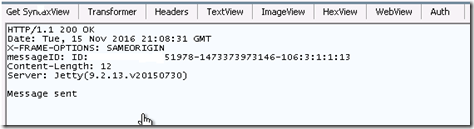
Getting a transmission failure each time BizTalk posts a message is not acceptable and we searched for a solution. We created a custom behaviour to add this a Content type to the header of the response but the WCF-WebHTTP adapter transmission failure occurs before the message gets to that point. Next we tried to configure the AMQ to add a content type but could not find the correct “config” to edit.
Finally we decided to choose BizTalk HTTP adapter instead of the WCF-WebHTTP adapter to POST the message to the AMQ. The HTTP adapter is a very old adapter and I reasoned that it might not be as picky about what is in the header of the response. It was pleasing to find that the HTTP adapter did POST a message to the AMQ without a transmission failure. This is a good example of where the HTTP adapter can do something that the modern WCF-WebHTTP adapter cannot do. Thanks to Deepa Kamalanathan for proving all this.
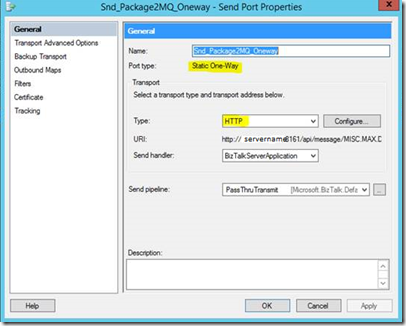
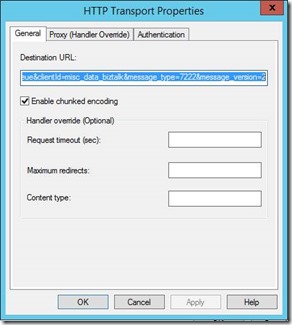
In summary we have now shown that you can consume messages from a Apache AMQ with the BizTalk WebHTTP adapter and that you can publish messages to the AMQ with the HTTP adapter. One question remains and that is what throughput can be achieved using these adapters.
by BizTalk Team | Dec 1, 2016 | BizTalk Community Blogs via Syndication
Today, we have the pleasure of announcing the general availability (GA) of BizTalk Server 2016 – our tenth release. You can read the full announcement on the Microsoft Hybrid Blog here.
Alongside this momentous occasion we are also GA’ing today the BizTalk Server 2016 Logic Apps adapter – see here. This new adapter enables you to call Logic Apps from BizTalk Server 2016 giving you easy access from BizTalk applications to our vast array of cloud connectors in Azure truly enabling the hybrid cloud. To understand more about this adapter see here.
And that’s not all! We’re also shipping today the GA of our new BizTalk Server 2016 updated System Center Operations Manager (SCOM) management pack as well – get that here.
This new management pack includes the following enhancements:
– Support for both SCOM 2016 and SCOM 2012 R2
– Discover multiple version of Biztalk server
– Fixed the issue with the discovery of the installed BizTalk Server version
– Show biztalk .net performance counter for localized language
We hope you enjoy the new features and as always give us your feedback – today is a great day to be a BizTalker!
by michaelstephensonuk | Nov 17, 2016 | BizTalk Community Blogs via Syndication
Today we have so many technologies available when it comes to developing integration solutions. In some ways things are a lot easier and in other ways things are harder. One thing is for sure that in technology there has been a lot of change. For many organisations one thing that definitely has not changed is the challenges they face with the non-technical side of integration projects. You know for most companies, the technology you use for the implementation of the project isn’t that important when it comes to the decisive factor that determines success from failure. If you choose vendor A or vendor B, as long as your team know how to use the technology they will usually be able to build stuff successfully. With that said the thing organisations struggle with still is “how do we get the technology people to build something to do what we want it to do” and the IT organisation then has the challenge of how to live with that solution through its life span.
These are not technology problems, they are problems about communication, collaboration, documentation and allowing people the time to do stuff properly.
In my opinion two of the most common organisational challenges facing integration teams within a business today are:
- Shitty Requirements
Whenever I meet people around the world who are doing integration the one thing that seems to be a common challenge is that generally integration projects start off with a 1 line requirement. “I want to get this data from here to there”.
- Lack of Knowledge Sharing
The world of an IT department is generally a chaotic place so the idea of giving people time to do stuff properly is never really a thing for many organisations. Think of poor developers who barely finish writing code for one solution and then they are shipped to the next project and the department is generally surviving because of all of the information in people’s heads.
For many organisations the thing that is really needed is the ability to collaborate around projects in a way that brings people together and artefacts and information into one place. In some ways this is a big culture shift for some organisations and for others the problem is the lack of tooling. For quite a while now I have been a fan of combining TFS for source code, work items, and other stuff with Confluence and a few other tools but the challenge around the tooling is often licensing, procurement processes and the fragmented nature of using a number of different tools. Recently however I have been playing with Microsoft Teams and I think this is a really good package which I can see helping a lot of organisations. First off there are many ways your company could use it, but in this post I would like to talk about how it could help an integration team. Before going any further here are a couple of links which are useful:
How can my Integration Team Use Teams
First off in Microsoft Teams you could create a team and include people in your integration team. I would recommend not storing sensitive data in the teams area because what you want to do is open the transparency of your team so that your business users can work with you. Include your team members but your stakeholders and key business contacts should be included too. These are the people you will need to capture information from and you want them contributing to the team.
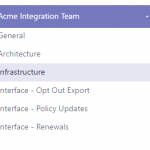
In terms of structuring your team in MS Teams I went for something like shown in the below picture.
Under the team you have Channels. I am thinking of using Channels for the following reasons:
- One for architecture related to the integration platform
- One for infrastructure related to the integration platform
- 1 Channel per interface or integration solution you develop
You may also choose to put in channels for guidance and training and other stuff like that.
What’s in a Channel
The cool thing about a channel is you have a few customization options about what you can have in the channel. Out of the box you get the following:
- Conversations – This is a bit like a slack/yammer style conversation thread
- Files – This is a place to upload documents related to the channel
- Notes – This is a one note work book for the channel
Those are some really handy things, you can also add other tabs to your channel like the below graphic:
My first thoughts for this are that you could use a SharePoint side as a tab to link to a site where you might store any sensitive stuff. You could also use planner as a light weight task board of to do stuff related to the channel. You could maybe link to Team Services for more complex planning.
In general the basic channel provides a way to have conversations, documents and stuff in a single place for a related context. Halleluiah, if we could have no more projects managed via email then the world would be a far less stressful place.
Channel Per Interface?
I mentioned above a few general channels for the bigger areas such as architecture and infrastructure, but one of the biggest wins could be a channel per interface. Imagine we had an interface which did a B2B style integration with a partner to send a list of customer marketing preferences so they could do out sources marketing for us. Think how many companies you may have worked with who may have delivered such an interface and they will often have an interface catalogue but it is usually just a spreadsheet list of interfaces they have (or more often it doesn’t exist), but if you asked the question “tell me everything about this interface”. Well I would guess in Average Company Inc, the answer would be to make you sit with 1 person who is the subject matter expert on it, they 2 more people who are stakeholders and know a bit about it. If your lucky there might also be some documents but I bet they get emailed to you and there are probably a few other documents which kind of say the same stuff but in a different way.
With MS Teams having 1 channel per interface means this list can be out interface catalogue, but it can also be the holder for everything about that interface. Lets have a look at what we could do:
Conversations
First off with conversations, imagine all discussion about the interface happens in 1 place. No more email threads. The conversation would still be available 2 years in the future when the original people on the project have left and the new people can see the history of discussion around the interface. Below shows some example conversations. Given this is just me but the example comments are from a real project. In many projects the history of the journey of how a project/interface got from start to implementation is a goldmine of knowledge which often leaves the organisation when the project is over. This can be avoided by using conversations.
Files
Files provides a simple place for any documentation which relates to the interface. Ideally any internal documentation produced by the team would be in the One Note notes which we will talk about in a minute. Often documentation is produced before your team is involved or gets supplied by vendors and its often a challenge to find where to keep it. This file store with the interface is a great option.
Below is an example:
You might ask why MS Teams and why not SharePoint. First off im not a big fan of documents. They are often old and obsolete and incorrect. I much prefer the wiki, one note and confluence style of approach. That said documents do still exist on projects. Keeping them close to the context where they are used just means they don’t get lost or forgotten about. I think using SharePoint if you need the added security etc that it brings is fair enough but for many cases its probably a bit over the top and just adds more steps to maintaining effective documentation.
Notes
Having a One Note workbook in the team is really cool. Im a big fan of using this for elaborating on the interface, flushing out requirements and then maintaining this for the support team and dev team for the long term. One Note encourages it to be light weight and effective documentation. This is a view of how we can use it. The page structure could look like below:
I think this is a minimum set of pages which will help you structure your information effectively.
The high level requirements page can just be a table of requirements which are teased out of stakeholders and taken from conversations in the team space. It might look like below:
The features and scenarios page would help us to write gherkin style stories of what we want the interface to do. These stories should be simple enough for everyone in the team to understand.
Next we might have message specifications. They could be json, xml, flat file, edi, etc. The key thing is to include sample messages and definitions of the messages so we know data is in the correct formats.
When it comes to the architecture element of your interface, I am a fan of the context, containers and components approach as a lightweight way of expressing the architecture of an interface. Although the diagrams below probably could be flushed out a bit more they will do for this example. In the One Note page I can start with some simple pen drawn diagrams to illustrate the key points. This is shown below.
Later when the project starts to stabilise I might choose to draw the diagrams in a more formal way using Visio or Lucidchart but certainly early in the project you spend lots of time redrawing the diagram as things evolve so lets keep it simple and use pen. You can open the One Note page in the full One Note client to get the richer drawing experience.
In the interface design section we can again elaborate on the interface further and include some specifics on the implementation. Again in the early stages I can just use pen drawn diagrams if I want and later replace them.
In the code and deployment pages id simple document what it does and how to deploy it. Im also a fan of using videos so we can do a video walk through of the code and upload it to the files section and provide a link to watch a walk through.
In the support page this will be a 2 way set of documentation between your ops/DevOps team and everyone else who is a stakeholder around support aspects of the interface. Everyone should be able to contribute from things developers learn in development and ops people also learn post go live. An example is below:
The notes should really be the living documentation to support the interface through its lifecycle.
Plan
I like the idea of being able to have planning options associated with the interface. I have some options here. First off for a higher level plan I can link to a Team Services project and see this at team level, but another option I really like is Planner. If your not familiar with it then this is a feature in Office 365 which is a bit like Trello. It gives me a basic task board and if I consider this to be at interface level it’s a great way to keep an eye on tasks at that level. You could include delivery tasks, bugs, technical debt clean up and loads of things specific to this interface. I think this is especially important post go live for the initial release of the interface as it gives you a place to keep tasks that may not be done until some future time as an optimisation activity.
In the below picture it shows the simple task board for Planner created directly from our Team channel
Power BI
One of the challenges of changing the culture is how to get people in contributing to the team, one of the best ways to do this is to connect and reporting or MI related to the interface to the Team channel. MS Teams lets you have multiple Power BI tabs in the channel and you can then bring in team dashboards. In the below picture I have chosen to bring in a UAT and Production dashboard for the interface as this lets the team see how things are performing in test and live.
I mean how cool is that!!
What about Cross Functional Teams
If you watched me talk at Integrate in 2016 you may remember how I talked about how organisations are changing from having centralised integration teams to cross functional teams which means those doing integration are all over the organisation. Well the reality of it is that that approach takes all of the non technical challenges organisations face and makes them worse. Possibly having multiple teams doing their own thing in their own way.
With MS Teams you can treat the Integration Team as a virtual team which is comprised of people who are in different delivery teams. What you want is them working in a manner with respect to integration that is aligned and allows for teams to create, change and disappear without knowledge leaving the organisation or your interfaces becoming orphaned. Using MS Teams to collaborate as a virtual team is a great way to support your organisation doing cross functional team based development while allowing your integration specialists to have visibility and to apply governance across those teams.
Conclusion
Im really excited about how I think MS Teams could be applied by integration teams to help solve some of the problems we face with many customers and organisations which fall into the culture, communication and collaboration space which lets face it has a much bigger impact on the overall success of your project than anything technical will.
Id love to hear how others are looking to use it.
by Nino Crudele | Nov 16, 2016 | BizTalk Community Blogs via Syndication
I’m preparing two next events, one in Italy and one in Belgium and this article wants to explain what I’m going to present and to speak about.
In the last months, I have been focused in many activities like, improve my knowledge, study new Azure stacks, improve GrabCaster with new features.
Microsoft is doing a lot of stuff around Azure, I’m impressed by the number of new features I see now in the portal and not just Microsoft but the entire IT world is producing any kind of new framework and pattern.
The IT world is changed, most of the companies now are more and more closed to use open source and I’m very happy about that.
The Cloud is now able to proposes so many options about IaaS or Application, Services and Data and more.
In my opinion Microsoft Azure now is the leader about services and integration, I’m not saying that because I’m Microsoft MVP or because I like to be closed to Microsoft, I think that because I’m not able to see the same offering in the other platforms.
Holistic education is a philosophy of education based on the premise that each person finds identity, meaning, and purpose in life through connections to the community, to the natural world, and to humanitarian values such as compassion and peace.
I think now we need to speak about holistic Integration because each technology in now able to find his identity, meaning, and purpose in the world of technology through connections to the others.
I normally use and mix all of the stacks like Service Fabric, Azure Functions, Logic App, GrabCaster, API management, Redis Cache and more together because I’m not able to achieve the best result using one only and each of these stack is absolutely specialized for a specific area.
Azure Function is something we can define as Nano Service oriented, very light and usable, very similar and, in the same time, very different from Azure Fabric for many reasons.
With Azure Fabric we have a concept of full reliable elastic scaling approach, Azure function is something we use for specific Nano tasks, but obviously we can extend the using of Functions to drive and manage specific logic in cloud.
I normally use GrabCaster for fast hybrid integration and to manage complex remotely event handling issues in on premise environment, and GrabCaster uses all the Microsoft Azure stacks to extend the capabilities and the results are impressive.
Logic App is now the workflow engine in the cloud, used to strictly correlate processes and services in the cloud, Microsoft is extending a lot this stack and we are able now to interconnect and consume the different Azure entities in fast way.
About messaging Service Bus is an ultra-mature stack but I know that Microsoft is preparing something fantastic, I can’t say anything more on that but, believe me, you will be happy.
Another interesting area is the Enterprise Integration Pack which is a complete stack we can use for EDI, VERTE and B2B, I’m waiting some more details regarding the pricing but it is awesome for fast VERTE and B2B integration.
Last and but not the least BizTalk Server which is going to the 2016 version, he is mature, solid and absolutely reliable and I have many nice surprises about BizTalk Server to present at the events.
Holistic is something characterized by the belief that the parts of something are intimately interconnected and explicable only by reference to the whole.
I always like to say…
We need to have a look to the whole if we want to be able to understand the single one.
If you are interesting to learn more about cloud then the Microsoft Academy is the best place for.
My next events will be:
WPC 2016 in Milan, the most important event in Italy about IT
You can register here.
At BTUG.be in Microsoft Belgium with the Belgium BizTalk User Group, I’m very to be there, the Belgium BizTalk User Group has many strong integration animals and great experts and I’m sure it will be a fantastic opportunity to share knowledge and good beer.
You can register here.
Looking forward to see you in one of these events.
by SanjivGupta | Nov 7, 2016 | BizTalk Community Blogs via Syndication
Microsoft IT’s Enterprise Integration Platform (EPS) team became the first to go-live on BizTalk Server 2016. The platform that is managed by EPS is one of the most critical in the Microsoft ecosystem as it processes over 30 million B2B transactions per month worth in excess of USD 120 Billion annually with 2000 + partners using multiple message formats including X12, EDIFACT, XML, SWIFT spans across all business domains viz., Supply Chain, Finance, Human Resources, Volume Licensing. The initial functional & performance test results of BizTalk 2016 were so encouraging that the team implemented a “critical” trade screening business process that ensures screening of organizations, consumers before Microsoft sells its products and services.
This project is part of overarching initiative to optimize infrastructure costs by adopting Azure’s IaaS & PaaS offerings and completely eliminating on premise footprint. This is where BizTalk 2016 delivers key business value due to its compatibility with Azure IaaS while providing a supported High Availability solution. Yes, that’s right – unlike its predecessor, BizTalk Server 2016 leverages out-of-box SQL Server 2016’s “Always On Availability Group ” functionality to provide high availability solutions on Azure IaaS. This release also provides BizTalk connectors to support hybrid integration scenarios.
While the PaaS story of B2B integration matures with the rapid emergence of Logic Apps, Microsoft was fully focused on this new release of BizTalk Server as it allows existing customers to move to Microsoft supported BizTalk-IaaS solution without having to change existing BizTalk applications. To ensure a defect-free release of BizTalk 2016, Microsoft IT and BizTalk Product Group collaborated to identify top enterprise integration scenarios which need to be tested before general availability (GA) of BizTalk 2016 and be the first customer to adopt BizTalk 2016 on IaaS. To achieve this objective, rigorous testing and validation was performed along the following lines:
- BizTalk functional testing on IaaS
- All artefacts, including different adaptors and message types
- End to end flows which include B2B and hybrid A2A scenarios using the new Logic Apps adaptor.
- Individual Application data and sanity validation tests
- High Availability tests
- Change the backend SQL HA/DR architecture of the SQL WFSC cluster to SQL Always On Availability Group and potential implications/best practices to adhere to.
- Extreme HA tests, including MSDTC edge case scenarios.
- Performance & Load testing
- Performance tests (sustenance, peak load behavior, etc.)
- Reliability tests (peak load auto-recovery)
- Scalability tests (ability to handle up to 5X the normal traffic load patterns)
The migration from BizTalk Server 2013R2 was “lift and shift” or as is basis. Existing BizTalk applications from 2013R2 were used as is.
The experience overall with BizTalk Server 2016 on Microsoft Azure IaaS VMs has been exciting, especially with the new set of features including IaaS High-Availability support, Logic Apps adaptor, improved BizTalk Admin UI console and new features which have made administration easier than before. Additionally, due to the migration to IaaS, the team has been able to consolidate and optimize hardware requirement exactly as per use, thereby already showing up to 20% cost savings annually in the initial analysis.
by BizTalk Team | Nov 3, 2016 | BizTalk Community Blogs via Syndication
We have launched the BizTalk Server 2016 Developer image on MSDN. You can download this by going into our MSDN subscriber download site.
BizTalk Server 2016 Developer is a free licensed product that can be used in testing. It does not require an MSDN subscription, however only MSDN Subscribers will be able to access and download the file.
We would like to emphasize the changes made to BizTalk Server 2016
| Feature |
Description |
| Support for newer platforms |
BizTalk Server 2016 adds support for the following Microsoft platforms:- Visual Studio 2015
– Windows Server 2016
– SQL Server 2016
– Office 2016Hardware and Software Requirements for BizTalk Server 2016 |
| SQL Server 2016 AlwaysOn Availability Groups |
Support includes:
– Using on-premises and in Microsoft Azure IaaS virtual machines
– Using for production workloads
– Provides a high available (HA) solution in Microsoft Azure
High Availability using SQL Server AlwaysOn
|
| BizTalk Server Azure VMs in production |
BizTalk Server Azure virtual machines are now fully supported for production environments. Using SQL Server 2016 AlwaysOn, a highly available solution is now possible.
High Availability using SQL Server AlwaysOn
|
| Logic App adapter |
Connect to your Logic Apps hosted in Azure, and get access to all the connectors including Salesforce, SharePoint, CRM Online, and more. For example, you can receive an order in BizTalk Server, connect to your Logic App, and update Salesforce.
Logic App adapter
|
| FTP adapter |
SYST command is no longer required. When you configure the FTP adapter on a receive location or send port, there is a property called FTP Server Type. Using this property, you choose the FTP server you want; which determines if SYST is required.
As a result of this change, there are more “supported” FTP servers.
Configuring the FTP adapter
|
| SFTP adapter |
SFTP adapter is re-engineered to use WinSCP to connect to SFTP; which allows support for more SFTP servers. Client-side logging and additional encryption ciphers are also new.
SFTP adapter
|
| Allow import of tracking settings |
When importing a binding a file, you can choose to import (or not import) the tracking properties enabled on your orchestrations, send ports, and so on. This is a global setting (set at the Group level) so you can set this feature in your different environments. For example, you can import the existing tracking properties for your Development environments, and don’t import the tracking properties for your Production environments.
BizTalk Settings Dashboard, Group Page
|
| Shared Access Signature (SAS) |
You can use SAS authentication for the Service Bus connection with the BasicHttpRelay, NetTcpRelay, BasicHttp, and WebHttp adapters.
WCF-BasicHttpRelay adapter
WCF-NetTcpRelay adapter
WCF-BasicHttp adapter
WCF-WebHTTP adapter
SB-Messaging adapter now includes the steps to get Access Control (ACS) values using PowerShell.
|
| Ordered delivery on dynamic ports |
– Includes the adapters that support ordered delivery on static send ports
– You can enable the ordered delivery option in the BizTalk Administration console |
| SHA-2 hash functions |
SHA-2 is fully supported, including:
- BizTalk can consume SHA2-signed certificates across all of its components
- Supports the following Advanced Encryption Standard (AES) exchange system for signature keys in AS2, RosettaNet, and the MIME/SMIME encoder:
- Supports the following SHA2-based MIC calculations for AS2:
- Supports the following SHA2-based digest methods in RosettaNet:
- SHA1 certificates will continue to work
|
| Compile your maps |
Choose to compile your maps using XslTransform or XslCompiledTransform |
| Schema window |
In the BizTalk mapper, the Schema dialog window is now resizable |
| Office web components (OWC) |
Office web components (OWC) is now an optional installation component. |
| Adapters and Accelerators |
Improvements and changes include:
– SAP adapter now uses SAP Connector for .NET (NCo), while still supporting the classic RFC SDK. WCF-SAP adapter support for the SAP .NET Connector provides more details.
– BizTalk Accelerator for HL7: The MLLP adapter on a receive location now supports the option to initiate an outbound connection to a remote LOB listener.
|
| Import/export parties |
Changes include:
– The import and export option is separated from the Application. For example, you can export a party without exporting the application. You can import a party without importing the application.
– Can choose which parties, business profiles, and agreements you want to import or export
– Can continue to import/export the business-to-business artifacts as you do in BizTalk Server 2013 R2, BizTalk Server 2013, and BizTalk Server 2010.
|
| BizTalk Administration |
Some changes include:
– Configure the settings for multiple hosts/host instances simultaneously
– Filter artifacts in the BizTalk Administration console using a new search capability
– Save multiple suspended messages simultaneously to a file within Group Hub
– The BizTalk Administration console has a more modern look and feel
|
Deprecated & Removed List



