by michaelstephensonuk | May 5, 2017 | BizTalk Community Blogs via Syndication
Recently I had a requirement to extend one of our BizTalk solutions, this solution was around user synchronisation. We have 2 interfaces for user synchronisation, one supporting applications which require a batch interface and one which supports messaging. In this case the requirement was to send a daily batch file of all users to a partner so they could setup access control for our users to their system. This is quite a common scenario when you use a vendors application which doesn’t support federation.
In this instance I was initially under the impression that we would need to send the batch as a file over SFTP but once I engaged with the vendor I found we needed to upload the file to a bucket on AWS S3. This then gave me a few choices.
- Logic Apps Bridge
- Use 3rd Party Adapter
- Look ad doing HTTP with WCF Web Http Adapter
- Azure Function Bridge
Knowing that there is no out of the box BizTalk adapter, my first thought was to use a Logic App and an AWS connector. This would allow the logic app to sit between BizTalk and the S3 bucket and to use the connector to save the file. To my surprise at time of writing there aren’t really any connectors for most of the AWS services. That’s a shame as with the per-use cost model for Logic Apps this would have been a perfect better together use case.
My 2nd option was to consider a 3rd party BizTalk adapter or a community one. I know there are a few different choices out there but in this particular project we only had a few days to implement the solution from when we first got it. Its supposed to be a quick win but unfortunately in IT today the biggest blocker I find on any project is IT procurement. You can be as agile as you like, but the minute you need to buy something new things grind to a halt. I expected buying an adapter would take weeks for our organisation (being optimistic) and then there is the money we will spend discussing and managing the procurement, then there would be the deployment across all environments etc. S3 is not a strategic thing for us, it’s a one off for this interface so we ruled out this option.
My 3rd considered option was remembering Kent Weare’s old blog post http://kentweare.blogspot.co.uk/2013/12/biztalk-2013integration-with-amazon-s3.html where he looked at using the Web Http adapter to send messages over HTTP to the S3 bucket. While this works really well there is quite a bit of plumbing work you need to do to deal with the security side of the S3 integration. Looking at Kents article I would need to write a pipeline component which would configure a number of context properties to set the right headers and stuff. If we were going to be sending much bigger files and making a heavier bet on S3 I would probably have used this approach but we are going to be sending 1 small file per day so I don’t fancy spending all day writing and testing a custom pipeline component, id like something simpler.
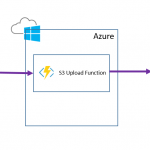
Remembering my BizTalk + Functions article from the other day I thought about using an Azure Function which would receive the message over HTTP and then internally it would use the AWS SDK to save the message to S3. I would then call this from BizTalk using only out of the box functionality. This makes the BizTalk to function interaction very simple. The AWS save also becomes very simple too because the SDK takes care of all of the hard work.
The below diagram shows what this looks like:
To implement this solution I took the following steps:
Step 1
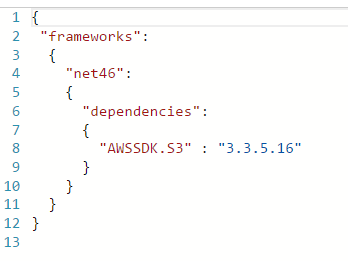
I created an Azure Function and added a file called project.json file in the Azure function I modified the json to import the AWS SDK like in the below picture:
Step 2
In the function I imported the Amazon namespaces
Step 3
In the function I added the below code to read the HTTP request and to save it to S3
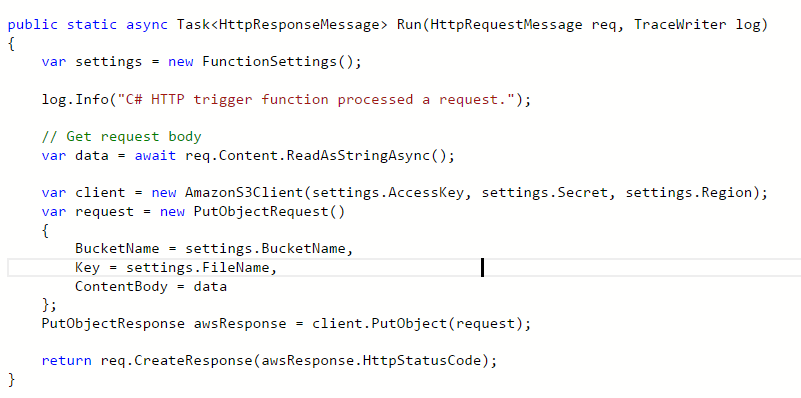
Note that I have a helper class called FunctionSettings which contains some settings like the key and bucket name etc. I am not showing these on the post but you can use the various options for managing config with a function depending upon your preference.
At this point I could now test my function and ensuring my settings are correct it should create a file in S3 when you use the test function option in the Azure Portal.
Step 4
In BizTalk I now added a one way Web Http send port using the address for my function
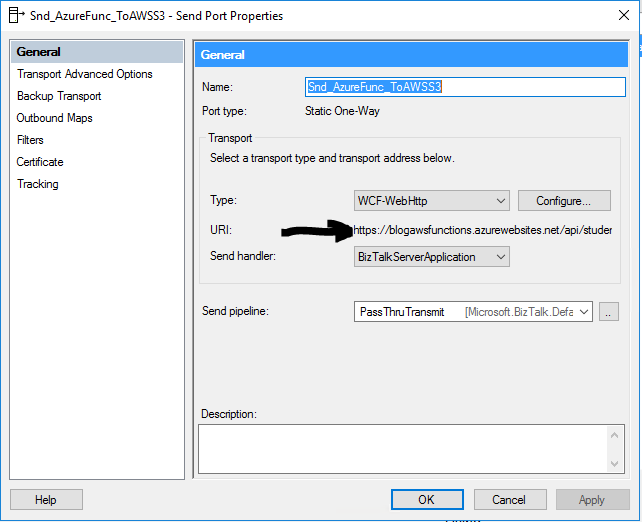
The function address url I can get from the Azure Portal and provides the location to execute my function over HTTP. In the adapter properties I have specified to use the POST http method.
In the message tab for the adapter I have chosen to use the x-functions-key header and have set a key which I generated in the Azure Portal so BizTalk has a dedicated key for calling the function.
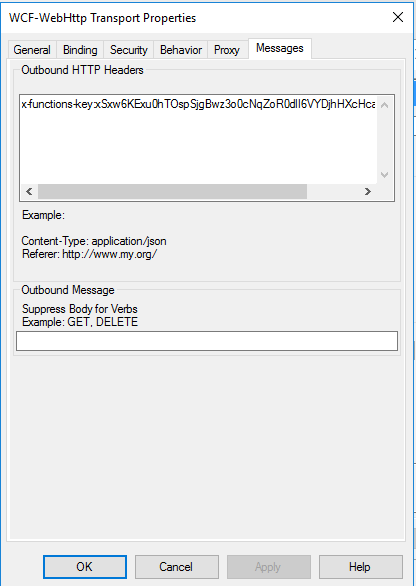
Note you may also need to modify some of the WCF time out and message size parameters.
Step 5
Next I can configure my send port to use the flat file assembler and a map so my canonical message of users is transformed to the appropriate csv flat file format for the B2B partner. At runtime the canonical message is sent to the send port and converted to csv. The csv message is then sent over http to the function and the function will save it to the S3 bucket.
Conclusion
In this particular case I had a simple quick win interface which we wanted to develop but unfortunately one of the requirements we couldn’t handle out of the box with the adapter set we had (S3). Because the business value of the interface wasn’t that high and we wanted this done quickly and cheaply this was a great opportunity to take advantage of the ability to extend BizTalk by calling an Azure Function. In this particular solution I was able to develop the entire solution in a couple of hours and get this into our test environments. The Azure Function was the perfect way to allow us to just get it done and get it shipped so we can focus on more important things.
While some of the other options may have been a prettier architecture or buy rather than build the beauty of the function was that its barely 10 lines of code and its easy to move to one of the other options later if we need to invest more in integration with S3.
by Nino Crudele | May 3, 2017 | BizTalk Community Blogs via Syndication
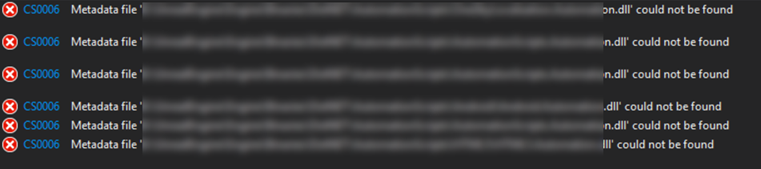
I faced this error and it’s quite complicate to solve so I’m writing a post just to keep note and hopefully to provide some support to some other developers.
I spent a lot of time around this error and there are many reasons, ways and different scenarios because this error.
I had a look in internet and I tried any explicable and inexplicable workaround I found in Stackoverflow.
In my opinion is a common cause created by different things which are;
- different .net version used by some of the libraries, sometime we inadvertently change that.
- dependency breakdown in Visual studio, in that case we are able to build using MSBUILD but we can’t build using Visual Studio UI.
- Nuget package not updated in one of the referenced libraries.
- Project file with different configuration.
Quickest way to fix this issue is following some main steps:
- Fix the target framework, if you have few projects then is fine but if you have 70 projects or more then could be a problem so,
download the Target Framework Migrator and in one click align all the target framework in all project, this is a great tool to do that.
- Fix nugget, enter in the nugget console
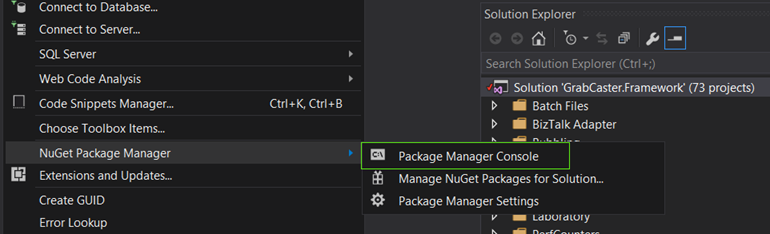
and execute Nuget restore SolutionName.sln
- Align and check the build configuration, right click on the solution and select properties.
Select configuration properties and check that all the projects are using the same configuration.
Check that all proper projects have the build checkbox selected.
Some external project like WIX or SQL or others could have the build checkbox selected, if this is the case then check that the specific project builds correctly or uncheck the box and apply.
- Unload all the project from the solution and start loading each project starting from the base library.
Every time you reload one then rebuild the solution.
At the end of this procedure the problem should be definitely solved.
Author: Nino Crudele
Nino has a deep knowledge and experience delivering world-class integration solutions using all Microsoft Azure stacks, Microsoft BizTalk Server and he has delivered world class Integration solutions using and integrating many different technologies as AS2, EDI, RosettaNet, HL7, RFID, SWIFT. View all posts by Nino Crudele
by michaelstephensonuk | May 1, 2017 | BizTalk Community Blogs via Syndication
In todays organisations there is a massive theme that API’s and iPaaS are the keys to building modern applications because these technologies simplify the integration experience. While this is true I think one of the things that is regularly forgotten is the power of a well thought out messaging element within your architecture. When building solutions with API’s and iPaaS we are often implementing patterns where an action in one application will result in an RPC call to another application to get some data or do something. This does not cover the scenarios where applications need a relatively up to date synchronised copy of certain data so that various actions and transactions can be performed.
While data can be moved around behind the scenes with these technologies I believe there is a big opportunity in looking at evolving your architecture to make your key data entities available on service bus in a messaging solution so you can plug and play applications into this rather than having to rebuild entire application to application interfaces each time.
When working on one project last year this was one of the solutions we implemented and it has been really interesting to see the customer reap the benefits and repeat the pattern over and over.
The initial project we were working on was about implementing Dynamics CRM as a system of engagement in a higher education establishment to engage with students and to provide a great support experience for students. For pretty much any IT project in an education setting there are certain data entities you probably need your application to be able to access:
- Students
- Staff
- Courses
- Course Modules
- Course Timetable
- Which student is on which course
- Marks and Grades
In the project initial discussions talked about using SSIS and some CRM add-ons for SSIS to do ETL style integration with Dynamics CRM to send it the latest staff, student and course information on a daily basis. While this would work, there is little strategic value in this because the next project is likely to come along and implement the same interfaces again and again and before you know it all systems have point to point integrations passing this data around.
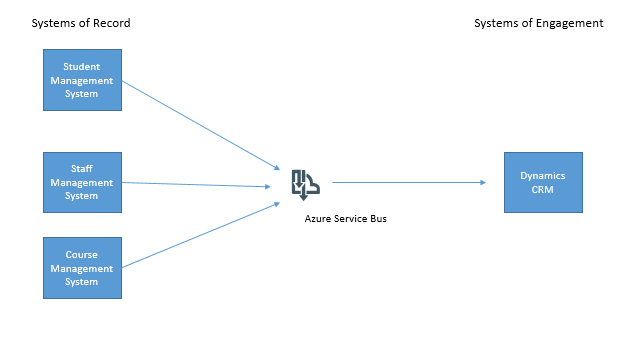
Our preferred approach however was to use Azure Service Bus as an intermediary and to publish data from the system of record for each key data entity to Service Bus then we could subscribe to this data and send it to CRM. In the next project another subscriber could subscribe to data on service bus and take what it needs.
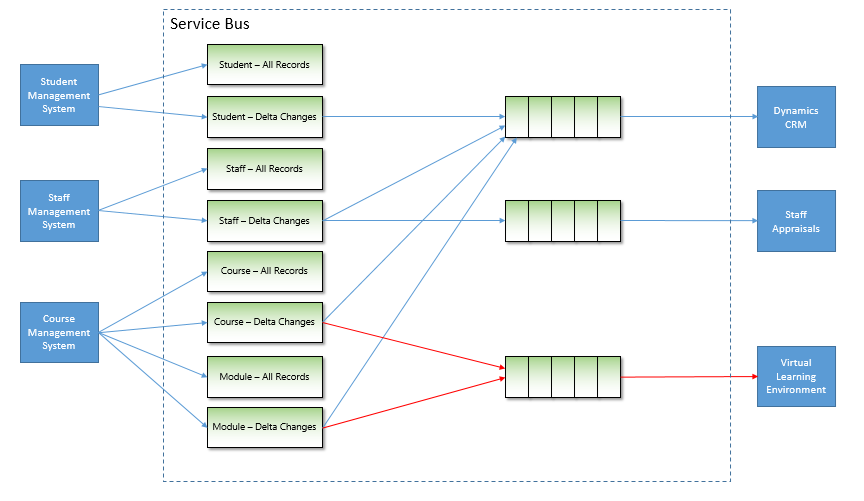
The below diagram shows the initial concept for our project.
Rather than try to solve all possible problems in day one we chose to use this approach as a pattern but to implement it in a just in time fashion alongside our main business project so that eventually we would make all key data entities available on service bus.
One of the key things we thought about was the idea of sending to topics and receiving from queues. This is really the best practice way to use service bus in my opinion anyway. Think of a topic as a virtual queue and we had 1 topic per type of entity.
We also extended this so that for each entity we would have 1 topic for all instances of the entity and one topic just for changes. We had 2 types of system of record for our main data entities, some applications would be able to publish events in a near real time fashion (for example CRM would be capable of doing this for any data entities it was determined to be the master system for) and other applications were only able to have information published if an Integration technology pulled out data and published it. Any system publishing events would be using a delta topic and any system publishing in “batches” would use a topic for delta changes and a topic for all elements. To elaborate on this with an example, imagine the student records system has a SQL table of students. We might have a process with BizTalk that took all students from the table and published them to the “all” topic. We would then have another BizTalk process which would use a last modified field on the table and publish just the records that had changed to the “delta” topic. This means that receiving applications could take messages from either topic depending on the scenarios:
- They always want all records
- They want all records the first time and then after initial sync they only want changes
- The application only ever wants changes
This approach would give us a really rich hub of data and changes which applications could take what they needed. In the diagram below you can see how we created a worker queue for CRM to be fed messages and we had many more topics which applications were publishing data to. Using Azure Service Bus we can define subscriptions to create rules on which applications want which messages. We then use the Forward To property to forward messages from the subscription to the worker queue for CRM.
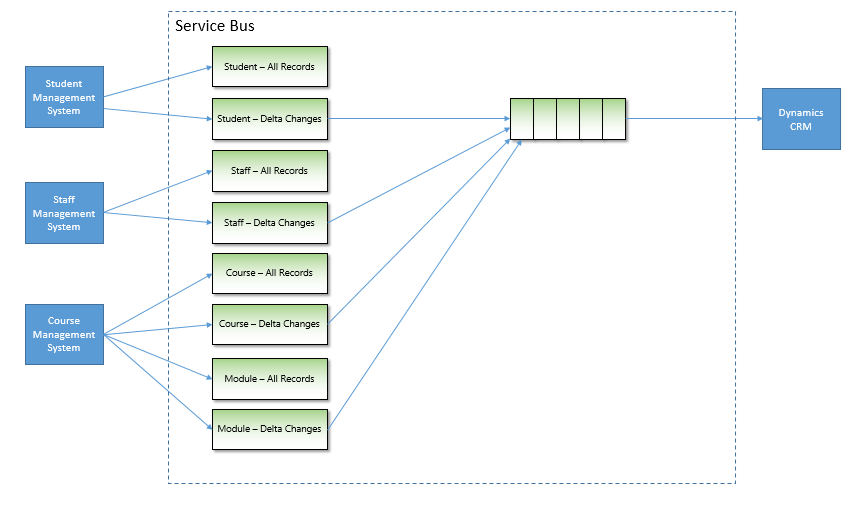
Just a quick point to note, we never receive messages directly from a subscription, we always use forward to and send the messages to a queue. The reason for this is:
- You cant define fine granular security for a topic
- Forward To allows the worker queue to process many different kinds of messages
- Its easier to see which applications are receiving which messages
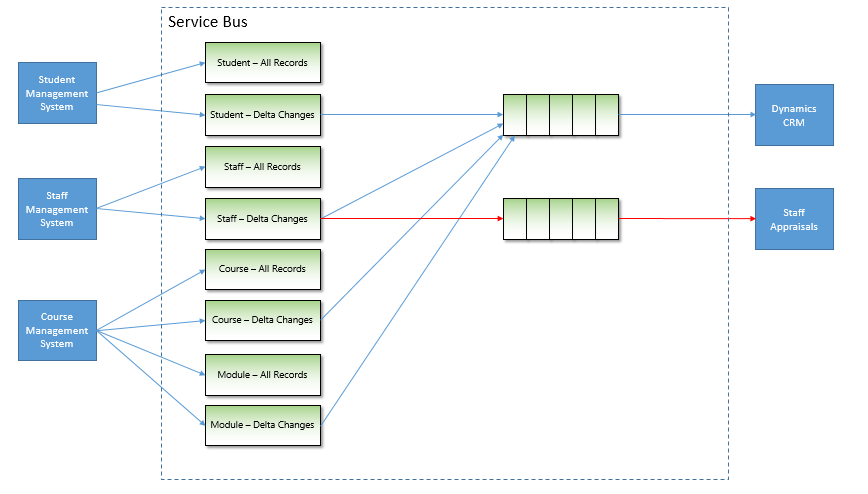
Once we had done our initial project where we had the core data entities available on Service Bus when the next project came along and they wanted staff information then we could simply add a subscription and routing to forward staff messages to a queue for this new application. The below diagram shows how a staff appraisal application was easily able to be fed staff information without having to care about the staff system of record. That problem had already been solved.
If you notice the staff appraisal application was getting all staff information every time it was published, when the project got to a more stable point we modified the routing rules so that the staff appraisal application was only sent staff records which are changing. To do this we just modified the subscription rules like in the diagram below:
In the next project we had a similar scenario where this time the virtual learning environment needed course data. This data was already available in service bus so we could create subscriptions and start sending this information with a significant reduction in the effort required. The below diagram illustrates the extension to the architecture:
After a number of iterations of our platform with various projects adding more key data entities to the platform we now have most of the key organisational data available in a plug and play architecture. While this may sound a bit like the ESB pattern to some, the key thing to remember is that the challenges of ESB were that they combined messaging alongside logical processing and business process to make things very complex. In Service Bus the focus is purely on messaging, this keeps things very simple and allows you to build the architecture up with the right technologies for each application scenario. For example in one scenario I might have a Logic App which processes a queue and sends messages to Salesforce. We might have a BizTalk Server which converts a message to HL7 and sends it to a healthcare app or I might do things in .net code with a Web Job. I have lots of choices on how to process the messages. The only real coupling in this architecture is the coupling of an application to a queue and some message formats.
There are still some challenges you may come across in this architecture, mainly it will be in cases where an application needs more information than the core message provides. Lots of applications have slightly different views on data entities and different attributes. One of the possibilities is to use something like a Logic App so that when you process a message you may make an API call and look up additional data to help with message processing. This would be a typical enrichment pattern.
The key thing I wanted to get across in this article is that in a time where we are being told API and iPaaS are simplifying integration, messaging as an architecture pattern still has a very valuable and effective place and if done well can really empower your business rather than building the same interface over and over again but in slightly different forms.
by michaelstephensonuk | Apr 28, 2017 | BizTalk Community Blogs via Syndication
Recently I had the opportunity to look at the options for combining BizTalk and Azure Functions for some real world scenarios. The most likely scenarios today are:
- Call a function using the HTTP trigger
- Add a message to a service bus queue and allow the function to execute via the Service Bus trigger
This is great because this gives us support for synchronous and asynchronous execution of a function from BizTalk.
The queue option doesn’t really need any elaboration, there is an adapter to call Service Bus from BizTalk and there are lots of resources out there to show you how to use a Queue trigger in a function.
What I did want to show however was an example of how to call a function using the http trigger. First question though is why would you want to do this?
I think the best example would be when using a façade pattern. This is a pattern we use a lot where we often create a web service component to encapsulate some logic to call an external system and then we call that web service from BizTalk. The idea is that we make the interaction from BizTalk to the web service simple and the web service hides the complexity. In the real world we usually do this for the following reasons:
- It makes the solution simpler
- The performance of the solution will be improved
- It is cheaper and easier to maintain in some cases
Azure Functions offers us an alternative way to implement the façade component compared to using a normal web service which we might host in IIS or on Azure App Service. Lets take a look at an imaginary architecture showing this in action.
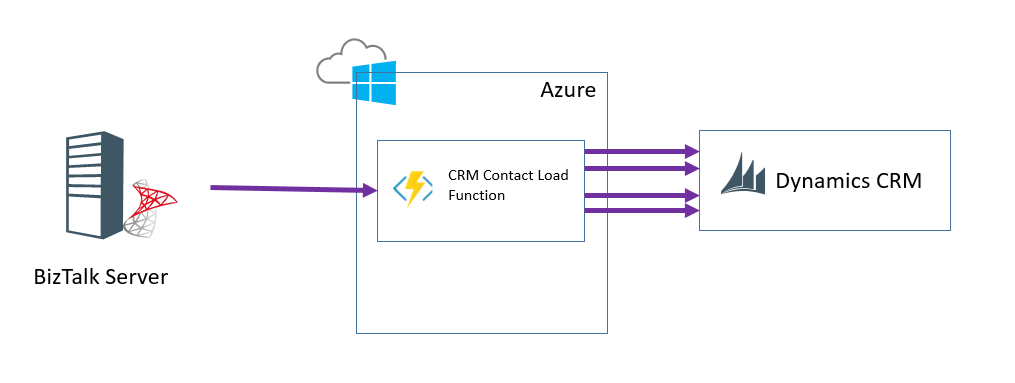
In this example imagine that BizTalk makes a call to the function. In the function it makes multiple calls to CRM to lookup various entity relationships and then create a final entity to insert. This would be a typical use of the façade pattern for this type of integration.
Demo
In the video below I show an example of consuming a function from BizTalk.
[embedded content]
What would I like to see Microsoft do with BizTalk + Functions?
There are lots of ways you can use Functions today from within BizTalk, but Microsoft are now investing quite heavily in enhancing BizTalk and combining it with cloud features. I would love to see some “Call Function” out of the box capabilities.
Imagine if BizTalk included some platform settings where you could register a function. This would mean a list of functions which had a friendly name, the url to call the function and a key for calling it. Maybe there was a couple of variations on this register function capability so you could use it from different places. First off:
- Call Azure Function shape in an Orchestration
This would be a shape where we could pass 1 message into it a bit like the transform shape we have now and get 1 message out. Under the hood the shape would convert the messages to xml or json then call the function. In the orchestration you would specify the function to call from a drop down choosing from the registered functions. This would abstract the orchestration from the functions changeable information (url/key).
This would be like the expression shape in some ways but by externalising the logic into a function it would become much easier to change the logic if needed.
- Call Azure Function mapping functoid
We drag the azure function functoid onto the map designer. We wire up the input parameters and destination. You supply your friendly named function from the functions you have registered with BizTalk. When the map executes again it makes an http call to the function. The function would probably have to make some assumptions about the data it was getting, maybe a collection of strings coming in and a single string coming out which the map could then further convert to other data types
The use of a function in mapping would be great for reference data mapping where you want an easy way to change the code at runtime.
by BizTalk Team | Apr 26, 2017 | BizTalk Community Blogs via Syndication

Enterprise integration is rapidly evolving, and we are pleased to announce the general availability of BizTalk Server 2016 Feature Pack 1. This release extends functionality in key areas such as Deployment, Analytics, and Runtime.
BizTalk Server 2016 Feature Pack 1 is available for Software Assurance customers running the BizTalk Server 2016 Developer and Enterprise editions or are running BizTalk Server in Azure under an Enterprise Agreement. Feature Pack 1 is production ready and provides only non-breaking features.
Deployment:
- Deploy with VSTS – Enable Continuous Integration to automatically deploy and update applications using Visual Studio Team Services (VSTS)
- New management APIs – Manage your environment remotely using the new REST APIs with full Swagger support
Analytics:
- Application Insights – Tap into the power of Azure for tracking valuable application performance and to better understand your workflow
- Leverage operational data – View operational data from anywhere and with any device using Power BI
Runtime:
- Support for Always Encrypted – Use the WCF-SQL adapter to connect to SQL Server secure Always Encrypted columns
- Advanced Scheduling – Set up advanced schedules using the new capabilities with Feature Pack 1
Feature Pack 1 builds on the investments we made to release BizTalk Server 2016 last December.
We encourage you to actively engage with us and propose new features through our BizTalk User Voice page
For more information select the feature you want to know more about below or go straight to our launch page and download the latest Feature Pack for BizTalk Server 2016
Our great Partner BizTalk360 has also written about this and the difference between a CU and a Feature Pack. Take a look here.

by Nino Crudele | Apr 4, 2017 | BizTalk Community Blogs via Syndication
In the last period, I invested time in something that I think is one of the most important aspect in the integration space, the perception.
During my last events I start introducing this topic and I’m going to add a lot more in the next future.
In Belgium, during the BTUG.be, I shown my point of view about open patterns and in London, during the GIB, I presented how I approach to the technology and how I like to use it, I’ve been surprised by how many people enjoyed my sharing.
The Microsoft stack is full of interesting options, in the on premise and Azure cloud space, people like to understand more about how to combine them and how to use them in the most profitable way.
In my opinion, the perception we have about a technology is the key and not the technology itself and this is not just about the technology but this is something related about everything in our life.
We can learn how to develop using any specific technology stack quite easily but it is more complicate to get the best perception of it.
I like to use my great passion for skateboarding to better explain this concept, a skateboard is one of the most simple object we can find, just a board with 4 wheels and a couple of trucks.

It is amazing seeing how people use the same object in so many different ways, like vert ramps, freestyle, downhill or street and how many different combinations of styles in each discipline and each skater has an own style as well.

Same thing needs to be done for the technology, I normally consider 4 main areas, BizTalk Server, Microsoft Azure, Microsoft .Net or SQL and the main open source stack.

I don’t like to be focused about using a single technology stack and I don’t think is correct using a single technology stack to solve a problem.
For instance, BizTalk Server is an amazing platform full of features and able to cover any type of integration requirement and looking to the BizTalk architecture we can find a lot interesting considerations.
The slide below is a very famous slide used in millions of presentations.
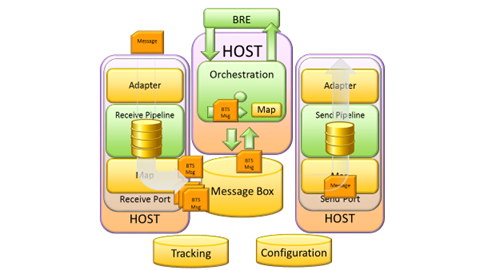
Most of the people look at BizTalk Server as a single box with receive ports, hosts, orchestrations, adapters, pipelines and so on.
When I look to BizTalk Server I see a lot of different technology stacks to use, to combine together and to use with other stacks as well.
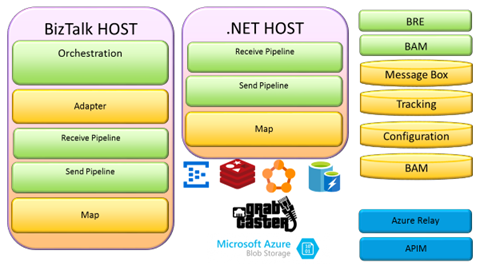
I can change any BizTalk Server behaviour and I can completely reinvent the platform as I want, I don’t see real limit on that and same thing with the Microsoft Azure stack.
Microsoft Azure offers thousands of options, the complicate aspect is the perception we have for any of these.
Many times our perception is influenced by the messages we received from the community or the companies, I normally like to approach without considering any specific message, I like to approach to any new technology stack like a kid approach to a new toy, I don’t have any preconception.

Today we face a lot of different challenges and one of the most interesting is the on premise integration.
The internal BizTalk architecture itself is a good guidance to use, we have any main concept like mediation, adaptation, transformation, resilience, tracking and so on.
If we split the architecture in two different on premise areas we open many points of discussion, how to solve a scenario like that today?
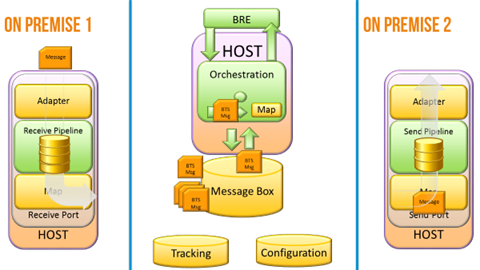
Below is the same architecture but using any technology stack available, during the GIB I shown some real cases and sample about that.
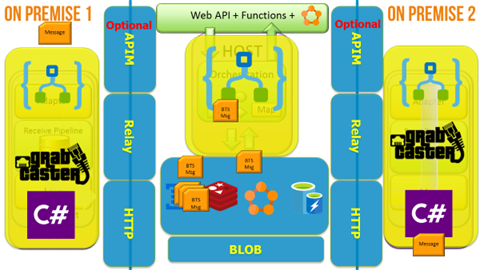
I also like to consider event driven integration and in that case GrabCaster is a fantastic option.
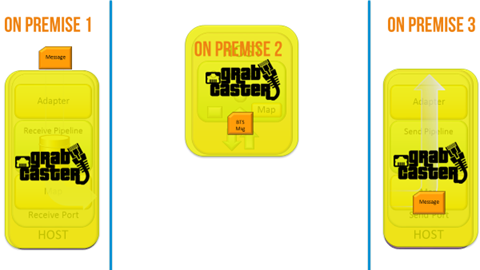
My next closets event will be TUGAIT in Portugal, TUGAIT is the most important community event organized in Portugal, last year I had the privilege to be there and it was an amazing experience.
3 days of technical sessions and covering any technology stack, integration, development, database, IT, CRM and more.
Many people attend TUGAIT from any part of the Europe, I strongly recommend to be there, nice event and great experience.
Author: Nino Crudele
Nino has a deep knowledge and experience delivering world-class integration solutions using all Microsoft Azure stacks, Microsoft BizTalk Server and he has delivered world class Integration solutions using and integrating many different technologies as AS2, EDI, RosettaNet, HL7, RFID, SWIFT. View all posts by Nino Crudele
by Mark Brimble | Apr 1, 2017 | BizTalk Community Blogs via Syndication
NZ daylight saving time ends at 3a.m today (2/3/2017) ends. To celebrate this I am going to share a string datetime functoid that I have used for many years.
A common task when mapping one message to another is transforming a date e.g. 1/3/17 15:30 to 2017-03-01T15:30+13:00. Many years ago I was reviewing some maps in a BizTalk solution and discovered that just about every map was using different C# code in a C# scripting functoid to transform between date formats. I decided to create a functoid that would convert any string that was a valid date to any other date format. The two objectives were to make sure that all date format changes were consistent and it was easy to use.
Here is are some maps that show cases the StringDateTime functoid. In this case the UTC date 2017-02-25T08:18:48.000Z is transformed to 25/02/2017 21:18
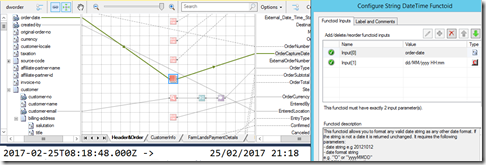
Note in the example above that the time is incremented by 13 hours because on the 25/2 NZ is on daylight saving and is UTC+13.
The code that does the work is shown below.
You can download the class file, bit map and resource file from
here if you want to create the functoid yourself. Please see one of
Sandro Pereira’s posts if you need any help to create it.
In summary this BizTalk functoid gives consistency to the way dates are formatted and is easy to use. All you need to enter is the either a standard date format or a custom date format.
by Nino Crudele | Mar 20, 2017 | BizTalk Community Blogs via Syndication
My previous post here.
https://blog.ninocrudele.com/2017/03/10/logic-apps-review-ui-and-mediation-part-1/
I keep going with my assessment with Logic Apps, I need to say that more I dig and more I like it and there are many reasons for that.
I love technology, I love it in all the aspects, one of the things that most fascinate myself is, what I like to call, the technology perception.I like to see how different people approach the same technology stack, Logic Apps is a great sample for me as BizTalk Server or Azure Event Hubs and other.
When I look to Logic Apps I see an open and fully extensible Azure stack to integrate and drive my azure processes.In these days I’m pushing the stack quite hard and I’m trying many different experiments, I have been impressed by the simplicity of the usability and the extensibility, I will speak more in detail about that in my next events but there are some relevant points of discussion.
Development comfort zone
Logic Apps offers many options, Web UI, Visual Studio, and scripting.
As I said in my previous post the Web UI is very fast and consistent but we can also use Visual Studio.
To develop using Visual Studio we just only need to install the latest Azure SDK, I’m not going to explain any detail about that as it is very to do and you can find anything you need here.
I just would like you to notice some interesting points, like the project distribution and the extensibility, first of all, to create a new Logic Apps process we need to select New Project/Cloud/Resource Group.
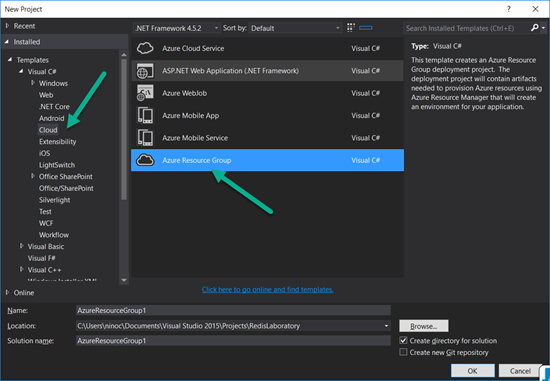
and we will receive a long list of templates, with the Logic Apps one as well.
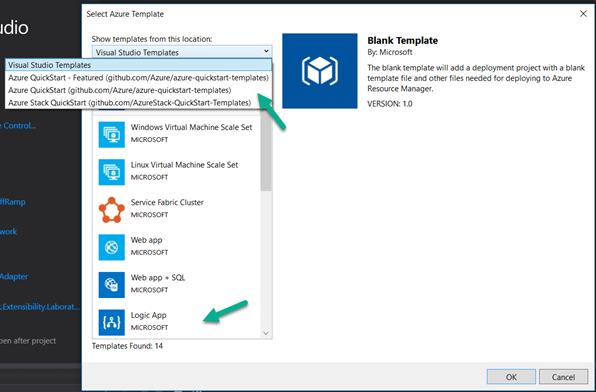
I definitely like the idea of using the concept of multi templates as Azure resource group, I can create my own templates very easily and release them on GitHub for my team.
In Visual Studio we have two main options, using the designer just selecting the LogicApp.json file, right click and “Open using the Logic App designer” or directly using the JSON file.
The second by the editor which is able to offer the maximum granularity and transparency.
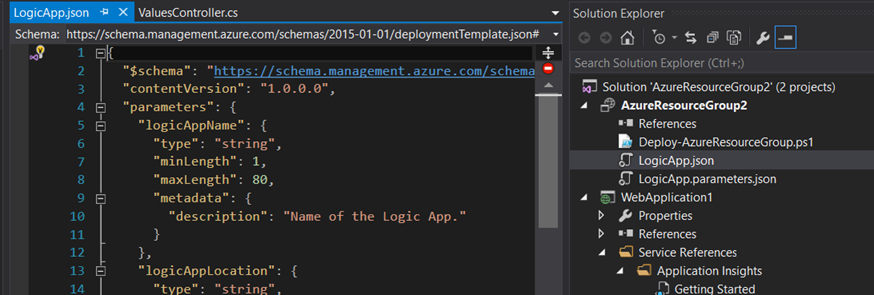
Deployment
About the development experience I need to say that it is very easy, just right click and Deploy
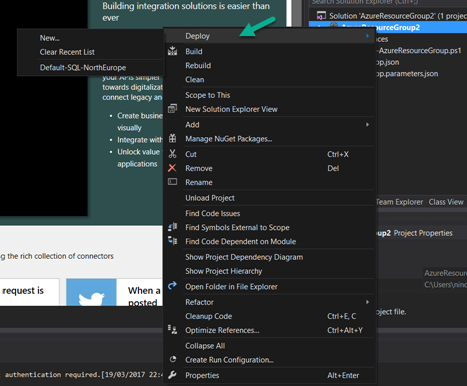
Extensibility
Logic Apps offers a lot of connectors, you don’t need to be a developer expert to create a new workflow, it is very simple to integrate an external stack and implementing a workflow able to exchange data between two systems, but my interesting has been focused on another aspect, how much simple is to extend and create my own applications blocks, triggers and actions.
I had a look at the possibility to extend the triggers and actions and I need to say that is very simple, we have two options, we can navigate in GitHub and start using one of the templates here, Jeff Hollan has created an impressive number of them and all of them are open source, I normally use these repositories to get the information I need or we can just create a new one from scratch.
Well, how much easy to create a new one from scratch, from Visual Studio we need to select New Project/Aps.Net Web Application/Azure Web API, set our Azure hosting settings
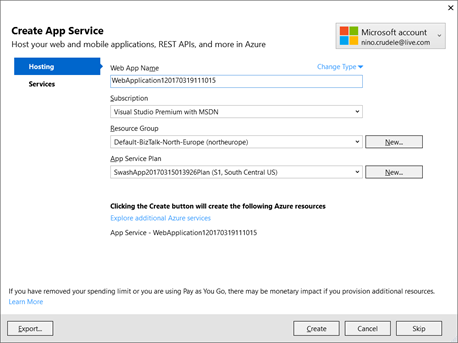
and we only need to implement our Get and GenerateAsyncResponse method able to provide the HttpResponseMessage that the Logic App flow needs to invocate for the trigger.

Continuous Integration
For the deployment, we can publish from Visual Studio or, very interesting and option for continuous integration, using GitHub, I tried both and I have been very satisfied by the simplicity of using GitHub.
To integrate GitHub we just need to create a new deployment slot in our Web API
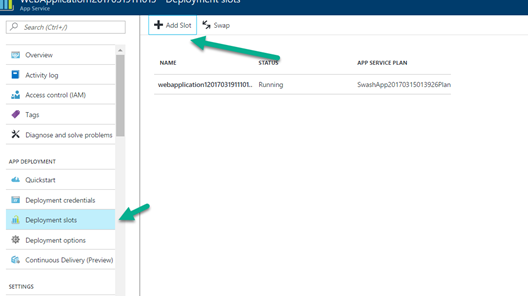
The slot is another Web API by REST able to integrate the source control we like to use, we need to select our new slot
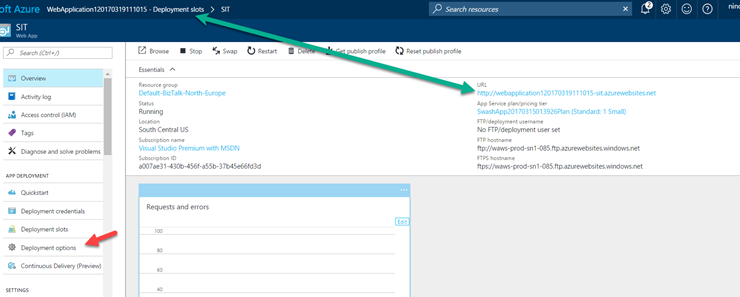
and select the source type we like to use, absolutely easy and fast, great job.
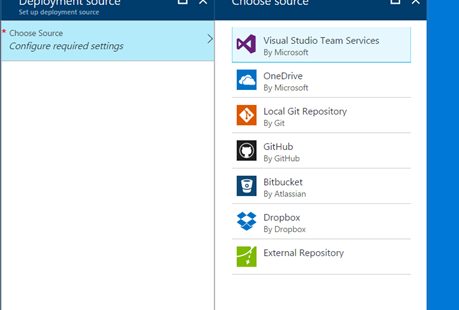
Telemetry
I also appreciated the possibility to use the Live Data telemetry which is very useful during the tests and the development and we have the same thing in the Azure portal.
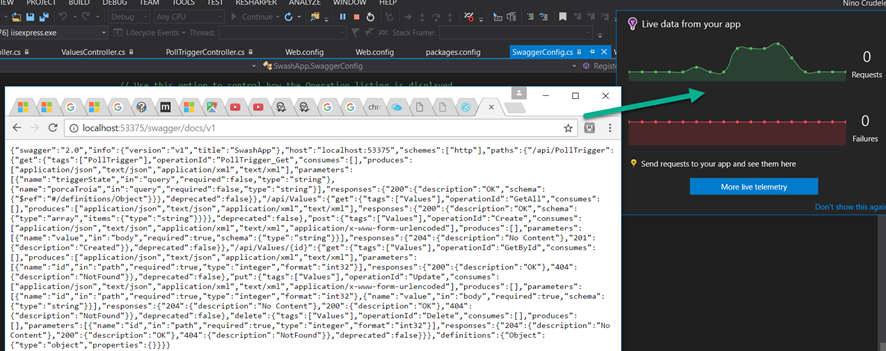
I have so much to say about Logic Apps, you can find a lot of material and resources on an internet and please feel free to contact me for any more information.
I’m also experimenting many interesting things using Logic Apps in conjunction with BizTalk Server, I will speak a lot more in detail my next events, I definitely getting so much fun playing with it.
Author: Nino Crudele
Nino has a deep knowledge and experience delivering world-class integration solutions using all Microsoft Azure stacks, Microsoft BizTalk Server and he has delivered world class Integration solutions using and integrating many different technologies as AS2, EDI, RosettaNet, HL7, RFID, SWIFT. View all posts by Nino Crudele

by Steef-Jan Wiggers | Mar 14, 2017 | BizTalk Community Blogs via Syndication
Last month was a busy month and in February most of my time I spend on the road or plane. Anyways, what has Stef been up to in February?
In this month, I have also written a few guest blogs for BizTalk360 blog and did a demo for the Middleware Friday Show. The blog posts are:
The show can be found in Middleware Friday show 5th episode about Serverless Integration.
During my trip in Australia and New-Zealand I did a few short interviews, which you can find on YouTube:
· Mick Badran
· Wagner Silveira
· Martin Abbott
· Daniel Toomey
· Bill Chesnut
· Rene Brauwers
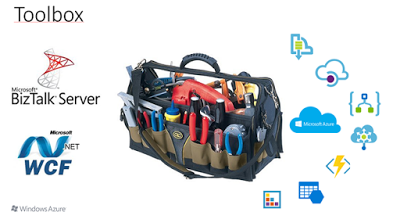
Besides the interviews a few Meetups took place, one in Auckland, another one in Sydney and a live webinar with Bill Chesnut in Melbourne. In Auckland I talked about the integration options we have today. An integration professional in the Microsoft domain had/has WCF and BizTalk Server. With Azure the capabilities grow to Service Bus, Storage, BizTalk Services (Hybrid Connections), Enterprise Integration Pack, On Premise Data Gateway, Functions, Logic Apps, API Management and Integration Account.
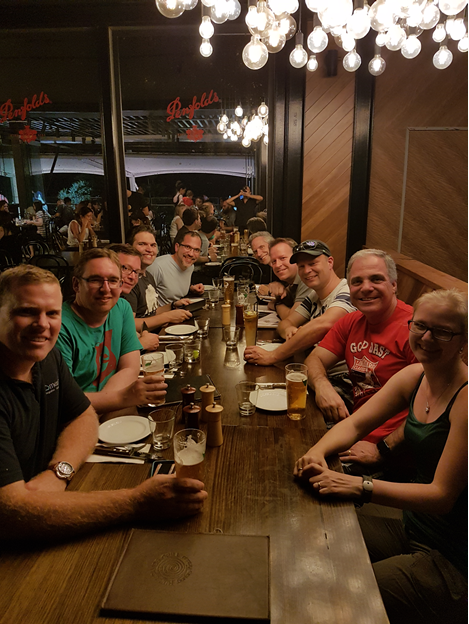
After my talk in Auckland I headed out to the Gold Coast to meet up with the Pro Integration Team (Jim,Jon, Jeff and Kevin) and Dan Rosanova. They were all at the Gold Coast because of Ignite Australia, and here’s a list of their talks:
During my stay, we went for a couple of drinks and had a few good discussions. One night Dean Robertsoncame over and we all had dinner. After the Gold Coast Dan Toomey, took me, Eldert and his wife to Brisbane for a day sightseeing.
The next week after Auckland, Gold Coast and Brisbane I returned to Sydney for the Meet up organized bySimon and Rene. My topic was “Severless Integration”, which dealt with the fact that we integration professional will start building more and more integration solutions in Azure using Logic Apps, API Management and Service Bus. All these services are provisioned, management and monitored in Azure. In the talk I used a demo, which I also described in Serverless Integration with Logic Apps, Functions and Cognitive Services.
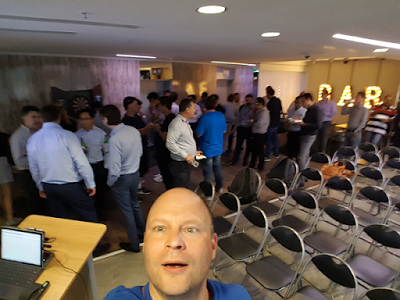
In Sydney I was joined on stage with Jon, Kevin and Eldert. We had about 45 people in the room and we went for drinks after the event.
The next day Eldert and me went to Melbourne to meetup with Bill, Jim and Jeff who were there to do a Meet up. The PG had split up to do meetups in both Sydney and Melbourne. In Melbourne, we did two things, we visited Nethra, who survived the Melbourne car rampage 25th of January and did a live Webinarat Bill house in Beaconsfield.
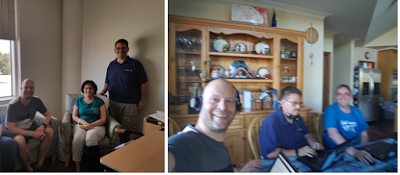
Overall the trip to Australia and New Zealand was worthwhile. The meet ups, the PG interaction in Australia, the community and hospitality were amazing. Thanks Rene, Miranda, Mick, Nicki, Simon, Craig,Abhishek, James, Morten, Jim, Jon, Jeff, Kevin, Martin, Dan Rosanova, Bill, Mark, Margaret, Johann,Wagner and many others I met during this trip. It was amazing!!!

Although February was a short month I was able to find a little bit of time to read. I read a few books on the plane to Australia, New Zealand and back:
- Together is better, a little book of inspiration by Simon Sinek. I read this book as I shared aninterview (Millennials in the Workplace) with him on Facebook. It tells a short story about three young people escaping from a playground that has a playground king to find a better place. The story is about leadership with the message that leaders are students, need to learn and to take care of their people and inspire.
- Niet de kiezer is gek by Tom van der Meer. On March 15th, we will have a general election for a new upcoming government. And we as voters are more aware of the what each party has to offer than the parties think we know. The access to information, because of digitalization has made voters more informed on the situation in our country, how politicians operate and vocal.
My favorite albums that were released in February were:
· Soen – Lykaia
· Immolation – Atonement
· Persefone – Aathma
· Ex Deo – The Immortal Wars
· Nailed To Obscurity – King Delusion

In February I did a couple of runs, including a half just before my trip started. During my busy travel schedule, I ran with the same frequency, but cut the number of miles to prevent to wear myself out.

There you have it Stef’s second Monthly Update and I can look back again with a smile. Accomplished a lot of things and exciting moments are ahead of me in March.
Cheers,
Steef-Jan
Author: Steef-Jan Wiggers
Steef-Jan Wiggers is all in on Microsoft Azure, Integration, and Data Science. He has over 15 years’ experience in a wide variety of scenarios such as custom .NET solution development, overseeing large enterprise integrations, building web services, managing projects, designing web services, experimenting with data, SQL Server database administration, and consulting. Steef-Jan loves challenges in the Microsoft playing field combining it with his domain knowledge in energy, utility, banking, insurance, health care, agriculture, (local) government, bio-sciences, retail, travel and logistics. He is very active in the community as a blogger, TechNet Wiki author, book author, and global public speaker. For these efforts, Microsoft has recognized him a Microsoft MVP for the past 6 years. View all posts by Steef-Jan Wiggers
by BizTalk Team | Mar 14, 2017 | BizTalk Community Blogs via Syndication
BizTalk Server 2016 was our tenth release of the product bundled with a ton of new functionality
One of the things we added was enhanced support for Microsoft to collect usage data from the BizTalk environment. You can enable telemetry collection during the installation of BizTalk Server 2016 , although the default option is to opt-out from sending this data to Microsoft.
Microsoft use the usage data to help us improve our products and services, including the focuse of the actual usage to get BizTalk in the right direction. Read our privacy statement to learn more.
The data gathered includes overall information and counts of the different artifacts. Data is sent to Microsoft once a day or when you restart one of your host instances.
There are two keys in the registry that store this information regarding your telemetry data gathering and submission to Microsoft.
HKEY_LOCAL_MACHINESOFTWAREMicrosoftBizTalk Server3.0CEIPEnabled
And
HKEY_LOCAL_MACHINESOFTWAREWOW6432NodeMicrosoftBizTalk Server3.0CEIPEnabled
If these values are set to “1” telemetry data collection is turned on.
You can also go here and download a the registry update as a .reg file to enable Telemetry in your BizTalk Server 2016 environment.
We gather the count only of the following artifacts in BizTalk
- Send Ports
- Receive Location
- Adapters
- Hosts
- Partners
- Agreements
- Schemas
- Machines
We appreciate you taking the time to enable telemetry data to help us drive the product going forward.



