Following my previous blog post, Oracle.DataAccess.Client.OracleException: ORA-00942: table or view does not exist, and once I was able to solve that last issue, I was surprised by a brand new communication error between BizTalk Server and ORACLE, fortunately for me, this time with a more explicit error message: ORA-00942: table or view does not exist.
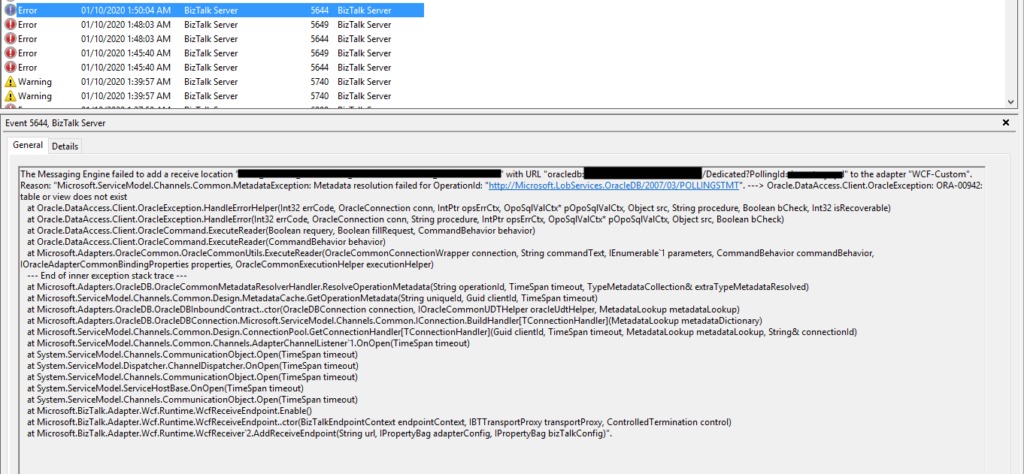
The Messaging Engine failed to add a receive location “ORACLE_RECEIVE_LOCATION_NAME” with URL “oracledb://SERVER_ADDRESS:PORT_NUMBER/SERVICE_NAME/Dedicated?PollingId=polling_id” to the adapter “WCF-Custom”. Reason: “Microsoft.ServiceModel.Channels.Common.MetadataException: Metadata resolution failed for OperationId: “http://Microsoft.LobServices.OracleDB/2007/03/POLLINGSTMT“. —> Oracle.DataAccess.Client.OracleException: ORA-00942: table or view does not exist at Oracle.DataAccess.Client.OracleException.HandleErrorHelper(Int32 errCode, OracleConnection conn, IntPtr opsErrCtx, OpoSqlValCtx* pOpoSqlValCtx, Object src, String procedure, Boolean bCheck, Int32 isRecoverable) at Oracle.DataAccess.Client.OracleException.HandleError(Int32 errCode, OracleConnection conn, String procedure, IntPtr opsErrCtx, OpoSqlValCtx* pOpoSqlValCtx, Object src, Boolean bCheck) at Oracle.DataAccess.Client.OracleCommand.ExecuteReader(Boolean requery, Boolean fillRequest, CommandBehavior behavior) at Oracle.DataAccess.Client.OracleCommand.ExecuteReader(CommandBehavior behavior) at Microsoft.Adapters.OracleCommon.OracleCommonUtils.ExecuteReader(OracleCommonConnectionWrapper connection, String commandText, IEnumerable`1 parameters, CommandBehavior commandBehavior, IOracleAdapterCommonBindingProperties properties, OracleCommonExecutionHelper executionHelper) — End of inner exception stack trace — at Microsoft.Adapters.OracleDB.OracleCommonMetadataResolverHandler.ResolveOperationMetadata(String operationId, TimeSpan timeout, TypeMetadataCollection& extraTypeMetadataResolved) at Microsoft.ServiceModel.Channels.Common.Design.MetadataCache.GetOperationMetadata(String uniqueId, Guid clientId, TimeSpan timeout) at Microsoft.Adapters.OracleDB.OracleDBInboundContract..ctor(OracleDBConnection connection, IOracleCommonUDTHelper oracleUdtHelper, MetadataLookup metadataLookup) at Microsoft.Adapters.OracleDB.OracleDBConnection.Microsoft.ServiceModel.Channels.Common.IConnection.BuildHandler[TConnectionHandler](MetadataLookup metadataDictionary) at Microsoft.ServiceModel.Channels.Common.Design.ConnectionPool.GetConnectionHandler[TConnectionHandler](Guid clientId, TimeSpan timeout, MetadataLookup metadataLookup, String& connectionId) at Microsoft.ServiceModel.Channels.Common.Channels.AdapterChannelListener`1.OnOpen(TimeSpan timeout) at System.ServiceModel.Channels.CommunicationObject.Open(TimeSpan timeout) at System.ServiceModel.Dispatcher.ChannelDispatcher.OnOpen(TimeSpan timeout) at System.ServiceModel.Channels.CommunicationObject.Open(TimeSpan timeout) at System.ServiceModel.ServiceHostBase.OnOpen(TimeSpan timeout) at System.ServiceModel.Channels.CommunicationObject.Open(TimeSpan timeout) at Microsoft.BizTalk.Adapter.Wcf.Runtime.WcfReceiveEndpoint.Enable() at Microsoft.BizTalk.Adapter.Wcf.Runtime.WcfReceiveEndpoint..ctor(BizTalkEndpointContext endpointContext, IBTTransportProxy transportProxy, ControlledTermination control) at Microsoft.BizTalk.Adapter.Wcf.Runtime.WcfReceiver`2.AddReceiveEndpoint(String url, IPropertyBag adapterConfig, IPropertyBag bizTalkConfig)”.
Once again, followed by the following error:
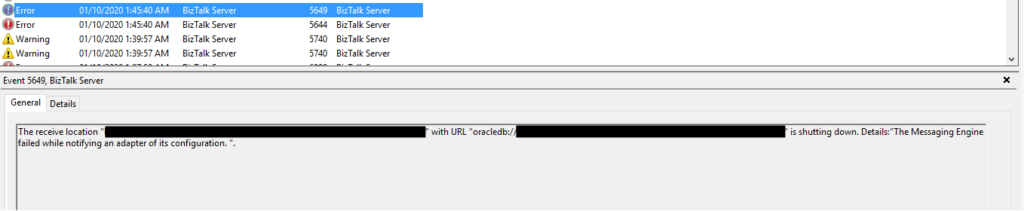
The receive location “ORACLE_RECEIVE_LOCATION_NAME” with URL “oracledb://SERVER_ADDRESS:PORT_NUMBER/SERVICE_NAME/Dedicated?PollingId=polling_id” is shutting down. Details:”The Messaging Engine failed while notifying an adapter of its configuration. “.
Of course, these two errors are related, but the first one is the one that has more precise information regarding what is happening.
Cause
As the error message describes, the table or the view you are trial to communicate doesn’t exist on the ORACLE database you are trying to communicate.
Solution
I wish all problems were that simple!
To solve this issue, you need to contact your ORACLE team and make sure that they properly deploy the missing databases, tables, or views.
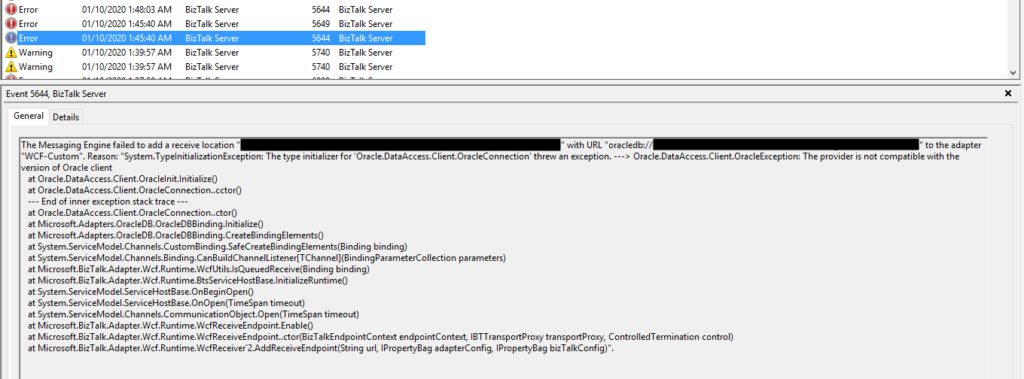
I’m back to one of my favorite topics, error, warnings, cause, and solutions blog post – still have plenty of them in my backlog to be published. I recently installed a new BizTalk Server solution in production in one of my clients that integrate with ORACLE. When I try to activate the Oracle Receive ports, I got the following error inside Event Viewer:
The Messaging Engine failed to add a receive location “ORACLE_RECEIVE_LOCATION_NAME” with URL “oracledb://SERVER_ADDRESS:PORT_NUMBER/SERVICE_NAME/Dedicated?PollingId=polling_id” to the adapter “WCF-Custom”. Reason: “System.TypeInitializationException: The type initializer for ‘Oracle.DataAccess.Client.OracleConnection’ threw an exception. —> Oracle.DataAccess.Client.OracleException: The provider is not compatible with the version of Oracle client at Oracle.DataAccess.Client.OracleInit.Initialize() at Oracle.DataAccess.Client.OracleConnection..cctor() — End of inner exception stack trace — at Oracle.DataAccess.Client.OracleConnection..ctor() at Microsoft.Adapters.OracleDB.OracleDBBinding.Initialize() at Microsoft.Adapters.OracleDB.OracleDBBinding.CreateBindingElements() at System.ServiceModel.Channels.CustomBinding.SafeCreateBindingElements(Binding binding) at System.ServiceModel.Channels.Binding.CanBuildChannelListener[TChannel](BindingParameterCollection parameters) at Microsoft.BizTalk.Adapter.Wcf.Runtime.WcfUtils.IsQueuedReceive(Binding binding) at Microsoft.BizTalk.Adapter.Wcf.Runtime.BtsServiceHostBase.InitializeRuntime() at System.ServiceModel.ServiceHostBase.OnBeginOpen() at System.ServiceModel.ServiceHostBase.OnOpen(TimeSpan timeout) at System.ServiceModel.Channels.CommunicationObject.Open(TimeSpan timeout) at Microsoft.BizTalk.Adapter.Wcf.Runtime.WcfReceiveEndpoint.Enable() at Microsoft.BizTalk.Adapter.Wcf.Runtime.WcfReceiveEndpoint..ctor(BizTalkEndpointContext endpointContext, IBTTransportProxy transportProxy, ControlledTermination control) at Microsoft.BizTalk.Adapter.Wcf.Runtime.WcfReceiver`2.AddReceiveEndpoint(String url, IPropertyBag adapterConfig, IPropertyBag bizTalkConfig)”.
Followed by the following error:
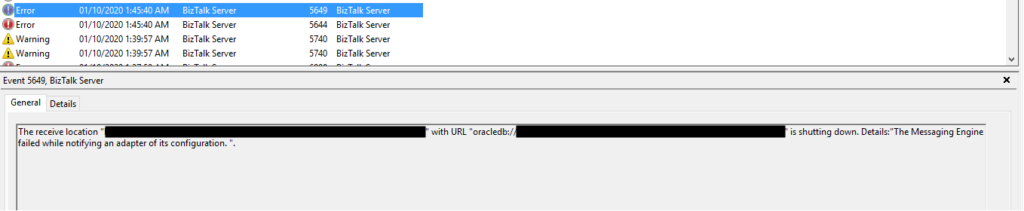
The receive location “ORACLE_RECEIVE_LOCATION_NAME” with URL “oracledb://SERVER_ADDRESS:PORT_NUMBER/SERVICE_NAME/Dedicated?PollingId=polling_id” is shutting down. Details:”The Messaging Engine failed while notifying an adapter of its configuration. “.
Of course, these two errors are related, but the first one is the one that has more precise information regarding what is happening.
Cause
Usually, these types of problems occur when you don’t have the correct versions of the Oracle Data Provider for .NET (ODP.NET) and the Oracle client, which are part of the Oracle Data Access Components (ODAC). Still, it may occur, or similar errors, for other several reasons like for example:
The Oracle Data Provider DLLs are not properly registered into GAC.
Mistmach installation versions between the components, for example between Oracle Client and ODP.NET.
Mistmach installation versions between 32bit or 64bit ODAC components.
Unfortunately, kind of, none of the above reasons were justifying my issues since I already had several ORACLE receive locations, running with success on the environment.
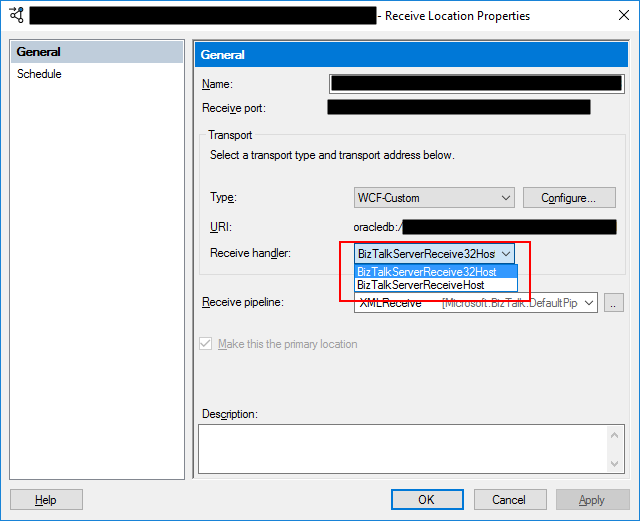
When I investigate the other running ports, I realized that all of them were running the 64-bit Host Instance. And this one that was getting problems was running in 32-bit Receive Host Instance. I then realize that ODAC 32-bit components were not properly installed in production.
Even if you don’t use it, it is essential to have always the 32, and 64-bit of each adapter installed correctly in your environment. If that’s not possible, make sure to associate the 32, and 64-bit Receive Handlers and Send Handlers for each adapter accordingly.
Solution
In my case, the solution was simple, since I had already several ORACLE receive location successfully running in the environment. I have to access the receive location and configure the Receive Handler to be the 64-bit Host Instance.
After this modification, the problem was gone, and I could pull data from the ORACLE database. Otherwise, make sure to install the necessary 32-bit or 64-bit ODAC components correctly.
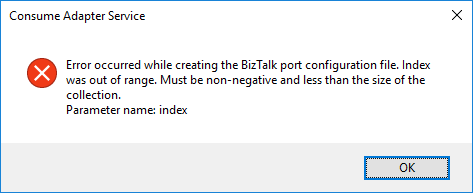
I have done these thousands of times and it is a very straightforward task once you know how to communicate with Oracle system but this time I got the following error:
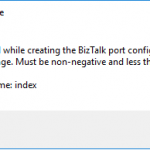
Error occurred while creating the BizTalk port configuration file. Index was out of range. Must be non-negative and less than the size of the collection. Parameter name: index
A curiosity is that the Wizard was able to successfully generate the Oracle Schemas. The problem occurred while it was trying to generate the Binding file.
Cause
Unfortunately, I don’t know exactly the cause reason for this error. In my view, the same occurred due to some special character coming from the Oracle resources that are being consumed or incompatibilities between Oracle data types and .NET data types and that are used to generate the Binding file.
Nevertheless, this is not a stopping issue. You still have all the necessary BizTalk resources generated by the wizard: the Oracle schemas. The only thing that is not generated is the binding file, which is extremely useful to create the receive or send port in the BizTalk Server Administration Console. However, despite this constraint, you are still able to manually create the port without requiring the binding file.
Solution
Well, you know me, it is possible to manually create the ports without requiring the binding files, however, this is an accelerator that I prefer not to lose. So, I had to investigate and solve this problem, before it appears more often.
And in fact, the solution is quite easy:
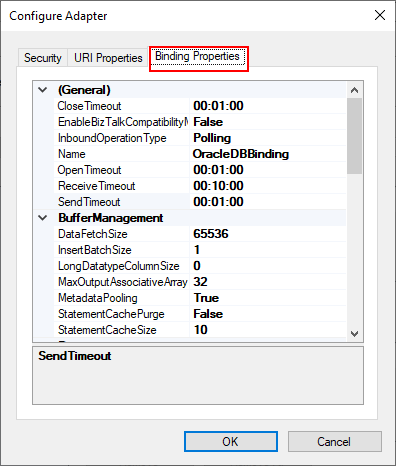
On the Consume Adapter Service Schema Generator Wizard, while you are configuring the connection string to Oracle, configure the URI, select the Binding Properties tab.
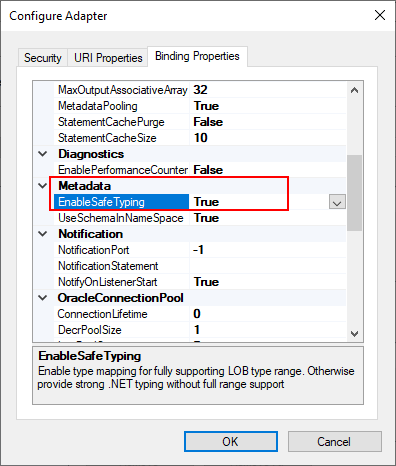
On the Binding Properties tab, scroll down to the Metadata section. There you will find a property called: EnableSafeTyping.
This feature controls how the adapter surfaces certain Oracle data types and by default this value is false.
To solve this issue you need to change the EnableSafeTyping value to true.
Since not all .NET and Oracle types are created equally, we occasionally need to set the value true for this property to handle some constraints around data types.
This is not a unique Oracle issue, this same error may happen when you are trying to generate schemas from SAP also.
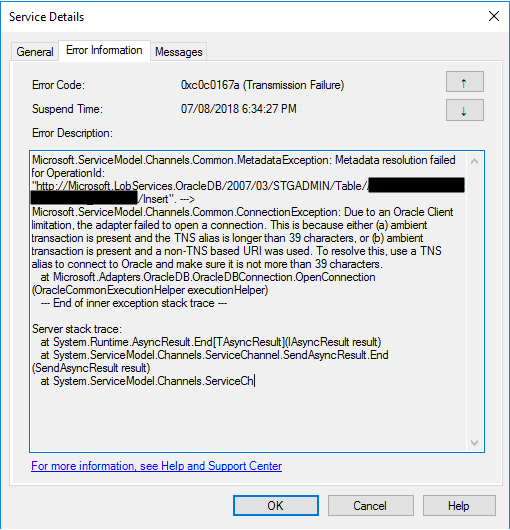
Another day, another error to report – still have plenty of them in my backlog to be published, they are an “easy and quick way” to publish something in my blog when I really don’t have much free time to write something different. Today is about “This is because either (a) ambient transaction is present and the TNS alias is longer than 39 characters” error message that I got when I was initially trying to connect for the first time to ORACLE database to insert some data:
Microsoft.ServiceModel.Channels.Common.MetadataException: Metadata resolution failed for OperationId: “http://Microsoft.LobServices.OracleDB/2007/03/STGADMIN/Table/TRANSACTIONS/Insert”. —> Microsoft.ServiceModel.Channels.Common.ConnectionException: Due to an Oracle Client limitation, the adapter failed to open a connection. This is because either (a) ambient transaction is present and the TNS alias is longer than 39 characters, or (b) ambient transaction is present and a non-TNS based URI was used. To resolve this, use a TNS alias to connect to Oracle and make sure it is not more than 39 characters.
at Microsoft.Adapters.OracleDB.OracleDBConnection.OpenConnection(OracleCommonExecutionHelper executionHelper)
— End of inner exception stack trace —
Server stack trace:
at System.Runtime.AsyncResult.End[TAsyncResult](IAsyncResult result)
at System.ServiceModel.Channels.ServiceChannel.SendAsyncResult.End(SendAsyncResult result)
at System.ServiceModel.Channels.ServiceCh.
Followed by other similar warning messages:
A message sent to adapter “WCF-Custom” on send port “INSERT_PAYMENTS_WCFORACLE” with URI “oracledb://IP-ADDRESS:PORT-NUMBER/PATH” is suspended.
Error details: Microsoft.ServiceModel.Channels.Common.MetadataException: Metadata resolution failed for OperationId: “http://Microsoft.LobServices.OracleDB/2007/03/STGADMIN/Table/PAYMENTS/Insert”. —> Microsoft.ServiceModel.Channels.Common.ConnectionException: Due to an Oracle Client limitation, the adapter failed to open a connection. This is because either (a) ambient transaction is present and the TNS alias is longer than 39 characters, or (b) ambient transaction is present and a non-TNS based URI was used. To resolve this, use a TNS alias to connect to Oracle and make sure it is not more than 39 characters.
at Microsoft.Adapters.OracleDB.OracleDBConnection.OpenConnection(OracleCommonExecutionHelper executionHelper)
— End of inner exception stack trace —
Server stack trace:
at System.Runtime.AsyncResult.End[TAsyncResult](IAsyncResult result)
at System.ServiceModel.Channels.ServiceChannel.SendAsyncResult.End(SendAsyncResult result)
at System.ServiceModel.Channels.ServiceChannel.EndCall(String action, Object[] outs, IAsyncResult result)
at System.ServiceModel.Channels.ServiceChannel.EndRequest(IAsyncResult result)
Exception rethrown at [0]:
at System.Runtime.Remoting.Proxies.RealProxy.HandleReturnMessage(IMessage reqMsg, IMessage retMsg)
at System.Runtime.Remoting.Proxies.RealProxy.PrivateInvoke(MessageData& msgData, Int32 type)
at System.ServiceModel.Channels.IRequestChannel.EndRequest(IAsyncResult result)
at Microsoft.BizTalk.Adapter.Wcf.Runtime.WcfClient`2.RequestCallback(IAsyncResult result)
Non-TNS based URI is not supported under an ambient transaction. If you have to use transactions, you should use the TNS alias.
Note: TNS Alias needs to be less than 39 characters.
Solution
To solve this problem, you need to:
Open the send port properties, by double-clicking on the port;
Click on “Configure…” button under Transport
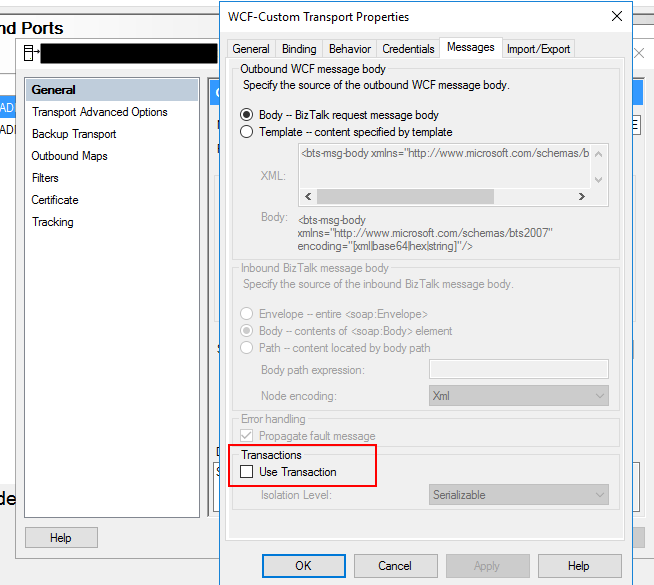
On the Transport Properties window, select the “Message” tab and then uncheck the “Use Transaction” box under Transactions
If you try to resend the message this problem should be solved. Additionally, if this error still persists, you should change the following properties in the oracleDBbinding:
“enableBizTalkCompatibilityMode” = True (this is set to false per default)
And/or “useAmbientTransaction” = False
Author: Sandro Pereira
Sandro Pereira lives in Portugal and works as a consultant at DevScope. In the past years, he has been working on implementing Integration scenarios both on-premises and cloud for various clients, each with different scenarios from a technical point of view, size, and criticality, using Microsoft Azure, Microsoft BizTalk Server and different technologies like AS2, EDI, RosettaNet, SAP, TIBCO etc. He is a regular blogger, international speaker, and technical reviewer of several BizTalk books all focused on Integration. He is also the author of the book “BizTalk Mapping Patterns & Best Practices”. He has been awarded MVP since 2011 for his contributions to the integration community. View all posts by Sandro Pereira