
by Steef-Jan Wiggers | Jul 7, 2017 | BizTalk Community Blogs via Syndication
Integrate 2017, a well-organized Microsoft Integration focused event, took place from 26 to 28 of June at Kings Place in London. It attracted 380 plus attendees from 50 different countries and had 28 speakers from around the globe including the Microsoft Product Group. I did a session around Logic Apps from the consumer, end user, and business perspective and used sentiment analysis as for my demo.
Context
To provide you some context. Logic App service was the most prominent technology during the three-day event. This Azure Service became general available a year ago and is starting to build momentum as premier cloud integration capability. Most of all, the service fits rather well in the complete Azure Platform with its connectors to a wide variety of other Azure services and in addition, it connects with SaaS solutions such as Twitter, Zendesk, Salesforce, ServiceNow, PagerDuty, and Slack.
During Integrate 2017 I talked about empowering business with Logic Apps. And my goal was to show the audience the value of Logic Apps for the business. The service is a true iPaaS service according to the definition Wikipedia provides online. And it is a part of Azure, which is multi-tenant, has a subscription model or in the case of Logic Apps it’s consumption based (micro-billing), provides pre-built ready available connectors, deployment/manage/monitoring through the platform.
iPaaS
If you look at how for instance Gartner describes iPaaS then again Logic Apps are a true cloud-native integration platform. Consumers of Logic Apps in Azure can implement data, application, API and process integration projects spanning cloud-resident and on-premises endpoints. I will quote the Gartner report here:
“This is achieved by developing, deploying, executing, managing and monitoring “integration flows” (aka “integration interfaces”) — that is, integration applications bridging between multiple endpoints so that they can work together.”
And the iPaaS capabilities typically include according to Gartner:
• Communication protocol connectors (FTP, HTTP, AMQP, MQTT, Kafka, AS1/2/3/4, etc.)
• Application connectors/adapters for SaaS and on-premises packaged applications
• Several data formats (XML, JSON, ASN.1, etc.)
• Data standards (EDIFACT, HL7, SWIFT, etc.)
• Mapping and transformation of data
• Quality of data
• Routing and Orchestration
• Integration flow development and lifecycle management tools
• Integration flow operational monitoring and management
• Full lifecycle API management
Looking at the above capabilities than Logic Apps in combination with Integration Account and API Management provide those capabilities.
Gartner Quadrant
Logic Apps are positioned in Gartner Quadrant in the Visionaries box, which means that the vendor of the service is able to execute lower than the leaders (in the Quadrant vendors like Dell Boomi and Informatica), have a smaller install base, certain immaturity, timid marketing, reactive sales operation and lack of strategic commit to the market.
My take on that is that Logic Apps is relatively new in the iPaaS market.
- A year ago it became general available. And it is maturing at a fast pace with new feature releases every two weeks with an expanding set of connectors.
- Sales representation from Microsoft at Integrate 2017.
- And finally, the commitment is strong with the Pro Integration Product Group presence at various conferences throughout 2017. This year they have or will attend Ignite, Build, Integrate2017 Europe, Inspire (former WPC), Integrate 2017 US, Integration Bootcamp, Global Integration Bootcamp, Global Azure Bootcamp, and smaller User Group meetings worldwide.
Hence I struggle a bit with the classification of the current state of Logic Apps. I strongly feel the service is close to the border of visionary and leader. It has promised to become a true iPaaS leader.
Benefits
Business can reap the benefits from this service as the attention is towards solving the problem(s) it is facing. Logic Apps is a part of a large Platform. And it can deliver solutions fast as there’s no need for procuring servers, or other infrastructure related capabilities. This accounts for the business that has transformed their business to the cloud and requires cloud-native solutions. That’s what fit for purpose with Logic Apps. And the costs are less and time to market of your solutions is fast.
Use Cases
The connectors provided by Logic App can help you build solutions for various enterprise scenarios. For instance, you leverage cognitive services to identify a person to subsequently grant him access to resources, start an onboarding process, or provide access to a facility. An example of leveraging Cognitive Services is to perform text analysis on tweets, which I will explain in further detail later in this post.
The text analysis can be useful to detect sentiment in a tweet. Particularly on a #hashtag, for instance, a person like Trump, product or service. I mention President Trump here as the current US President uses this social media service quite extensively. And the tweets he produces are evaluated intensively for stock trading.
Dynamics 365
Other thinkable use cases evolve around the Dynamics 365 CRM Online connector. This connector provides connectivity to Dynamics CRM that provides various features like customer service automation, marketing campaigns, and social engagements.
Dynamics 365 has several capabilities or flavors; one is Dynamics for Field Service, which provides a complete Field Service management solution, including service locations, customer assets, preventative maintenance, work order management, resource management, product inventory, scheduling and dispatch, mobility, collaboration, customer billing, and analytics. Therefore, during integrate I talked about leveraging this solution in combination with IoT devices. The picture below shows the data flow from device to the Dynamic Field Service features.
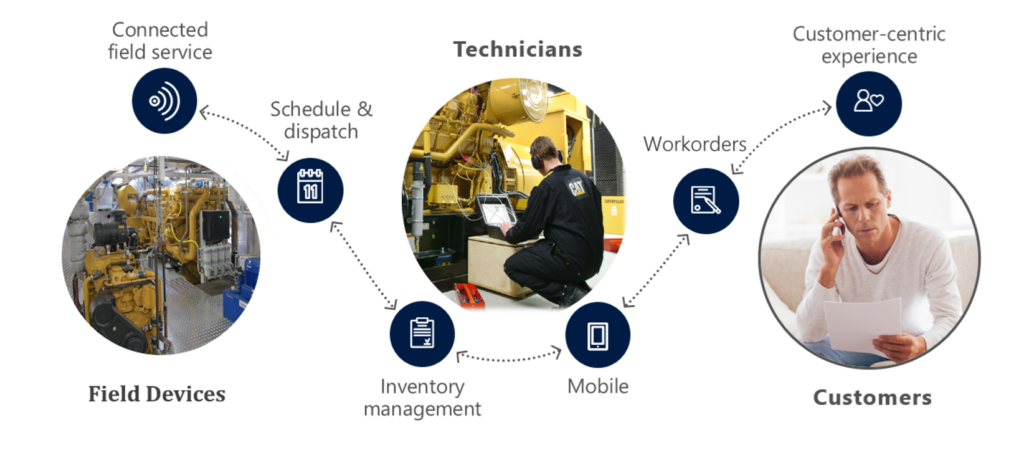
Data from a device can be consumed by IoT Hub service in Azure and pushed to the service bus queue, which can be read by Logic App. The Logi App forwards the data into Dynamics Field Service through the CRM connector. In conclusion, a Logic App or number of them can be part of an end-to-end solution for various field services.
The previous paragraph discussed one of the many use cases possible including Logic Apps. Moreover, there are many other scenarios thinkable since Logic Apps are a part of a bigger platform, which means you leverage them with other Azure Services or create flows to move data around. With sentiment analysis, you can detect sentiment within a text using one of the Cognitive Services API’s. The way sentiment analysis API functions are that it returns a numeric score between 0 and 1 on a given text. Scores close to 1 indicate positive sentiment and scores close to 0 indicate negative sentiment. A score of 0.5 is neutral. With Logic Apps, you can receive tweets within a certain interval (occurrence) based on filter i.e. hashtag and feed the body into Detect Sentiment action.
Sentiment Analysis Solution
To build a solution leveraging the capabilities Cognitive Services deliver with a Logic App, Azure Storage Account, Azure Function and Power BI you need to set up these services up.
Cognitive Service
The setup of the first is basically provisioning of a Cognitive Service instance i.e. API. In the Azure Portal, you find the Cognitive Service in the marketplace. Subsequently, you click on the service you specify a name, choose a subscription, and subsequently which API you like to use.
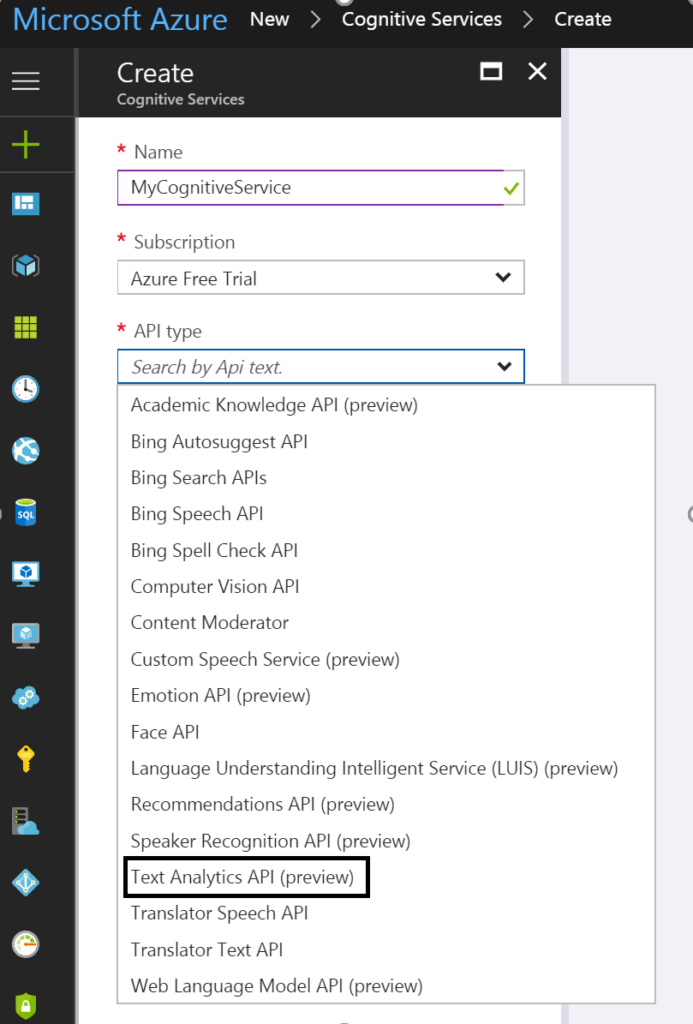
To detect sentiment analysis in a text you need to choose Text Analytics API, which as the time of writing is still in preview. The Text Analytics API is only available in region West US, and pricing of service varies depending on the tier you require. Below you can see the different pricing options.
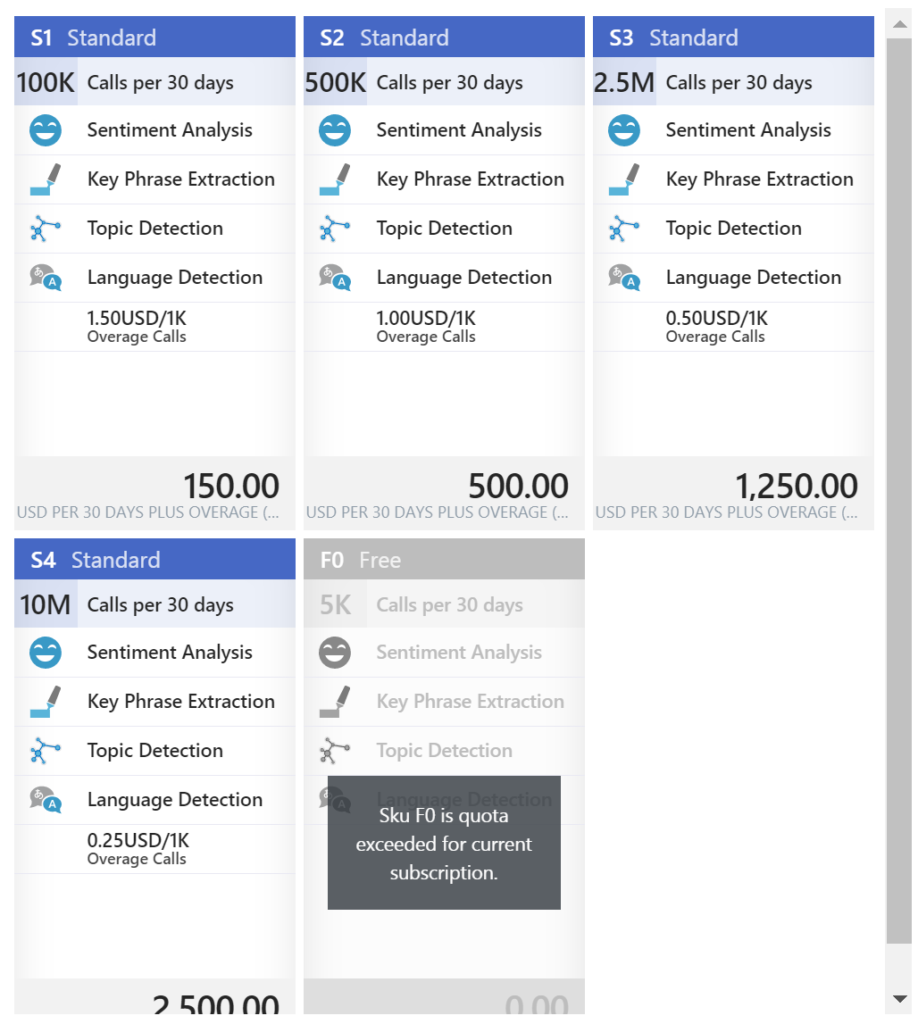
As you can see in the picture above the Cognitive Service provides four features:
• Sentiment Analysis
• Key Phrase Extraction
• Topic Detection
• Language Detection
Once you have chosen the required tier you can create this service.
Power BI
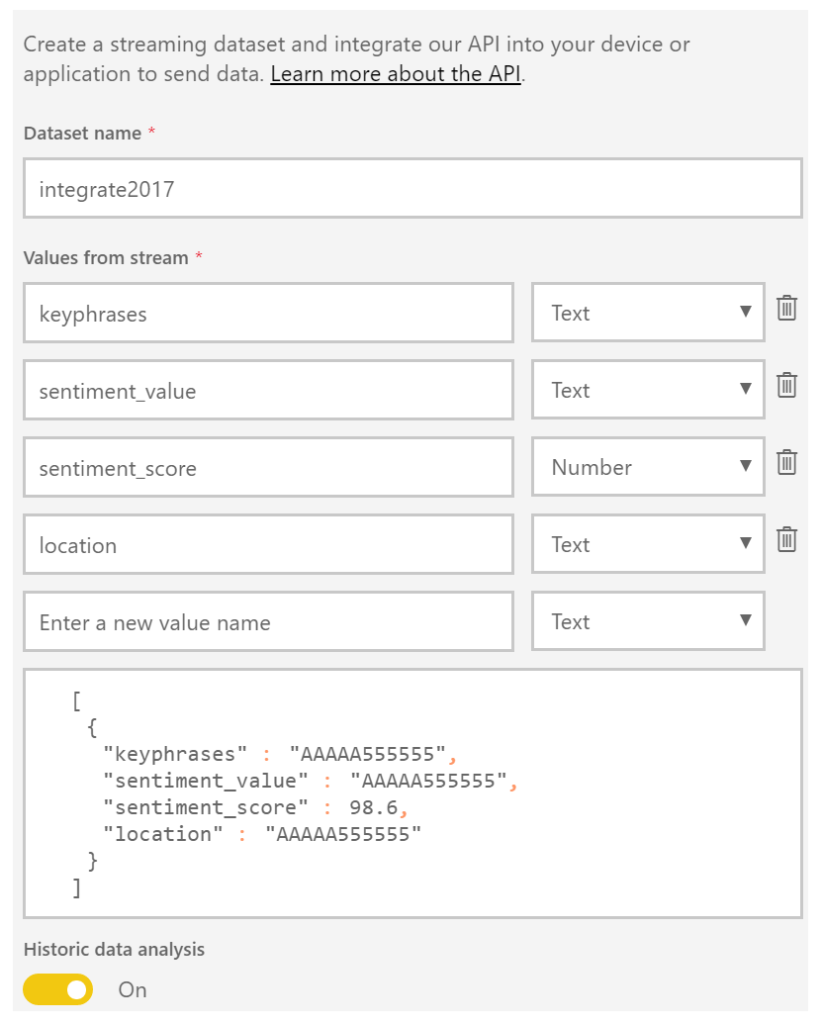
The next service is Power BI, which is a part of the Office365 offering and can be found here: https://powerbi.microsoft.com/. You can sign in and start building datasets, dashboards, and reports. For a solution to visualize sentiment you can create a streaming data set. Go to the powerbi.com and “Streaming datasets”, create a dataset of type API, click next and name the dataset and add fields to the streaming data set like shown below.
The Solution
In a solution, I build I created four text fields and one number field. The historic data analysis was enabled to build a collection of the data to be used for a report.
Now both Cognitive Service and Power BI have been setup and next step is to create a storage account in Azure. This account will archive tweets in a blob storage container tweets. Provisioning a storage account is easy and straightforward process. In the marketplace find storage account, select it, specify name, deployment model, purpose (choose blob storage), replication, access tier (cold), secure transfer, subscription, resource group, and location.
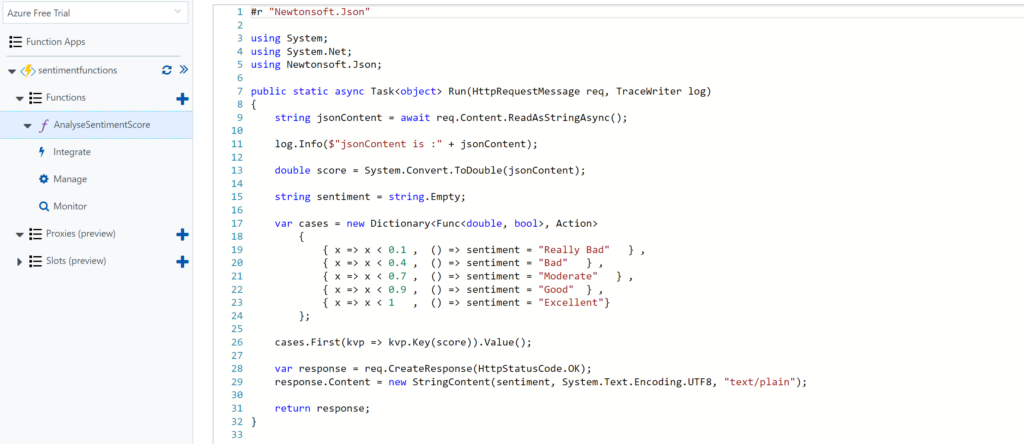
The final service required for the solution is a function. The Function in our solution will be provided with the input from the Cognitive Service API response (Score). Azure Functions provide a serverless coding capability using a Browser and the piece’s code you write can run in Azure i.e. within a Function App.
For our solution, we add a GenericWebHook-CSharp. We will rename the function to AnalyseSentimentScore. And in the Develop tab, we see some generic default code, which we will change to the code below.
Architecture
The solution architecture I build looks like the diagram below and resembles a process manager pattern.
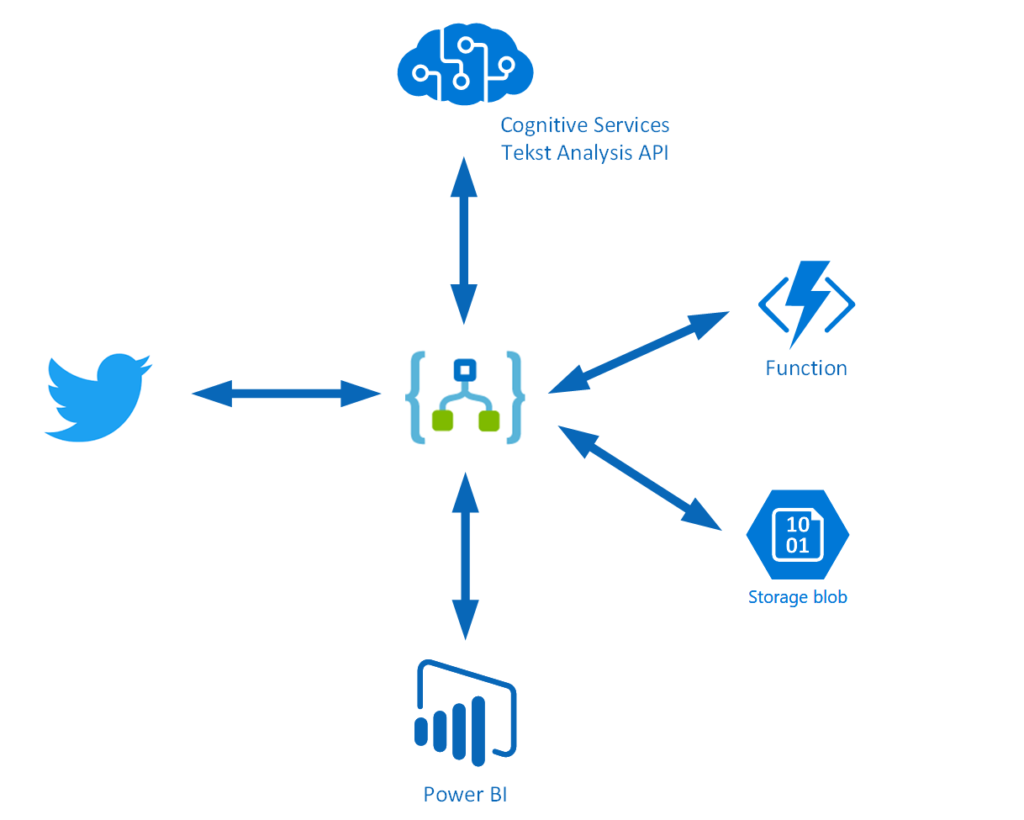
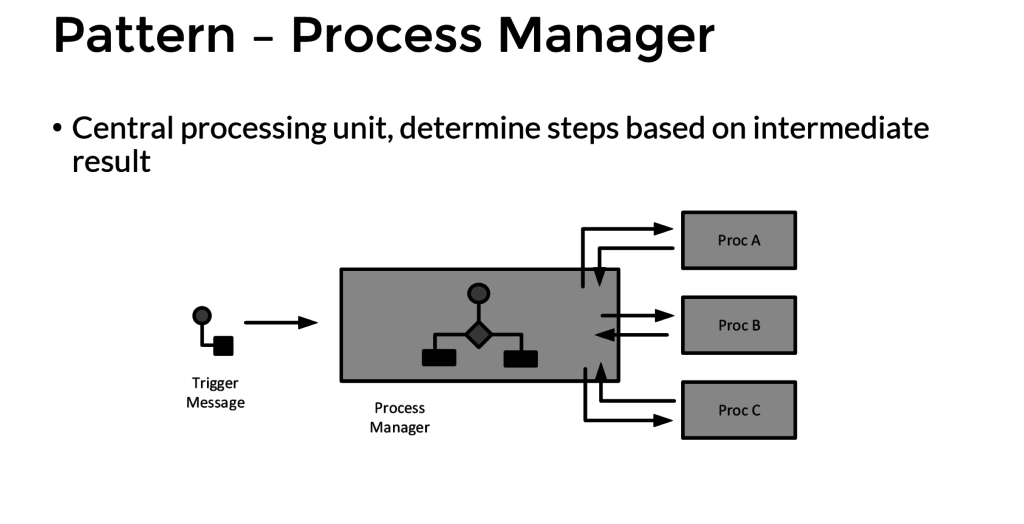
This pattern implies that a trigger message is sent to a process manager (Logic App). The process manager is a central processing unit and determines steps based on intermediate results. A tweet is the trigger message that starts a flow in a Logic App. The body is sent to Cognitive Service (Proc A) and the score is sent to a Function (Proc B), which will evaluate the score. The Tweet is stored in blob storage and a few fields are sent to Power BI to fill the dataset. A diagram of a process manager is depicted below.
Implementation
The implementation of the solution is slightly different than from the pattern as after the second intermediate step the tweet data is sent to Azure Blob Storage and Power BI dataset.
The Logic App is implemented with a Twitter trigger, authorized to use my twitter account, with the search text #integrate2017 and interval (frequency) of 5 minutes i.e. every 5 minutes tweets with #integrate2017 will be picked up. Subsequently, this trigger is followed by several actions.

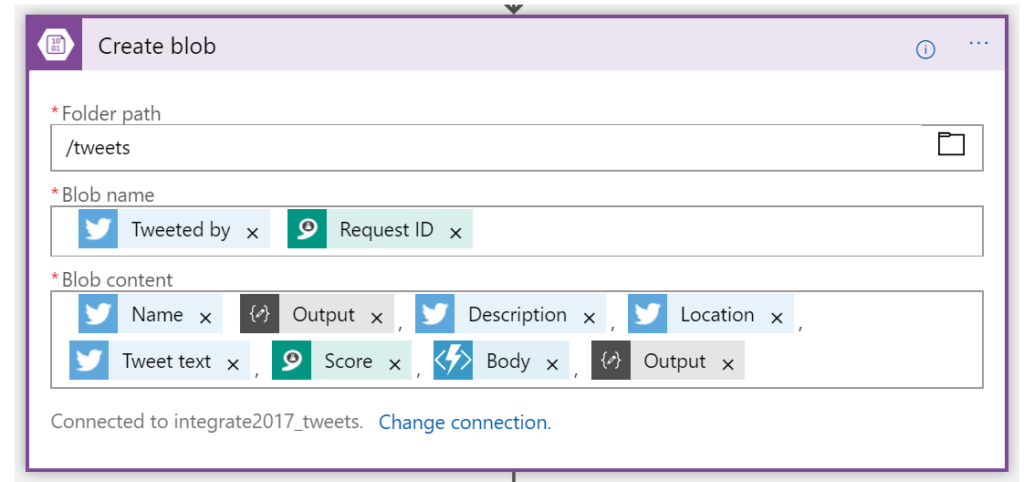
The picture above shows the flow of the Logic App. First, a Twitter triggers then a compose action to create an element part containing the username of the tweet. Subsequently the detect sentiment and the detect key phrases actions. Then the second composes to create a JSON array of the key phrases. And after the second compose the score of the detected sentiment is send to the function, which will return a string (text) of the evaluated score (see also the function). Several tokenized elements are sent to blob storage (see picture below).
And the final step of this solution (Logic App definition) is sending some of the tokenized elements to a dataset row in Power BI dataset.
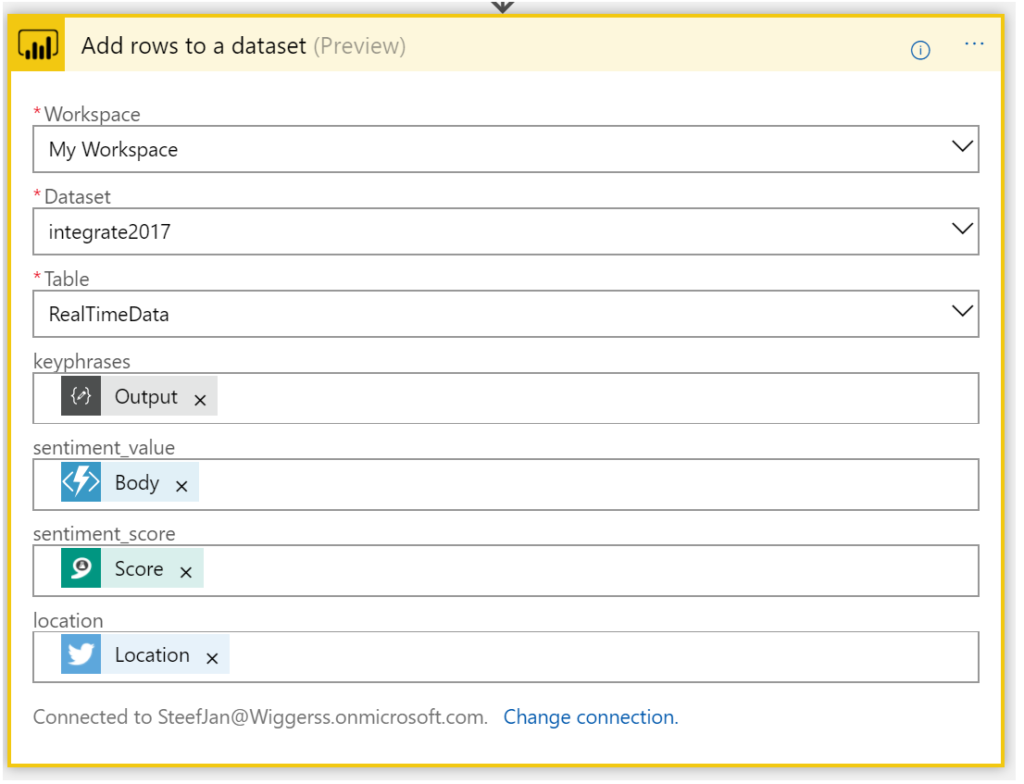
Now we have walked through the complete Logic App definition and the key actions of the solution.
Integrate 2017 Report
For integrate 2017 I ran the Logic App between 17th of June until the 1st of July. And the event took place between 26th and 28th of June in London. Every 5 minutes the Logic App collected tweets from Twitter with hashtag integrate2017. Over this period of 15 days, 3500 tweets have been aggregated around this event. It started slowly with around 50 tweets until the event started on the 24th with a burst of tweets. Below you can see a report created in Power BI with some visualization of sentiment measured in the tweets.
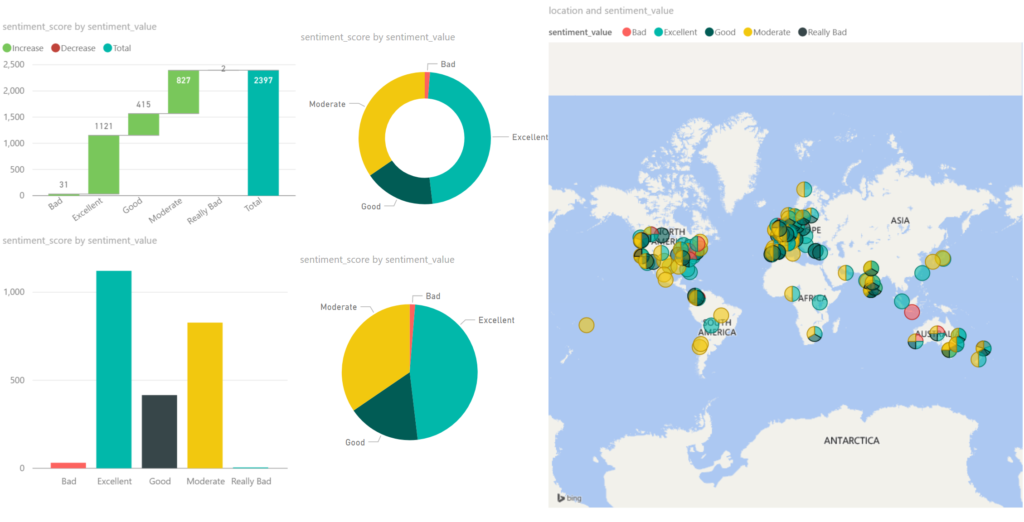
Around 2/3 of all the tweets, the sentiment was excellent/good, which can be viewed as positive. 1/3 of the tweets were evaluated as moderate. The Cognitive Service Text Analysis capability was unable to determine negative or positive. And finally, a very small percentage was negative (bad). Hence you can conclude that the event was a great event given the sentiment score.
The benefits of building a solution like described above are that with a relative simple Logic App sentiment can be analyzed leveraging several abilities provided by the Cognitive Service. Probably when a business likes to measure sentiment through Social Media channel it can use Logic Apps. Therefore, Logic Apps provide a quick solution in this manner to provide quick insights with low costs. There are no servers necessary and a pro-integration professional can build this type of solutions within a few hours depending on the complexity. Hence it provides quick time to market.
The costs
The interesting part of this solutions is cost. The breakdown of costs for this solution is:
– Logic App (Consumption)
– Function (Consumption)
– Cognitive Service (Tier)
– Storage Account (Volume)
– Power BI (Enterprise Plan)
The Logic App and Function are consumption based and measured on the execution of an action or function. And in general, it can sometimes be hard to predict the workload these services need to process. Hence you need to be aware of this. A good reference with regards to costs with Logic Apps is a post by Rene Brauwers, Tips & Tricks: Cost savings using Logic Apps.
For the Logic App in this solution, 3500 tweets were processed, and the Logic App consists of 8 actions (including the trigger). Hence 28K action calls costs based on the pricing (First 250K actions = €0.000675 / action) approximately 19 euro. And less than a euro for the executions of the Function.
Next, the costs for the Cognitive Service depends on the tier. The free tier could be an option, however, if the workload is too high then you run into rate limiting issues. The S1 Standard can be sufficient and costs 150 Euro a month. Yet you can turn it off after your campaign of measuring sentiment, which could be a few days. In this solution, the costs are 75 euro. Storage of less than 4 Mb of tweets is neglectable. This leaves the costs for Power BI. For the solution, I build I used the pro version, which is around 10 Euro per month. Thus, in total, a sentiment analysis solution costs around a 100 euro.
Conclusion
Depending what the requirements are and perceived value is, Logic Apps combined with other Azure Services and Office365 (Power BI) can be a good fit for purpose for low costs, agility and time to market. Logic Apps are becoming a leader in the iPaaS. On a short term, it will be able to cross the border from visionary to leaders in the Gartner Magic Quadrant. The Product Group is cranking out enhancements on the service and new connectors every two weeks. And they have kept this pace since the General Availability of the service a year ago. Nevertheless, the competition is strong however I am confident Logic Apps will be amongst the leaders.
Author: Steef-Jan Wiggers
Steef-Jan Wiggers has over 15 years’ experience as a technical lead developer, application architect and consultant, specializing in custom applications, enterprise application integration (BizTalk), Web services and Windows Azure. Steef-Jan is very active in the BizTalk community as a blogger, Wiki author/editor, forum moderator, writer and public speaker in the Netherlands and Europe. For these efforts, Microsoft has recognized him a Microsoft MVP for the past 5 years. View all posts by Steef-Jan Wiggers

by Steef-Jan Wiggers | Jul 3, 2017 | BizTalk Community Blogs via Syndication
It has been an amazing month, June 2017, with Integrate2017 and the momentum towards it. Team BizTalk360 and Saravana did an excellent job. Bhavana Nambiar wrote a great post about it.
Month June
In this month I did two talks one for the BizTalk UserGroup in Belgium, and Integrate 2017. For the BTUG.be session in Ghent at Codit I did a Logic App session.
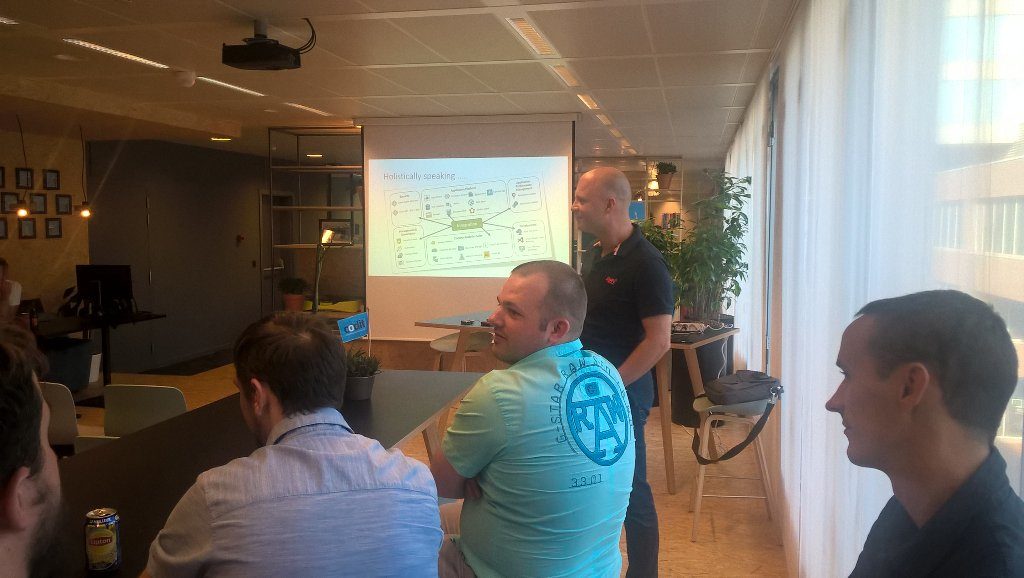
During the month I prepared my session for integrate 2017 and executed on the 2nd day of the event. It was focussed on the end user/consumer of Logic Apps i.e. business. And I interviewed 30 people around the world to share their views with me.
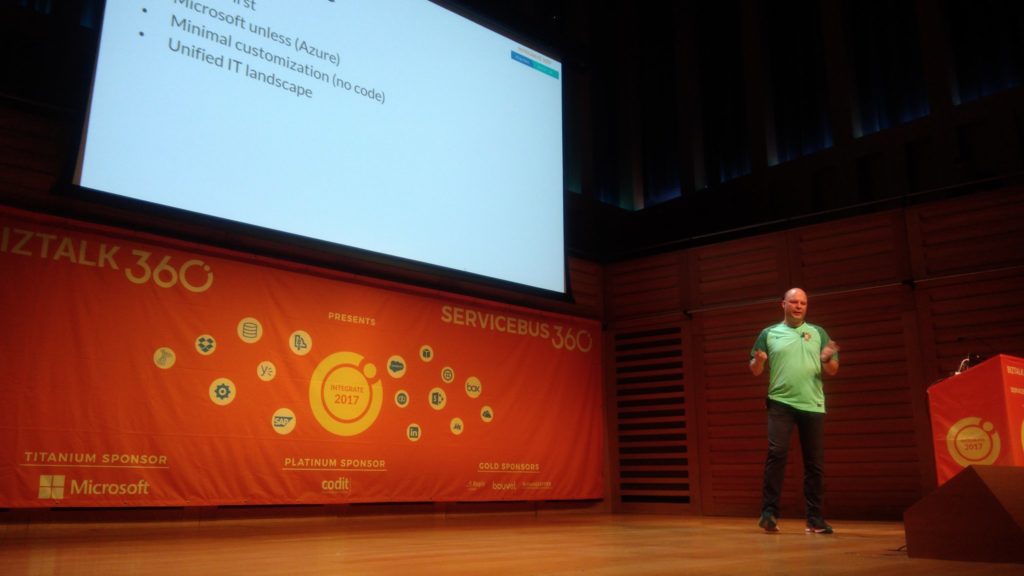
The event was in my view a huge success. The Pro-Integration team, Service Bus Team and MVP’s were present to give an awesome show!
Around Integrate 2017 and BTUG be I interviewed several people for my talking with integration pro youtube movies:
Music
My favorite albums in June were:
- Elder – Reflections Of A Floating World
- SikTh – The Future In Whose Eyes?
- Anathema – The Optimist
- Iced Earth – Incorruptible
- Vintersorg – Till Fjälls Del II
Dublin
After Integrate I went with Kent and Melissa to Dublin. We had to unwind a bit from all the excitement in London.

That’s all folks for this month. Next month I will be on holiday to Portugal (visiting Sandro) and France!
Cheers,
Steef-Jan
Author: Steef-Jan Wiggers
Steef-Jan Wiggers is all in on Microsoft Azure, Integration, and Data Science. He has over 15 years’ experience in a wide variety of scenarios such as custom .NET solution development, overseeing large enterprise integrations, building web services, managing projects, designing web services, experimenting with data, SQL Server database administration, and consulting. Steef-Jan loves challenges in the Microsoft playing field combining it with his domain knowledge in energy, utility, banking, insurance, health care, agriculture, (local) government, bio-sciences, retail, travel and logistics. He is very active in the community as a blogger, TechNet Wiki author, book author, and global public speaker. For these efforts, Microsoft has recognized him a Microsoft MVP for the past 6 years. View all posts by Steef-Jan Wiggers

by Srinivasa Mahendrakar | Jun 27, 2017 | BizTalk Community Blogs via Syndication
What a day it was at ‘Integrate 2017’ today. For Logic Apps enthusiasts, it was a treat. have you missed the sessions? don’t worry, I am going write on all that was talked about today on logic apps.
Azure Logic Apps – Microsoft IT journey with Azure Logic Apps – By Divya Swarnkar and Mayank Sharma
Microsoft has a large IT wing to serve its business which is called ‘MSIT’. This team is well known for ‘eating its own dog food’. Mayank and Divya are from MSIT’s integration team. When they started their session by describing the scale of business their team is serving, we were all blown away. Look at the number of business entities they are serving. Around 170 million messages flow through their 175 BizTalk servers serving 1000 plus trading partners across various business entities.
“We are moving all of this Integration to Logic Apps.”
MSIT is modernizing their integration landscape completely. Divya and Mayank made it very clear that they are moving all the BizTalk interfaces to Logic Apps and BizTalk is only going to be used as a proxy to serve existing partner requests. They so far were able to deliver three releases.
- Release 1.0 they moved most of their interfaces relying on X12 and AS2, Logic Apps.
- Release 1.5 they were able to move interfaces related to EDIFACT to Logic Apps.
- Release 2.0 release they moved many of the XML-oriented interfaces.
All these interfaces helped them to achieve following goals.
- Enable Order to Cash Flow for digital supply chain management.
- Running trade integrations and all customer declaration transactions.
- They became ready to retire “Microsoft BizTalk Services” instances by end of July.
Solution Architecture
They then continued to explain their solution architecture. Below is the slide that they presented. Following are some of the important aspects of their solution architecture.
- Azure API Management: All trading partners send the messages(X12/EDIFACT/XML) through Microsoft’s Gateway store. Azure API management service then routes the message to an appropriate logic app.
- Integration Account: The Logic apps they have built, make full use of Integration account artefacts such as Trading Partner Agreements, Certificates, Schemas, Transformations etc.
- On-premises BizTalk: On-premises BizTalk is merely used as a proxy for Line of business applications. This makes sense as they may not want to change all the connections which already exist for Line of Business Applications and also they need to support the continuity of other interfaces. This is the perfect example of how other organizations can start migrating their interfaces to Logic Apps.
- Logic App Flow: The Logic apps make use of typical VETER pipeline which involves AS2 connector, X12 connector, Transformation, Encoding and HTTP connectors as shown below.
- OMS for Diagnostics and Monitoring: Operational Management Suits(OMS) is used for collection of diagnostic logs from Integration Accounts, Logic Apps and Azure functions which are part of their solution. Once all the diagnostic data is collected they will be able to query and create nice dashboards for getting analytics on their interfaces. Currently, Integration accounts have their built-in solutions for OMS. Please refer the video http://www.integrationusergroup.com/business-activity-tracking-monitoring-logic-apps/ to know about Diagnostic logs in Logic Apps and Integration accounts.
Fall-back and Production Testing Using APIM
They have scenarios where they want to test the logic apps in production and also want to fall back to previous stable versions of the logic app. They make use of APIM to achieve this requirement. APIM is configured with rules to switch between the logic apps end points.
Disaster Recovery
Business continuity is very important especially for MSIT with the scale of messaging they are handling. In order to achieve the business continuity assurance, they make use of Disaster Recovery feature which comes along with integration account.
The disaster recovery is achieved by creating similar copies of logic apps, integration accounts and azure functions in two different regions. As you can see from the picture they have this replication in both Central US and West US regions. Visit the documentation https://docs.microsoft.com/en-us/azure/logic-apps/logic-apps-enterprise-integration-b2b-business-continuity to know more about disaster recovery feature.
Huge confidence Boost to Customers who are contemplating on moving to Logic Apps
Azure Logic Apps – Advanced integration patterns By Jeff Hollan and Derek Li
I am a big fan of Jeff Hollan. When he is on the stage it’s a treat to listen to him. He brings life into technical talks and involves the audience by leaving a lasting impression. Enough of personifying him. Jeff Hollan and Derek Li were on to the stage to talk about advanced integration patterns in Logic apps.
Internals of Logic Apps Platform
Jeff arrived on the stage with the clear intention of explaining the internal architecture of Logic Apps platform. You might be wondering why we should be knowing about the internals of Logic Apps as it is a PaaS offering and we generally treat them as a black box from the end user perspective. However, he gave three powerful reasons why we should understand the internals.
- There are some published limits for the Logic apps. We need to understand them in order to design enterprise grade solutions.
- Understanding the nature of the workflows
- Internals help us to clearly understand the impact of design on throughput especially when we are working with Long running flows.
- We will be able to leverage the platform as much as possible for concurrency.
- Helps us to understand the structure and behavior of our data
Agenda
The agenda was not just talking about the internal architecture of logic apps but also to talk about Parallel Actions, Exception handling, workflow expressions.
Logic Apps Designer
Logic apps designer is apparently a TypeScript/React JS application. All the functionality that we observe in logic apps designer is all self-contained in this application. This is the main reason how they are able to host it in visual studio. This makes use of Swagger to render the inputs and outputs. Also as we already aware it generates the workflow definition in JSON.
Logic Apps Runtime
As we know logic apps will have triggers and actions. When we create a logic app all these will be defined in a JSON file. When we click save button, logic apps runtime handles it as below.
- Runtime engine reads the workflow definition and breaks down into various tasks and identifies the dependencies. the tasks will not be executed until their dependencies are worked out.
- It spins distributed workers which coordinate to complete the execution of the tasks. This is very revealing to know that all the workers are distributed which makes the logic app more resilient
- Runtime engine ensures that all the tasks inside the flow are executed at least once. he announced that in the history of logic apps he has not seen any instance where a task is left unexecuted.
- There is no limit on the number of threads executing these tasks and hence there is no overhead of managing active threads.
Example logic App
He gave an example of a logic app with a service bus trigger receiving list of products, and writes each product to a SQL database.
In this example, his main intention was to show how runtime identifies the tasks which can be executed. In this example, a for each loop decides that run time can spin parallel tasks to execute the SQL task. The workflow orchestrator then completes the message by calling service bus complete connector and ends the workflow.
Parallel action
Now with run times ability to spin parallel tasks, he showed us how to use parallel action in logic app definition.
From above picture, it is clear that we can add as many parallel actions we want to add by just clicking Plus symbol on the branches.
Exception handling
At this point, Derek Li took over the stage to show some geeky stuff. He started off by creating a logic app in which one of the action fails and when it fails he would send an email to Jeff. To achieve this he puts a scope and adds all the actions required. After the scope, he configured the run after settings for an action. I do not have an exact snapshot from his slide but it was something like below.
With run after configuration for an action, it is easy to handle the error conditions. Also, he showed how we can set the timeout configuration for an action.
When the timeout expires, we can take some action again by setting run after configuration to “has time out”
Workflow expressions
He spoke about important aspects of workflow expressions. Following are the highlights.
- Any input that changes for every run is an expression. He showed some example expressions.
- He explained the difference between different constructs such as “@”, “{}”,”[]” and “()”.
@ is used for referring a JSON node, {} means a string, [] is used as JSON path and () is used to contain the expressions for evaluation. He also showed the order in which elements of an expression executed.
Summary
As explained earlier it was a real treat for all the logic app enthusiasts and gave a lot of insights into a logic app platform.
- The first session from Mayank and Divya gave the audience a great level of confidence about going with logic app implementations.
- The session from Jeff and Derek brought an understanding of logic apps internals and patterns.
Author: Srinivasa Mahendrakar
Technical Lead at BizTalk360 UK – I am an Integration consultant with more than 11 years of experience in design and development of On-premises and Cloud based EAI and B2B solutions using Microsoft Technologies. View all posts by Srinivasa Mahendrakar

by Steef-Jan Wiggers | May 27, 2017 | BizTalk Community Blogs via Syndication
The month May went quicker than as I realized myself. Almost half 2017 and I must say I have enjoyed it to the fullest. Speaking, travelling, working on an interesting project with the latest Azure Services, and recording another Middleware Friday show. It was tha best, it was amazing!
Month May
In May I started off with working on a recording for Middleware Friday, I recorded a demo to show how one can distinguish Flow from Logic Apps. You can view the recording named Task Management Face off with Logic Apps and Flow.
The next thing I did was prepare myself for TUGAIT, where I had two sessions. One session on Friday in the Azure track, where I talked about Azure Functions and WebJobs.
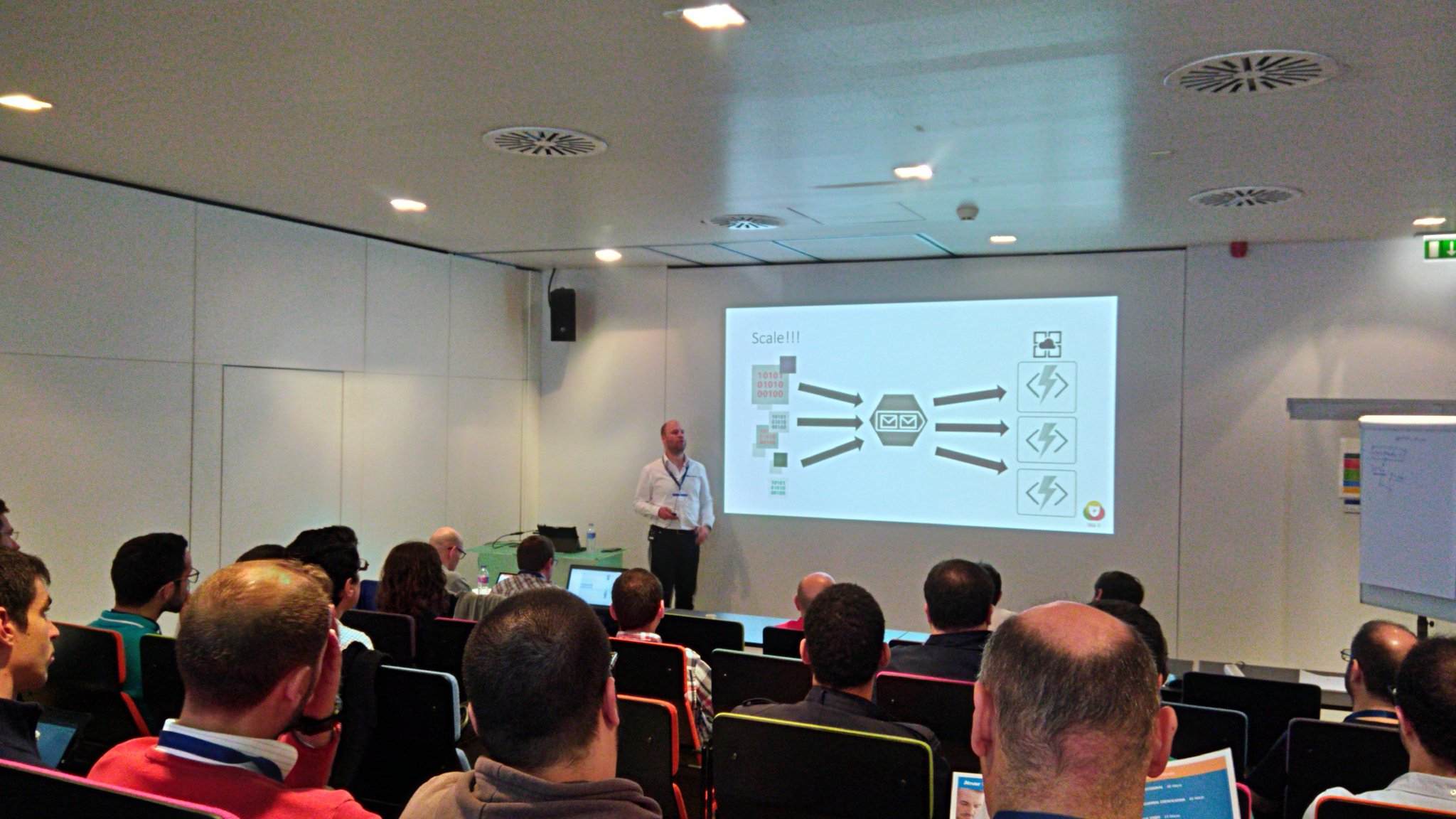
And one session on Saturday in the integration track about the number of options with integration and Azure.
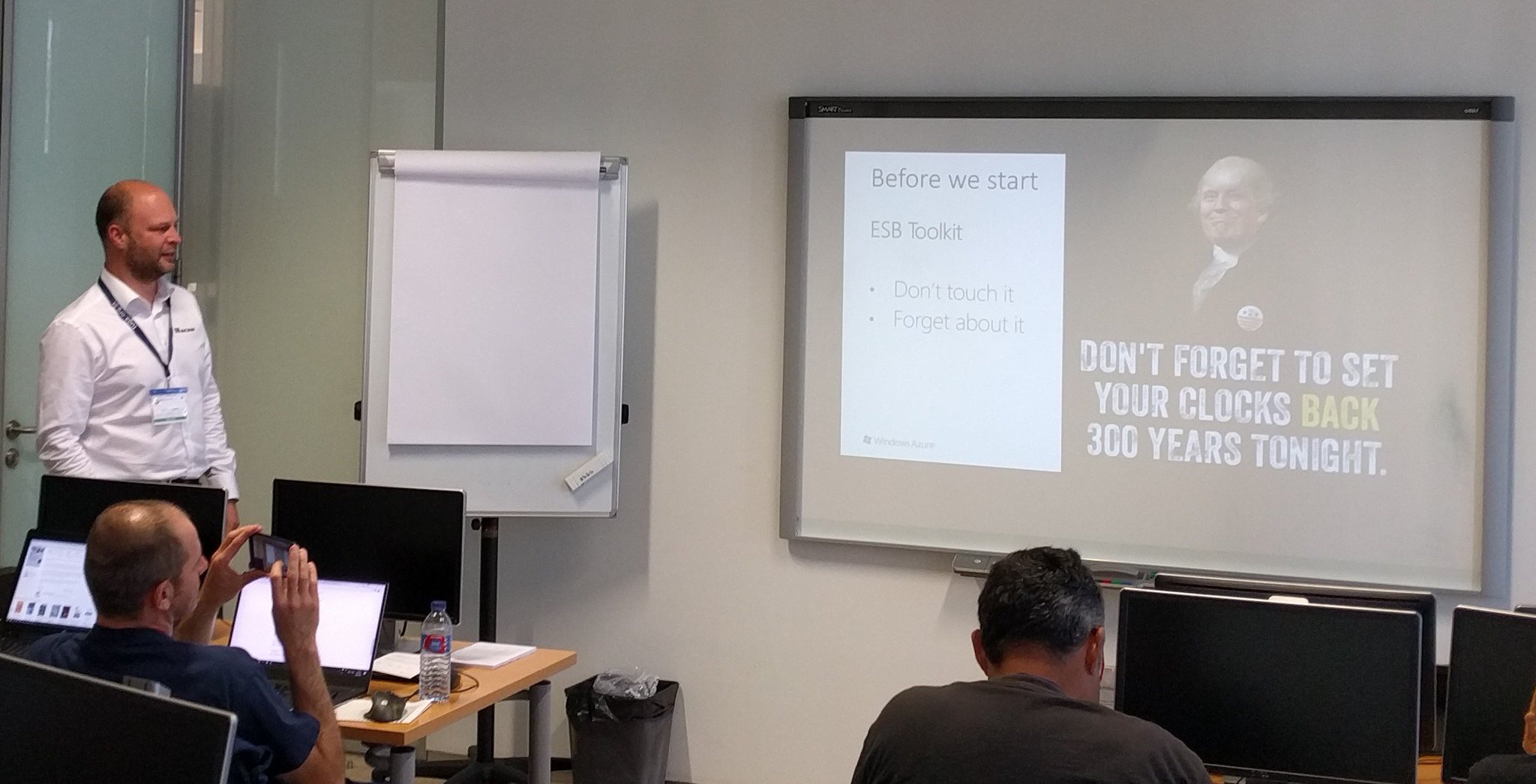
I enjoyed both and was able to crack a few jokes. Especially on Saturday, where kept using Trump and his hair as a running joke.
TUGAIT 2017 was an amazing event and I enjoyed the event, hanging out with Sandro, Nino, Eldert and Tomasso and the food!
During the TUGA event I did three new interviews for my YouTube series “Talking with Integration Pros”. And this time I interviewed:
I will continue the series next month.
Books
In May I was able to read a few books again. I started reading a book about genes. Before I started my career in IT I was a Biotech researcher and worked in the field of DNA, BioTechnology and Immunology. The book is called The Gene by Siddharta Mukherjee.

I loved the story line and went through the 500 pages pretty quick (still two weeks in the evenings). The other book I read was Sapiens by Yuval Noah Harari. And this book is a good follow up of the previous one!
The final book I read this month was about Graph databases. In my current project we have started with a proof of concept/architecture on Azure Cosmos DB, Graph and Azure Search.
The book helped me understand Graph databases better.
Music
My favorite albums that were released in May were:
- God Dethroned – The World Ablaze
- Voyager – Ghost Mile
- Sólstafir – Berdreyminn
- Avatarium – Hurricanes And Halos
- The Night Flight Orchestra – Amber Galactic
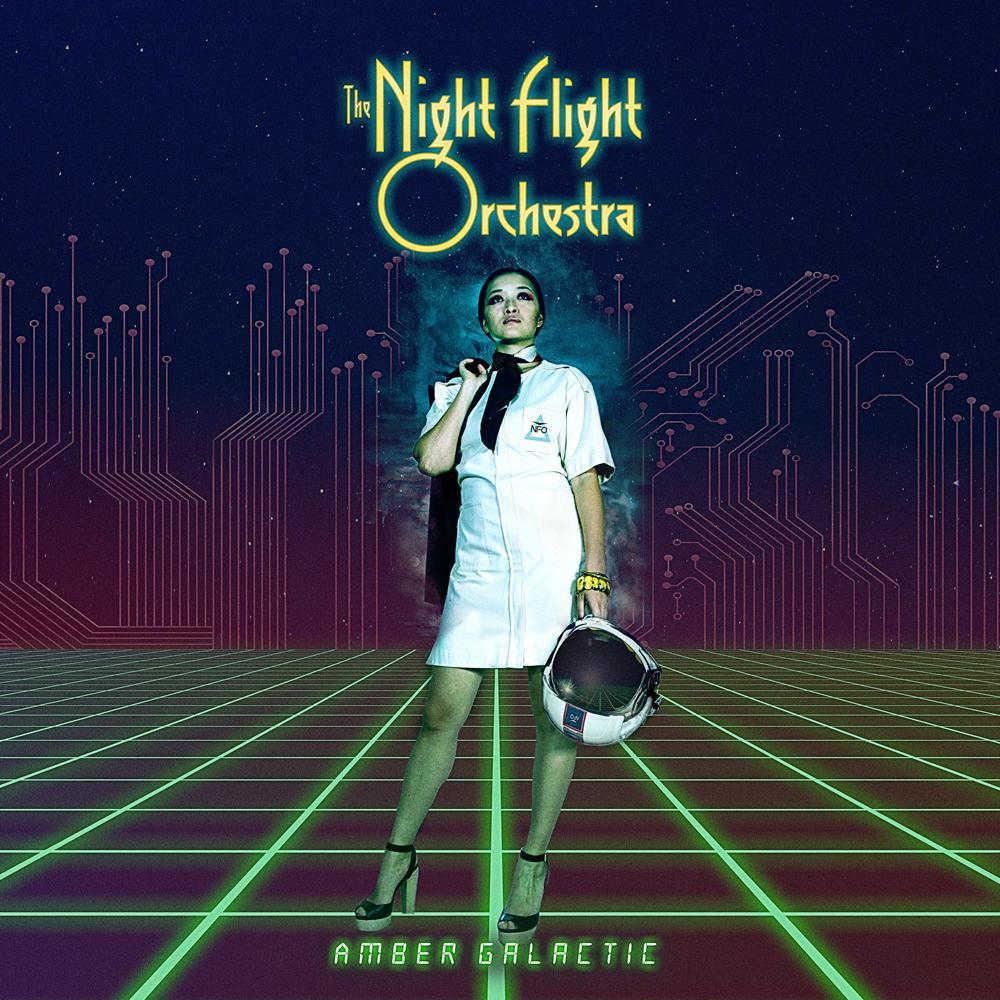
There you have it Stef’s fourth Monthly Update and I can look back again with great joy. Not much running this month as I was recovering a bit from the marathon in April. I am looking forward to June as I will be speaking at the BTUG June event in Belgium and Integrate 2017 in London.
Cheers,
Steef-Jan
Author: Steef-Jan Wiggers
Steef-Jan Wiggers is all in on Microsoft Azure, Integration, and Data Science. He has over 15 years’ experience in a wide variety of scenarios such as custom .NET solution development, overseeing large enterprise integrations, building web services, managing projects, designing web services, experimenting with data, SQL Server database administration, and consulting. Steef-Jan loves challenges in the Microsoft playing field combining it with his domain knowledge in energy, utility, banking, insurance, health care, agriculture, (local) government, bio-sciences, retail, travel and logistics. He is very active in the community as a blogger, TechNet Wiki author, book author, and global public speaker. For these efforts, Microsoft has recognized him a Microsoft MVP for the past 6 years. View all posts by Steef-Jan Wiggers
by Sandro Pereira | May 26, 2017 | BizTalk Community Blogs via Syndication
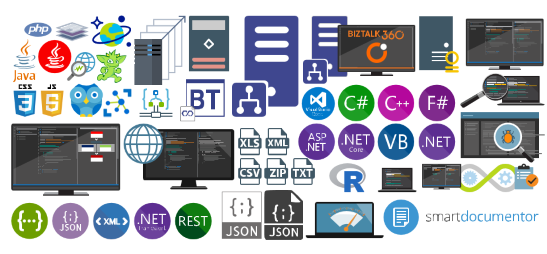
Once again, my Microsoft Integration Stencils Pack was updated with new stencils. This time I added near 193 new shapes and additional reorganization in the shapes by adding two new files/categories: MIS Power BI and MIS Developer. With these new additions, this package now contains an astounding total of ~1287 shapes (symbols/icons) that will help you visually represent Integration architectures (On-premise, Cloud or Hybrid scenarios) and Cloud solutions diagrams in Visio 2016/2013. It will provide symbols/icons to visually represent features, systems, processes and architectures that use BizTalk Server, API Management, Logic Apps, Microsoft Azure and related technologies.
- BizTalk Server
- Microsoft Azure
- BizTalk Services
- Azure App Service (API Apps, Web Apps, Mobile Apps and Logic Apps)
- API Management
- Event Hubs
- Service Bus
- Azure IoT and Docker
- Virtual Machines and Network
- SQL Server, DocumentDB, CosmosDB, MySQL, …
- Machine Learning, Stream Analytics, Data Factory, Data Pipelines
- and so on
- Microsoft Flow
- PowerApps
- Power BI
- Office365, SharePoint
- DevOpps: PowerShell, Containers
- And much more…
Microsoft Integration Stencils Pack v2.5
The Microsoft Integration Stencils Pack v2.5 is composed by 13 files:
- Microsoft Integration Stencils v2.5
- MIS Apps and Systems Logo Stencils v2.5
- MIS Azure Portal, Services and VSTS Stencils v2.5
- MIS Azure SDK and Tools Stencils v2.5
- MIS Azure Services Stencils v2.5
- MIS Deprecated Stencils v2.5
- MIS Developer v2.5 (new)
- MIS Devices Stencils v2.5
- MIS IoT Devices Stencils v2.5
- MIS Power BI v2.5 (new)
- MIS Servers and Hardware Stencils v2.5
- MIS Support Stencils v2.5
- MIS Users and Roles Stencils v2.5
These are some of the new shapes you can find in this new version:
You can download Microsoft Integration Stencils Pack for Visio 2016/2013 from:
 Microsoft Integration Stencils Pack for Visio 2016/2013 (10,1 MB)
Microsoft | TechNet Gallery
Author: Sandro Pereira
Sandro Pereira lives in Portugal and works as a consultant at DevScope. In the past years, he has been working on implementing Integration scenarios both on-premises and cloud for various clients, each with different scenarios from a technical point of view, size, and criticality, using Microsoft Azure, Microsoft BizTalk Server and different technologies like AS2, EDI, RosettaNet, SAP, TIBCO etc. He is a regular blogger, international speaker, and technical reviewer of several BizTalk books all focused on Integration. He is also the author of the book “BizTalk Mapping Patterns & Best Practices”. He has been awarded MVP since 2011 for his contributions to the integration community. View all posts by Sandro Pereira

by Sandro Pereira | May 15, 2017 | BizTalk Community Blogs via Syndication
We are 3-days away of Tuga IT 2017 to return to Lisbon! And you are still on time to register for this event here. This year, in addition to organizing the integration track, I will also present 2 sessions, one focused on PowerApps and Microsoft Flows on SharePoint/Office365 track, and the second focused on Azure Enterprise Integration features: Logic Apps.
You can check the full event agenda here.
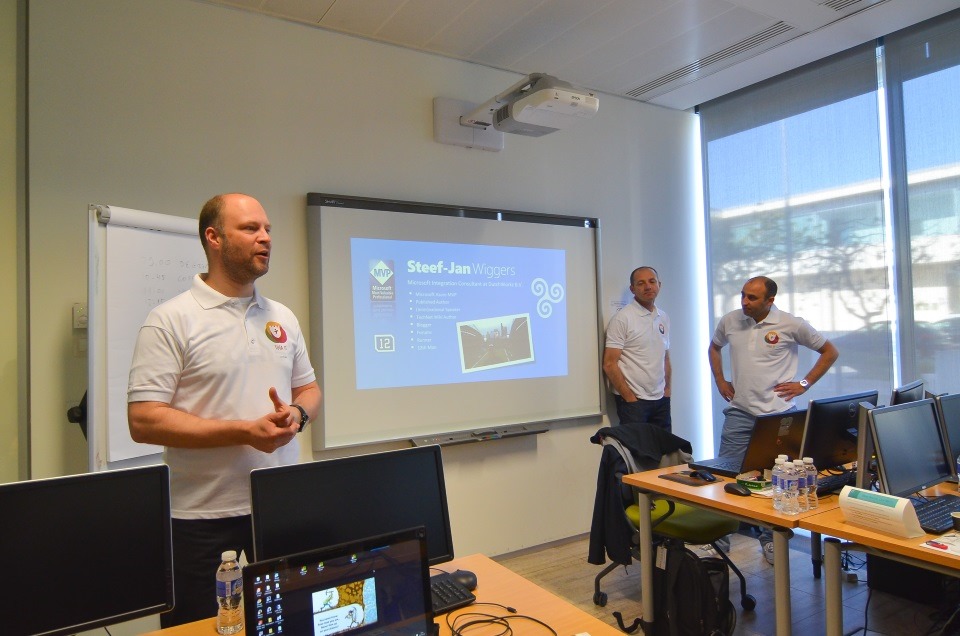

Here are the title and abstract of the sessions I will deliver at TUGA IT 2017
How can PowerApps and Microsoft Flow allows your power users to quickly build Enterprise Mobile Apps
How can PowerApps and Microsoft Flow allows your power users to quickly build Enterprise Mobile Apps will occur May, 19th at SharePoint/Office365 track between 9 AM to 10 AM.
Every organization faces constant pressure to do more with less. While technology is often the key to operating more effectively and efficiently, cost and complexity have often prevented organizations from taking maximum advantage of the potential benefits. The growth of SaaS (software as a service) has lowered barriers – no need to deploy servers or to install and configure complex software systems. Just sign up and go.
Microsoft Flow and Microsoft PowerApps will help these people (normally business users) achieve more.
We know not every business problem can be solved with off-the-shelf solutions. But developing custom solutions has traditionally been too costly and time-consuming for many of the needs teams and departments face, especially those projects that integrate across multiple data sources or require delivery across multiple devices from desktop to mobile. As a result, too many technology needs end up unsolved or under-optimized. We piece together spreadsheets, email chains, SharePoint or/and manual processes to fill in the gaps.
PowerApps and Microsoft Flow are both aimed squarely at these gaps. They give people who best understand their needs and challenges the power to quickly meet them, without the time, complexity and cost of custom software development.
In this session, we will look at these two new offering from Microsoft: PowerApps and Flow. What are they? How can I use it? But special we will walk through and create from scratch some live demos showing how to create Enterprise Mobile Application that easily connects with all your enterprise platforms like Office36, SharePoint Online, Dynamic CRM, on-premise SQL, Social Networks and much more and also how they can automate some common tasks using the new Microsoft Flow.
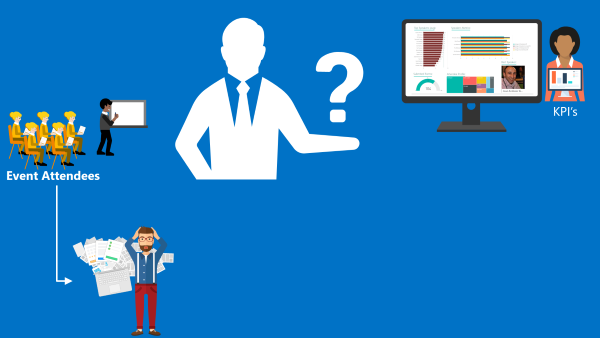
The Speaker Nightmare: Eval Forms, OCR, Logic Apps & Power BI
The Speaker Nightmare: Eval Forms, OCR, Logic Apps & Power BI will occur May, 20th at Enterprise Integration track between 10:20 AM to 11:30 AM
An evaluation form is something that a speaker love and hates, especially, if the results are processed in real-time and public available. If the result was excellent, then it is extremely rewarding, other times, it may “hurt” the speaker who has made himself available to share his knowledge and has been evaluated negatively. Sometimes the attendees are unfair in their evaluations, like, to basic in a 100-level session (these types of sessions are supposed to be basic or introductory) or sometimes the speaker had a bad day (it happens with everyone).
(this demo will be in real time)
I speak from personal experience, is these last 6 years that I have been doing speaking at community events, in Portugal and abroad, I already been evaluated in all ways: badly, reasonable, good and excellent, sometimes I saw in, the same sessions, attendees with different profiles evaluate me badly and excellent. The key point for the speaker is:
- All feedback is good, either negative or positive, he can learn to improve itself, if that’s the case, or that I specific topic is not good for a certain audience
- He only needs to give his best! We cannot please everyone, and the goal is to fill happy with yourself and your performance.
I love evaluation forms and I love for them to be public available, even better if they are public available during the event. Because, at least, it will give during the event a good topic of conversation for people that do not know each other and it will keep the conversation flowing (naturally), people normally are affray or shy to start a conversation between unfamiliar persons, this is a good ice break.
In this session, I will show and explain a real live demo on how we can easily build a robust solution for process evaluation forms, using an OCR software and easily integrate them with Power BI to present the results in an interactive and beautiful way. But most important: How you can educate your enterprise Developers and IT pros users to easily extend capabilities for power users, who understand their business challenges the best, and allow them to use their familiar tools like: OCR software (SmartDocumentor) to process Evaluation forms and quickly build and deliver Power BI solutions to build Interactive Data dashboards. And at the same time integrate these tools, platforms or systems and a very quick and robust way using integrate feature on Azure, like, Logic Apps, API Apps and Azure Functions. How to start from a simple solution and evolve them enabling new functionalities.
Registration For TUGA IT 2017
TUGA IT 2017 will take place in Microsoft Portugal’s offices, in Lisbon, on May 18-20, 2017. It will feature 3 days of breakout sessions and full-day workshops by world-class speakers where IT Professionals can spend 3 amazing days checking the future of IT and also take the time to network with top-level speakers and other IT Professionals.
Registration for TUGA IT 2017 is a few euro’s or even free if you do require lunch (the fee is there to reduce waste and prevent having an abundance of food).
You can register here and I will see you there in Lisbon!
Author: Sandro Pereira
Sandro Pereira lives in Portugal and works as a consultant at DevScope. In the past years, he has been working on implementing Integration scenarios both on-premises and cloud for various clients, each with different scenarios from a technical point of view, size, and criticality, using Microsoft Azure, Microsoft BizTalk Server and different technologies like AS2, EDI, RosettaNet, SAP, TIBCO etc. He is a regular blogger, international speaker, and technical reviewer of several BizTalk books all focused on Integration. He is also the author of the book “BizTalk Mapping Patterns & Best Practices”. He has been awarded MVP since 2011 for his contributions to the integration community. View all posts by Sandro Pereira

by Sandro Pereira | May 10, 2017 | BizTalk Community Blogs via Syndication
After the success of last year, Tuga IT 2017 is one week away from returning to Lisbon! From May 18th until the 20th, a variety of world class speakers (local and international) that will present a huge variety of “fresh” and “hot” topics about Microsoft Data Platform, SharePoint, Office 365, Enterprise Integration, Agile Methodologies, Open Source Technologies, Azure and much more. And this is only possible thank to the collaboration of all of the 9 communities taking part in Tuga IT 2017 event organizers or track owners.
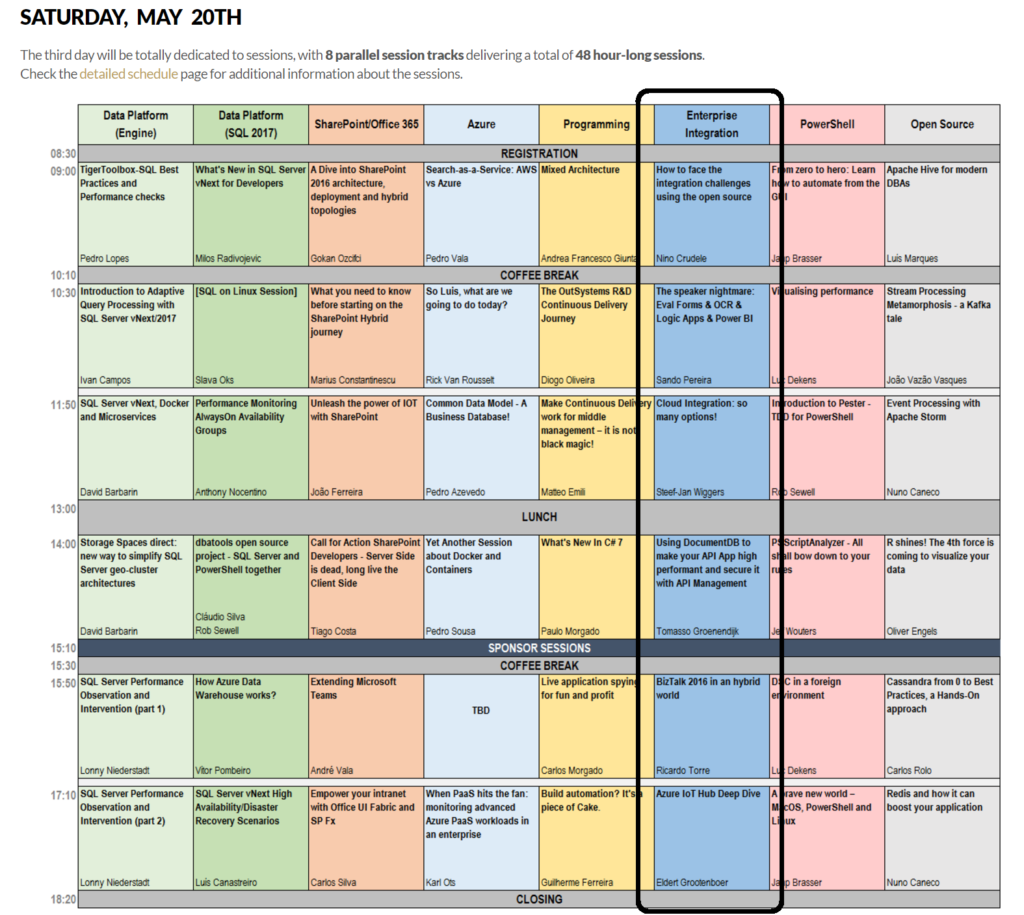
Once again, I was invited to lead the Integration track and yes, we will once again have again a dedicated Enterprise Integration track! The integration track on Saturday the 20th will be packed with amazing sessions by Azure MVP’s Nino Crudele, Steef-Jan Wiggers, Eldert Grootenboer, Tomasso Groenendijk, myself and Ricardo Torre.
Enterprise Integration Track Agenda
8:30 Registration
9:00 How to face the integration challenges using the open source by Nino Crudele [Azure MVP]
“The open source space offers a lot of different options and opportunities in order to face the endless challenges that we normally need to face in the integration of technologies.
During this session, we will explore all the best open source options to cover the most advanced and complex requirements.
We will explore new options to extend the actual technologies and how to use the open source in conjunction with technology stacks like, pure .Net Framework, BizTalk Server and Microsoft Azure to solve complex integration scenarios.
During the session, we will also examine the best options available in the market and in the open source space.”
10:10 Coffe break
10:30 The speaker nightmare: Eval Forms & OCR & Logic Apps & Power BI by Sandro Pereira [Azure MVP]
“An evaluation form is something that a speaker love and hates, especially, if the results are processed in real-time and public available. If the result was excellent, then it is extremely rewarding, other times, it may “”hurt”” the speaker who has made himself available to share his knowledge and has been evaluated negatively. Sometimes the attendees are unfair in their evaluations, like, to basic in a 100-level session (these types of sessions are supposed to be basic or introductory) or sometimes the speaker had a bad day (it happens with everyone).
I speak from personal experience, is these last 6 years that I have been doing speaking at community events, in Portugal and abroad, I already been evaluated in all ways: badly, reasonable, good and excellent, sometimes I saw in, the same sessions, attendees with different profiles evaluate me badly and excellent. The key point for the speaker is:
- All feedback is good, either negative or positive, he can learn to improve itself, if that’s the case, or that I specific topic is not good for a certain audience
- He only needs to give his best! We cannot please everyone, and the goal is to fill happy with yourself and your performance.
I love evaluation forms and I love for them to be public available, even better if they are public available during the event. Because, at least, it will give during the event a good topic of conversation for people that do not know each other and it will keep the conversation flowing (naturally), people normally are affray or shy to start a conversation between unfamiliar persons, this is a good ice break.
In this session, I will show and explain a real live demo on how we can easily build a robust solution for process evaluation forms, using an OCR software and easily integrate them with Power BI to present the results in an interactive and beautiful way. But most important: How you can educate your enterprise Developers and IT pros users to easily extend capabilities for power users, who understand their business challenges the best and allowing them to use their familiar tools like OCR software to process Evaluation forms and quickly build and deliver Power BI solutions to build Interactive Data dashboards. And at the same time integrate these tools, platforms or systems and a very quick and robust way using integrate feature on Azure, like, Logic Apps, API Apps and Azure Functions. How to start from a simple solution and evolve them enabling new functionalities.”
11:50 Cloud Integration: so many options! by Steef-Jan Wiggers [Azure MVP]
Traditional integration has changed with the rise and evolution of cloud computing. And connectivity between systems on premise will evolve to connections with services and solutions in the cloud. Data is everywhere, applications are everywhere and people are everywhere with their devices always connected. In this world integration is key. Azure offers us various ways to implement integration solutions to provide connectivity to the business to their data. This talk will be a journey of options you have when building these types of solutions!
13:00 Lunch
14:00 Using DocumentDB to make your API App high performant and secure it with API Management by Tomasso Groenendijk [Azure MVP]
APIs are becoming more important for organizations and people even talk about the API economy but how can you create your own API, expose it globally and make a profit with it? In this session, Tomasso is going to show how you can use API Apps and DocumentDB to create a high performant API and how to use API Management in combination with Web Apps to expose the API.
15:10 Sponsor Session
15:30 Cofee Break
15:50 BizTalk 2016 in a hybrid world by Ricardo Torre
The integration landscape has definitely evolved to be a hybrid, significant on-premise investment has been accumulated over the years while at the same time cloud computing brought new challenges and new ways of implementing integration. Let’s navigate through the innovations in both worlds and how BizTalk and the cloud currently live together.
17:10 Azure IoT Hub Deep Dive by Eldert Grootenboer [Azure MVP]
Azure IoT Hub gives us the possibility to manage and secure and do bi-directional communication with billions of IoT devices. In this session, we will dive into all these possibilities, to show how you can easily set up a robust and hyper-scalable solution for your IoT needs.
18:20 Closing
More information on the official website: http://tugait.pt/2017.
Invitation for a social game.
A social SPEAKER game… there might be other games (and awards) but that is still under NDA!
Speaker game has 1 objective: getting you the MAXIMUM social experience, getting you to LEARN about your fellow speakers, about the event and about THE ATTENDEES.
The winner/s will be determined by the collection of the maximum number of points and we shall determine the winner on Saturday evening … (the prize, again, is still under NDA) and here is how you can start collecting points on the game card will receive at the airport/event:
- Get to know 5 people at the event and write down their name, company, it area & specialty: 5 points
- Vote your favorite Tuga IT 2017 speaker (you will need to attend that session): 1 point
- Write down the number of countries that Tuga IT 2017 speakers represent: 1 point
- Write down the number of countries that Tuga IT 2017 attendees represent: 1 point
- Name all Tuga IT 2016 sponsors: 1 point
- Name the person who was the most influential in your career: 1 point
- Name 3 IT Celebrities (MVPs/Speakers/PMs) who started outside of IT: 1 point
- Name the creation dates of the involved User Groups: 1 point per correct answer (there are 9 groups in total)
- Name the youngest speaker of Tuga IT 2017: 1 point
- Discover how many MVPs/Microsoft MVPs/Oracle Aces do we have at the Tuga IT 2017? 1 point
And even more for the social part:
It might be worth playing… you know… you never lose in trying.
Registration For TUGA IT 2017
TUGA IT 2017 will take place in Microsoft Portugal’s offices, in Lisbon, on May 18-20, 2017. It will feature 3 days of breakout sessions and full-day workshops by world-class speakers where IT Professionals can spend 3 amazing days checking the future of IT and also take the time to network with top-level speakers and other IT Professionals.
Registration for TUGA IT 2017 is a few euro’s or even free if you do require lunch (the fee is there to reduce waste and prevent having an abundance of food).
You can register here and I will see you there in Lisbon!
Author: Sandro Pereira
Sandro Pereira lives in Portugal and works as a consultant at DevScope. In the past years, he has been working on implementing Integration scenarios both on-premises and cloud for various clients, each with different scenarios from a technical point of view, size, and criticality, using Microsoft Azure, Microsoft BizTalk Server and different technologies like AS2, EDI, RosettaNet, SAP, TIBCO etc. He is a regular blogger, international speaker, and technical reviewer of several BizTalk books all focused on Integration. He is also the author of the book “BizTalk Mapping Patterns & Best Practices”. He has been awarded MVP since 2011 for his contributions to the integration community. View all posts by Sandro Pereira

by Steef-Jan Wiggers | May 4, 2017 | BizTalk Community Blogs via Syndication
Two more weeks and I will, once again, return to Lisbon for the TUGAIT event. Last year during the 2016 edition Azure MVP’s Sandro, Nino and myself (the three integration animals, see picture below) did a workshop and several sessions on integration i.e. BizTalk, Open Source connectivity (GrabCaster), and Hybrid And this was no doubt a successful event and the debut of the integration track. Hence this year the track will active again!

TUGAIT 2017
The May 18th until the 20th, a variety of speakers will present on a myriad set of technologies like Xamarin, Angular, DataScience, Agile, Scrum, DevOps, Integration, DotNet, SQL Server, SharePoint, Office365, Azure and IoT.
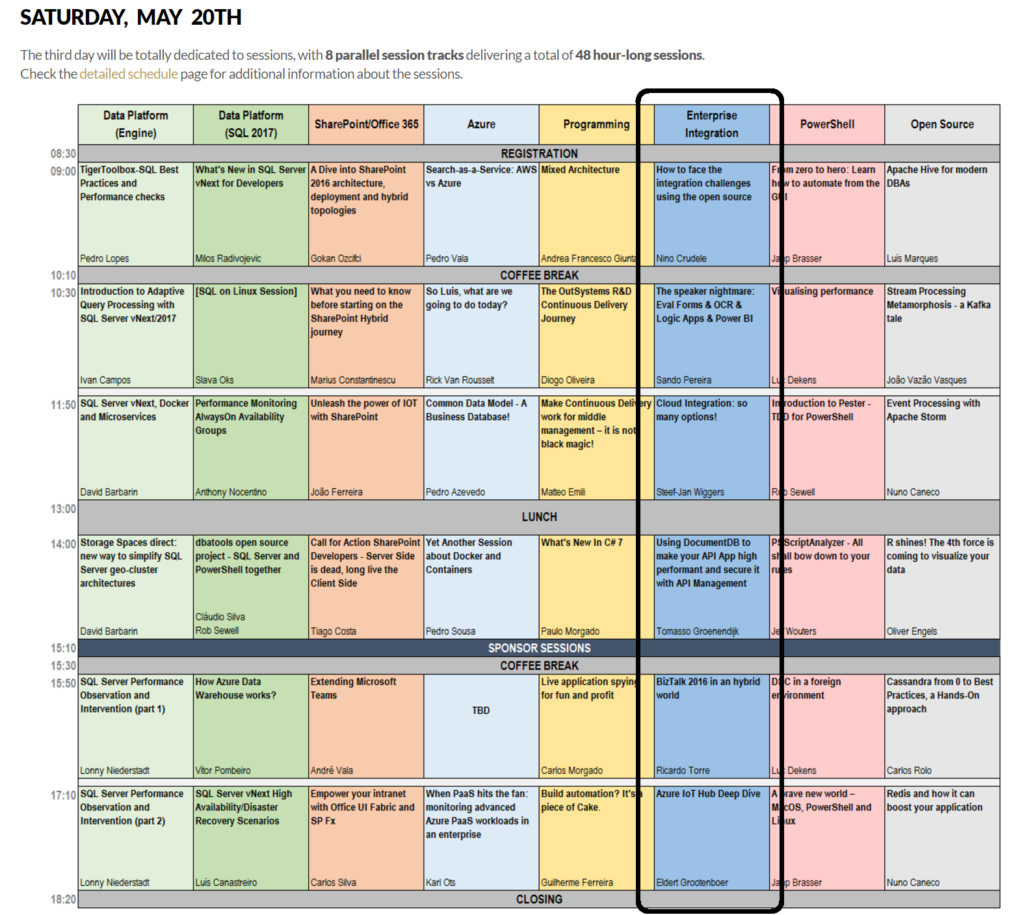
The integration track on Saturday the 2oth will be packed with session by Azure MVP’s Sandro, Nino, Eldert, Riccardo, Tomasso and myself.
Integration in 2017: Logic Apps
Microsoft has made a leap forward with several of there Azure Services including Logic Apps. A Service that went GA end of July 2016 and evolved rapidly to maturity. Already we see a steady growing adoption of this service within enterprises. Logic Apps is not the replacement of BizTalk, its Microsoft answer to solve integration challenges in the Cloud. The Logic App connectors provide connectivity to other Azure Services and several SaaS solutions like MailChip, SalesForce and CRM online. At TUGAIT 2017 in the Integration Track you will learn more about Logic Apps.
Why attend?
“Nice there’s an integration track, but what if I like to learn about other technologies (too)?”
Well you are at the right place as on the 18th there’s a full day of workshops you can choose from. On Friday there are 5 parallel tracks from which you can pick and choose. The same accounts for Saturday, including the integration track!
The event is located in one of the most beautiful, cultural cities of Portugal. It’s three days packed with content, stellar speakers and community leaders you can listen to and grab to ask questions.
Registration
Registration is a few euro’s or even free if you do require lunch (the fee is there to reduce waste and prevent having an abundance of food).
You can register here and I will see you there in Lisbon!
Cheers,
Steef-Jan
Author: Steef-Jan Wiggers
Steef-Jan Wiggers is all in on Microsoft Azure, Integration, and Data Science. He has over 15 years’ experience in a wide variety of scenarios such as custom .NET solution development, overseeing large enterprise integrations, building web services, managing projects, designing web services, experimenting with data, SQL Server database administration, and consulting. Steef-Jan loves challenges in the Microsoft playing field combining it with his domain knowledge in energy, utility, banking, insurance, health care, agriculture, (local) government, bio-sciences, retail, travel and logistics. He is very active in the community as a blogger, TechNet Wiki author, book author, and global public speaker. For these efforts, Microsoft has recognized him a Microsoft MVP for the past 6 years. View all posts by Steef-Jan Wiggers

by Steef-Jan Wiggers | May 4, 2017 | BizTalk Community Blogs via Syndication
Two more weeks and I will, once again, return to Lisbon for the TUGAIT event. Last year during the 2016 edition Azure MVP’s Sandro, Nino and myself (the three integration animals, see picture below) did a workshop and several sessions on integration i.e. BizTalk, Open Source connectivity (GrabCaster), and Hybrid And this was no doubt a successful event and the debut of the integration track. Hence this year the track will active again!

TUGAIT 2017
The May 18th until the 20th, a variety of speakers will present on a myriad set of technologies like Xamarin, Angular, DataScience, Agile, Scrum, DevOps, Integration, DotNet, SQL Server, SharePoint, Office365, Azure and IoT.
The integration track on Saturday the 2oth will be packed with session by Azure MVP’s Sandro, Nino, Eldert, Riccardo, Tomasso and myself.
Integration in 2017: Logic Apps
Microsoft has made a leap forward with several of there Azure Services including Logic Apps. A Service that went GA end of July 2016 and evolved rapidly to maturity. Already we see a steady growing adoption of this service within enterprises. Logic Apps is not the replacement of BizTalk, its Microsoft answer to solve integration challenges in the Cloud. The Logic App connectors provide connectivity to other Azure Services and several SaaS solutions like MailChip, SalesForce and CRM online. At TUGAIT 2017 in the Integration Track you will learn more about Logic Apps.
Why attend?
“Nice there’s an integration track, but what if I like to learn about other technologies (too)?”
Well you are at the right place as on the 18th there’s a full day of workshops you can choose from. On Friday there are 5 parallel tracks from which you can pick and choose. The same accounts for Saturday, including the integration track!
The event is located in one of the most beautiful, cultural cities of Portugal. It’s three days packed with content, stellar speakers and community leaders you can listen to and grab to ask questions.
Registration
Registration is a few euro’s or even free if you do require lunch (the fee is there to reduce waste and prevent having an abundance of food).
You can register here and I will see you there in Lisbon!
Cheers,
Steef-Jan
Author: Steef-Jan Wiggers
Steef-Jan Wiggers is all in on Microsoft Azure, Integration, and Data Science. He has over 15 years’ experience in a wide variety of scenarios such as custom .NET solution development, overseeing large enterprise integrations, building web services, managing projects, designing web services, experimenting with data, SQL Server database administration, and consulting. Steef-Jan loves challenges in the Microsoft playing field combining it with his domain knowledge in energy, utility, banking, insurance, health care, agriculture, (local) government, bio-sciences, retail, travel and logistics. He is very active in the community as a blogger, TechNet Wiki author, book author, and global public speaker. For these efforts, Microsoft has recognized him a Microsoft MVP for the past 6 years. View all posts by Steef-Jan Wiggers

by Steef-Jan Wiggers | Apr 29, 2017 | BizTalk Community Blogs via Syndication
The first three months of 2017 was a rollecoster ride, like the trip to Australia and New-Zealand, the very succesful Global Integration Bootcamp, the publication of the labs, the guest blogs I wrote for BizTalk360 blog, and the collobaration with Kent on Middleware Friday. And the Month April was not different in experience.
Month April
The month kicked of with a marathon run in Rotterdam. If there was any marathon in the Netherlands I wanted to do it was Rotterdam. The 9th of April was a very sunny beautiful day, however for running 42K it was a challenge. Yet I made it after 5:05:45.



Besides running a marathon I prepared myself for a trip to Sweden to talk to the Swedisch BizTalk Usergroup in Gothenburg and Stockholm. Thanks to Johan Hedberg we (Eldert and myself) were able to travel to these nice cities in Sweden and do our talks (see Elderts post on the recap of that trip). Moreover, in Stockholm Eldert and myself joined an very interactive architecture session organised my Mikael Sand together with Mikael Hakansson, Johan Hedberg, Robin Hultman, Mattias Logdberg, and Joakim Schütt at Enfo.
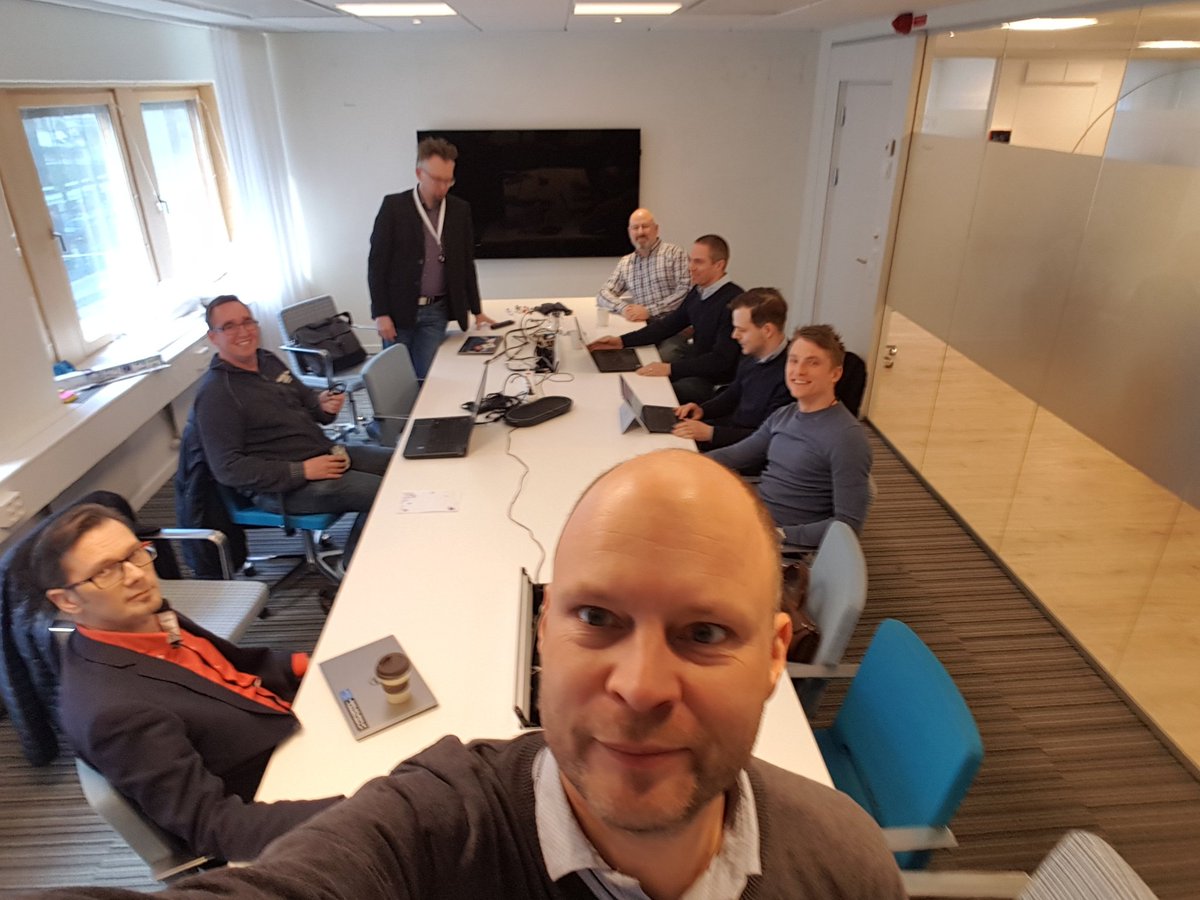
We talked about hybrid scenario’s, connectivity, workload driven design, Logic Apps/Functions and exchanged ideas, experiences and thoughts. It was a very useful sessions for all of us.
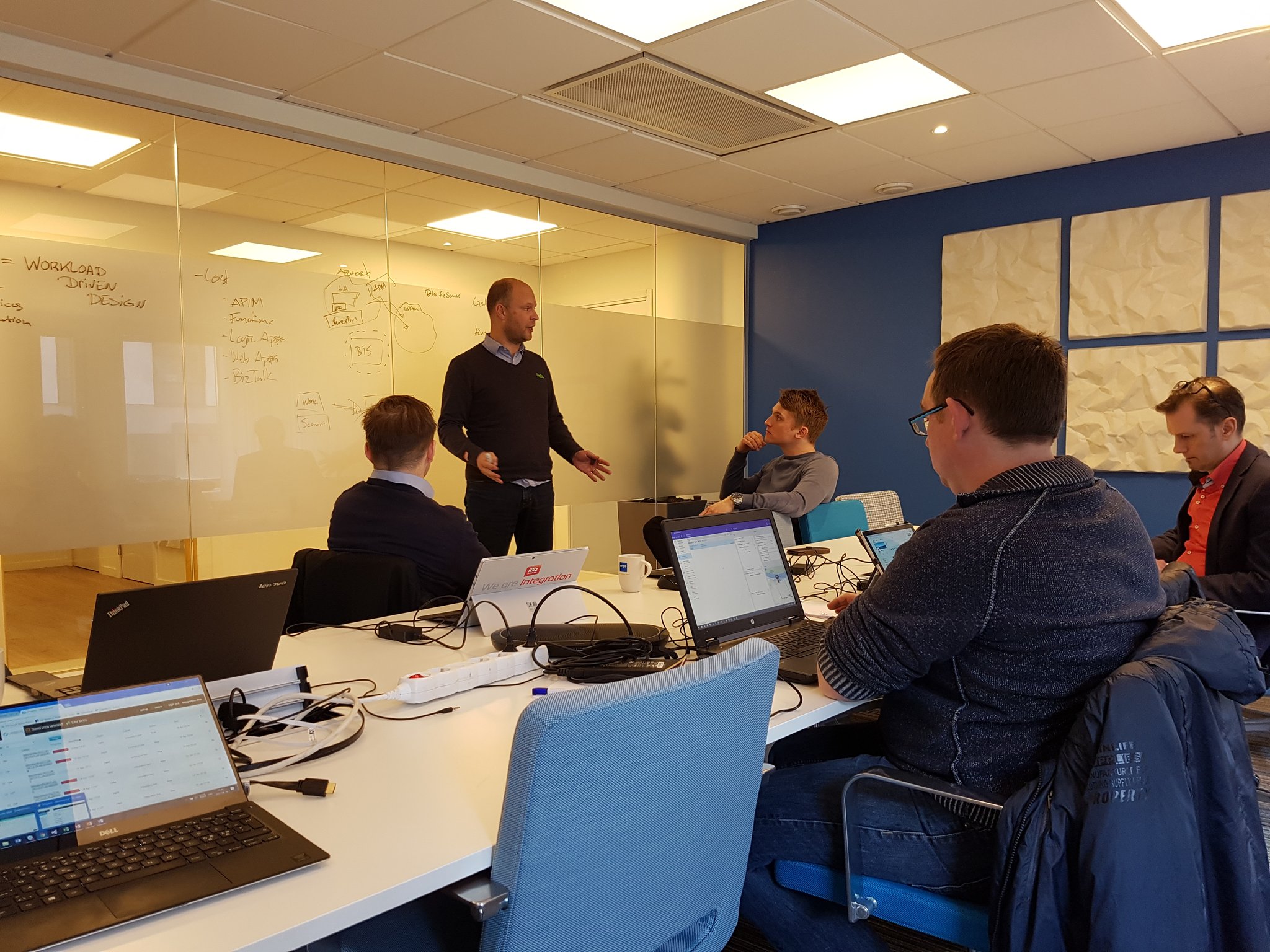
During the Usergroup sessions I did four new interviews for my YouTube series “Talking with Integration Pros”. And this time I interviewed:
Finally I also wrote an article on LinkedIn about Logic Apps and Functions:
Bet on Serverless: Azure Functions and Logic Apps

Music
My favorite albums that were released in April were:
- Aryeon – The Source
- Life Of Agony – A Place Where There’s No More Pain
- Ghost Bath – Starmourner
- Novembers Doom – Hamartia
- Royal Thunder – WICK
- Deep Purple – Infinite
Prague
After my trip to Sweden I went with my family to Prague, the capital of the Czech Republic. We spend a couple of days here to visit some remarkable areas of this beautiful city. The food, city and vibe was great.

There you have it Stef’s fourth Monthly Update and I can look back again with great satisfaction. The marathon was a challenge, however I am happy I finished and completed my third marathon. I’m looking forward to my trip to Portugal, where I will be speaking at TUGA IT.
Cheers,
Steef-Jan
Author: Steef-Jan Wiggers
Steef-Jan Wiggers is all in on Microsoft Azure, Integration, and Data Science. He has over 15 years’ experience in a wide variety of scenarios such as custom .NET solution development, overseeing large enterprise integrations, building web services, managing projects, designing web services, experimenting with data, SQL Server database administration, and consulting. Steef-Jan loves challenges in the Microsoft playing field combining it with his domain knowledge in energy, utility, banking, insurance, health care, agriculture, (local) government, bio-sciences, retail, travel and logistics. He is very active in the community as a blogger, TechNet Wiki author, book author, and global public speaker. For these efforts, Microsoft has recognized him a Microsoft MVP for the past 6 years. View all posts by Steef-Jan Wiggers

