by Sandro Pereira | Apr 21, 2017 | BizTalk Community Blogs via Syndication
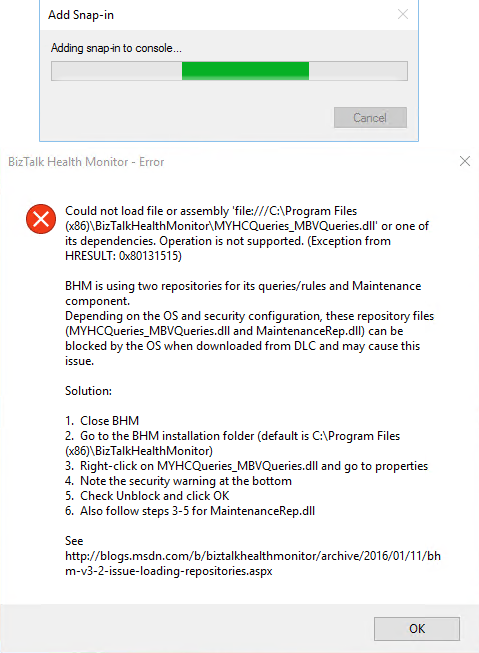
This BHM load error regarding to MYHCQueries_MBVQueries.dll, that can may also occurs with MaintenanceRep.dll, is a very well-known problem/annoying issue that occurs after we install BizTalk Health Monitor or update it to a new version that will apply in all BizTalk versions (BizTalk Server 2016, 2013 R2, 2013 or 2010) and SO (Windows 10, Windows Server 2016, 2012 R2, 2012 and so on):
Could not load assembly file ‘file:///C:Program files (x86)BizTalkHealthMonitorMYHCQueries_MBVQueries.dll’ or one of its dependencies. Operation is not supported. (Exception from HRESULT: 0x80131515)
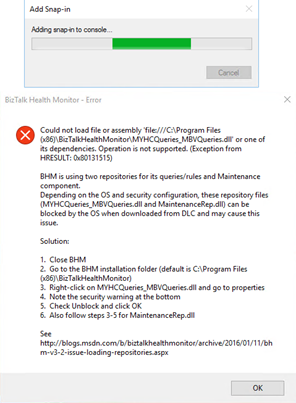
CAUSE
That is one of that times that BizTalk Server team did a great job. Not only throw the error but they also explain the problem and the solution to solve it.
This error when BHM tries to load the repository files downloaded from the Microsoft Download Center (DLC). BHM is using two repositories for this configuration, these repository files (MYHCQueries_MBVQueries.dll and MaintenanceRep.dll) can be blocked by OS when downloading from DLC and may cause this issue.
Solution
Again, the solution to this problem is also explained in the error window:
- Close BHM
- Go to BHM installation folder
- The default path is C:Program files (x86)BizTalkHealthMonitor
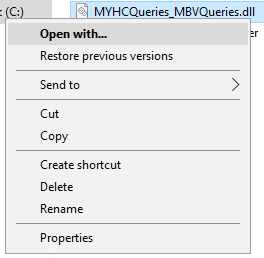
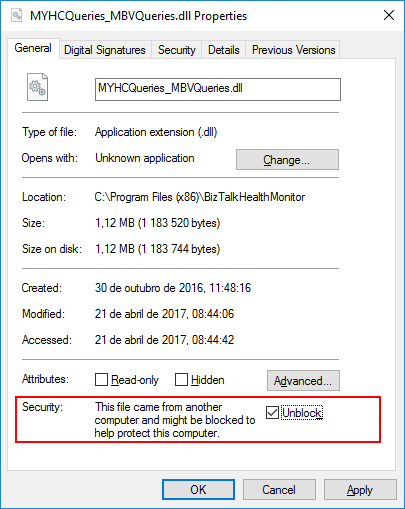
- Right-click in MYHCQueries_MBVQueries.dll and select “Properties” option
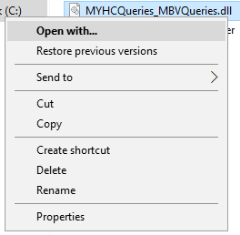
- You may see that the security warning at the bottom of the windows saying: “The file came from another computer and might be blocked to help protect this computer”
- Check “Unblock” option and click “OK”

- Do the same steps for “MaintenanceRep.dll”
Once you have unblocked both files, you should no longer see the security warning when you go back into their properties and if you try to execute BHM again all the above-mentioned errors related to loading repositories should be resolved.
You may also find more details about this issue directly from BizTalk Health Monitor blog: BHM v3.2 – Errors While Loading Repositories.
Note:
- If you have not yet installed BHM, you can also follow the above steps on the unzipped package prior to installing BHM.
Author: Sandro Pereira
Sandro Pereira lives in Portugal and works as a consultant at DevScope. In the past years, he has been working on implementing Integration scenarios both on-premises and cloud for various clients, each with different scenarios from a technical point of view, size, and criticality, using Microsoft Azure, Microsoft BizTalk Server and different technologies like AS2, EDI, RosettaNet, SAP, TIBCO etc. He is a regular blogger, international speaker, and technical reviewer of several BizTalk books all focused on Integration. He is also the author of the book “BizTalk Mapping Patterns & Best Practices”. He has been awarded MVP since 2011 for his contributions to the integration community. View all posts by Sandro Pereira

by Sandro Pereira | Jan 17, 2017 | BizTalk Community Blogs via Syndication
While researching for my last post, Thinking outside the box (or not): How to create “Global C# function” to be reused inside a map?, in BizTalk360 blog, I encountered several errors while playing around with maps in order to find an approach that would allow me to create the concept of Global Function. And some of this errors were:
“Inline Script Error: must declare a body because it is not marked abstract, extern, or partial”
“Inline Script Error: ; expected”
or
“Inline Script Error: Type ‘BizTalkMapper.FunctoidInlineScripts’ already defines a member called ‘FunctionName’ with the same parameter types”
Causes
The cause of this problem is that you do not correctly declare the body of the Inline C# Function.
Or, if you are trying to reuse an existing Inline C# Function you are doing it properly.
To reuse Inline C# Functions these are the rules that you need to follow:
- If all of the Scripting Functoids are in the same grid page: In the first Scripting Functoid, linked from the source to the destination, we will have to specify the body function and in the following functoids, we only need the function declaration (no body).
- If the Scripting Functoids are in different grid pages: The Scripting Functoid that specifies the body function needs to be on the leftmost grid page and the remaining Scripting Functoids (with the function body declared) on the other grid pages to the right. In other words, counting the grid pages from left to right, if the Scripting Functoid that specifies the body function is on the second grid page, the remaining functoids with the function body declared, cannot be placed on the first grid page, they can only be placed from the second grid page (including the second).
Solution
The solution to solve this issue you have two options, you need to follow the rules described above (BizTalk Mapper tips and tricks: How to reuse Scripting Functoids with Inline C# inside the same map) or you need to implement the concept of global C# Function described in my post: Thinking outside the box (or not): How to create “Global C# function” to be reused inside a map?, in resume:
- Add a Grid page to your map and rename it to “GlobalFunctions”
- Set this grid as the first grid page of your map (important step)
- Drag-and-Drop a Scripting Functoid to the “GlobalFunctions” grid page and place the C# code
- Do not link any inputs and don’t map (link) this Scripting Functoids to any element in the destination Schema.
- Double click the earlier Scripting Functoids added to the “GlobalFunctions” grid page and set the expected input values as empty constant values, that by default doesn’t exist
- Now you can use these functions in other grid pages using only the function declaration
Author: Sandro Pereira
Sandro Pereira lives in Portugal and works as a consultant at DevScope. In the past years, he has been working on implementing Integration scenarios both on-premises and cloud for various clients, each with different scenarios from a technical point of view, size, and criticality, using Microsoft Azure, Microsoft BizTalk Server and different technologies like AS2, EDI, RosettaNet, SAP, TIBCO etc. He is a regular blogger, international speaker, and technical reviewer of several BizTalk books all focused on Integration. He is also the author of the book “BizTalk Mapping Patterns & Best Practices”. He has been awarded MVP since 2011 for his contributions to the integration community. View all posts by Sandro Pereira