by Jeroen | Dec 13, 2018 | BizTalk Community Blogs via Syndication
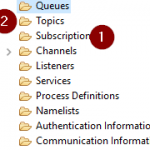
When using the IBM MQ Client library for .NET it is possible to directly make use of “Subscriptions” (1) on IBM MQ, without a topic object (2), by specifying the “TopicString” while sending a message.
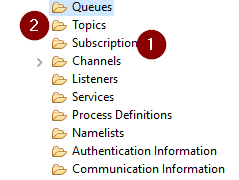
The BizTalk MQSC adaptor cannot directly specify a “TopicString” in the adaptor. Also, it is not possible to directly connect to a “Topic” (2) object. It only supports sending to a “Queue” object.
The Solution:
It is however, perfectly possible to create a Queue Alias that has a Topic as BaseObject. This Topic can be linked to one or more Subscriptions based on the TopicString.
[Queue Alias, with base object Topic] => [Topic, with TopicString /xyz/] => [Subscriptions, based on TopicString /xyz/]
by Sandro Pereira | Dec 13, 2018 | BizTalk Community Blogs via Syndication
Welcome back to another entry on my blog post series about “BizTalk Server Tips and Tricks” for developers, administrators or business users and I couldn’t resist on speaking about a topic that normally divides BizTalk developers and BizTalk administrators: Tracking Data!
Problem
Normally Developers have in their environments Full tracking Enabled, why? Because it’s easier to debug, troubleshoot, analyze or validate and see if everything is running well or simply, what is happening with their new applications.
The important question is: Do Developers remember to disable tracking before they put the resources in production?
No! And actually… they don’t care about that! Is not their task to do it or control it. And if you ask them, you should always have them enabled! Sometimes, to be fair, they don’t know the right configurations that should be applied to production.
This can be an annoying and time-consuming operation. It will be the same as asking developers to change their way of being, and for them to remember each time they export an application to disable the Tracking data properties can be a big challenge… or even impossible!
Solution (or possible solutions)
My advice is, if you are a BizTalk Administrator, let them be happy thinking they are annoying you and take back the control of your environment by yourself.
These tasks can be easily automated and configured by easily creating or using PowerShell.
You should disable all Tracking or enable just the important settings at the application level. You may lose 1 day developing these scripts, but then you do not need to worry anymore about it.
As an example, with this script: BizTalk DevOps: How to Disable Tracking Settings in BizTalk Server Environment, you can easily disable all tracking settings for all the artefacts (orchestrations, schemas, send ports, receive ports, pipelines) in your BizTalk Server Environment
# Disable tracking settings in orchestrations
$Application.orchestrations |
%{ $_.Tracking = [Microsoft.BizTalk.ExplorerOM.OrchestrationTrackingTypes]::None }

# Disable tracking settings in Send ports
$disablePortsTracking = New-Object Microsoft.BizTalk.ExplorerOM.TrackingTypes
$Application.SendPorts |
%{ $_.Tracking = $disablePortsTracking }

# Disable tracking settings in Receive ports
$Application.ReceivePorts |
%{ $_.Tracking = $disablePortsTracking }

# Disable tracking settings in pipelines
$Application.Pipelines |
%{ $_.Tracking = [Microsoft.BizTalk.ExplorerOM.PipelineTrackingTypes]::None }

# Disable tracking settings in Schemas
$Application.schemas |
    ?{ $_ -ne $null } |
    ?{ $_.type -eq "document" } |
    %{ $_.AlwaysTrackAllProperties = $false }
This can easily be edited by you to disable only one application or you can configure the right tracking setting that you want for your applications and environment.
If you are working with BizTalk Server 2016…
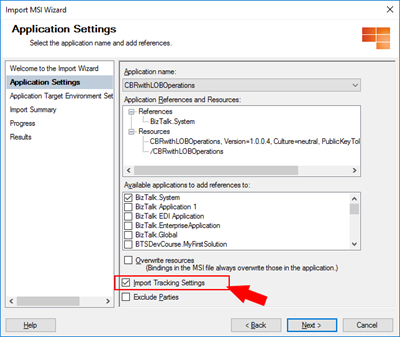
In previous versions of BizTalk Server, tracking settings were automatically imported with the rest of the application bindings. However, if you are working with BizTalk Server 2016, you have a new feature that allows you to have a better control while importing your BizTalk Applications: Import Tracking Settings.
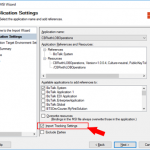
If you are importing an MSI file, on the “Application Settings” tab, you will have a checkbox “Import Tracking Settings” that allows you to say: I don’t want to import the tracking from DEV or another environment in which the MSI was generated from.
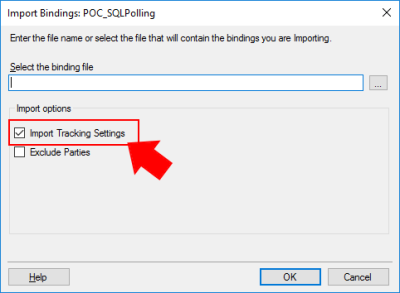
If you are importing a Binding file you will also have this same option:
Of course, if you want to properly define the correct or minimum tracking settings of your application, you need to do it manually or, once again, using a PowerShell script to accomplish that.
Quick, simple and practical.
Stay tuned for new tips and tricks!
Author: Sandro Pereira
Sandro Pereira is an Azure MVP and works as an Integration consultant at DevScope. In the past years, he has been working on implementing Integration scenarios both on-premises and cloud for various clients, each with different scenarios from a technical point of view, size, and criticality, using Microsoft Azure, Microsoft BizTalk Server and different technologies like AS2, EDI, RosettaNet, SAP, TIBCO etc. View all posts by Sandro Pereira

by Sandro Pereira | Dec 9, 2018 | BizTalk Community Blogs via Syndication
There are simple BizTalk Server installations and then there are some quite annoying BizTalk Server topologies and complex configurations which tend to give rise to the appearance of diverse types of errors: SQLNCLI11 ole db provider not found in the system. It’s one of the most recent I’ve found.
Let me contextualize the appearance of this error.
To simplify I have 5 machines in my environment:
- 2 SQL Server’s in a cluster and SSO Master Secret Server in a cluster
- 2 BizTalk Server’s
- And 1 IBM WebSphere MQ Server and with only BizTalk Server 2016 MQSeries Agent installed
I successfully installed:
- BizTalk Server 2016 Cumulative Update 5 (CU5) in the SSO Master Secret Server’s
- And BizTalk Server Feature Pack 3 with CU5 on BizTalk Server’s
Nevertheless, while I was trying to install BTS2016 CU5 on the MQ Server I got the following error:
Ole db providers : SQLOLEDB, MSDataShape, ADsDSOObject, MSDASQL, MSDASQL Enumerator, SQLOLEDB Enumerator, MSDAOSP
SQLNCLI11 ole db provider not found in the system.
TLS1.2 support requires SQL Server 2012 Native client 11.0 must be installed on all BizTalk machines. Install SQL Server Native client 11.0 before applying the update.
To download and install Microsoft SQL Server 2012 Native Client 11.0, see this Microsoft Download Center webpage. https://www.microsoft.com/en-us/download/details.aspx?id=50402&751be11f-ede8-5a0c-058c-2ee190a24fa6=True
Aborting installation of this update.
Please try after installing SQL Server 2012 Native client 11.0.
Cause
Unfortunately, to install BizTalk Server CU5 and I guess previous ones there is this default requirement that you need to have: SQL Server 2012 Native client 11.0 installed in the server.
In fact, for the BizTalk Server 2016 MQSeries Agent to work properly this component is not required. This is a validation requirement of the CU5.
Solution
The solution is quite simple:
After you install the SQL client you will be able to successfully apply the BizTalk Server 2016 CU5.
Author: Sandro Pereira
Sandro Pereira lives in Portugal and works as a consultant at DevScope. In the past years, he has been working on implementing Integration scenarios both on-premises and cloud for various clients, each with different scenarios from a technical point of view, size, and criticality, using Microsoft Azure, Microsoft BizTalk Server and different technologies like AS2, EDI, RosettaNet, SAP, TIBCO etc. He is a regular blogger, international speaker, and technical reviewer of several BizTalk books all focused on Integration. He is also the author of the book “BizTalk Mapping Patterns & Best Practices”. He has been awarded MVP since 2011 for his contributions to the integration community. View all posts by Sandro Pereira
by Sandro Pereira | Dec 7, 2018 | BizTalk Community Blogs via Syndication
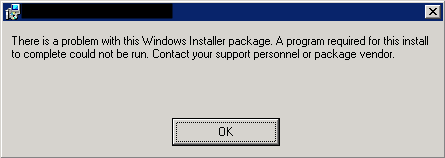
There is something special when you find a solution or possible solution to an annoying error message (for not using another type of language) and this is one of these cases: There is a problem with this Windows Installer package!
This error occurred each time my team was trying to install a BizTalk Application on a non-developer environment: Test or QA. And the full error description was:
There is a problem with this Windows Installer package. A program run as part of the setup did not finish as expected. Contact your support personnel or package vendor.
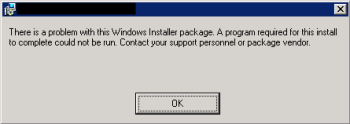
And “Contact your support personnel or package vendor”? What a ****, It is me! I am the support personnel and package vendor/creator… you still write these kinds of error messages?
Cause
Unfortunately, this error may be caused by several reasons, but some places may tell you that this problem can be related to:
- The package is actually corrupted, you should export again and import it – not really like to a happen or solve it
- The fact of the destination location does not exist – that is not true, because the installation will create the directories;
- Invalid drive letter – again it is not true because the MSI will not go further on the wizard if that happens
To correctly diagnose the problem and find the cause of the problem you should consult the Event Viewer of the BizTalk Server in which you are trying to install the MSI. Normally you will find more details about the cause of the error.
The most common will be:
- The Installation Path that you are providing in the wizard along with the name of the assemblies will have more than 256 characters.
By default, the installation folder will be:
- C:Program Files (x86)Generated by BizTalkname of the BizTalk Application
That is:
- 46 characters for the default folder “C:Program Files (x86)Generated by BizTalk”
- Adding, more or less, 15 characters for the BizTalk Application name folder
Will give you a total of 195 characters to be used in the assembly’s names. Which normally is enough.
Solution
Once again, in this case, the solution is very simple:
- ·Change the installation folder to a small path like:
By providing a small path, my team was able to successfully install the MSI.
Author: Sandro Pereira
Sandro Pereira lives in Portugal and works as a consultant at DevScope. In the past years, he has been working on implementing Integration scenarios both on-premises and cloud for various clients, each with different scenarios from a technical point of view, size, and criticality, using Microsoft Azure, Microsoft BizTalk Server and different technologies like AS2, EDI, RosettaNet, SAP, TIBCO etc. He is a regular blogger, international speaker, and technical reviewer of several BizTalk books all focused on Integration. He is also the author of the book “BizTalk Mapping Patterns & Best Practices”. He has been awarded MVP since 2011 for his contributions to the integration community. View all posts by Sandro Pereira
by Sandro Pereira | Dec 6, 2018 | BizTalk Community Blogs via Syndication
This week I installed on a BizTalk Server 2016 environment Host Integration Server 2016 (HIS), and to my surprise, I was receiving this quite unusual and annoying error: String was not recognized as a valid DateTime.
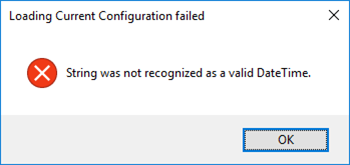
Each time I try to open the HIS Configuration Console.
Nevertheless, this error did not occur the first time I ran the configuration console, in other words, after I install the HIS, the first time I executed the Configuration console everything worked ok. Even, if I close and open again, everything was still working fine. The problem only occurred once I actually configure something.
This error only occurred If:
- I configure let’s say all the HIS features;
- Close the HIS Configuration console
- And then try to open the Configuration console again
Cause
As far as I know, there is no other reason, this is a bug!
Solution
The solution is very simple:
- Install Host Integration Server Cumulative Update 1
But in fact, there is already Host Integration Server Cumulative Update 2 available so I will recommend you installing this one instead:
After installing HIS CU2, everything worked as expected.
Author: Sandro Pereira
Sandro Pereira lives in Portugal and works as a consultant at DevScope. In the past years, he has been working on implementing Integration scenarios both on-premises and cloud for various clients, each with different scenarios from a technical point of view, size, and criticality, using Microsoft Azure, Microsoft BizTalk Server and different technologies like AS2, EDI, RosettaNet, SAP, TIBCO etc. He is a regular blogger, international speaker, and technical reviewer of several BizTalk books all focused on Integration. He is also the author of the book “BizTalk Mapping Patterns & Best Practices”. He has been awarded MVP since 2011 for his contributions to the integration community. View all posts by Sandro Pereira

by Sandro Pereira | Dec 4, 2018 | BizTalk Community Blogs via Syndication
Happy to introduce my first guest blog author: Peter Vervoorn from Virtual Green. Peter is a very experienced integration specialist. He has been working in ICT since 1995 and was a co-founder of Axon Olympus (now part of the Codit Group). Until his sabbatical in 2014 he headed the team of consultants at Axon Olympus as Technical Director. During his sabbatical in Thailand, he lost over 50 kilos and currently, he divides his time between Thailand and The Netherlands. He is a specialist with (Microsoft) Integration Tools and Technologies like BizTalk Server, Windows 10 IoT, Node-RED and is also involved in developing industrial automation prototypes.
Peter reach me with this funny, a bit unusual but quite interesting scenario: Calling multiple Disassemblers in a Receive pipeline, and I challenge him to be my first guest blog author on my blog. Challenge that he gladly accepted.
Situation
You receive a zip file, containing several files to extract. The extracted files should be disassembled too. (Possibly because they are in flat file format, or you want to call the XmlDisassembler to set the message type.)
Problem
Although the disassemble stage in the receive pipeline can contain multiple components, only the first component (matching the message) will be executed.
Solution
Create a new disassembler component, which will handle calling the sequential disassembler components.
The implementation of the Disassemble method is very easy, just call the initial component in the sequence.
The GetNext method is where it becomes a bit more interesting. Here we would have to extract all the messages from the first stage and feed them to the second stage. Note that it is not possible to create a single instance for the second stage and keep feeding it messages; each message requires its own instance of the component.
To do this, we have to create a new instance of the second stage component. Then we set the required properties (e.g., with values from the property bag.) Then we call the Disassemble method on the component. Next, we call GetNext to retrieve all messages and queue them.
The remainder of the implementation is for dequeening the messages.
Code
In the sample code below, all the usual methods (Load, Save, Validate, etc.) are not shown. Only the two relevant methods are shown. Also, all the plumbing has been removed for brevity/clarity.
[ComponentCategory(CategoryTypes.CATID_PipelineComponent)]
[ComponentCategory(CategoryTypes.CATID_DisassemblingParser)]
[System.Runtime.InteropServices.Guid("YOUR-GUID-HERE")]
public class MultiDisassembler : IBaseComponent, IPersistPropertyBag, IComponentUI, IDisassemblerComponent
{
    private ExtractorComp extractPC = new ExtractorComp();
    private Queue<IBaseMessage> messages = null;

    public void Disassemble(IPipelineContext pContext, IBaseMessage pInMsg)
    { extractPC.Disassemble(pContext, pInMsg); }

    public IBaseMessage GetNext(IPipelineContext pContext)
    {
        if (messages == null)
        {
            messages = new Queue<IBaseMessage>();
            IBaseMessage msgS1 = null;
            while ((msgS1 = extractPC.GetNext(pContext)) != null)
            {
                XmlDasmComp  xmlDasmPC = NewXmlDasmWithPropertiesSet();
                xmlDasmPC.Disassemble(pContext, msgS1);
                IBaseMessage msgS2 = null;
                while ((msgS2 = xmlDasmPC.GetNext(pContext)) != null)
                { messages.Enqueue(msgS2); }
            }
        }

        if (messages.Count > 0)
        { return messages.Dequeue(); }
        return null;
    }
    //...
    //Missing Code
}
Tips
- You can add more stages, as required;
- If necessary, you can inspect a message and choose to either enqueue it directly or use a different component to disassemble that message.
(An example would be a zip file containing a mix of XML files and nested zip files)
- In the above sample, all messages are queued when the GetNext method is called the first time. Another possibility is getting the next message in a just-in-time fashion. This requires a bit of additional work as you have to do additional housekeeping and handle possible empty messages.
- Often you see a disassembler also implementing IComponent. This is not required if only the DisassemblingParser attribute is set.
THIS SAMPLE CODE IS PROVIDED “AS IS”, WITHOUT WARRANTY OF ANY KIND.
 BizTalk Server Recipe: Calling multiple Disassemblers in a Receive pipeline (2 KB)
Microsoft | TechNet Gallery
BizTalk Pipeline Components Extensions Utility Pack
The pipeline component is available on BizTalk Pipeline Components Extensions Utility Pack project, that is a set of custom pipeline components (libraries) with several custom pipeline components that can be used in received and sent pipelines, which will provide an extension of BizTalk out-of-the-box pipeline capabilities.
The project is available on BizTalk Server Open Source Community repository on GitHub (https://github.com/BizTalkCommunity), and everyone can contribute with new pipeline components that can be extended or improve the existing BizTalk Server capabilities.

You can download BizTalk Pipeline Components Extensions Utility Pack from GitHub here:
BizTalk Pipeline Components Extensions Utility Pack
GitHub
Author: Sandro Pereira
Sandro Pereira lives in Portugal and works as a consultant at DevScope. In the past years, he has been working on implementing Integration scenarios both on-premises and cloud for various clients, each with different scenarios from a technical point of view, size, and criticality, using Microsoft Azure, Microsoft BizTalk Server and different technologies like AS2, EDI, RosettaNet, SAP, TIBCO etc. He is a regular blogger, international speaker, and technical reviewer of several BizTalk books all focused on Integration. He is also the author of the book “BizTalk Mapping Patterns & Best Practices”. He has been awarded MVP since 2011 for his contributions to the integration community. View all posts by Sandro Pereira
by Sandro Pereira | Nov 30, 2018 | BizTalk Community Blogs via Syndication
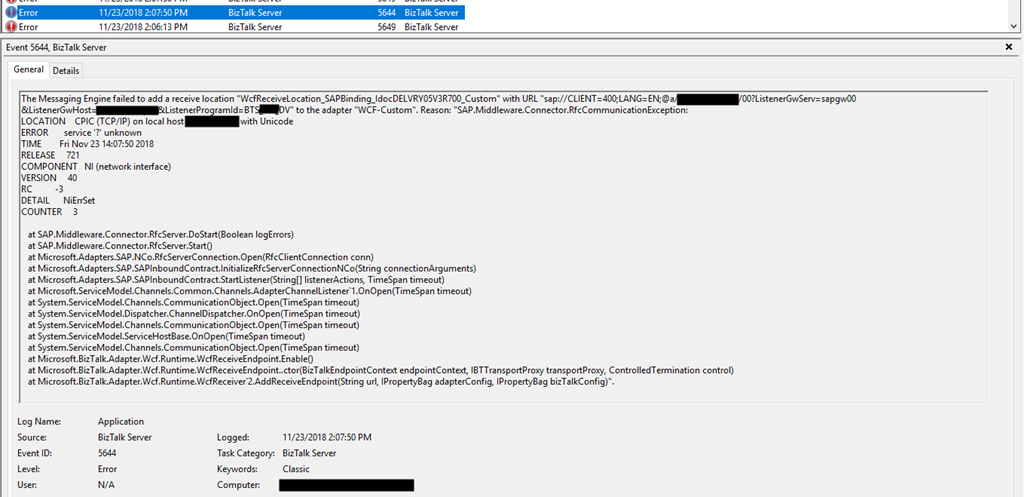
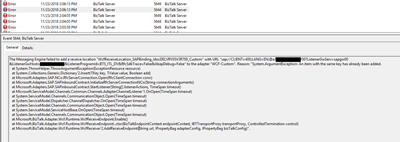
Following my last post and continuing on the pain points of BizTalk Server infrastructure tasks migration, I end up founding another interesting error: WCF-Custom Reason: System.ArgumentException: An item with the same key has already been added.
Again, we indeed did more than a simple migration, we take this opportunity to improve our solutions and/or BizTalk Server environment to update our applications to the new the new available features. In terms of WCF-SAP Adapter, we are no longer using traditional RFC and we will be starting using SAP .NET Connector (NCo). Despite WCF-SAP adapter will continue to support both the RFC SDK and the SAP .NET Connector, SAP has announced deprecation of its classic RFC SDK (no longer be supported after March 31, 2016) and because of that, it should be used anymore.
While trying to connect our BizTalk Server Receive Location to SAP in order to listen to incoming messages, we initially got this error message:
The Messaging Engine failed to add a receive location “WcfReceiveLocation_SAPBinding_IdocDELVRY05V3R700_Custom” with URL “sap://CLIENT=400;LANG=EN;@a/SERVERNAME/00?ListenerGwServ=sapgw00&ListenerGwHost=LISTENERHOST&ListenerProgramId=BTS_LIST&RfcSdkTrace=False&AbapDebug=False ” to the adapter “WCF-Custom”. Reason: “System.ArgumentException: An item with the same key has already been added.
at System.ThrowHelper.ThrowArgumentException(ExceptionResource resource)
at System.Collections.Generic.Dictionary`2.Insert(TKey key, TValue value, Boolean add)
at Microsoft.Adapters.SAP.NCo.RfcServerConnection.Open(RfcClientConnection conn)
at Microsoft.Adapters.SAP.SAPInboundContract.InitializeRfcServerConnectionNCo(String connectionArguments)
at Microsoft.Adapters.SAP.SAPInboundContract.StartListener(String[] listenerActions, TimeSpan timeout)
at Microsoft.ServiceModel.Channels.Common.Channels.AdapterChannelListener`1.OnOpen(TimeSpan timeout)
at System.ServiceModel.Channels.CommunicationObject.Open(TimeSpan timeout)
at System.ServiceModel.Dispatcher.ChannelDispatcher.OnOpen(TimeSpan timeout)
at System.ServiceModel.Channels.CommunicationObject.Open(TimeSpan timeout)
at System.ServiceModel.ServiceHostBase.OnOpen(TimeSpan timeout)
at System.ServiceModel.Channels.CommunicationObject.Open(TimeSpan timeout)
at Microsoft.BizTalk.Adapter.Wcf.Runtime.WcfReceiveEndpoint.Enable()
at Microsoft.BizTalk.Adapter.Wcf.Runtime.WcfReceiveEndpoint..ctor(BizTalkEndpointContext endpointContext, IBTTransportProxy transportProxy, ControlledTermination control)
at Microsoft.BizTalk.Adapter.Wcf.Runtime.WcfReceiver`2.AddReceiveEndpoint(String url, IPropertyBag adapterConfig, IPropertyBag bizTalkConfig)”.
Cause
What I found out was that this error was somehow related to the error reported in my previous post: BizTalk Server WCF-SAP Adapter: SAP.Middleware.Connector.RfcCommunicationException: LOCATION CPIC (TCP/IP) on local host BTSSERVERNAME with Unicode, ERROR service ‘?’ unknown.
The reason why I’m saying that is that each time I restarted the BizTalk Server Host Instances, the error that I got the first time I try to enable the port was this service ‘?’ unknown error. Afterward, whenever I tried to enable this port, I would receive this new error:
- System.ArgumentException: An item with the same key has already been added
Why this is happening for me is a mix of a small bug and consistency, let me explain better:
- Why consistency? This because in fact, you cannot have two SAP Receive Locations listening to the same SAP endpoint/SAP Listener Program Id.
- Actually, this should be when this error would normally occur.
- Why a small bug? Because in fact there isn’t any Receive location enable for that specific SAP endpoint/SAP Listener Program Id. What is happening is that despite the error and the receive location became automatically disable it somehow stores in memory that SAP endpoint/SAP Listener Program Id
Solution
The solution is very simple and stupid:
- Restart the host instance that is running that Receive Location
After that, this problem goes away, but make sure you solve all the problems, or this may happen again.
Author: Sandro Pereira
Sandro Pereira lives in Portugal and works as a consultant at DevScope. In the past years, he has been working on implementing Integration scenarios both on-premises and cloud for various clients, each with different scenarios from a technical point of view, size, and criticality, using Microsoft Azure, Microsoft BizTalk Server and different technologies like AS2, EDI, RosettaNet, SAP, TIBCO etc. He is a regular blogger, international speaker, and technical reviewer of several BizTalk books all focused on Integration. He is also the author of the book “BizTalk Mapping Patterns & Best Practices”. He has been awarded MVP since 2011 for his contributions to the integration community. View all posts by Sandro Pereira
by Lex Hegt | Nov 29, 2018 | BizTalk Community Blogs via Syndication
In this blog post, we will explain how different stakeholders within your organization can be involved in operating the BizTalk environment and managing BizTalk interfaces, by smartly, but safely deploy BizTalk360.
The BizTalk Administrators – the primary users of BizTalk360
Primarily, BizTalk360 will mainly be used by BizTalk administrators. They will use the product in their day to day operations and will probably be the ones who firstly receive notifications of threshold violations and daily health check reports.
These administrators are responsible for the day to day operations of the BizTalk group(s) and will be the main group of users of BizTalk360. Therefore, they need all the authorizations so they will have Super User accounts in BizTalk360. They will also be responsible for creating and maintaining User Access Policies.
After installation of the product, they will set up alarms for the BizTalk platform and the BizTalk applications it contains and receive notifications which are generated by the alarms.
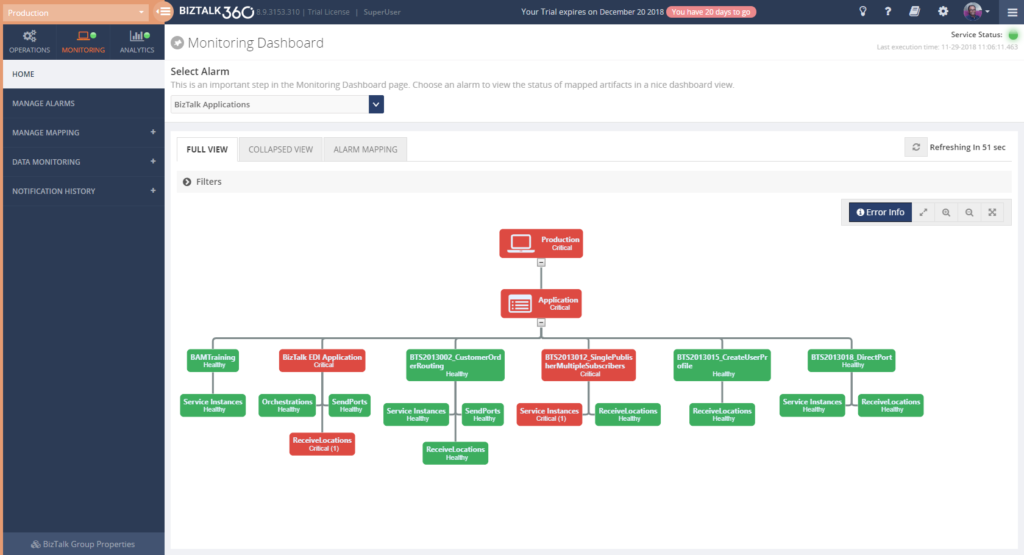 The way they configure monitoring of their BizTalk environments with BizTalk360, might evolve like this:
- Basic Threshold/Health Check monitoring with email notification
- BizTalk Platform – Monitor platform components like Host Instances, SQL Server jobs, NT Services, BizTalk Health Monitor
- BizTalk Applications – Monitor application artifacts like Receive Locations, Orchestrations, Send Ports, Instance states
- Advanced Environment Monitoring
- Endpoints – Monitor web services, queues, file shares, FTP sites, Azure services
- Data monitoring – Monitor interface processing, automate resuming and terminating of service instances
- Enterprise notification channels – Receive notifications via HP Operations Manager, Slack, ServiceNow, Microsoft Teams, Webhook, PowerShell
In case of any issues, the (team of) BizTalk administrators will fix these issues themselves, or they contact other stakeholders to discuss how the issues need to be fixed.
Improve your business processes by extending the reach of BizTalk360
The power of BizTalk360 lies in the fact that it provides a rich user interface with many different dashboards for many different purposes, both from a technical and a functional perspective. In contrast with the tools which come out-of-the-box with BizTalk Server, all the capabilities in BizTalk360 are protected by User Access Policies and Auditing. This enables you to give any person exactly that set of permissions that they need to be able to do their job.
When the BizTalk administrators feel comfortable with the product and with BizTalk administration in general, or when the organization requires it, BizTalk360 can be deployed to other parts of the IT department or business departments.
Involve stakeholders by sending notifications and providing access to BizTalk360
By sending alerts to stakeholders directly, you improve information management as your BizTalk Administrators don’t need to send separate emails or contact these stakeholders based on issues that have occurred.
Although in many cases, email will be the primary means of sending notifications from BizTalk360, the product also contains the following Notification channels:
• Microsoft Teams
• ServiceNow
• Slack
• PowerShell
• Webhook
These channels can be configured on each BizTalk360 alarm and enable you to receive the notifications where it is most convenient for you. You can also use a simple to use SDK to develop your own custom Notification channel. Read more about Notification channels in our Documentation Portal.
But you can go even further, BizTalk360 allows you to give stakeholders secure and limited access to BizTalk360. This kind of access can reach from read-only access to particular parts of the BizTalk platform to the capability to act on certain issues.
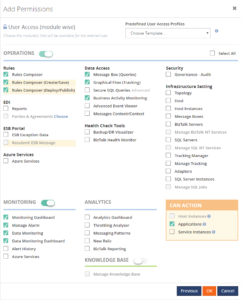
Deployment of BizTalk360 to your organization can be done in the pace you and your organization feel comfortable with. By sending notifications to the stakeholders and provide access to BizTalk360, you can keep the stakeholders informed of any issues, improve the availability of your business processes and meanwhile spreading the workload between all the stakeholders.
Think of the following scenarios which could be achieved:
- Sending alerts to the help desk – This enables the help desk engineers to analyze any issues at hand and take countermeasures
- Informing your administrators directly of any issues – Think of your System Administrators or DBA’s who receive alerts about server or database issues
- Automated creation of support tickets in your ticketing system – This takes away the need to have an administrator to do it manually
- Inform business users of issues – Think of batches which are not processed (non-events) or faulty processing of their messages
- Provide access to dashboards/portals – Give your stakeholders access to portals like the BAM portal, ESB portal, Business Rules Composer, (Data) Monitoring/Analytics dashboard, etc. etc.
Identifying stakeholders
When it comes to deploying BizTalk360 throughout an organization, you can identify the following roles:
- IT Support personnel
- SQL Server DBA’s, System Administrators and BizTalk developers
- Business Users
Let’s have a look at the roles mentioned above and their potential responsibilities with regards to BizTalk Server/BizTalk360.
IT Support personnel
To have a good eye watching on your BizTalk environment, you could involve the IT Support staff of your organization. Depending on your organization, they might be available 24/7. So it makes sense to send notifications of unexpected behavior happening on the platform level, as they might be able to act before BizTalk Administrators can. Besides sending them notifications, you could give the IT Support staff read-only access to BizTalk, so they can explore any issues and maybe help you fix them, while you might be at home, having weekend.
SQL Server DBA’s, System Administrators and BizTalk developers
Since operating BizTalk involves more than just the BizTalk Server product itself, but also components like SQL Server databases and all kind of Windows Server components, you might consider involving System Administrators and SQL Server DBA’s in BizTalk operations by sending them notifications which might be relevant for them.
A few examples are:
- SQL Server Administrators can receive notifications in case the BizTalk related SQL Server jobs fail
- System Administrators can receive notifications when the BizTalk servers are running out of disk space
- BizTalk Developers can receive notifications in case issues arise with upgraded or newly deployed BizTalk applications
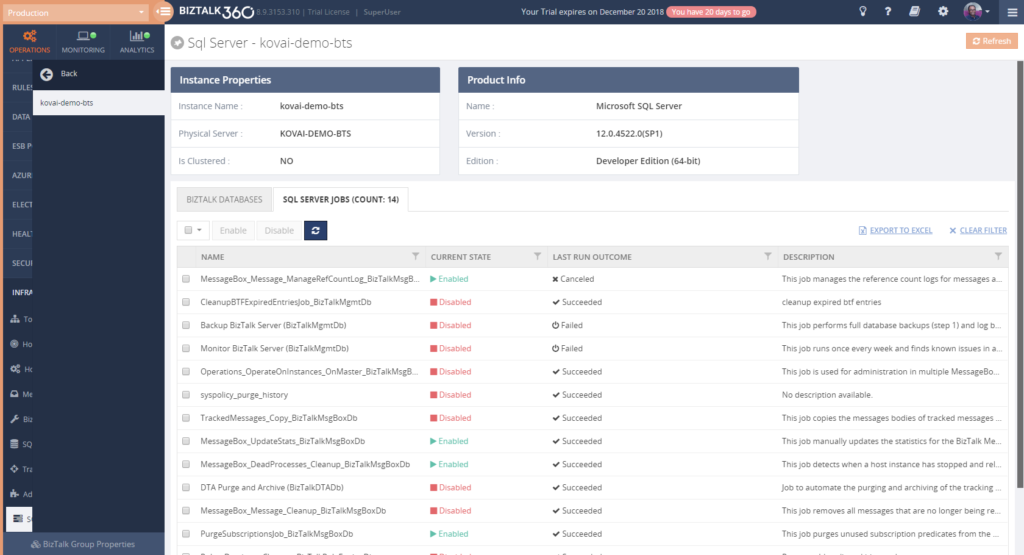
As a next step, you might give these administrators and developers access to BizTalk360. This ranges from providing read-only access to particular features to giving them full operational access to the parts of their interest.
 If you give any of the stakeholders access to BizTalk360, it is also helpful to use the BizTalk360 Knowledge Base. When you properly maintain the Knowledge Base, your support people will have the help they need at their fingertips and be able to solve known issues quickly.
The Knowledge Base associates Knowledge Base articles to Service Instances, EventLog entries, ESB Exceptions, and Throttling data. Read more about its capabilities in our Documentation portal.
You might consider providing System Administrators, SQL Server DBAs and BizTalk developers with the following authorizations:
- System Administrators
- Advanced Event Viewer
- BizTalk Health Monitor
- Topology
- Host/Host Instances
- BizTalk/SQL Servers
- Manage BizTalk/SQL NT Services
- Tracking Manager
- Adapters
- Backup/DR Visualizer
- SQL Server DBA’s
- Secure SQL Queries
- Advanced Event Viewer
- BizTalk Health Monitor
- Message Boxes
- SQL Servers
- Manage SQL NT Services
- SQL Server Instances
- Manage SQL Jobs
- Backup/DR Visualizer
- BizTalk developers
- MessageBox queries (with/without access to content/context)
- Tracking Queries
- Advanced Event Viewer
- Tracking Manager
- Secure SQL Queries
- BAM portal
- ESB Exception portal
- EDI Reports
- Messaging Patterns
Business Users
This category of users might exist both inside as outside your organization. Depending on that, it will differ how they are involved in managing the interfaces. Normally, they will not take part in managing the BizTalk platform itself.
Internal business users can be informed about the processing, by providing them with notifications of disruptions in the processing of their interfaces, i.e., inform them of suspended instances, transmission failures, and failing process monitoring.
When you want to give business users access to BizTalk360, you can think of the following features:
– Specific BizTalk applications
– Message Box (Queries)
– Graphical Flow (Tracking)
– Business Rules Composer
– EDI Reports, parties and agreements
– ESB Portal
– Business Activity Monitoring
– Messages Content/Context
– Secure SQL Queries
In case external business users are involved in certain interfaces, you might send them the same notifications as internal business users. As the external business users will be outside your organization, you normally will not give them access to the BizTalk360 User Interface.
Conclusion
We often see, that BizTalk Server is considered as a black box and deep BizTalk knowledge is needed to be able to find out what’s all happening inside that box. By using BizTalk360, we make it easy to gain that insight, even with little BizTalk expertise. Furthermore, by deploying BizTalk360 outside the BizTalk administrators team, you can give your middleware a face and achieve much more transparency about all the processing taking place in your BizTalk environment.
By using BizTalk360 outside the admin team, it is easier to notify other stakeholders by sending them notifications directly from BizTalk360. Even further, besides sending notifications to these stakeholders within (or outside) your organization, you can give people (limited) access to BizTalk360. This way they can view for themselves how all the processing is taking place or check the wellbeing of the environment, without the need of contacting the BizTalk Administrators team.
All in all, it must be clear, that by extending the use of BizTalk360 outside the admin team, you will have a better ROI of the product. If you would like to know more about how BizTalk360 can help your organization to manage your BizTalk Server middleware platform, feel free to contact us.
Author: Lex Hegt
Lex Hegt works in the IT sector for more than 25 years, mainly in roles as developer and administrator. He works with BizTalk since BizTalk Server 2004. Currently he is a Technical Lead at BizTalk360. View all posts by Lex Hegt
by Sandro Pereira | Nov 28, 2018 | BizTalk Community Blogs via Syndication
I’m currently migrating a BizTalk Server infrastructure from BizTalk Server 2013 R2 to BizTalk Server 2016, this is a simple task to do in terms of BizTalk Server Applications, or BizTalk Server solutions. However, migrating or in fact, creating a new environment always brings challenges in terms of connectivity and/or proper configurations. SAP.Middleware.Connector.RfcCommunicationException: LOCATION CPIC (TCP/IP) on local host BTSSERVERNAME with Unicode, ERROR service ‘?’ unknown error is one of this cases!
We indeed did more than a simple migration, we toked this opportunity to improve our solutions and/or BizTalk Server environment to update our applications to the new the new available features. In terms of WCF-SAP Adapter, we are no longer using traditional RFC and we will be starting using SAP .NET Connector (NCo). Despite WCF-SAP adapter will continue to support both the RFC SDK and the SAP .NET Connector, SAP has announced deprecation of its classic RFC SDK (no longer be supported after March 31, 2016) and because of that, it shouldn’t be used anymore.
While trying to connect our BizTalk Server Receive Location to SAP in order to listen to incoming messages, we initial got this error message:
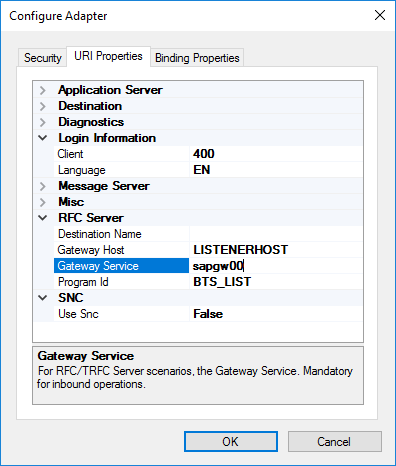
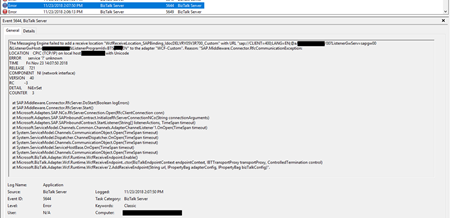
The Messaging Engine failed to add a receive location “IN_WCF_SAP_LISTENER_BTS” with URL “sap://CLIENT=400;LANG=EN;@a/SERVERNAME/00?ListenerGwServ=sapgw00&ListenerGwHost=LISTENERHOST&ListenerProgramId=BTS_LIST&RfcSdkTrace=False&AbapDebug=False” to the adapter “WCF-Custom”. Reason: “SAP.Middleware.Connector.RfcCommunicationException:
LOCATION CPIC (TCP/IP) on local host BTSSERVERNAME with Unicode
ERROR service ‘?’ unknown
TIME Fri Nov 23 13:47:22 2018
RELEASE 721
COMPONENT NI (network interface)
VERSION 40
RC -3
DETAIL NiErrSet
COUNTER 3
at SAP.Middleware.Connector.RfcServer.DoStart(Boolean logErrors)
at SAP.Middleware.Connector.RfcServer.Start()
at Microsoft.Adapters.SAP.NCo.RfcServerConnection.Open(RfcClientConnection conn)
at Microsoft.Adapters.SAP.SAPInboundContract.InitializeRfcServerConnectionNCo(String connectionArguments)
at Microsoft.Adapters.SAP.SAPInboundContract.StartListener(String[] listenerActions, TimeSpan timeout)
at Microsoft.ServiceModel.Channels.Common.Channels.AdapterChannelListener`1.OnOpen(TimeSpan timeout)
at System.ServiceModel.Channels.CommunicationObject.Open(TimeSpan timeout)
at System.ServiceModel.Dispatcher.ChannelDispatcher.OnOpen(TimeSpan timeout)
at System.ServiceModel.Channels.CommunicationObject.Open(TimeSpan timeout)
at System.ServiceModel.ServiceHostBase.OnOpen(TimeSpan timeout)
at System.ServiceModel.Channels.CommunicationObject.Open(TimeSpan timeout)
at Microsoft.BizTalk.Adapter.Wcf.Runtime.WcfReceiveEndpoint.Enable()
at Microsoft.BizTalk.Adapter.Wcf.Runtime.WcfReceiveEndpoint..ctor(BizTalkEndpointContext endpointContext, IBTTransportProxy transportProxy, ControlledTermination control)
at Microsoft.BizTalk.Adapter.Wcf.Runtime.WcfReceiver`2.AddReceiveEndpoint(String url, IPropertyBag adapterConfig, IPropertyBag bizTalkConfig)”.
The receive location “IN_WCF_SAP_LISTENER_BTS_ DV” with URL “sap://CLIENT=400;LANG=EN;@a/SERVERNAME/00?ListenerGwServ=sapgw00&ListenerGwHost=LISTENERHOST&ListenerProgramId=BTS_LIST&RfcSdkTrace=False&AbapDebug=False” is shutting down. Details:”The Messaging Engine failed while notifying an adapter of its configuration. “.
Cause
The first thing you need to know is that this error is not related to the fact that we are now using the SAP .NET Connector (NCo). This error will still occur if you change back to the classic RFC.
The basic steps if of course to see if we have connectivity and proper access to SAP, and because we were in DEV environment a good way to test this is to Add WCF-SAP Adapter Metadata to a BizTalk Project inside Visual Studio
- In your Visual Studio BizTalk project, in Solution Explorer, right-click your project, click Add, and then click Add Generated Items.
You will have the same look and fill as creating a Receive Port on the Administrative Console with the advantage of being able to navigate the under the SAP object structure. This way you can test connectivity and access to the proper resources.
In our case, everything worked well. We were able to connect and generate the schemas.
However, all of this is not enough. For the WCF-SAP adapter to work properly in runtime you also need to configure, somewhere in the BizTalk Server machine the TCP port where the SAP adapter will be looking for these connections, because this property is not exposed through the BizTalk Server WCF-SAP Adapter GUI port (send or receive) configuration.
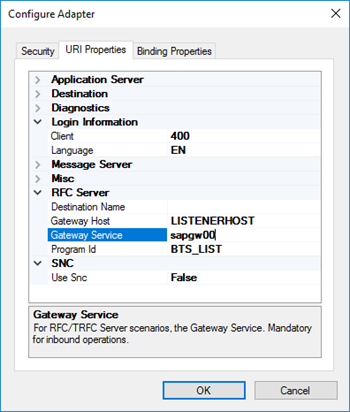
In our case, the .NET Connector need to know the port of the message server. This is also very common to happen in load balancing situations.
Solution
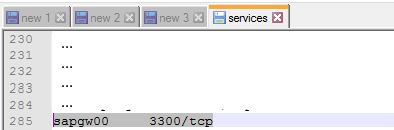
In order to specify this TCP port, you need to modify the ‘services’ file in each BizTalk Server machine, normally in:
- C:Windowssystem32driversetcservices
To include the following entry:
MSHOST 1234/tcp # SAP ENV System Message Server Port
Where:
- MSHOST is your Gateway server, in our case sapgw00
- And 1234 is your message server port, in our case: 3300
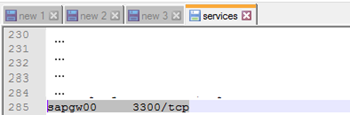
Just for curiosity, BizTalk isn’t the only that will use these values and this ‘services’ file. SAPGUI will also use these same values when connecting to SAP systems.
After we did this configuration, we were able to connect and start receiving messages from our SAP system.
Author: Sandro Pereira
Sandro Pereira lives in Portugal and works as a consultant at DevScope. In the past years, he has been working on implementing Integration scenarios both on-premises and cloud for various clients, each with different scenarios from a technical point of view, size, and criticality, using Microsoft Azure, Microsoft BizTalk Server and different technologies like AS2, EDI, RosettaNet, SAP, TIBCO etc. He is a regular blogger, international speaker, and technical reviewer of several BizTalk books all focused on Integration. He is also the author of the book “BizTalk Mapping Patterns & Best Practices”. He has been awarded MVP since 2011 for his contributions to the integration community. View all posts by Sandro Pereira
by Sandro Pereira | Nov 20, 2018 | BizTalk Community Blogs via Syndication
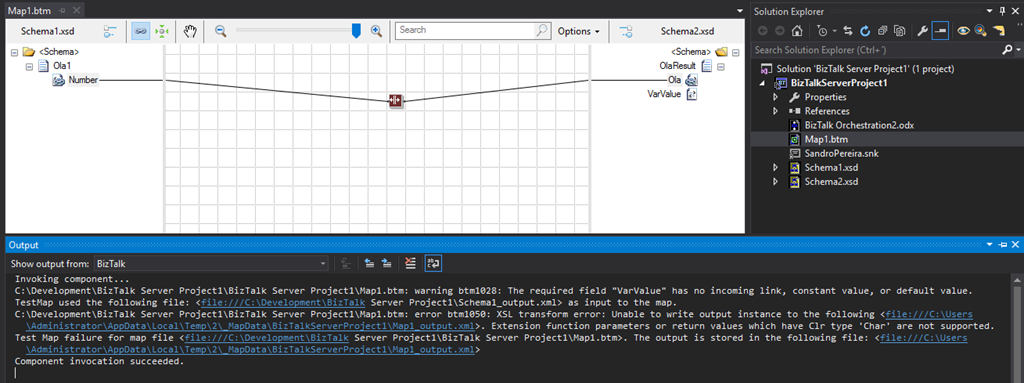
Back to Errors and Warnings, Causes and solutions, this time with a surprising error that I got while I was testing a custom Functoid that I had developer: Extension function parameters or return values which have Clr type ‘Char’ are not supported
The full error description was:
Invoking component…
C:DevelopmentBizTalk Server Project1BizTalk Server Project1Map1.btm: warning btm1028: The required field “VarValue” has no incoming link, constant value, or default value.
TestMap used the following file: <file:///C:DevelopmentBizTalk Server Project1Schema1_output.xml> as input to the map.
C:DevelopmentBizTalk Server Project1BizTalk Server Project1Map1.btm: error btm1050: XSL transform error: Unable to write output instance to the following <file:///C:UsersAdministratorAppDataLocalTemp2_MapDataBizTalkServerProject1Map1_output.xml>. Extension function parameters or return values which have Clr type ‘Char’ are not supported.
Test Map failure for map file <file:///C:DevelopmentBizTalk Server Project1BizTalk Server Project1Map1.btm>. The output is stored in the following file: <file:///C:UsersAdministratorAppDataLocalTemp2_MapDataBizTalkServerProject1Map1_output.xml>
Component invocation succeeded.
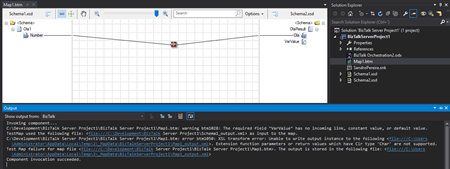
Again, I catch this error while I was trying to test my custom functoid inside Visual Studio.
The Custom Functoid was invoking the following code:
private string GetCSharpBuffer()
{
    StringBuilder builder = new StringBuilder();
    builder.Append("public string SplitText(string element, int pos, char splitter)n");
    builder.Append("{n");
    builder.Append("tstring[] listValues = element.Split(splitter);n");
    builder.Append("tif (listValues != null)n");
    builder.Append("ttif (listValues.Length > pos)n");
    builder.Append("tttreturn listValues[pos];n");
    builder.Append("treturn "";n");
    builder.Append("}n");
    return builder.ToString();
}
Or, to be easier to read in a clean C# code that would be like this:
public string SplitText(string element, int pos, char splitter)
{
   string[] listValues = element.Split(splitter);

   if (listValues != null)
      if (listValues.Length > pos)
         return listValues[pos];
   return "";
}
Cause
Unfortunately, this is a BizTalk mapper engine limitation. The type Char is not supported at least on built-in code inside the XSLT, in other words by using the Functoid SetScriptBuffer functionality:
SetScriptBuffer(ScriptType.CSharp, this.GetCSharpBuffer());
I didn’t test but it may work if you replace this functionality with the SetExternalFunctionName functionality:
SetExternalFunctionName(GetType().Assembly.FullName, GetType().FullName, "SplitText");
Note: This means that the code will not be inside the XSLT but instead you will be calling an external assembly that needs to be on GAC.
Solution
The simple solution, or let’s call I workaround, is to use strings instead, either on inputs as outputs parameters of the Functoid. For that we just need to replace the above code to this:
private string GetCSharpBuffer()
{
    StringBuilder builder = new StringBuilder();
    builder.Append("public string SplitText(string element, int pos, string splitter)n");
    builder.Append("{n");
    builder.Append("tstring[] listValues = element.Split(Convert.ToChar(splitter));n");
    builder.Append("tif (listValues != null)n");
    builder.Append("ttif (listValues.Length > pos)n");
    builder.Append("tttreturn listValues[pos];n");
    builder.Append("treturn "";n");
    builder.Append("}n");
    return builder.ToString();
}
Or again, in a simple C# form:
public string SplitText(string element, int pos, string splitter)
{
    string[] listValues = element.Split(Convert.ToChar(splitter));

    if (listValues != null)
       if (listValues.Length > pos)
          return listValues[pos];
    return "";
}
By doing that you will be able to successfully test the Functoid.
Author: Sandro Pereira
Sandro Pereira lives in Portugal and works as a consultant at DevScope. In the past years, he has been working on implementing Integration scenarios both on-premises and cloud for various clients, each with different scenarios from a technical point of view, size, and criticality, using Microsoft Azure, Microsoft BizTalk Server and different technologies like AS2, EDI, RosettaNet, SAP, TIBCO etc. He is a regular blogger, international speaker, and technical reviewer of several BizTalk books all focused on Integration. He is also the author of the book “BizTalk Mapping Patterns & Best Practices”. He has been awarded MVP since 2011 for his contributions to the integration community. View all posts by Sandro Pereira